Forum Replies Created
-
AuthorPosts
-
 Moderator
Congratulations on the 1611 purchase – a very useful bit of kit!
The 3500 works the same way in option 5 or 6.
Have you tried L.OPT 4 and then set your Beo4 as a LINK only remote, so you don’t have to select LINK each time?
EDIT: Also have you tired L.OPT 1 and/or L.OPT 2? In some of the older MCL kit you had to set L.OPT 1 or 2 as well as L.OPT 5 or 6 to make it work correctly.
Location: Warwickshire, UK
My B&O Icons:

This is basically a copy of a posting I also placed in General Discussion but that was before I knew this sub forum existed. So my apology but hope you will read it anyway.
I have deleted the other one, otherwise I think many people will see both from the Forum Home page. Hopefully someone will be able to assist.
(And welcome to the Forum!)
Location: Warwickshire, UK
My B&O Icons:
You could also look for a replacement ISDN – they are quite cheap now that support is dropping in many countries. Alternatively could you swap for a PSTN and still connect to your current router?
What country are you in?
EDIT: I meant to add that I would still persevere with the current equipment. As Keith pointed out, lack of connection and the pin request can be related to the Base thinking that too many handsets are connected. However, if the base was indeed reset then this problem would have cleared. I have found that brand new batteries can resolve Beocom 6000 problems, and you need to wait for a while (for them to charge) after pressing that key sequence.
Location: Warwickshire, UK
My B&O Icons:
Have you tried removing/replacing/charging the batteries in the handsets? If fitting a brand new battery you should press 9 # 9 # 9 * 6 5 5 OK in order to let the phone know it is charging a new battery.
Can I also check how you are trying to connect? I haven’t used my ISDN for a while, but I think that it is only ‘open for registration’ for a minute or so after connecting the power. (This is unlike the PSTN bases which have a physical button to press to open registration)
EDIT: I checked the manual – there is also a light on the rear of the ISDN that flashes whilst open for registration – is this happening?
A further thought that might enable you to test the handsets: If your internet modem/router has built in DECT (many do), then you may be able to connect your Beocom 6000s straight to it cordlessly without using the B&O ISDN base. I have used Beocom 6000s like this in the past (with a German router) – there will be reduced functionality but calls in/out should work fine. At least this would check that the handsets work.
Location: Warwickshire, UK
My B&O Icons:
The Mk1 phones did have a problem with the RF chip that stopped them connecting, but given that at least one of your phones was working recently let’s hope that you can re-connect.
Have you tired resetting the handset as well using the (dot) 7 000 9 sequence?
Also recycle the power on the base unit – leave it off for 30 mins (or even overnight) before trying to reconnect. Connection can be temperamental but others have had success by leaving it all powered down for a while, including the phone handsets themselves.
Make sure that the phones are fully charged when you try to reconnect also.
EDIT: This thread is a good example of perseverance reaping results: https://forum.beoworld.org/forums/topic/beocom-6000-mk1-base-pin-code/
Location: Warwickshire, UK
My B&O Icons:
I think that’s a misprint – mine are SW1.3 and have worked in that arrangement.
And I would assume that this is the latest version being sold: https://shop.oneremote.dk/shop/69110-parts-for-bo/4072-firmware-beolink-converter-16111612/
And this thread: https://archivedforum2.beoworld.org/forums/p/42843/311271.aspx#311271
Location: Warwickshire, UK
My B&O Icons:
There’s some confusing information above that may not be helpful to the OP!
It would be useful to know exactly what speakers are to be connected to the BM4500’s speaker 1 sockets.
If they are straightforward Passive speakers (Beovox or Redlines) then a 2-pin din connection will be fine.
If the speakers have their own displays (eg Penta 1) then 4 pin speakerlink connection is required. The extra 2-pins carry display data and display chassis to the speaker’s display (which shows volume and source at the speaker, I think).
The reference to ‘MCL’ above is only applicable to the BM4500 Speaker 2 sockets (which are 3-pin, not 4-pin).
If they are newer Active Beolab speakers, then powerlink cables will be required, and should be connected to the BM4500’s Powerlink sockets.
EDIT: This may help: https://www.beoworld.org/beotech/mclconn1.htm
Location: Warwickshire, UK
My B&O Icons:
Anywhere that list is documented?
I don’t think so. As far as I am aware you download a PUC table as part of the configuration process for new sources, so you may have to have a dummy run of going through the source configuration process to see what is available.
Does the PUC do anything but allow IR control from the B&O One remote?
No, but in my experience with earlier TVs/PUCs some set-top-boxes or DVD players allow a more user friendly control experience than others. It’s definitely worth asking other Forum members if they can recommend a particular DVD/BR player that they also control using BV11 and Beoremote One.
Location: Warwickshire, UK
My B&O Icons:
Time for a new DVD player it seems!
Maybe find one that already has a PUC code in the list! I am sure others will make recommendations. I am still using DVD1, although on the rare occasion that I get a new disc I often just rip it to my NAS and play using Apple TV.
Location: Warwickshire, UK
My B&O Icons:
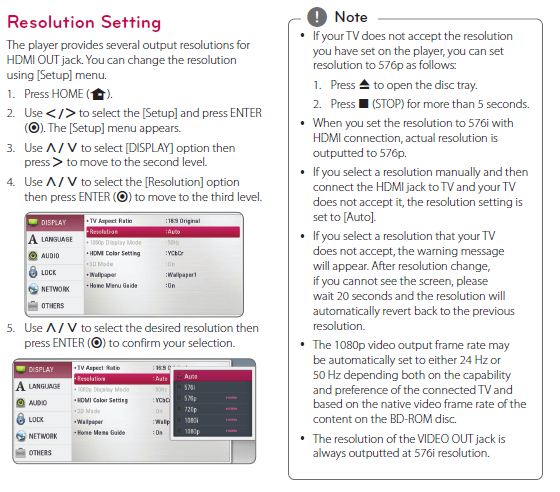
Have you tried playing about with the BluRay output resolution as described in its manual here. Maybe try the procedure in the box on the right:

Location: Warwickshire, UK
My B&O Icons:
What’s the LG BluRay player model number?
Location: Warwickshire, UK
My B&O Icons:
Any chance this TV is not HDCP compatible?
No – even my old BV10-32 is HDCP compatible!
Have you tried the BluRay player with another TV? Could it be faulty? (EDIT: Just re-read that you had tried with a PC monitor – sorry!)
As a side note you have probably noticed that your replies are not formatted correctly. It’s a bit clunky, but use the tab above the message box that says ‘text’ rather than ‘visual’, and then make sure that your reply is on a line below the final ‘blockquote’ text. You can then click the ‘visual’ tab to make sure that it looks right.
Location: Warwickshire, UK
My B&O Icons:
Keith must be busy otherwise I am sure he would have replied further.
Firstly have you tired the default pin of 0000? – always worth a try!
Otherwise, with a Mk1 BC6000 you may wish to try a reset of the base. You can do this as follows:
– Reset base: Press (dot) 7 000 8
Out of interest you can also reset the handset by pressing (dot) 7 000 9.
Be aware that your phonebook is probably stored on the base, so you may wish to note down important numbers first!
Location: Warwickshire, UK
My B&O Icons:
Hi and welcome to Beoworld!
In order to help we would need some more details about how you have tried to connect your TV to an hdmi source. Have you read this entire thread and explored the solutions mentioned?
Location: Warwickshire, UK
My B&O Icons:
It looks like the sort of picture you get when there is a mis-match between resolutions – I used to see similar trying to connect PS3 to various TVs. The PS3 had the ability to automatically cycle through various resolutions until the picture was clear.
Is there a menu in the LG BluRay player where you can adjust the output resolution?
Location: Warwickshire, UK
My B&O Icons:
The MX8000 has an STB controller installed. Wouldn’t that be an option as well?
The STB controller is just to let the TV control other devices (set top boxes). The IR blaster that you would connect is just a transmitter. It wouldn’t help in this situation.
Location: Warwickshire, UK
My B&O Icons:
A further thought: Is the MX8000 fitted with the masterlink option? If you have other masterlink equipment, you could try connecting it to a B&O audio system in A.OPT 2 and see if you can control it.
Location: Warwickshire, UK
My B&O Icons:
I can’t think of anything else to suggest! I am surprised that the MX4200 IR cable had 6 pins because I think it was based upon the other TVs from the MX range, many of which had two-way IR and therefore 7 or 8 pins to allow for IR transmission. I would be more confident about a BV/BC1 IR board if you can find one.
Any further details of the purpose of the previous ‘installation’? I can’t think why the IR function would have been remoted, unless the TV was inside a cabinet or behind a drop down screen.
Location: Warwickshire, UK
My B&O Icons:
It’s covered in the Service Manual as follows, so if the dealer won’t do it simply find an electronic repairer who will:

Location: Warwickshire, UK
My B&O Icons:
I can’t find a circuit diagram for the MX4200, but it is a one-way product so perhaps it can be made to work in the MX8000.
Are you sure that the TV is not in V.OPT 0, where it won’t respond to IR commands?
EDIT: Can you confirm that there are just 6 pins on your MX8000’s IR connector, and what about the MX4200 IR board – 6 also?
Location: Warwickshire, UK
My B&O Icons:
-
AuthorPosts