Forum Replies Created
-
AuthorPosts
-
 Moderator
Thanks for posting this, Guy! I’m down to one remote, the greatest remote, my precious Beo4.
No problem Evan – very happy to help!
I hope that your Beo4 Apple TV PUC control works well. As you can see, my TV has the older ‘Apple Remote’ PUC which is fine for most controls, apart from having to press the Beo4 EXIT button twice to get it to switch on! Oh yes, and I can’t do the useful apple remote TV button ‘press and hold’ to get the Control Centre to show up.
Location: Warwickshire, UK
My B&O Icons:

On the Navi remote you can adjust the IR power, so that may be the problem.
Access the service menu by pressing stby + LIST at the same time, and then MENU + (joystick) at the same time. Press ^ several times until the display reads IRPWR: X.
1 is the lowest and 7 is the max IR signal strength (default is 4)
(EDIT: It might be LIST instead of ^ (up) – I can’t check as my Navi is in a box somewhere!)
Location: Warwickshire, UK
My B&O Icons:
In order to look at other options, can you tell us what other B&O equipment (and with what connections) will be in the same room as your Beogram?
Also, have you thought about RIAA amplification? If connecting to a datalink-capable Beomaster/Beosound (or even 1611 converter) without an RIAA stage you will have to ensure that the datalink connections bypass your chosen pre-amp.
Location: Warwickshire, UK
My B&O Icons:
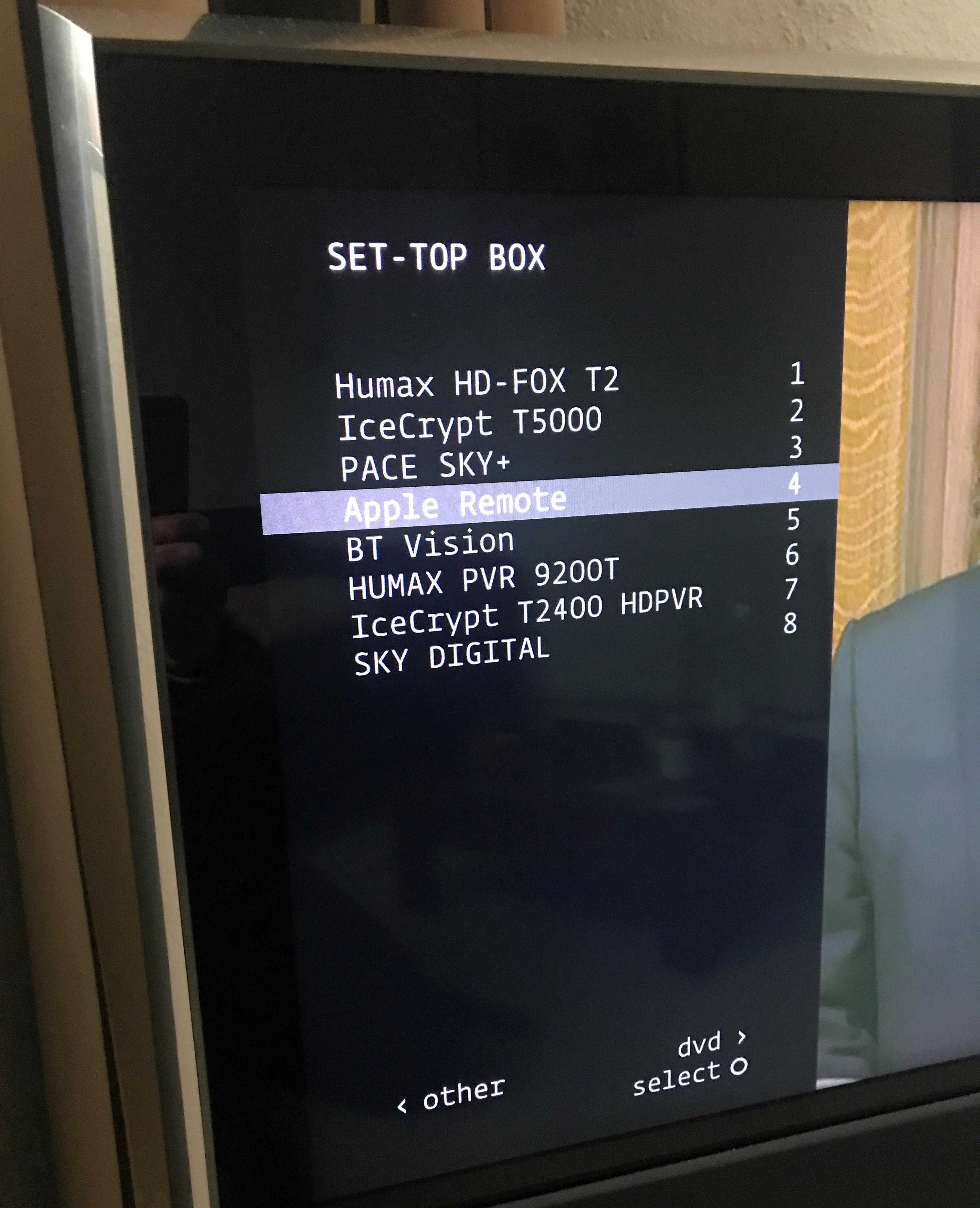
If you want to control any external box using Beo4 then you first need to go the TV’s connections menu and see what Set Top Boxes the TV has been ‘programmed’ to control.
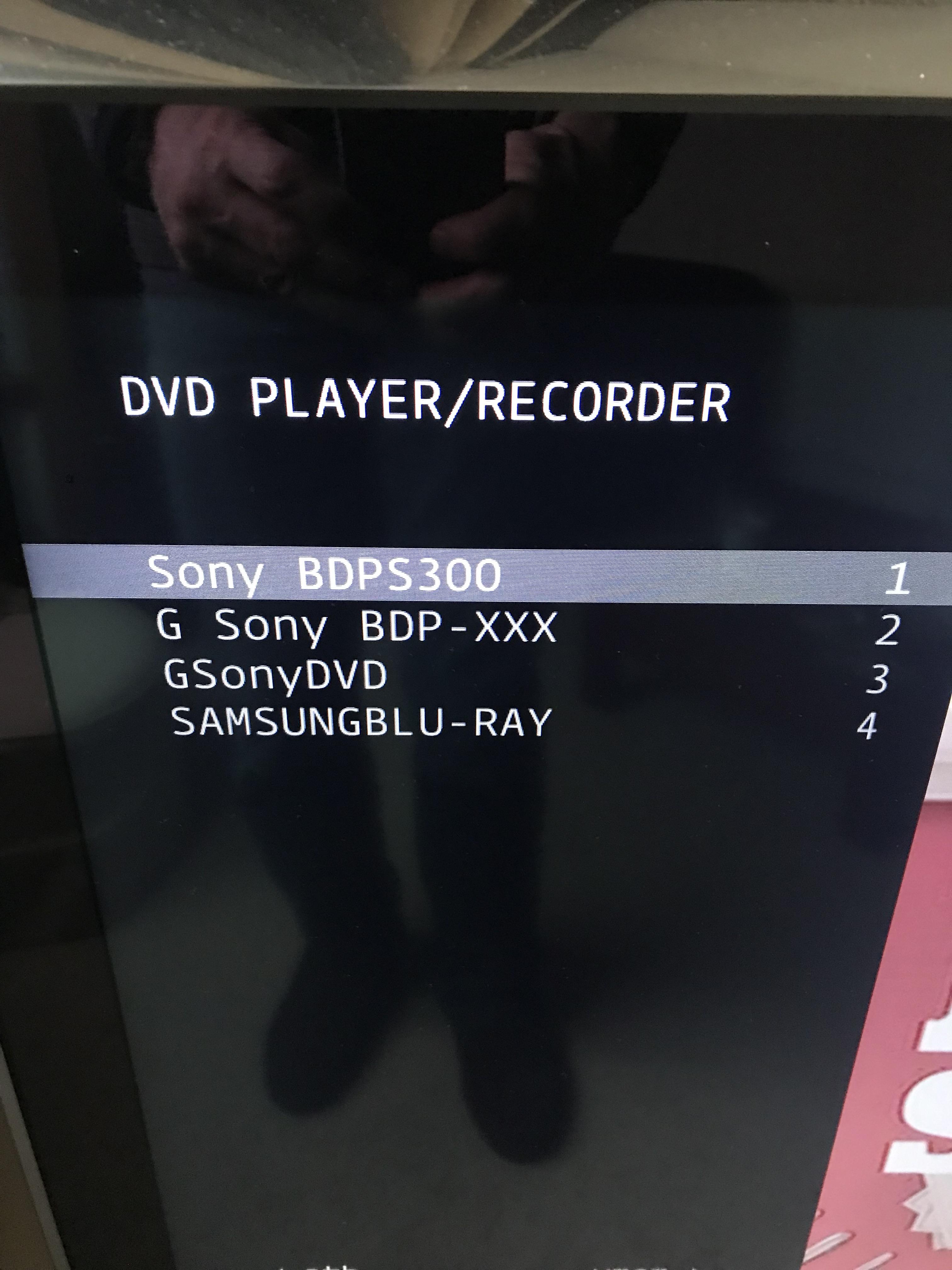
Have a look in the ‘User’ manual at how to ‘Register Additional Video Equipment’. You will have to go through the registration process in order to then see screens like this, showing you what STBs are controllable:

Or this:

Location: Warwickshire, UK
My B&O Icons:
Great news – thanks for letting us know that it worked.
And I had saved that information from a chap called Roger who posted some 11 years ago! Here’s the post: https://archivedforum.beoworld.org/forums/p/40084/332794.aspx#332794
Location: Warwickshire, UK
My B&O Icons:
Beogram control over masterlink has been raised several times in the archived forum. Unfortunately I don’t think anyone got it to work as required!
This thread is worth a read if you use Google translate: https://archivedforum2.beoworld.org/forums/p/11690/102249.aspx#102249
You may be able to use a workaround to get sound distributed, but full control does not seem to be possible.
Location: Warwickshire, UK
My B&O Icons:
You could try resetting the Beo4 to Default.To do so, press Power (Red Dot) and LIST together. ADD? appears in display.Press up and down arrows to display MODE, and press the centre button.Press up and down arrow to show RESET, and press the centre button.Then try the remote again.(EDIT – sorry I did not read your post properly – try the MODE 2 setting also..)
To use with your older products, you may want to set the Beo4 Navi in MODE 2, where the actual navi buttons do not work (because they are not needed). To do so. follow the above procedure but select MODE 2 instead of RESET.
Location: Warwickshire, UK
My B&O Icons:
Everything is now working pretty much perfectly.
Great news – thanks for the update. And I’d be interested to know if the MCL2P ‘power down’ starts working as it should.
Location: Warwickshire, UK
My B&O Icons:
Some of the info (and attached files) from this thread may be useful: https://archivedforum2.beoworld.org/forums/p/2861/25305.aspx#25305
Location: Warwickshire, UK
My B&O Icons:
Have you tried moving the MCL2P powerlink connection to one of the TV’s PL sockets where the Pentas are connected – just to see if they trigger on?
Location: Warwickshire, UK
My B&O Icons:
The original BL4000s have a little power switch (combined with light indicator) on the front. Have you pressed that? (if there is one!) It should light up in red in standby, and then turn green when the speaker turns on.
Location: Warwickshire, UK
My B&O Icons:
Ok, so the dot button I assume is the off button on a Beo 4 — am i correct?
Yes, it’s the ‘off’ button, the red dot bottom right.
Location: Warwickshire, UK
My B&O Icons:
That IR plaster end was the end that sits (usually taped / fixed) to the peripheral unit i.e Sky box, Blu Ray player etc….the other end, that goes in the Theatre, is the usual PUC cable end. Business as usual.
Hi Sandy. I know what the blaster end looks like – I have several. I just noticed that the other end of the IR blaster cable that Steve held up in the video was a 3.5mm jack plug, like on my old Beovisions. I would be surprised if the theatre wasn’t RJ45 for PUC, hence my question!
Location: Warwickshire, UK
My B&O Icons:
Great video Steve!
One question: Is the PUC A+B connection an RJ45 or a 3.5mm socket (like the older TVs). I only ask because you held up an IR blaster with a 3.5mm plug!
I did look for a User Manual on the B&O ‘Support’ site but gave up when faced with very limited FAQs ?
Location: Warwickshire, UK
My B&O Icons:
The BM8000 doesn’t have an internal battery backup, otherwise I would suspect that (especially after moving house and disconnecting from mains power for a while).
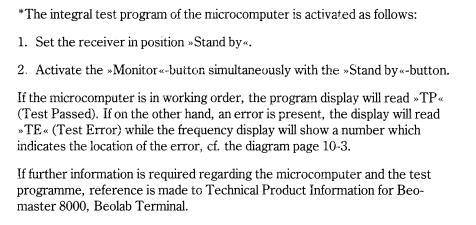
The Service Manual (avail to Silver/Gold members) does mention a uP test as follows:

Location: Warwickshire, UK
My B&O Icons:
Great news – thanks for letting us know the solution!
Location: Warwickshire, UK
My B&O Icons:
That sounds frustrating!
I don’t have a Stage but I thought that the RJ45 (rather than hdmi CEC) was used for control of the connected TV. I just had a quick look at the set up instructions, and noticed the following:
2 – Go to the TV’s Connection menu, then find HDMI Device Settings and disable “Auto
Device Detection” to allow Beoremote One to control your HDMI connected device to
Beosound Stage.If you haven’t done the above, could it be that the TV is ‘auto-detecting’ the lack of Stage hdmi output (when airplaying) and shutting down?
As an aside, whilst living in a rental my TV and Audio are currently not connected by Masterlink or whatever. I find this quite refreshing as it allows me to listen to the standalone radio (original BS1) whilst the TV is on Mute. I am finding it especially useful this week to watch the televised QE2 activities without the BBC commentary!
Location: Warwickshire, UK
My B&O Icons:
OK, a longshot, but perhaps the Beo4 is set to permanent LINK mode?
On the Beo4, press Standby (Red dot) + LIST together
Press LIST until CONFIG appears
Enter the numbers 2002 , the display will read LINK ON (or LINK OFF)
Press Exit
Repeat the above to toggle between the two settings. You want LINK OFF.
Location: Warwickshire, UK
My B&O Icons:
I don’t have a BS5, but I think it is probably set up not to respond to IR commands. I think that somewhere in the BS5’s settings menu you need to change the ‘AM’ (Audiomaster) setting to Option 1.
Hopefully someone who owns a BS5 can be more specific!
Location: Warwickshire, UK
My B&O Icons:
I used to use my BV6-26 with a Humax HD Fox T2 connected to one of the SCART sockets. Works well , especially if the box is in the TV’s PUC list. You should then be able to distr the TV’s analogue output.
Location: Warwickshire, UK
My B&O Icons:
-
AuthorPosts