Forum Replies Created
-
AuthorPosts
-
 Moderator
Having re-read your first post I think thatyou have an early Beo4 without a navi button (joystick).
As far as I am aware. the BV11 is designed to be used with the Beo4 with navi button only. (Unless there was a sw version that allowed you to go into the settings an chose ‘no navigation button’, as there is in older TVs)
A possible workaround: If your BV11 is connected to your home network you could try using the B&O app to control the tv.
-
This reply was modified 1 month, 3 weeks ago by

Location: Warwickshire, UK
My B&O Icons:

For the navi remote (with joystick)
> Press and hold the standby button down.
> Press LIST to get access to the Beo4 setup function.
> Let go of both buttons. ADD? appears in the display.
> Press LIST or ^ to display ZONE?, CONFIG? or MODE? on Beo4.
> Press the centre button to select the setup you want.
> Press up or down arrow to display the setting you want on Beo4.
> Press the centre button to store the configuration.
> STORED appears, indicating that the configuration has been stored.
Long press on BACK will leave the setup.Location: Warwickshire, UK
My B&O Icons:
Hi and welcome to Beoworld!
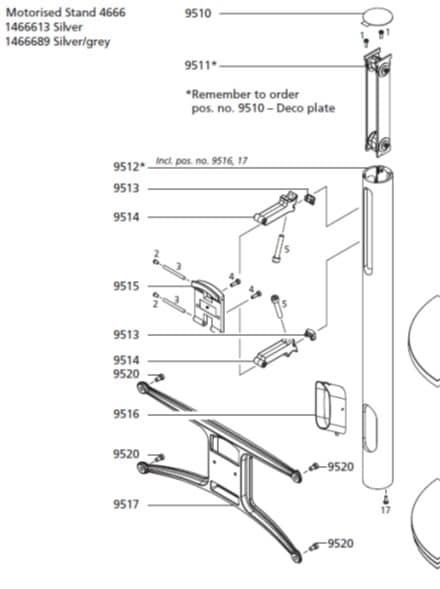
Your photo shows a BV10-40 or 10-46, I am not sure which. Either way, even if you had the correct ‘spider’ piece (labelled 9517 in the diagram) which fits onto the back of the BV10 ready for stand-mounting, the black holder piece at the top of your current stand is too wide to fit into the slot. On the proper stand (see below) the part labelled 9515 is narrower.
Diagram is from the service manual (full manual available on site to Silver/Gold Members): (click to enlarge)
I would look for a second-hand BV10 stand – they do come up on the usual sites very occasionally!
Location: Warwickshire, UK
My B&O Icons:
Sorry for delay – I’ll contact Mark and ask asap
Location: Warwickshire, UK
My B&O Icons:
Hi Mike and welcome to Beoworld!
Could you let us all know roughly whereabouts in North America you are looking? It may help to narrow down the location. Thanks!
Location: Warwickshire, UK
My B&O Icons:
Great news – have fun controlling your BC9500. Now you can do exciting things like 7-day timer programming, I think!
I will be storing skolesen’s details for when my BL5000 inevitably needs repair.
Location: Warwickshire, UK
My B&O Icons:
The TV’s camcorder input will accept composite signals, so the adaptor that you linked to should provide Composite video, Left and Right audio via the yellow, white and red phono/cinch output sockets. The camcorder input should also accept S-video, which should give better picture quality than composite.
But I think (from searching AI) that the Bang & Olufsen BeoVision Avant did also support S-Video signals via its SCART connections. Hence if you want to use SCART and want to use the adaptor to which you linked, you will also need a further S-video to SCART connector. As far as I know, the SCART pins used are an industry standard, but you may need to check which of the TV’s SCART sockets will accept S-video input – from memory I don’t think that they all do.
Hopefully someone else will add more specific advice – I only have distant memories of trying similar with a Beovision 3.
Location: Warwickshire, UK
My B&O Icons:
50 – you need Beohelp 😂
I agree – it got a little out of hand once I had a few. I just need a house with lots of rooms, and a second-hand PABX exchange … 😉
Location: Warwickshire, UK
My B&O Icons:
Oh YES! I’ve just read your other message! The Serene, of course!
Thank you SO MUCH – you’re absolutely right 🌟
I really appreciate your help. Very best wishes to you 😊
No problem – very happy to help!
Location: Warwickshire, UK
My B&O Icons:
You probably posted prior to seeing my second post. THanks for the extra pictures – I think we can safely say that it’s for B&O’s Serene mobile.
Feel free to post for sale in our ‘For Sale’ pages here: https://forum.beoworld.org/forums/forum/beoworld-for-sale-wanted/beoworld-private-sales/
There might be a Serene collector or owner out there on Beoworld! I have about fifty B&O landlines but am forbidden from collecting more phones or accessories!
Location: Warwickshire, UK
My B&O Icons:
Further searching to satisfy my own curiousity has come up with this: https://www.etsy.com/uk/listing/4473492178/bang-olufsen-1114895-earset-1-mobile
Have a look at the 7th picture showing a close up of the connector. If it matches yours then it’s ‘Earset 1 wired for B&O’s Serene mobile’
Serene was a joint venture with Samsung, hence the strange connector.
The funny thing is that I have a broken Serene in a box somewhere – if it was to hand then I probably could have answered a little quicker!
Good luck with the sale!
Location: Warwickshire, UK
My B&O Icons:
Hi and welcome to Beoworld!
The blurred background in your second photo appears to show a B&O Earset 1, which was produced in two version: Home and Mobile, each with different connectors.
The home version had a plug to connect to BC6000 Mk2 or Beocom 4 – yours definitely doesn’t resemble those. And as far as I know BeoCom 2 does not accept a headset connection.
The mobile version had a 2.5mm jack plug, again unlike yours.
Maybe it connected to one of the early GSM mobiles: Beocom 9000, 9500, 9600, 9800, but I am really not sure!
Perhaps a better picture of the actual headset, rather than connector, would help? Does it have a name/number on the side?
Location: Warwickshire, UK
My B&O Icons:
Great to hear that you got it working ind the end and that it was not a fault in the Essence or a software issue. I guess this also confirms that its only the IR eye with the join button that works on the Essence MK2.
Yes, but I still find it strange that the older IR eye (Timer button version) will work as an IR receiver with a NL/ML converter. Anyway, it will be quite nice to have the ability to use the other buttons on the IR eye such as ‘Join’, plus of course volume control.
The Essence MK2 just recently got an update – fantastic that B&O has not forgotten this long eol’ed product.
I have 3 of them 😀😀😀Yes I was quite surprised that there seem to be regular SW updates. It’s strange that the NL/ML Converter doesn’t have SW updates available, as it is from a similar time period.
Location: Warwickshire, UK
My B&O Icons:
Sorry MM it’s not that good – I have misled you!
I put the BS1 in A.OPT 0, and then used the buttons to select AUX, hence just using as a dumb amplifier. It would indeed be great if I could work out a way to auto start it. But doesn’t one of the Essence BlueTooth remote setups also send an IR aux signal (I think I read that here).
My main aim was to get IR control of the Essence working – I really don’t like controlling it with the phone App and would rather just pick up the Beo4 and press RADIO (or N.RADIO – it responds to both). Eventually I will connect Beolabs, probably either my BL4000s or BL4s.
Just to add, volume control of the Essence also works well using Beo4 or the buttons on the IR sensor (as long as the Essence is not in fixed output level mode).
EDIT: I have also now updated the Essence SW to version 6.5.58119.11794462 (the SW change versions are here: https://update.bang-olufsen.com/products/58ba6c9e15524870a403957cdfbee6ab)
(IR control was working both before and after the SW update)
Location: Warwickshire, UK
My B&O Icons:
An old thread I know but there’s been a major development 😊
After much patience I today got hold of a new round IR eye with the ‘join’ button, pre-wired with an RJ45 ready for Essence or NL/ML Converter (an ‘as-new unused’ purchase from Mercor’s eBay shop for about £45 incl P&P).
I booted up the Essence Mk2 connected from RJ45 PL output to the Aux input of a BeoSound 1. I pressed the sensor’s ‘join’ button and the internet radio burst into life. I then tried a Beo4 with no response.
I then used the app to stop radio playback, and carried out the usual Beo4 procedure to put the Essence in A.OPT 1 – this was acknowledge with a double flash of the little green LED at the bottom of the IR receiver.
I then pressed radio on the remote and it burst into life! Allows me to change channels and everything! I am very pleased (and relieved that there isn’t a fault with the Essence)! 😊
I will now try all the ways to control the Essence with the Beo4 (aux/source selection etc) and refer back to my old notes about what I was trying to achieve previously. I will add the NL/ML converter plus my M3 at some stage and see what sources I can select from where.
I genuinely think that there must be some sort of data ‘handshake’ requiement that prevents an older (non-join-button) IR sensor from working with the Essence Mk2, hence my problems with extensive testing of other sensors.I am happy to try other Essence Mk2 ‘IR control’ experiements if anyone wants me to look at anything else.Location: Warwickshire, UK
My B&O Icons:
Sorry for reply in English!
You could use a BV6-26 or 7-32 wall mount, but be aware that the bracket orientation is different – see here: https://forum.beoworld.org/forums/reply/60350/
… and I am not sure that the wall mounting is designed to hold such a heavy TV.
I would try to find the proper BV10-32 wall mount – known as ‘Wall bracket – close, type 4708’. Or you could buy STB’s equivalent: https://www.stbbrackets.co.uk/product/wall-bracket-for-gypsum-and-dry-lined-walls/
Or you could try fixing the metal plate from your current stand onto the wall (drill new holes) and slide the TV on from above. I think someone from the forum has tried this successfully.
-
This reply was modified 3 months ago by
Location: Warwickshire, UK
My B&O Icons:
22 July 2026 at 09:34 in reply to: Master Control Link (82) compatible with Beomaster 5500 and Beolink 1000? #124625Any decent cable with 5+ cores should be fine to extend the transciever cable – the MCL82 cable should be fine. The installation instructions do say that it should be no more than 10m long. (The cable originally supplied is 5m). Be aware that the cable is soldered at the transciever end, so you will be best just extending from the current bare wires – you could use another short piece of terminal block, or solder and wrap the wires for a neater join.
-
This reply was modified 3 months ago by
Location: Warwickshire, UK
My B&O Icons:
20 July 2026 at 08:36 in reply to: Master Control Link (82) compatible with Beomaster 5500 and Beolink 1000? #124597@Guy: Regarding the connection box/terminal block, could you give some more details on how this would work as I’m not that experienced in wiring? I guess one wire in and two wires out for each of the seven wires of the MCL, right? What kind of terminal block would you recommend? I’ve got a rather long MCL cable with the speaker plugs in one end that I connect to the Beomaster. Not sure if it’s possible to cut some of this at the other end for the shorter connections. Otherwise need to find another MCL or make as suggested by speedsixdave (very good suggestions there!)
You can just use relatively cheap terminal block like this: https://www.screwfix.com/p/essentials-16a-12-terminal-strips-10-pack/91532
… and to connnect just use the MCL cable (connected to your Beomaster’s speaker 2 sockets) and split out the 7 individual wires into one side, with then two wires from each connection the other side (one to each room or zone). You can put the terminal block inside some kind of box if you want to hide it.
And if you use the MCL2AV with passive speakers (connected directly to the MCL2AV’s loudspeaker sockets) you will not have independent volume control (the crcuit diagram of the MCL2AV just shows a relay in the loudspeaker circuit). To achieve independent* volume you need to add a Passive (or MCL2P) connected to one of the MCL2AV’s Powerlink sockets.
* Note the volume control will not be strictly independent – see the following text from the MCL Handbook:
This volume control permits you to reduce the volume in the link room without
affecting the volume in other rooms. The volume can be increased by 12
dB in the link room without affecting the volume in other rooms. If the
volume is increased further, the volume in other rooms will be increased
comparatively.-
This reply was modified 3 months, 1 week ago by
Location: Warwickshire, UK
My B&O Icons:
18 July 2026 at 14:46 in reply to: Master Control Link (82) compatible with Beomaster 5500 and Beolink 1000? #124576So if I understand it correctly, I could either connect two passive speakers such as my CX50s to an MCL2AV (in which case I need to get a Beolink passive to go between) or two active ones directly to the MCL2AV? If I manage to find an MCL2AV without the transceiver, would the MCL2A transceiver that I bought also support the independent volume control?
Yes to all the questions that you have asked in this paragraph. Be aware that the MCL2AV requires a 15v power supply so ideally look for that when you purchase. If you can find one, the predecessor to the Beolink Passive was known as an MCL2P, and had the advantage of a built in 15v power output designed to power the MCL2AV.
I’m hoping to connect two rooms linked to the main room: first the one mentioned above with either the MCL2a or the MCL2AV, and then another one on the other side which may not need its own remote control ability since there’s only a glass door in between which is most often open. In this case I can maybe use the old MCL82 relay box just to hook up the additional speakers (passive ones). But how do I set up this as a “star” network, i.e. splitting the MCL cable from the Beomaster in the main room and one cable going left and another right to each of the linked rooms? In the owner’s manual there is mention of a “connection box” for this purpose but I can’t seem to find this online. Or is there an MCL cable splitter that could be used for this purpose?
Don’t worry about a specific ‘connection box’, as a simple terminal block will be fine to run parallel MCL circuits from the main room to two link rooms. I would be a bit wary of using the old MCL82 in parallel with the newer MCL2A (or AV) as there may be conflicts; it is however probably worth a try, especially if you are only using the MCL82 as an on/off switch in one of the rooms.
-
This reply was modified 3 months, 1 week ago by
Location: Warwickshire, UK
My B&O Icons:
I have an appalling memory.
Me too! I make extensive use of Google to remind myself of things that I said just a couple of weeks ago! 🙁
Location: Warwickshire, UK
My B&O Icons:
-
This reply was modified 1 month, 3 weeks ago by
-
AuthorPosts