Forum Replies Created
-
AuthorPosts
-
 Moderator
En route to BeoWorld HQ
Have a good trip! Hope it doesn’t involve Eurostar or Eurotunnel? ?
Location: Warwickshire, UK
My B&O Icons:

Eventually sttled on a BV 10-32 in black and in excellent condition.
Good choice – that’s what I have as my main (only) TV. I am happy with the sound but our living room is quite small. Mine’s hooked up to an Apple TV 4K controlled via STB/PUC.
Location: Warwickshire, UK
My B&O Icons:
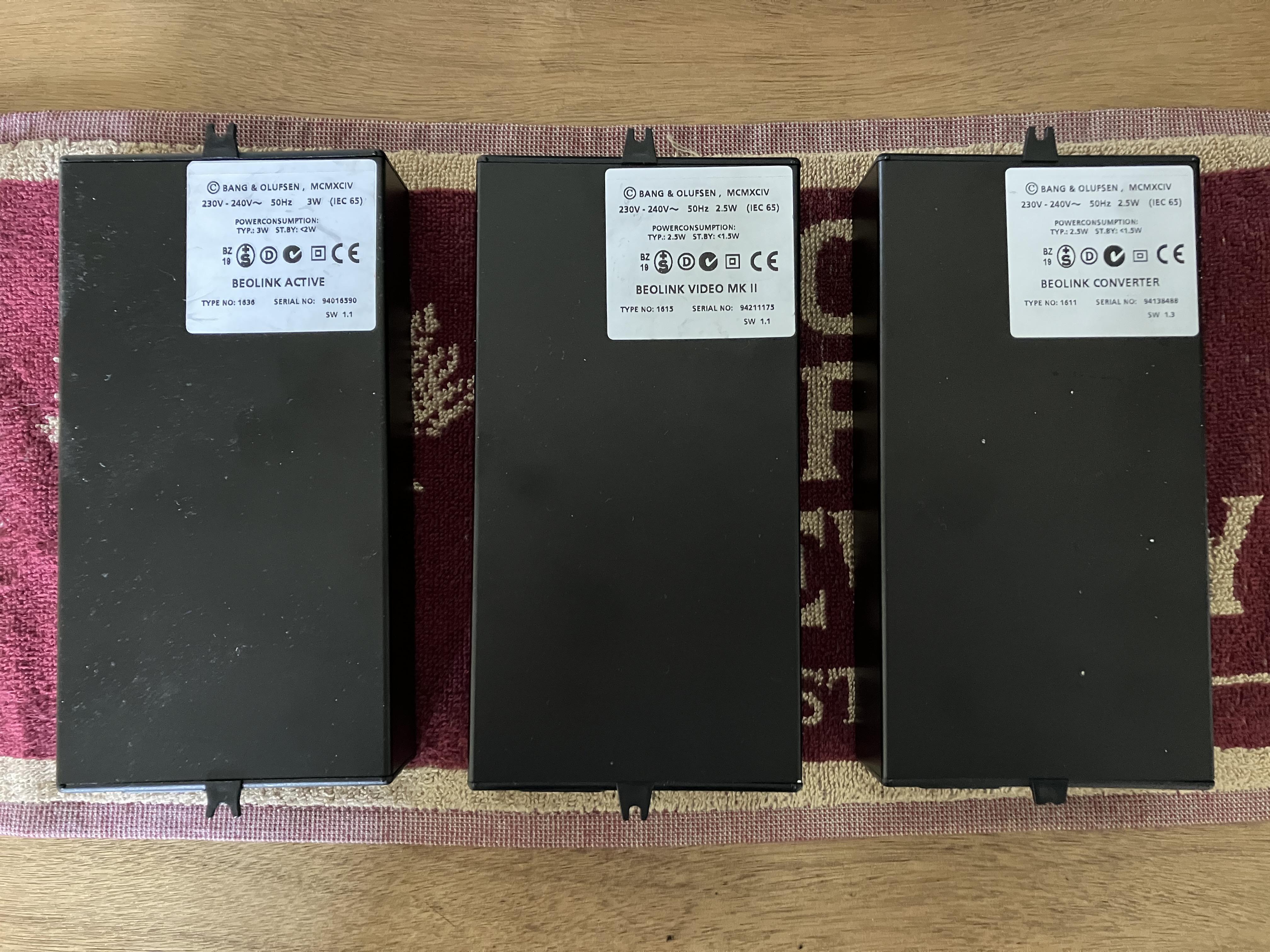
So here are the three similar looking (but very different) devices that I have discussed above:
Left to right: BeoLink Active, Beolink Video, Beolink Converter
Click on the photo to enlarge so that you can read the labels:

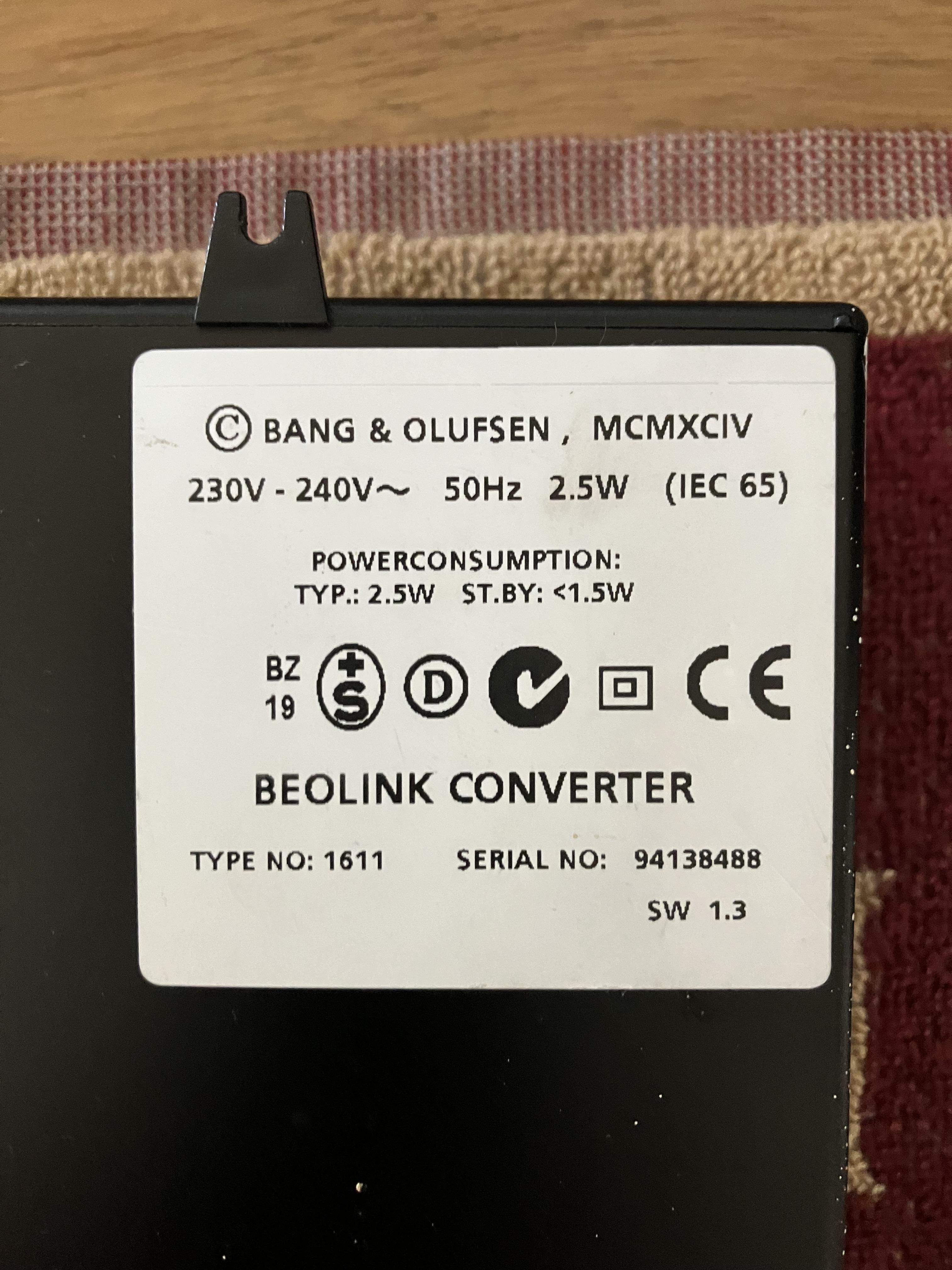
And you need the one on the right – here’s a close up of the label: (you also need to check that the Type Number is 1611 as shown)

Location: Warwickshire, UK
My B&O Icons:
I had to replace Beo Converter 1611 (PC, PowerLink, IR, Master Link) on Beo Converter 1615 (AAL Audio Aux Link, Master Link) because the previous one did not have an input: AAL.
Firstly the ‘Beo Converter 1611 (PC etc)’ that you mention was actually a Beolink Active – this Active is the only device that I know of with a PC input.
Secondly, a ‘Beo Converter 1615’ is not the correct device (although it does indeed have an AAL socket) – what you have is actually a ‘Beolink Video Type 1615’ designed for a different purpose, and it even has the Powerlink socket blanked off.
You need to find a BeoLink Converter Type 1611 – check the label carefully to make sure that you are buying the correct device. I will post a photo of the label in a moment.
Location: Warwickshire, UK
My B&O Icons:
20 December 2023 at 18:54 in reply to: Will BOTH BeoGram 6500 and BeoSound 3000 connect to either BeoLink Passive OR #51381Hi and welcome to Beoworld!
I am slightly confused by what you want to achieve! The Passive does not work as a stand-alone amplifier (without a powerlink input trigger) so at the very least you will need the Beogram to be connected to a Beomaster/Beosound first, not least to control volume. Then you could connect the Beomaster/Beosound output to a Passive via Powerlink.
You could simply connect the Beogram to the BS3000 aux input, and then connect the BS3000 powerlink output to a Passive.
Alternatively, you could connect your Beogram to the AAL input of a BeoLink Converter Type 1611, then masterlink that to a Passive input. If you then connect an IR eye to the Passive you will be able to switch on/off and control volume by selecting a Video input with a remote. You will not be able to remote control the Beogram, so that will be manual-only.
Location: Warwickshire, UK
My B&O Icons:
As stated by Hiort in the other BV11 thread, the service manual is available on site to Gold and Silver Members, so you’ll be able to download it if you upgrade your membership.
Have a look here: https://beoworld.org/what.asp
Location: Warwickshire, UK
My B&O Icons:
If you find that N.MUSIC, N.RADIO are not available to add to your list key all is not lost, selecting A.TAPE 2 will activate N.MUSIC and PHONO will give you N.RADIO.
As an aside, on newer Beo4 NAVIs you may find that you can add the following to the LIST button:
USB is the same as A.TAPE2/N.MUSIC
DOCK is the same as PHONO/N.RADIO
Location: Warwickshire, UK
My B&O Icons:
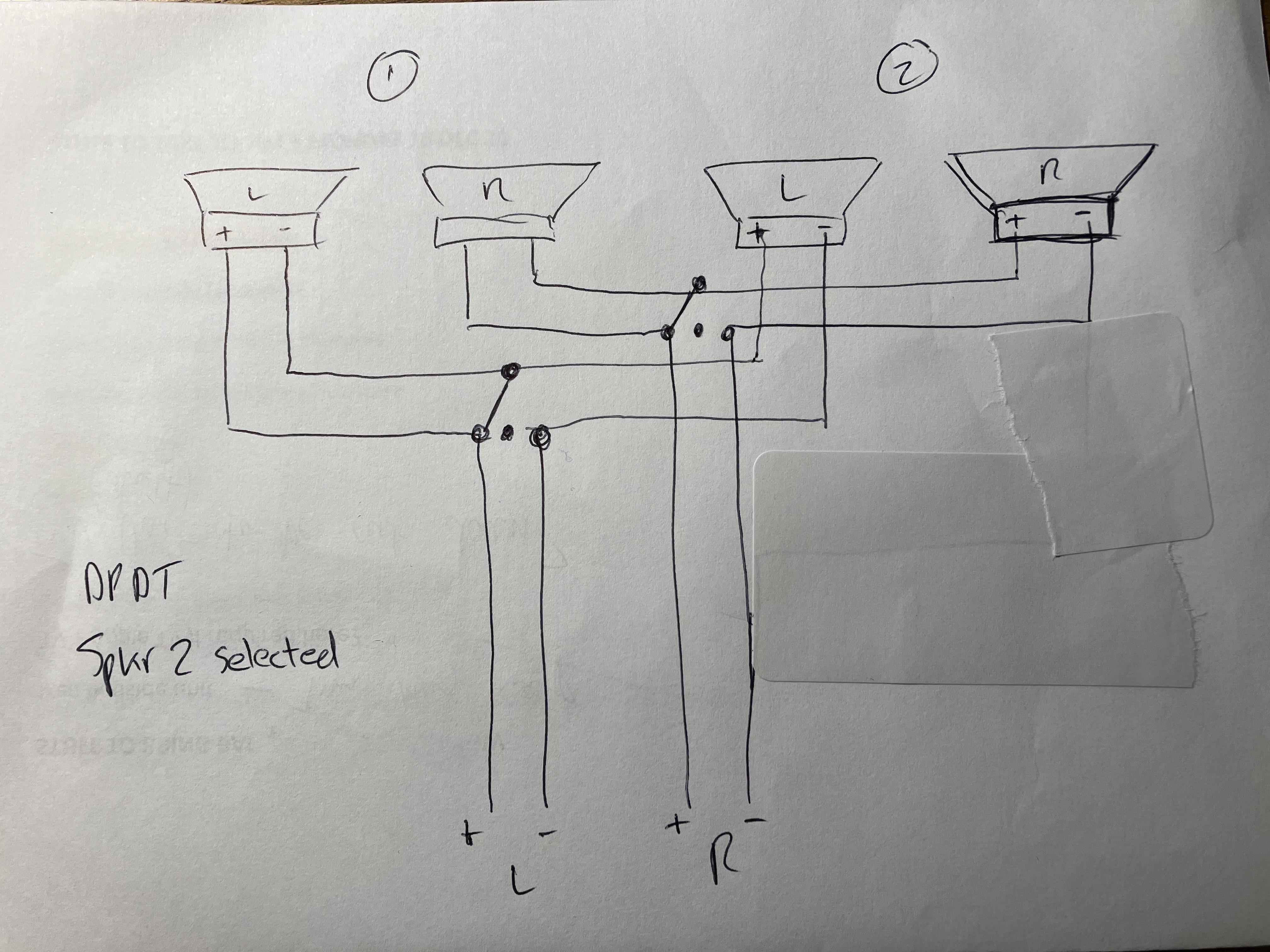
This thread has reminded me that my in-laws had their BC9500 connected to two sets of passive speakers, in their case RL60.2s and CX50s. The CX50s were in a seperate room but for some reason they didn’t want an MCL sensor on the wall!! A speaker switch selected RL60s, CX50s or both.
Anyway, I disconnected the system when they moved house and realised that the speakers were connected in series from the speaker 1 sockets. The selector switch (DPDT, centre off) effectively ‘shorted out’ the speaker pair that was not being used. The centre position meant both pairs of speakers were driven in series. Obviously impedance varied according to the switch setting but the system worked well!
Here’s a scruffy schematic to explain!
I should add that the switch was fitted by the local B&O dealer when they purchased the system. The BC9500 spkr 2 socket was also being used to supply a couple of MCL2 link rooms.
Location: Warwickshire, UK
My B&O Icons:
How would the relative loudness between the front and rear speakers be controlled with a either a Beolab speaker or Passive solution?
They couldn’t, unless it was set up as a pseudo linkroom (by adding a BL1611 and and an IR eye to the Passive, which would then have to be put in L.OPT 4 so that it could only be controlled by pressing LINK first on the Beo4.)
But then RossJP is currently unable to control relative volume, but can of course Mute the speakers connected to the Spkr 1 output. If I was using the Passive setup (not with BL1611 etc), I would connect the 5700s to the BC9500 spkr 2 output. Mute would then work on the PL output to the Passive and other speaker pair, enabling them to be turned off whilst leaving the 5700s running*.
EDIT: This would be a bit messy to use because every time you then adjusted the volume control the BC9500 would unmute!!
Location: Warwickshire, UK
My B&O Icons:
An observation: If you disconnect the ML cable after initiating the BL Active with PC, the source will continue to play and you can adjust volume using remote or IR puck buttons, but you cannot turn off using either remote or buttons.
Location: Warwickshire, UK
My B&O Icons:
Many thanks – I missed that (and was typing my edit as you posted above!)
I am dubious that any version of Active worked stand-alone, but yes it was good of OneRemote to answer.
Location: Warwickshire, UK
My B&O Icons:
One other thing that intrigues me is that some OneRemote documentation implies that the BL Active can be used stand-alone with the OneRemote radio as an input – look at the ‘tip’ in the diagram below: I wonder if the adaptor cable does something funny to make stand-alone operation possible?
I contacted OneRemote about stand-alone use of the BL Active as shown in the diagram on my earlier post. Here’s their response:
We know for certain that it works in at least some installations with an open-end ML socket.
When I got your question none of us was really certain, so we tried it in our lab. The guide was written many years ago. The test showed that it did not work until we connected Beolink Active to a Masterlink source.
So, the answer is that sometimes it works.
Our test Beolink Active has firmware 1.1 and this does not work.My BL Active is SW1.1 also. Leaving aside connection of a OneRemote source, it could be worth trying a later SW BL Active (1.3 or 1.5?) to see if that works stand-alone with a source to the PC input – anyone able to do so?
EDIT: @madskp I just read back through the thread and saw that you were going to give it a try with SW1.6 – this may have been lost in the noise with the other ongoing experiments …
Location: Warwickshire, UK
My B&O Icons:
You will likely have the same issues with “smaller Beolabs for the rear”. The root of the problem is that the low impedance configuration that you are trying to run is pushing the BC9500 past its design limit.
But wouldn’t Beolabs reduce the load on the BC9500 because they are providing their own amplification? (Connected to BC9500’s PL output before its main amp stage)
Location: Warwickshire, UK
My B&O Icons:
I have just tried only the 5700 speakers, and on channel 2. It no longer drops volume at at full volume. Actually it might have a little with louder songs, but nowhere near as pronounced.
If the mute relay is fine then the ‘speakers 1’ connection should be fine also, so that is worth trying just to be sure. (But faulty mute relay symptoms are usually a little different – often cutting out at low volumes until the volume is increased and then the mute relay jumps into action and the sound blares out!)
I would still consider experimenting with a Passive for your RL45s – you can pick them up for about £30 and sell for no loss if you don’t use it! This would leave the BC9500 to just drive the 5700s.
This is not my advert but I have bought from the seller before: https://www.ebay.co.uk/itm/145245293217
Location: Warwickshire, UK
My B&O Icons:
Hi and welcome to Beoworld!
I have definitely experienced a similar automatic volume reduction when using my BC9500 to drive a pair of passive Audiorama 8000 speakers – I assumed that it was due to some sort of overload protection although I can’t find this documented anywhere. (I will have a search of the archived forums to see if I can find anything.) I didn’t have to switch my BC9500 off/on to reset it – turning the volume down resolved the problem.
Instead of getting BeoLabs, one quick and easy way to reduce the load would be to get hold of a secondhand B&O Passive which could be used as an ‘off-board’ amp for one of the pairs of speakers. This could simply be connected to one of the BC9500s Powerlink outputs and would automatically turn on with the main unit.
Are you using both sets of speakers in the same room?
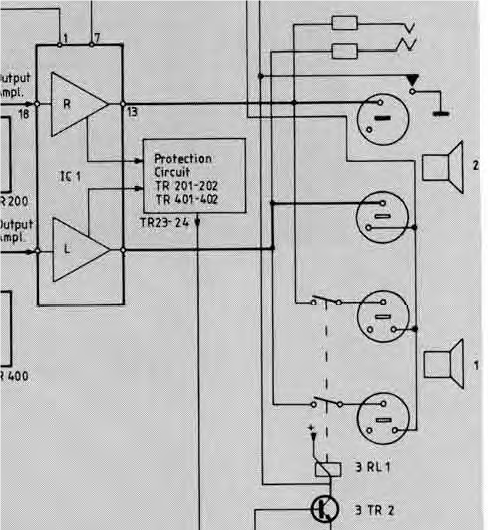
EDIT: I found this in the service manual – the protection circuit loops back to the microprocessor where it is labelled ‘Power Down’ which I would interpret to mean power reduced, rather than power off (but I could be wrong!):

EDIT2: There can also be problems with the Mute Relay (poor contacts giving poor/low sound), but this would only affect the sound from the Speaker 1 sockets (the relay is 3 RL 1 in the diagram above).
Location: Warwickshire, UK
My B&O Icons:
You have mistakenly listed the inputs to a BL Active Type 1636 in your diagram.
For your setup you want a BeoLink Converter 1611, the connections to which are as follows:
- Mains power
- Masterlink (connect to NL/ML converter)
- Powerlink input (not used in your setup)
- Audio Aux Link (AAL) – connect to the BC9500 TV/AUX socket with 7-pin DIN to DIN.
Your speakers should be connected to the BC9500’s Powerlink Outputs.
Location: Warwickshire, UK
My B&O Icons:
On B&O support site here: https://bangolufsenassistentgohe.blob.core.windows.net/manuals/TELEVISIONS/BEOPLAY_V1/EN_BeoPlay_V1_EU.pdf
Other V1 manuals here:
https://support.bang-olufsen.com/hc/en-us/articles/360041950551
Location: Warwickshire, UK
My B&O Icons:
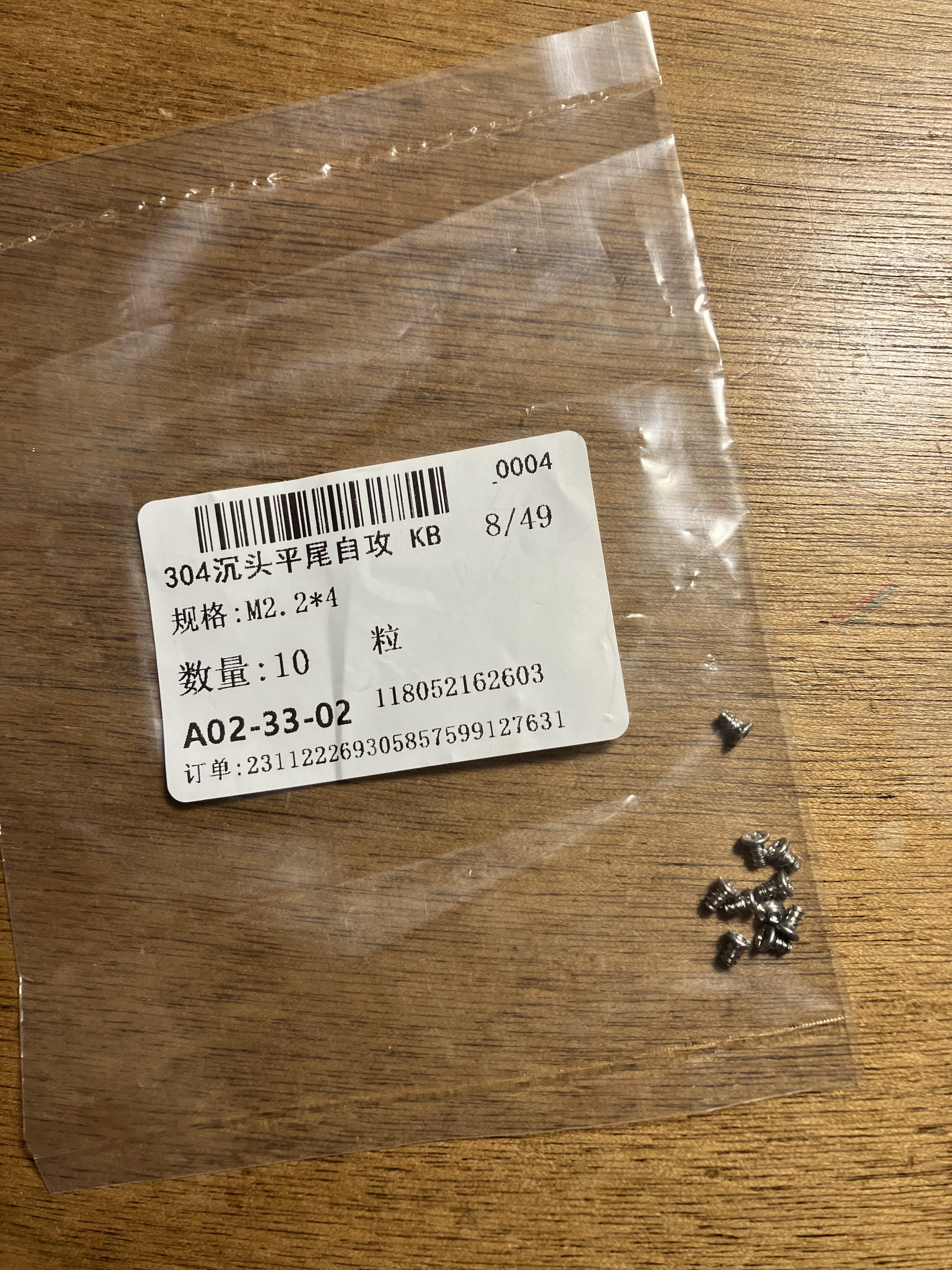
An easy fix today – replacing a couple of missing screws in Beo4s; the four tiny ones that hold the overall remote together. I found the size in the service manual (M2.2×4) and ordered on eBay. I couldn’t find a UK supplier (size M2.2 seems rare) but these came from China and fit well.
https://www.ebay.co.uk/itm/186149792663 (Choose ‘M2.2x4mm’ from the drop down menu)
Location: Warwickshire, UK
My B&O Icons:
According to Apple, Control Centre is the settings menu top right here:

Location: Warwickshire, UK
My B&O Icons:
Thanks for the 1636 schematic Keith!
I should also point out that the type 1636 (EU) replaced the 1611.
In fact, all type 161x converters were replaced with 163x units when one was purchased. In other words if a 1611 (EU) converter failed, it must be replaced by a 1636 (EU)
I must admit that I don’t understand this!
I can imagine the BL Active 1616 (two PL sockets) being replaced with Active Type 1636 (PL and PC sockets). However surely the BL Converter 1611 is used for a totally different purpose with PL and AAL inputs? Or is there another ‘EU’ version of the 1611 out there?
Location: Warwickshire, UK
My B&O Icons:
-
AuthorPosts