Forum Replies Created
-
AuthorPosts
-
 Moderator
One thing I will try to test is if it will run with a BLC 1614 connected on Masterlink, just to check if a Audio- or videmoster is required, or if its just the presence of Masterlink voltage, and or signals
That’s a good idea – I don’t think I have a 1614 but I guess yours arrived as part of that large pile of black boxes you acquired!
Location: Warwickshire, UK
My B&O Icons:

I wonder if the setup manual describes a speciel setup code for this setup?
The setup manuals for OneRemote’s latest devices just show the code to make the OneRemote respond to the PC source key, without saying whether this is received directly (IR to OneRemote) or indirectly via the PCSNUT.
My older OneRemote has different codes for direct mode (IR to OneRemote), different codes for indirect datalink and futher codes for indirect AAL.
Attached is the AAL page from my OneRemote instruction manual – as annotated I think there may be a mistake in the BL Active codes:
Location: Warwickshire, UK
My B&O Icons:
I had forgotten about this thread when I posted in ‘BL1611 innovative configurations’! Anyway, if/when I investigate the BL Active further I will post here.
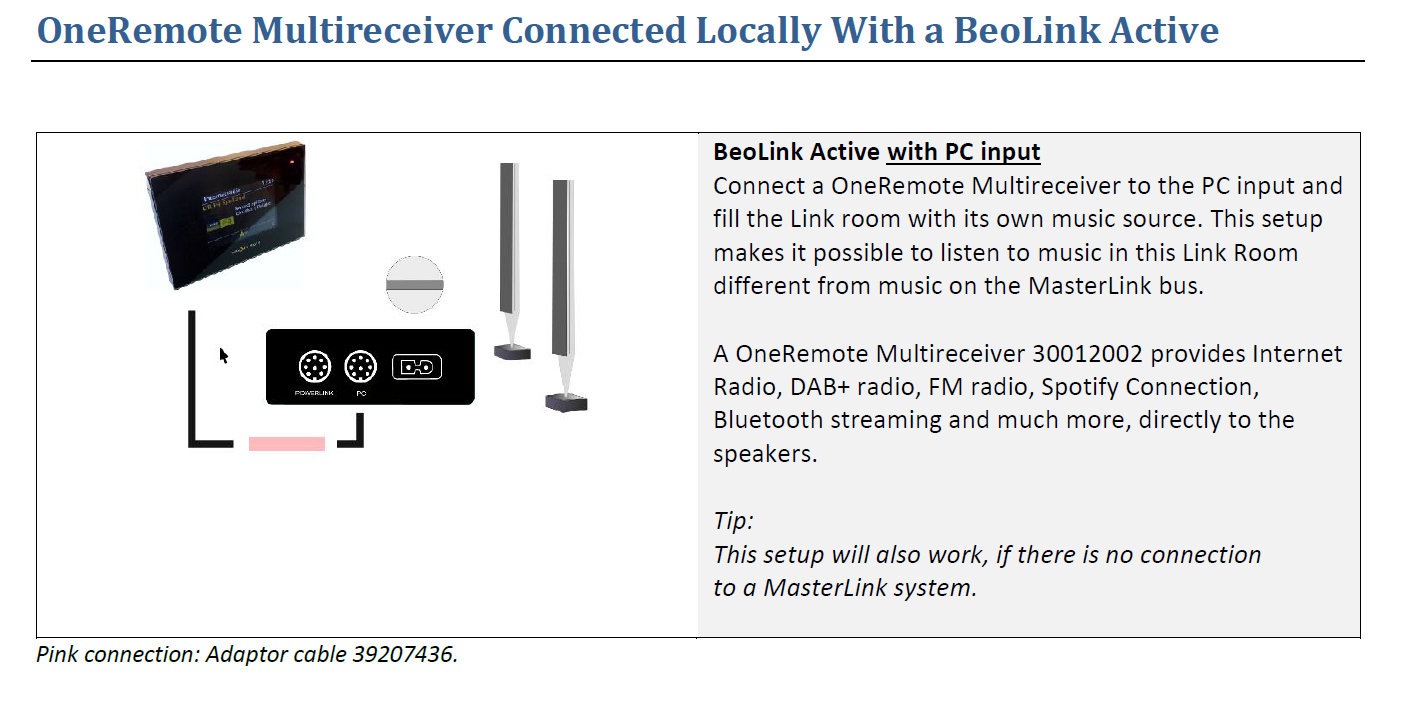
One other thing that intrigues me is that some OneRemote documentation implies that the BL Active can be used stand-alone with the OneRemote radio as an input – look at the ‘tip’ in the diagram below:
 I wonder if the adaptor cable does something funny to make stand-alone operation possible?
Location: Warwickshire, UK
My B&O Icons:
According to Keiths post here https://forum.beoworld.org/forums/topic/beolink-active-1636-pc-input/#post-14712 those are Masterlink data.
I had forgotten about that other thread that I started! I will post further there!
Location: Warwickshire, UK
My B&O Icons:
To make your adapter/Switchbox really universal you could make data connections to both pin 6 and 7 at the input end.
I might add something like that in the future, probably for testing different combinations rather than permanent use. Pin 6 would have to be switchable because I don’t want to risk a ‘grounded’ pin 6 input cancelling a connected pin 7.
On a related subject, I do want to do some further experiments with the BL Active’s PC input at some stage. I know audio L & R go to PC pins 2 & 4 but I wondered about pins 6 and 8 and whether they could be used for datalink (or AAL) control of a local source. PC input pins as listed in this thread: https://archivedforum.beoworld.org/forums/p/15997/281594.aspx
Location: Warwickshire, UK
My B&O Icons:
Welcome to Beoworld and sorry for replying in English.
Sadly Lightmanager Pro for B&O are now only now available second-hand but they do come up occasionally if you are patient – I purchased one from a Beoworld forum member. I would set up a search alert on eBay.de – there are a couple of the non-B&O type on there at the moment but I have seen the B&O version in the past.
Location: Warwickshire, UK
My B&O Icons:
There is actually a circuit diagram for the MCL2E within the MCL Service Manual, available on this site for Silver and Gold Beoworld Members. The MCL2E is a bit more complicated that I first thought – the components must be on the other side of the board in your photo. Basically it just provides a fresh 9.3V power supply (pink wire) for the downstream MCL2As, and also amplifies the data signal (white wire).
Location: Warwickshire, UK
My B&O Icons:
Hi and welcome to Beoworld!
Check with the seller but I think this is what you are looking for:https://www.quality-dream-audio.co.uk/beolink/14012910.html
EDIT: Further to the above, I would of course do a full check of the rest of the MCL2 connections first – it would be quite easy for a single wire to become disconnected that would cause the problems that you describe (possibly the pink ‘dc power’ cable.) Also, as you can see there are not many components in the MCL2E – without having the schematics I cannot be sure but an electronic repair shop could probably replace all components quite cheaply and see if that cures the fault. I would also check the output of the PSU that you are using with the MCL2E.
Location: Warwickshire, UK
My B&O Icons:
I will do some testing when I have time this week. There have been unsuccessful attempts to use BL Active stand-alone in the past, such as here: https://archivedforum.beoworld.org/forums/t/31173.aspx
My BL Actives are all Type 1636 SW1.1.
Location: Warwickshire, UK
My B&O Icons:
It does turn on their Beoplay V1, and do control the volume. However the volume function seems to be stuck somehow so it will keep turning up the volume even if I turn of the TV volume functions in the ATV settings. I will have to look into a way to reset the Siri remote to see if this behavior does continue.
That’s strange – but if you can’t reset it and it’s less than a year old them you should be able to raise as a fault with Apple and get a replacement.
Location: Warwickshire, UK
My B&O Icons:
I am just wondering why you are using pin 7 as datapin on the 2 inputs? Is that what the oneremote radio is using?
Yes exactly that. The OneRemote radio usually connects to a Beomaster input such as TAPE using pin 7 for datalink. To use it with an AAL input (either BL1611 or a Beomaster TV/AUX) you put it in a special mode and OneRemote sell an adaptor to move data from pin 7 to 6.
Location: Warwickshire, UK
My B&O Icons:
After digging out my OneRemote Radio earlier in the week and using it together with a BL1611 converter and BL3500, I decided to make a junction box to provide two separate DIN inputs for connecting to the BL1611’s audio and video inputs.
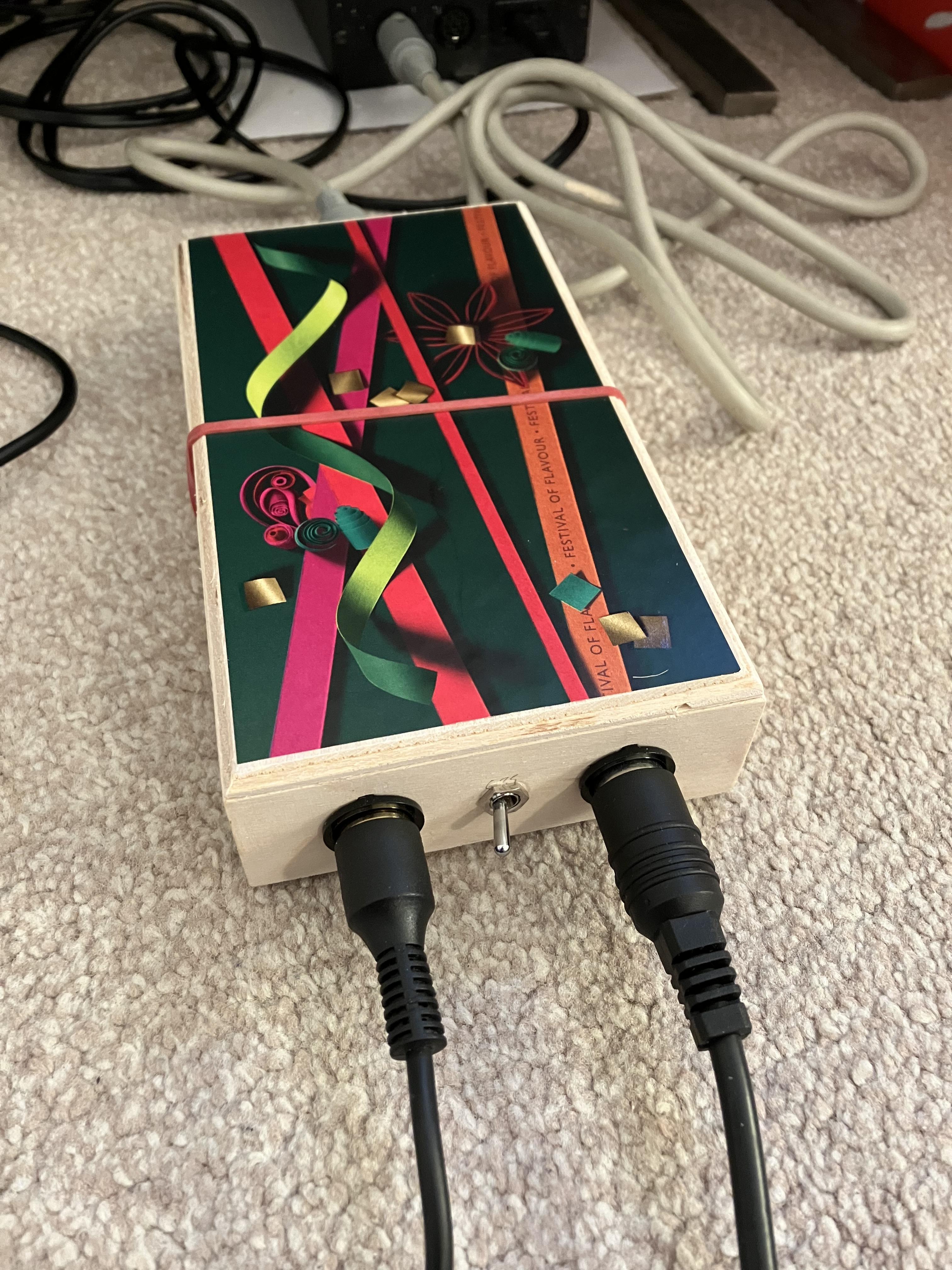
Here’s the result, built in a rather fetching empty Waitrose chocolate box. The little switch decides which of the inputs sends its pin 7 data to the output DIN pin 6 for AAL:

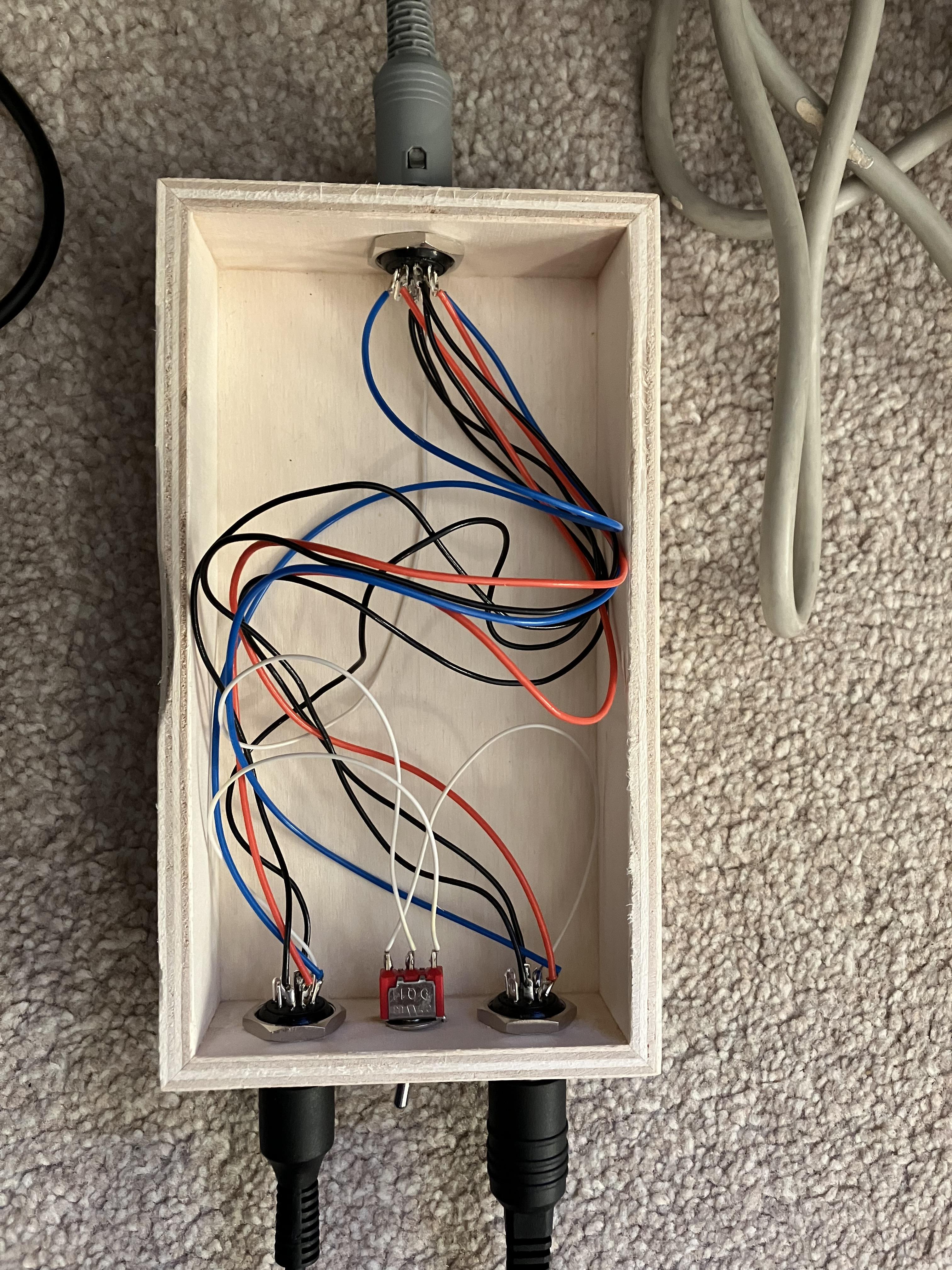
And the inside. Left is video, right audio. Colour code:
- Blue – Left Audio
- Red – Right Audio
- White – Data
- Black – Ground
It works very well, but eating the chocolates was far more fun than the soldering so I don’t think that I will be going into production!
Location: Warwickshire, UK
My B&O Icons:
Also looking at diagrams for Beomasters/Beocenters with MCL capability the data pins are on the same connections as the TV/Aux sockets Pin 6, which is also what is used to communicate to Beolink converters 1611 and 1614 .
And BeoCenters such as BC2300 have an AUX socket with both datalink on pin 7 and AAL on pin 6, so the socket can be used for both ‘simple’ control (eg a datalink turntable) and a more complicated AAL setup (either a BeoVision or via BL1611 to masterlink). It can even use both these pins at the same time if both a Beogram and BL1611 are connected using a Y-adaptor.
Location: Warwickshire, UK
My B&O Icons:
I hope others find this interesting. I had a quick look at OneRemote’s site (link here) earlier and I think that their newer B&O ‘Digital Radio Solutions’ have lost the datalink capability of mine – I think that they can only be controlled directly by B&O IR remotes. Happy to be corrected if anyone knows otherwise!
I contacted OneRemote by email yesterday, sending them a link to my post and asking about their use of datalink in their latest products. They sent me a very nice reply including the following:
Datalink Simple
Simple Datalink, the data used on DIN TP, CD, Phono inputs to control a connected Tape, CD is very limited.
It was made to control a simple cassette deck player and a record player, and therefore only has a few commands.
We have used them to control DAB receivers previously, but the few commands are not enough to make a reasonable control of a modern Internet radio.
So, we do not support the Simple Datalink control anymore.Datalink MCL
Datalink MCL is used between a connected B&O Radio and TV’. It has a lot more commands, even the colored buttons used on Beo4 and later.
On some Audiomasters the TV/AUX socket communicate with Datalink MCL format.
The adaptors we have now still can be used with Datalink MCL, as it gives the same control possibilities as directly controlled with IR.It is the Datalink MCL that you use via the Beolink Converter.
So I assume from the above (particularly the last sentence) that ‘Datalink MCL’ is the same as ‘Audio Aux Link’ since that is the only data connection that the BL1611 supports. I am tempted to start a separate ‘OneRemote Digital Radio Solutions’ thread if there are other users out there?
Location: Warwickshire, UK
My B&O Icons:
Yes, but not sure that you are able to use a audio source command for the BL1611 in that case? At least it’s not possible on the ouverture
My trial had both datalink Beogram and BL1611 connected to BC2300, with ML cable from BL1611 to BV6-26 in another room. I was able to control the Beogram remotely via the TV. So in this case the BL1611 AAL input was receiving an audio source (pins 1 and 4) and passing it to the TV by ML.
Details in this thread: https://archivedforum2.beoworld.org/forums/p/46501/334454.aspx#334454
I think that I could also control and hear the TV from the BC2300 – but can’t be 100% sure.
Of course unlike the Ouverture the BC2300 does not have ML, hence I had to use a BL1611.
Location: Warwickshire, UK
My B&O Icons:
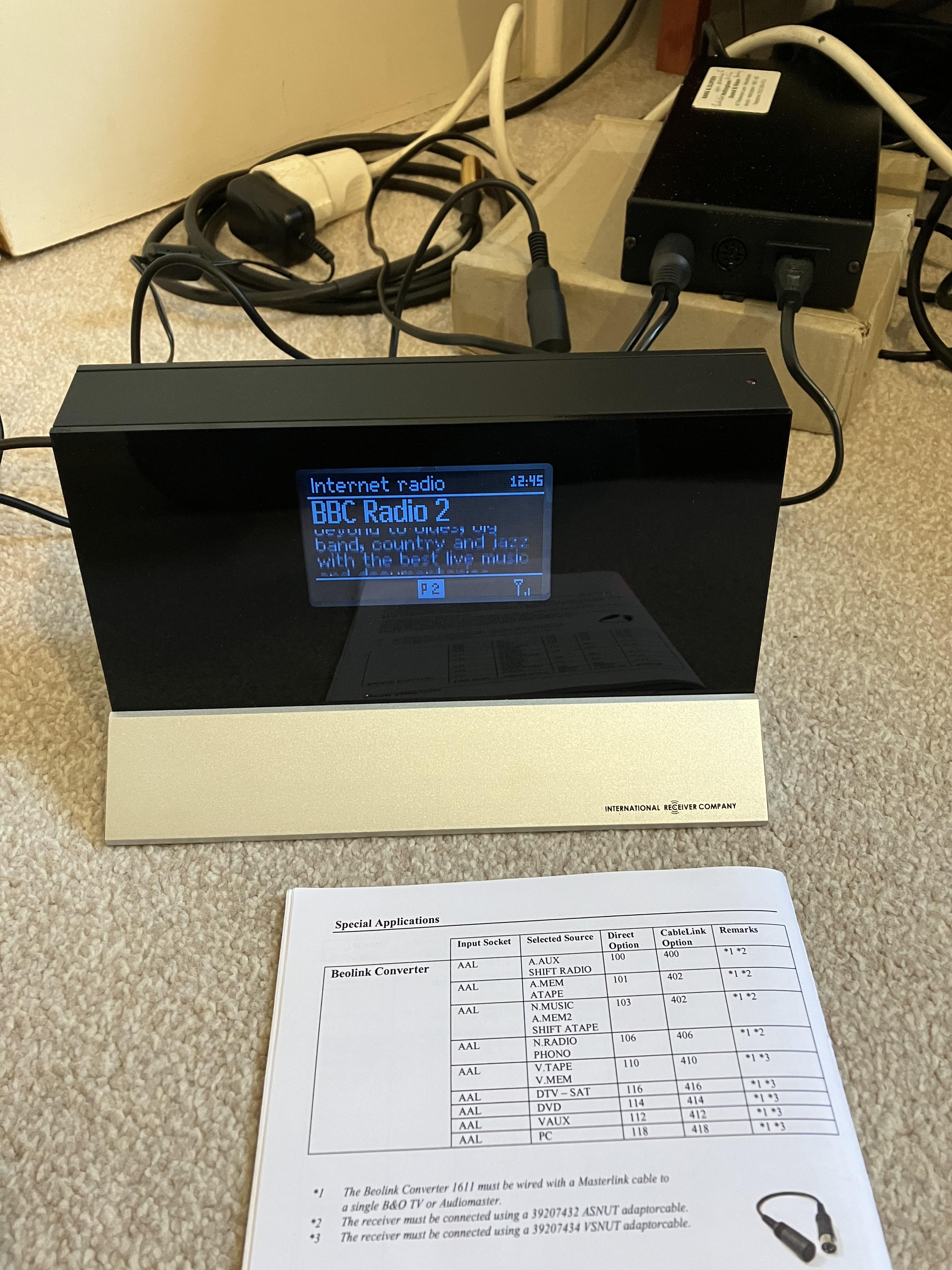
After discussing the UK’s transition to DAB (and possibly DAB+) on another thread, I thought that I would dig out my OneRemote receiver and check the DAB/DAB+ reception in my area. I had previously mainly used it for internet radio. I took advantage of our knowledge from the Beolink Converter 1611 Innovative Configurations thread, where I posted about the OneRemote/1611 combination here: https://forum.beoworld.org/forums/topic/beolab-3500-and-1611-converter-settings/page/9/#post-14354
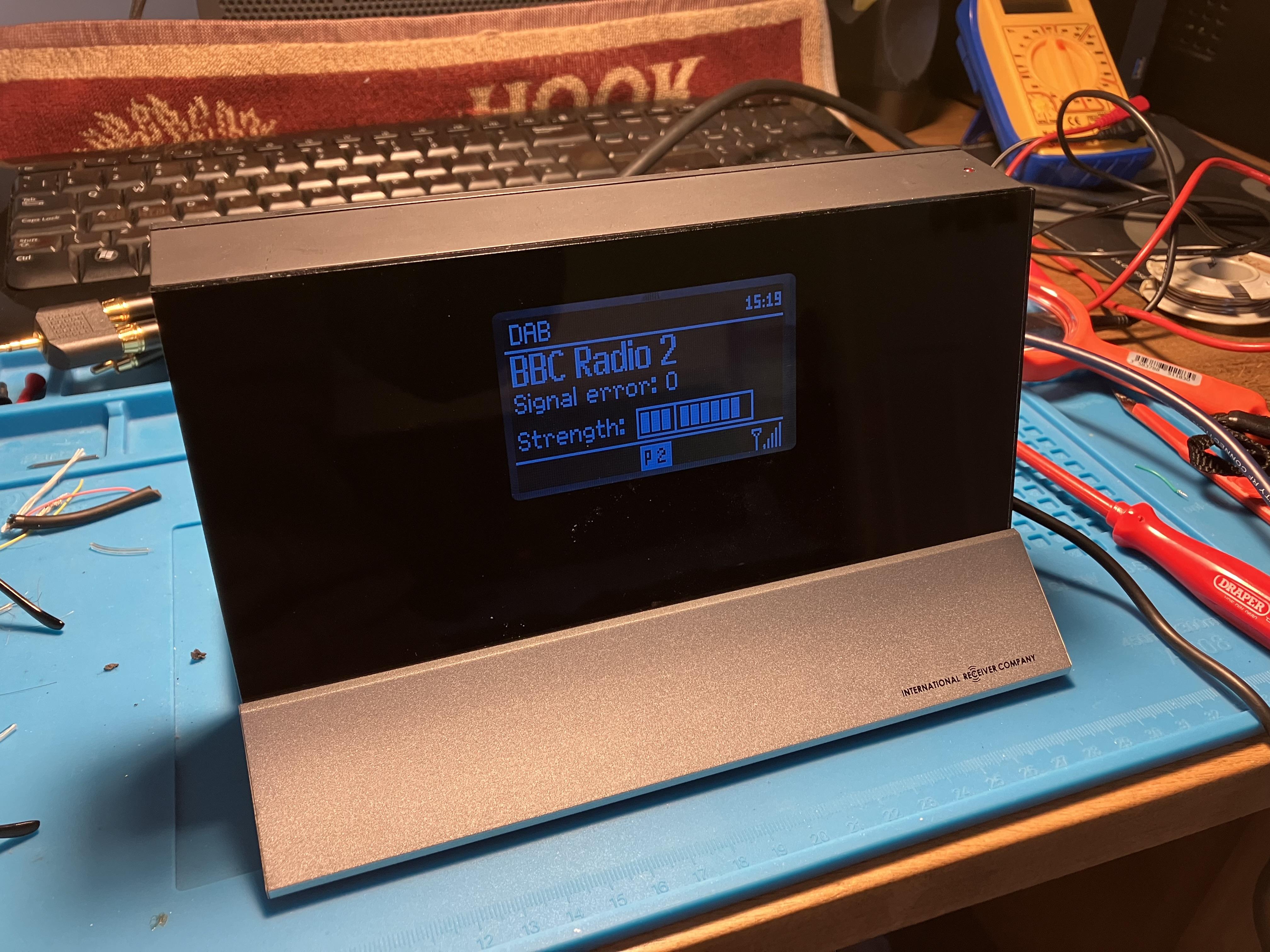
Here’s a photo from that post (the BL1611 is further connected via ML to BL3500):
Anyway, I set up the OneRemote as before and had a bit of a play. The first thing that I worked out is that there are additional OneRemote ‘cablelink’ codes not shown in the table above that can be used to turn on and control the OneRemote via Datalink. I found that code 404 allows it to be selected by input ‘CD’, and code 408 by ‘RADIO’. The latter code is very useful because in a stand alone setup with BL1611 and BL3500 you can use the Beo4’s RADIO button to turn on, and RADIO obviously shows in the BL3500 display.
I searched for DAB stations and performance was poor – I thought due to my temporary antenna stretched over the wardrobe.
I also noticed that the OneRemote’s line-out volume was imbalanced – far stronger on the right than left. I checked the OneRemote’s headphone output and that was balanced nicely and at a similar level to the line out.
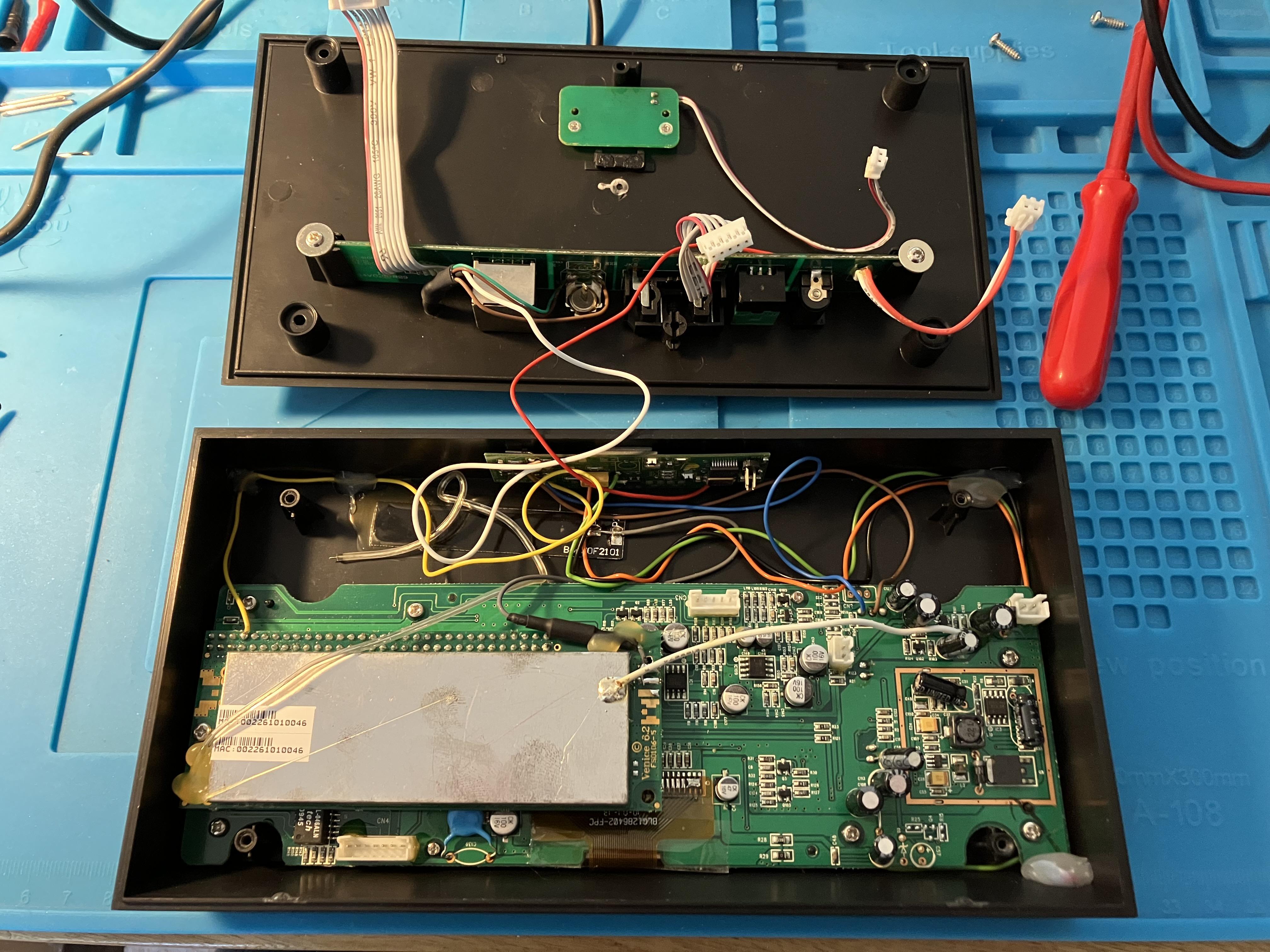
I decided to open up the OneRemote receiver to see if the balance issue was anything obvious (click to enlarge).

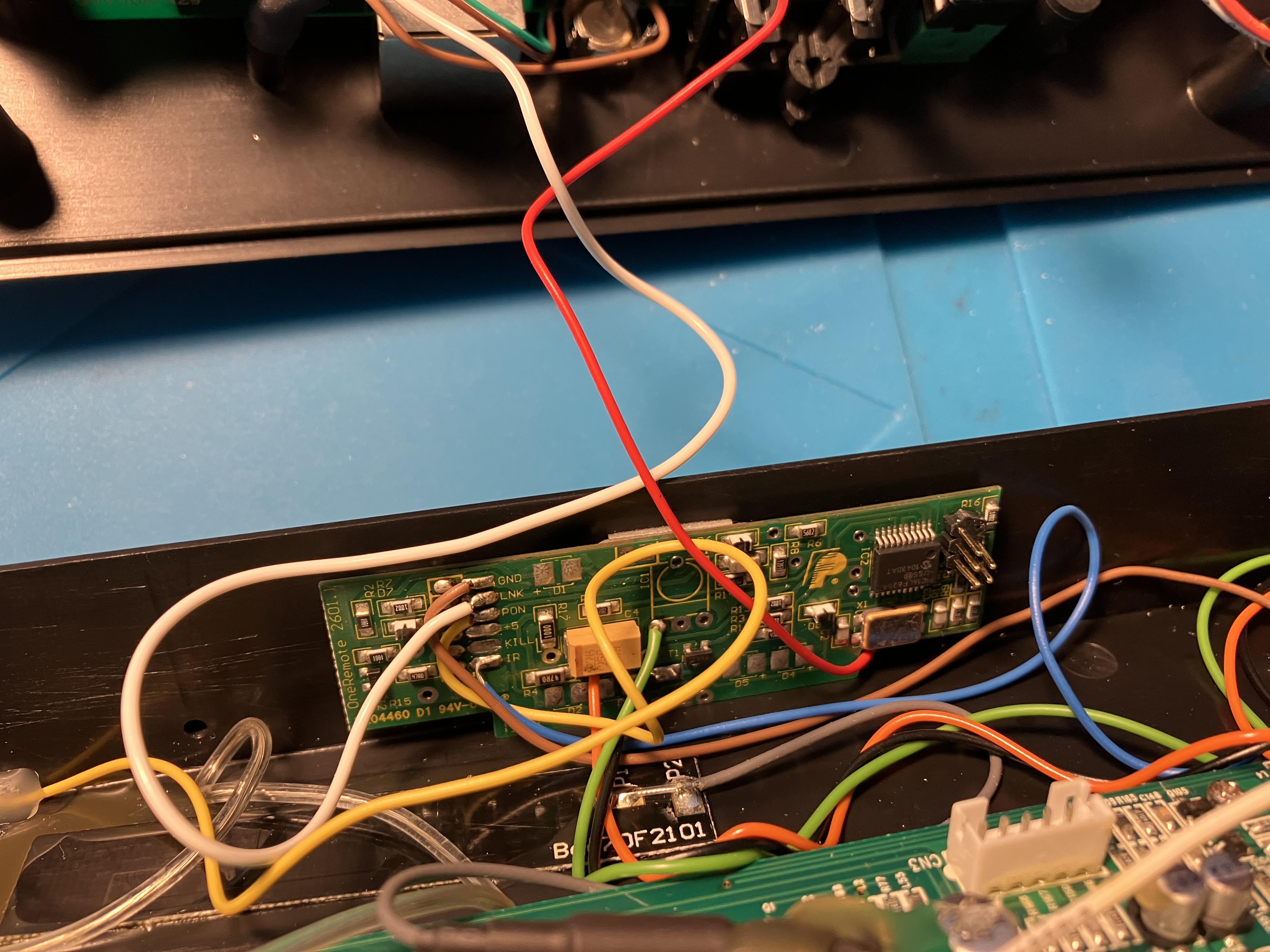
The first thing I noticed is that the antenna wire (silver from PCB lower left) had not been soldered to the back of the F-Type connector. Perhaps this was an oversight when OneRemote modified the receiver for B&O datalink/remote compatibility, so I have now connected it.
Out of interest, here’s a close up of the extra PCB that must give the datalink capability – the white (LNK) wire is connected to pin 7 on the DIN output plug:
I couldn’t see anything obvious causing the balance imbalance (?) so I cheated and moved the audio output cables internally from the line-out to the headphone-out. Headphone volume is effectively fixed anyway, so no issues.
I reassembled and all is now working fine including a strong DAB signal.
I am going to use the OneRemote in my study for a while together with the BL1611/BL3500 described earlier so I can experiment with the usability and quality of DAB versus Internet radio – I will also check DAB+ when I can find a UK DAB+ station. The OneRemote also has FM radio (which works now that the antenna is connected!) and a Music player that I can use to play music from my NAS.
I hope others find this interesting. I had a quick look at OneRemote’s site (link here) earlier and I think that their newer B&O ‘Digital Radio Solutions’ have lost the datalink capability of mine – I think that they can only be controlled directly by B&O IR remotes. Happy to be corrected if anyone knows otherwise!
Location: Warwickshire, UK
My B&O Icons:
This all sounds a bit strange – I think from a bit of googling that others have used Chromecast with Google TV and an extractor just as an audio streaming input, so fundamentally it should work. Have you tried unplugging the DVI connection to the TV to see if you just get sound?
It could also be worth trying other leads (hdmi to dvi) and also checking the audio lead that you have used between extractor and TV PC input. Also try connecting another analogue input (phone etc) to the TV’s PC input whilst the rest of the setup is connected to the DVI input.
Also worth checking that the audio extractor is getting sufficient power – I used a 12W Apple adaptor with mine.
SPDIF could be worth a try also but I am not sure how the TV then choses the right audio input.
Dare I say it could be worth trying yet another audio extractor? I did send a couple back to Amazon for a full refund when I was experimenting!
Location: Warwickshire, UK
My B&O Icons:
I just remembered that I had a sound output problem when I used an Atlona extractor. I decided that it could be an EDID problem – see my post (and the rest of the useful thread) here:
https://archivedforum2.beoworld.org/forums/p/49863/350521.aspx#350521
Location: Warwickshire, UK
My B&O Icons:
sing ML and NL, so I doubt that these will help. I suspect that while DAB is still being used
Don’t forget that Classic FM (and lots of other radio stations including BBC) are also broadcast on Freeview (Channel 731) and FreeSat (Channel 721) – so if your TV is connected to NL/ML that could also be an option allowing distribution of radio. I used to listen to BBC radio via Freeview on my BV10-32 until I bought a BeoSound 1 (CD/Radio) as an FM receiver for my living room.
Location: Warwickshire, UK
My B&O Icons:
28 November 2023 at 13:56 in reply to: Conversion kit Beolab 4000 to Sonos electronics with Trueplay #47308Click the ‘Main Web Site’ link above (or under the Menu button if using a phone), then look to the right hand side below the LOGOUT button – you should see a link to ‘Upgrade/Renew Membership’.
Location: Warwickshire, UK
My B&O Icons:
-
AuthorPosts


 I wonder if the adaptor cable does something funny to make stand-alone operation possible?