Forum Replies Created
-
AuthorPosts
-
 Moderator
But now you will need an extra room for that in your new house
I will be happy with just one ‘museum’ room with lots of shelving and power points!
I’ve had a similar feeling after getting something working with a full “recap/reflow”
My recap of a BeoLink 5000 (7 caps total) was about as ambitious as I get. Despite being successful, it was enough to put me off soldering for life! I can’t imagine tackling some of those larger projects!
Location: Warwickshire, UK
My B&O Icons:

I a pretty sure that the audio part will work, but more interesting if the data will. For one thing which commands should be used? But you could try something like Link + CD or AV + CD.
Yes I anticipate that the lack of Commands/Option Settings may be a constraint, but could be worth trying a few funny commands such as LINK and AV, so thanks for that.
Another thing is that it can only be set to option 0 or 1, so no way to select which is a link room. However if this is/was an attempt of a new type of link system, the role definition might not be the same as in the older systems
Yes I am struggling to think of a ‘use case’ where two BS1s (two audiomasters?) are connected in separate rooms, but it could be an interesting test nevertheless.
Perhaps we should try connecting the BS1’s Data + and Data – to a Masterlink device Data in/out (pins 1 and 2) and see what happens? If I am feeling brave I could try it with my BV10-32, but I wouldn’t know what to connect to the ‘ML sense’ pin 3.
Location: Warwickshire, UK
My B&O Icons:
Most are on ‘Main Web Site’ then ‘Products’ and look for link bottom left as follows:
https://beoworld.org/manuals.asp
But following migration, some are on this newer forum page top right – as follows:
https://beoworld.org/beoworld-document-library/
EDIT: And Happy New Year too! ?
Location: Warwickshire, UK
My B&O Icons:
That’s a tricky spot to do a neat install! I’d be tempted to use one of those cable management boxes to hide the power strip and any adaptors. It might not be large enough but I have found these D-Link ones to be good value: https://www.diy.com/departments/d-line-small-black-cable-tidy-unit/203420_BQ.prd
EDIT: I just used my moderator super-powers to rotate your first photo upright!
Location: Warwickshire, UK
My B&O Icons:
Now that I have my second BeoSound 1 (see here), I wondered if it could be worth making a 7-pin DIN ‘crossover’ cable and joining the two together. Thus ‘audio out’ would become ‘audio in’ in the second, and more interestingly data-out would connect to data-in and vice versa. I don’t have time for the next few days but it could be worth a try!
Location: Warwickshire, UK
My B&O Icons:
I ‘won’ a spares-or-repair BeoSound 1 (my second!) yesterday on eBay, and collected it to avoid the risk of damage in the post. The listing stated that the CD player wasn’t working, so I was quite looking forward to stripping it down and attempting a repair.
Anyway I plugged it in and tested – sure enough any CD would start to spin and then stop/eject. I gave the lens a little clean and tried again but there was no difference. Out of interest I then went to Service Mode and it showed CD module errors: OF6 and OF10. I then tried a couple of the CD tests – just the first two from the list below (focus and then turntable on/off):

I then took it out of Service Mode and tried the CD again and it worked flawlessly! I can only assume that the focus was stuck and the Service Mode tests got it moving again. I have tried several CDs including a couple that won’t play in my other BS1, and all is well. Strangely I can’t help being disappointed that it wasn’t more of a challenge to fix!

The only other fault was that the aerial protruded about 5mm when in the down position. I realised that it just needed a few clockwise turns to screw it down fully into the mechanism.
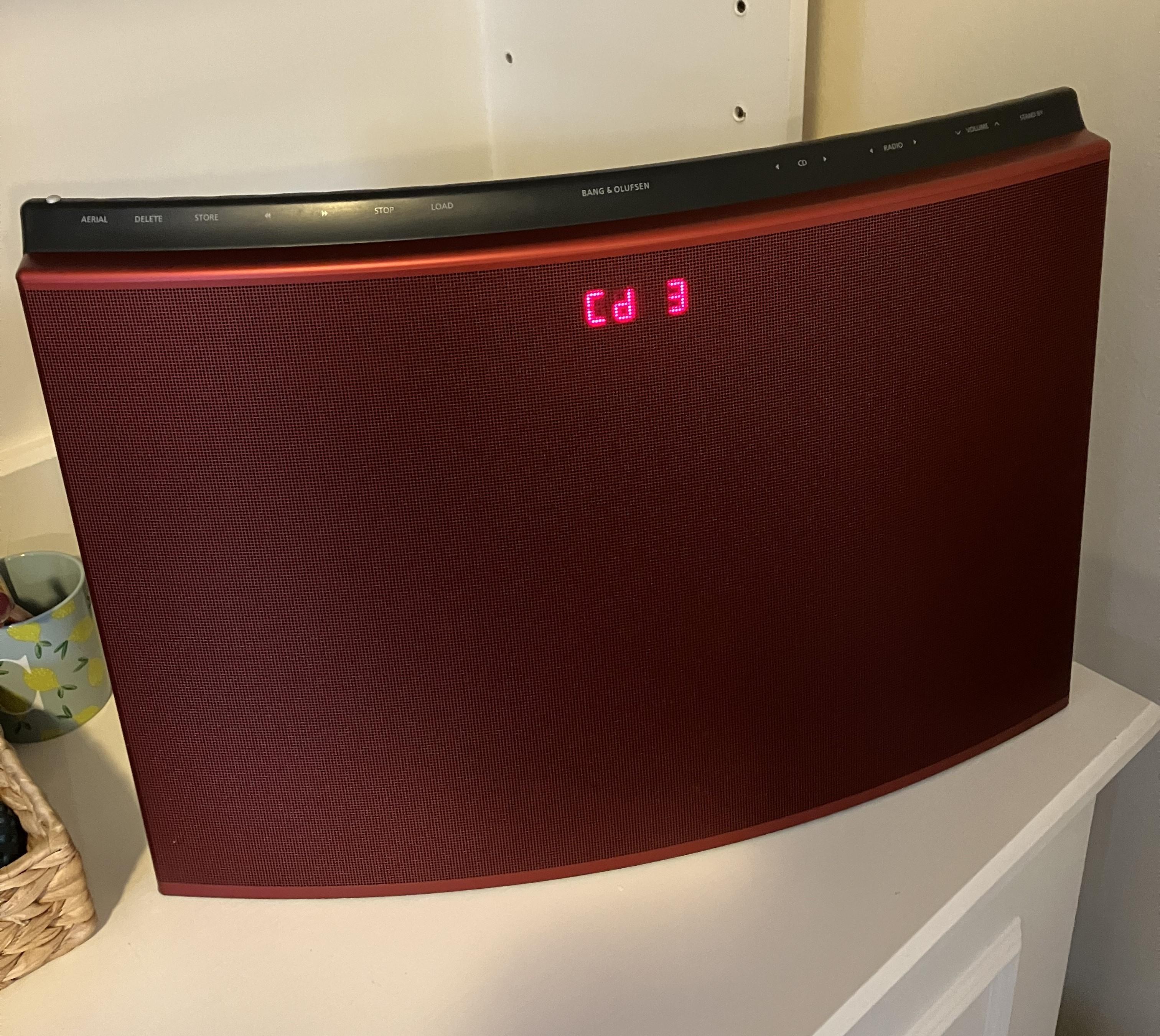
Here it is in position in the lounge after further cleaning:

Location: Warwickshire, UK
My B&O Icons:
If I get a chance this week I will connect my OneRemote radio to my BS1 aux and do some further tests using my adaptor to switch data between the two pins, plus trying the OneRemote in ‘AAL’ mode as if connected to a BL1611 (I don’t think that I tried that before).
I experimented with various permutations of settings yesterday. I tried the OneRemote radio in various different cablelink ‘modes’, both for normal datalink and AAL and tried most of the source triggers (incl video, audio and PC). Each mode was tried with data to pin 7 and then separately to pin 6. There was no response in any of these setups.
Location: Warwickshire, UK
My B&O Icons:
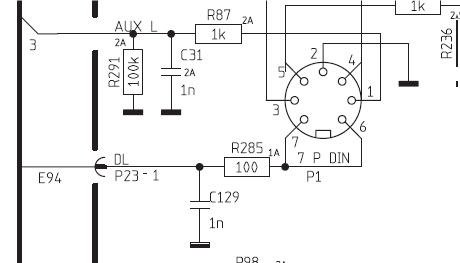
BS3000 also has no datalink but shows ‘DL’ connections to pins 6 and 7 in the circuit diagram:

Specification pages state pins 6 and 7 ‘not used’
EDIT: But for the BS3000 the manual does also say ‘N.C.’ no connection where it joins the microprocessor interface PCB.
Location: Warwickshire, UK
My B&O Icons:
Strange that the data connections are shown in the service manual. Perhaps they are disconnected internally and/or the software was never made compatible.
If I get a chance this week I will connect my OneRemote radio to my BS1 aux and do some further tests using my adaptor to switch data between the two pins, plus trying the OneRemote in ‘AAL’ mode as if connected to a BL1611 (I don’t think that I tried that before).
Location: Warwickshire, UK
My B&O Icons:
I am not sure whether the part is compatible, but even if it is there could well be a requirement for a dealer software update for the BV7-40 – see here: https://archivedforum.beoworld.org/forums/p/30066/239251.aspx#239251
A more modern set-top box is likely to have a better user interface anyway, and possibly better performance especially if you are after DVB-S2 rather than DVB-S.
EDIT: Here’s the fitting guide that was referred to in that other thread: https://beoworld.org/download.asp?file=DVBST-BeoVision7-40MKIII-fittingguide-eng.pdf
Location: Warwickshire, UK
My B&O Icons:
Do your passive speakers still work with the BeoCenter?
Are you sure that you haven’t removed/dislodged the little line in/out connector on the rear of the BC9500? (Just above the Powerlink 1 socket)
Otherwise yes wait and test the speakers with a phone adaptor.
Location: Warwickshire, UK
My B&O Icons:
Hi and welcome to Beoworld! We don’t get many questions about Beo1/BV1 so it is nice to see a new challenge!
I am not aware of any procedure for pairing the remote, or for telling the TV which remote to respond to.
However, this old thread may be of use – it explains how to get a Beo1 to behave like a Beo4, which I suppose could solve your problem: https://archivedforum.beoworld.org/forums/t/29071.aspx?PageIndex=1
EDIT: Can I just check that this is the Beo1 to which you refer, rather than the newer (and very different) BeoRemote One?

Location: Warwickshire, UK
My B&O Icons:
Just a quick thought, have you tried selecting N.RADIO with the remote, and this could be the BC2’s radio source if using DAB?
Location: Warwickshire, UK
My B&O Icons:
Excellent work – you must have kept comprehensive notes from all the testing that you have been doing, and it’s great to see it presented so clearly!
In the New Year I will have a more comprehensive look through all the combinations, but I really should prioritise looking for a new house to buy so I can settle down and use some of these setups for real.
Many thanks indeed for putting these together for the benefit of all!
Location: Warwickshire, UK
My B&O Icons:
The new Core connected to the Celestials is all you need–assuming you already have an amplifier such as BeoAmp 2 to provide them power.
If BeoAmp 2 is too pricey, then don’t rule out a second-hand Beolink Passive – you would just need the correct cable from the Core’s RJ45 to the Passive’s Powerlink input (8 pin DIN). Sounds Heavenly (link at bottom of page) should be able to supply.
Location: Warwickshire, UK
My B&O Icons:
Welcome back!
Yes that’s how it will perform with a standard DIN input (pins 3 and 5) to the BL1611’s AAL socket – only VIDEO source selection will activate the input.
Have a look at this post (and thread) and you will see that the BL1611 can accept an AUDIO input but only if connected to pins 1 and 4 of the DIN AAL input: https://forum.beoworld.org/forums/topic/beolab-3500-and-1611-converter-settings/page/4/#post-14017
It’s a very useful solution for a double input to BL3500 etc.
Location: Warwickshire, UK
My B&O Icons:
That sounds like the BL3500 is not getting a ‘valid’ input.
Try pressing MENU 09 GO and checking that ML is switched on, as described in this post by madskp: https://forum.beoworld.org/forums/topic/beolab-3500-does-not-work-in-masterlink/#post-22054
PS: I think I recognise your username from the archived forum, but if you are indeed new here then welcome to Beowrold!!
Location: Warwickshire, UK
My B&O Icons:
I see. Maybe try an eARC audio extractor as discussed in this thread: https://forum.beoworld.org/forums/topic/sound-control-from-lg-tv-to-beomaster-6500-not-possible/
But I am not sure if the audio processing delay will cause delay/lip-sync problems. To avoid further delay, you would have to use in conjunction with the Beolink Converter 1611 as suggested by Steve in that first thread I linked.
Location: Warwickshire, UK
My B&O Icons:
Hi and welcome to Beoworld!
Have a quick look at this thread and then come back if you have further questions, I am sure we can help: https://forum.beoworld.org/forums/topic/beomaster-5-a-aux-source/
Location: Warwickshire, UK
My B&O Icons:
Congratulation all! And Merry Christmas!!
Location: Warwickshire, UK
My B&O Icons:
-
AuthorPosts