Forum Replies Created
-
AuthorPosts
-
 Moderator
It’s about 15 years since I changed the belts on my BC9500, but I remember a similar problem! I think there was a probelm with cables snagging at the front, and that you had to remove the multi-plugs from the rear.
Where did you get the belts – did they come with instructions?
Location: Warwickshire, UK
My B&O Icons:

Having seen quite a few ‘spares or repair’ BeoCom 2s on UK eBay I thought I’d dip my toe in the water and experiment with fixing one.
It arrived yesterday, and when trying to ‘power up’ the screen would just show some random lines and then shut down. The charging base was showing a fluctuating voltage under no load, alternating between 4 and 6V, so I stripped that down (damaging it in the process, but I now think I could dismantle another without damage, so lesson learnt!). I also had to re-terminate the RJ45 connection into the PSU. Anyway, the charging pins are now showing a steady-ish 5.6V.
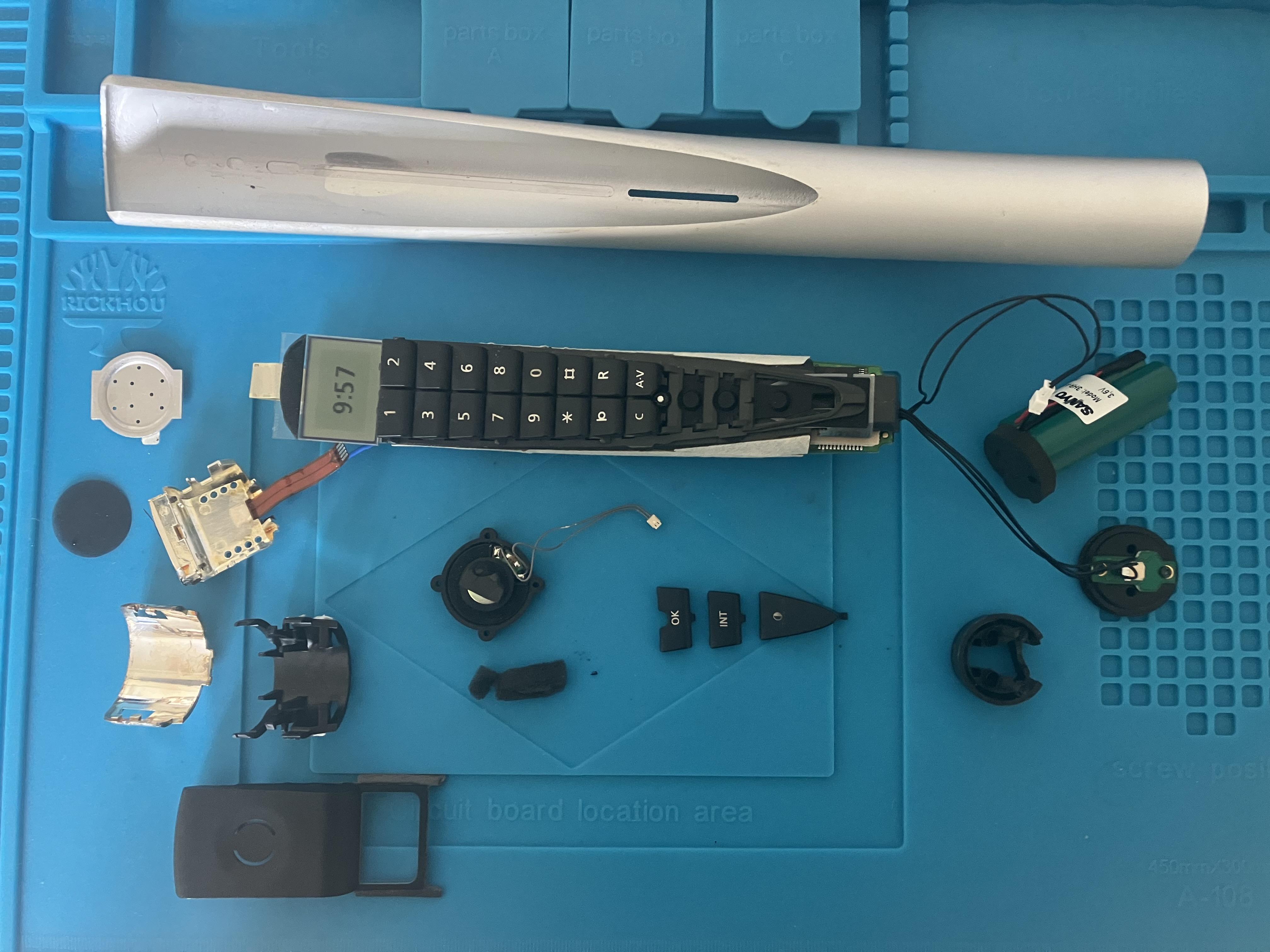
I then stripped the handset down – very tricky indeed but helped slightly by a blurry YouTube video (4 hours long in 4 parts – I didn’t watch it all!). Once in pieces I tried a trick that often works with a BeoCom 6000 – I simply disconnected and reconnected the LCD screen – in the BC2 this is a little ribbon connector. Once the battery was then re-charged the phone burst into life, so I reconnected the antenna (blue wire below) and managed to connect to my PSTN base without difficulty. All the functions (phonebook, dialling, answering etc) seem to work (albeit with earpiece and IR remote transmitters disconnected).
Here’s a picture of it working in pieces.

As you can possibly see, the little ‘track point’ (below the C and A-V buttons) is broken so I want to have a go at fixing that before re-assembly and more testing. I don’t think my wife will be happy to use a watch screwdriver to move the pointer when scrolling between menus.
If anyone else wants to give dismantling a go I am happy to help with advice, and maybe some close up photos of the parts that seem to get stuck in the slots on the inside of the casing. I will say that it is very difficult to accomplish without damage, but I purchased the handset and charger for less that £20 so I was happy to take a few risks.
Anyway, must crack on with this now as I have a third BeoSound 1 arriving later in the week – with faulty CD apparently … 🤔
Location: Warwickshire, UK
My B&O Icons:
would the amplifier unit I already have from a BC8500 fit into the BC9000 as a straight swap?
I had a look at the service manuals of the 9500/8500 against the 9000 and can’t see any differences, but the amplifier module part numbers are different. There are statements in the archived forums that say the amplifiers are ‘basically identical’.
It’s the sort of swap I personally would try, but obviously at your own risk! (and be careful not to break anything else as you swap the boards over – those connecting plugs cables etc are getting quite old and brittle!)
Location: Warwickshire, UK
My B&O Icons:
Don’t rule out keeping the BL2000 also – I was quite impressed with the sound quality from mine (which also came with a BL3500). They don’t look very attractive, but tucked away in the corner of a small room they can be quite useful, especially as you can control them without the remote (some source selections* and volume control possible).
* BL2000 Mk1 version allows you to select TAPE, CD or RADIO from front panel, Mk2 version allows TV, CD or RADIO.
Location: Warwickshire, UK
My B&O Icons:
Here’s one for sale suggesting it’s for Beomaster 3000: https://www.ebay.co.uk/itm/375316828722
Here we go, it’s an SM20 for Beosystem 2000 or 3000: https://beo.zone/en/beocenter-av5/cabinet-sm20
Location: Warwickshire, UK
My B&O Icons:
what is the Line In/Out port for?
I remember reading that it was just in case users wanted to add a graphic equaliser or such – these were popular for a while back in the 80s!
Location: Warwickshire, UK
My B&O Icons:
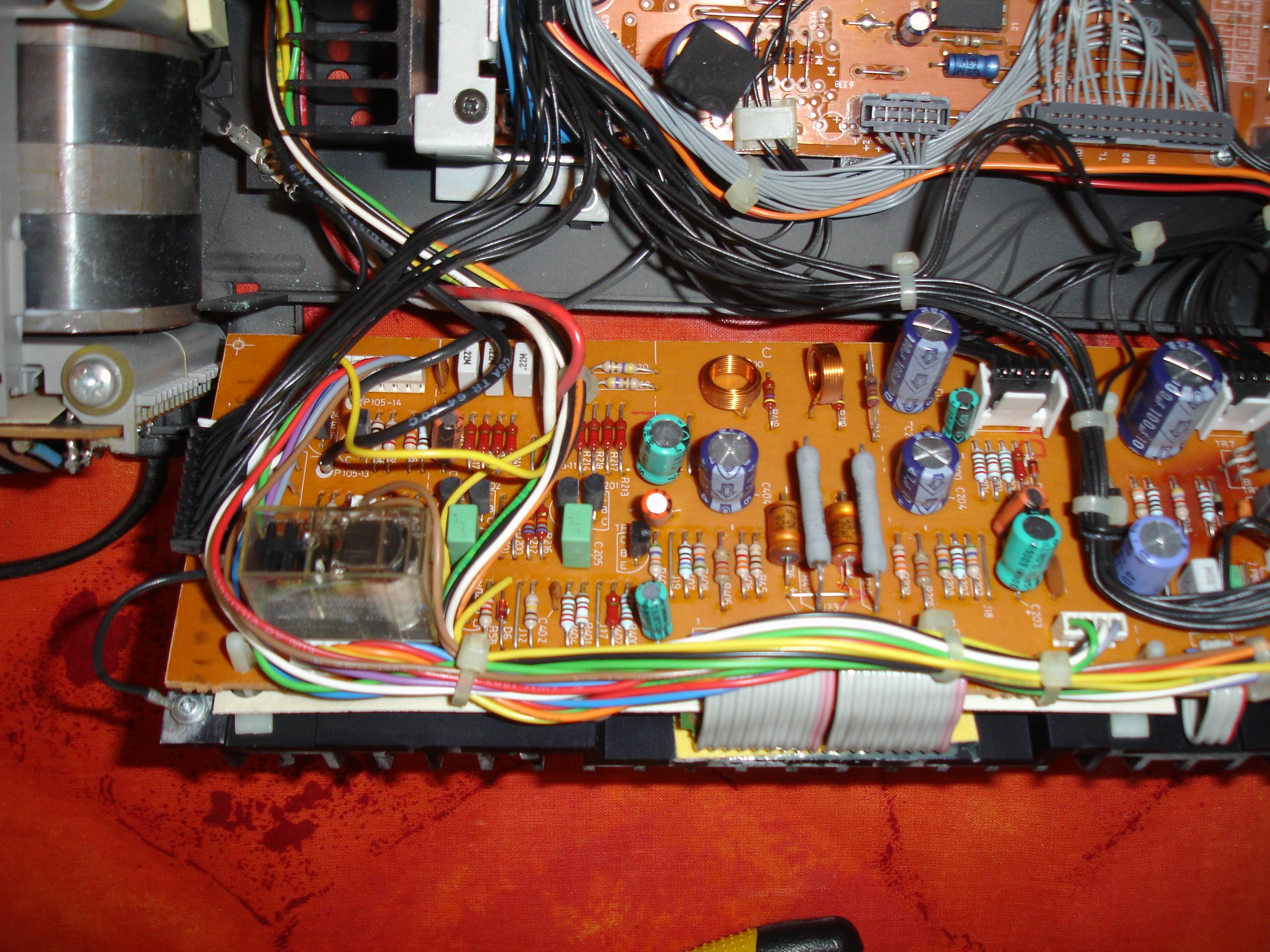
Yes it needs soldering – here’s the relay in a BC9500:

Location: Warwickshire, UK
My B&O Icons:
Have a good read of this thread about the door strings: https://forum.beoworld.org/forums/topic/my-beocenter-9500-restoration/
And the Speaker 1 problem does usually indicate that it is time to replace the Mute relay – the contacts are corroded or dirty – best to replace. You can find a new one at BeoParts.
EDIT: I managed to get some replacement door strings from this seller but I think he only has the plastic sliders left: https://www.ebay.co.uk/itm/166490477922
Location: Warwickshire, UK
My B&O Icons:
I am not sure if it helps, but the DVD1 Mk2 version (Type No 4621) apparently shares the same power supply – I must have read this in this forum at some time! I just checked the part number in the DVD1 Mk2 service manual and it states 8006898, which is suspiciously close!
Your friend may well be able to find a DVD1 Mk2 for spares more easily than a BS1 power supply.
Location: Warwickshire, UK
My B&O Icons:
I’m not sure what it will actually do when connected,
Put simply, it will allow you to play the TV audio through the BC8500, and vice versa.
This is dependent on ‘Option Settings’. If TV and BC are in V.OPT 1 and A.OPT 1 respectively, each will normally play sound though their own speakers and be controlled directly by the Beo4. In this setup, if you press ‘AV’ before selecting a source, if will play through the ‘other device’ – i.e TV will play audio through BC8500 speakers (if connected) and BC8500 will play through TV.
Other option settings will change the behaviour, but it’s probably best to come back and ask once you have it setup!
Location: Warwickshire, UK
My B&O Icons:
Do you still have a powerlink cable between the BC9300 and BL1611 converter? The setup needs this to pass control panel (not Beo4) commands from the BC9300 to the rest of the system.
Location: Warwickshire, UK
My B&O Icons:
The Avant DVD had the STB IR codes on a replaceable chip (so you had to change the chip to get new codes), so you can’t necessarily assume that the dealer can upload from the same database to a newer TV, but fingers crossed that is possible. Searching some of the old forums it states that Dreambox use the same IR codes for all their devices, so if 8000 isn’t available it may well be worth the dealer trying a different model, perhaps even an earlier model. I would take the Dreambox to the dealer as well so they can test.
Location: Warwickshire, UK
My B&O Icons:
I am no sure that the newer OneRemote devices rely on datalink, so might be controlled with a B&O remote regardless of how it is connected. The User Guy on this forum has one of their older devices so he have some experience with it.
Sorry I am late to join this thread! I am a big fan of the OneRemote devices having used one for several years. I also strongly prefer Beo4 for control, rather than iPhone/tablet.
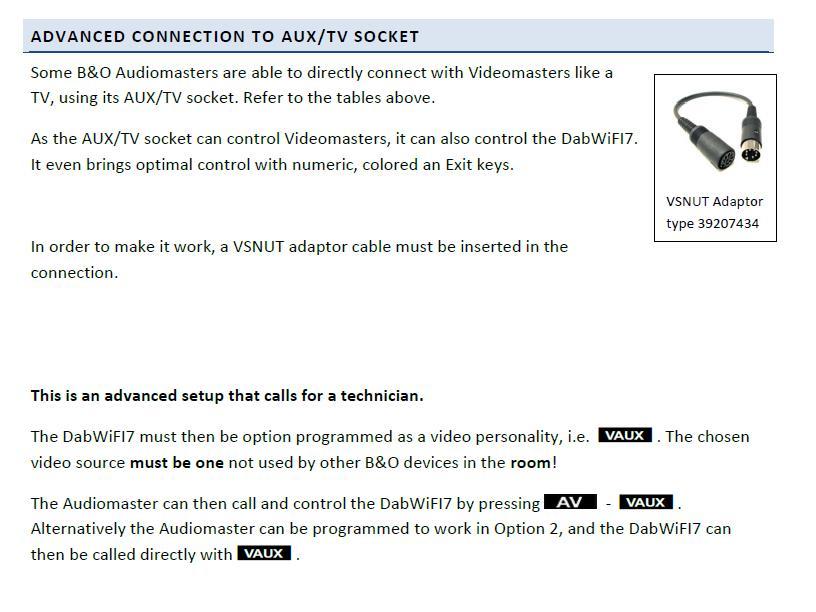
As madskp states above, newer OneRemote radios typically use direct B&O IR control (rather than through datalink). This is because ‘simple datalink’ does not have sufficient commands to control the more complex newer OneRemote receivers. However, if you look at the user instructions for their DABWifi7 it does explain that you can use the AUX/TV socket in older audiomasters (such as BC8500) to control the OneRemote. Here’s the relevant section of their DAB Wifi7 manual:

I emailed them because my 12-year old OneRemote has stopped receiving BBC internet radio – this is because it is not compatible with HLS/DASH streaming technologies that BBC Sounds have recently adopted. They suggested the DAB Wifi7 because it is DASH compatible, but I am not replacing it yet because mine can receive BBC on DAB as an alternative.
If you have any questions about OneRemote devices they are very responsive to emails.
Location: Warwickshire, UK
My B&O Icons:
I think it may well be work in progress, but go to the Beoworld page here: https://beoworld.org/
… then chose the ‘products’ tab, find/search the product and then scroll to the bottom to see what is downloadable.
Was there a particular manual that I may be able to find in my own off-line storage? I seem to have downloaded quite a few!
Location: Warwickshire, UK
My B&O Icons:
Phil’s remarkable software displayed beautiful scrolling metadata N.MUSIC:song name/artist/album and N.RADIO radio station/song name on BS3000, but not on BL3500. I think Phil said at the time that the BL3500 just didn’t have the functionality.
When I saw this it made me wonder if my BL3500 shows FM radio RDS data (station name etc). I just checked with my BC2300 (RDS module fitted), BL1611 and BL3500, and it doesn’t! 🙁
Location: Warwickshire, UK
My B&O Icons:
Ah, I have found a MCL2P manual online and it seems I was wrong. I t seems it should be like this:
- Beocenter 8500 connects to MCL2AV via MCL cable
- MCL2AV connects to MCL2P via Powerlink, and also the 15v connector you mention
- My CX50 speakers are therefore connected to the MCL2P, rather than the MCL2AV
- If I later decide to expand my setup with some more active speakers, I would no longer need to the MCL2P, but would need a power supply for the MCL2AV
Yes that’s all correct!
And you will need to find/make the correct 15V power lead to go from MCL2P to MCL2AV. Each end should be fitted with a DC power connector, male plug, 5.5mm x 2.1mm.
EDIT: @madskp beat me to it, but I was checking the DC connector size … 😀
EDIT2: This connector should do the trick: https://www.amazon.co.uk/kenable-2-1mm-5-5mm-Connector-Power/dp/B079J67YM4
Location: Warwickshire, UK
My B&O Icons:
If there are no speakers connected to the Powerlink outputs the BS9000 goes to A.OPT 0 by default.
You can use this adaptor to change the A.OPT: https://soundsheavenly.com/bang-olufsen/141-2631-beosound-9000-and-beosystem-9000c-speaker-sense-adapter-gives-remote-control-functions-when-no-speakers-are-connected.html#/19-colour-white
Location: Warwickshire, UK
My B&O Icons:
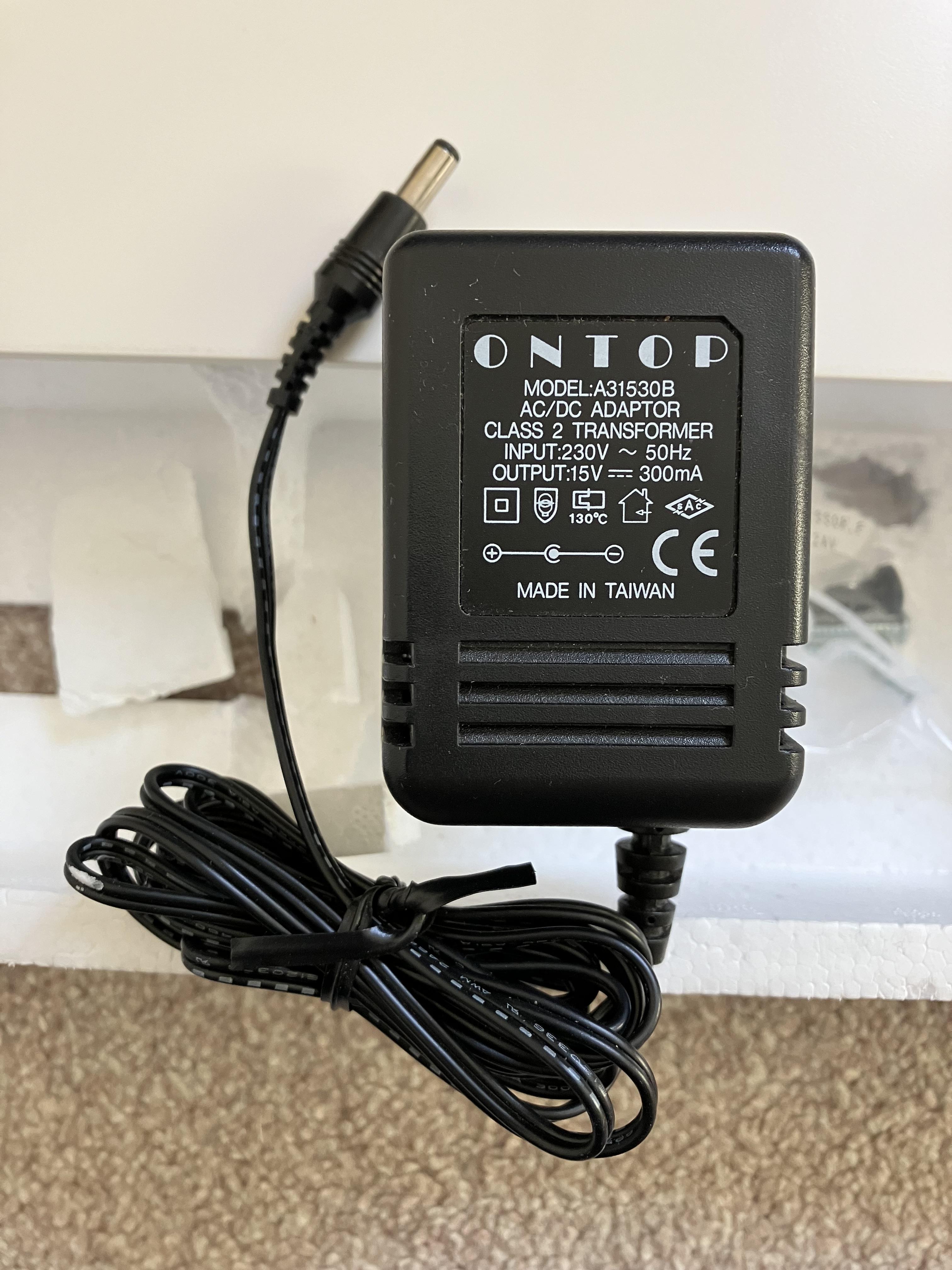
The one in my photo is the original adaptor that came new in box with an MCL2AV. I think that the ‘Max 250mA’ on the MCL2AV itself refers to the maximum current drawn.
Location: Warwickshire, UK
My B&O Icons:
If you look at the adaptor, you can see the model number A31530B

A search for that part number soon comes up with this similar looking, correctly rated adaptor: https://www.ebay.co.uk/itm/274422759276
EDIT: When I had that adaptor in my eBay ‘Watched Items’ the seller sent me an offer with a couple of pounds off a few days later.
But if you look closely at the diagram at the bottom the polarities are reversed; for the MCL2AV the positive needs to be the outer part of the connector. Simply reverse the polarity of the cable and you should be fine.
Alternatively, send an email to https://www.quality-dream-audio.co.uk/ and see if they have one in stock that is not listed on their website. They often have MCL2 equipment.
Location: Warwickshire, UK
My B&O Icons:
Here’s the link: https://dk.bosscom.com/products/details?id=1143
Location: Warwickshire, UK
My B&O Icons:
-
AuthorPosts