Forum Replies Created
-
AuthorPosts
-
 Moderator
As far as the mute relay goes… Do you have any idea why B&O would only mute Speaker1 and not Speaker2 in the BM5500?
Glitch
Because the Spkr 2 socket is designed to supply Link Rooms via the MCL2 system, hence when pressing Mute you only want to silence the main room.
Location: Warwickshire, UK
My B&O Icons:

Great news that you got it working – thanks for letting us know.
The behaviour when you press TV sounds normal. Effectively, the BC9300 is not turned off because it is part of the integrated AV system which is still in use, albeit for TV. A long press on the remote’s OFF button is usually used to turn off the complete system.
Location: Warwickshire, UK
My B&O Icons:
Further to the advice from madskp, have you perhaps set up a ‘default audio’ speaker combination in the BS3’s Sound Adjustment menu? Perhaps it is trying to play the audio through speakers that are not connected!
Other than that, I’d be checking the audio aux lead to make sure it is fully wired.
One other note that I just spotted in the BS3 manual: If you want to integrate your audio/video system using Master Link, you must set POWER SAVING to OFF
Location: Warwickshire, UK
My B&O Icons:
Even one simple thing – if I were to get an RJ11 splitter, do you think the same power adapter would be able to power both? Has anyone tried that?
As I recall the Beocom PSU is 7.5V and the Beotalk 9V – I wouldn’t risk it!
Location: Warwickshire, UK
My B&O Icons:
I take it you asked the question here because of the B&O audio in the laptop!
When just a few hotkeys don’t work it’s almost always due to the incorrect drivers being installed for the keyboard type fitted. This can often be the case if the system has been restored and/or Win10 re-installed.
I did a quick search and found this – scroll down to the Windows 10 paragraph: https://www.asus.com/uk/support/faq/1015071/
Location: Warwickshire, UK
My B&O Icons:
Battery life may also depend on how the unit has been used. My mother-in-law and I both have BC9500s of similar age. She used to turn hers off at the wall power switch every night, and her battery failed about 10 years ago. Mine is still going strong (or at least it was when I put it in a box about 2 years ago!). So I guess the battery has to work a bit harder if it is compensating for lack of mains power more frequently, or for longer periods overall.
But I agree with madskp – something else is likely to fail before the battery so just replace while it is dismantled. Plus the BC2300 and similar models are far easier to replace then BC9500.
I plan to replace batteries in my BC9500 and second BC2300 in the coming weeks when I give them a quick clean and service. I was also going to do the same for my two BeoSound 1s, but they are working well in daily use so I am hesitant to start poking around inside – not even sure where the battery is!
Location: Warwickshire, UK
My B&O Icons:
<p>Hi,</p>
<p>thank you for the warm welcome.</p>
<p>Great! I could figure out the rubber piece. That helped. Thanks for that.</p>
<p>Ok. regarding the top right connector, i cannot see how the cable has been originally installed. I would have assumed it is soldered in, but it was not, there is just rubber-like material on top of it. So i am not sure if I can reattach that. if it is just for the headphone socket and Remote control, that would be ok, as this was never used.</p>
<p>But how does the device connect the ground base station on the floor (the box with the telephone cable). I guess that is one of the chips?</p>
<p> </p><br>
If you don’t/won’t use the IR or earphone connector then I think that the phone should work OK without these connected. However, doesn’t the rubber like material simply cover soldered connections underneath? That plug shown in your photo would then connect to the PCB.
Once working, the BeoCom 6000 simply connects to the base using DECT – the same comms protocol used by many (non-B&O) cordless phones. You will have to ‘open the base up for registration’ and the method depends upon the type of base: The pyramid PSTN/chargers have a little button between the charging contacts, whereas the later PSTN simply goes to registration mode when you first power it up. You then use the Beocom ‘Settings’ then ‘Handset’ menus to search for and connect to the base. If you struggle just post a picture of the PSTN base and I will try to help further.
Location: Warwickshire, UK
My B&O Icons:
Hi and welcome to Beoworld!
The little rubber piece goes into the same sized slot in the removable clear plastic piece (just above it in the first picture). When assembled correctly, it connects the display contacts to the main PCB. Experiment a little and I am sure that you will work it out!
The connector top right is for the headphone socket and IR transmitter (for remote control of B&O audio/video devices). It’s a while since I disassembled a Mk2, but I think that should also connect to the top of the main PCB.
Location: Warwickshire, UK
My B&O Icons:
Above two posts showed as ‘awaiting moderation’ – I approved them with my Moderator powers!
EDIT: I approved one of madskp’s post earlier; that also had a link.
Location: Warwickshire, UK
My B&O Icons:
Good morning and thanks for all the work in the background to get to this stage.
One thing to add to your list – the links to the Archived Forms do not work – I think this is because they refer to archivedforum.beoworld.co.uk rather than the correct archivedforum.beoworld.org
EDIT: Plus some missing posts. This thread for example states 10 posts made (and I remember them!) but only the first is showing: https://forum.beoworld.org/forums/topic/the-poor-mans-ml-link-room/
Location: Warwickshire, UK
My B&O Icons:
Oh, we’re back! Hello all! ?
Location: Warwickshire, UK
My B&O Icons:
I have tried Link option 1-6 and do not see any change in behaviour no matter which one I choose, so I am not sure if the options settings does anything for this particular setup.
For the BL1615 it may also be worth trying V.OPT settings, as that is what you would do if there was a connected TV.
Location: Warwickshire, UK
My B&O Icons:
For some reason the linkroom setup responds to both normal audio commands and LINK audio commands today. Very weird. I can’t tell why it differs today, but might have to do some more long term testing.
Does the IR eye/BL1615 combination accept Option programming? This could explain the change of response. Also, I am not sure whether the Option setting is stored in the IR eye or the BL1615 – you’d have to swap between components to test.
Location: Warwickshire, UK
My B&O Icons:
Great result – thanks for posting.
Perhaps if the audio was fed into a Playmaker, auto-sense on its line-in could switch on connected PL speakers and you would have Beo4 volume control also? You’d probably need the PM in A.OPT 4 so that it will respond to the ‘link mode’ volume commands that are used to activate the BL1615, and you’d have to avoid the A.MEM command as this would put the PM into Airplay mode.
If the PM works then maybe Essence would be similar.
Location: Warwickshire, UK
My B&O Icons:
Yes it’s strange that it refers you back to a section that is made out of date by the CDM modification. Looking at the circuit diagram for the new CD interface board (PCB89) I can’t see anything that is adjustable anyway. Nor is there anything adjustable on the CD Servo and Decoder board – PCB88.
I think your Ouverture and my BC2300 share the same board, like the one for sale here: https://www.ebay.co.uk/itm/375101801373
Location: Warwickshire, UK
My B&O Icons:
I have just replaced the battery in the electronically similar BC2300 – see thread here:
https://forum.beoworld.org/forums/topic/beosound-ouverture-cd-not-working/page/2/#post-29315
But after seeing your picture I may speed up battery replacement in my other similar aged B&O devices.
Location: Warwickshire, UK
My B&O Icons:
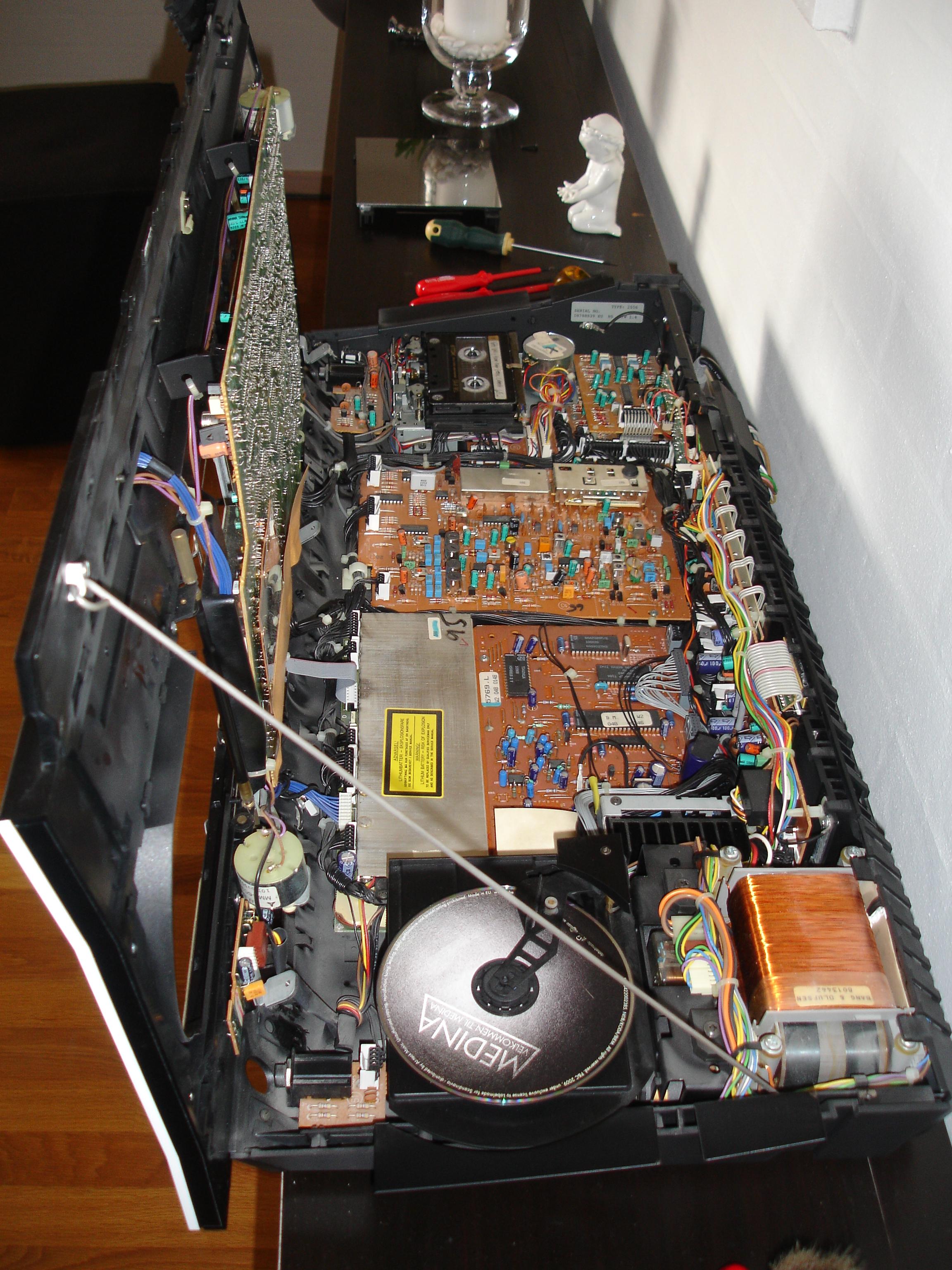
Further to all the excellent advice above, you will see from the picture of my similar BC9500 below that all the cables and connections should be routed through the front edge of the BeoCenter, thus allowing it to pivot forward and upwards freely:
(Note that it was opened up with the CD/Tape doors closed – the doors were then opened whilst in the service postion)

Location: Warwickshire, UK
My B&O Icons:
I assume from the earlier thread that you have access to the ‘special’ Beo4 remote hence are able to get the REG2 command to show.
I too am not sure what is meant by ‘disconnect the DVB-T module’, but if you look at this FAQ it describes the DVB-T in some detail which may enable you to work out how to disconnect.
https://beoworld.org/faq_view.asp?id=93
Location: Warwickshire, UK
My B&O Icons:
To add SHIFT to the Beo4:
– Press Power (Red Button) and LIST together, the display should read ADD?
– Press GO.
– Press LIST until the display shows SHIFT then GO.
– SHIFT should then be listed under LIST
Location: Warwickshire, UK
My B&O Icons:
2 April 2024 at 14:48 in reply to: DVB-T2 HEVC external receiver compatible with BV7-55 and Beo4 #54042In Scandinavia we do not use the HEVC codec/compression. A Danish T2 receiver does not work in e.g. Italy or Germany unless you can read in the specs that HEVC is supported….
I see. I just had a look at the spec for my HD-FOX-T2 and I don’t think HEVC is supported. Looking at Humax’s Italian website this model would work: https://it.humaxdigital.com/product/digimax-t2/
It has IR remote which is supposed to be a learning remote, but I doubt it would learn the B&O IR frequencies. You could get lucky and find that it is controlled by one of the older Humax IR PUC/STBs.
Location: Warwickshire, UK
My B&O Icons:
-
AuthorPosts