Forum Replies Created
-
AuthorPosts
-
 Moderator
I have no experience with the NL/ML converter, but according to the lexicon the JOIN function can be added to the LIST Button of a Beo4 Navi (the one with the little joystick)

EDIT: And according to this the Beoremote One (IR version) can send the command also: https://support.bang-olufsen.com/hc/en-us/articles/360041742571-How-do-I-activate-sources-using-BeoRemote-One-or-Beo4-
Location: Warwickshire, UK
My B&O Icons:

My IP is in the U.S. Now, in the discussion above the UK tax (“licence”) is mentioned. I do not pay this tax and never signed up for TuneIn back when that was an option.
There is no requirement to pay for a licence for BBC Radio, even outside UK. Outside UK, certain broadcasts (eg live sport) may be restricted due to ‘rights restrictions’, but you can get around this using a VPN service. This is a separate issue to the BBC stream format that is causing problems on some older B&O (and other makes) equipment.
Someone mentioned there is another thread: where is it?
Is this the other thread that you mean? https://forum.beoworld.org/forums/topic/beoport-n-radio-stopped-working/
Location: Warwickshire, UK
My B&O Icons:
This is very interesting.
How did you connect the Beocom with the DECT ?
You may not get a response from jesuisrelou because the discussion about DECT is over a year old.
But from memory, when I connected my BC6000 to a DECT router/modem I simply used the handset’s ‘Register’ menu to search for the DECT base, and it found and connected with ease. Depending on the modem/router, you may need to log in to its setup menu to enable the DECT functionality and make it ‘discoverable’.
Location: Warwickshire, UK
My B&O Icons:
Then I got a V8000 beocord to repair, black screen.
I can’t find the service manual by any chance does anyone have one?It’s available on Beoworld (Main Web Site) for Silver and Gold Members!
Location: Warwickshire, UK
My B&O Icons:
Thanks a lot for your support! Just called to B&O support – it is MK1. So for any one who might be interested – 0952 is also MK1 =)
That was quick – thanks for letting us know! ?
Location: Warwickshire, UK
My B&O Icons:
Good question – I suspect that the above table was not kept up to date in the later years of Beocom 2 production. You can probably get in touch with B&O support with the full number and ask them.
See here for Mk1/Mk2 differences: https://beoworld.org/faq_view.asp?id=94
EDIT: B&O support here: https://support.bang-olufsen.com/hc/en-us/articles/360038206572
Location: Warwickshire, UK
My B&O Icons:
As far as I know it’s the second to fifth digit. Hence in your example type number is 0952.
Location: Warwickshire, UK
My B&O Icons:
There is a Test Mode, but you have to remove the case and short-circuit the CD clamper switch for 2-3 seconds. Pressing 7 then deletes all preset programmes, but I think this just means radio presets rather than timer/clock function.
I would have thought that a dead lithium processor backup battery would cause the unit to reset the clock. As you suggest, try leaving the BS2500 powered down for a time (several hours, in case the battery has some life in it) and then reconnect to mains power, noting the time of start and then waiting to see what is displayed on the BL3500.
Location: Warwickshire, UK
My B&O Icons:
Great result – thanks for letting us know that it worked, and enjoy your TV! ?
Location: Warwickshire, UK
My B&O Icons:
Which terminals are you using on the TV? If it’s the ones behind the little flap top left then you can activate by pressing CAMERA on the Beo4 remote.
You can add CAMERA to the Beo4’s LIST button by following this procedure:
– Press Power (Red Dot) and LIST together, the display should read ADD?
– Press GO.
– Press LIST until the display shows CAMERA, then GO.
You should now be able to find CAMERA by pressing LIST repeatedly until it shows in the display. Then simply press GO to select the input.
Location: Warwickshire, UK
My B&O Icons:
Hi Adam,
Firstly I just amended you post to show the photo in the text rather than as an attached heic file (which some browsers struggle to display!)
Secondly I am 99% sure that you will need a clock-enabled ML (or MCL) audiomaster in order to show the time on BL3500 – a videomaster may also work but I am not sure.
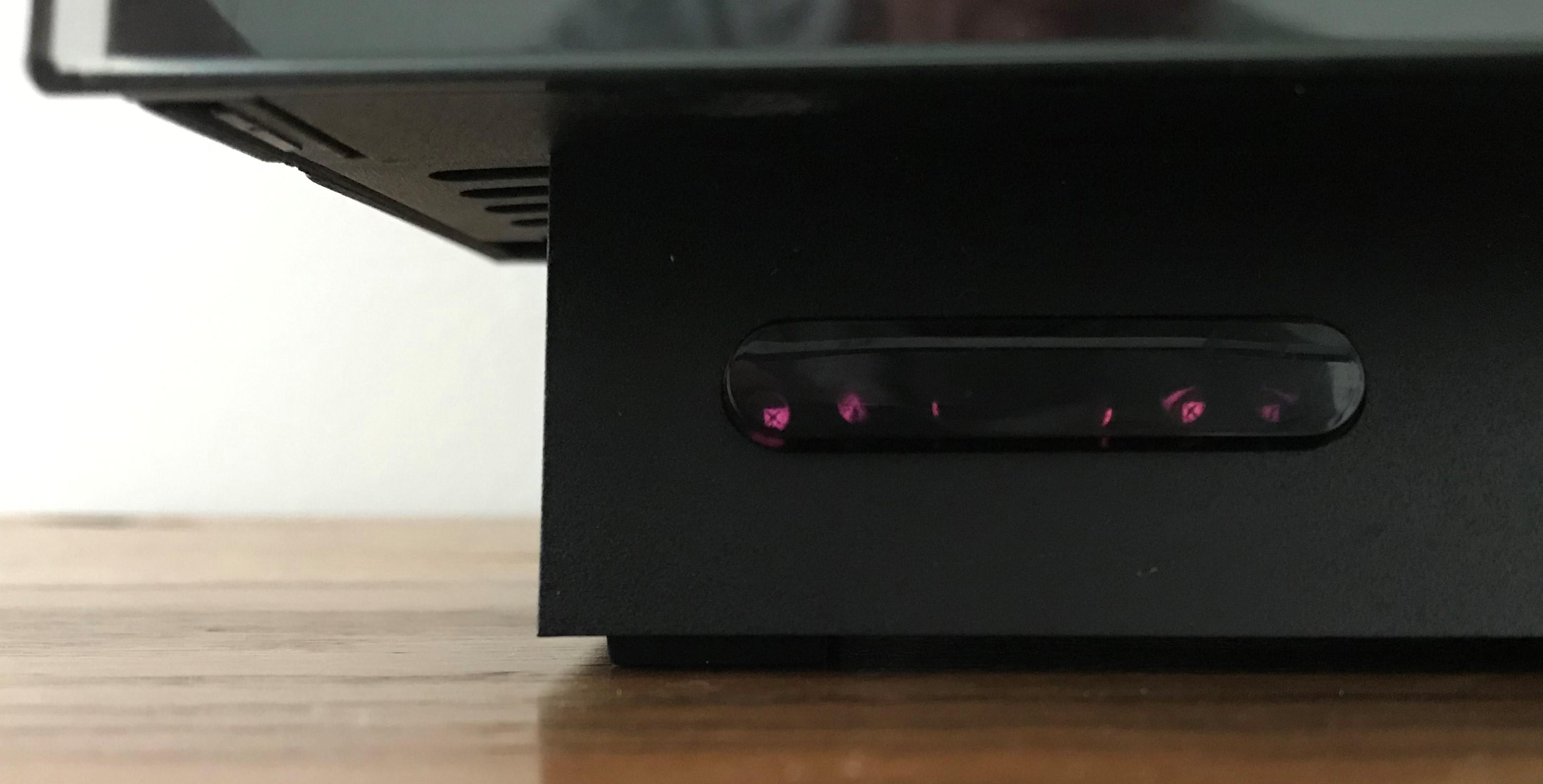
EDIT: I think early BS2500 (with the two-way IR) had the clock function, but to set and operate it you needed to use a two-way remote such as the BL7000 or BL5000. The two-way BS2500 could be recognised by its IR window being bottom left of the unit below the moving glass doors, as shown below:

Location: Warwickshire, UK
My B&O Icons:
Hi and welcome to Beoworld!
The BS9000 may be in A.OPT 0, where it will not respond to IR commands.
To resolve this:
Turn to standby/off.
On the Beo4, press the POWER button and LIST together. Then press LIST until OPTION is shown, press GO (centre button), and then press LIST to show A.OPT. Then press 1. The power light on the BS9000 may blink to show that it has been accepted.
Remote control should then work.
EDIT: By the way, A.OPT 0 is automatically selected if no speakers are connected to the BS9000
Location: Warwickshire, UK
My B&O Icons:
It doesn’t carry any data or trigger signals
Morning Steve! There have been a couple of posts in the past that suggest limited data through the mini-AV socket. The post here mentions BC2 in particular: https://archivedforum2.beoworld.org/forums/p/8855/78153.aspx#78153
EDIT: Also mosquito’s posts here: https://forum.beoworld.org/forums/topic/beosystem-2300-mit-beovison-11-verbinden/#post-15918
Location: Warwickshire, UK
My B&O Icons:
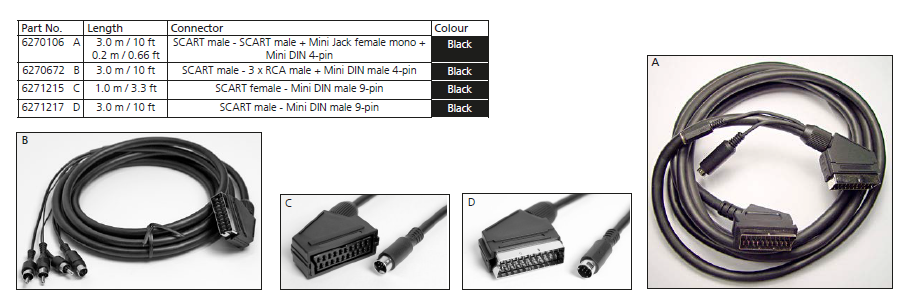
I think the BV11 also has a mini-AV socket, hence you could use one of the following cables (probably ‘D’): (taken from Beolink Handbook v1-9 page 128 – click to expand)

Location: Warwickshire, UK
My B&O Icons:
I lost BBC stations from two of my Internet Radios, however, I can still hear Radio 4 on LW through a Dansette radio from the 1960’s and even older valve radios.
Excellent! But sadly the last sentence of this article suggests that you have only another year to enjoy Radio 4 on LW! https://radiotoday.co.uk/2023/05/more-details-announced-regarding-bbc-radio-4-long-wave-switch-off/
Location: Warwickshire, UK
My B&O Icons:
My conclusion is that the cable has the speaker points backwards, that is, point three at point 1 and point 5 at point 4.
That sounds to me as if your cable is an output (from the DIN socket) rather than an input. (Pins 1 and 4 are the line output from the BS3200 Aux socket.) Hopefully a new cable and/or help from mexking will resolve the problem.
Location: Warwickshire, UK
My B&O Icons:
That looks to me as if you are using an external set top box. If so, the subtitle settings may well be in the menu of that STB.
Location: Warwickshire, UK
My B&O Icons:
And their latest reply. Looks like we just have to wait.
Thanks for chasing this and keeping us up to date. Are they looking at BBC streams on both N.RADIO and NetRadio? (You said the latter was working in UK)
Location: Warwickshire, UK
My B&O Icons:
22 June 2023 at 07:36 in reply to: BeoCenter 2300: where is the motion sensor for the doors located? #47237Thanks Guy!
No problem – very happy to help and it was useful research for me (and hopefully other Beoworlders!). Next time my BC2300 comes out of storage I will have a much greater understanding of the door control system ?
Location: Warwickshire, UK
My B&O Icons:
How do I do that?
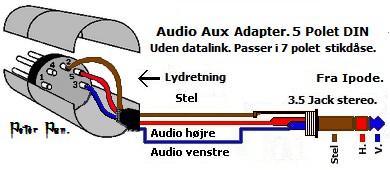
Use a multimeter or continuity tester to check for continuity between the tip and ring of the 3.5mm plug and pins 3 and 5 of the DIN plug.
This may help:

Location: Warwickshire, UK
My B&O Icons:
-
AuthorPosts