Forum Replies Created
-
AuthorPosts
-
 Moderator
Hi and welcome to Beoworld!
A strange fault! Can you do all the operations OK from the BeoCenter’s touch panel?
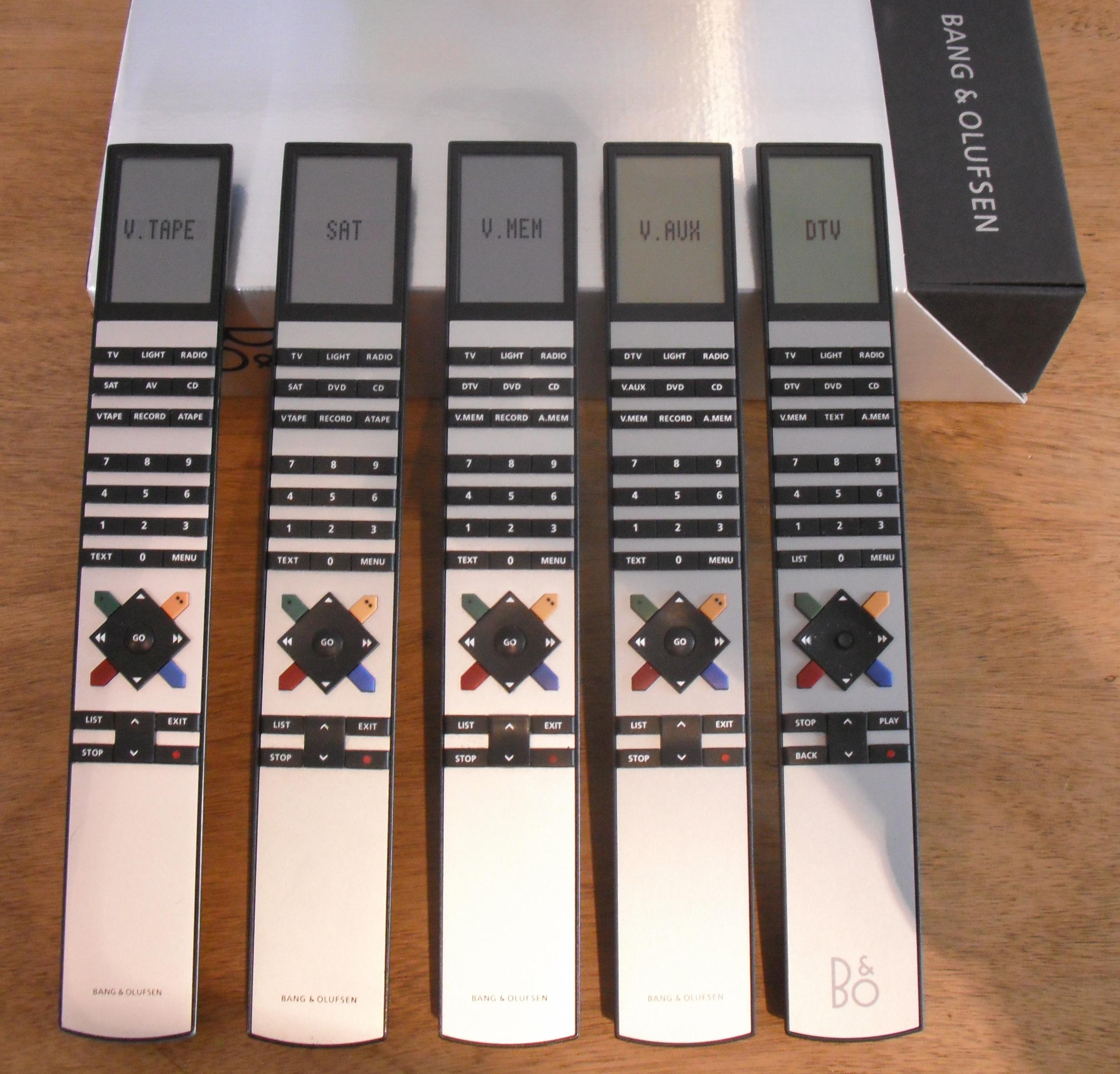
Also is the remote a standard Beo4? (not the ‘Hotel’ version which has reduced functionality). It should work fine with any of the following – which is yours? (click to enlarge and check the button labels)

Location: Warwickshire, UK
My B&O Icons:

Hi, I can find a 7 PIN AUX SPLITTER – DUAL AUX / TAPE INPUT SOCKETS from Sounds Heavenly. Is it the right adaptor in my case? Howver, unfortunately, he will not send to my place right now. Thanks.
I think that you will experience problems with this adaptor if you leave both turntables connected at the same time – the input impedance will be wrong and the sound level reduced.
You will need to use a switched solution.
Location: Warwickshire, UK
My B&O Icons:
A more expensive remote controllable solution here: https://uk.bosscom.com/products/details?id=1143
Location: Warwickshire, UK
My B&O Icons:
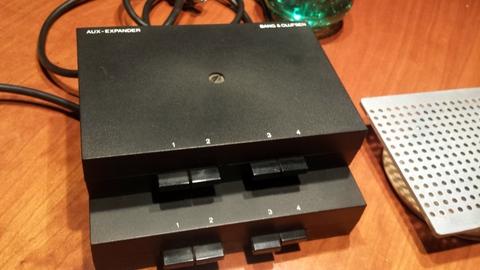
B&O used to make an aux expander with full 7-pin DIN inputs/outputs as shown below:

I don’t know of any other 5/7 pin switching units.
The alternative is to use DIN to phono adaptors, and then get a switching box like this: https://www.amazon.co.uk/Way-Cd-Aux-Stereo-Switch-Black/dp/B000KVODHA/?th=1
I think Sounds Heavenly used to supply such a box but I can’t find it on Steve’s site – he can probably help with leads.
Location: Warwickshire, UK
My B&O Icons:
Two further thoughts:
BC9300 has a ‘lock’ that prevents you from changing channel/track etc when recording to cassette. Could you have inadvertently started recording?
Do you have a plasma TV switched on in the room – problems have been caused in the past! See here: https://archivedforum.beoworld.org/forums/t/22716.aspx
(In that linked thread you could also try Peter’s option setting solution in the third post, but I don’t think that this is the problem)
Location: Warwickshire, UK
My B&O Icons:
can i reduce volume in passive, since don’t need to be so loud in bathroom
A Passive (or MCL converter) can be used with either the ML or the Powerlink input.
If a Passive is used with its Powerlink input then the volume control must be done at the source.
If a Passive is used with an ML input (i.e as part of an ML system) then you should also add an IR eye and will then be able to control its volume independently.
Furthermore, if you use an MCL2P remember that this does not have an ML input.
Location: Warwickshire, UK
My B&O Icons:
Hi and welcome to Beoworld!
That does indeed sound like the battery. Here’s the battery that I bought for my BC9500:
It does required careful soldering. Following picture (arrow) shows location in BC9500 – I think it’s the same in BC9000;

Location: Warwickshire, UK
My B&O Icons:
a quick search on beoworld or trading sites reveals sooo many panel issues related to BV10. I would not consider BV10 as its remaining ‘life’ is a kind of ‘ticking bomb’…
Slightly flippant comment, but my BV10 cost me £250. At that price I can afford to take a bit of risk … ?
Location: Warwickshire, UK
My B&O Icons:
You should simply be able to unplug the ML cable from the BV7-55 and this should not prevent the BS9000 being listened to in other rooms.
However, assuming that you are currently listening to the BS9000 through the TV and its speakers, then you will need a solution for that room. If the BS9000 is in the same room, the simplest solution is simply to add BeoLab active speakers to the BS9000.
Location: Warwickshire, UK
My B&O Icons:
4 November 2023 at 18:35 in reply to: Help!! Just bought house with 11 MCL speakers/transceivers #50201For that matter, a photo of the current state of your audio closet would not be amiss — might trigger great ideas from people less didactic and penurious than me!
Having recently sold and moved from an MCL-equipped house (not yours, obv ?) I too would welcome a photo of the ‘audio closet’. I don’t think think that even I would persevere with MCL today, but there may indeed be novel ways to use the hardware that is already there, especially if you are happy with the sound quality of the in-wall speakers (perhaps just in some of the rooms).
Location: Warwickshire, UK
My B&O Icons:
Hi Johan and welcome to Beoworld!
The service manual (including schematic) is available on site to Gold and Silver Members, so you’ll be able to download it if you upgrade your membership.
Good luck with the repair – I am sure that others will be able to offer advice also.
Location: Warwickshire, UK
My B&O Icons:
Isn’t there a possibility to directly replace the entire cable by dismantling the turntable?
I am not quite sure why you wish to replace the whole cable, rather than simply adding the correct connection. Perhaps the cable has been replaced in the past, and doesn’t have the correct core to carry the additional datalink signals.
Anyway, yes you could open up the turntable and replace the cable. The service manual would help with the dismantling and connections and is available on this site for Silver and Gold members.
Here’s a sneak preview of the correct wiring of the cable (note that this is a mirror image of my earlier diagram – as if looking into the plug and viewing the pins). Pin 6 is datalink.

EDIT: The photo in this post may be useful – you can see the cable entering top right and routed to the front and then left: https://forum.beoworld.org/forums/topic/beogram-5500-scraping-sound-any-ideas/#post-7118
Location: Warwickshire, UK
My B&O Icons:
3 November 2023 at 09:45 in reply to: Beomaster 5000 cuts out after 20seconds – what are the trimmers? #50080I’ll try some local hifi guys.
Roughly where do you live? – a forum member may be able to suggest a specialist.
Location: Warwickshire, UK
My B&O Icons:
Hi Guy and thanks so much for your reply. In fact the beogram has a 6 pin cable. How can I replace it with a 7 pin one? Thank you!
It’s strange to have just 6 pins. Normally pins 6 and 7 have been removed so that it can be connected to a non-B&O amplifier with a 5 pin DIN input.
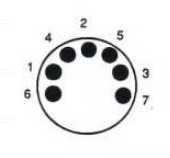
Pins 6 and 7 actually unscrew with a fine screwdriver, and your BG5500 just needs pin 6 for control data. The following diagram shows the pin diagram viewing the solder side of the plug (or looking into a socket). If possible, you may have to move pin 7 to 6.

You can buy replacement pins here: https://www.beoparts-shop.com/product/datalink-pin-for-remote-control-communications-din-cable/
If the above does not make sense, perhaps post a photo of the connector (showing the pins) so that we can advise further.
Also, what Beomaster are you using? BM5500?
Location: Warwickshire, UK
My B&O Icons:
Hi and welcome to Beoworld!
I assume that the Beogram is connected to a Beomaster, because this will relay the remote commands.
If so, check that the DIN plug connecting the Beogram to the Beomaster has 7 pins. If pin 6 or 7 are missing then there will be no communication between devices and no remote control of the Beogram.
Location: Warwickshire, UK
My B&O Icons:
Thanks for the update and I am glad that you found a solution.
I think many more landline users will have compatibility problems when the UK analogue telephone network is switched off in 2025. My provider is PlusNet and they have no current plans to offer a digital landline connection (despite the PlusNet Hub 2 router having a phone socket!), so I may well be looking for a third-party VOIP provider when the inevitable happens.
Location: Warwickshire, UK
My B&O Icons:
B3OHACK3R wrote:
Obviously you can do everything that is also possible in an option 2:0 setup with a (2-way) video master.That makes sense. A beomaster/beocenter in option 0 should be able to get all remote commands from a connected tv in option 2 via datalink
But does it get (or even need) volume control commands when the only audio output from the Beomaster/beocenter is usually at a fixed line level? In that option 2:0 setup does the Beomaster/beocenter volume display change when you adjust volume via the TV – I can’t remember from my previous setup!
Also, if using a Beolink Converter 1611 as part of an option 2:0 setup, you need to add a Powerlink cable (Beomaster/beocenter to 1611) to ensure that volume changes on the Beomaster/beocenter front panel are conveyed to adjust the volume output from the TV.
Location: Warwickshire, UK
My B&O Icons:
Sneak peek at my ongoing project !
Intriguing! Looking forward to hearing more as it develops.
(Is the MCP showing the elapsed time of the playing source? – they are only one second apart)
Location: Warwickshire, UK
My B&O Icons:
You would have two independent controls but could probably work if you also send a DL command to set a fixed volume.
Most Beocenters/Beomasters have the ability to store a preset start-up volume, which should alleviate this problem.
Location: Warwickshire, UK
My B&O Icons:
I see. Early versions of the BC9000 did not have the ability to set A.OPT 0, so that would not have been the problem. I think Option setting is a bit strange on the BC9000.
If the remote control is now working that’s good news.
Location: Warwickshire, UK
My B&O Icons:
-
AuthorPosts