Forum Replies Created
-
AuthorPosts
-
 Moderator
I meant to add that you could also look at one of the OneRemote products to get DAB+ on your BC2.
DAB+ radio options here: https://shop.oneremote.dk/shop/69094-digital-radio-solutions-for-bo/
I have an older OneRemote product that I used with my BC9500 for internet radio when I lived abroad – I checked the other day and it also has DAB and DAB+ for when I need it. OneRemote’s older products had the option to control via B&O datalink, hence they could be also used to listen and control from ML/MCL link rooms. However, I think that their newer products are only controlled directly using a B&O remote, and for some of them you need to purchase a separate 455kHz IR receiver for an additional €40.
Location: Warwickshire, UK
My B&O Icons:


There was a concerning article in The Telegraph which said that stations would be moving to DAB+ in the UK (classic FM will do in January) although the BBC said they will support DAB for the foreseeable.
I have just read that Telegraph article; it is a bit disconcerting that a UK transition from DAB to DAB+ could be happening by stealth, and all driven by the desire to cram more stations into the available spectrum rather than to improve sound quality.
Can’t you just switch back to using FM radio on your BC2s for Classic FM in the meantime? I can’t see that being switched off until BBC also get rid of FM, and that shouldn’t be until at least 2030.
Location: Warwickshire, UK
My B&O Icons:
https://forum.beoworld.org/forums/topic/beosound-core-mit-beosound-3000-verbinden/#post-26527
Location: Warwickshire, UK
My B&O Icons:
It would seem hard to see for sure whether a BC2 has the DAB+ upgrade – if you search second hand ones for sale there is sometimes an annotation of the label to say that the DAB+ module has been added.
This thread from the old forum may be useful, if only to rule out DAB+ fitment due to serial number incompatibility: https://archivedforum2.beoworld.org/forums/p/3100/28866.aspx#28866
I assume that you are in UK where there are not many DAB+ stations anyway.
Location: Warwickshire, UK
My B&O Icons:
Again, thank you kindly for all the advice given. I have now purchased:
- A beolink masterlink converter (https://www.beoworld.org/prod_details.asp?pid=983);
- A Beo4 remote control; and
- OpenII 7 Pin DIN Male to Dual RCA Male Cable Audio Adapter Lead to connect AUX Port to Bang Olufsen – without me knowing if this is definitely what I need.
I have connected everything up (powering the converter last), set the remote control to Option 6, and tried the A.Aux button. On the wall controls / IR eyes there are only ever red lights – this never goes out, which presumably means it is only ever in standby(?). I cannot hear anything through the passive speakers and nothing seems to happen when using the remote (there is a signal being sent from this). I know the music source system is playing through line out (generally) but when connected to the converter I cannot get any sound through the passive system. I have run out of ideas of how to resolve the problem myself – can anyone offer any further help, please? Many thanks in advance!
As madskp stated, I think that the cable you have bought is probably this one from UK Amazon: https://www.amazon.co.uk/OpenII-Adapter-Connects-player-Olufsen-1-meter/dp/B07V9LCVMM?th=1 The word ‘dual’ in the description refers to two phono connecters rather than an ‘input’ and ‘output’. It should work fine.
… hence if used as previously suggested into the AAL socket (not PL socket) of the BeoLink Converter , then it should be selected by pressing any video source (eg TV or DTV) on the Beo4 remote in one of the link rooms.
If still not working, go back to the cupboard where the heavy B&O black boxes reside – these are B&O Passives as stated earlier. Check that each Passive box has cables connected as follows:
- Masterlink cable – this connects throughout the ML ‘system’ and should send data to, and receive the audio signals from, your newly acquired Beolink converter’s Masterlink socket.
- L&R speaker connections to your existing in-wall passive speakers.
- IR connection to your in-wall IR sensors.
- Power connection to mains power.
Given that there are red lights on your sensors, I don’t think there is a problem with the IR or power connections. It could be worth checking that the Masterlink cables have continuity across the system – is it possible that there could be a further ML junction box elsewhere (attic or another cupboard?) that has been disconnected? If you have a spare short length of masterlink cable you could connect your Beolink converter directly to one of the Passives in the cupboard to see if that works to supply music to the corresponding single room.
One other thing – what is the Type number of the Beolink Converter that you have purchased? This should be on its label bottom left.
Location: Warwickshire, UK
My B&O Icons:
I was surprised at how difficult or odd he found it, but I’ve been used to Beolink 1000 and then Beo4 for what must be over 30 years so I find other brands difficult to use. For example, the writing on a lot of remotes is too small to read and there are too many buttons. With the exception of DVD1 I have never had any problems using Beo4 or understanding B&O’s language.
Same thoughts here regarding remotes/keypads. I think of the button logic as being similar to a reverse Polish calculator; once you are used to the sequencing it’s actually much easier to use and less prone to input errors.
EDIT: Just to add that I am basing this comment on Beo4 and BL1000 – I have no experience of BeoRemote One.
Location: Warwickshire, UK
My B&O Icons:
Good discovery!
I did vaguely remember a door compatibility problem being mentioned before, but with speakers. When the BC2500 was used with the BeoLab 3 speakers the doors misbehaved.
I did a search and found it mentioned here: https://archivedforum2.beoworld.org/forums/t/46913.aspx
And also here for BC2300 (the link within the above thread no longer works): https://archivedforum.beoworld.org/forums/t/32921.aspx
I would have a play around with the location of the input device and try some different cables (and different cable routing). Hopefully you will find a solution that works for your preferred setup!
Location: Warwickshire, UK
My B&O Icons:
The BC2300 does not have built-in RIAA so in order to use the BG3000 you would have to add a phono/RIAA pre-amp.
Here’s one that Steve sells but see the note at the bottom about lack of remote control: https://soundsheavenly.com/beogram-record-players/12-2196-pre-amp-bundle-for-bo-beogram-and-all-turntables.html#/36-output-5_pin_din_aux/41-power_supply-uk_eu_us_aus
Location: Warwickshire, UK
My B&O Icons:
Welcome to Beoworld!
Random thoughts:
- Plasma TV in room can cause problems with IR.
- Are you sure that a remote isn’t on permanent send?
- Try powering down/disconnecting the speakers to see if they are having any effect.
- The keypad at the front can fail but I am not sure that would affect the doors. Do all the buttons work fine?
- The lights either side of the CD and Cassette mechanism look very bright (but it may just be the camera) – have they been replaced with an aftermarket version or LEDs that may interfere with the door sensors?
Location: Warwickshire, UK
My B&O Icons:
16 November 2023 at 19:45 in reply to: How to reinitiate N.Radio updates in BeoMaster 5 / BeoSound 5 #50493Thanks for this Luc. Sorry that you had problems posting – I think the spam filter didn’t like the link but it all works now.
Location: Warwickshire, UK
My B&O Icons:
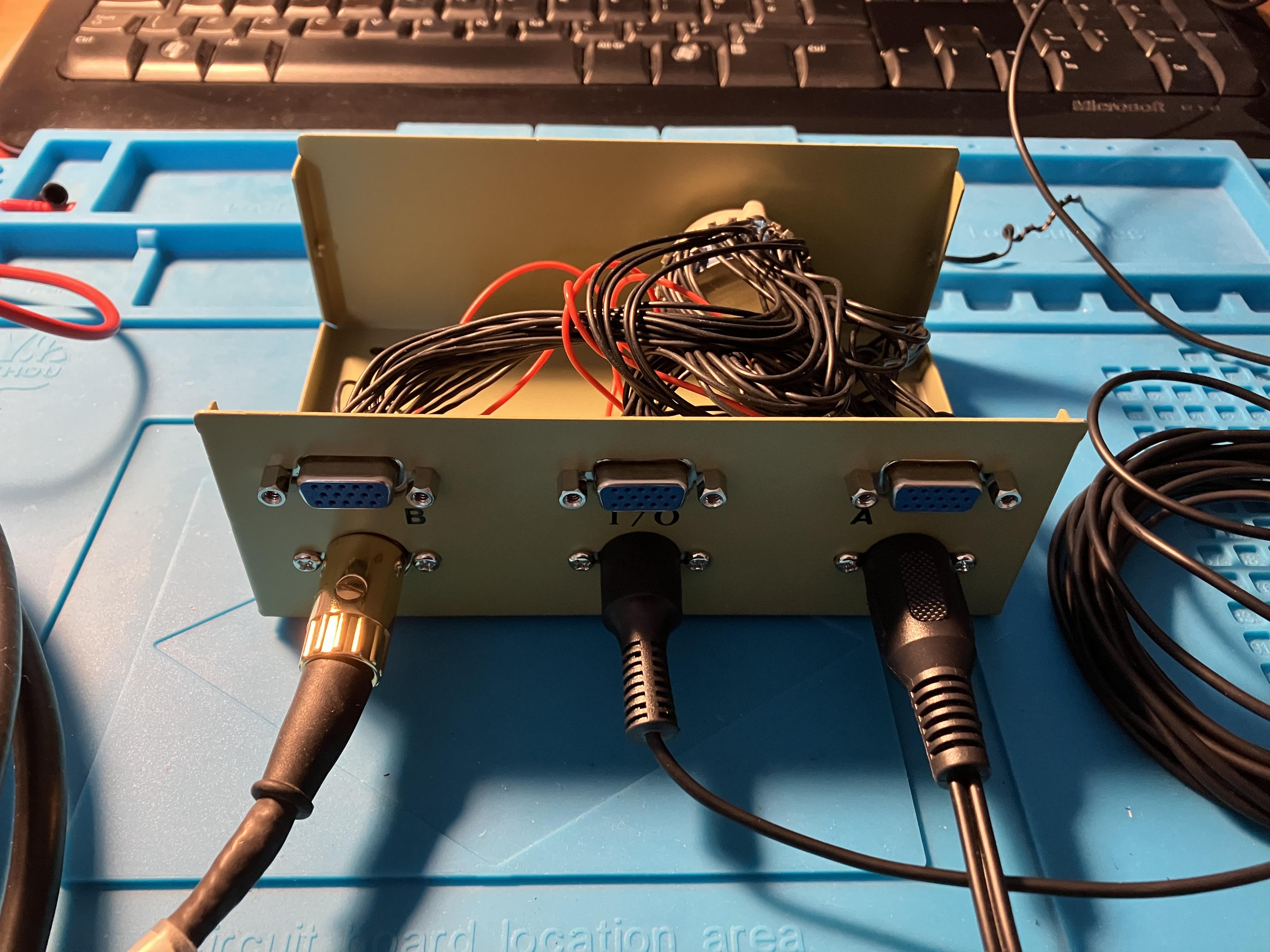
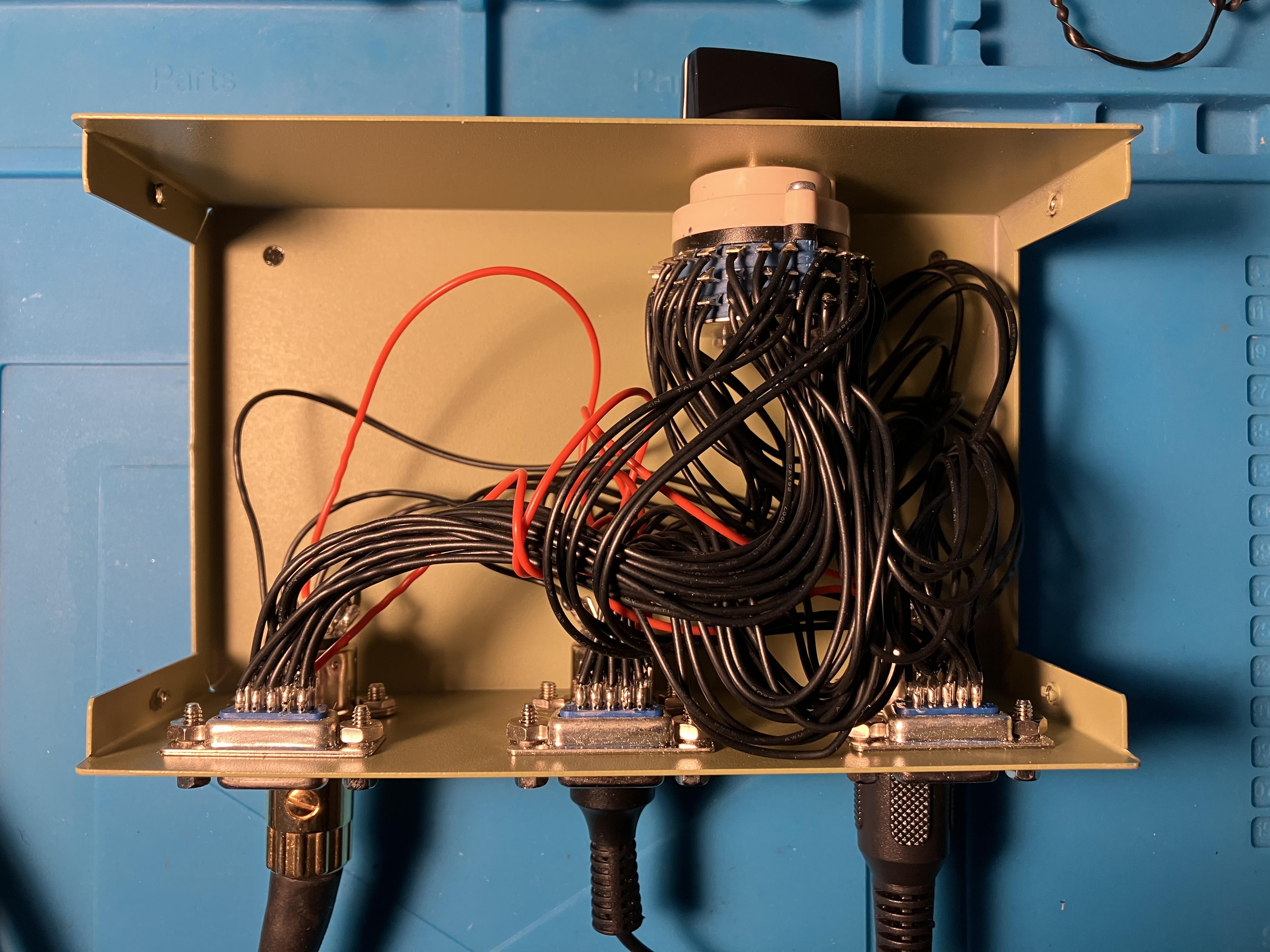
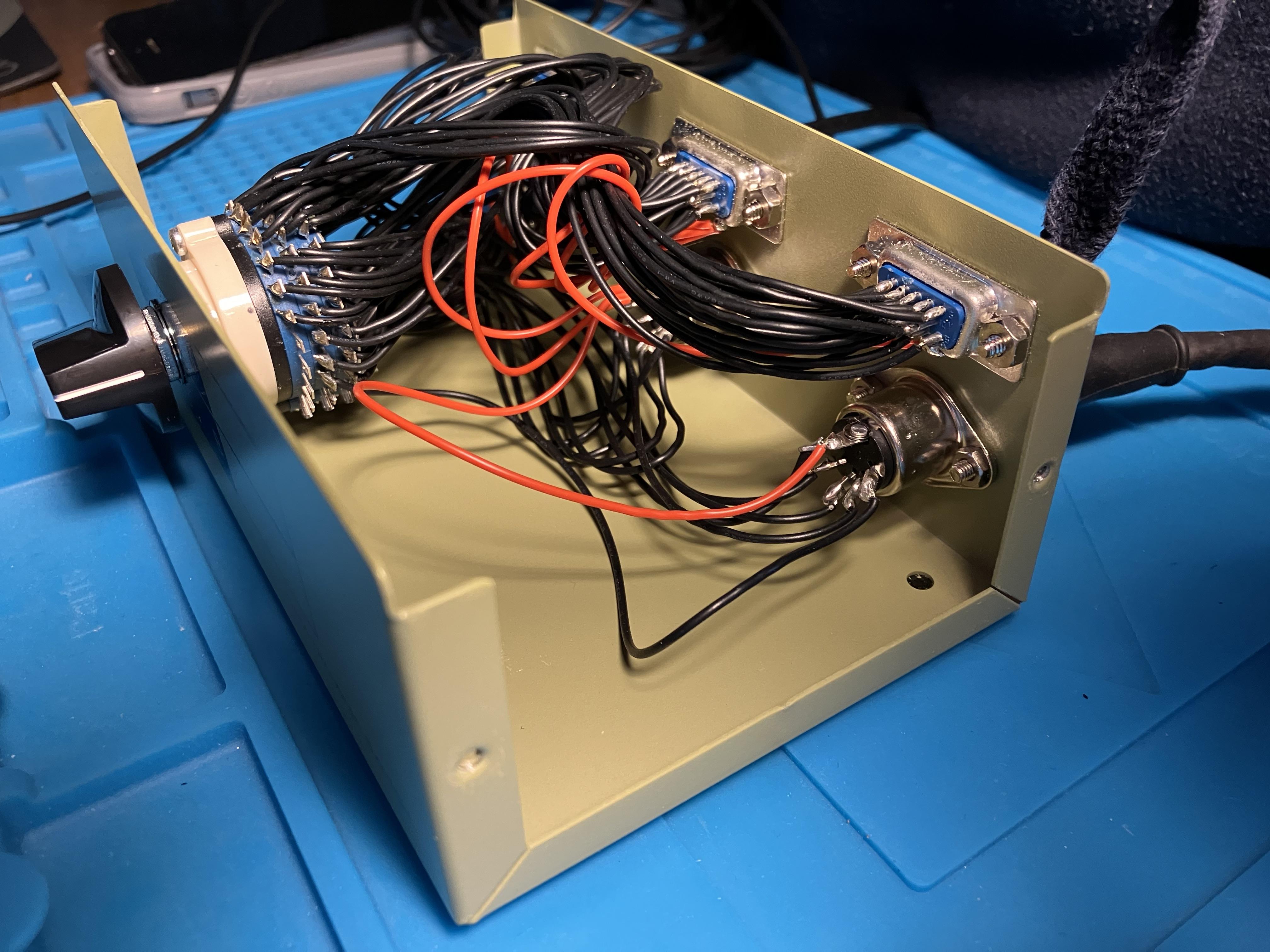
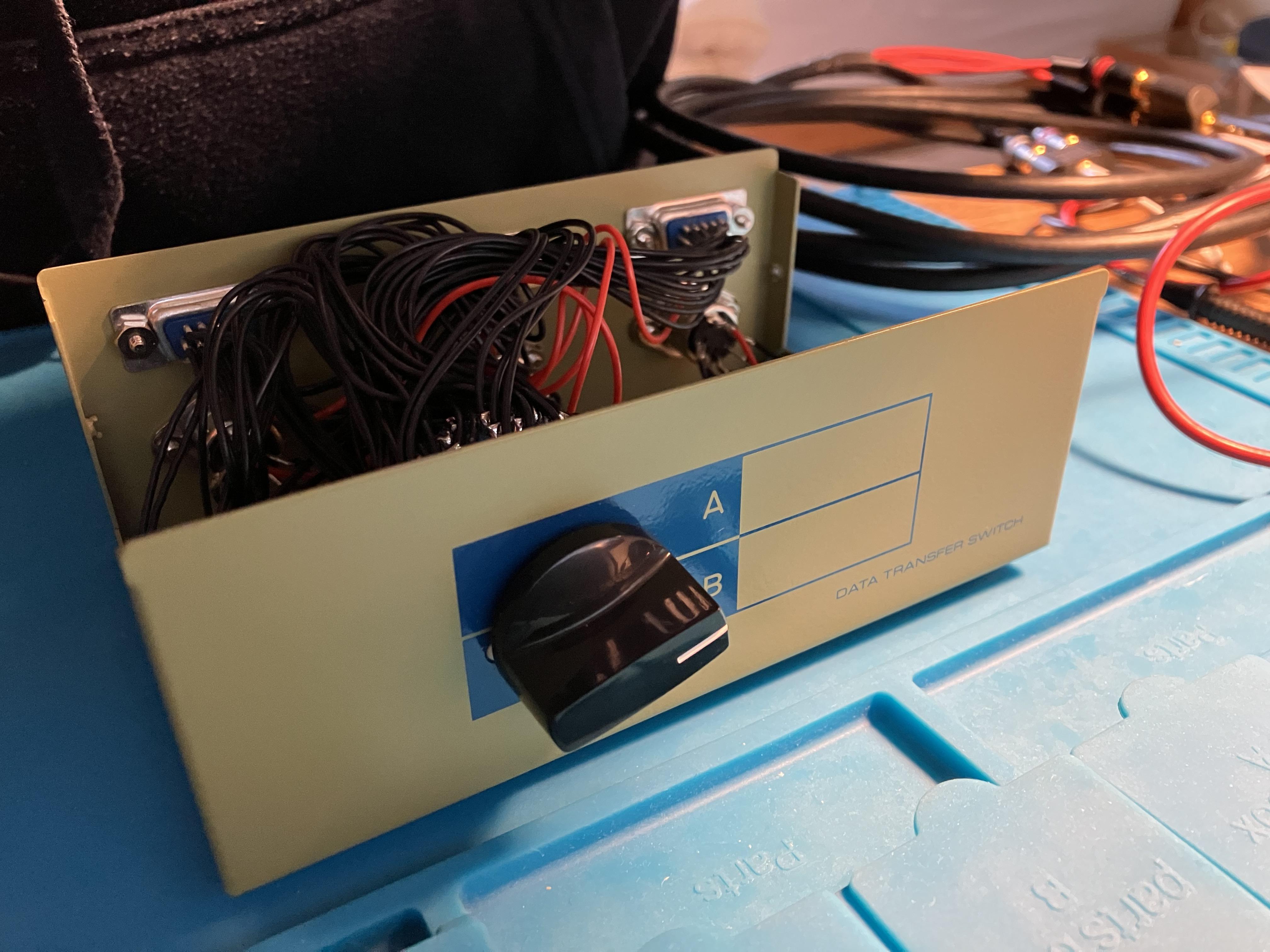
So the switch box arrived today.
Although I bought ‘opened never used’ from eBay, here’s a reminder of the type from one of many suppliers: https://www.tvcables.co.uk/2-port-svga-5-pin-din-switch-box-sb-392.html
I opened it up to check the wiring and it appears to be fully switching between all 5 pins of the din inputs (plus of course the added ‘bonus’ of the 15-pin VGA sockets). I think the main rotary switch would be described as at least 20-pole two-way, but I may well have the terminology wrong!
Anyway, I did a quick check with a couple of iPhones and it works well to switch between two-5 pin DIN inputs to a single 5-pin DIN output. It comes in a nice metal case with rubber feet.
Here are some photos:

I did check for ‘crosstalk’ between the two inputs but couldn’t detect anything. I am not sure that I would use it for non-RIAA/pre-amplified turntables due to lack of screened cables, but as a line-level audio switching box I would expect it to be fine – hence perfect for connecting two turntables to the BS9000 as asked in the thread. You would just have to remove pins 6 and 7 from the Beogram DIN plugs, and then use a 5-pin DIN to DIN for the output/input to BS9000.
It would also be quite easy to replace the 5-pin sockets with 7-pin for datalink (or 8-pin for Powerlink) and move some of the cables from the VGA sockets.
Happy to answer any further questions!
Location: Warwickshire, UK
My B&O Icons:
I not sure whether it would help at all but have you tried running the ‘Test Mode’ for the CD, as mentioned on page 5-17 of the service manual?
Location: Warwickshire, UK
My B&O Icons:
The BC9300 does not have built-in RIAA so in order to use the BG3000 you would have to add a phono/RIAA pre-amp.
I would look for a Beogram 3500/4500/6500 or 7000 with built in RIAA and datalink – thereby allowing you to control the turntable by remote. 3500/4500 are probably the best visual match with the BC9300.
This may help:https://beoworld.org/faq_view.asp?id=42
Location: Warwickshire, UK
My B&O Icons:
Hi and welcome to Beoworld!
Your Beogram 5000 requires an RIAA pre-amplifier to bring it up to line-level for the Bose AUX input.
Some details here: https://www.beoworld.org/faq_view.asp?id=18
Our site sponsor SoundsHeavenly offer such an amplifier here: https://soundsheavenly.com/beogram-record-players/12-2196-pre-amp-bundle-for-bo-beogram-and-all-turntables.html#/36-output-5_pin_din_aux/41-power_supply-uk_eu_us_aus
Location: Warwickshire, UK
My B&O Icons:
14 November 2023 at 13:57 in reply to: beosound 9000 setup Beolink4 Beolink / Masterlink Gateway #50458I am not sure what B&O TV you have, but in an ML setup to receive the ‘audio’ commands the TV should be in V.OPT 2. I am not sure how this is done with a BeoRemote One, but there must be a way!
What B&O TV do you have?
EDIT: I see that you do have a Beo4: With the TV in stand-by, follow the same procedure as with the BS9000, but when you get to A.OPT use the arrows to select V.OPT and then press 2.
Location: Warwickshire, UK
My B&O Icons:
I am pretty sure that the RL60 ones are the same, but perhaps someone else can confirm.
RL60 floor stand part number was 8960187 – these are also used for RL45.
These bargains on eBay don’t specify which model, but perhaps you could ask the seller to measure or look for a part number label (there may go quickly once I have highlighted on here!) Some black hammerite would bring them up a treat: https://www.ebay.co.uk/itm/166420352802
Or if you are happy to spend a little more: https://www.quality-dream-audio.co.uk/stands-furniture-wall-mounts-and-clocks/23030303.html
I have no connection to either of the above sellers – I just spend too much time surfing for bargains!
Location: Warwickshire, UK
My B&O Icons:
Brilliant! I tried the option thing and it all now works. Thank you so much. I love it even more now! simon
Great news! Glad you got it working!
I would have suggested the ‘Option Setting’ earlier but was hesitant because you said some functions did work with the remote – normally when in Option 0 the remote will do nothing at all!
Anyway, stick around and enjoy the Forum – there’s lots of useful advice for when you add to your collection ?
Location: Warwickshire, UK
My B&O Icons:
That version should work fine, especially as you can see it transmitting. The black dots will have worn away with use.
Did you try the BeoCenter front panel? Pressing the numbers while playing a CD should jump to that track, and you should be able to search for radio stations, for example?
Then try pressing numbers on the remote while a CD is playing for the same result. The up and down arrows on the remote should step through tracks also. Try holding the remote very close to the remote sensor.
I must admit that most of my experience is with the earlier/similar BC9500. I have read on the archived forum that BC9300 could suffer from remote control problems, but I find it strange that only some functions are working!
Location: Warwickshire, UK
My B&O Icons:
No problem – happy to help!
A further thought – a while back I found this switch box which is designed for a different purpose: https://www.tvcables.co.uk/2-port-svga-5-pin-din-switch-box-sb-392.html
Anyway, I just searched eBay, found one cheap and purchased it. I plan to use it for a different project, but when it arrives I will check the internal switching and connections and see if it could be used as an aux switcher. I will post back here when I know more.
Location: Warwickshire, UK
My B&O Icons:
Hi, thanks for your reminder. I think I need to find a switch box with 7 pin input instead.
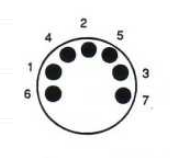
You won’t need 7 pin. Pins 6 and 7 are only for datalink which the BS9000 does not have. You should be able to unscrew pins 6 and 7 from the DIN plugs with a small screwdriver, and then use a 5-pin switching unit – if you can find one.

EDIT: And if you do remove the pins keep them somewhere very safe for future use (or future BeoGram users!)
Location: Warwickshire, UK
My B&O Icons:
-
AuthorPosts