Forum Replies Created
-
AuthorPosts
-
 Moderator
The plug looks fine and fits perfectyl into the Beomaster…The pins are straight and complete.
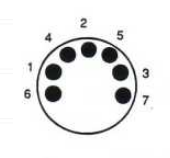
If trackbeo’s TAPE2 suggestion above does not work, I would open up the DIN plug and check that the soldered connection to pin 7 is still intact.
Pin diagram below – viewing from solder side of plug:
Location: Warwickshire, UK
My B&O Icons:


Also check that the DIN plug connecting the Beocord to the Beomaster has 7 pins. If pin 6 or 7 are missing then there will be no communication between devices and no remote control of the Beocord.
Location: Warwickshire, UK
My B&O Icons:
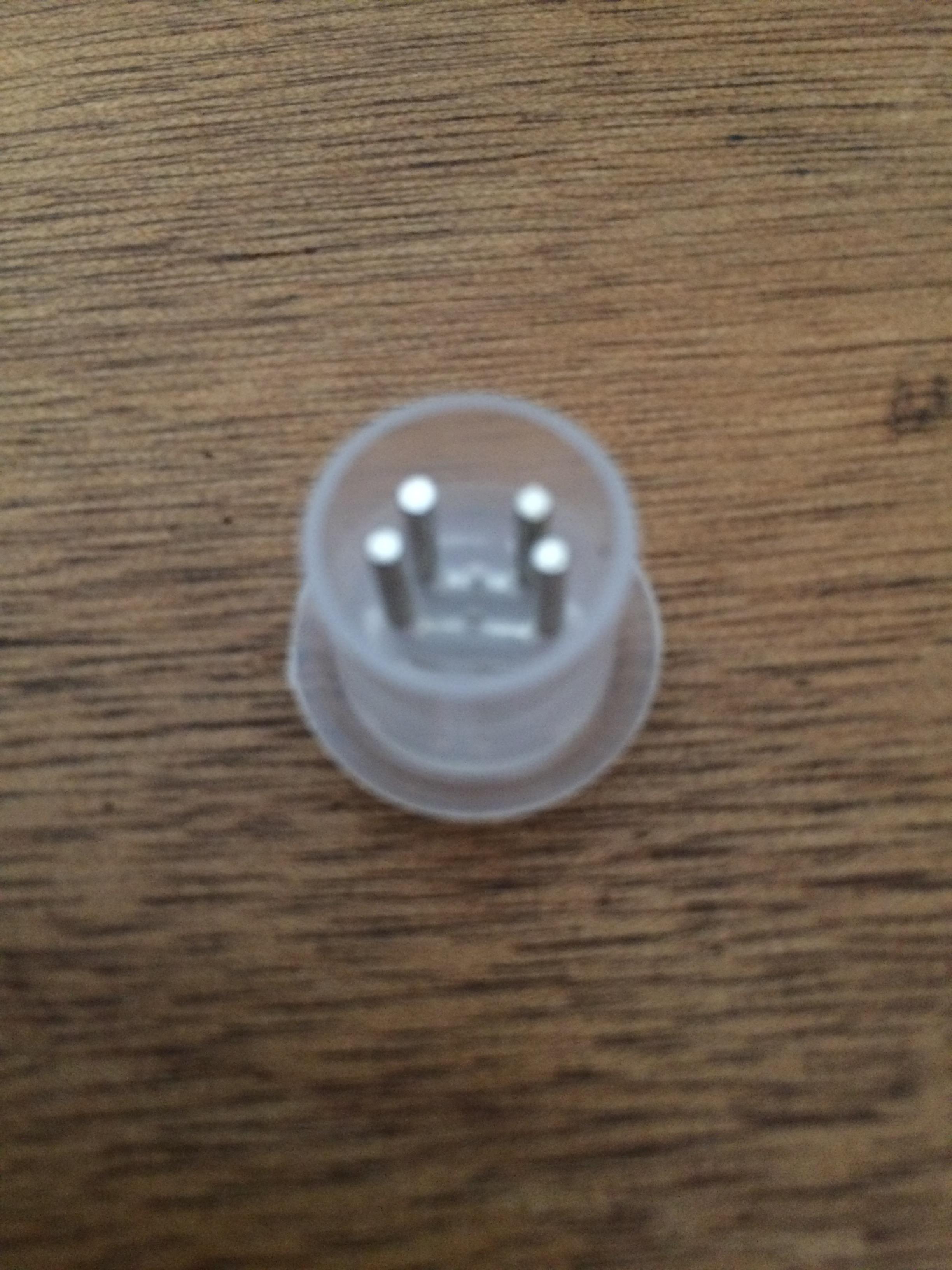
The function of the ‘Line In/Out’-plug is also understand – but … is it only a plastic pin which presses the inside contacts together, or an electrical connection – for example a jack plug whose 2 contacts be short-circuited ? –> I’m looking for alternative if I dont can get such original plug.
It’s an electrical connection within the plug – here’s a blurry photo of mine:
If using a standard DIN plug, connect pins 1 to 3, and 4 to 5 as you can (just) see below.

Location: Warwickshire, UK
My B&O Icons:
BeoLink 1000 still works (transmit), but no reaktion on the receiving side. I will see in the next time what’s necessary to do.
The BC9500 may be in A.OPT 0, where it doesn’t react to IR remote control commands.
To resolve this, with the system in standby, press SOUND, 2, STORE on the Beolink 1000. the Beocenter should briefly display a ‘2’ on its display top-right.
Then try remote control again.
Location: Warwickshire, UK
My B&O Icons:
Bump just to check the thread is visible to all including non-moderators! Hopefully the first post is back as it should be!
Location: Warwickshire, UK
My B&O Icons:
There are quite a few threads in the second Archived Forum about this subject, with some suggestions for third-party devices that will allow light control with Beo4 etc. It’s probably worth a search to find others.
Here’s an example: https://archivedforum2.beoworld.org/forums/p/36376/271647.aspx#271647
As stated in that thread, I have been very happy with my LightManager Pro for Beo4 light control – so much so that I purchased a second one from a forum member. Unfortunately they are no longer made by JBMedia, but it could be worth keeping an eye on eBay – probably German eBay as they were popular there (JBMedia is a German company).
I wouldn’t go down the LC2 route unless you enjoy getting your soldering iron out to replace capacitors! They are also very fussy about the type of bulb that is used.
I am sure that other forum members have experience of other solutions.
Location: Warwickshire, UK
My B&O Icons:
I have just tested again after just over 12 hours of standby – all still working as before!
One other thing that I forgot to mention. I tried setting the Apple TV ‘delay before Apple TV automatically turns off’ to 5 minutes and left the system running. After 5 minutes, the Apple TV does turn off but there is no ‘off’ message sent to the TV, so it stays on. If it had switched off the TV then this would have been useful for turning off the ‘system’ after airplay ceases. I suppose you can always set the TV to go to standby automatically instead – I can set the BV10-32 to do so after one hour.
One other aside: I bought a new bracket to mount this smaller 3rd gen ATV behind my TV and can recommend this one: https://www.amazon.co.uk/dp/B0C4PQ7R32
Location: Warwickshire, UK
My B&O Icons:
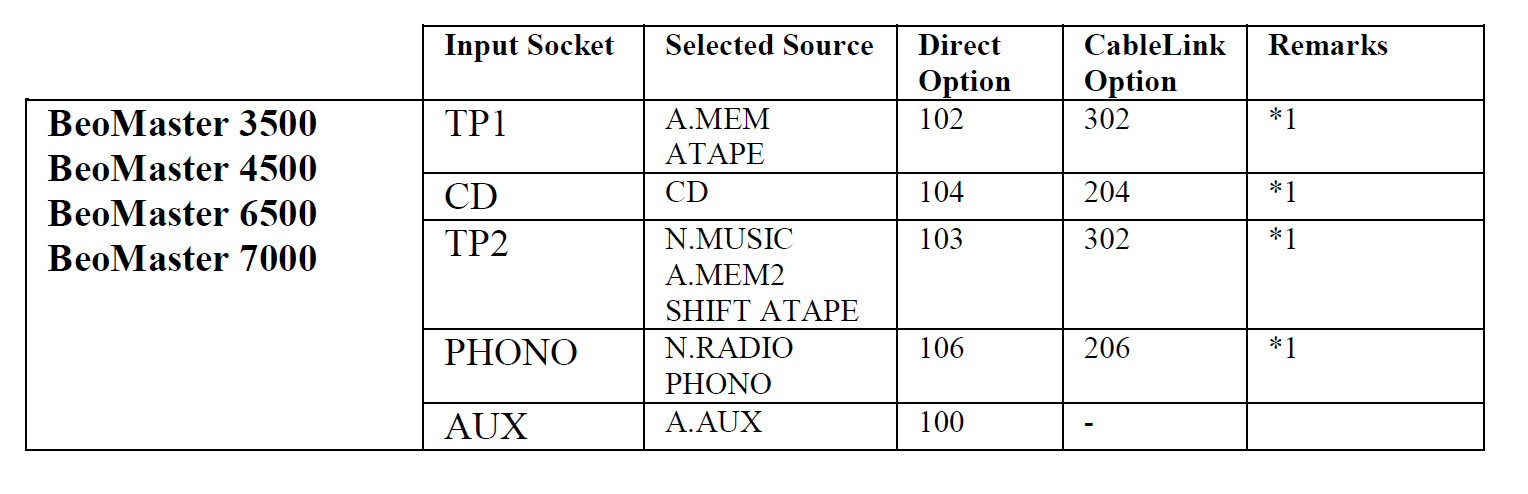
CD and PHONO also seems identical, but I haven’t pushed the investigation enough to confirm that.
They are identical enough that the CD connector on a MCL2AV can control a Beogram
Again, looking at the OneRemote setup, but this time with datalink. Different OneRemote cablelink setup codes are required depending upon whether you want to control via CD (204) or PHONO (206). This suggests that there may be a difference.

Location: Warwickshire, UK
My B&O Icons:
Thanks for testing. Indeed I must have mixed up something then. So the 1611 cannot switch between the two different datalink protocols.
This is also demonstrated when setting up a OneRemote radio to work when connected to a BeoLink Converter 1611. If connected to a datalink-capable beocenter, my OneRemote is programmed with a 3-digit cablelink code starting with a 2 or 3 (eg 302, 206). If connected to a TV (via SCART) or to BeoLink Converter 1611, the cablelink code starts with a 4 (eg 402, for control via Beolink Converter 1611 using A.TAPE to select). Thus cablelink codes starting 2 or 3 are datalink, whereas 4XX signifies AAL.
More details in this post: https://forum.beoworld.org/forums/topic/beolab-3500-and-1611-converter-settings/page/9/#post-14354
Location: Warwickshire, UK
My B&O Icons:
When you mention that you have to turn off the TV manually can this be done with the remote app on the iphone if the siri remote is placed stationary?
Yes, that’s what I meant to say although I can see how the word manually was ambiguous! After airplaying, the iPhone remote app can be used to turn it all off.
I have just tested again after the siri remote has been untouched/unmoved for 3 hours, and the functions all do still work. Next ‘sleep’ test will be overnight.
Location: Warwickshire, UK
My B&O Icons:
So I have now just tested turning on the TV (BV10-32) via AirPlay and/or using the iPhone/iPad remote.
First I turned off my TV’s digital internal tuner and assigned the Apple TV to the ‘TV’ input.
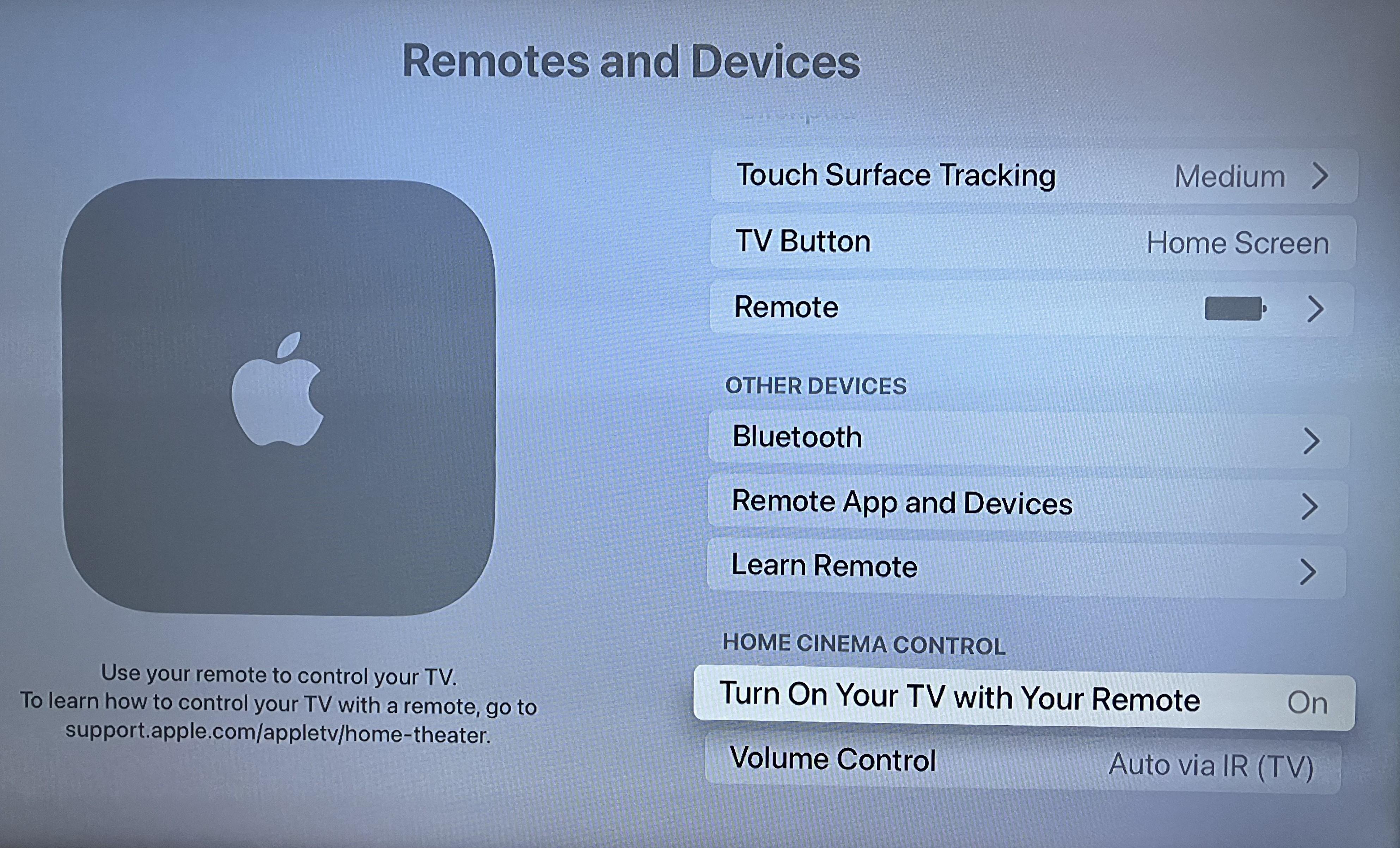
In the Apple TV menu, I changed ‘Turn On Your TV with Your Remote’ to ‘On’.
I placed the Siri Gen 3 remote so that it was pointing towards the TV.
First I tried the iPhone remote function, and was able to turn on/off the BeoVision and Apple TV using just the little power button symbol on the top right of the iPhone’s remote screen. I tried this several times to make sure that the siri remote was not disconnecting when turned off. I viewed the end of the siri remote with an iPad camera and could see the IR pulses transmitting ‘on’ and ‘off’ commands.
I then turned the Beovision and Apple TV to standby and tried airplaying – this worked perfectly to turn the Beovision and Apple TV on and start airplay. It doesn’t turn off when you stop airplaying, so you have to turn off manually as previously. (I may try later to see if the system goes to stand-by a little while after airplay stops, but I doubt that this will happen.)
I will now leave the Apple TV sleeping, and leave the siri remote perfectly stationary to see if it goes to ‘sleep’ and stops working as outlined above. I will test in a couple of hours, and if that it successful I will leave overnight. I am not using the siri remote charging cable at this stage.
If there is anything that I haven’t covered please let me know and I will test further.
Location: Warwickshire, UK
My B&O Icons:
One use case for both DL and ML could be to actually control a Beogram from a Masterlink only product (BS Ouverture, BC2, BS4, BS5 and Beovisions with ML). Would probably need the use of some alternative source commands to make this work,
A trivial correction, but BS Ouverture does have datalink – you were probably thinking of BS3000/3200 which are ML-only. ?
Following the thread with interest …
Location: Warwickshire, UK
My B&O Icons:
I have now edited the first post with updated info.
That looks great – many thanks for updating and especially the diagrams and remote names. I don’t think there’s anything missing but am sure that we will come up with more advice as we experiment further!
@Guy can you confirm if the Apple TV setup screen still looks like the screenshot in the post?
Similar but more complex now – see below:
(Note that there is an additional partially visible ‘Clickpad’ menu item above ‘Touch Surface Tracking’. This enables you to toggle between ‘Click and Touch’ or ‘Click Only’.)

(Sorry for slightly distorted image – AFAIK there is no ‘screenshot’ facility on Apple TV and I don’t have a ‘mac’ with which there is apparently a workaround).
With my BV10-32 the digital tuner is using ‘TV’, hence I normally have ‘Turn On Your TV …’ set to ‘Off’, and my siri gen 3 volume control will work with either ‘Auto via IR(TV)’ (as displayed above), or simply ‘TV via IR’.
If I find time I will try to test the ‘airplay’ initiation, albeit accepting that the siri remote will select the wrong input for my setup.
Location: Warwickshire, UK
My B&O Icons:
BC9500 only has Opt 1 and 2 as far as I know.
its possibly worth just disconnecting the BC2 in the first instance, and see how the BC9500 performs.
Location: Warwickshire, UK
My B&O Icons:
I would maybe also try some fault finding by swapping ML cables/connections – or move the BL3500 to bedroom 2 to test the ML cable to there. You may have tried this already.
You could also try a different datalink cable (fully wired 7-pin) between BC9500 and Converter.
EDIT: There may be a conflict due to having two ML audiomasters (the Beolink converter acts as one, plus the BC2)
Location: Warwickshire, UK
My B&O Icons:
Is the Beolink Converter definitely connected to the BC9500’s TV/AUX input? (not the TAPE 2).
And have you tried different sequences of powering everything up (Beolink Converter last?) and then setting option settings with the entire system at stand-by?
Location: Warwickshire, UK
My B&O Icons:
When you describe the a.tape a.aux commands etc. Is this a remote control?
A.TAPE and A.AUX are source commands that could/would be sent by a B&O remote control (or by operating the front panel of a B&O audiomaster (audio unit with tuner/cd player etc).
Presumably same remote works in each room?
Yes indeed!
What remote would I need?
You could get the system to work with the older BeoLink 1000 – see here
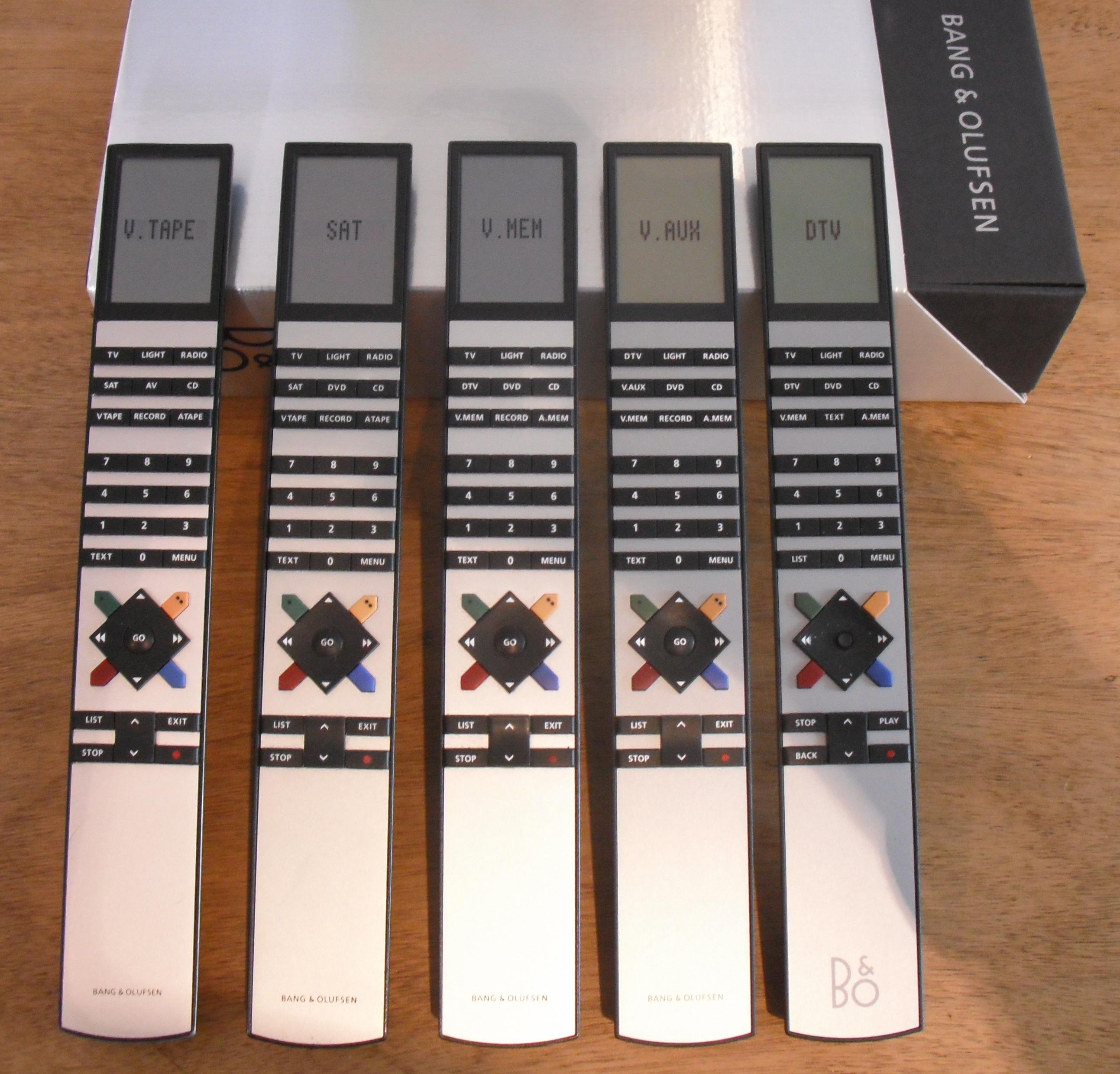
But I would probably go for a Beo4. several different types are available as shown below: (Click to enlarge):

Any of the above will work. The middle one is probably the most plentiful 2nd hand (approx £30-£50 on UK eBay) – the third row of buttons should read DTV DVD CD and there is a GO button in the centre of the arrows. Don’t be tempted by a Hotel version that has very different buttons and much reduced funtionality.
EDIT: Beaten to it by MM!!! The more the merrier! ?
Location: Warwickshire, UK
My B&O Icons:
Hi Steve, and welcome to Beoworld!
The only adjustable glass topped adjustable stand that I can think of is the ST6500 (but your width measurement would be wrong)
If that’s not it, perhaps post a photo and I am sure someone will be able to help.
EDIT: There’s a picture of the same stand in white attached to the post here: https://archivedforum2.beoworld.org/forums/p/46915/337133.aspx#337133
I did find a Beomaster 6500 service manual with the stand listed as ‘Type 2095’, but it could be that 2090 is for a different colour.
Location: Warwickshire, UK
My B&O Icons:
One other test:
I just connected my older 1st gen (no white circle) siri remote to the new 3rd gen Apple TV 4K. It works fine including IR volume control of the TV.
However, when I then connect the 3rd gen siri remote back to the 3rd gen Apple TV, the 1st gen siri remote stops controlling volume, even when the Apple TV is turned off and the Beovision playing normal off-air TV.
I worked out that you need to get the 3rd gen Apple TV to ‘forget’ the 1st gen remote. I re-connected the 1st gen remote to my 3rd gen Apple TV, and then put the remote in the garage where is was out of range. I then used my iPhone to control the Apple TV, went to the ‘remote’ option and there was an option to ‘forget’ the 1st gen siri remote. I then re-connected the 3rd gen siri remote.
Bringing the 1st gen siri remote back into the room, it would control B&O TV volume again without being connected to the Apple TV.
A bit confusing but I hope this makes sense! ?
Location: Warwickshire, UK
My B&O Icons:
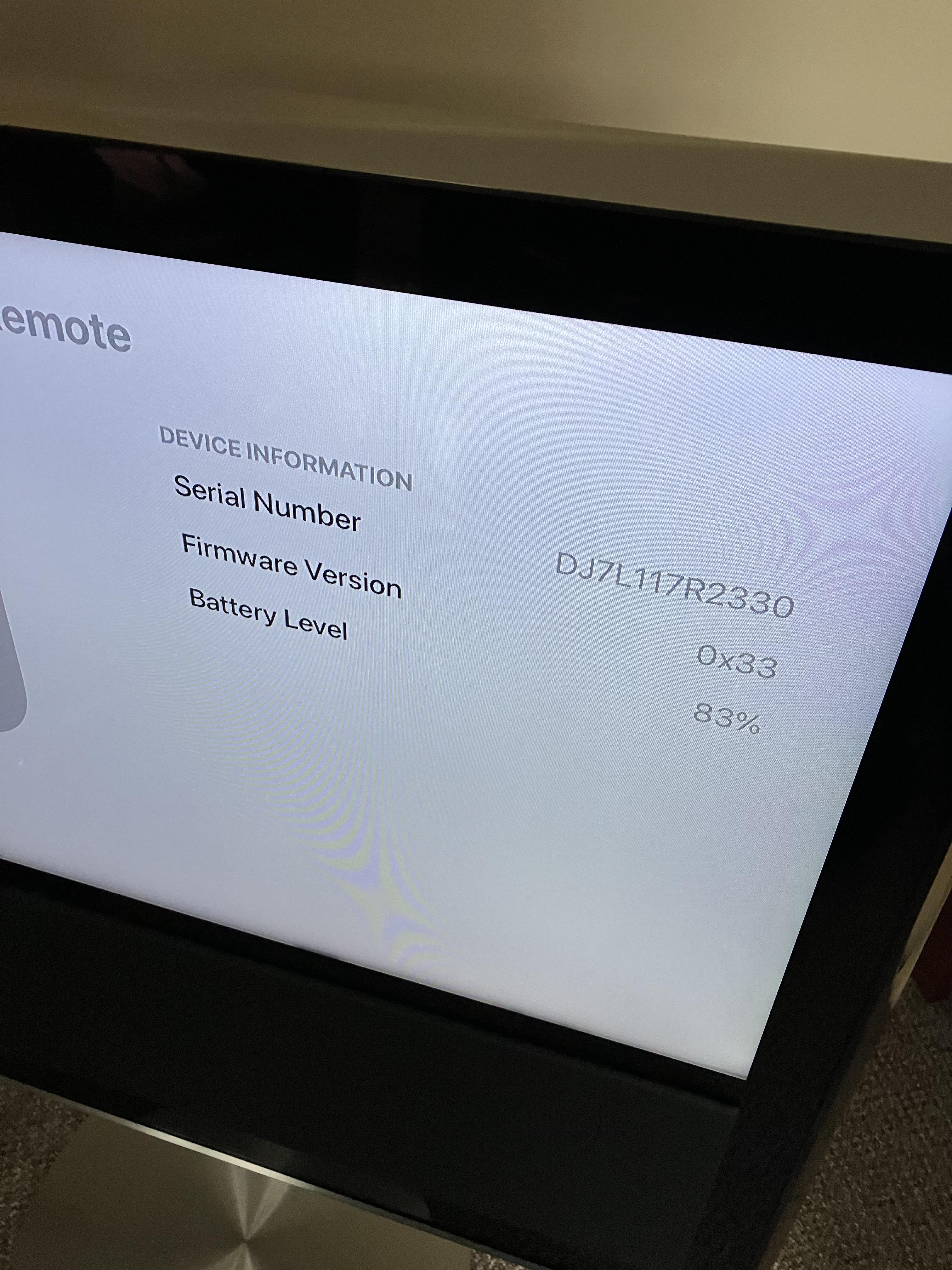
Just wanted to add a minor observation: Although that linked site lists remote FW as 0x033, it is actually displayed on the 3rd gen ATV as 0x33:
(I think that the older ATV’s showed the second ‘0’ – can’t check as mine is now disconnected)

Location: Warwickshire, UK
My B&O Icons:
-
AuthorPosts