-
AuthorSearch Results
-
11 July 2024 at 09:23 #57343
In reply to: NetRadio in Beovision 11
 GOLD Member
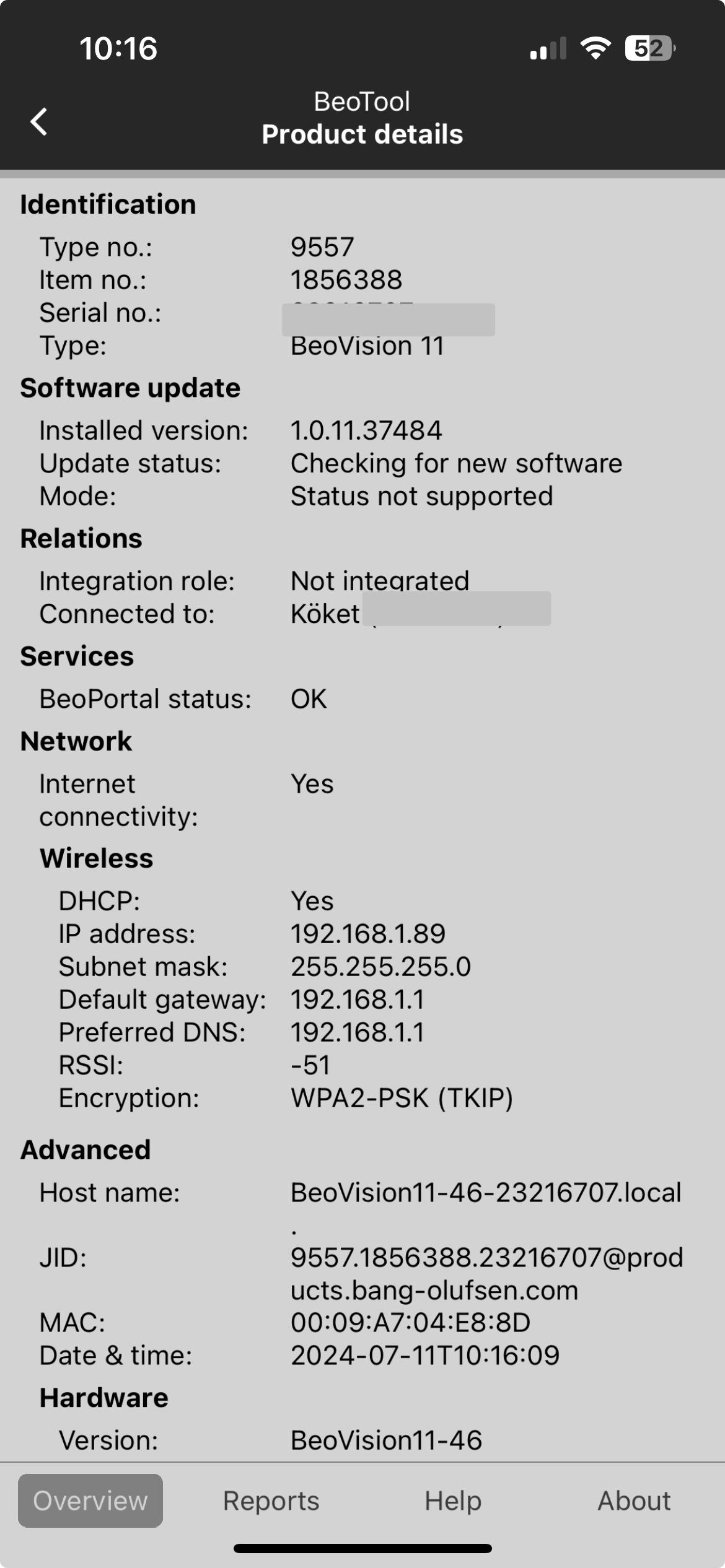
This is what my BV11 looks like through the Beotool app.

This is the latest version of the software.
Think you need to reach out to a dealer and have them push the update to you.
I had B&O (through my dealer) to do that when I got hold of a Beovision Eclipse with super old software.
However, in this case I do not recall that the BV11 got something special in the latest version, but its of course best to have latest version.
Location: Sweden
My B&O Icons:
 6 July 2024 at 16:11 #57262
In reply to: Speaker configuration
I use 18s as front and 4000 as rear speakers, the latter are daisy chained. They turn off if I change the profile e. g. from surround to stereo. My Eclipse is a 1st gen.
You say Beolab 9000 as rears, so you mean BL 9?
Kind regards,
Rolf
Location: Germany
Favourite Product: BeoSystem 4500
My B&O Icons:
6 July 2024 at 13:14 #57256Topic: Speaker configuration
in forum General Discussion & QuestionsStuart50_1BRONZE MemberHi
I have some beolab 9 on the back of my system and some 20 at front there driven by a eclipse
the speaker are daisy chained together my question is
When I change audio profiles even though the profile is set up to turn the back speakers off they stay turned on ?
But no sound comes out when the chosen profile is in use.
Should the back speakers stay on even though there is no need or sound coming out ?and the set up says they are turned off /?
4 July 2024 at 13:04 #57182In reply to: BeoVision 11-46 burned component.
Those are the standard mains suppression capacitors that have been fitted to most electronics since the 1970s. They can fail and, when they do there’s usually a bang and some smoke, but I would have though this TV was far too young for that.
I wonder if this is tied in with a visit we had a year or two back to change out a board on our Beovision Eclipse TV as a “preventative maintenance precaution” due to a potential failure issue that had been identified? As I’m in the UK, our lovely new forum owners, Multicare, contacted us directly and came and did the job for free, but I wasn’t home that day so didn’t find out exactly what it was they changed.
As the TV is fairly recent, I would say that your best port of call initially would be a B&O dealer if you have one nearby.
9 June 2024 at 19:30 #56391In reply to: B&O App version 5.90
StanBRONZE MemberIt seems they’re redesigning some of the TV controls. I can no longer move the stand on my Eclipse gen1. They replaced the text option “stand” with a cute icon, but pressing the icon does nothing. Same with the TV remote control features. Instead of the text “remote control” that took me to screens that allowed me to control my TV similar to the actual beoremote1, I get a cute icon that does nothing. Optimistically, I’m hoping this was a stupid oversight/build error that will be fixed soon. I can’t see them taking these function away since they were working quite well. Then again, you never know the depths to which software may sink.
29 May 2024 at 00:37 #56049In reply to: B&O App version 5.90
StanBRONZE MemberI’ve finally been hit with a non-working “improvement”. I’m not in the beta program, but with latest Android release (5.9.0.24…). The TV remote feature no longer works with my Gen1 Eclipse. I also can no longer control the stand. They’ve redesigned the interface so I get a cute little remote icon replacing boring words, but pressing it does nothing. Similarly, there’s an icon for moving the stand that doesn’t work either. 2 steps forward, 6 steps back..
At least the beoremote1 works, but it is sometimes more convenient to use the app if the remote is not near or lost in the couch.
Then again, aside from Sonos, every one complains about their “smart speaker” apps (e.g. Kef, Klipsch, Naim Muso). Doesn’t mean it’s acceptable, but at least we’re not alone.
25 May 2024 at 11:02 #55950Topic: Beovision Eclipse Sound Centre speaker groups without LG tv
in forum BeoVision00blueBRONZE MemberHi there, hoping someone could provide some advice please? I have a Beovision eclipse 55 Mk1 sound centre (just the sound bar, not the tv) and im trying to work out how I can set up speaker groups. I dont have an LG tv (running WebOS) to install the B&O TV app, and I also dont have a Beoremote one. I was hoping to be able to configure speaker groups via the iOS B&O app but that doesnt seem to allow me to configure speaker groups, only switch between different groups. What would be the best approach from here in order to get speaker groups configured on the Sound Centre? Would simply getting a Beoremote one allow me to do this (without an LG tv??).
Many thanks in advance.
22 May 2024 at 13:06 #55844Topic: Beovision Eclipse
in forum For SaleBeoMitchBRONZE MemberFirst Generation Beovision Eclipse 55 with Motorised floor stand
Immaculate condition in every respect
offers in the region of £3500
Collection Only
Pics to follow
21 May 2024 at 19:10 #55817In reply to: Netgear Orbi B&O Protocol Big Problems
StanBRONZE MemberI have an older Orbi setup: one base, 2 satellites. I have an Eclipse, BS1, BS2, 2 Essences, M3 and a BS5 linked via an airport express all connected via WiFi. I have a pair of Balances (daisy chained) and a BL/NL converter wired to the base station. There’s also a couple TVs and variety of smartphone, computers, printers all on the same mesh.
I highly recommend the suggestion to assign fixed IP addresses to all of the B&O devices. Before I did that, things were pretty flakey. Now, for the last maybe 2 years, my B&O equipment is quite stable. The balances have hiccuped a few times, but this seems more from the daisy chained network connection. I say this because, once or twice, I’ve had to completely reset them, and they only seem to reset correctly if I removed the network cable, set them up wirelessly, then plug them in to the router. I have thought about running them wirelessly to see if this changes anything, but then I go a long while with no problems so why change anything?
21 May 2024 at 14:04 #55809In reply to: Flash Your B&O – new(er) thread!
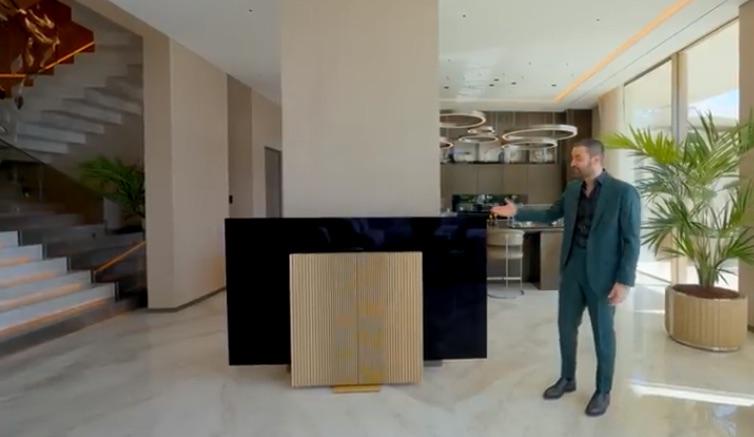
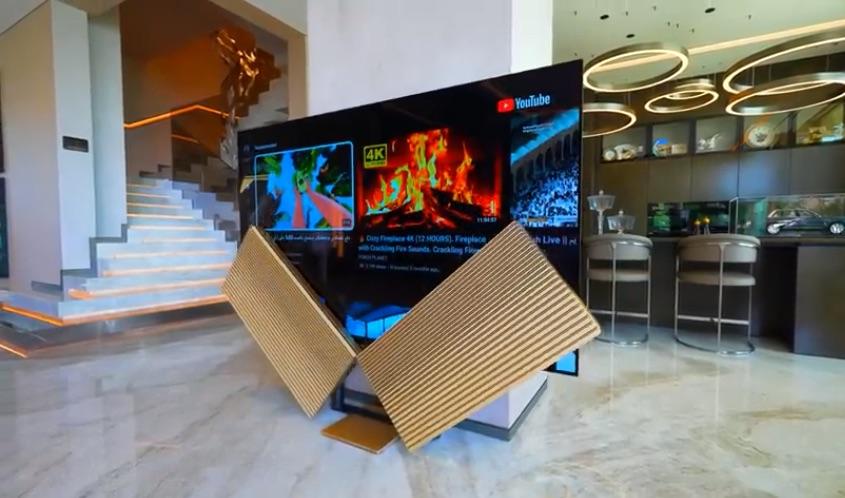
Enes Yilmazer’s YouTube channel of mansion tours has posted another with at least 7 B&O TVs (2 Harmony, 2 Eclipse, 2 BV-Theatre, & 1 Contour). Bonus points if you can spot the BeoRemote 1’s: https://www.youtube.com/watch?v=goFsqVqQ8H8 .

One wag who comments on such videos pointed out that the Beovision Harmony is waaay too big for its place in front of a column and will form a “hazard to navigation” coming from the kitchen! What he didn’t notice is that they sped up the display opening — like they do filming motorized patio doors — because it’s much too slow for snappy video pacing.
 6 May 2024 at 19:42 #55325
Topic: Speakers
in forum General Discussion & QuestionsStuart50_1BRONZE MemberHi all
I have some beolab 9000 on the back of my system and some 20 at front there driven by a eclipse the speaker are daisy chained together my question is
When I change audio profiles even though the profile is set up to turn the back speakers off they stay turned on .
But no sound comes out when the chosen profile is one with the speakers set to off.
Should the back speakers stay on even though there is no need or sound coming out ?5 April 2024 at 18:40 #54100In reply to: LG update to newer WebOS – question?
patcherleyGOLD MemberI have updated my Eclipse, apart from the UI haven’t noticed any real difference, not sure I really like the new UI. But again I also don’t use the UI much at all, it I watch a TV programme I go straight there with the BeoRemoteOne short cut button.
Location: Hampshire
Favourite Product: Beolink 7000
My B&O Icons:
1 April 2024 at 07:16 #39932In reply to: Beosound Theatre — Knowledge Base
cklitModeratorQ: How do I setup a Listening Position for (2.0) music listening on Beosound Theatre?
A: Here is what I would do: I have a 5.0.2 setup (Theatre+Fronts+Surrounds+Front heights). If this was a Beovision Eclipse or 11 or similar and I wanted a listening position for music listening, I would probably create a dedicated 2.0 speaker group, where only the Front speakers were added. However, because bass management in Theatre works differently (all speakers play their part in the low frequencies based on their capability), I do it differently here.
1: I’ll start by setting up and adjusting a Listening Position with all speakers, optimized for the sweetspot.
2: I’m lucky enough to have a room that allows for “the triangle”, so that I can sit perfectly in the middle of the 2 fronts at the same distance from each speaker, as the distance that the fronts are apart. Therefore, after the microphone measurement, I check that the distance to each front is set to the same (because I don’t want to mess with the timing between the 2 fronts, when I know I’m seated in the optimal position). While I’m at it, I check all the other distances too
3: Once the Listening Position with all speakers is perfectly tweaked, go to your desired Sound mode and ensure that the processing is set to ‘Direct’. Leave ‘Bass management’ ON. This way ALL your speakers are helping with the low end, even though it’s only the fronts that are playing everything above 120Hz.
Now you won’t hear large differences in bass performance, e.g. when switching from a movie in surround to music in stereo – AND you’re utilising the full performance of your carefully collected entertainment system.
Just to recap: If I only have one seating position, I can limit myself to 1 Listening Position with all speakers included, and 2 sound modes; one in Direct mode for music, and one in True Image for movies (my own preference, use something different if you like). Obviously, you may need a listening position optimised for more people, but that is kind of out of the scope of this question. Remember that you can assign a specific sound mode and listening position to each individual source via the app, so that you don’t have to change manually each time.
Enjoy the music 🙂
27 March 2024 at 08:27 #53844In reply to: Beovision 11 headphone attachment
Hi,
You can use a cable like this in one of the Powerlink outputs of the TV and set this output to stereo:-
Kind regards, Steve.
Location: The cable workshop, England
Favourite Product: Beosystem 72-23
Signature: Cables, friendly advice and great ideas for connecting Bang & Olufsen! Ask any questions at https://soundsheavenly.com to get the best from your B&O! Please visit my B&O YouTube channel at https://www.youtube.com/soundsheavenlycables
My B&O Icons:
23 March 2024 at 02:19 #49935In reply to: Eclipse sound ?
Ianc2BRONZE MemberThere are eclipse settings to share bass , have dedicated sub , multiple subs , crossover points , levels etc .
If if sounded acceptable to you through the old tv , I’d say you have the eclipse set up wrong .22 March 2024 at 03:26 #53305In reply to: Finally got beolab 8s set up .
Ianc2BRONZE MemberA quick update :
They still look good & they still sound good .
However , I messed them up !!!
As mentioned earlier the rear surround sound will get part upgrade / part downgrade now the 8s are in place , and I temporarily placed the BL3s on the floor behind the sofa pointing up at an angle to bounce off the rear wall .
They are sat on a roll of masking tape as the backs are round .
I then went into the eclipse menu to add them ….After FINALLY figuring a way to get the 3s to output sound , then playing with levels I was happy with the way the experiment was going and then went back to private ryan .
A bullet that was supposed to enter the water from the right traveling left seemed odd , but I carried on for a few more minutes then rewinded .The right BL8 had no sound !!!
I was done for the night , so made sure Bluetooth streaming was working on both and planned to revisit the following night .
I spent a night reading instructions , trying to figure out what the eclipse menu meant by speaker presets etc and tried again .
Still no sound from that one 8 .
This time I did not try Bluetooth at the end .Next night I got in from work and she told me she tried to stream but it didn’t work .
She paired her iPad , and it made the conformation sound but no music :/I’ve not had time to revisit this , but I plan to do a factory reset tonight to get at least Bluetooth streaming working ….
22 March 2024 at 03:00 #53442Ianc2BRONZE MemberI have read it is possible to add a later model 65” lg screen with different bracketry and modifying the eclipse aluminum slightly . i will look at mine this weekend for a reminder , but i believe only hdmi and 1 rj45 connect to the screen , so in theory it could be used with any size/brand screen . i have a spare Vizio tv i can try this with .
I looked , and yes entirely possible to do this .
I think the thread ravsted linked to that replaces the old oled with a newer model is the best way to go . And what I will do should my panel ever develop problems .
however if you are wall-mounted and do not need a motorized mount etc it can be a totally seperate system using a tv wall-mount to space the panel off the wall inline with the sound center .
It will not look as good from the side though , should you have a doorway next to tv like I have .
The thing I like most about the eclipse is its integrated look , it looks much better than a theater in that regard .
I slso like that it has compartment on the back perfectly sized to integrate an Apple TV 4K .
It will fit other older models , but new 4k is smaller and more efficient .
I went a step further and ordered the correct length power and hdmi cables to make install better …19 March 2024 at 08:23 #53594In reply to: Beosound theatre for listening stereo music
cklitModeratorHi,
I will probably be repeating Sandyb’s answer a bit, but here’s what I would do:
I have a 5.0.2 setup (Theatre+Fronts+Surrounds+Front heights).
If this was a Beovision Eclipse or 11 or similar and I wanted a listening position for music listening, I would probably create a dedicated 2.0 speaker group, where only the Front speakers were added.However, because bass management in Theatre works differently (all speakers play their part in the low frequencies based on their capability), I do it differently here.
I start by setting up and adjusting a Listening Position with all speakers, optimized for the sweetspot.
I’m lucky enough to have a room that allows for “the triangle”, so that I can sit perfectly in the middle of the 2 fronts at the same distance from each speaker, as the distance that the fronts are apart. Therefore, after the microphone measurement, I check that the distance to each front is set to the same (because I don’t want to mess with the timing between the 2 fronts, when I know I’m seated in the optimal position). While I’m at it, I check all the other distances too 🙂
Once the Listening Position with all speakers is perfectly tweaked, go to your desired Sound mode and ensure that the processing is set to ‘Direct’. Leave ‘Bass management’ ON. This way ALL your speakers are helping with the low end, even though it’s only the fronts that are playing everything above 120Hz.
Now you won’t hear large differences in bass performance, e.g. when switching from a movie in surround to music in stereo – AND you’re utilising the full performance of your carefully collected entertainment system 🙂
Just to recap: If I only have one seating position, I can limit myself to 1 Listening Position with all speakers included, and 2 sound modes; one in Direct mode for music, and one in True Image for movies (my own preference, use something different if you like).
Obviously, you may need a listening position optimised for more people, but that is kind of out of the scope of this question.
Remember that you can assign a specific sound mode and listening position to each individual source via the app, so that you don’t have to change manually each time.
Enjoy the music.
17 March 2024 at 14:36 #53488In reply to: Beoconnect Core with HDMI (e)ARC
StanBRONZE Member@MM
I understand the difference between home cinema and stereo, and I agree that they’re not really comparable. I have an Eclipse after all. My point in asking why so many TVs have 2 speakers was to point out that maybe listening to stereo TV was NOT the “weirded possible way”. Also, if it’s solely about cost, why not just have 1 speaker and eliminate that weird stereo TV watching experience? It would be cheaper still.
This will be a music first system so TV audio is secondary (or perhaps even tertiary, with looks/usability being secondary). Having said all this, my wife is not excited about the return of the “all those speaker cables” (i.e. one thin PL running from source to daisy chained speakers) so the Stage is back in the running… or I need to do better cable management.
I agree that given B&O’s history of outstanding home cinema audio it’s a bit odd for B&O to be pushing this stereo TV concept, but then you have to sell what you have. Marketers will do their marketing. Or maybe this is a case of “the customer is always right” (used as that phrase was originally intended, not the more recent “Karen” interpretation). That is, perhaps there was enough feedback saying this is desirable so they built it, even though it runs counter to ~30 years of B&O’s home cinema audio history.
16 March 2024 at 20:10 #53486In reply to: Beoconnect Core with HDMI (e)ARC
@severed_hand The Marantz can’t multi-room with my Beosound in the adjoining bathroom. It also doesn’t work just like all the other beosounds with which my wife has finally become comfortable. I listened to TV through stereo speakers for many years. I don’t understand the pushback. I’m not doing critical listening. It’s mostly background noise, but with better bass, treble and midrange than the weak built in speakers. If stereo is so odd, why do most tvs have 2 speakers?
Another point is that you can not control the Marantz with a Beoremote One.
The reason why most tv’s have two speakers, is that it is the easiest (and cheapest) way to do sound.
For decades tv programmes were 2 channel aka stereo natively, so there was no real need for audio processing for more channels.Since those two speakers are located in the tv/with the screen, what we call a phantom center is mostly also heard coming from there.
The further away from the screen/the picture the external speakers are, the more this shifting of the phantom center can be disturbing…..especially for those who sit off axis.For many years all B&O tv’s have had an option for creating a center channel, if you had connected external L/R speakers there also.
In the 90’s, when I had a BV6000, there was an option for creating a socalled ‘center balance’. This was before they started processing the sound in a modern sense.
Later – when the first Avant (the CTR tv) came, there was a ‘surround decoder’ built in, which made the two builtin speakers a center channel, if you had external speakers connected.For the BV7 there was even a dedicated center channel speaker option (the BL7-4/BL10) – these BV’s had a surround decoder.
The new Avant had a 3 channel speaker system built in and in addition a multichannel processor for more speakers.
So does the Eclipse and the Harmony – also the Stage and the Theatre do have multiple speakers built in….the center being relatively powerfull.From this point of view just having a set of L/R speakers with a tv is a retreat from what B&O untill now has offered as their ‘normal’ way of listening to audio from video sources.
Nowadays a lot of video material is multichannel (5.1 and more), which means that this has to be downmixed for the Beoconnect Core, which potentially will make the dialog less audible.
Something that you would not experience with a genuine 3-channel speaker setup.
There you have a wider seperation of left/right and a much more defined center.
That two speakers isn’t sufficient is also the reason for the popularity of soundbars nowadays.Of course you may have become used to/get used to two channel tv sound, but it is far from optimal in most cases.
And it should not be praised so in the PR announcements for the BeoConnect Core:
Quote: “Simply plug in your screen and marvel as your B&O speakers transform movie nights into cinematic experiences”.
But, of course they want to sell speakers!If you primarily use the box for 2 channel audio/stereo music, the box is fine – however, so was the Core and the Essence box.
Whether this box is better, only a test/daily use will tell.
For Shape users the COM port seems to be an improvement – also the USB-out could be beneficial for BL90/50 users.
For users with primarily Mozart based products the new Core may be the better choice.If sound is just ‘background noice’, all this does not matter, of course ?
MM
Location: Flensborg————Danmark
-
AuthorSearch Results
-
Search Results
-
Topic: Speaker configuration
Hi
I have some beolab 9 on the back of my system and some 20 at front there driven by a eclipse
the speaker are daisy chained together my question is
When I change audio profiles even though the profile is set up to turn the back speakers off they stay turned on ?
But no sound comes out when the chosen profile is in use.
Should the back speakers stay on even though there is no need or sound coming out ?and the set up says they are turned off /?
Hi there, hoping someone could provide some advice please? I have a Beovision eclipse 55 Mk1 sound centre (just the sound bar, not the tv) and im trying to work out how I can set up speaker groups. I dont have an LG tv (running WebOS) to install the B&O TV app, and I also dont have a Beoremote one. I was hoping to be able to configure speaker groups via the iOS B&O app but that doesnt seem to allow me to configure speaker groups, only switch between different groups. What would be the best approach from here in order to get speaker groups configured on the Sound Centre? Would simply getting a Beoremote one allow me to do this (without an LG tv??).
Many thanks in advance.
Topic: Beovision Eclipse
First Generation Beovision Eclipse 55 with Motorised floor stand
Immaculate condition in every respect
offers in the region of £3500
Collection Only
Pics to follow
Topic: Speakers
Hi all
I have some beolab 9000 on the back of my system and some 20 at front there driven by a eclipse the speaker are daisy chained together my question is
When I change audio profiles even though the profile is set up to turn the back speakers off they stay turned on .
But no sound comes out when the chosen profile is one with the speakers set to off.
Should the back speakers stay on even though there is no need or sound coming out ?