Generic selectors
Exact matches only
Search in title
Search in content
Post Type Selectors

Search Results for 'eclipse'

Home Forums Search Search Results for 'eclipse'

Viewing 20 results - 21 through 40 (of 350 total)
  • Author
    Search Results
  • #66189
    Eric Stone
    BRONZE Member

    Hello everyone.  I previously posted about this setup with the eclipse and I ended up getting rid of the eclipse.  It had its own set of issues but it was able to properly filter the bass between the 28s and 19.

    I Figured the core and transmitter could do the same since it seems pretty simple and both the app and the sub itself have filtering on it.

    the setup plays but it sounds nothing like it did when the eclipse was controlling it.  The bass feels empty and off in some way.

    here’s the thing, if I have the filter set to off on the sub, and set to 20hz in the app, play a 40hz tone, the sub still plays.  So it would seem the app filtering isn’t working.

    if I set the filter on the sub to on, and set it to 40hz, then play a 50hz tone, again the sub still plays something.

    I have no idea what is going on, and of course bang and olufsen tech support can’t help.  Does anyone here have any experience getting the filtering on the core or the 19 to work?  Not sure if I should post this in the core section…

    #65820
    Beoet
    BRONZE Member
    The only downside with getting a new C4/C5 panel is that the new panels are significantly narrower than the original C7 panel (for the 65″ I think the new panels are 12.6 mm narrower than the original one). Meaning that the edges will not align with the lower glass panel…. The picture quality should be really bad to sacrifice esthetics (Eclipse is a successful and timeless design IMO)!

    If STBbrackets could have provided a 3 edges “click-on-frame” to fill in the 6.3mm width on each of the 3 sides for the new panel, I think upgrading would be a no-brainer!

    NQVHNWI
    BRONZE Member
    I had a similar problem from the otherside – selling a (unknown to me) burnt-in Eclipse 65. Had to do a deal with the Dealer to keep everything on the level.
    On one hand…Im happy that I moved from an Eclipse to a Theatre and took the panel (obsolesce – for now or future fault/burn-in) out of the Ownership equation. Even back in late 2022 IIRC, the Theatre was getting up there price-wise and I almost thought the Eclipse was my last Beovision?
    Back to the Post. Glad that went well. I have heard anecdotal stories that Dealers can take other panels (oh, and B&O did have some original panels to cover warranty issues only) and graft them on. From what I loosely heard, its more about retro-fitting the C7 for a C9 or CX into the case more than anything else?? Maybe.
    This is where B&O really need to pull up their socks. Its history know and Buyer beware but at the time the C7 was a problem panel and B&O knew it. They did very little to warn people, recall or even collaborate on revised software as far as I can ascertain? The STB solution is not cheap but I guess it can get you up and running and not trashing a perfectly good soundbar and stand?
    More importantly, this Cradle to Cradle business is less about the Customer having endless repairs on their products I fear….and more about 100% recyclability at the local dump? Im sure we will see when a few PCBs or drivers give-up and there are no spares left (again). Just sign-up for the latest $30k soundbar and swallow it as the cost of doing business?
    Mbee
    BRONZE Member
    In 2023, I had the opportunity to get an Eclipse MKI, which I thought was in perfect condition. Arrived to my home, I discovered that the panel was broken.I did know that the special Oled 55C7BO was expensive to get for an outdated technology. My dealer confirmed that with a €2600 quote. (at this time, a brand new 55C3 was only €1600).Then, I thought a bit about the fact that the new Eclipse are working with a software that is easy to get from the LG store, and that the connectivity of the newer MKIII Eclipse were the same that mine (Ethernet + HDMI), so I thought that with a bit of chance, my MKI could work with the new LG software, as it seemed that my Eclipse was, like the new ones, a HDMI ARC soundbar with a control over ethernet.I discussed about that with my dealer, who contacted B&O to ask if it was possible.
    The answer from B&O product manager in Denmark was a clear “NO”, as for him the MKI Eclipse didn’t support HDMI ARC.I doubted about that, and I just thought that the current product manager has no idea what was inside the MKI, because he might not be at this job for long, and never worked on MKI.
    Fortunately, my dealer is multi brand and sells LG. So I asked him if I could connect my sound center to one of his LG C3 panels, which he allowed me to do, interested to see the result.
    So I went to my dealer with my sound center AND motorized stand. Connected his LG C3 where he already installed the B&O app… And saw that everything was working! So I ordered him a LG 55C3.
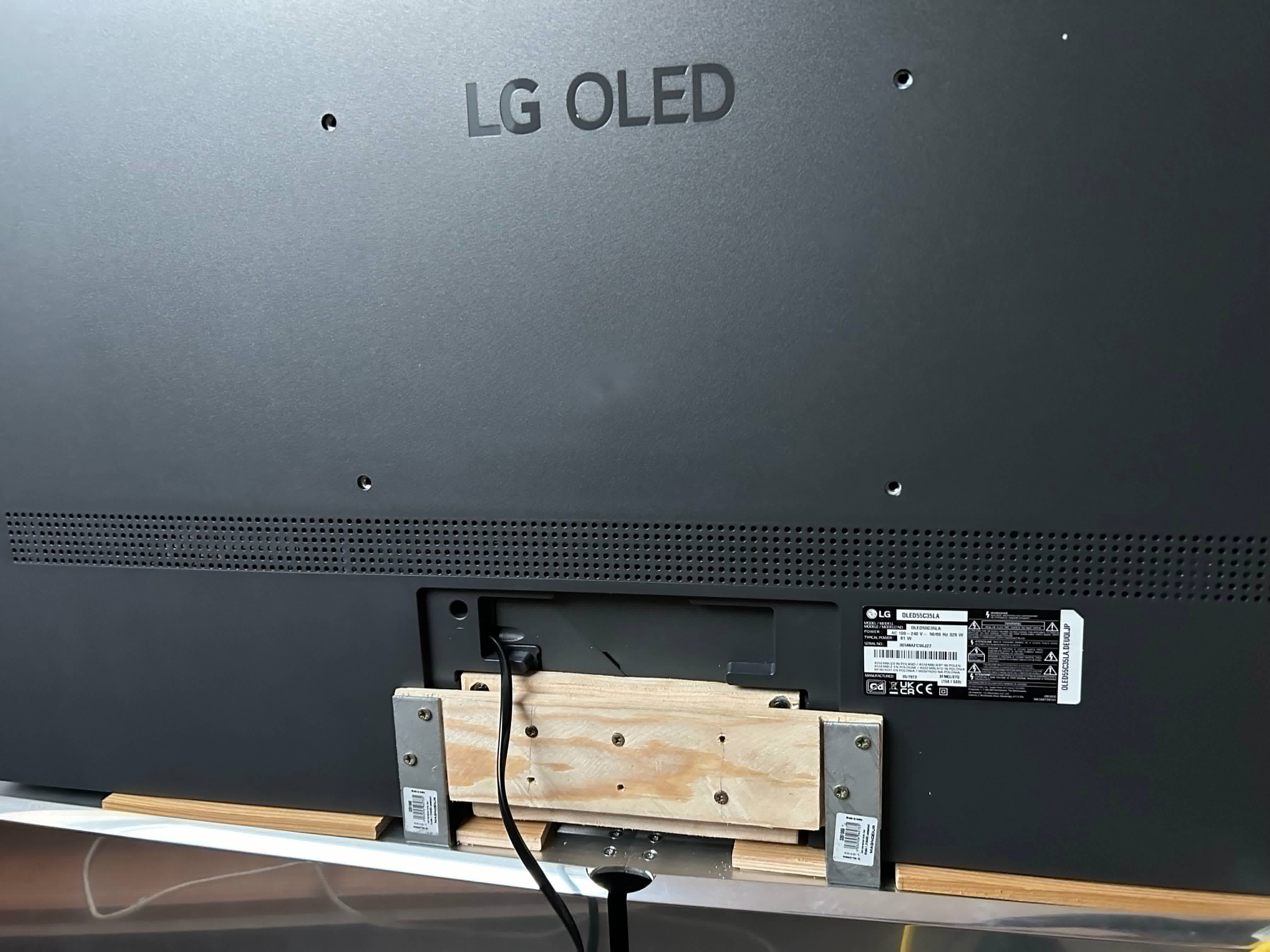
    I then had to adapt the panel to the Soundcenter, as the old panel stand from MKI wasn’t adapted to the new LG. So I made a DiY stand with 2 metal brackets and a bit of wood (see picture). Overall cost: around €10.
    Since then, everything was working, except the MyButtons, which didn’t work at all. That was not a big issue as I still have the MKI Beoremote One: there is only one MyButton and Netflix+amazon buttons were working (but the remote is ugly with those buttons 😀).
    Seeing the nice result, my dealer already retrofitted one customer with a homemade bracket.
    If you’re a Beoworld follower, you may have heard about that from this topic : https://forum.beoworld.org/forums/topic/eclipse-mki-with-lg-c3-oled/
    I then saw the Facebook post of Ariel, a dealer in Israel who was asking if he could switch the panel of one of his customers to a standard C4. So I explained him everything in MP, as I didn’t want B&O to be upset… His installer made a better job than me (picture).
    But as a dealer, he knows people… And talked about that to STB Brackets, who started working on a very nice adapter, with covers to make everything very clean.So now, in may 2025, it’s officially available: the STB Bracket Eclipse MKI to LG C4/C5 adapter!! 🥳
    https://www.stbbrackets.co.uk/product/beovision-eclipse-lg-c4-upgrade-adapter/
    But there is more ! STB worked with B&O, and now, there is a special “Retrofited Eclipse” software, which makes the MyButtons completely functional!!! And even more : with this software, the Eclipse MKI is displaying the source on the top of the screen in audio mode, as with MKIII and Harmony (and visuals in Radio and Deezer modes). That thing may damage your screen as it’s fixed display on OLED, but now you can replace it at LG cost, and not B&O cost 😆
    Mbee
    BRONZE Member

    double post, moderator please delete!

    Mbee
    BRONZE Member

    double post, moderator please delete!

    #65740
    Beoet
    BRONZE Member
    Our 2018 65″ Eclipse is suffering from burn-ins, and I consider ordering this adapter.

    Millemis
    BRONZE Member

    There should be multiple solutions to this.

    If you want an external streamer (to be used with an app on phone/tablet), you could use the line-in/optical on the Eclipse. Just connect the output of the streamer there.
    If you want to try that out, go for e.g. a WiiM Mini (these devices have good reputations).
    The small box can easily be hidden away. You can even create a seperate Speaker Group for that input….in case you have external speakers connected to the tv.

    If the 1st Generation BeoVision Eclipse still supports Casting, you could just (chrome)cast from the Qobuz app on your device.

    The Qobuz app should be available for download to the tv (?).
    In case this is not supported on the 1st Generation BeoVision Eclipse, you could add a GoogleTV streamer via HDMI…..I am pretty sure you can find the Qobuz app in the Google app store for that.

    In case you lean more towards Apple solutions, you could add an AppleTV box – there is a Qobuz app for that.

    MM

    Location: Flensborg————Danmark

    #65586
    Eric Stone
    BRONZE Member

    Just wanted to follow up on this topic for future reference.

    I was never able to resolve the speaker group issue on the eclipse.  B&O could not help.

    I ended up purchasing a beoconnect core and transmitter 1.  Unfortunately, this setup does not produce the same audio quality as the eclipse being the source.  The bass and me the 28s becomes (as best as I can describe it) empty, as if it initially punches but doesn’t follow through.  The filters seems to do little, bass management nothing, and no other settings configuration seems to address the issue.

    so sad 🙁

    blake.ferguson
    BRONZE Member

    Hello BeoWorld,

    Wondering if there are any recommendations out there for a Music Streamer which is Qobuz compatible and can be connected to a 1st Generation BeoVision Eclipse?

    All recommendations and stereo diagram setups welcome!

    SimonWeir
    BRONZE Member

    Please may I offer a curve ball for consideration…

    I have a Theatre with 4 sets of BeoLab 17 and a BeoLab 19, there is real merit in matching speakers and building a full 7.1.4 system as more and more TV programmes and films now have an Atmos soundtrack, along with more music being available in an Atmos format.

    I consult for a B&O store and calibrate their in store and customer systems.  You may want to consider instead of a BeoLab 28, you buy two sets of BeoLab 8, trade in your BeoLab 18 and keep your BeoLab 19.  There is no match to having a BeoLab 19 in your system unless you have 50s or 90s… it is a must keep.  The punch and rumble of a BeoLab 19 is unmatched; and using the Theatre to redirect the bass around all system is a significant step up than when connected to a Harmony, Eclipse or Avant (I have had them all).

    BeoLab 8 have a frequency range almost identical to BeoLab 28, and better bass capability than BeoLab 18.

    With two sets of BeoLab 8s  you have the flexibility to use as Fronts, Surrounds or Backs, or even heights.  You can also buy more sets be that new, demos or in years to come 2nd hand.

    The BeoLab 8 drivers are a closer match in physical size and their sonic output to the front speakers in the Theatre than your BeoLab 18, which when you dial in the distances, db levels and redirection levels make for a more uniformed sound bubble, meaning wherever you sit the greater consistency in what you hear.

    Lastly I setup the Theatre for TV & Movie as the default, using where available as many speakers for the listening position including the virtual option to always have 7.1.4, and then toggle between the Sound profiles of Speech, Movie or Music this works wonderfully for whatever I am wanting to do… casual TV, a bit of music or a film, but when I am just in the mood for music on my own I use a 2.1 listening position 1 set of BeoLab 17 with the BeoLab 19 no Theatre speakers with the redirection set at -4 on the BeoLab 17 and 0 on the BeoLab 19.  If you want to tweak Atmos further copy the BeoSonic Movie sound profile (6, 7, 5, 5) in the App but switch TrueImage for Direct and call this Atmos Movie, I find for Atmos, if you have the physical speakers this edges it over TrueImage in purity of where the effects are coming from.

    #64700

    In reply to: Beolab 18s + 19 vs 28s

    Rolf2
    GOLD Member

    Together with my wall mounted Eclipse 65 I am using a pair of BL 18 (same as Severed_hand_of_skywalker in his great setup). I cannot compare to a pair of BL 28 and what you like is mostly related to your hearing habits. Personally, I do not like it too much, when the bass in a movie shakes my furniture. Having used my combo until recently without a sub as well, I agree that I do not miss any bass listening to movies or music.

    Out of curiosity I added a S8. This should be power wise a close match to the BL 19. It is also a downfiring sub and I have a wooden floor, having had no complaints about it when in use. I rarely use it, because the bass of the BL 18 usually is completely satisfying for me.

    When checking the sound, I use the same songs with the different speaker set ups. E. g. you can compare the treble really well when listening to the first tunes of Pink Floyd’s „High Hopes (Early Version 1994)“. For bass there are many choices, a good one for me is Freya Ridings „Lost without you“. In between 1:25 and 1:30 a deep bass sets in. For a movie I would take e. g. Transformers sequels.

    Whatever your decision will be, have fun and enjoy!

    Kind regards

    Rolf

    Location: Germany

    Favourite Product: BeoSystem 4500

    My B&O Icons:

    #64642

    In reply to: Beolab 18s + 19 vs 28s

    Iceman23
    BRONZE Member

    Thanks for the response.

    You have an incredible setup! I currently have the Eclipse so that will act as my centre speaker (pales in comparison to the Theatre but hopefully one day I will upagrade).

    So I have engineered wooden oak flooring so that maybe an issue it seems? Surely if you wall mount the 28s, the subwoofer will be firing against the walls? Well, I think I have breeze blocks and plasterboards so isn’t as hard as concrete?


    #63879
    patcherley
    GOLD Member

    Just been updated to Webos TV 23, took a couple of restarts to get everything sorted but all ok now. Originally was only getting sound via HDMI from the Sound center but the second restart fixed that

    #63307
    carolpa
    BRONZE Member

    Thank you for sharing, I think the difference between the 18s and 28s could lie within the stereo pairing. I feel the 18s may be paired via your theatre whereas the 28s pair themselves. Maybe I can break the pairing and force the eclipse to view them individually.

    I’m under the impression it is a sound-setup “issue” in the Eclipse. The Eclipse will find the bass capabillities of the BL28 superior to the BL19. So the bass will be re-directed to the BL28. Somewhere in the sound settings this can be changed.

    And no, no need to break the pairing. As long the BL28 are connected to the Eclipse the PL/WISA connection, these connections are in favour over the paired BL28’s.

    #63278
    Eric Stone
    BRONZE Member

    Thank you for sharing, I think the difference between the 18s and 28s could lie within the stereo pairing.  I feel the 18s may be paired via your theatre whereas the 28s pair themselves.  Maybe I can break the pairing and force the eclipse to view them individually.

    #63255
    B&O Orlando
    BRONZE Member

    I don’t have an Eclipse to test this with, but I know that with my Theatre system, I have a speaker group that is comprised of a pair of BL18s and one BL19 – completely excluding the Theatre bar. However, things may be different with Eclipse

    Location: Winter Park, FL

    My B&O Icons:

    #63239
    Eric Stone
    BRONZE Member

    Hi All,

    so after giving in and spending more money than I would have ever wanted to make the 19 work, I have found something interesting.  The 19 works only if the speaker group includes the sound center speakers.  If they are deactivated in a new pair, the 19 does not work.

    this makes no sense as the signal is still going to the eclipse.  Am I missing something, is or did bang and Olufsen really not think this through? Simple logic would suggest that if it works with them included, the sound center can carry out the same function without the sound center speakers on.  I have put in a request for this to be reviewed and asked they come out with a software update to solve what would appear to be a very simple problem.

    thanks!


    ps, the 28s can absolutely benefit from the 19.  I got it for rap music, but you can even notice the improvement in classical or any other genre in my opinion.

    #63100

    In reply to: Harmony or Theater?

    YannChris
    GOLD Member

    Hi Sanjeev,

    Good guess:2024-11-23 IMG_5328 - iPhone 15 Pro - iPhone 15 Pro

    The main reason for my choice is the higher flexibility of the Theatre in terms of screen swapping.

    Second reason is the more modern sound processor.

    My doubts about EOL of Harmony were not justified at the time of my choice, as it’s still on sale.

    But I recently recieved an offer for Eclipse Trade-in for the purchase of an Harmony. So today I would have the same doubts.

    For the time being, 15 months after delivery, I’m very satisfied with my new TV.

    Kind regards,

    Yann.

    Location: Brittany, France

    My B&O Icons:

    #62963
    B&O Orlando
    BRONZE Member

    I don’t have experience with the Eclipse, but if its anything like the newer TVs, if you unplug the 18s it will still function. HOWEVER – it will continue to send L/R audio to the 18s so you will no longer hear those channels. You’ll need to change the config in the Eclipse to send L/R to the built in speakers instead.

    Slide the covers UP and then pull away. You need to remove the cover first to disconnect the cables.

    There is a notched nut on the bottom of the wall mount. It comes with a special tool for removal, but it can probably be done with some small needle nose pliers (carefully!). Remove the nut and lock washer and lift the speaker out of the mount.

    Procedure for mounting the speaker on the wall is up to you, but I would make sure they are mounted into wood (ideally studs) with some decent screws or lags. All of the weight is sent to the bottom, that’s a lot of leverage.

    Backing for sound quality shouldn’t be a big deal, they are ported out of the front. Just make sure they are safely mounted.

    Location: Winter Park, FL

    My B&O Icons:

Viewing 20 results - 21 through 40 (of 350 total)