-
AuthorSearch Results
-
11 September 2022 at 14:33 #37316
In reply to: New product launch – beosound theatre?
 SandybBRONZE Member
OK, I’ve just come back from spending 40 minutes listening to the Theatre.
The B&O area in Selfridges, London has had a Theatre installed in their small listening room, with BL18s as front l/r, and BL28s as rears.
I posted the below on Discord:
Their set up is Theatre, BL 18s left / right front, and BL28s rears, all in the relatively small room that was shown in the photos yesterday……
We’ve all seen enough photos of the Theatre now, so in real life, nothing will change vis a vis your visual appreciation……if you liked it from the pictures, you’ll like it in real…..if you dont, then you probably wont…….they had the 65 Theatre on the floor stand…Sound wise – i listened to the Theatre on its own (speaker group 1 in their setup), the Theatre in a group called TrueImage (Theatre, 18s fronts, 28s rears), and a 3rd speaker group Theatre + rear 28s (i.e no front left / right 18s)……
I wanted to gauge how good the Theatre was on its own – speak group 1 above….And its a pretty big sound, certainly more voluminous (width / depth / height) than the Eclipse. Was it mnd blowing on its own? Not to me, no. In simple terms, if i had a Harmony, its broadly similar, and i wouldnt feel compelled to change (on sound considerations)
I also wanted to gauge whether i (and this is just me) the Theatre alone would remove the need for front speakers (L/R) – and to me, no…i’d definitely still retain a dedicated set of front l/r speakers…..for context i like a massive wide soundstage, and my lounge is 3-4 times the size of the listening room.
Flicking between their group 1 (Theatre on its own) to group 2 (adding BL18s fronts) was reasonably different to me – there’s just quite a bit of extra width with dedicated fronts…..
Speaker group 3 – the B&O triangle lets call it – Theatre + 28s rears, was extremely good….oddly enough, i can see why they recommend this…..in this configuration, i didnt really miss the BL18s front l/r……..for a decent but not large livign room, i can see why that will be a very good setup…..
7 September 2022 at 06:36 #37313In reply to: New product launch – beosound theatre?
Emilos88BRONZE Memberapp setup / settings looks decent enough to my eyes. I wonder if that means there is no / very little B&O menu section that shows up / can be shown on the LG panel itself. (I’m not overly familiar with the Eclipse / Harmony generations to be honest). Anyway, I dont especially mind doing most of the settings on the app. not sure if that way will appeal to everyone though. Guess we’ll find out in a few weeks.
The soundbar can be used with any screen, so therefore there needs to be a app option. On a correct LG model, it is as we are use to.
6 September 2022 at 18:04 #37310In reply to: New product launch – beosound theatre?
SandybBRONZE Memberapp setup / settings looks decent enough to my eyes.
I wonder if that means there is no / very little B&O menu section that shows up / can be shown on the LG panel itself. (I’m not overly familiar with the Eclipse / Harmony generations to be honest).
Anyway, I dont especially mind doing most of the settings on the app.
not sure if that way will appeal to everyone though.
Guess we’ll find out in a few weeks.
6 September 2022 at 08:55 #38886In reply to: Eclipse MK2
Emilos88BRONZE MemberIt very much depends on the future design on the OLED from LG,
So maybe, maybe not. B&O have no control over LG, so it is wrong to promise anything with the Eclipse.
The Theatre is a whole other approach, but it is not as integrated as the Eclipse. There is plusses and minus with every solution.
I would not think much about it, imo there is nothing new to want in the next couple of years thinking about panels.
6 September 2022 at 08:41 #38885In reply to: Eclipse MK2
SandybBRONZE MemberGuessing yes – there was after all a reason that the Eclipse was modified to a v3.
At the same time, the Eclipse is very close to being discontinued.
6 September 2022 at 07:54 #38884Topic: Eclipse MK2
in forum BeoVision355fBRONZE Member4 months ago I bought an eclipse MK2 from my dealer and was informed that this model will accept future panels fromLG, I did not buy the original MK1 just for reason it was built with one panel in mind
Fast forward a few months it looks like we have eclipse 3, with the G2 panel- does this mean that the future upgradeability i was promised lasted for 6 months only??
4 September 2022 at 15:01 #37308In reply to: New product launch – beosound theatre?
SimonWeirBRONZE MemberIn the last 8 years I have direct swapped from Avant 55 with motorised floor stand to an Eclipse Gen 1 with motorised arm bracket to an Eclipse Gen 2 using same motorised bracket. Connected to 3 pairs of BeoLab 17 and a BeoLab 19 all via WiSA. Only swapped so quickly as the Avant 55 screen went red and required a board change under warranty and the Eclipse Gen 1 screens showed ghosting where Sky News ticker banner is, and no LG C9 screen could be sourced.
I was planning to swap again to Eclipse Gen 3 to get the LG G2 screen, but may consider Theatre with 55” screen on the motorised arm bracket, but I don’t like the look, (don’t like the BeoLab 28 look either) and I have found a workable TrueImage Atmos via Apple TV outputting LPCM, or my Panasonic UB820 sending 7.1 over LPCM for UHD Discs.
Due to the limitations of my room the Soundcenter is always set to FL, CF, RF, and cannot add any speakers to take over the Front role.
1 of my BL17 is set to CH (above the Eclipse when it is powered off but just behind above the Eclipse when it travels out) and this really aids the Soundcenter centre channel.
Other BL17 are set to:
SL, SR, LB or LSH, RB or RSH, depending on source.
I have tried many locations and settings for the BL19 and have returned to all 9 speakers filtered to the sub. I did for a long time run with only the speakers in the Soundcenter filtered to the sub and the BL17s unfiltered as I liked the extra base round the room… bit like how this will now be with the Theatre.
All the above being said, I have SMS the hero that is John at Manchester Bang Olufsen for an audition of a Theatre as soon as they have one in the store and setup to decide on whether now is the time to swap and to what.
3 September 2022 at 21:46 #37305In reply to: New product launch – beosound theatre?
Peter the BikerGOLD MemberBeosound Theatre + TV on top will replace my BeoVision 8 and a Technisat receiver.
Additional speakers:
For me BeoLab 9 BeoLab 4000 or 6000 or 3 (all existing). BeoLab 9 in front and another pair rear. I am still considering a 55″ or 65″ TV. Looking into a very special crystal ball I think the price tag for a full mounted system is approximately something like a BeoVision Eclipse. For Sound only the BeoSound 5 and 9000 will continue working. For good pictures a new apple TV and an existing Bluray-Player (replaced by 4k?) will do their job.
PS: A small black box reserves my BeoLab 9 for BeoSound 5 or 9000, when one of them is switched on. Thanks to my dealer around the corner 300 m from my home.
Location: Eastwestfalia
My B&O Icons:
 2 September 2022 at 18:32 #37302
In reply to: New product launch – beosound theatre?
StanBRONZE MemberLooks great. Solves the biggest issue with my Eclipse gen1 – what happens when the screen dies? I wish they had this 5? years ago when I bought my Eclipse…
31 August 2022 at 17:48 #37264In reply to: New product launch – beosound theatre?
Hi,
Yes, there is an analogue audio input via the USB-C port, this needs an adapter from B&O (part number 6271374).
This cable will connect from one of the Powerlink outputs of the Beosound 9000 or Beocenter 9300 to the 3.5mm line adapter:-
Please set the Beosound/Beocenter volume to a high level (50-75%) to give you the full range of volume control from the TV remote or B&O app.
You then just need a Speaker Sense Adapter for the Beosound 9000 (this plugs into the other Powerlink socket on the Beosound 9000 to allow it to accept commands from the B&O remote control without having B&O speakers connected):-
Kind regards, Steve.
Location: The cable workshop, England
Favourite Product: Beosystem 72-23
Signature: Cables, friendly advice and great ideas for connecting Bang & Olufsen! Ask any questions at https://soundsheavenly.com to get the best from your B&O! Please visit my B&O YouTube channel at https://www.youtube.com/soundsheavenlycables
My B&O Icons:
31 August 2022 at 16:08 #37258In reply to: New product launch – beosound theatre?
Looking to the pictures of B&O’s website, I am rather mixed on the floor-stand.
Too imposing for my taste, it seems less airy and sophisticated than the Eclipse’s one.
While Eclipse floats in the air, Theater seems to be painfully extricating itself from the soil.
I agree, that’s a purely personal and subjective feeling which needs to be confronted to the in-the flesh product.
At last and if I read the specifications correctly, it can only control 2 products via the PUCs. It’s unfortunately too short for my current needs.
Location: Brittany, France
My B&O Icons:
31 August 2022 at 15:46 #37254In reply to: New product launch – beosound theatre?
SandybBRONZE MemberIndeed – 5400/6400 (wood) is a lot, but around the same price as the existing Eclipse sound centre, so should have been expected. They couldn’t just slide in the extra surround processing board and extra connections into the Stage form factor…that was never going to work either.
I think about it like this – 5400/6400 GBP will get you something flexible (the attachable wings mean various TV sizes can be used with it), and something that will e good for 10-15 years….over that time many will go through 2 BVs…..and the Theatre price plus 2 (during that 10-15 yr period) panels will be less than the price of 2 BVs.
Its also a beast power wise, with all sorts of connectivity.
Deposit about to go down.
20 August 2022 at 07:06 #37075In reply to: Beolab 28 set up
NQVHNWIBRONZE MemberHi,
I think you are in a territory not many Beoworlder have wide experience of. i.e the combination non-B&O TV with current SOTA actives loudspeakers, and passives with separate amplification.
Some of my points…
1. Subwoofer. Can add this later. If you are pre-wiring in a build, wire in for a sub.
2. We suspect that B&O will release a new sound bar in September. It is suspected that it may be a Beovision Eclipse sound bar of sorts with pluggable external loudspeakers and 5.1 processing. If true, this would simplify your whole home theatre approach…..
7 August 2022 at 18:26 #36651In reply to: Beosystem 7000 und Beovision Eclipse
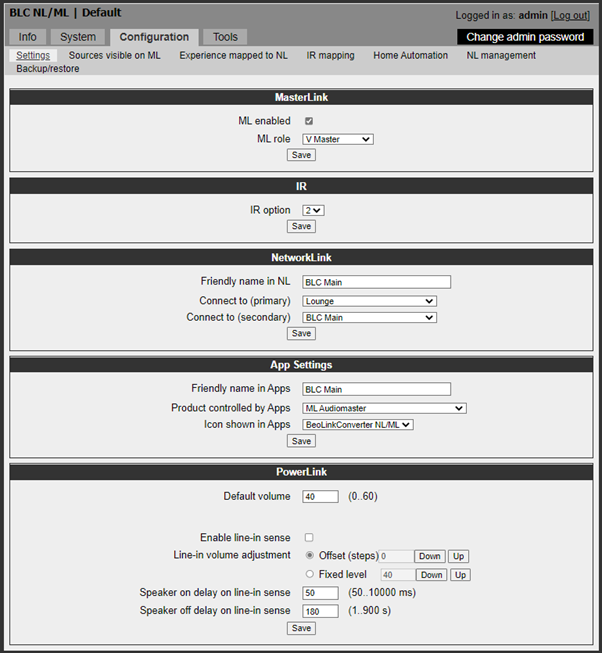
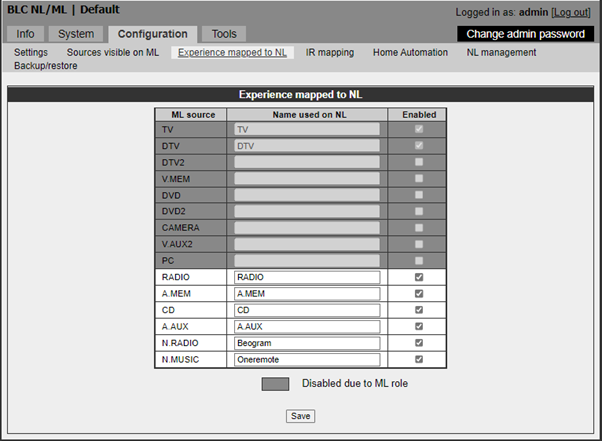
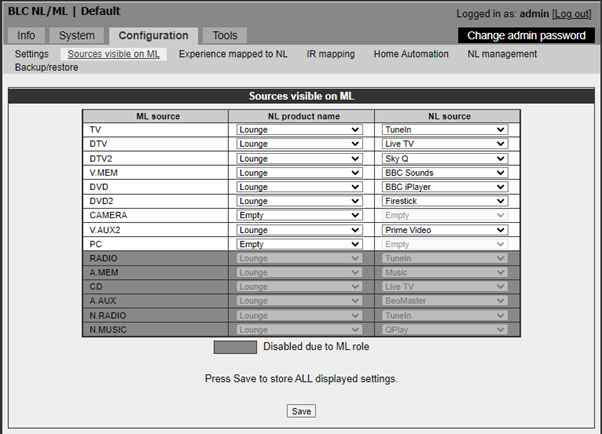
patcherleyGOLD MemberFor the NL/ML set up I did the following, not sure this is the best way but it works.


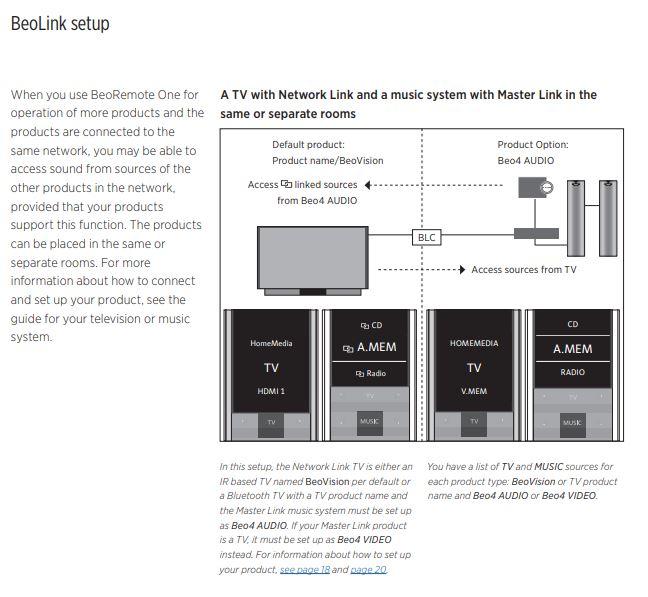
I then followed the BeoRemote User Guide for the Beolink set up, in my case I did not see the link symbol against the source so I just see “Radio” not as in the picture.

This all seems to work well, I can select a source on the BM7000 with my Beo4 and it plays and I can control the volume or I can select the source using the Beoremote. I can also play audio from the Eclipse on my Beolab 3500, my Beovision 6 and Beolink PC2. The only problem I really have is not being able to choose a speaker group when in Beo4 Audio mode.
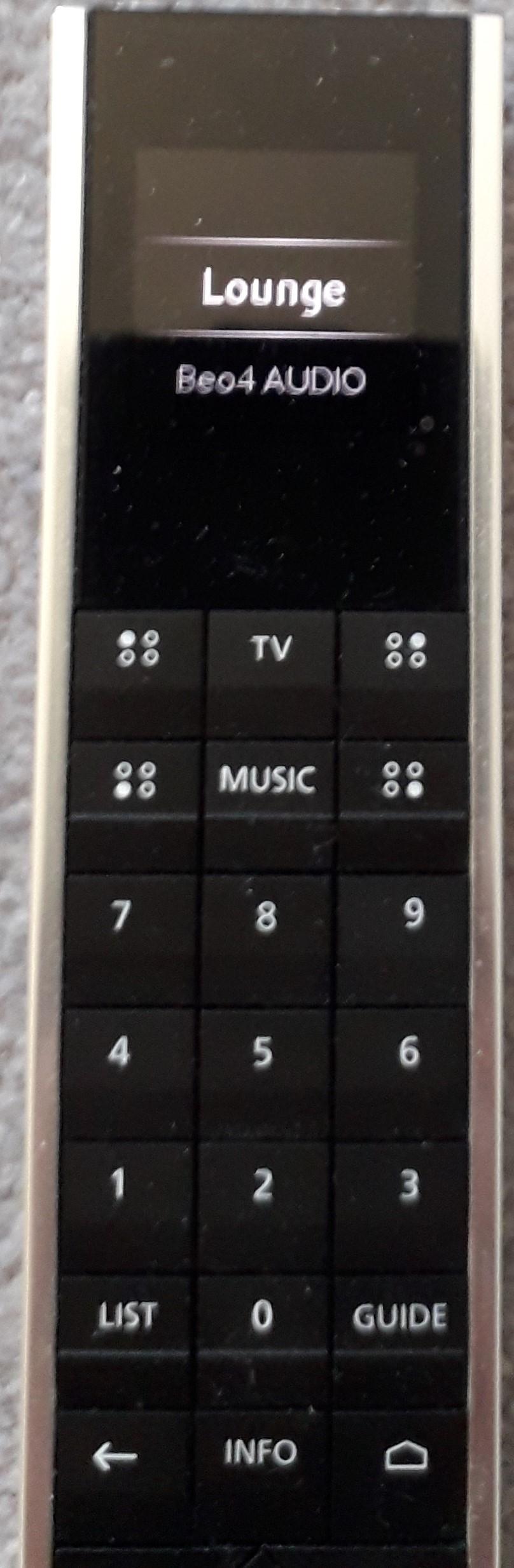
On my Beoremote I have a choice of “Lounge” my Eclipse or Beo4 Audio and choose which one.

Hope this helps.
Paul
Location: Hampshire
Favourite Product: Beolink 7000
My B&O Icons:
7 August 2022 at 17:07 #36650In reply to: Beosystem 7000 und Beovision Eclipse
MM, taking your lead I played around with the settings and it all works! The dealer had spent a number of days talking to B&O who were adamant it wouldn’t work. The only minor issue is that if I mute the Eclipse sound it also mutes the linked product. Paul
Same question as above for you.
7 August 2022 at 17:06 #36649In reply to: Beosystem 7000 und Beovision Eclipse
I can listen to sounds from the Eclipse on the Masterlink products and even switch it off but not the other way round!
To setup your system and know the capability limits of this system, please give some insight of your products (ML, NL)
Also settings of options (ML) and the BLC is essential
6 August 2022 at 11:33 #36648In reply to: Beosystem 7000 und Beovision Eclipse
patcherleyGOLD MemberMM, taking your lead I played around with the settings and it all works! The dealer had spent a number of days talking to B&O who were adamant it wouldn’t work.
The only minor issue is that if I mute the Eclipse sound it also mutes the linked product.
Paul
Location: Hampshire
Favourite Product: Beolink 7000
My B&O Icons:
5 August 2022 at 14:45 #36647In reply to: Beosystem 7000 und Beovision Eclipse
patcherleyGOLD MemberI can listen to sounds from the Eclipse on the Masterlink products and even switch it off but not the other way round!
Location: Hampshire
Favourite Product: Beolink 7000
My B&O Icons:
5 August 2022 at 12:35 #36644In reply to: Beosystem 7000 und Beovision Eclipse
patcherleyGOLD MemberSorry to reply in English but I have an Eclipse and a BM7000 and B&O told me that possibility 1 won’t work, the Eclipse NL doesn’t work that way so I have had to go with possibility 2 but sacrificing a BM7000 connection since AAux is used to connect to the Masterlink converter.
Paul
Location: Hampshire
Favourite Product: Beolink 7000
My B&O Icons:
5 August 2022 at 09:09 #36643In reply to: Beosystem 7000 und Beovision Eclipse
Hallo Matthias
Eigentlich gibt es 2 Möglichkeiten.
1: die kompliciertere und bessere.
Du brauchst einen (B&O) ML/NL Konverter um deinen BM7000 bzw den Masterlink Konverter mit einem NL-basierten Setup (Eclipse und eventuelle andere NL-Lautsprecher im Setup) zu verbinden.So kannst du den BM7000 inclusive Beogram ungefährt so bedienen wie vorher mit dem BV10.
2: die einfachere/günstigere, aber nicht so bequeme Lösung.
Ein (DIN-)Kabel vom BM7000/A.Aux oder auch vom PL zu Minijack/Line-Eingang am Sound Center/Eclipse.
Hierbei wird einfach das, was am BM7000 abgespielt werden über die Lautsprecher/Eclipse, hörbar. Die Quelle/BM7000 muß manuell/Beo4 ausgewählt/kontrolliert werden. Die Laustärkeregelung erfolgt über den Eclipse.2a: falls es dir nur um den Plattenspieler geht, könntest du einfach diesen mittels Adapter DIN zu Minijack mit dem Line-Eingang am Soundcenter verbinden (der BM7000 wird dann nicht benötigt).
Der Beogram muß mauell bedient werden/Lautstärkeregelung über Eclipse.Hoffentlich hilft dies ein wenig!
MM
Location: Flensborg————Danmark
-
AuthorSearch Results
-
Search Results
-
Topic: Eclipse MK2
4 months ago I bought an eclipse MK2 from my dealer and was informed that this model will accept future panels fromLG, I did not buy the original MK1 just for reason it was built with one panel in mind
Fast forward a few months it looks like we have eclipse 3, with the G2 panel- does this mean that the future upgradeability i was promised lasted for 6 months only??