Forum Replies Created
-
AuthorPosts
-
 MadskpGOLD Member
You should use the 2 pin connector for connecting passive speakers.
The third pin carries data and power for use in a multiroom system (MCL)
Location: Denmark
MadskpGOLD MemberRegarding removal of SMD caps see my two last posts here https://forum.beoworld.org/forums/topic/beosound-9000-ir-repair-pcb-14/#post-55674
Especially the youtube video is very usefull.
regarding the flat cable rip an alternative could be to solder two thin wires directly to the solder blobs on the motor and find the corrosponding signals on the PCB and solder the other ends of the wires there. I did that with a harddrive once to get it working again. Not sure if there might be any downsides to this method other than routing of and space for the wires
Location: Denmark
MadskpGOLD MemberThis unit is very intriguing.
I have been looking at the picture of the front several times since you posted, and I am wondering about the 3 columns of connectors named 1, 2 and 3 for both AUX, PL and AVL, and also the labeling master and slave in the bottom of the scart connectors.
Can you see if the connctors in the single columns (for example 1) are directly connected internally so they work as a passthrough or if they go through some circytry on the board? This could indicate wheether alle types of connectors in one column. are both master and slave
I wonder if the IR sockets might be for direct use with the 7 pin DIN IR connectors on the round IR eyes for Beolink active and Passive.
Location: Denmark
MadskpGOLD MemberNice writeup. There is something about those blue B&O instruments. You can almost feel the quality of them.
I had a student job in the drawing archive in the R&D department of B&O for a year back in 1996/1997. Those blue instruments were all over the place in the R&D department back then.
I have a SN14 power supply myself that I have had for almost 30 years now and had much use of. It might need some servicing by now though as the voltage regulation is a little unstable now.
I also have this box with a disassembled TG7 and an extra main PCB that I got from my father. He has no idea what might be wrong with it, and its not high on my priority list. But maybe someday 😀

Location: Denmark
MadskpGOLD MemberFor that use case the 1611 is the correct option.
it is possible to use the Beosystem 2500 with MCL by use of a Beolink Passive or ML-MCL converter.
It connects to the Beosystem with powerlink and converts to MCL
Location: Denmark
MadskpGOLD MemberAnd yes a 1614 can not be used in this scenario
Location: Denmark
MadskpGOLD MemberThe Beosystem 2500 (and 2300) does not have masterlink, but you are right they can convert to masterlink with the use of the 1611 converter connected to the AUX socket of the Beosystem
Location: Denmark
MadskpGOLD MemberThen, my second of two comments: Could maybe the indent while citation is applied be decreased? Otherwise only few or even only one character is displayed. Please see also the attachment. I believe it is not easy getting all these browsers running / displaying things correctly, I keep fingers crossed …
I can add that this has not been like this all the time with the new forum. I first observed it in the post you are refering to, and I use the citation feature a lot
Edit: also have a iPhone SE 2020
Location: Denmark
MadskpGOLD MemberThere was recently a thread about the same issue for a Beovision 11 (same platform as the V1), and in the last post in that thread user Vikinger tells that ha had to take his BV11 to a dealer to have it updated correctly as the USB stick method was not working in that case
https://forum.beoworld.org/forums/topic/netradio-in-beovision-11/page/2/
Location: Denmark
MadskpGOLD MemberI Also have diagrams/service manuals for some vintage TV’s
Hi, I have finally looked through all the manuals that we received, we dont have the following. If you are happy to scan them that would be great 😎
- Capri TV 606
- Capri TV 608
- Capri TV 609 FM
- Grand Prix TV 514
- Grand Prix TV 607
- Beovision 1300
- Beovision Type 3206-3223
- Beovision Type 3131-3132-3135-3136
- Beovision 300-700-100-1800
Also moved topic to BeoWorld Feature / Problem
I will bring them to the large format scanner and send them to you when done
Location: Denmark
MadskpGOLD MemberYou will need a 3.5mm minijack to rca cable to connect the Alexa and UCA222.
Be aware that you have to activate the A.AUX on the Beomaster/Beosound 5 for the music to pass through that to the speakers, so you can not voice control the whole process
Location: Denmark
MadskpGOLD MemberI was also a little confused about this at first, but there are some ways to achive this.
On the forum front page there is a thing called fresh topics
In the little forum drop down menu you can choose: Forum view -> Fresh topics
Or you can just use this direct link
https://forum.beoworld.org/forums/view/topics-freshness/
Hope this helps
Location: Denmark
MadskpGOLD MemberGlad to keep you occupied 🙂
Location: Denmark
MadskpGOLD MemberThe problem here is that the problem can be both software or electronics.
If you want to dive in to the electronic side of it I might have a hint here.
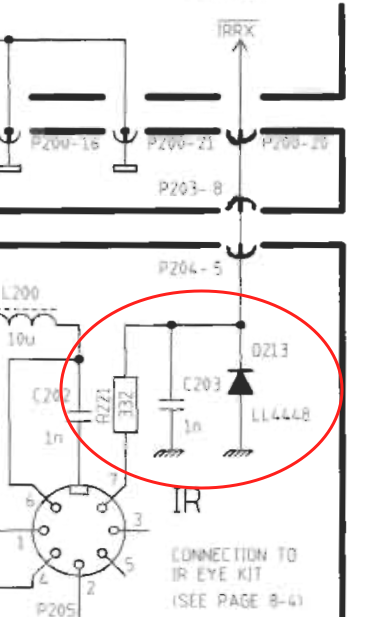
Since there are not schematics of these kind of newer products I have been looking at the schematics for Beolink Active and Beolink Passive just to see if anything obvious shows up.
It seems that for those the IR signal is connected to the microcomputer with only a resistor in between. The resistor is not likely to fail. However these units also has a protection diode to ground, and that could fail. A screenshot from the Beolink passive service manual to clarify what I am talking about

If you can locate a diode with the same purpose in the Essence you can meassure if it has continuty in only on or both directions whre the latter would indicate a failed diode.
Hope this can be usefull for the further proces of fault finding
Location: Denmark
31 July 2024 at 16:09 in reply to: BeoSound Essence Mk2 final sw version number? 2.5.55678(170713653) ? #57809MadskpGOLD Member(But I still can’t get IR control to work – annoyingly!)
Did you ever get any answer from B&O support regarding that issue?
Location: Denmark
MadskpGOLD MemberThe link wont work. it is on beoworld.org rather than forum.beoworld.org, it is from an old test part of the site which should not have been accessible.
Ok that explains the layout, but vierdly enough both me and the other member had acces and was getting notifications
Location: Denmark
MadskpGOLD MemberI have a thread that doe not have the correct page layout, and does not appear to be in any forum catgory. However I am getting notifications when a new post is made in the thread, and so must the other person posting do. The thread is here https://forum.beoworld.org/forums/topic/beocenter-2-cd-tray-belt/#post-29706
This has been resolved now
Thanks, I can find it now with the search funtion. But it looks like some of the most recent posts in the thread is missing, and therefor the direct link from before is not working anymore
Location: Denmark
MadskpGOLD MemberI have a thread that doe not have the correct page layout, and does not appear to be in any forum catgory. However I am getting notifications when a new post is made in the thread, and so must the other person posting do. The thread is here https://forum.beoworld.org/forums/topic/beocenter-2-cd-tray-belt/#post-29706
Location: Denmark
MadskpGOLD MemberYou were right – the DIN connection was quite poor because of the recess in the casing. If I pushed it in more firmly, it gave a better connection.
Good to hear that was also the case with yours and ended up making it better
Location: Denmark
MadskpGOLD MemberOh, that looks cool. That’s in my bookmarks now, hopefully they will bring that to market. That’s exactly what I need, and if I understood it right, might also be able to bring datalink controls back to the Beogram 3000 I have connected to by Beosound 4.
Yes it will be very interesting to see what they might bring to market. The possibilities are endless, but in the end it may rely on a buisness case how many variations they end up making
Location: Denmark
-
AuthorPosts