





Home › Forums › Product Discussion & Questions › BeoSound › Connect Essence MKII with old IR eye?
- This topic has 42 replies, 6 voices, and was last updated 3 months, 1 week ago by


-
AuthorPosts
-
27 June 2024 at 17:42 #57069
 MadskpGOLD Member
A little down this page looks to confirm that the wirering for the Essence and the NL/ML converter is the same although different color coding is used in the examples
https://forum.recordere.dk/bo-din-kabler-connection-div-diy_topic7820_page47.html
Location: Denmark
27 June 2024 at 18:00 #57070A little down this page looks to confirm that the wirering for the Essence and the NL/ML converter is the same although different color coding is used in the examples https://forum.recordere.dk/bo-din-kabler-connection-div-diy_topic7820_page47.html
Thanks for that – useful to know that I am at least trying to get it right, albeit without the Tx Rx connections!
The RJ45 cable that I used matches the T-568B standard colours of the second diagram. It would seem that B&O use those cables for 20m and great, but have a bespoke cable colour scheme for their 10m version.
Interesting that the photo at the link actually shows an Essence Mk1 – on the Mk2 the IR socket moves to the right of the Powerlink (one of the things I was checking when I bought mine!)
Location: Warwickshire, UK
My B&O Icons:
 28 June 2024 at 19:00 #57101MadskpGOLD Member
I have now made and adapter from RJ45 to 7 Pin female DIN so I can connect a ML IR eye to my NL/ML converter (only ground, +5V and IR data signals are connected in the adapter).
I have tested it with the NL/ML converter in stand alone mode with line in input and an active speaker + the IR eye connected.
I can control volume, set it to standby and activate it agin with a BEO4, so seems to be working with the wirering specified for the NL/ML converter.
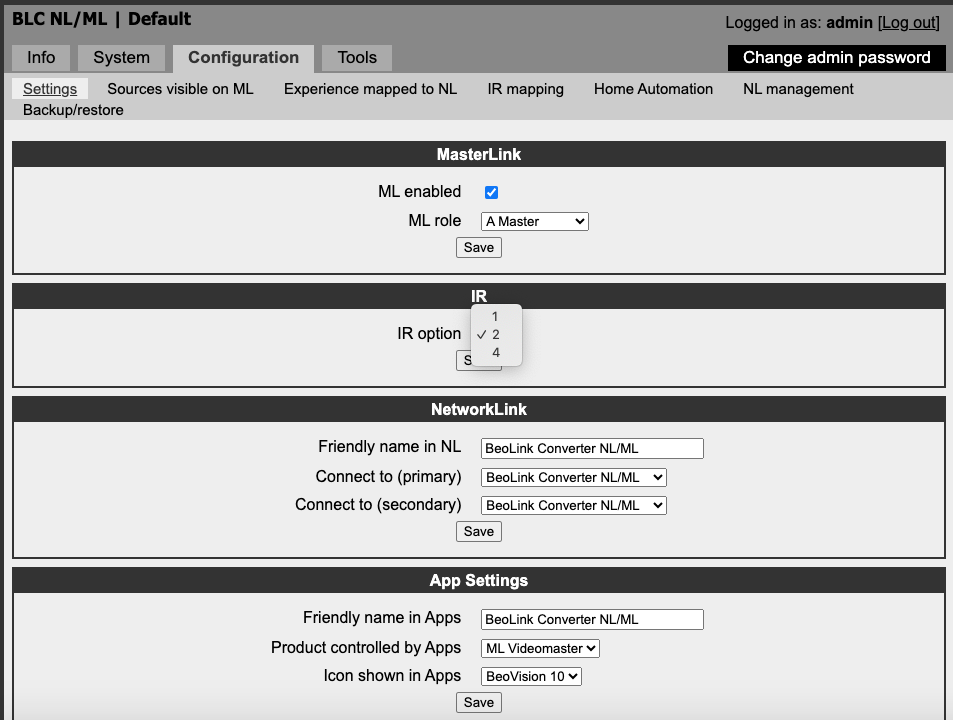
The settings for IR in the NL/ML converter are option 1, 2 or 4, and thats it, so might be different that on the Essence.

Location: Denmark
28 June 2024 at 19:03 #57102MadskpGOLD MemberI forgot to measure the voltages while I had it connected. Will try to connect it again during the weekend and do some measurements
Location: Denmark
28 June 2024 at 20:23 #57104Many thanks for checking with the NL/ML converter – it’s useful to know that works with the ML eye and just the three wires connected.
The instructions for IR with Essence only mention that it requires A.OPT 1. It’s explained here: https://support.bang-olufsen.com/hc/en-us/articles/360041742571-How-do-I-activate-sources-using-BeoRemote-One-or-Beo4
Option setting is one of my concerns. As we know, when Option setting is done with the Beo4, a B&O product is usually in ‘stand-by’ (powered up but not turned on). I can’t be totally sure what state the Essence should be in when setting options. It can either be ‘off’ (but powered), at ‘network standby’, or ‘on’. I am guessing that ‘network standby’ is right for option setting, but have tried all three states just to check. It would be far easier if there were a drop down A.OPT menu in the settings like your NL/ML converter.
Anyway, I am hoping that there’s a bug with the current firmware; I sent a query to B&O last night and they have responded to say that it has been forwarded to their technical team.
Location: Warwickshire, UK
My B&O Icons:
30 June 2024 at 15:08 #57118MadskpGOLD MemberI forgot to measure the voltages while I had it connected. Will try to connect it again during the weekend and do some measurements
Ok got the setup with the NL/ML converter up and running again. Measuring arround 1.2-1.3V between ground and IR data when no command is used on the BEO4, rising to arround 4V when a command is used from the BEO4, so opposite reaction from when used with a ML or MCL product, but higher voltages than you see.
If I disconnect the IR data wire I meassure Arround 1V on the IR data srew terminal on the Eye, and arround 4.95V on the loose wire from the NL/ML converter.
Hope it can be usefull. In any case I got arround to make the adapter which is nice to have for easy connection until I eventually find a resonable price one with JOIN button.
Location: Denmark
30 June 2024 at 15:09 #57119MadskpGOLD MemberAnd I will let the setup be conencted for now, so let me know if there are other things that migth make sense to test
Location: Denmark
30 June 2024 at 17:39 #57120Thanks for testing those voltages. My Essence doesn’t seem to be supplying any voltage to a disconnected IR wire, so perhaps there is a Firmware problem (hopefully not a hardware problem, but we’ll see).
I am still waiting to hear back from B&O Tech support, and will post back here when I do.
Location: Warwickshire, UK
My B&O Icons:
30 June 2024 at 18:19 #57123MadskpGOLD MemberMy Essence doesn’t seem to be supplying any voltage to a disconnected IR wire, so perhaps there is a Firmware problem (hopefully not a hardware problem, but we’ll see).
Ok good to at least know that the problem is in the essence itself and don’t come down to a comptability issue (would not expect that either based on what we know about B&O IR eyes).
Hopefully it can be solved by replacing the firmware, but I guess you can not just download an older one yourself and try?
Location: Denmark
31 July 2024 at 16:36 #57812Just an update – having been reminded by the other Essence thread!
I have been in discussions with B&O tech support but I still can’t get it to work. They advised me to update the software (which I already had) and asked me to confirm the connections – I sent a copy of the NL/ML eye wiring diagram from the ML handbook and they didn’t say it was wrong. I also asked them to confirm when to set A.OPT 1 – once they understood the question they told me that it should be done when the Essence is in ‘Network Standby’ – again, I had already tried this.
So I have given up! If there are new SW updates I will check again. Otherwise, it would be useful to know if anyone has got it to work recently, either with the newer JOIN ML IR eye or the older TIMER version that I am trying.
Location: Warwickshire, UK
My B&O Icons:
31 July 2024 at 17:26 #57813MadskpGOLD MemberThe problem here is that the problem can be both software or electronics.
If you want to dive in to the electronic side of it I might have a hint here.
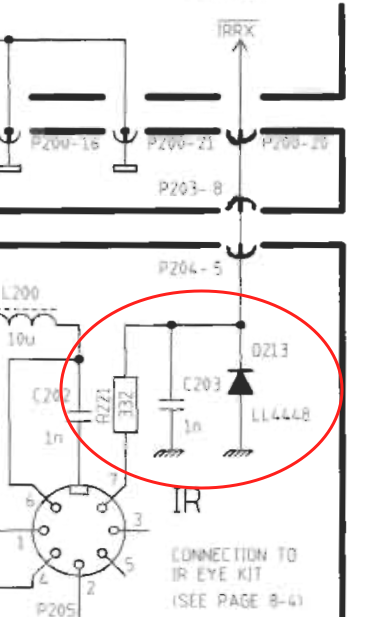
Since there are not schematics of these kind of newer products I have been looking at the schematics for Beolink Active and Beolink Passive just to see if anything obvious shows up.
It seems that for those the IR signal is connected to the microcomputer with only a resistor in between. The resistor is not likely to fail. However these units also has a protection diode to ground, and that could fail. A screenshot from the Beolink passive service manual to clarify what I am talking about

If you can locate a diode with the same purpose in the Essence you can meassure if it has continuty in only on or both directions whre the latter would indicate a failed diode.
Hope this can be usefull for the further proces of fault finding
Location: Denmark
31 July 2024 at 18:03 #57816Thanks @madskp – I may well have a look inside! It’s actually boxed up again at the moment, but you’ve given me a reason to get it back out and have a play.
Location: Warwickshire, UK
My B&O Icons:
31 July 2024 at 18:45 #57817MadskpGOLD MemberGlad to keep you occupied 🙂
Location: Denmark
2 October 2024 at 13:57 #59696A quick update …
I now have an NL/ML converter, so I today connected my round ‘Timer version’ IR sensor and it controlled the converter perfectly, hence I have proved that there is nothing wrong with my IR sensor or RJ45 wiring. I tried the IR sensor again connected to the Essence and it still didn’t work, despite yesterday’s Essence SW update.
It might be time to delve inside the Essence as @madskp suggested a couple of posts ago. I have limited time at present and need to prepare my motorbike for its MOT tomorrow, so I will report back here when I have news.
Location: Warwickshire, UK
My B&O Icons:
2 October 2024 at 17:13 #59702MadskpGOLD MemberLooking forward to the development in this 😀
To bad that the update did not change anything
Location: Denmark
25 July 2026 at 14:22 #124663An old thread I know but there’s been a major development 😊
After much patience I today got hold of a new round IR eye with the ‘join’ button, pre-wired with an RJ45 ready for Essence or NL/ML Converter (an ‘as-new unused’ purchase from Mercor’s eBay shop for about £45 incl P&P).
I booted up the Essence Mk2 connected from RJ45 PL output to the Aux input of a BeoSound 1. I pressed the sensor’s ‘join’ button and the internet radio burst into life. I then tried a Beo4 with no response.
I then used the app to stop radio playback, and carried out the usual Beo4 procedure to put the Essence in A.OPT 1 – this was acknowledge with a double flash of the little green LED at the bottom of the IR receiver.
I then pressed radio on the remote and it burst into life! Allows me to change channels and everything! I am very pleased (and relieved that there isn’t a fault with the Essence)! 😊
I will now try all the ways to control the Essence with the Beo4 (aux/source selection etc) and refer back to my old notes about what I was trying to achieve previously. I will add the NL/ML converter plus my M3 at some stage and see what sources I can select from where.
I genuinely think that there must be some sort of data ‘handshake’ requiement that prevents an older (non-join-button) IR sensor from working with the Essence Mk2, hence my problems with extensive testing of other sensors.I am happy to try other Essence Mk2 ‘IR control’ experiements if anyone wants me to look at anything else.Location: Warwickshire, UK
My B&O Icons:
25 July 2026 at 16:10 #124664Hi Guy
That sounds amazing.
However allow me a couple of questions…
1. Normally you have to activate the Aux on the BS1 manually:
‘The AUX socket is activated by pressing both arrows and CD simultaneously’.The way you describe it, the BS1 autosenses a signal coming from the Essence MK2/PL (and starts in Aux-mode).
Have I understood that correctly?2. You write that the Netradio (from the Essence) starts and can be controlled, when you push Radio on the Beo4.
How come the BS1 does not react to the Radio command and activates the built-in tuner there???I would assume, that this will only be possible, if you use a BROne/bt (connected to the Essence), since there is no ir command going on.
3. Is your goal to use the BS1 as an only-speaker device with the Essence Mk2 as the source device (including whatever is beo-linked to it)?
That would imo be a great little setup!P.S.
I guess, in that case the ir-eye would not be needed at all.
MM
Location: Flensborg————Danmark
25 July 2026 at 16:33 #124667Sorry MM it’s not that good – I have misled you!
I put the BS1 in A.OPT 0, and then used the buttons to select AUX, hence just using as a dumb amplifier. It would indeed be great if I could work out a way to auto start it. But doesn’t one of the Essence BlueTooth remote setups also send an IR aux signal (I think I read that here).
My main aim was to get IR control of the Essence working – I really don’t like controlling it with the phone App and would rather just pick up the Beo4 and press RADIO (or N.RADIO – it responds to both). Eventually I will connect Beolabs, probably either my BL4000s or BL4s.
Just to add, volume control of the Essence also works well using Beo4 or the buttons on the IR sensor (as long as the Essence is not in fixed output level mode).
EDIT: I have also now updated the Essence SW to version 6.5.58119.11794462 (the SW change versions are here: https://update.bang-olufsen.com/products/58ba6c9e15524870a403957cdfbee6ab)
(IR control was working both before and after the SW update)
-
This reply was modified 3 months, 1 week ago by
-
This reply was modified 3 months, 1 week ago by
Location: Warwickshire, UK
My B&O Icons:
25 July 2026 at 19:16 #124670MadskpGOLD MemberGreat to hear that you got it working ind the end and that it was not a fault in the Essence or a software issue. I guess this also confirms that its only the IR eye with the join button that works on the Essence MK2.
Location: Denmark
25 July 2026 at 19:22 #124671The BS1 in Option 0 – that explains it!
I have always felt it a pity, that there is no ‘autosense’ on the A.Aux (of the BS1).
That is a feature that came with later products.Would have been really nice, since the BS1 is very good sounding.
(That always kept me from buying one)You can use ir with the BROne, but you have to change from one setting to another….which in the long run is too awkward.
I guess the only way to make that work, is some kind of automation….which I do not really understand.
The Essence MK2 just recently got an update – fantastic that B&O has not forgotten this long eol’ed product.
I have 3 of them 😀😀😀Happy further experimenting.
MM
Location: Flensborg————Danmark
-
This reply was modified 3 months, 1 week ago by
-
AuthorPosts



- You must be logged in to reply to this topic.