Forum Replies Created
-
AuthorPosts
-
 MadskpGOLD Member
Not much knowledge about the Beosound Moment, but have noticed quite a few threads about dead tablet which might be a dealbreaker.
As for updates and software support for streaming services I would not count on it.
However if used with a NL/ML converter it is possible to t define which ML source the NL sources will be. So music from the moment can be set to be N.Music, or also a Video source which will free up the N.Music for other sources on the ML network
If you are patient I think Hall Audio is working on something togheter with Polyvection that could be what you are looking for. I am not sure if it has been mentioned much her on Beoworld, but there was an episode about it on the Beotalk Podcast on youtube not long ago https://www.youtube.com/live/_9yRGFLIepY?si=mdYDLxA3iMGvTSPy
Location: Denmark
MadskpGOLD MemberBased on this post the outer ring in the DIN connector has a separate wire on a Beogram 2000, so pretty sure that must be a ground connection https://forum.beoworld.org/forums/topic/how-to-wire-7-din-plug-to-beogram/#post-53422
My parents has the same cheap Riaa amplifier as you have (you mentioned in another post). I remember the first time I connected it there was some hum. I noticed that because the DIN connectors on the RIAA is recessed the outer casing on the wire DIN plugs can be a little fidely to get into the the connector. It was like it had to be alligned very precisly to get the connector get to the bottom. Hope that makes sense
I know your problem is not hum, but a bad connection can make all sorts of trouble, so maybe worth to try
Location: Denmark
MadskpGOLD MemberEven then, despite the Datalink protocol being design to have a Beogram and a Beocord on the same bus (only from a data bus point of view, not the audio), I don’t think the Beosound has kept that capability in its firmware.
It has the capability. That is what I have tested without the audio signals as mentioned in the first post. I think B&O has made it this way so datalink will work wheether the AUX connection is used with a Beogram or a Beocord, although only one at a time.
Datalink sources always drive the audio lines, and it’s up to the receiver to select which source to listen to.
Which means a simple “Y” cable can not be used to connect 2 sources, it would require an active device, that would select which of the sources audio is sent to the to Beosound.
And this missing source selection caused by only one physical AUX input might be the reason for this not to be a good idea to use with an Y-cable.
It could be interesting with an external datalink controlled audio selection switch for this purpose, but the number of people who would use it might be very limited since this scenario only applies to Beosound Ouverture and Beocenter 9300 as far as I can figure out.
Location: Denmark
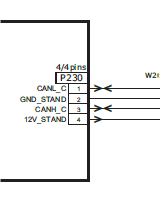
MadskpGOLD MemberNormally I’d refer you to the service manuals (avail to Silver & Gold members), but here are screenshots from the relevant sections. I am not convinced that it is straightforward but if you can get it to work please come back and let us know how! BV11:
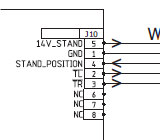
 BV10:
BV10: 
I would no be to sure that these stands are compatible. 12V on one vs 14V on the other. Two wires with twoway communication on one vs 3 wires with one way communication on the other.
You have to be very sure what you do if you try to combine these
Location: Denmark
MadskpGOLD MemberIt looks like attaching STL files is not working on Beoworld based on some other threads about 3D printed parts
Location: Denmark
MadskpGOLD MemberIs your BC2 a Mk1 or Mk2 version?
I think it’s a MK1 (no DAB and no sound when touching the buttons)
The Head unit is Type 2801 and the socket unit type 2811. SW 1.3 (both on the labels and in the service menu), manufactured 2004, so probably an early one.
Location: Denmark
MadskpGOLD MemberDid you find a solution, similar issue with AV5 and Oveture
I guess the described solution can also be apossibility for you with the exception that the Ouverture might not be able to be in option 6 depending on the age of it
Location: Denmark
MadskpGOLD MemberI try to link a Beocenter 2 to a Beocenter AV5 via Masterlink. I have additional speakers connected to the Beocenter 2. What is the correct option setting for the Beocenter 2 and the Beocenter AV5? Normally it would be 1 each, but this results in both CD players turning on when pressing CD. Therefore, Beocenter AV5 in option 2 and Beocenter 2 in option 0 or option 5 seems right. However, using the AV button to transfer sound from one source to the other doesn’t work properly then. Any ideas how I can get that configuration to work properly, if any such configuration exists?
I can’t find any manual describing this scenario, neither any description of how option settings works for a Beocenter AV5.
I have a Beocenter 6, 22″ with Built in radio myself and have tried to see how that react to different option settings, so my answer is based on that, and things might work differently on a Beocenter AV5.
On the Beocenter 6, 22″ the video option settings seems to have effect for both the video sources and the radio source.
If it set it to option 1 (or 5) I can only control the video sources when controlled locally
If I set it to option 2 (or 6) I can control both the video sources and the radio source when controlled locally
If I connect a link speaker I can only control the sources from that if the TV is in option 1 or 2.
Based on that I think that the Beocenter wil work as both and audio and video master at the same time when in option 1 or 2.
So to solve your issue I guess that you have to setup either the Beocenter AV5 or the Beocenter 2 as a link room in order to avoid conflict with two audio masters in the same system.
For example you can set the Beocenter AV5 in option 6 and the Beocenter 2 in option 0. That way you can control the sources on the Beocenter AV5 with normal commands, and the sources on the Beocenter 2 with Link + source commands. Downside is yo do not get sound out of the speakers connected to the Beocenter 2, and you can not distribute sources from the AV5 to other link rooms.
An other possibility is to set the Beocenter AV5 in option 2, and the Beocenter 2 in option 4, and no masterlink between them. That way you can control the sources on the Beocenter AV5 with normal commands, and the sources on the Beocenter 2 with Link + source commands. Downside is that one system is not linked to the masterlink network.
Hope this helps figuring out a way to use the system.
Location: Denmark
MadskpGOLD MemberI can also confirm after a test that with a combination of BC2 (A.Opt 2) and Beoport (Opt. 0) I also get the the metadata showing on the BC2 display
Location: Denmark
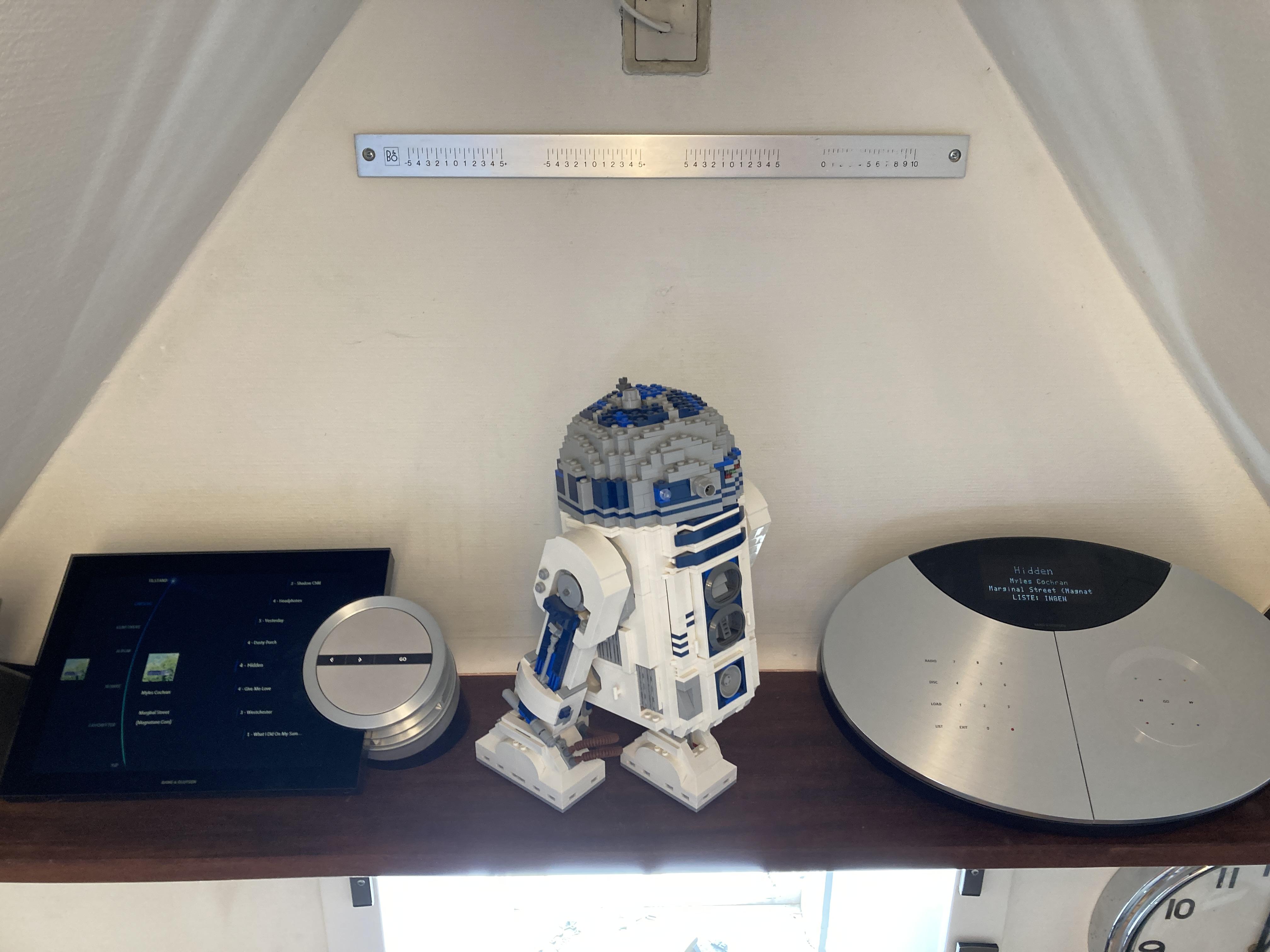
MadskpGOLD MemberHere is a shot of my BS5 and BC2 combo where the BC2 shoes the metadata of the music played on the BS5. I will asume the data is displayed nearly the same way on the BS4

The BC2 is set as master (A.Opt 2) and the BS5 as no in AudiomasterLocation: Denmark
MadskpGOLD MemberTake a look at this thread
https://archivedforum2.beoworld.org/forums/t/35714.aspx
The problem sounds like the one you have, and at some point the original poster confirms that he used a wrong cable to start with, and the right cable solved the problem
Location: Denmark
MadskpGOLD MemberSometimes a thread can really work fast when you are busy with other things 😀
Nice to hear that it all seems to work out even with the age of this device 😀
Location: Denmark
MadskpGOLD MemberThis is useful, thanks. I bought another MCL2AV from eBay but ‘untested’ as it was just the unit – no cables, power supply or IR eye. I thoight it was worth a shot though as it was only £10 and I already have the cables and IR eye from my old MCL2A. I’d like to test if it is working – I have a bunch of old power adapters, the closest one is 12v 1.25A – would that be risky given the higher amp rating? I’s have to reverse the polarity on it too but that’s simple enough.
I would not worry much about the higher ampere rating. The circiut should not draw more amps than needed unless there is a short circuit.
The polarity however is more crucial as that can kill the unit.
I have now tested 3 MCL2AV’s with the 12V supply without any issues, so pretty confident that a 15V supply is not needed.
Location: Denmark
MadskpGOLD Memberbut no matter what option I try, the N.Music audio will only ever come out of the PC speakers – I cannot get it to play through the connected Beolabs.
One thing that came to mind. Are you aware that a minijack cable has to be attached from the sound out on the PC and to sound in on the Beoport?
This might not be obvious, but because of the age of the Beoport it does not carry sound via USB
Location: Denmark
MadskpGOLD MemberBetter to ask the manufacturer?
Well, the innnards might not be B&O, and guess that B&O support might not know much about this product now.
However reading about the topic for other brands, it sounds like the filesystem on a harddisk recorder might be properitary at not easily (if at all) readable on a computer, so might look for other methods of transfer
Location: Denmark
MadskpGOLD MemberThat link you gave doesn’t seem to work by the way.
Sorry, a mishap of switching between MacOS and Windows and using the wrong shortcuts for copy and paste 😉 The right link is this one https://forum.beoworld.org/forums/topic/beoport-beoplayer/
I think I’ve tried every setting now and nothing seems quite right. The closest I’ve got is the default setting of Option 6, and with the Powerlink cable to my Beolab speakers connected to the PC2, rather than direct to my BS4. This will then play CD, radio from the BS4 through thr e speakers, and it will display track info for N.Music in the BS4 display, but no matter what option I try, the N.Music audio will only ever come out of the PC speakers – I cannot get it to play through the connected Beolabs.
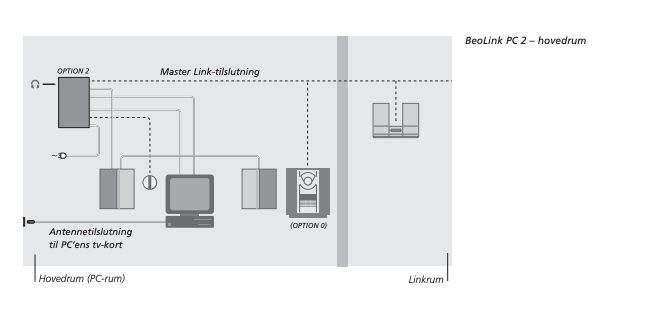
Ok sounds odd that you get track info on the BS4 display, but no music. I have not been able to find much info about setups like this. However I stumbled upon a version of the danish manual for Beolink PC2 (rather than the newer manual for Beoport) that has this drawing (in Danish sorry):

This might suggest that the Beoport is setup as the Master in option 2, and the Beosound in option 0 (no remote). This will however require an allways on computer for remote control. Have you tried with the BS4 in option 1 or 2 and the Beoport in option 0?
There are a good few options available in the Beoport software, to which, of course, the user manual makes no reference whatsoever!
The manual could be more thorough yes, but I also think that the software part of the product evoled over time, making a static manual problematic to handle all functionallity.
I have a Birthday for one of my kids tomorrow, but will try to dive a little more into it friday or saturday as I also wan’t to know more about how that should work.
Location: Denmark
MadskpGOLD MemberThis post https://“ServerURL”=”https://nradio.beoplayer.com/nradiodata.asp”
has some discussion about the N.radio features of the Beoport, and indeed some talking about a registry file.
I can however not figure out what ended up getting it to work in that thread. Maybe @Guy can help there
I just tried to uninstall the software on my PC to reinstall it and see if that changed anything, but ran into that I can’t install without the Beoport connected.
Will try kater when I am near the Beoport again
Location: Denmark
MadskpGOLD MemberI have it connected to my PC via USB, and also to an ML junction box which is them connected to my Beosound 4. My Beolab speakers are connected to the BS4, not to the PC2. If I hit N.Music on my Beo4, N.Music appears on the BS4 display, but nothing plays.
Have you setup options settings on the Beoport? This is done under Setup -> Config -> Advanced
It might be in option 6 (as a link room) as standard, and can’t distribute source to ML in that option.
Also I was given to understand that N.Radio still has some limited functionality on a PC2/Beoport, but if I click that, the panel comes up on the left but everything juts says ‘Empty’
Looking at it on my computer (not connected to the Beoport at the moment) my radio list is also empty, and in the bottom is a text saying not registred. Something rings a bell about a registry file having to be applied, I wil try to see if I can find some more info.
Location: Denmark
MadskpGOLD Memberhttps://forum.beoworld.org/forums/topic/bl3500-and-the-mcl-pl-connector/#post-44537
Then you are most likely missing the ground connection from your bluetooth adapter. You can see the difference in pinout between the cable for a Beolab 3500 MK1 and MK2 (most likely the cable you have) in number 2 post in this thread https://www.hifi4all.dk/forum/forum_posts.asp?TID=32157&PN=1&TPN=30
The specific cable for the Beolab 3500 MK1 are sold by several sellers including one of this sites sponsors Sounds Heavenly https://soundsheavenly.com/airport-express/155-2344-ipodtvairport-express-to-beolab-3500-mk2-cable.html#/2-length-1m/62-beolab_3500_version-mark_1
This will still have the limitations mentioned in my earlier post
Location: Denmark
MadskpGOLD MemberAre you using a standard 7 Pin DIN to minijack adapter or one that is made for a Beolab 3500 MK1?
The reason for asking this is that the wirering of the adapter is different and could affect what you are experiencing
Location: Denmark
-
AuthorPosts