Forum Replies Created
-
AuthorPosts
-
 Moderator
true. this is very reasonable approach. when I receive the cables and get my MMC2 back from service, I will start working around with it and let everybody know
?
Location: Warwickshire, UK
My B&O Icons:


When attempting to find workable solutions for non-standard or ‘novel’ configurations of B&O equipment, it is not unusual for there to be several different methods to move towards the desired results. This thread is fairly typical of some of the more complex configurations discussed within the forum.
However, the two main solutions that you have been given share very similar (possibly identical) hardware requirements in terms of cables and adaptors. I think that it is time for you to get hold of the required hardware and conduct experiments to work out which solution you prefer. As mentioned earlier in the thread, you will probably need to look carefully at how you control volume for your headphones, and also make sure that the BS9000 responds correctly to your B&O remote, if you need that functionality.
Location: Warwickshire, UK
My B&O Icons:
Anyone with a BV10-32 at home….please comment!
MM
I wanted to, but can’t find a PIN code menu or entry method anywhere on my BV10-32, or in any of the manuals!
EDIT: But if I have time tomorrow I’ll dig out a Navi remote and try again.
Location: Warwickshire, UK
My B&O Icons:
Im Going back many years but from me memory you would need to use optical to rca from the Apple TV and I wouid presume use the scart socket, might be able to use spdif socket, then the masterlink will carry the sound to the link rooms, passive kits shoud work ok link room you would need to press the av command followed by source ie dtv. That worked on the avant and bvis 7’s I think that will work on bvis 10
Yes that all makes sense and should be the same on BV10. Pressing AV before DTV is only required if the link room is in L.OPT 5 (where it normally only responds to audio commands). If you put a Link Room in L.OPT 6 it should respond to both audio and video commands, hence no need to press AV first.
Location: Warwickshire, UK
My B&O Icons:
So I just rigged up a quick test system to check the hdmi distribution to an audio-only link room. (I don’t now have a second BeoVision so I can’t test a BeoVision-only linkroom.)
My BV10-32 already has Apple TV 4K connected via hdmi. I ran an ML cable to another room and connected a BeoLink Active plus IR sensor and speakers. The TV was in V.OPT 1 and the Active in L OPT 6.
The result is not straightforward! If I airplay to the Apple TV and then select the Apple TV (using source ‘DTV’) from the ‘link’ room, the TV light turns green but the music does not play in the link room, unless I return to the main TV toom and also select DTV to turn the TV fully on. I can then mute the TV’s sound and the music keeps playing in the link room, but if I turn the TV off sound goes off in the link room. Hence music distribution is workable but far from ideal.
Interestingly my BV10-32 also has a built-in digital tuner – the DVB T2 ‘HD’ version. Distribution of sound from this HD tuner is possible to the link-room without the TV being fully on. I can even listen to the TV’s built in HD tuner sound in the link room whilst Apple TV is playing on the TV itself.
It’ll be interesting to hear results from your test, but I think that when I tried it before with a BV6 link room, the sound from the hdmi must have been transmitted over the rf coax.
Location: Warwickshire, UK
My B&O Icons:
The simple solution here is to borrow/loan a source (Apple TV, Firestick etc) that only has an hdmi output, connect to the BV10 and test it with the ML system.
I think it will work to distribute the source to link rooms, however:
- Link rooms that have a BeoVision only may just receive the sound via the rf, rather than ML, hence it could be poorer quality (and possibly mono – but I am not sure). If the link room picture also works, quality could be poor (mine was watchable but only just!)
- Link rooms that have audio only (Beolink Passive/Active) should receive the full stereo sound. Moreover, selecting the hdmi source from the audio-only link room should just turn on the TV in the main room but with a muted (blank) screen.
*** EDIT: See my post two below regarding problems with the audio-only link room ***
I suggest doing some testing and reporting back!
Location: Warwickshire, UK
My B&O Icons:
Have a look here: https://archivedforum.beoworld.org/forums/p/42495/352266.aspx#352266
Location: Warwickshire, UK
My B&O Icons:
No, I mean this:
BS9000 (aux) to splitter …
Splitter socket A to Beogram (accepts input – pins 3&5)
Splitter socket B to Moment (provides fixed line level output – pins 1&4)
BS9000 (powerlink) to BT transmitter (provides variable output, as required for headphones, controllable with BS9000 volume panel or associated Beo4)
And that’s my last ‘input’ for tonight – it’s been a long day … ?
Location: Warwickshire, UK
My B&O Icons:
the tv is connected to masterlink and rf distribution, as far I know you can’t distribute an hdmi signal via rf
I thought that too, but was surprised when it worked to distribute Apple TV hdmi from my BV10-32 to a linked (with ML and RF only) BV6. Other forum members have also noticed this anomaly.
EDIT: The last bit of this post mentions the distribution anomaly – also noticed by pepps with his BV7: https://forum.beoworld.org/forums/topic/dvb-hd-t-c-mk1-latest-version/#post-4728 Perhaps the actual restriction is that the ‘HD’ picture is not distributed, but a lesser SD version of it.
Location: Warwickshire, UK
My B&O Icons:
What do you mean pass both the BS9000 and BG65000 to the moment? how can I do this?
I was answering your question using similar terminology! Perhaps I should have said that my amended solution would pass either BS9000 or BG6500 to the Moment (depending on what source you select on the BS9000, CD or AUX).
and how I can the stream to Bt transmitter?
From the variable Powerlink output, in this amended solution.
Location: Warwickshire, UK
My B&O Icons:
Guy wrote:
I was thinking that the headphones would be able to control the volume output of the BT transmitter. Perhaps not! Anyway, instead just connect the BS9000’s variable Powerlink output to the BT transmitter, and connect the fixed output (from the adaptor) to the Moment’s line-in.With the above solution I would not be able to pass to the Moment either the BS9000 or the Beogram6500, right?
The level is very important and it is good that it was mentioned hereMy amended solution would pass both BS9000 and BG6500 to the moment. The AUX socket is not just an input – it also works as a continuous line level output of whatever source is playing on the BS9000.
Location: Warwickshire, UK
My B&O Icons:
With the following connection diagram:
Beogram 9000 ———> AUX (BS9000)
BS90000 (powerlink) —–>splitter —A—–> Moment
splitter—B—> BT transmitter
the BS9000 can control only the volume of the cd’s not the volume of the Aux?
thank you
The BS9000 will control both the volume of the CD and the volume of the Aux.
However, with this arrangement you have two devices sharing (via the splitter) an identical PL output, hence the inputs of the Moment and BT transmitter are effectively connected in parallel and this may cause interference and/or interfere with the output levels.
EDIT: This thread really needs Steve to comment on the best solution/workaround! I’ll send him a PM.
Location: Warwickshire, UK
My B&O Icons:
How is the TV linked around the house? Does this use masterlink and coax, or some kind of hdmi matrix system?
Even if it’s the former, I tested a setup with my BV10-32 and found that the ATV picture was distributed. Picture quality was poor, as expected from rf distribution.
Location: Warwickshire, UK
My B&O Icons:
I was thinking that the headphones would be able to control the volume output of the BT transmitter. Perhaps not!
Anyway, instead just connect the BS9000’s variable Powerlink output to the BT transmitter, and connect the fixed output (from the adaptor) to the Moment’s line-in.
Location: Warwickshire, UK
My B&O Icons:
correct??
Yes. This will provide a fixed BS9000 line-level output to the BT transmitter, and a variable output to the Moment (I said Core by mistake earlier, sorry). The only difficulty is making sure that the connector from the splitter to the BT transmitter is from the DIN output pins (1&4) rather than the input pins (3&5). Many people find it easier to use a lead like this which provides both inputs and outputs: https://soundsheavenly.com/bang-olufsen/154-2336-5-pin-din-to-4-x-rca-input-and-output-cable-for-bo-naim-quad.html#/2-length-1m
If there are no Powerlink speakers connected directly to the BS9000, I think you will also need one of these to maintain remote control: https://soundsheavenly.com/bang-olufsen/141-2309-beosound-9000-speaker-sense-adapter-gives-remote-control-functions-when-no-speakers-are-connected.html#/18-colour-black
It is probably worth contacting Steve at Sounds Heavenly to confirm (or otherwise) that my suggestions will work!
Location: Warwickshire, UK
My B&O Icons:
The BS9000 AUX socket can be an input and output at the same time, but at the very least you’d need one of these cables to do both: https://soundsheavenly.com/bang-olufsen/11-312-7-pin-aux-splitter-dual-aux-tape-input-sockets.html#/20-length-02m
And then connect from the adaptor’s second socket to your Beosound
CoreMoment – I am not sure if Sounds Heavenly provide a cable to do this direct because you need the output to come from DIN pins 1 and 4.Alternatively you could take an audio output from one of the BS9000’s Powerlink sockets, remembering that the volume will be variable (which might not be a problem if in A.OPT 0, or you are not using an IR remote. )
Location: Warwickshire, UK
My B&O Icons:
You can also try to measure voltage on pin 6 and 7 on your devices just to see if you also have the 5V on pin 6
I just checked – same results for me (exactly as in your first post).
It’s a shame that the 5V is always there, not just when turned on, as that could have been useful.
Also, it would be quite useful to be able to turn the BS1 on via the AUX input, for instance when I start airplaying to a connected Airport Express.
Location: Warwickshire, UK
My B&O Icons:
No, please don’t do that. As Madskp wrote ML requires a special receiver and transmitter circuit operating at low voltages +/- 0.25 V. It’s definitely not available in the BS1 according to the service manual. My best guess is that it’s an exposed serial port of the microcontroller. Either use an oscilloscope or a logic analyser to see if something is coming out there. If it’s valid serial data then you could talk to it with something like the FTDI TTL-234X-5V.
Thanks for advice @B3OHACK3R! I will leave that thought alone and start saving for an oscilloscope!
Location: Warwickshire, UK
My B&O Icons:
This is not something that I am currently working on, but I have made an interesting (to me!) observation during my recent tests using iPhone inputs to Beolink Converter 1611/BL3500.
Like many legacy B&O enthusiasts, I have amassed a number of 3.5mm to 5 pin (or 7 pin) DIN connectors, useful for connecting such devices as iPhones or Airport Express to B&O DIN aux sockets. Typical connector shown below:

In testing, I noticed that two of my four connection leads have the L&R channels reversed!
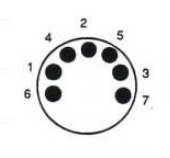
In the 3.5mm ‘headphone’ plug, the tip is ‘left’, the ring is ‘right’ and the sleeve is ‘ground’. For a B&O DIN input, left is pin 3, right is pin 5 and ground is pin 2 – with the pins numbered as shown below (solder side of 7-pin plug shown):

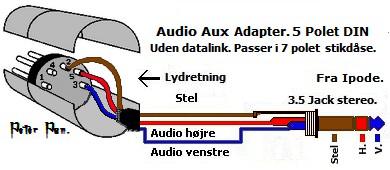
Pins 3 and 5 are incorrectly reversed in two of my leads, including the one in the photo above.
EDIT: For clarity, here’s one of the late Peter Pan’s excellent diagrams, where ‘venstre’ is ‘left’ and ‘højre’ is ‘right’:

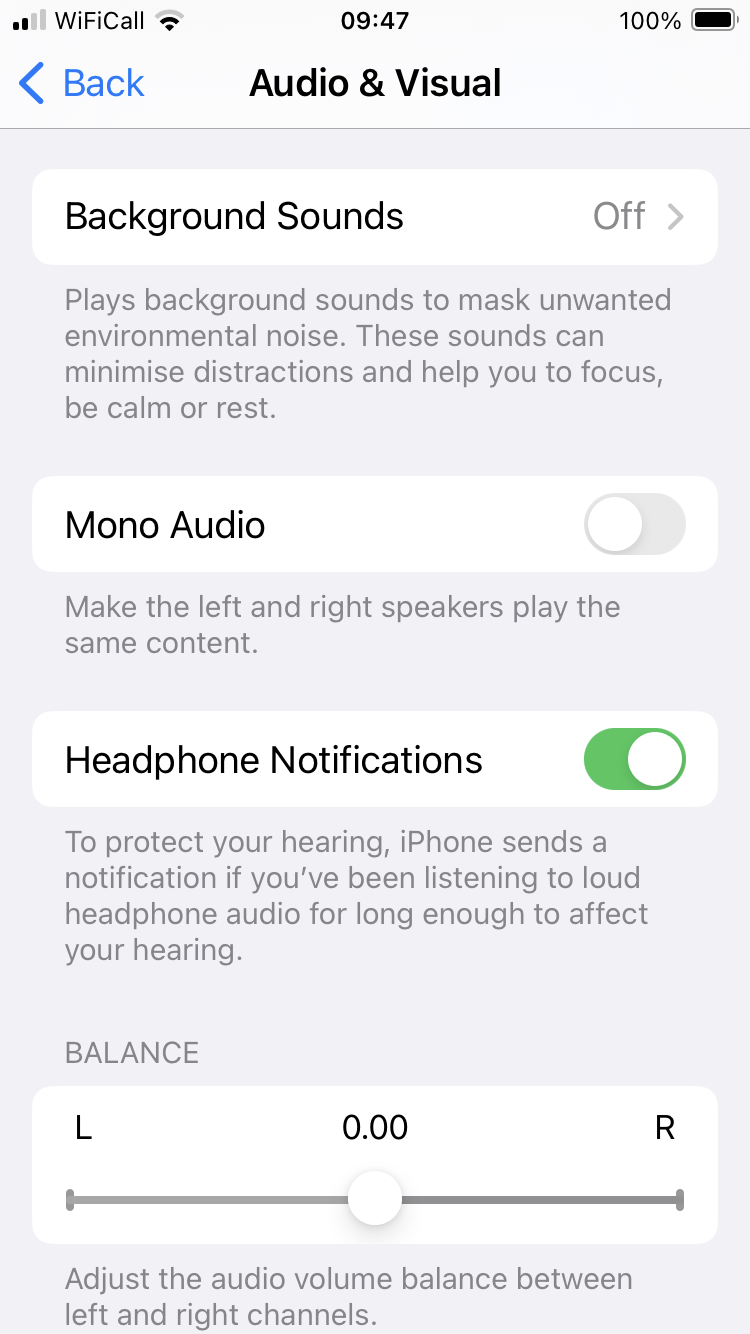
Obviously you can check with a multimeter, or just connect up a phone and adjust the balance. On the iPhone the balance control is strangely hidden under Settings > Accessibility > Audio & Visual, as shown below:

I hope this is useful!
Location: Warwickshire, UK
My B&O Icons:
Maybe not a good idea as the Masterlink data is something like 0.25V
Good point! I will hold back from that!
One other thought: My original BeoSound 1 (used for tests) is at SW version 1.3, and my newer one at SW1.4. I think that the later BS1s (with built in clock) have SW versions 2.X. – I doubt that there are any differences and if anything B&O would probably reduce any link capability in the newer versions. Any idea of your parents’ BS1 SW version?
Location: Warwickshire, UK
My B&O Icons:
-
AuthorPosts