Forum Replies Created
-
AuthorPosts
-
4 November 2025 at 22:00 in reply to: Beovision 7, Typ 9361 + Beosystem 2500, Typ 2601 + Beolink Converter 1611 #70920
 BRONZE Member
Beovision 7 > Masterlink Cable > Beolink Converter > 7 PIN DIN (fully wired) Datalink Cable > Beosound AUX
Verbinde die Produkte, ohne sie an die Stromversorgung anzuschließen. Schließe dann den Strom an. Ich denke, die Reihenfolge, in der sie Strom erhalten, kann entscheidend dafür sein, ob sie sich korrekt verbinden. Wenn sich die Produkte im selben Raum befinden, musst du die richtige „Option“ wählen. Wenn der Fernseher über eine BeoLab 7 verfügt und die Musikanlage ebenfalls Lautsprecher angeschlossen hat, wähle bei beiden Produkten Option 1.
Hi,
my thinking was not to modify the stand at all.
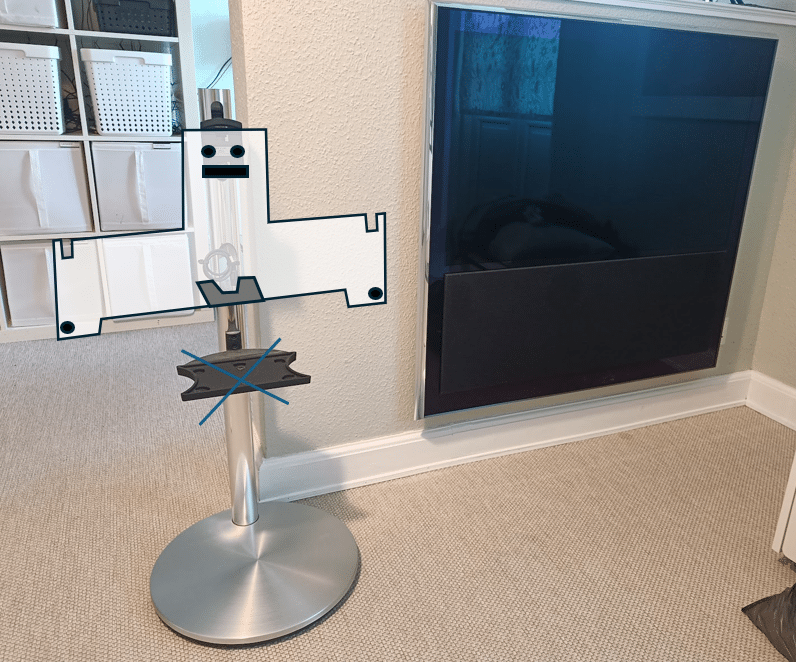
I got a 10-40 hanging on the wall and a BV7-32 stand. I just placed them next to each other to illustrate how I would make the adapter plate.
I looks a bit like a ghost 🙂 – – but it is Halloween tomorrow – – so…. 🙂
At the top you have 2 holes to bolt it to the original bracket. There is a small cut-out for the hinge.
Put 2 bolts into the TV and slide it into the two cuts/slots at top.
Fasten the bolts and add the additional 2 at the button.
The cut-out at the button ensures the ventilation isn’t blocked.
A small bracket (drawn in grey) determines the tilt as the TV will lean forward by default due to the modified ‘balance point’.
This will put the TV at the original heigh above the stand-base i.e. approx. 8-10 cm.

Just an alternative option.
If you are a ‘handyman’ … it should be possible to convert a BV7-32 stand for the BV10-40.
Where I live there are many BV7 stands available and you get them more or less for free (<40£)
You can buy a DIN<>8 PIN micro-fit molex cable or solder one and make a plywood adapter plate yourself.
Hi Henri,
Interesting project.
I upgraded a non HDMI BV7 with a new(er) panel a while ago. You can read more about that here:
With this approach it is not really a B&O TV anymore… Just a 3rd party television with a B&O speaker and controllable via B&O remote. But no integration or masterlink capabilities remain.
How do you plan to modify the TV and does it relate to ‘timer’ ?
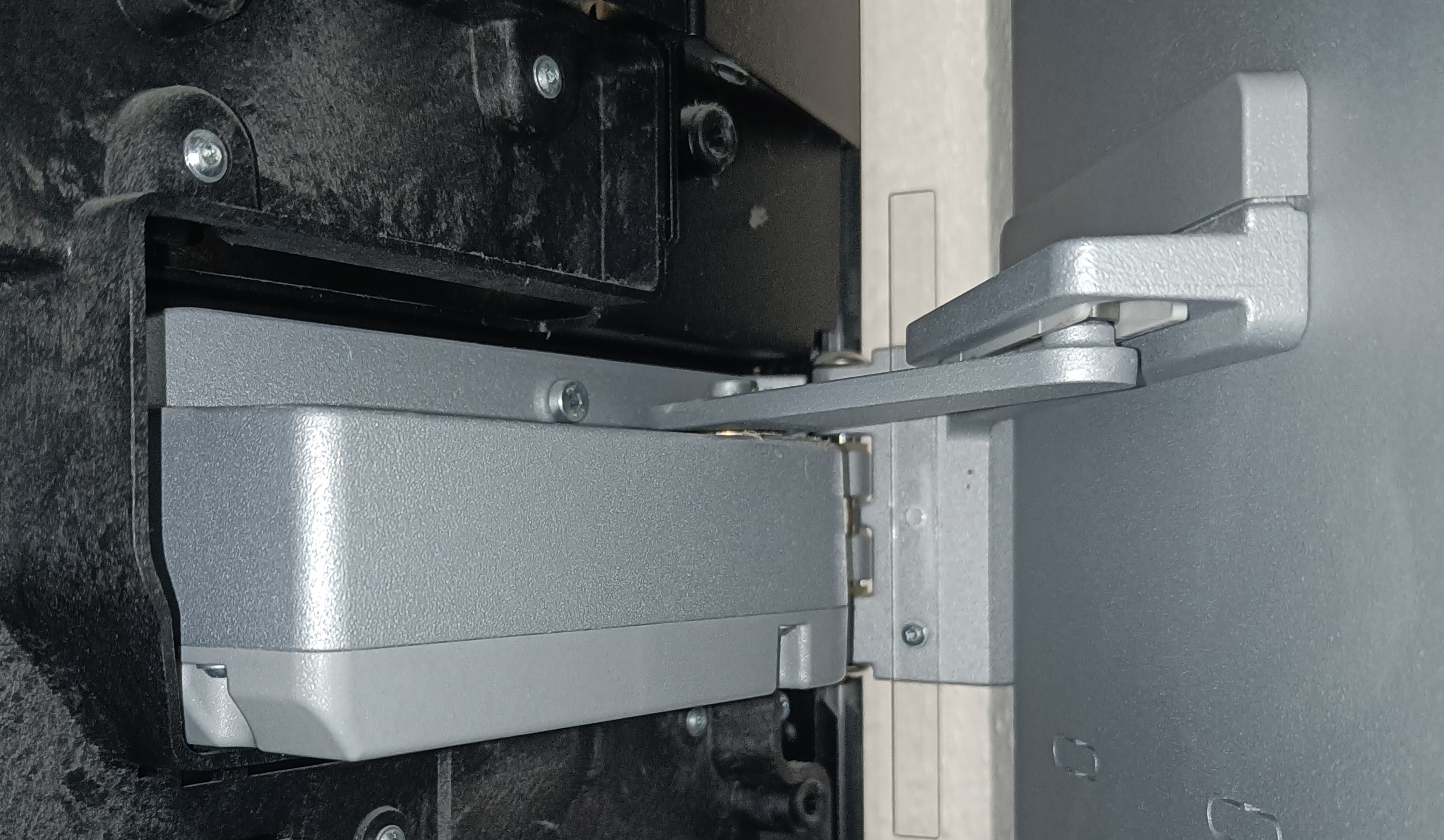
Alright.. so that means that this ‘part’ is just an empty ‘shell’ on the non-motorised version ?
10 October 2025 at 22:19 in reply to: Beo4-Controlled Raspberry Pi setup for streaming Net Radio on BeoLabs #70294I have tried to upload the config files… but it does not seem to work 🙄
10 October 2025 at 22:09 in reply to: Beo4-Controlled Raspberry Pi setup for streaming Net Radio on BeoLabs #70292Hi,
I can share that.
Download ‘volumio’ and burn the image to an SD card.
Boot up your pi. On the monitor connected to the pi, you can see what IP the pi got on your network.
Access the ‘volumio’ frontend via the browser on your computer. Register a free account. From the web frontend you can now install the IR remote plugin. And in the ‘volumio’ settings you choose your audio output. I use minijack.
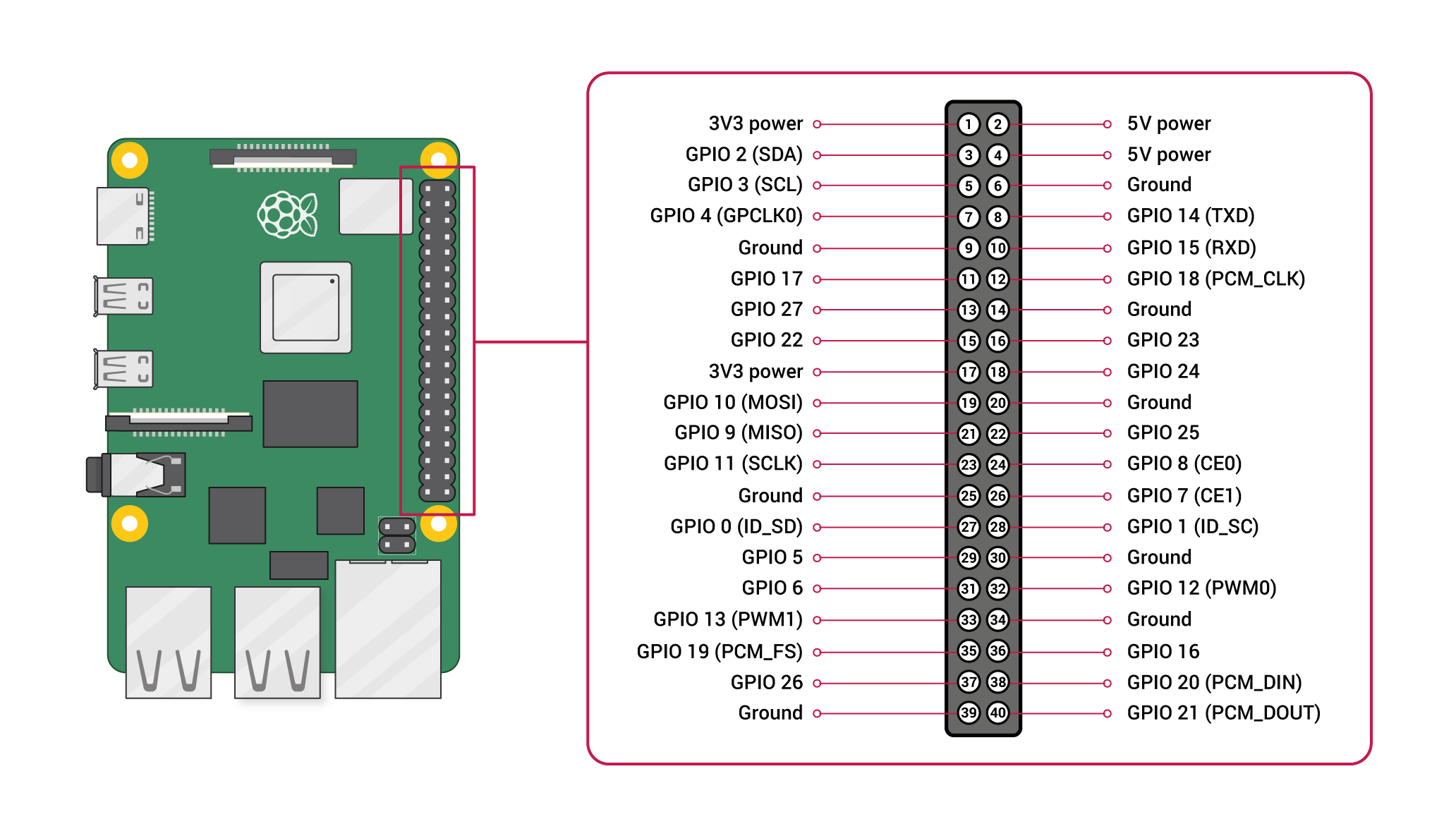
Connect the B&O IR Eye to PIN 2, 6 and 12.
Pin 2 is +5v
Pin 6 is ground
Pin 12 (called GPIO 18) is data
In the IR plugin on the ‘volumio’ web frontend select GPIO 18 and save.
All that is remaining is to create a folder with the name ‘Beo4’ in a specific folder on the pi. The web frontend defines where.
In that folder you place two custom files which tells the pi how to decode the signal from the B&O IR Eye and what to do when a specific button is pressed.
When the folder is created and the files are saved in the folder, Beo4 will appear in the remote control list. Select and save.
The files are called:
lircrc
lircd.conf
Now restart the plugin. A bit of flair for Linux, ssh and command line is an advantage.
I will share my 2 config files. That will make it easier to get started and modify for your needs.
Hope this guide helps.
Link to GPIO overview:
https://cdn.sparkfun.com/assets/learn_tutorials/1/5/9/5/GPIO.png
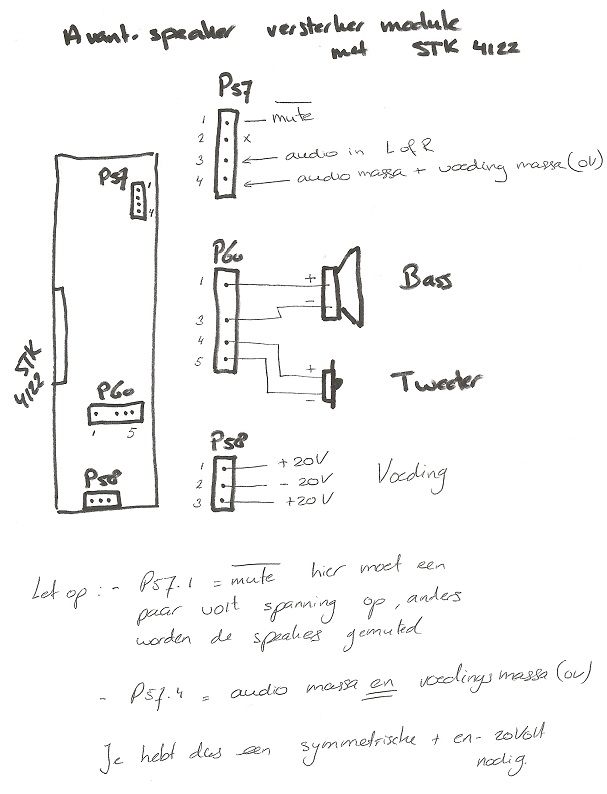
25 September 2024 at 15:13 in reply to: Reusing speakers from BeoVision Avant 32 (CRT) as active standalone speakers #59396This diagram is from old forum.
Note: power supply is not 20v DC
It is -20v / +20v
You can translate the Dutch text if required.
I have heard one drilling a hole in the cover and added a low noise fan to efficiently cool the heatsink…
15 April 2024 at 16:28 in reply to: Beolab 3 – die kleinen Riesen sind wohl doch nicht perfekt. #35256Und…. Hatte ganz kurz BL4…. Dass ist eine andere Welt. Kann man überhaubt nicht vergleichen.
Nie wieder BL4….. Egal im welchem Raum.
15 April 2024 at 16:26 in reply to: Beolab 3 – die kleinen Riesen sind wohl doch nicht perfekt. #35255Ich habe BL4000 und BL3.
Ich finde die BL3 am besten.
BL3 ohne sub in 20 m2 … Und früher mit Cambridge Minx 201 sub (6 Zoll) in 50 m2.
In Dänemark kosten ein Paar rund 5000 – 6000 DKK abhängig von Zustand und Zubehör.
Also 700 EUR +/-
On a beo4 with joystick you can select ‘mode’.
There are 3 modes.
With your ‘mode’ setting pressing the ‘play’ button instead of the joystick should do the trick.
2 April 2024 at 13:03 in reply to: DVB-T2 HEVC external receiver compatible with BV7-55 and Beo4 #54041In Scandinavia we do not use the HEVC codec/compression. A Danish T2 receiver does not work in e.g. Italy or Germany unless you can read in the specs that HEVC is supported….
Hi,
I listened to the ‘Emerge’ in a B&O store.
I was not impressed by the performance at all. I felt the speaker was ‘struggling’ if the volume was just slightly above what I would define as ‘background music’ listening level.
But, I don’t know what settings where applied in B&O app. So, changing those settings could probably improve the performance.
As single, stand alone speaker, I can understand that some people find the ‘Emerge’ sufficient.
As stereo pair I would never consider the ‘Emerge’. And design wise I can ‘kind of’ understand the ‘design language’. As stereo pair they would look very odd to me.
Steve, Sounds Heavenly, has reviewed the speaker on YouTube. Have a look…..
Agree.
BL3 offers many placement options as well.
-Rubber ring.
-Low stands.
-High stands.
-Wall mount.
I got them on low stands and set the placement switch to ‘free’ (despite it should be wall/corner) which gives pretty decent bass especially at low listening levels where ABL does it’s thing.
It will also activate AUX input via Beo4 remote.
Press A.MEM or A.TAPE. Mine does at least …
Hi,
Forum is very slow today.
It takes at least 10 secs just to open a post…
Edit: and it took approx. 30 secs to submit this reply…
Fingers crossed… I hope you have successfully fixed the problem and that you now can enjoy the effort you put into this project. I write this message while I watch my own similar Beovision 5 upgraded TV. It got a LG 42″ LED and is still going strong after several years.
Once again – congratulations giving new live to a true B&O design icon.
Well done.
Some noise is normal.
Especially for speakers with class A/B amplifiers.
If the power LED on your speakers are also a power switch then they got class A/B amps. If the LED is LED only (not a switch you can push) they got IcePower digital amps.
If you can hear the noise within 1 meter distance but not let’s say 2 meters away it’s what I would define as normal.
Hi,
If you don’t find them… I used ‘gift ribbon’ in dark grey for my RL 60…
Regards
R.
-
AuthorPosts