Forum Replies Created
-
AuthorPosts
-
18 May 2026 at 12:10 in reply to: Beo4-Controlled Raspberry Pi setup for streaming Net Radio on BeoLabs #123653
 BRONZE Member
Using Essence Remote for start/stop/vol+/vol-
18 May 2026 at 12:09 in reply to: Beo4-Controlled Raspberry Pi setup for streaming Net Radio on BeoLabs #123652lircrc:
begin
prog = irexec
button = KEY_STOP
config = /usr/local/bin/volumio stop
end
begin
prog = irexec
button = KEY_POWER
config = /usr/local/bin/volumio stop
end
begin
prog = irexec
button = KEY_RADIO
config = curl “http://volumio.local:3000/api/v1/commands/?cmd=playplaylist&name=P4” >/dev/null 2>&1
end
begin
prog = irexec
button = KEY_VOLUMEUP
config = /usr/local/bin/volumio volume plus
end
begin
prog = irexec
button = KEY_VOLUMEDOWN
config = /usr/local/bin/volumio volume minus
end
begin
prog = irexec
button = KEY_LEFT
config = /usr/local/bin/volumio previous
end
begin
prog = irexec
button = KEY_RIGHT
config = /usr/local/bin/volumio next
end18 May 2026 at 12:08 in reply to: Beo4-Controlled Raspberry Pi setup for streaming Net Radio on BeoLabs #123651lircd.conf:
begin remotename /home/osmc/beo4_ireye_pc.confflags RAW_CODESeps 50aeps 150gap 2000begin raw_codesname KEY_UP1562 1562 1562 1562 1562 140581562 1562 1562 4686 1562 46861562 4686 1562 4686 1562 46861562 4686 1562 4686 1562 78101562 1562 1562 4686 1562 46861562 7810 1562 4686 1562 46861562 4686 1562 1562 1562 109341562name KEY_DOWN1562 1562 1562 1562 1562 140581562 1562 1562 4686 1562 46861562 4686 1562 4686 1562 46861562 4686 1562 4686 1562 78101562 1562 1562 4686 1562 46861562 7810 1562 4686 1562 46861562 4686 1562 4686 1562 109341562name KEY_LEFT1562 1562 1562 1562 1562 140581562 1562 1562 4686 1562 46861562 4686 1562 4686 1562 46861562 4686 1562 4686 1562 78101562 1562 1562 4686 1562 78101562 4686 1562 1562 1562 46861562 7810 1562 1562 1562 109341562name KEY_RIGHT1562 1562 1562 1562 1562 140581562 1562 1562 4686 1562 46861562 4686 1562 4686 1562 46861562 4686 1562 4686 1562 78101562 1562 1562 4686 1562 78101562 4686 1562 1562 1562 78101562 1562 1562 4686 1562 109341562name KEY_RADIO1562 1562 1562 1562 1562 140581562 1562 1562 4686 1562 46861562 4686 1562 4686 1562 46861562 4686 1562 4686 1562 78101562 4686 1562 1562 1562 46861562 4686 1562 4686 1562 46861562 4686 1562 7810 1562 109341562name KEY_STOP1562 1562 1562 1562 1562 140581562 1562 1562 4686 1562 46861562 4686 1562 4686 1562 46861562 4686 1562 4686 1562 78101562 1562 1562 4686 1562 78101562 4686 1562 1562 1562 78101562 4686 1562 1562 1562 109341562name KEY_VOLUMEUP1562 1562 1562 1562 1562 140581562 1562 1562 4686 1562 46861562 4686 1562 4686 1562 46861562 4686 1562 4686 1562 78101562 1562 1562 7810 1562 46861562 1562 1562 4686 1562 46861562 4686 1562 4686 1562 109341562name KEY_VOLUMEDOWN1562 1562 1562 1562 1562 140581562 1562 1562 4686 1562 46861562 4686 1562 4686 1562 46861562 4686 1562 4686 1562 78101562 1562 1562 7810 1562 46861562 1562 1562 4686 1562 78101562 1562 1562 4686 1562 109341562name KEY_POWER1562 1562 1562 1562 1562 140581562 1562 1562 4686 1562 46861562 4686 1562 4686 1562 46861562 4686 1562 4686 1562 78101562 1562 1562 4686 1562 46861562 4686 1562 7810 1562 46861562 1562 1562 4686 1562 109341562end raw_codesend remoteHier findest du das 3200 Service Tool Dokument.
http://www.abo-center.dk/Abo_center_2/reptips/diagrammer/Beosound/BeoSounddiaforside.html
Super.
Die Zeichnungen von Peter Pan hat mir oft geholfen. Suche einfach ein Lautsprecher Modell und der Nahme ‘Peter Pan’ in Google… Dann findest du ganz sicher eine relevante Zeichnung…
Manual:
https://support.bang-olufsen.com/hc/da/articles/360042003031-Beolab-7-1
Service Manual (Danish/English)
http://www.abo-center.dk/Abo_center_2/reptips/diagrammer/Beolab/BeoLabdiaforside.html
By the way… the BL4000 MK1 also suffer from foam rot.
And removing the old foam might even damage them even further.
I have cleaned speakers that worked prior to cleaning… and they didn’t work after cleaning. I had them fixed and re-foamed.
You can split …. and your speakers will both play as stereo pair.
How that will sound will depend on placement.Example of splitter:
If the BL4000 are MK1 they have the same connection panel as your BL8000. A line/powerlink switch, a line in phono socket and a powerlink socket.
If they are MK2 they only have the switch and the powerlink sockets. No phono socket.
You’ll need a speciel cable to convert fra e.g phono to powerlink (din8) …
Soundsheavenly got them.
Du kannst ja mit PIN 4 und 7 anfangen. Max 5V.
Zeichnung von der Legende Peter Pan.
And another option… Try at own risk. Personally I never did such a reset. Others might know if this is a good idea.
Press:
TV
Menu, menu
You now got the menu with 4 options.
Press
Menu, 0, 0, GO (you need to be pretty quick)
This will take you to the ‘hidden’ service menu.
You can enter a menu item with ‘GO’ and leave with ‘STOP’ (on my non-joystick Beo4).
Under ‘settings’ there is the option to ‘reset all features’. Other who have tried can explain the consequences. I assume this will reset to factory settings.
Strange.
I don’t know if this can help somehow. I assume these are the correct ‘terms’ in English. My GUI is DK.
Under
Menu, menu, other options, connections, AV1 …. I got:
Source: DTV
Name: ……
IR: None
HDMI: A
S/P-DIF: None
One more thing… Long shot.
Under
Menu, setup (4), other options, HDMI
HDCP: On
Pressing DTV changes to HDMI socket ‘A’ where I got a gen 2 Chromecast connected.
Try power cycle the TV. Remove from mains in 10 mins.
Hi,
This is how the menu is on my 10-40.
Turn on TV: Beo4 TV
Beo4: MENU
Beo4: MENU (press again within few seconds)
This gives a menu with 4 options.
Choose ‘øvrige muligheder’ (other options)
Choose ’tilslutning’ (connections)
This is where you ‘map’ a AV socket (e.g. a HDMI input) to a source button on the Beo4.
I have AV1 mapped to DTV
AV2 mapped to V.MEM
AV3 to DVD
So… Those 3 buttons on the Beo4 now select either of the 3 HDMI inputs.
Hope it helps.
Hi,
thanks for your reply.
In the meanwhile I consultet chatgpt and it seems like I wont get the proper shielding.
I took the DIN connector apart again and managed to crimp a short cobber lead to the RJ45 shield and solder it to PIN 7 as specified.
But thanks for your tip.
Ravsted.
You might loose true surround sound.
Not all TVs transcode to AC3 (Dolby Digital) over SP/DIF. If you e.g use a build-in TV App for Netflix it will stream E-AC3 (Dolby Digital Plus).
But DD+ is not compatible with SP/DIF.
Some TVs transcode to AC3/DD …. Some don’t. If it doesn’t you’ll only get e.g. stereo over SP/DIF and your BS3 with only provide Surround Sound as Dolby Pro Logic. And that is bad and would be a dealbraker for me.
You might think plan-b would be eARC extractor … But the issue will be the same. I do not know of any eARC extractor which can transcode to AC3/DD.
Hi,
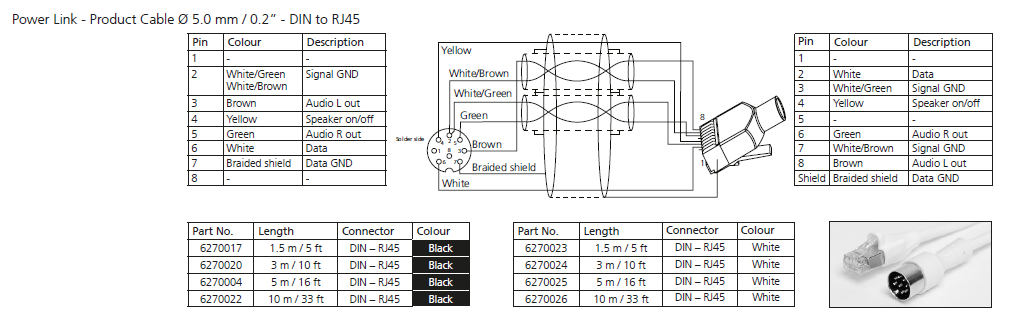
I made a cable for Beovision 11 and Beolab 3 today using the below diagram.
I did it slightly different, but it seems to work without any issues.
However, I would like to understand the consequences of the change I made.
DIN PIN 2 (signal ground) > RJ45 PIN 3 (signal ground) & RJ45 PIN 7 (signal ground)
DIN PIN 2 (signal ground) > DIN PIN 7 (data ground)
DIN PIN 3 (audio L) > RJ45 PIN 8
DIN PIN 5 (audio R) > RJ45 PIN 6
I did not solder the RJ45 shield to DIN PIN 7
Instead I shorted DIN PIN 2 and DIN PIN 7
Reason… simply because I could not solder the material/wire of the RJ45 cable. The solder would not stick.
Any feedback on this approach – explaining the consequences.
Thanks.

I can’t help you with the solution.
But for older products I often go to this website to find the service manuals.
I dont find any for MX7000 but there is one for 6000 and 8000. If I remember correctly the only difference between 6000 and 7000 were the more powerful speaker system in 7000.
Maybe the information there will help you to identify the root cause.
Good luck.
http://www.abo-center.dk/Abo_center_2/reptips/diagrammer/Beovision/BeoVisiondiaforside.html
5 November 2025 at 21:38 in reply to: What do I need to play audio out of my Beocenter 2 into my Beovision 11-46 #70944I agree with Mads.
However, if you just want to test it, both the BC2 socket unit and the BV11 have SP/DIF input and output.
You can start playback on the BC2, then configure and select the corresponding input on the BV11. You can listen using P.MUTE.
It should work — though it’s not the most elegant solution.
4 November 2025 at 22:35 in reply to: Beovision 10-40 stuck on stand by mode. B&O genius required :/ #70924Not sure… But seems like your ‘playing around’ in the service menu disabled both the TV and D(digital)TV tuner/function and if no sources for V.MEM or DVD is defined those buttons on the Beo4 remote won’t turn it on either. Add ‘camera’ to the LIST function of the Beo4 remote if it isn’t there already and press GO. I think that will turn on the TV and select the analogue RCA/Camera source.
4 November 2025 at 22:13 in reply to: Beovision 7, Typ 9361 + Beosystem 2500, Typ 2601 + Beolink Converter 1611 #70923Firestick > splitter > Beovision DVI und Beovision AV4 RCA / Cinch.
Und dann auch noch korrekt im Beovision / Connections Menü konfigurieren.
4 November 2025 at 22:05 in reply to: Beovision 7, Typ 9361 + Beosystem 2500, Typ 2601 + Beolink Converter 1611 #70921 -
AuthorPosts