Forum Replies Created
-
AuthorPosts
-
 BRONZE Member
I guess those are questions for ‘Rotel’ experts…

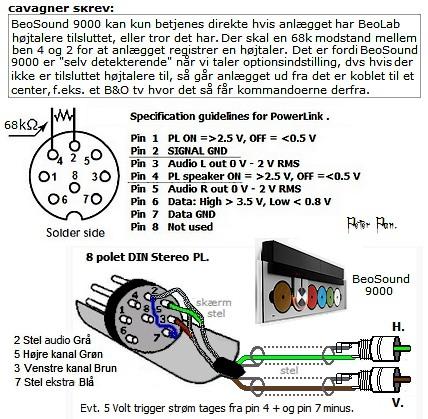
According to the legend Peter Pan a 68k ohm resistor is needed between pin 2 and 4
https://hifi4all.dk/forum/forum_posts.asp?TID=23818&PN=0&TPN=68
Are speaker and iPod charger in same power outlet ?
Try that !
Try different charger. In my case I reduced ‘hum’ by changing charger to an iPad charger.
I once wanted to connect a non-B&O subwoofer to Beovision 5. If I remember correctly I also soldered PIN 2 to PIN 4 … And obviously soldered the proper PINs to the RCA cable going to the SUB.
For the BeoSound 9000 the trick with the headphone jack seems even better….
Well, I would look for the matching BeoMaster
https://www.beoworld.org/prod_details.asp?pid=297
But instead of BeoMaster 5000 I would search for 5500
It can be remote controlled with Beo4, Beolink 1000 and the master control panel 5500
Both goes slightly lower than BL3.
Main difference is that 12.2 will cut off bass earlier than 12.3 when you increase volume.
At lower volumes 12.2 and 12.3 will be pretty much the same but at higher volume 12.3 will deliver more bass.
So, at the end of the day it depends on your listening preferences.
I personally find the proportions of the 12.2 pretty’er… But that is off course a different topic….
Well, the cable and the 5V USB adapter / power supply might be perfectly fine. I am powering on my BL2 via an Apple phone charger as well. The problem might be with the speaker itself. I cannot support you trouble shooting the internal circuit of the speaker. Last suggestion from my side…. Try replacing the supplied USB charger with another one you’ve got and see if it changes anything.
Should you need other cables consider contacting Sounds Heavenly. He can provide proper presales and post sales support as well.
Hi,
I see the supplied power supply is a universal one which can output from 3v to 12v
There should be a ‘dial’ on the power supply where you select what output you want. Please check it is set to 5v.
3v or 4.5v should work as well.
I use same method for my BeoLab 2. Not exact same cable but same principle. Unfortunately I cannot help troubleshoot the internal circuit of the BL2.
I see. I was worried you might feed the speaker relay with 12v. That will damage the speaker. 5v is correct.
When you provide the 5v trigger the LED must turn green an stay green. Also without receiving any audio signal.
Can you share a link to the cable you purchased?
Do you know if it worked in the B&O setup before you brought it home?
Hi,
What cable ?
Did you get the proper one ? Designed for 5v trigger or 12v trigger ? What power supply is triggering ?
Regards
R.
Uhhhh…. Clever little thing 🙂
?
Is the cable made / wired for this purpose ?
Or have you bought some ‘generic’ DIN > RCA cable ?
Yes, you are an ‘idiot’.
But at least an honest one.
That is appreciated.
Next time you seek help, tell the full story. You did not mention the HDMI switch. Which could also cause affect the trouble shooting.
Glad you got i working. Enjoy.
BeoIce mention in the first post that his converter works with SAT SetTopBox and it works with Apple TV 2.
So the problem must be related to the audio formats supported by Google TV.
I guess we can ask BeoIce to confirm that the new converter from Amazon works with other HDMI sources.
Just to re-confirm the problem only persist with Google TV
Have you tried the various audio settings on GTV HD ?
I believe Film Mode and Movie Mode is the same (depending on sw version)
From service manual:
Movie mode On/Off/Auto (default Auto)
Movie mode reduces judder in movies, e.g. better quality when panning.
If you experience a disturbing quality in scrolling text/titles that are more annoying
than the judder, you can disable the Movie mode.
Movie mode AUTO
Movie mode is only active in FORMAT 3, 16:9
Hi,
a quick search on beoworld or trading sites reveals sooo many panel issues related to BV10. I would not consider BV10 as its remaining ‘life’ is a kind of ‘ticking bomb’…
Beovision 9 is 50″ … Prices are low. But it’s a big ‘beast’ …
BV7-55 is in my opinion also a huge upgrade in terms of build quality, materials and sound performance (BeoLab 7.6)
Good luck finding your next Beovision
Ravsted
Hi,
I got the BeoLab 7.1 connected to a 32″ JVC in the Beovision 7-32 cabinet.
Read here:
The BeoLab is connected via a USB+Minijack to PowerLink cable. USB goes to the USB port if the TV.
Unfortunately the JVC USB port is on even if TV is in stand-by. In contrary to our Sony Bravia.
Besides the extra power consumption the speaker also makes a small ‘pop’ when the JVC powers on. I’ll try to find another ‘5v power source’ in the TV.
Do you know the power consumption when BeoLab 7.X is on without playing any audio ?
-
AuthorPosts