Forum Replies Created
-
AuthorPosts
-
 MadskpGOLD Member
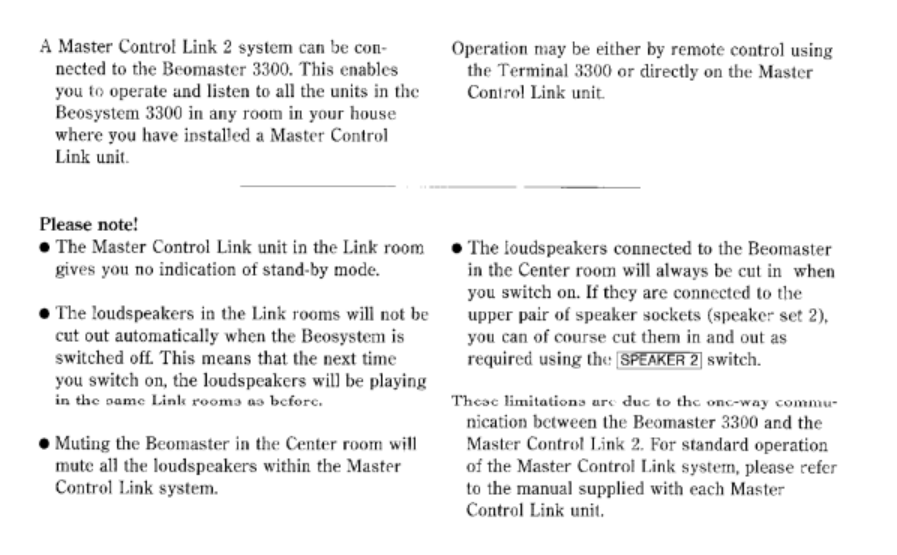
An extra note. The BM3300 do have some limitations in regards to muting the sound in the main room. See below:

Location: Denmark
MadskpGOLD MemberHello
MCL2 is just the naming of this type of link system.
There are three types of compatible link units to use for it:
1. MCL 2A for passive speakers. This is a relative simple unit where you can control the main system. Note that volume control follow each other for the main system and all link rooms with a MCL 2A. The unit consist of a relay box and an IR eye.
2. MCL 2AV for power link speakers. This unit have extra local inputs that can be used in that link room besides the sources from the main room. Also volume control is independent of other link rooms, and to some degree of the main room. The unit consist of a electronics box, an IR eye and a power supply (which might not be included when buying used now). Be avare that the power supply has reversed polarity, so you can not use any power supply that has the sam plug.
Passive speakers can also be connected to the MCL 2AV if a MCL 2P amplifier or a Beolink passive is used in between. A fully wired powerlink cable is needed for this to work.
3. Beolab 3500 MK1 ( up to serial number 19343452). This is a dedicated link room speaker with built in IR eye. Note that if you buy one now it might have been used in a ML system and will need to be setup for MCL2.
For all 3 options you will need MCL cable and 3 pin speaker plugs for connection to the Beomaster.
For the Beolab 3500 an 8 pin DIN has to be soldered to the cable.
Hope this help you. Pleas let me know if you need any elaboration
Location: Denmark
MadskpGOLD MemberHello and welcome to Beoworld
The DIN connectors use one pin for ground, 2 for left and right in 2 for left and right out, and the last two for data communication for control.
Therefor it is possible that the cable you are using is not wire correctly for this usecase.
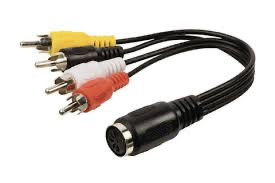
In cases like this it is often recommended to get a cable like this where you can easily switch to the right pin configuration

Hope this helpsLocation: Denmark
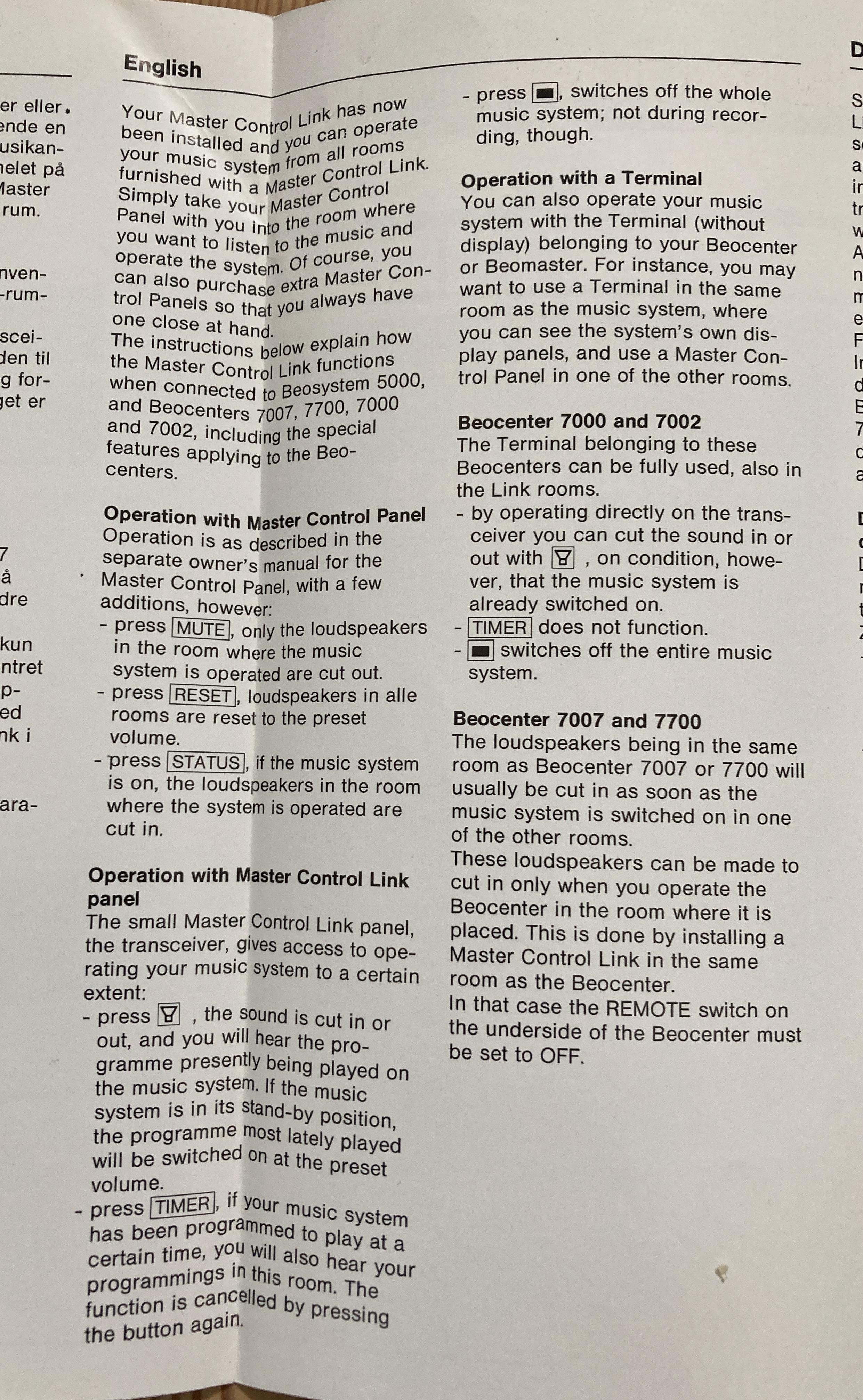
MadskpGOLD MemberLet me know if there is any information you need, and I can see if it is in the manual and take additional photos
Location: Denmark
MadskpGOLD MemberI just discovered that I have both the usermanual and the installation manual for MCL82 along with a MCL82 kit in original box. I have not seen these manuals in Beoworlds library or other places online before.
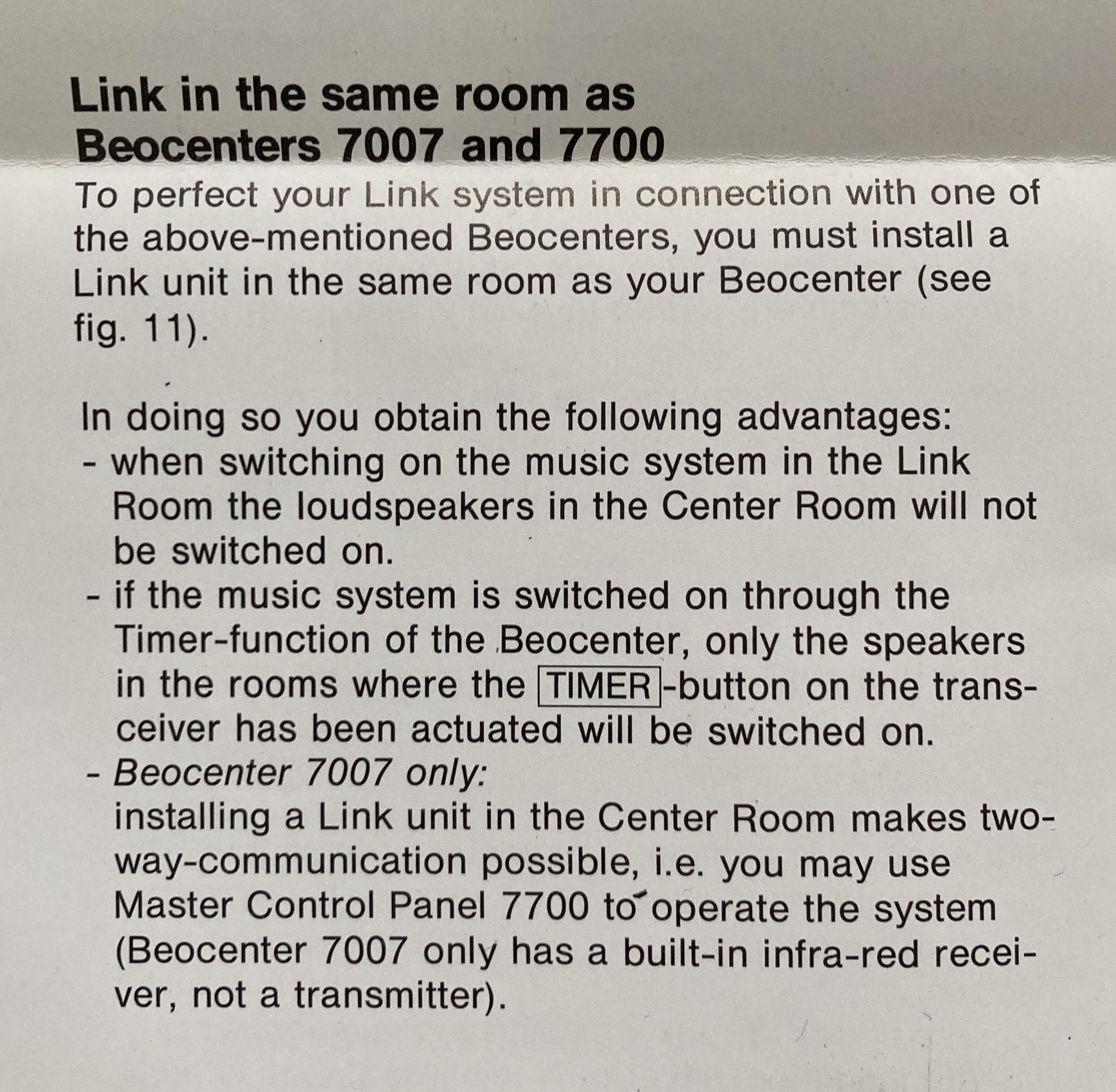
The user manual states that you need an extra MCL82 in the main room if you do not want the main room speakers to play when you activate a link room

The installation manual kinda confirms my suspicion that you need the same remote/Master control panel in the link rooms as in the main rooms

I will try to get a scan of the full user and installation manual when I have acces to an A3 format scanner.
Location: Denmark
MadskpGOLD MemberOn CharlieWednesday saidYou don’t happen to know if the Beolink converter 1614 is a suitable alternative to the 1611? It certainly looks exactly the same!
The 1614 cant supply the voltage to drive the masterlink network, so for this usecase it wont work. The 1611 will do this.
Location: Denmark
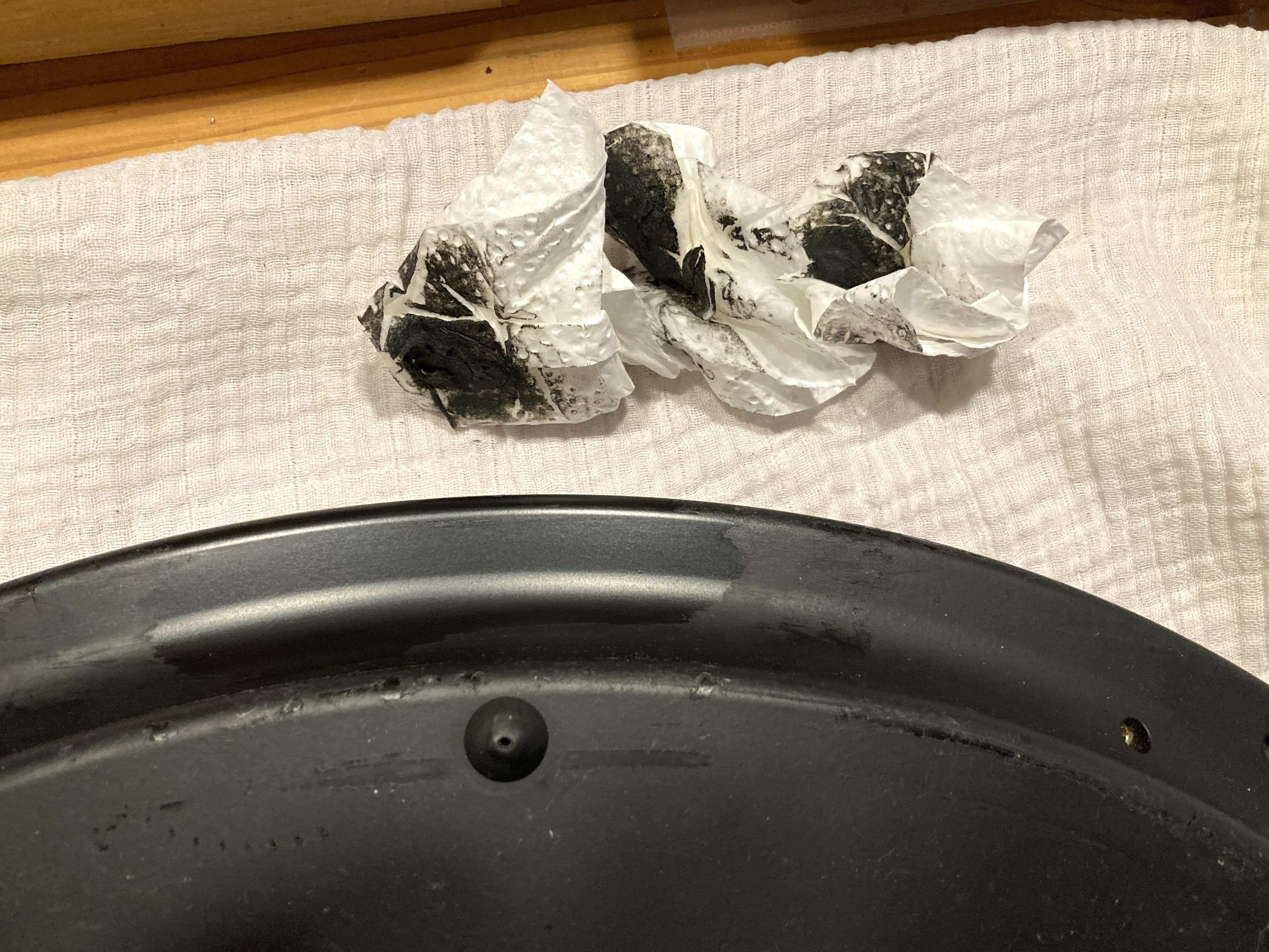
MadskpGOLD MemberOn Gaea saidI still need a fix for the sticky clamper, there seems to be a fix for it, but I haven’t found it.
I cleaned the sticky coating on both the clamper and the bottom of the of the BC2 with 99% isopropanyl alcohol. It took a lot of rubbing.
Example from cleaning the bottom here:

Location: Denmark
MadskpGOLD MemberBe avare that the belt Beoparts are selling is for the wings, and that might solve the problems.
The belt I mention in the thread you are linking to is for the CD clamper, where the issue in my case was that it did not close enough to hold the CD in. This belt however can not be sourced from Beoparts, so I had to find one on Ebay.
Location: Denmark
MadskpGOLD MemberIf the problem persist with both the 1611 and 1614 converter we can probably rule those out.
I assume you used the same masterlink cable with the BS3000 so this also can be ruled out?
The output from the BC9300 is fully compatible with the converters so this should not be an issue either. The fact that you get a spinning disc confirms that the control signals are passed through the converter.
It is normal that the BC9300 start in muted mode in this setup as it is using speakers not directly connected to it ( this is decided by option 0 )
You mention noise in speakers. Are those connected to the BC9300 or the Beosystem 3?
One thing just to be sure. Is the AUX cable connected to the AUX socket on the BC9300? If you have accedently have put it in one of the powerlink sockets the control functions will probably work, but the sound will not be on the right pins in the connector
Location: Denmark
MadskpGOLD MemberI am getting a little in doubt if my suggestion will help you. I was under the assumption that the MCL82 kit was controlled only by a terminal 5000 which might be easier to find.
However reading the manual for the Beocenter 7007 it refers to the MCL82 being controlled by the Beocenter terminal and Master Control Panel. I guees that means those for the Beocenter 7007 which does not solve your problem.
I sm wondering if the MCL82 only works with the remotes for the main system they are connected to
Location: Denmark
MadskpGOLD MemberThis Beotech might answer the question although it is negative.
https://beoworld.org/master-control-link-mcl30-mcl82/
A code converter was available for BM5000, and Beocenter 7700, but that does not help you much.
A possibility that comes to mind is to place a MCL82 link zone in the same room as the BC7007 and connect the speakers to the link box instead of the BC7007.
Hope this give some inspiration for the further procces.
Location: Denmark
MadskpGOLD MemberOn mdonald said@Guy, to check the cable I looked at Beotech, is the “Aux Link cable” correct?
That is the right one yes. Basicaly its pin1 to pin 1, pin 2 to pin 2 etc.
Not all pins are needed, but for your setup you will need t least pin 1, 2, 4 and 6 to be connected
Location: Denmark
MadskpGOLD MemberOn mdonald saidGood evening everyone,
I’m trying to masterlink a beocenter 9300 with beosystem 3, using a 1611 converter.
I connect the Bc9300 with a powerlink cable and an aux to the 1611 and then the 1611 to the bc3 via masterlink. I set v-option 2 to bs3 and a-option 0 to beocenter. I press CD, the disc spins, everything works but there is no sound.
Am I doing something wrong?Good evening.
They way you have done the setup sounds right
The function of the powerlink cable is to make it possible to adjust the volume from the BC9300 touch buttons. That means for testing you can take the powerlink link cable out of the system as it does not transport any sound in this setup.
Next try to power down all units and power them up one by one with the 1611 converter being the last
Location: Denmark
18 May 2024 at 06:00 in reply to: BeoLink Wireless 1 – no audio with Masterlink connections only #55718MadskpGOLD MemberSorry to hear that it did not work out, but then this product might never have been a good one.
One major issue is that it use the same 2,4ghz freqency as nany wifi nerworks, bluetooth, doorbells, baby monitors, microwave ovens etc. Which means that many issues can be caused if any of these systems are nearby. I can see in my notes from an older thread that SW 2,1 introduced the possibilty to shift channel, but only by the use of the B&O servicetool which means you would have to take them to a store or get a technitian out to get this done.
Hope you find another way to connect the speaker
Location: Denmark
17 May 2024 at 17:16 in reply to: BeoLink Wireless 1 – no audio with Masterlink connections only #55709MadskpGOLD MemberOne more thing. have you tried to control the Beolab 2000 with a remote instead of the buttons? It might be a long shot, but just in case something act’s differently
Location: Denmark
17 May 2024 at 17:14 in reply to: BeoLink Wireless 1 – no audio with Masterlink connections only #55708MadskpGOLD MemberOn XavierItzmann saidExchanging the units, factory re-setting them, and re-syncing them:
I was just about to ssuggest something like that
The BLW1 formerly ML’d to the Audio Master as T; now ML’d to the BL2000 as R: The BL2000’s buttons fail to wake up this BLW1.
Hypothesis: the ML circuitry on this BLW1 has failed, or its mechanical ML connection. When the now R was the T, it was getting a wireless wake up signal from the other BLW1, and perhaps trying to wake up the Audiomaster, but it “found” no detectable Masterlink.
That sounds like possible hypothesis.
I wish I could test if the Powerlink (R) works from the (T) ML’d to the Audiomaster —which is all I really wanted out of this set-up—, but apparently this functionality is non-testable in the absence of a compatible IR Eye. I have an IR Eye, but its termination is on an ethernet-like connector (RJ-45), not on a Powerlink connector (DIN).
The Round IR eyes with a DIN connector from a Beolink passive or active will work if you would happen to have any of theese in your system.
Any B&O IR eye that receive signals from a Beolink 1000 or Beo4 will also work as long as just the ground, +5V and IR data is connected in the DIN connector. So if you happen to have and old MCL IR eye or something else lying arround and are able to solder it in a DIN connector it should be possible to do that.
Location: Denmark
MadskpGOLD MemberOn pilatomic saidHey, Sorry for the long delay answering, since the forum update I don’t get emails anymore when replies are added to the thread.
You might have to re subscribe to the thread. Thats is the case for all threads I have subscribed to before the changes.
On Madskp saidA little curious question. Would it be possible to change the TAPE command with the CD command for the Beotooth 5500?</p>
<p>One usecase I could seen for this is a computer using one Beotooth as speaker connection, and the other beotooth could the be used for connecting a phone</p>
<p> </p><br>
That’s an interesting idea, I had not thought about that (as I still listen to CDs on a regular basis).
On the back of my mind, swapping the control messages should be fairly easy, the status messages are a bit different though, but nothing impossible.
I’ll have a look at that when I have some free time.
(It could be added as a selection command through the USB Serial interface, that is already used to customise the Bluetooth name of the Beotooth).<p style=”text-align: left;”>Great to know it is possible no immediet need for me, but some other usecase might show up</p>
There would be only 2 options here : Beogram or Beocord emulation (AFAIK Beogram CD and Beogram uses the same command set).
On a system with CD / PHONO / TAPE / TP2, CD and TAPE share one datalink bus, and PHONO and TP2 share another bus.That was also my understanding. The current TAPE function works both on the Tape and the Tape2 connection on my BM4500
Location: Denmark
17 May 2024 at 06:36 in reply to: BeoLink Wireless 1 – no audio with Masterlink connections only #55688MadskpGOLD MemberProblem with buying the W1’s used is that there is no way to tell the software version (except for the mentioned serial number), and units can have been upgraded with newer software without the seller remebering/knowing
Location: Denmark
17 May 2024 at 06:29 in reply to: BeoLink Wireless 1 – no audio with Masterlink connections only #55687MadskpGOLD MemberLooking in my notes i can see that it is from SW 2.1 from serial number 19956171 that the ML to ML functionality was introduced
Source: https://archivedforum.beoworld.org/forums/p/37237/346020.aspx#346020
Location: Denmark
17 May 2024 at 06:05 in reply to: BeoLink Wireless 1 – no audio with Masterlink connections only #55686MadskpGOLD MemberI think that the ML to ML function only works from a certain software version.
In the first version you could only use the powerlink connection on the receiver like a Beolink Active, and need an IR eye
Location: Denmark
-
AuthorPosts