

Forum Replies Created
-
AuthorPosts
-
 MadskpGOLD Member
But the speaker seems to be faulty because ticking noise starts immediatly and is accompagnied with a permanent bzzzzzz noise.
That sound like normal behaviour when using the test mode if the BL3500 is not connected to anything. For good measure I just double checked with one of my own BL3500’s and it does the same too. Not very loud though.
Do you have an idea how to fix this ?
I would expect it to go away if you connect something to it. What are you trying to achive?
The Menu + 0 + 4 + GO solution is not very good both because of the cumbersome way to active it + no volume control, and the speaker will go into standby if you press a button on the remote.
A more elegant solution was found in another thread where a 1611 converter connected via Masterlink give two remote controlled inputs to the BL3500. User Matador made a great setup drawing of this concept in this post https://forum.beoworld.org/forums/topic/beolab-3500-and-1611-converter-settings/page/22/#post-42623
Other alternatives are also mentioned in this post https://forum.beoworld.org/forums/topic/bl3500-and-the-mcl-pl-connector/#post-44537
Hope this helps
Location: Denmark
MadskpGOLD MemberI have my BeoMaster5 set to a fixed IP address, but I don’t remember how I did it. I’d like to change it. Does this require going into the service menu?
Haven’t tried it myself, but wold think so. On the Windows desktop there should be an icon labeled network connections. If you go to that you should be able to see something probably called local area connection. Right click on that and select properties. Now you should see an option to select TCP/IP, and in that you should be able to change the IP adress
Hope this leads you the right way althought only based on my knowledge about Windows XP, and not doing it on a BS5
A fixed IP is defined in the internet router not in the BeoMaster5
That is one way to do it, but most if not all network devices has the possiblity to set an IP address manually. There is a risk of conflicts with other devices having the same IP with this method, but can work fine. I have several network devices with a manually set IP address in the high end of the network range, and have not had any issues doing it that way.
Location: Denmark
MadskpGOLD MemberThat’s normal behavior for the MCP series (5000/5500/6500) and the blanking time can’t be adjusted. /steffen
Thanks. Good to know that it works as it should do 😀
Location: Denmark
MadskpGOLD MemberI want a power adapter for an MCL2AV but I can’t seem to find the right one. I’m no electrician, so don’t want to get it wrong and fry the damned thing. The MCL 2AV unit is printed with ‘DC 15v, Max 250mA’, and while it is easily possible to find a power supply of 15v, the output in amps is always far greater than 250mA. Any ideas?
This thread has got me thinking as I recently acuried 4 extra MCL2AV units as part of a LOT and none of them has a power supply. I have one 15V 400mA, but that was actually not easy to find, and I had to fit a new connector to it to get the right polarity.
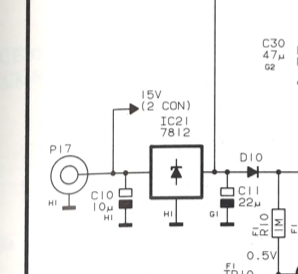
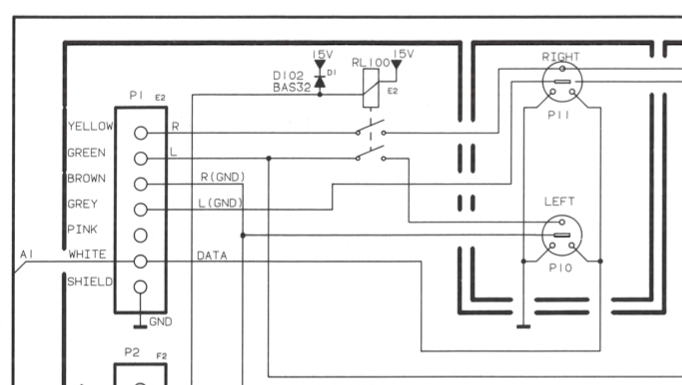
Looking at the schematics for the MCL2AV shows that the 15V is actually only used for the passive speaker relay which is only used when the MCL2AV is programmed to work as an MCL2A.


So I tried with a 12V 300mA power supply with exchangeble connectors that I had lying arround. This also made it easy to get the right polarity.
And for my first test with a MCL2AV with a Beogram CD 4500 connected and active speakers (in this case a Beolink Passive with passive speakers) everything seems to work. I tested it with the older type 2020 MCl2AV, and the 5V and 12V rails are the same values as when I use the 15V supply.
On the newer type MCL2AV without the antenna connection the passive speaker relay along with the connectors are removed, so I will asume that should also work without issues. My best guess is the 15V rating is to secure that the 12V and 5V levels can be stable even when the relay is active.
Hope this is helpfull
Location: Denmark
MadskpGOLD MemberCharlieWednesday wrote: I’m also wondering why it was necessary to have your BC2 on option 6 – would it not work on option 1? Also, on the MC22AV, what the hell is option 2.5!? In this setup the 1611 acts as the “main room” and are serving it’s sources, the MCL2AV to the “link rooms” which in this case is the BC2. If the BC2 were setup in option 1 (or 2 for that matter) it would then be the “main room”, and could not get sources with the Link + commands.
One extra note. Other “link rooms” like your Beolab 3500 will not be able to fetch the sources from the BS4 in this setup. Only the sources from the 1611/MCL2AV will be available, so you might miss some functionality if you choose to go this way
Location: Denmark
MadskpGOLD MemberSince the MCL2AV doesn’t have a Phono input I assume I would connect my Beogram to the Aux input, so I am not sure if controlling the Beogram via Beo4 remote would work that way. Still, I’ll give it a go.
No, it should be connected to the CD input as that use Datalink 80 codes, whereas the AUX port and the MCL system use Datalink 86 codes.
The Beogram Record player will react to the CD commands when connected to the CD port on the MCL2AV, but not Phono commands as they will be sent to the MCL connection.
Just to double check how you had it all connected: BC2 to BL1611 connected via ML BL1611 to MCL2AV via datalink cable Is that right?
That is correct
I’m also wondering why it was necessary to have your BC2 on option 6 – would it not work on option 1? Also, on the MC22AV, what the hell is option 2.5!?
In this setup the 1611 acts as the “main room” and are serving it’s sources, the MCL2AV to the “link rooms” which in this case is the BC2. If the BC2 were setup in option 1 (or 2 for that matter) it would then be the “main room”, and could not get sources with the Link + commands.
Option settings on the MCL2AV is a little different than on newer products. You have to do the options settings two times in a row: Link + 2 + Store, Link + 5 + Store. I am not sure the 5 matters much in this setup though.
Location: Denmark
MadskpGOLD MemberYou do like a good experiment don’t you @Madskp! I have both a 1611 and a 1614, but my MCL2AV did break a little while ago. I am looking out for another one.
Yep experimenting and testing is my thing
 I will probably look more into this setup type during the summer as I have 4 untested MCL2AV’s that I like to know if are working or not. So good to have some different test setups to try
I did try to test this again with my Beocenter 2 int option 6, 1611, MCL2AV in option 2.5 and a Beogram CD4500 connected to the CD port of the MCL2AV. And it works. i can control the Beogram CD 4500 with the Link CD command. I just had to be more patient to let the units handshake, and maybe there was a hickup on the link setup last I tried.
For some reason with a 1614 I can control the CD player, but get not sound through (tried with two 1614 units), so conclusion is that is not working.
Location: Denmark
MadskpGOLD MemberThis topic started with me thinking I’d like to link a Beosound 5 to my Beosound 4 as a digital music player that I could control with my Beo4, but it seems that’s not a brilliant option (apart from looking really good). I have found a Beomedia 1 on eBay for only £50, in working condition, but I don’t really know much about the Beomedia 1. I know Beomedia 1 is really intended for use with a Beovision TV, and while I do have a BV8, I don’t particularly want to have to turn on the TV every time I listen to digital music. If all connected together via ML, would my BS4 be able to show me what is playing on the N.Music source via the Beomedia 1, and would I be able to use my Beo4 to browse digital music on the BS4, without switching on my TV? Also, am I right in assuming that the N.Radio capability of Beomedia 1 would no longer function, due it’s age? I can only assume it would no longer be supported. You can also find Beolink PC2/Beoport cheap on eBay sometimes, but I’d like to have access to digital music when my PC is switched off, which is why I’m thinking Beomedia 1 might be better.
To my understanding the Beomedia 1 is essentially a Beolink PC2/Beoport integrated into a desktop PC with Windows XP embedded with a user interface fitted for use with a TV. I might be missing some details as I have not tried this product myself.
However as the Beolink PC2/Beoport is still able to to fetch netradio stations (with the limitations mentioned by Guy) I do not see why the Beomedia 1 should not be able to also get netradio. But it might be hit and miss.
One note for consideration about the Beomedia 1 is that the software has newer been available for download as it was for the Beoport, so the harddrive might be a single pont of failure for it to break. I ahve not seen the software and servicetoot for the Beomedia 1 available the same way it is for the Beosound 5.
Also I don’t know if the motherboard in the Beomedia 1 have had the same issues as the one in Beosund 5 which have lead to many defective units.
Location: Denmark
MadskpGOLD Member
Great to hear it vent well 😀
And great that the coating is possible to remove with good result in most cases. B&O was not the only ones to use it. I just had my hands on a remote for a 10 year old streaming box from Western Digital where the back of the remote was all sticky and left spots on my hands 😝
Location: Denmark
MadskpGOLD MemberReplaced the capacitor, re-installed – and all working again.
Great job 😀 And good to know that there is relativly simple fixes like replacement of single components that can be done on those newer ish TV’s where the service manusl only suggest to replace the whole PCB
Location: Denmark
MadskpGOLD MemberI remember seeing a page with PUC tables years ago (when the BV11 couldn’t find them). I can’t find that page which would give the possibility to update via USB.
haven’t heard of that before. On the older TV’s without internet connectivity you could only get PUC codes by having a B&O technitian lading them into the TV. And on the connected TV’s you get a list when setup of a new source.
If B&O stopped hosting, the software, who has it (besides potentially B&O support who did not give it to me when I initially said I had a problem updating)?
If they ever did host it for manuel updates (which I am not sure) it would be whoever downloaded it. I am not aware of any source who should be hosting B&O updates oficial or unofficial.
Looking at your starting post again I have a follow up question. When you do the network setup on the TV (wireless or by cable?) Can you see that the TV get an IP adress and DNS server IP adresses?
Location: Denmark
MadskpGOLD MemberYou might be able to get the software for manual update ifyou contact B&O support
Location: Denmark
MadskpGOLD MemberB&O stopped hosting the manuel software updates at one point. I am not sure if they were ever avsilable for the Internet connected TV’s.
The PUC tables are normally selected and downloaded when you setup your sources on the TV.
This thread mentions some of the same issues you have, but might not have a solution though
https://forum.beoworld.org/forums/topic/netradio-on-bv11/
Location: Denmark
MadskpGOLD MemberI also can confirm that netradio work on my Beoplay V1 TV.
Two thoughts about ehat could be the issue:
1) If the software on the BV11 is to old it mitght need a manuel update vis USB to come up to date and be able to communicate with B&O servers.
2) I can’t remember if you can set the time and date on the TV, but if so be sure that it is correct. A Windows computer is not able to update if the time and date is wrong, so guees that also could apply for a TV.
Just some random thoughts. Hope it can help
Location: Denmark
MadskpGOLD MemberThe 1611 might also be replaced by a 1614 in this scenario. At least I have tested something like that working at one point https://forum.beoworld.org/wp-content/uploads/2023/12/Beolik-Converter-Usecases-6.pdf
Location: Denmark
MadskpGOLD MemberYou do like a good experiment don’t you @Madskp! I have both a 1611 and a 1614, but my MCL2AV did break a little while ago. I am looking out for another one.
Yep experimenting and testing is my thing 😉
I will probably look more into this setup type during the summer as I have 4 untested MCL2AV’s that I like to know if are working or not. So good to have some different test setups to try
Location: Denmark
MadskpGOLD MemberCharlieWednesday wrote: As for th alternarive possible MCL2AV solution you give – I did have an MCL2AV only recently but had to return it to the seller as it failed after a short while. Madskp’s diagram does have a note bottom-right though saying this solution would not work if a Beosound was used as the audio master, soi I assume Madskp means that my Beosound 4 is not an alternative to a Beoport in this case. I think that a Beosound cannot directly replace the Beoport because in his example the BL1611 is acting as the audiomaster (only a BL1611 can do this, not a BL1614), and effectively the Beoport is a link product. There may be a work around but I will have to defer to madskp’s greater experience of such setups!
If this setup was to work the BS4 should be setup as a link room (option 5 or 6) and the 1611 would works as the Audiomaster (which is why the 1614 cannot be used).
I just tried with my Beocenter 2 in option 5 – 1611 converter – MCL2AV in option 2 – Beogram.
The commands would the be Link commands used for activating the Beogram in the “main room” (the MCL2AV).
However I can not get that to work, and I think I also have tried something similar when I made the different setup pages which might explain why I did not make one with a Beosound and the MCL2AV
I can not figure out why it is not working as it should be possible to have a Beosound setup as a link room and get sources from a main room
Location: Denmark
MadskpGOLD MemberThere are also kits available for mounting in several models here (Danish homepage) https://claudius-elektronik.dk/designs-og-l-sninger.html
Location: Denmark
MadskpGOLD MemberThe Beolab 3500 will probably not support the A.AUX command. according to this thread https://archivedforum.beoworld.org/forums/t/36474.aspx this is first supported from SW ver. 3.33 in the BL3500
My BL3500 is at SW2.0 and supports A.AUX (whereas my BL2000 at SW1.1 doesn’t). I think Keith’s post in that linked thread is a bit confusing – there were a few other anomalies spotted when we were testing BL3500 with BL1611.
I just did a test with my Beocenter 2 and 2 Beolab 3500’s with SW 2.0 and 3.1 respectivly, and I was able to active A.AUX on both BL3500’s and make them activate the source on the BC2. So that confirms indeed that it should be working.
Location: Denmark
MadskpGOLD MemberOne annoying thing though – the Beo4 does not seem to have ‘L-A.Aux’ available as an extra button, so I would not be able to select that source using my Beo4 on my Beolab 350
The Beolab 3500 will probably not support the A.AUX command. according to this thread https://archivedforum.beoworld.org/forums/t/36474.aspx this is first supported from SW ver. 3.33 in the BL3500
Location: Denmark
-
AuthorPosts
 I will probably look more into this setup type during the summer as I have 4 untested MCL2AV’s that I like to know if are working or not. So good to have some different test setups to try