Forum Replies Created
-
AuthorPosts
-
 Moderator
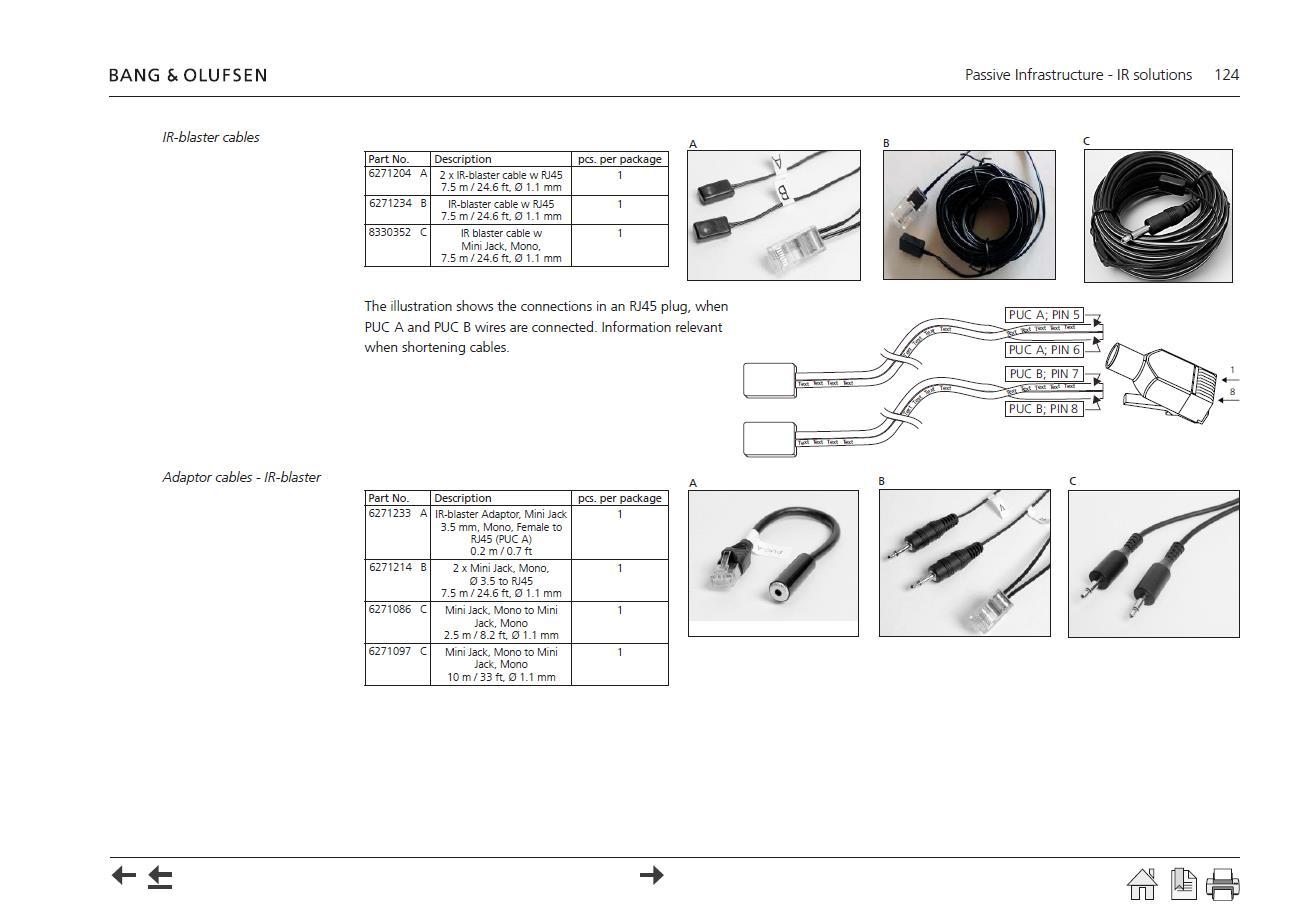
Here’s the page from the Beolink Handbook v1.9. It shows the adaptors also, but doesn’t actually map the connections across to confirm polarity (click to enlarge):

Location: Warwickshire, UK
My B&O Icons:

But are you saying It can not be turned up with a simple key on the remote and fed by power link? So long standalone Passive….
Sadly no – if you look at the Passive’s circuit diagram this shows that the Powerlink input doesn’t even go through the volume control (or Bass/Treble) circuitry. Instead the PL signal is passed almost directly to the output amplifier circuit.
To use the Passive as a stand alone you could make an adaptor to connect to the ML socket but you’d have to turn on and control with the Test Mode, and the sound quality would be impaired because the ML socket is expecting a ‘balanced input’ (basically a +ve and -ve sound signal, rather than signal and ground.)
MCL2AV is the way forward … but it would be great to avoid extra boxes (plus the MCL2AV would need its own 15v power supply – but if you used an MCL2P instead of a passive then then this has a 15v output especially for the MCL2AV).
Nothing’s simple – but it’s fun to try!
Location: Warwickshire, UK
My B&O Icons:
My further investigations: as I have a Beocenter 7700 I tried to use the MCL2A as it was intended. Beocenter has no speakers at all. Speaker ribbon from speaker 1 or 2 (didnt change anything) to the white box and there, IR eye hard wired and beovox connected.
BeoCenter 7700 was meant to be operated with MCL82 – the forerunner of the MCL2 system – so this could explain the incompatibilities – you just got lucky that ‘mute’ works!
Did you try Test Mode on the Passive?
Location: Warwickshire, UK
My B&O Icons:
About the passive in Masterlink configuration, is it possible to feed the box throut Masterlink (I know they are Line in/out wires…) or does the masterlink need some sort of handshake protocol or trigger current to start.
I think it’s the same problem as trying to power a BL3500 via just ML. From the Passive Service Manual, however, you should be able to ‘open the ML path’ by pressing MENU 0 3 PLAY (GO) on the remote – so you could try this to see if your eye is working.
My goal is to have a standalone thing made of amplification with the passive, control with the eye (on/off, volume, bass, treble) and speakers.
The easiest way to do this would be to add an MCL2AV together with the sensor. This would give you full control and extra inputs. I used to have a stand-alone system running like this to provide speakers for my PC.
Connectig the green to +5V (from computer USB) and brown to 0V. Played with the remote. Nothing. That IR eye came with a second board declared as faulty. Tried the same. Nothing.
As I said I am not 100% sure that this is a valid test. I am fairly certain that Green is +ve, and Brown ground, however! Maybe connect back to the Passive and give the TEST MODE a try to see if that works.
Location: Warwickshire, UK
My B&O Icons:
Bonus question: when is the Masterlink socket used in these boxes, seem like every time somebody want to use them the answer is “find yourself a fully wired PL cable”.
I didn’t answer this bit above.
The ML socket is used when the Passive is used in a link room as part of an ML system. The only input (data and audio) will be the ML socket, and the output (to passive speakers) will be controlled by connected IR eye.
Conversely, if the only input to the passive is via PL, then it is just acting as a dumb amplifier and no control is required (or indeed possible).
So you can connect either ML and IR eye, or just PL.
Location: Warwickshire, UK
My B&O Icons:
Interesting project!
I think that your IR eye wiring may be incorrect:
- On the MCL2A transceiver the Green wire is for +5v. (Green became IR data in later devices, such as BS3 sensor)
- I think that the White wire is IR data (but if that doesn’t work, try Yellow!)
- Brown is indeed Ground
Leave Grey and Yellow (or White) unconnected.
Guessing again, but to test the IR-eye connect a 5v supply to Green (+5v) and Brown (Gnd) and transmit with a B&O remote. A red LED should glow in response.
However, despite all that I have said above I am unsure whether the Passive will respond at all without an ML connection.
Location: Warwickshire, UK
My B&O Icons:
Not working for me either. Some stations show ‘opened’ under status but won’t play.
Location: Warwickshire, UK
My B&O Icons:
It was the Service Manual that I took those pictures from:

There is a separate document called the ‘Onsite Service Guide’ to which you may be referring.
Location: Warwickshire, UK
My B&O Icons:
I have a old Beosound 1 with Japan version; The radio frequency is like from 76 to 90; Can I change the radio frequency to the normal one like 87 to 108?
I have had a look at the manual and I don’t think it’s possible.
If you look at the ‘specification’ section, the Japan version gets a specific mention in the Tuner section, whish suggests to me that the actual tuner hardware is different: (none of the other country versions gets specific mention here)

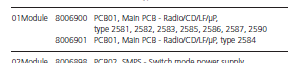
Edit: Also if you look at the ‘Available Parts’ list, you will see that type 2584 has a different part number for the 01Module – the main PCB including radio:

Location: Warwickshire, UK
My B&O Icons:
But if you do remove the two extra pins keep them somewhere safe so that future users of the Beogram can use datalink again! ?
Location: Warwickshire, UK
My B&O Icons:
For a TV as complex as the BV7, it is well worth reading the manual in detail in order to adjust the setup to your preference.
The B&O support site shows several BV7 manuals here: https://support.bang-olufsen.com/hc/en-us/articles/360041950191
So it is well worth working out which version of the BV7 that you have (from the Type Number) and then reading the correct manual in depth. You will need to look at the ‘TV Tuner Setup’, ‘Connections’, and ‘Registering Additional Equipment’ sections, as a minimum.
Once you have had a look through the manual, come back to the forum if there is anything that you don’t understand, or can’t get to work as expected. It can be quite daunting if you are new to B&O! ?
Location: Warwickshire, UK
My B&O Icons:
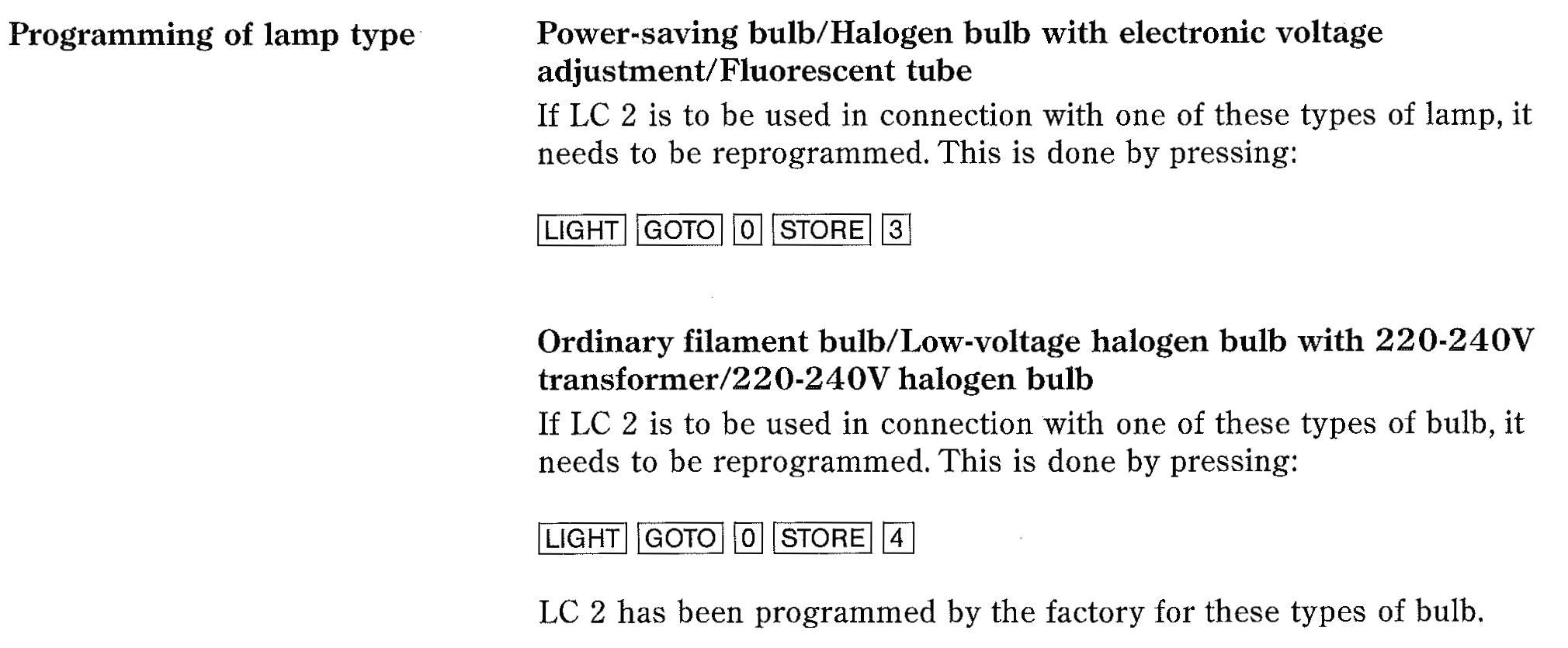
3 November 2022 at 09:24 in reply to: Wanted! Guide for setting up and controlling Light with the Beoremote One/BT. #40235BTW if someone could explain how you program the LC2 to on/off mode that would be very interesting to me.
With Beo4: (Touch the LC2 dome with your hand whilst programming)
Press LIGHT, then LIST to display SETUP. Press 0, then LIST to display STORE. Press GO then 3.
To return to dimming, same as above but press 4 at the end.
EDIT: It’s easier with BL1000: (again touch the dome whilst programming)

(Thanks for the heads-up about the Philips bulbs. I will have a look for some)
Location: Warwickshire, UK
My B&O Icons:
Maybe have a read of this extensive thread on the Siri remote: https://archivedforum2.beoworld.org/forums/t/34673.aspx?PageIndex=1
Location: Warwickshire, UK
My B&O Icons:
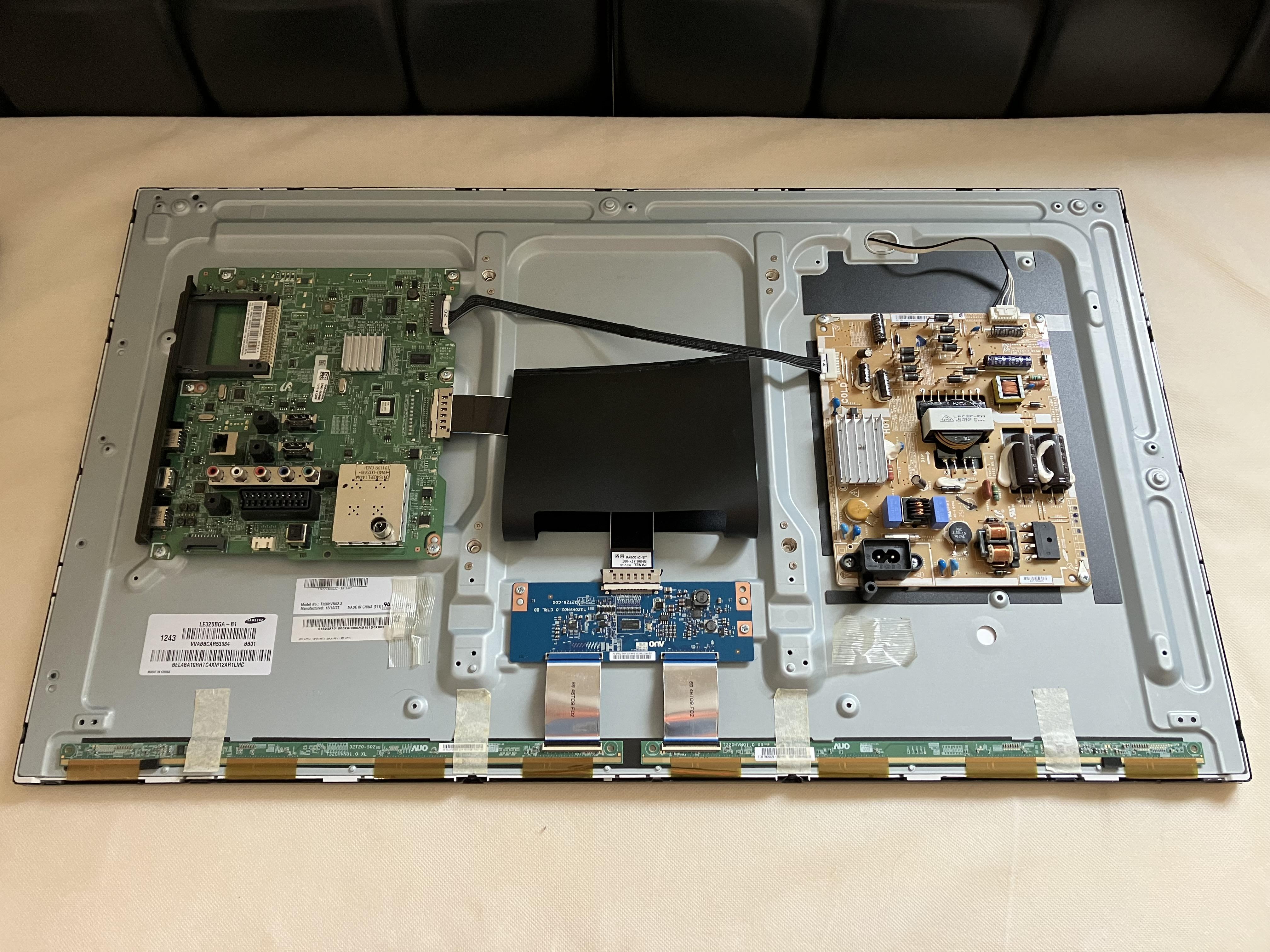
One other photo that make be of interest, showing the TV internals – there’s not much to them!

Location: Warwickshire, UK
My B&O Icons:
2 November 2022 at 10:09 in reply to: Wanted! Guide for setting up and controlling Light with the Beoremote One/BT. #40232N.B. What exactly do you mean with warm glow — ‘White Ambience’ or just ‘White’?
I was just about to ask the same question! Any chance of a link to the exact Philips bulbs that work with the LC2? And do they dim correctly, or are you using the LC2 in the on/off mode?
Location: Warwickshire, UK
My B&O Icons:
2 November 2022 at 00:01 in reply to: Beosound overture 2637 with beo4 remote – spares and repairs #40338Are there alternatives to the bunny ears?
If your FM signal is strong enough you could always just connect a ribbon aerial like this: https://www.amazon.co.uk/Indoor-Ribbon-Coaxial-Connector-Adapter/dp/B00XA0ZN22
… and hide it behind a curtain or under the table. Or connect an external aerial if you have one.
My BeoCentre 2300 worked very well with a wire coathanger hooked into the antenna socket!
But the ‘bunny ears’ aerial does look good – if you can be patient you may find one for a reasonable price.
Location: Warwickshire, UK
My B&O Icons:
A lamp of 12v 80mA is always the same no matter
As explained at the Beoparts link, in the BM1100 the stereo indicator bulb is part of the tuning circuit, with current varying with brightness. This won’t be linear due to temperature effects, hence it is critical that the bulb behaviour is correct. Many others on the forum have had similar problems in the past with indicator bulbs that purport to be the correct spec, but do not work in this application.
Of course there may be other (non-bulb related) problems in your tuning circuit, and perhaps others can suggest a solution.
Location: Warwickshire, UK
My B&O Icons:
Also one more question. I can not understand why insist on Beoparts. A lamp 12v/80mA has the same characteristics even bought from beoparts or elsewhere. I can imagine something special. Am i wrong?
I am not insisting, merely recommending!
To be honest I don’t fully understand the requirement for very specific electronic characteristics, although there is some explanation on the Beoparts page to which I linked. Similarly I don’t fully understand why tape drive belts from Beoparts work whilst other cheaper ones from eBay don’t! Overall, from experience I trust their spare parts supplies hence I continue to recommend them!
Location: Warwickshire, UK
My B&O Icons:
1 November 2022 at 11:40 in reply to: Beosound overture 2637 with beo4 remote – spares and repairs #40336Great news that the remote now works – thanks for letting us know! I get my Beo4 spares (rubber keypads etc) from here: https://www.avaservices.co.uk/
And our site sponsor (at the foot of the page) can supply the correct cable for connecting an airport express to the Ouverture’s AUX socket – this one: https://soundsheavenly.com/bang-olufsen/67-298-minijack-to-aux-in-ipod-to-beosound-beomaster-beocenter-using-aux-din-socket.html#/2-length-1m
I think there may be a thread about tape belt replacement – I’ll have a search and get back to you.
EDIT: Found it here: https://archivedforum2.beoworld.org/forums/p/26380/290890.aspx
Although I have never done a belt replacement I am sure that others here will help if you get stuck. Belts are available here: https://www.beoparts-shop.com/product/tapedeck-belt-2/
Location: Warwickshire, UK
My B&O Icons:
Lintronic are/were an excellent company, but technological times change – and when manufacturers build in solutions, or there’s no need for what you provide as a company, the inevitable happens.
I saw that they introduced a Bluetooth add-on module so that you could control IR devices with the BT Beoremotes. Personally I’d like to see this work in the other direction, so that the newer B&O TVs could be controlled with Beo4. I do have an old RE-BL (PS3 IR to BT controller – see here) that is similar in concept – just needs a bit of modification …
Location: Warwickshire, UK
My B&O Icons:
-
AuthorPosts