Forum Replies Created
-
AuthorPosts
-
 Moderator
This post is intended to provide additional information related to the Beolab 3500 mark 2 and the Beolink type 1611 converter rather than answer any particular question raised in this excellent thread.
Many thanks Keith – that’s really useful to have in this thread for reference.
Quick question: Do you know if BL3500 SW 2.1 will also make it show PC in the display? (rather than V.AUX which is currently displayed on my SW 2.0 version when I press PC)
(EDIT: And my SW2.0 version does already show DVD rather than CDV. Other sources display the ‘older’ input names)
Location: Warwickshire, UK
My B&O Icons:


Morning all!
Blimey, all these things to test! I need to text my wife (who’s at work) and let her know the vacuuming isn’t going to get done today!
Firstly great to have Steve on board, able to cast a professional eye over our attempts to push the boundaries of the B&O black boxes in our collections! Great to hear that your wife is back home recovering Steve.
@Guy: if you are willing to try it, I would be very interested to hear what reaction the BL 2000 and BL3500 has if you apply some voltage to the powerlink connector on the 1611 as I did. Do they turn on, and maybe off when power is removed?
I’ll add that to the test list – sounds like I am being forced to get my soldering iron out ☹
Guy, do you have a Beolink Active 1636 (or 163x)?
Yes!! And the good news is that I know what box it is in! According to my records it’s a 1636 at SW version 1.1.
I was told 163x converter replaced 1611 and I would like to know if it can drive the 3500 as standalone the same way the 1611 does.
I have never heard of a BL Active being used without it’s IR sensor attached, but am willing to try! I also suspect that the Active’s PC socket input will only respond to PC source selection.
Coffee required first, then into the boxes to find some bits …
Location: Warwickshire, UK
My B&O Icons:
So tonight I made an attempt at Test 12 – making use of the BL1611 AAL pin 6 datalink input.
I don’t have any pure datalink source devices other than my BG6500 turntable and that is packed away so carefully that I am not prepared to get it out for this project!
However, I do have a DVD1 for which I previously made a special SCART to 7-pin DIN cable for the project described here: https://archivedforum2.beoworld.org/forums/p/45162/327485.aspx#327485
Basically, the cable connects SCART data pin 8 to DIN pin 6, plus audio to DIN pins 3 and 5. It previously worked well to connect an extra ‘CD’ player (the DVD1) directly to my BC9500’s AUX/TV socket, which also uses pin 6 for data.
Anyway, for this test I used the BL3500 as the controlling ML device and the DVD1 was connected to the BL1611’s AAL socket. Audio (a CD) played fine with a video source connected, but no datalink control of the DVD1 was possible (I couldn’t start up the DVD1, play, stop, or change tracks with the remote, hence had to use the DVD1’s front panel). However, when I tried a long-press of the Beo4’s ‘off’ button, the entire system did shut down including the DVD1.
Hence some data is being passed from BL3500 to the DVD1 via the BL1611, but just not the full spectrum of normal datalink commands.
I hope that Test 15 (Control of OneRemote radio) will be more successful, once I have made that (nameless) adaptor!
Location: Warwickshire, UK
My B&O Icons:
Hi Guy, Yes, thanks for correcting my poor description in the video! The IR codes for CD and Phono are different, but any Beogram with Datalink can respond to either the PHONO or CD codes. This means that on an MCL system such as Beosystem 3500, 4500, 6500 or 7000, you can connect two Beograms to the mains system (one in the PHONO socket and one in the CD socket), plus two more into the local CD and PHONO inputs on the MCL2AV box in a link room. The link room sources can only play in that room but this does mean that you could potentially have remote control access to up to four Beograms from your bathtub (as in the video) with two in the main room and two in the link room. If anyone is feeling pedantic, the MCL2AV and extra Beogram for my bathroom are actually located outside the bathroom, with only the passive speakers and the IR remote receiver in the bathroom. This ensures that UK electrical safety rules are complied with! Hope this helps… Kind regards, Steve.
Thanks Steve – all totally clear, and it would be a great setup as described!
Good to see your website back up and running this evening – I hope all is well!
Location: Warwickshire, UK
My B&O Icons:
Guy wrote:
A.AUX doesn’t work (nor does PC)I don’t understand: is it that the commande from remote does not call an audio source?
Sorry, I missed this post earlier. The BL2000 just doesn’t respond to PC or A.AUX at all. I have now tried this both when connected to BL1611 in the dual-input setup, and also when connected to my Beoport by ML.
And yes a little cactus for the BL2000’s shelf in the middle would be great – should also keep prying fingers away!
Location: Warwickshire, UK
My B&O Icons:
PC shows PC and open the audio/audio port of the 1611.
In that case I think yours may be SW2.1, whereas mine is 2.0. You may have told us your SW version, but I can’t remember!
Just guessing but wasn’t the PC command added for the Beoport or when computers became an usual source of sound? Then it would make sense it shared the V.AUX entry like if it was the audio part of an AV source (sound plus picture i.e computer screen). Maybe related to the beomedia implementation? I don’t know.
That makes perfect sense and I vaguely remember something similar. I just can’t find anything in the archives. I’ll keep looking. (Of course that would explain why PC didn’t even exist on older Beo4s, although BL1000 allowed you to press SHIFT STORE for PC)
It would be interesting maybe to have a little timeline with beosources names changes and equivalent over time?
That would be very useful. The closest I have is a list of Beo4 SW updates (mostly in Danish) showing at what SW level new sources were introduced – the early part of this has dates. For example, PC was introduced to the Beo4 at SW EE3.2 (but there’s no date for this one!)
would be sad and surprinsing that there is no standby mode even if I dont hear any click when the speaker turns on.
There is a click on the BL3500 (and a much louder one on the BL2000) but it would be interesting to know if there is a difference between mute and stand-by for link room Beolabs.
Location: Warwickshire, UK
My B&O Icons:
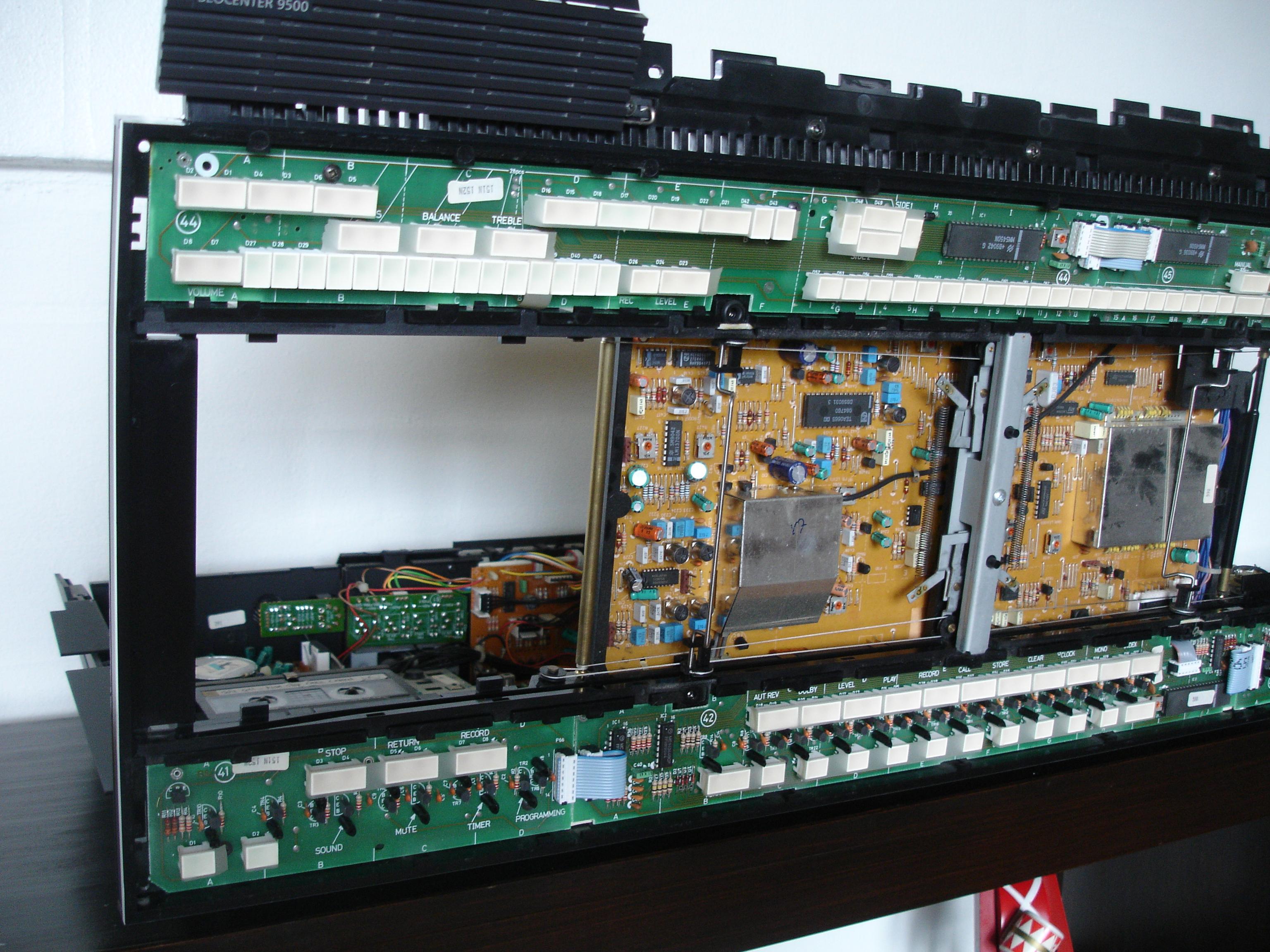
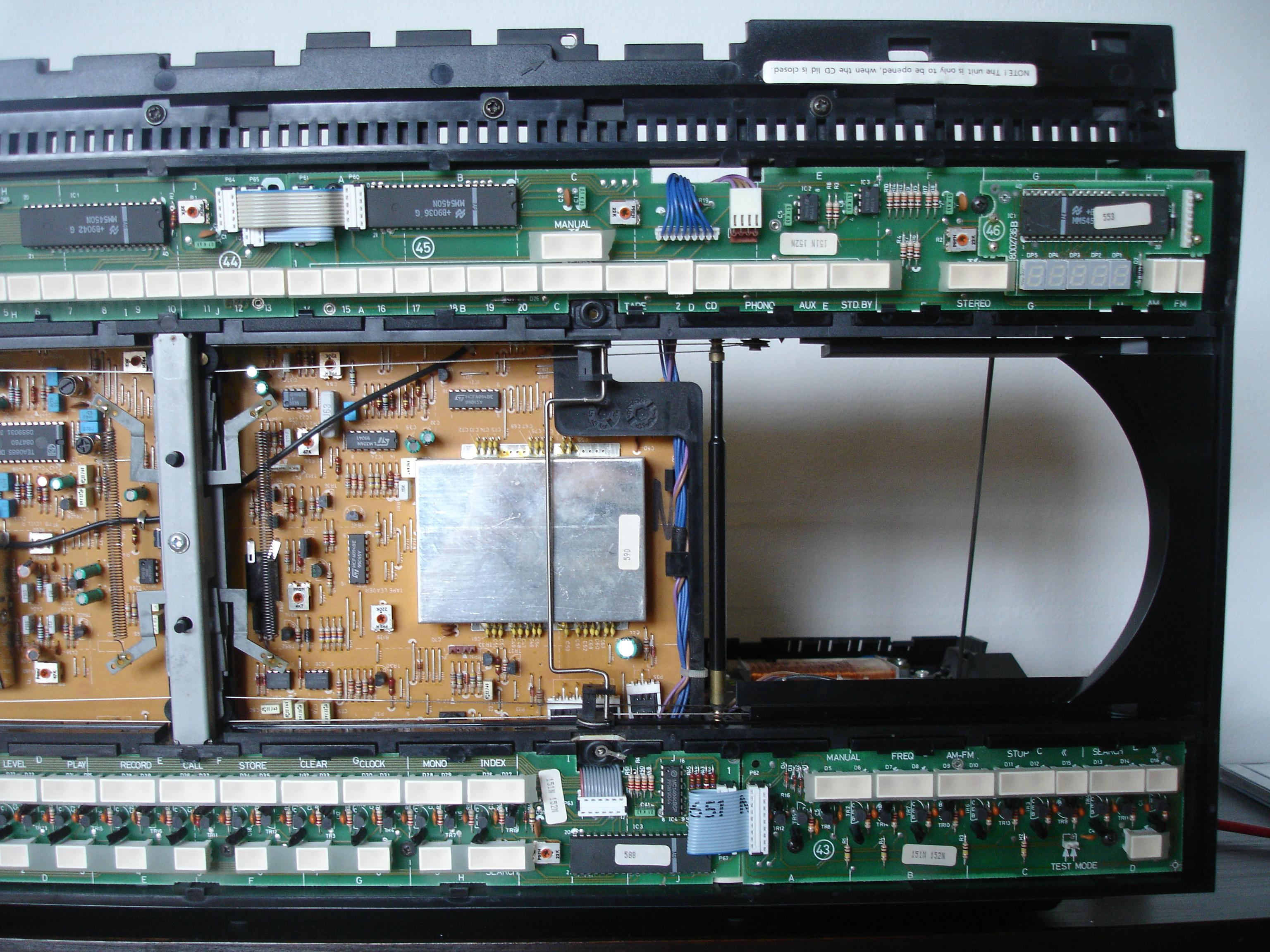
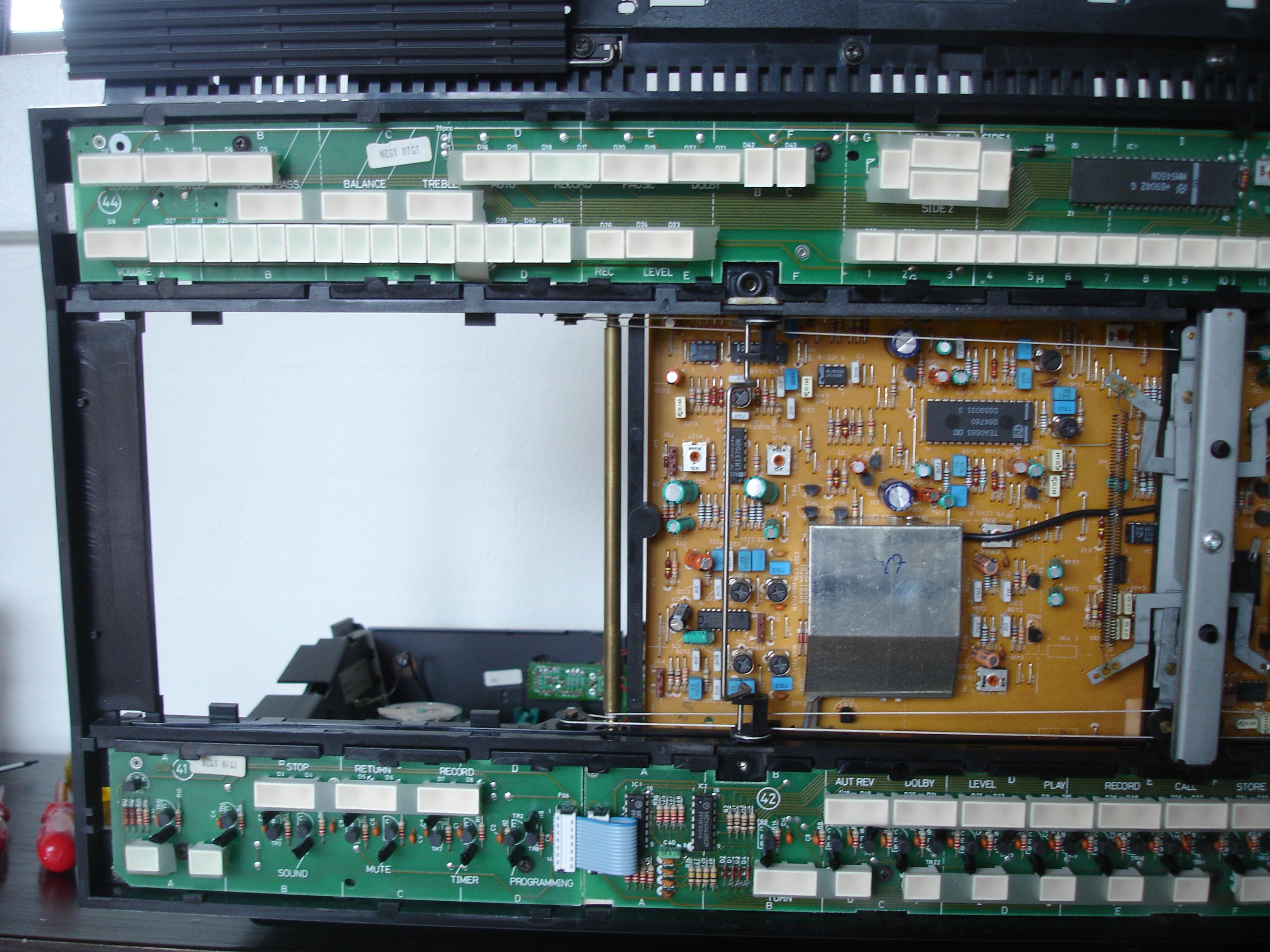
Great work – a BC9500 is well worth restoring. I have never tried re-threading those door strings, but it is supposed to be quite tricky. There’s some instructions in the service manual I think. Here’s some photos showing mine if that helps! (click to enlarge)

Location: Warwickshire, UK
My B&O Icons:
I am now trying the BL3500 with BL1611 and it seems to behave exactly as Matador’s. A.AUX works fine. However, when I select ‘PC’ it plays an audio source but shows V.AUX in the display.
Confusingly, if I use LIST to select V.AUX it plays a video source but shows V.AUX in the display!
Is that the same on yours Matador?
EDIT: Just saw a very old post of Keith’s that says you can turn on the BL3500 using the volume wheel of the BeoCom 6000 phone. I suppose that when it’s off, the BL3500 is really only muted so that makes perfect sense.
Location: Warwickshire, UK
My B&O Icons:
Hope it didnt ruin you
About the price of 60kWh of electricity – that’s my new measure!
Selectable with the front key!
Congrats on your new toys, may we make the interest to this understated speaker rise, make it the poor man’s Beosound 35…
Thanks Matador, and the first test is complete: The BL2000 behaves exactly like the BL3500. Front button source selection very useful, and I was quite lucky that it wasn’t the A.TAPE button version. Volume control wheel also useful. A.AUX doesn’t work (nor does PC) but I am not fussed about that. Only downside is Wife Acceptance Factor – she doesn’t like the look, and thinks there’s something missing from the middle.
One interesting test with your new equipment couldbe if both the BL2000, and BL3500 can coexist with the 1611 and acces both sources
Great idea – I’ll add it to the list. That does however mean I need to dive back into the cardboard box pile to search for an ML distr box that I know is in there somewhere!
Location: Warwickshire, UK
My B&O Icons:
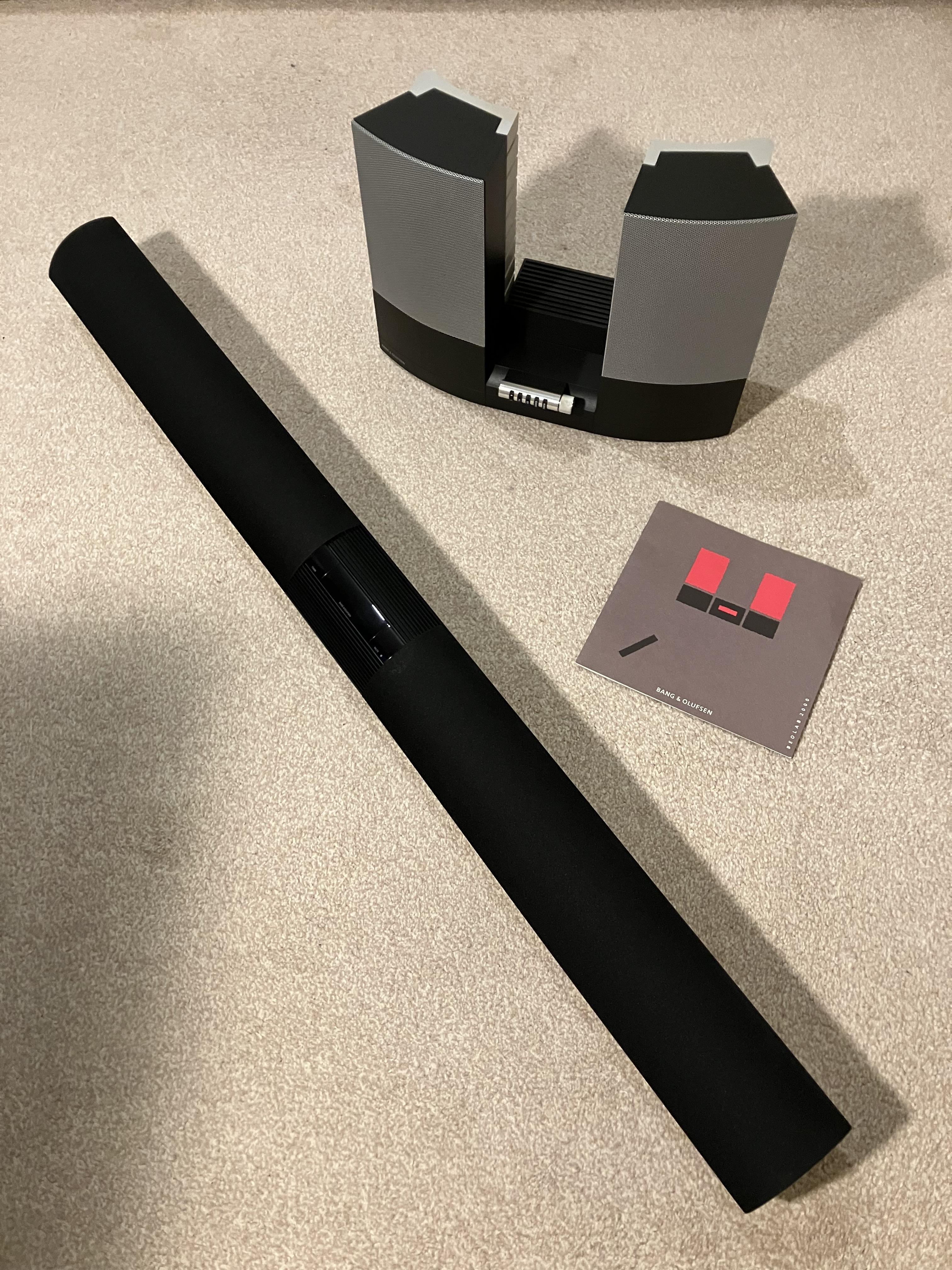
This thread has a lot to answer for! Look what I have been busy collecting today courtesy of UK eBay!

The BeoLab 3500 is a Mk2, at SW version 2.0 (which I think means that I get the older display items such as SAT instead of DTV). Not sure whether A.AUX will work.
The BL2000 is the later model with a TV button, and is at SW 1.3 (EDIT: It’s actually at SW 1.1 according to the label)
One of my first tests will be the BL1611 ‘dual-input’ to the BL2000, but I then hope to try a few of the other things being discussed today – three inputs sounds ambitious!
Location: Warwickshire, UK
My B&O Icons:
If I remember correctly something was mentioned in one of Steve’s videos about CD and Phono commands being the same
I found the video here: https://youtu.be/lWGir5kAVsE&t=7m15s
Although Steve states that the CD and PHONO IR codes are the same, I think he actually means that the datalink signal that results from pressing CD and PHONO are the same.
Location: Warwickshire, UK
My B&O Icons:
Very useful experiments – thanks for sharing!
I don’t have a beomaster with power link on hand, but since its only pin 4 (and 7 and 2 to ground) that is connected internally in the 1611 I made a cable where i could inject voltage on pin 4 and 7.
I didn’t think that PL pin 7 was connected to anything inside the BL1611. I presume that you were trying to use it as ground in conjunction with pin 2, or instead of?
This site https://github.com/toresbe/datalink explains why I cant use the Beocords datalink with the 1611, as there are two versions of datalink, where one is between components in a stereo system (Beomaster, CD,tape etc. and the other is between systems, beomaster to 1611 or beovision with datalink.
Interesting. This may explain why my OneRemote Radio has a different 3-digit option code when connected to BL1611 to when it is connected to BC9500. (Eg to activate with N.MUSIC on my BC9500 it needs to be set as ‘302’ and with a BL1611 is needs to be ‘402’). I haven’t tested this yet as I need to make up a converter lead to move data to pin 6.
I cannnot see why a Beogram is not communicating on pin 7 like a CD and tape player.
… but a Beogram with RIAA does use pin 7 apparently. Thus if I connect my BG6500 (with RIAA) to the PHONO socket on my BC9500 (also with RIAA) the mismatch between data pins stops me from activating the Beogram and using a double-RIAA setup.
If I remember correctly something was mentioned in one of Steve’s videos about CD and Phono commands being the same.
I remember this too – was it the video about controlled 15 Beograms from you bathtub? (I may have exaggerated the number!)
Location: Warwickshire, UK
My B&O Icons:
I vaguely remember something about the BS9000 RADIO being disabled when it’s in A.OPT 0, but I can’t find any references to this, so perhaps I dreamt it! ?
Location: Warwickshire, UK
My B&O Icons:
Not sure about the RADIO, but how are you selecting the AUX input for the Beogram?
Have you tried pressing A.MEM instead of A.AUX?
Have you tried disconnecting the spdif cable? (Sorry but I don’t know enough about BL5 to know why it is there! – EDIT: Because the BL5 has its own D to A converter, obviously!))
Location: Warwickshire, UK
My B&O Icons:
Id like to know how to connect passive speakers for the ceiling Atmos on a BL28 BS Theater 5.0.4 center setup.
A simple solution might be to connect a Beolink Passive, as shown here: https://beoworld.org/prod_details.asp?pid=981
These have a powerlink input (old style 8 pin DIN, so you’d need an adaptor) and 2-pin DIN outputs for L/R passive speakers, and can be used as a simple amplifier. You don’t need to connect an IR eye when used in this configuration. The advantage of using a Beolink Passive is that they should be triggered on/off by the powerlink output from the Theater.
Beolink Passives can be picked up for approx £30 on second hand sites.
EDIT: The ML/MCL Converter is identical to the Beolink Passive in this application. It only has a different name because it was supplied without the IR sensor. See here: https://beoworld.org/prod_details.asp?pid=984
Location: Warwickshire, UK
My B&O Icons:
Hi and welcome to Beoworld.
This problem came up quite often in the old forums – I can vaguely remember that someone manufactured something but can’t find the thread now. It could be worth a more in depth search.
As an alternative, you could use something like this: https://www.quality-dream-audio.co.uk/new-spare-parts/clip.html
By the way, I think the problem is confined to the BC9000. BC9300/9500 use a different CD mechanism and the spindle is different (and doesn’t fail).
Location: Warwickshire, UK
My B&O Icons:
I know this post is from March, but I have to ask what the issue with that DVD1 is? I have one I got for next to nothing as it is broken but in beautiful cosmetic condition. When loading a disc it just states reading and never starts playing. Is there a common repair for this? I have heard that the DVD1 was kind of junk from the beginning but it would be great to get it going again if its simple. Disc spins and everything looks alright inside but it just wont play!
If your referring to my post in March then the only problem was a slight vibration when playing the disc. Replacement of the screw fixed it.
Perhaps the laser/lens needs cleaning on your DVD1. I have never tried this but it sometimes cures similar faults with CD players.
Alternatively, have a look through the two archived Forums to see if anyone had a similar fault. Be aware that there are two visually-similar models of DVD1: The Mk1 was type number 4620, and the Mk2 was 4621 – the type number is written on the product label on the rear. The latter model is supposed to be better, but I have never had a problem with either.
Location: Warwickshire, UK
My B&O Icons:
I will try to make a converter cable one of the comming days and repport if that will work.
I am considering making a little junction box with two 7 pin DIN input sockets and switchable datalink pins.
You could actually modify a BL1611 and turn the PL socket into the ‘Audio In’. You’d just need to disconnect pin 4, and then run internal jumper cables from PL pins 2, 3, 5 and 7 to AAL pins 2, 1, 4 and 6 respectively. It could be quite straightforward but I don’t like modifying original B&O eqpt, so I think the external box would be better, and more flexible if the datalink was switchable.
Location: Warwickshire, UK
My B&O Icons:
@matador: just a suggestion for the drawing. One or both sources can still be a BEO product with datalink. The datalink pin 6 can be relevant to show on the DIN pinout drawing for this usage.
It’ll be interesting to try connecting a few B&O sources (CD player, Beogram etc) and see if they can be controlled. At the very least, some will need an adaptor to move datalink from pin 7 to pin 6.
From an old post by Peter about datalink pins:
Tape and CD use pin 7, Phono uses pin 6 except when the record player has a built in RIAA when it too uses pin 7. However TV/AUX uses pin 6 as well just to complicate things.
Location: Warwickshire, UK
My B&O Icons:
@Guy: Nice Beocom 6000 you have there
Ha ha. Well spotted – a gift from a very kind forum member! ?
Location: Warwickshire, UK
My B&O Icons:
-
AuthorPosts