Forum Replies Created
-
AuthorPosts
-
 Moderator
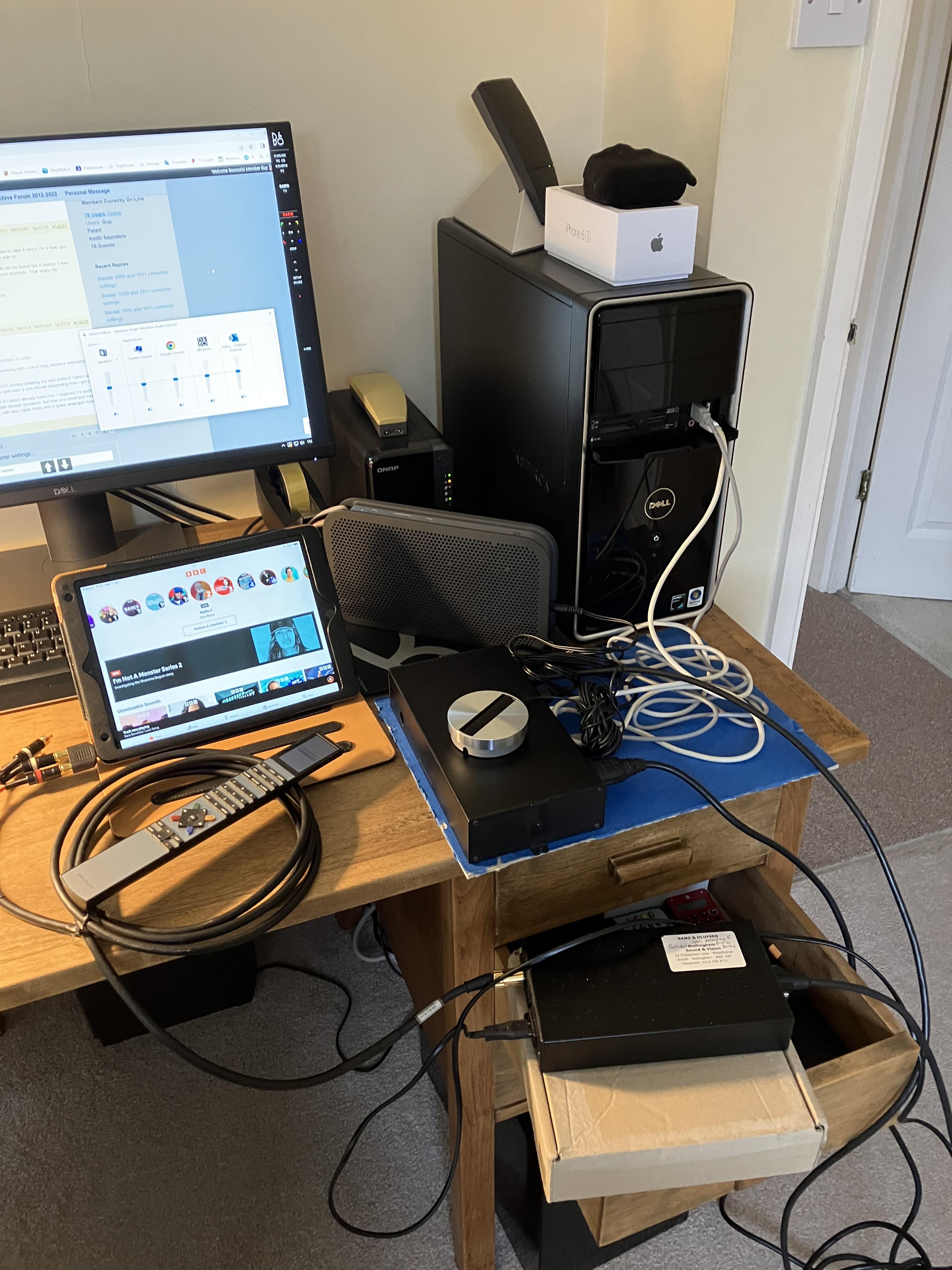
For amusement, here’s the Beoport/1611 test rig!

Location: Warwickshire, UK
My B&O Icons:

Cheers and again, thank you for being partner in crime.
A pleasure – it’s very satisfying to get it all working with a bit of long distance international teamwork!
I’ll probably do some more OneRemote/1611 testing (making my own ASNUT cable) and maybe 1611/Passive/IR as well, but may well start a new thread depending how I get on.
I am not sure that I would get a Beoport if I didn’t already have one. I suppose it’s quite useful in a stand-alone study system with Beolab speakers, but now you could just have a PC connected to a 1611 and BL3500, with less cable mess and a spare analogue input!
Location: Warwickshire, UK
My B&O Icons:
I’ve just seen the diagram corrections thanks, and good news that PC works too.
I have just tried the ‘double source’ with the BL1611 connected to my BeoPort (connected to Win PC) – there are no other ML connections. I put the Beoport in Opt 6 and added an audio source (RADIO) and video source (TV). I can select these using individually using the on screen remote or Beo4 – it’s very useful indeed to have the two additional analogue inputs:

Location: Warwickshire, UK
My B&O Icons:
Great news Matador – I am very pleased that it all works! To be honest when I discovered the Pin 1 and 4 audio-master trick I didn’t then consider a double/selectable source, and so straightforward to set up and control in the end!
I think that together we have doubled the value (and second-hand prices!) of BL1611 Converters, and probably BL3500 as well. I assume that the same would work with BL2000, and possibly also if the 1611 was connected to a Passive (with IR eye) – I might try the latter at some point.
Great diagram too – it looks like it comes from an official B&O manual! Maybe add a note to say that the BL3500 is in L.OPT 6.
(Actually, is it me or have you got the Audio and Video Beo4 sources reversed in the diag? Pins 3 and 5 (video source) were on the right hand side – source B.)
Also, have you tested what source (A or B) the PC command selects, if any? Some users may want the double setup in a study with their computers, and it would be good to see PC on the source display, if it does that.
Anyway, have a great day all!
Location: Warwickshire, UK
My B&O Icons:
And to confirm the above logic I just checked the Audio Aux Link circuit diagram for a non-ML equipped MX TV. The outputs are on pins 3 and 5.
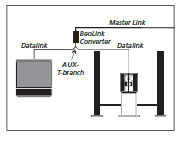
This also explains how this sort of setup works (from ML handbook):

… because the TV can receive the Audio from the BeoCenter, and vice versa, but the BL1611 ‘chooses’ whether the TV or BC audio is being sent over Masterlink, according to the source selected elsewhere in the ML network.
Location: Warwickshire, UK
My B&O Icons:
So after staring at a 7-pin DIN to DIN cable for several hours I have made progress!
Basically I realised that the 7-pin DIN to DIN is not a crossover cable, it maps identical pins between the two devices. Thus when I connected my BS1 to the 1611, I was connecting pins 3 and 5 of the BS1 (i.e the input pins) to pins 3 and 5 of the 1611 (also what I thought were the input pins). But that had worked, so it was not logical. The BS1 was sending its audio output via pins 1 and 4, hence the 1611 must have been getting its input from pins 1 and 4.
So I just tried the iPad connected to the 1611 AAL socket (pins 1 and 4) and by ML to the TV, and I could select the iPad by selecting any audio source on the TV! So it is working as an audiomaster!
It would seem therefore that the 1611 uses pins 3 and 5 as input when it is a video-master, but pins 1 and 4 when an audio-master. This starts to explain the OneRemote ASNUT cabling, but may still not help with the connection to a BL3500.
(Luckily I found one of these cables (and a 3.5mm to twin phono socket) so I was able to test without any soldering!)
EDIT: And your BC2300 should work in exactly the same was as my BS1 because the AUX socket pins 1-5 are connected the same way.
Location: Warwickshire, UK
My B&O Icons:
Guy succeed when using his Beosound 1 but why didnt I when connection my 2300?
I also once connected my BC2300 to my BV10-32 using a 1611, and it played fine through the TV, including the connected Beogram. (I had to use an a.aux Y adaptor, so the Beogram and 1611 shared the BC2300’s AUX socket)
Location: Warwickshire, UK
My B&O Icons:
Guy wrote:
7 pins, but I think the OneRemote data is going to pin 7 which is not connected inside the 1611. Hence why I think I need to swap 6 and 7 (or use an adaptor)That would be a very dirty trick from OneRemote.
But my BC9500 TAPE 2 input (where I previously connected the OneRemote) needs the datalink to be pin 7, so you can see OneRemote’s problem!
Location: Warwickshire, UK
My B&O Icons:
How much pins do your internet radio have ?
7 pins, but I think the OneRemote data is going to pin 7 which is not connected inside the 1611. Hence why I think I need to swap 6 and 7 (or use an adaptor)
Location: Warwickshire, UK
My B&O Icons:
Next I am going to dig out my OneRemote radio and see how that behaves connected straight to the 1611 and to the TV (without an ASNUT cable!) When my OneRemote was connected to my BC9500 it had to be connected to the Tape 2 socket, which uses datalink pin 7. Perhaps the ASNUT cable just moves the datalink to pin 6 for the 1611? I may try a pin 6 to 7 bridge …
I tried my OneRemote Internet Radio connected to the TV via the 1611 and it didn’t work (needs ASNUT cable!). I tried setting the radio to several different modes, both video and audio, direct and cable link. Nothing worked. I also tried bridging AAL pins 6 and 7, with no change. I may try swapping pins 6 and 7, but I really need to buy a 7 pin socket to make a lead and try that.
Location: Warwickshire, UK
My B&O Icons:
Try pressing MENU after selecting an audio source. When I do this it turns the TV screen on and shows that the audio source is connected, but sound is very very low.
Location: Warwickshire, UK
My B&O Icons:
Just return it to V.OPT 1 afterwards.
Location: Warwickshire, UK
My B&O Icons:
^ When you connected to the BC6 did you put it in V.OPT 2 first? (Otherwise it will ignore all audio commands)
Location: Warwickshire, UK
My B&O Icons:
Thanks Madskp – always good to have more input!
I just reconnected to my TV and tried the ‘double high volume’ trick with similar results – I can just about hear the iPad playing.
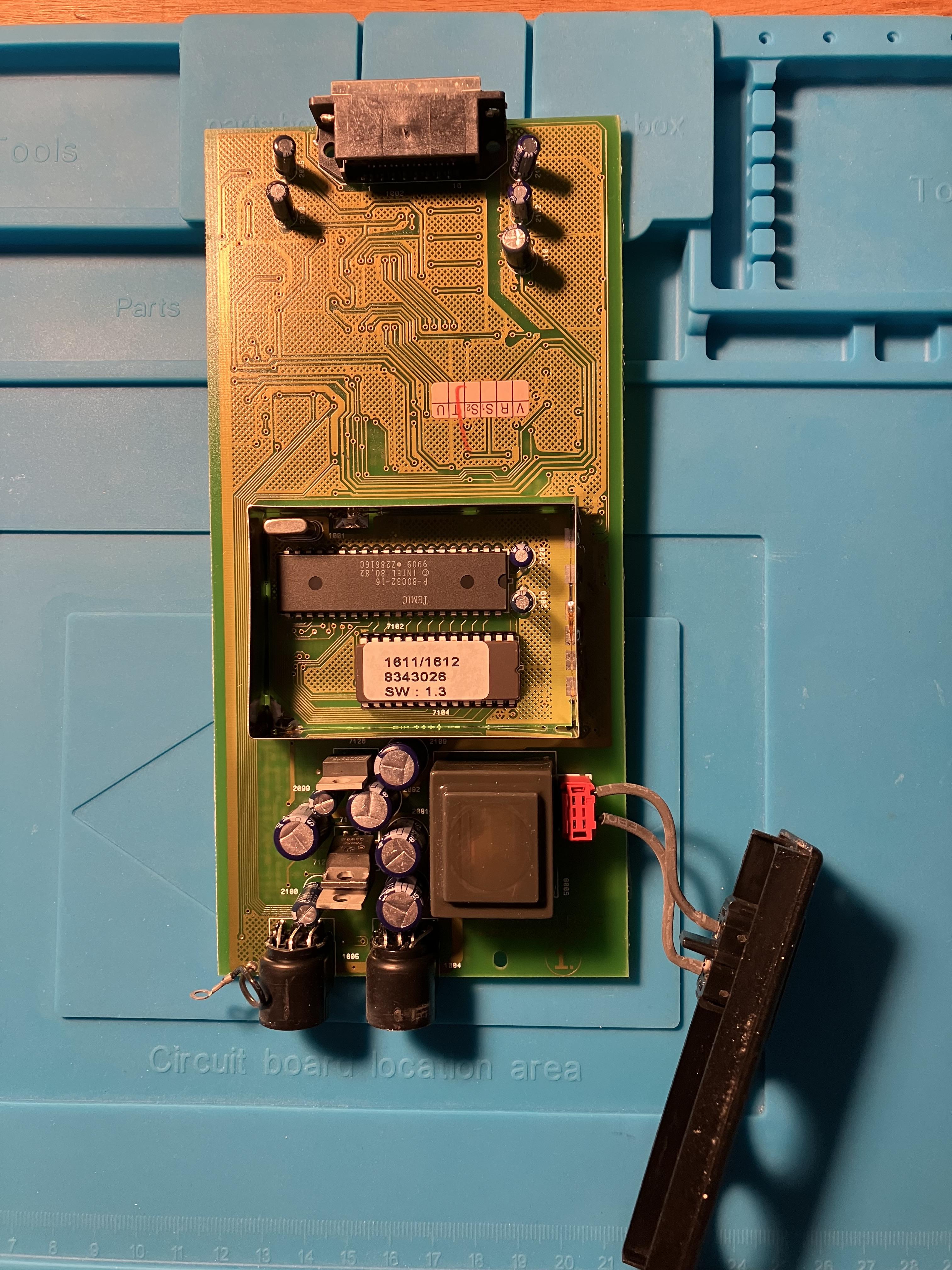
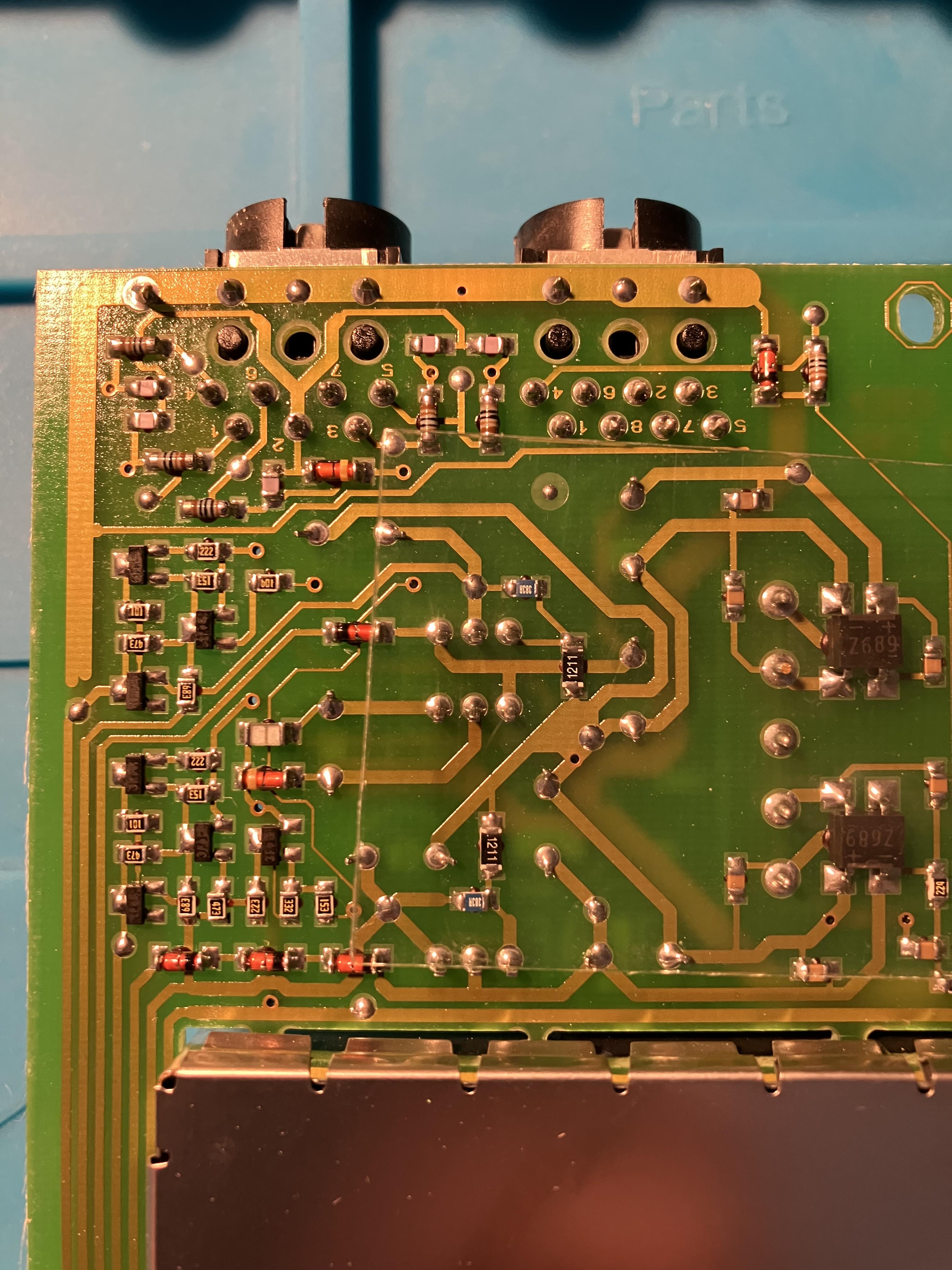
I just opened up my 1611 – herewith pictures:
Interestingly, AAL datalink pin 7 is not connected to anything (I checked the other side of the board too). AAL Pin 6 must therefore be used for data in any 1611 setup, hence the OneRemote ASNUT cable can’t connect pin 6 to ground otherwise no data would be able to pass.
Next I am going to dig out my OneRemote radio and see how that behaves connected straight to the 1611 and to the TV (without an ASNUT cable!)
When my OneRemote was connected to my BC9500 it had to be connected to the Tape 2 socket, which uses datalink pin 7. Perhaps the ASNUT cable just moves the datalink to pin 6 for the 1611? I may try a pin 6 to 7 bridge …
(Yes the BS1 datalink is interesting, and thanks for checking the circuit diagram. So the BS1 must be doing something to the 1611 via pin 6. I often wondered if my BS1 would control a connected Beogram turntable, but suspect that B&O didn’t want to add that software, preferring customers to purchase more expensive Beosounds!)
Location: Warwickshire, UK
My B&O Icons:
Well that’s the problem; I am getting the announcements on BS5 – I double checked with Support – and they got a little bit shirty with me, but re-confirmed.
Interesting – I guess that we’ll both just have to wait and see!
Location: Warwickshire, UK
My B&O Icons:
Part number 6250031 is a 5m cable with a DIN plug on each end.
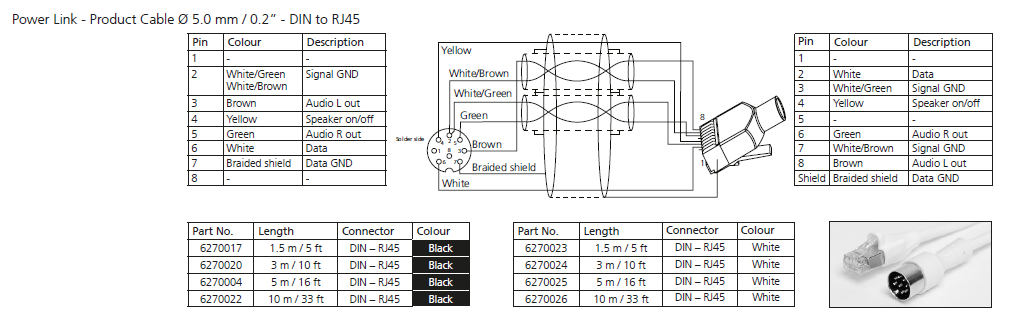
I f you need 8 pin DIN to RJ45 you probably want this: (click for larger image)

EDIT: The type of PL cable that you need will depend on what equipment you are connecting. The above diagram is taken from the Beolink Handbook v1.9. If you let me know exactly what you are connecting and I will post the details.
Location: Warwickshire, UK
My B&O Icons:
Great – I am glad that you got it working!
Some hdmi audio extractors just don’t work very well. I sent a couple back to Amazon for a refund when they didn’t work.
I fond this one to be most reliable: https://www.amazon.co.uk/aoeyoo%C2%AE-Analog-Converter-Digital-Extractor-White/dp/B00NAJ4UM2
Location: Warwickshire, UK
My B&O Icons:
Found this thread from the older forums regarding the power link socket on the 1611. Seems its an input, and might give some on off functionality maybe?
https://archivedforum.beoworld.org/forums/t/21371.aspx
what are your thoughts? The manual for the 1611 only mentions it briefly
If you look at my photo of the underside of the 1611’s PCB (back a page in the thread) you can see that only PL pin 4 is connected. PL pin 4 is speaker on/off – as I think some of the posts in your linked thread confirm.
Location: Warwickshire, UK
My B&O Icons:
Steve’s post here gives some advice about Cat 6 or 7: https://archivedforum2.beoworld.org/forums/p/26569/212622.aspx#212622
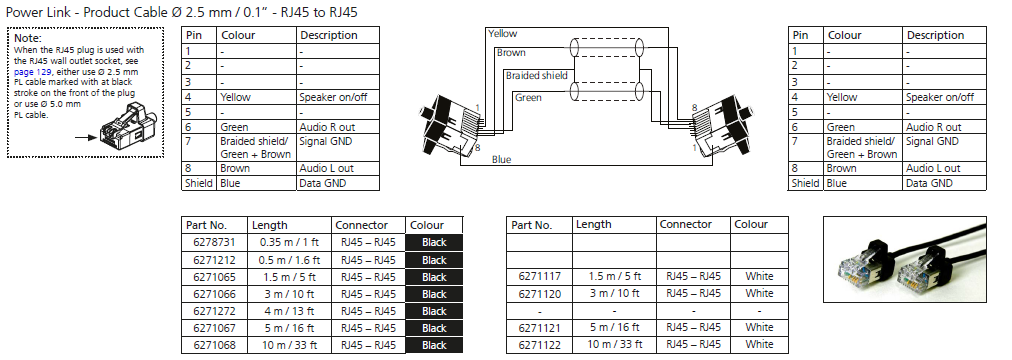
Here are the diagrams for RJ45 to RJ45 from the handbook:


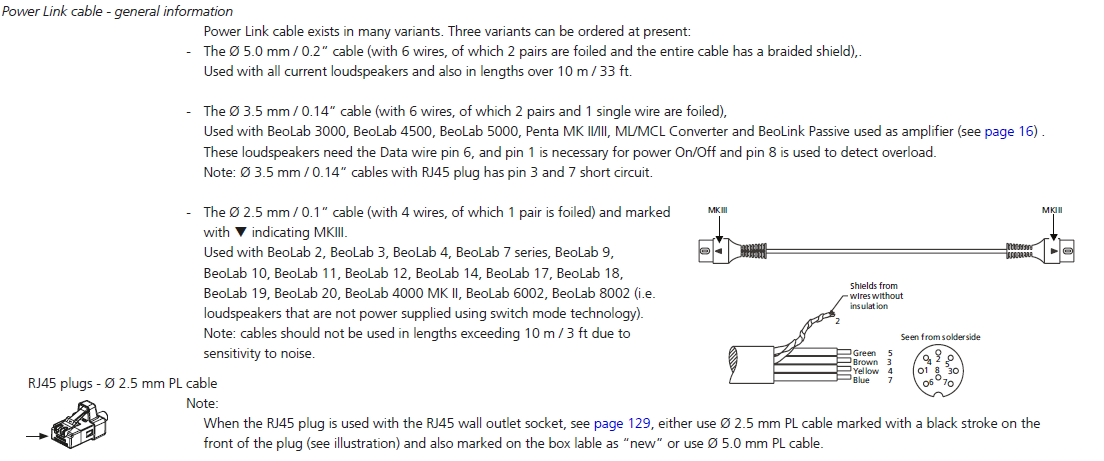
And here’s some info about whether to use 2.5mm or 5 mm:

Location: Warwickshire, UK
My B&O Icons:
So in both case, it is a video master, triggered by a video source key, right?
Seems correct because I can’t find posts stating that you can start it with an Audio command.It did when connected to my BV10-32 by ML, but only when the 1611’s AAL input was from the aux socket of my old BeoSound 1 radio, with a 7-pin DIN to DIN. I could select with any audio source button (CD, RADIO etc). This is strange because the BeoSound 1 apparently has no datalink (but who knows how its datalink pins are connected internally!)
Perhaps something in the ML cable tells it how to behave? Connect to a TV and it becomes an audiomaster, to a BeoSystem (or BL3500) and it becomes a videomaster.
Anyway, enough for today!
Location: Warwickshire, UK
My B&O Icons:
-
AuthorPosts