Forum Replies Created
-
AuthorPosts
-
 Moderator
What if I located a BeoCom 1 [ bace ] ( if I can find one) and run that along side the other US spec bace B&O 6000 , and left the charger in the bedroom.?
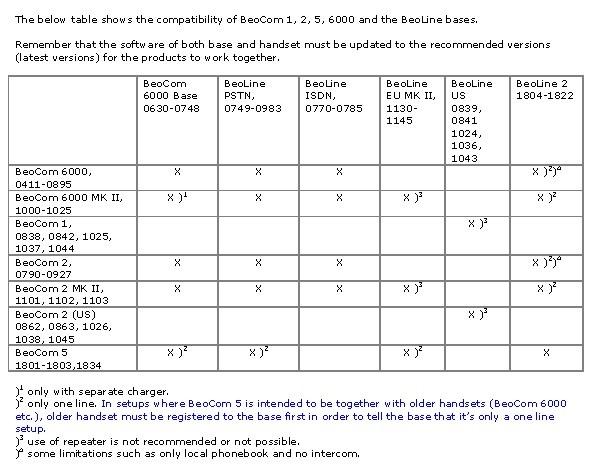
Yes that should work, provided that the US telephone landline system will support two phones on one line (I see no reason why not.) The BeoCom1 ‘base’ that you require is actually called a BeoLine US, like this one: https://www.ebay.co.uk/itm/295880603514 Hopefully you can find a second-hand (used) one cheaper in the US. The BeoLine US Type Numbers are in that earlier table, so you can check that you are buying the correct one. (That eBay one is Type 0841).
Question to you . Is it advisable to go through the steps and reset the base and then the handset for better performance does it clean up the functions or firmware of the phone?
In short, no. I would only carry out a reset if there were a problem that I was trying to resolve. This is especially the case with the older, original Mk1 BeoCom 6000s. It may only apply to the European versions, but some of these had a problem with the RF chip and lost the ability to re-connect to a base.
What if anything do you like to do with these old phones that are so darn good but of course not made anymore, not that I can afford (new ) one now. To make them keep operating or operate better.
All of my (30+) BeoCom phones are still useable in UK, but if not connected or used perhaps a display shelf of objet d’art:

Location: Warwickshire, UK
My B&O Icons:
 9 September 2023 at 08:50 in reply to: Beosystem 2500: new door belts but still not completely closing, why? #48831
I have never seen a problem with door vertical alignment mentioned on the forum!
If the little brackets are undamaged (i.e not bent) and glued to the door glass in the correct (symmetrical) positions, I would double check that you have assembled the BC2500 correctly. Cable tension may be an issue, but I would expect this to affect both doors as there is only one cable.
Location: Warwickshire, UK
My B&O Icons:
8 September 2023 at 04:31 in reply to: Beosystem 2500: new door belts but still not completely closing, why? #48828Have a look at this old thread for detailed instructions with pictures: https://archivedforum2.beoworld.org/forums/p/4707/42777.aspx#42777
Location: Warwickshire, UK
My B&O Icons:
Useful pictures thanks, from which I think the following:
Your original phone (on the left in the first photo) is a BeoCom 6000 Mk1. I didn’t previously realise that they made a US version of the BeoCom 6000 Mk1, but they did indeed and it is listed as a ‘Type 0700’ in this Beoworld page: https://beoworld.org/prod_details.asp?pid=788
To get to the service menu for this BeoCom 6000 Mk1 you need to press: 9 # 9 # 9 ✱ (dot) 7 OK. The (dot) is the button to the left of the circular control. You can then view the following: (Be careful not to muck up any settings!)
- HS SW VERSION
- BS SW VERSION
- CURRENT VOLUME
- MAX VOLUME
- NOMINAL VOL
- MIN VOLUME
- FORCED TRANSM
- EEPROM EDIT
- RAM WATCH
- CONTRAST
- SERIAL NUMBER
- ONTIME TOTAL
- ONTIME OFFHOOK
- ONTIME CHARGER
Also with this phone, you can carry out the following: (These functions are more useful!)
- Reset base: Press (dot) 7 000 8
- Reset handset: Press (dot) 7 000 9
- Read out Handset software version: Press (dot) 7 000 1
Note: You may wish to back up your contact lists before resetting the phone and/or base.
Your Beocom 6000 base unit is a Type 0642 (2nd to 5th digits of the number after B&O on the label) – again listed as US-spec on that Beoworld product page. Yours must be a US version because of the references on the label to ‘FCC’ rules. However, if you look at the table I posted earlier, this is not compatible with the Beocom 1, hence this is the problem.
If you want to have two working landline handsets then I think that you either need to find another US spec (Type 700) BeoCom 6000 Mk1, or find a ‘Beoline US’ base and another BeoCom 1.
I hope this is helpful – I am a bit out of my depth with the US-spec BeoComs!
Location: Warwickshire, UK
My B&O Icons:
Just thinking about this some more …
The base that you show in your picture seems to be a BC6000 base, which I do not think was produced for the US market. This may be because the DECT frequencies (between base and handset) were not to US standard for cordless phones.
Have you seen this table:

The above shows that a Beocom 1 is not compatible with a BeoCom6000 base. It needs to connect to a ‘Beoline US’.
Is your other working handset actually a UK/european spec BC6000 Mk2 – where the three buttons to the left of the wheel are ‘R’ ‘INT’ and ‘AV’? If so, this will connect to a BC6000 base without problem.
Location: Warwickshire, UK
My B&O Icons:
And I have no other handsets other than the main one
Did you acquire the base second hand? If so, the previous owner may have added handsets which remain registered on the base and count towards the six maximum. This should be easy to check from the working handset.
If you have had the base since new then this should not be the problem. You could try resetting the ‘new’ handset, which I think for BeoCom 1 is the same as BC6000. To get to the service menu press 9#9#9✱INT and then select ‘reset handset’ using the wheel.
You could also try the reset base option but do this at your own risk because you do not want to be in a position where you cannot re-register the first (working) handset.
EDIT: Meant to add – sometimes a new battery helps, or you could try swapping batteries between your two phones. Sometimes these phones can simply be temperamental and then suddenly they work as expected, often after fitting a new battery ?
Location: Warwickshire, UK
My B&O Icons:
I am not sure what your first (PSTN) base type is, but has it reached the maximum number of handsets connected (hence won’t be able to connect any more)? If your PSTN base is the one in the picture then it has a maximum of 6 connected handsets.
Using the initial (already connected) handset, go into settings then the ‘base’ menu and then remove any handsets that you don’t currently use (or recognise). Then try to connect your new handset again.
(Note that I am basing this advice on my knowledge of the similar European BC6000 Mk2 and PSTN bases, so please forgive any errors! I assume that you’re in the US.)
Location: Warwickshire, UK
My B&O Icons:
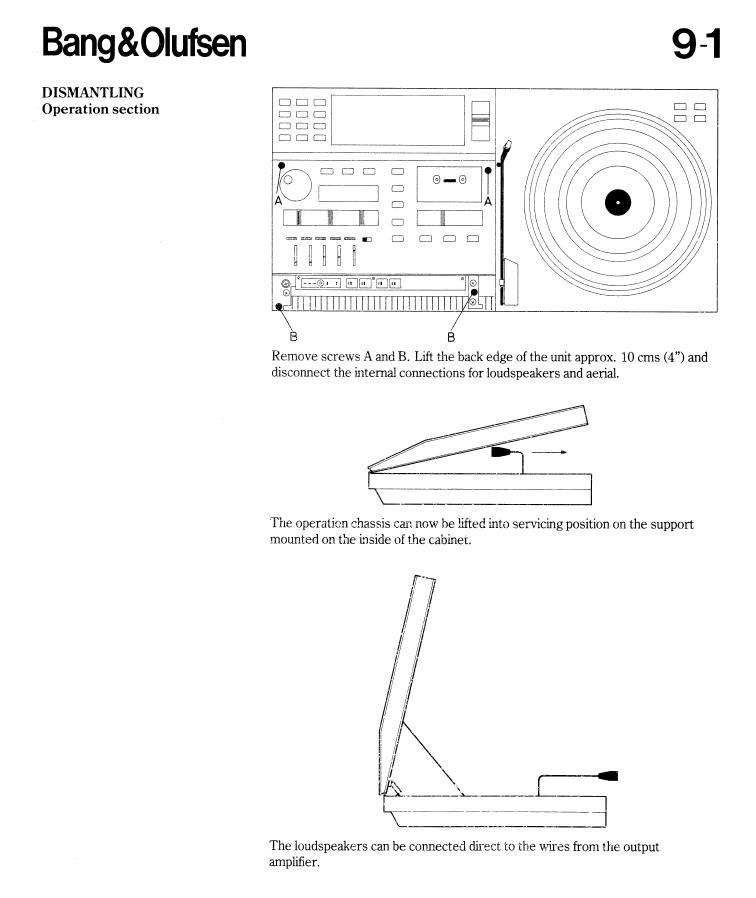
Or even a basic instruction for how to open the thing up?
From the Service Manual (avail on this site for Silver/Gold Members) – I will give you this sneak preview for free! A technician would want the full manual which includes the circuit diagrams.

Location: Warwickshire, UK
My B&O Icons:
Hi and welcome to Beoworld!
If the digital source is playing but weak, it is worth checking that your connecting cable is inputting to DIN pins 3 and 5. Sometimes people use a DIN output cable (pins 1 and 4) by mistake.
Otherwise there could be a fault with the Beocenter.
With regard to the manual, I think that the BC7002 operating manual may be similar and easier to find. We do have the 7002 manual on this site for Silver and Gold Members if you can’t find it elsewhere.
Location: Warwickshire, UK
My B&O Icons:
It’s not in the Beoworld library because for some reason the English Reference manual is listed twice.
B&O support page has it here (page 16 onwards): https://bangolufsenassistentgohe.blob.core.windows.net/manuals/TELEVISIONS/BEOVISION_7-32/beovision_7_32_mkii_iii_iv_v_7_40_mki_ii_user_guide_english.pdf
Location: Warwickshire, UK
My B&O Icons:
From looking at the circuit diagram, it looks like you have lost the 7v supply to display PCBs 42 (lower centre) and 43 (lower right), and possibly PCB 41 (lower left). 7V is also used for MCL power pins hence there’s your link to the possibly cause (as you identified). You really need the service manual to investigate the power supply further. (Join as a silver or gold member to download from this site!)
Location: Warwickshire, UK
My B&O Icons:
A further thought – are you sure that the text or numbers are supposed to be showing at that particular time? The BC9500 is designed to show only the functions/controls that are appropriate to the source that you are playing. Controls on the lower panels are arranged in three levels:
1. The light grey words etched on the surface.
2. Controls that only appear once you have made your choice from the first level. (eg ‘Stop’ only appears once you have started playing a Tape or CD)
3. Controls that only appear once you have made you choice from the second level.Location: Warwickshire, UK
My B&O Icons:
In attempting (with limited success so far!) to connect my Beocenter 9500 to a Beolab 3500 through an MCL cable, I think I’ve partially fried the 9500. I was getting sound through the BL3500 and cranked the volume up, then the volume lowered itself of its own accord and I have lost some of the lights on the BC9500.
The BC9500 will automatically reduce the volume if playing at too high a level. I am not sure whether it detects distortion or some other sort of overload, but this is usually a normal feature and I think that it is unlikely to be linked to the losing of lights.
Similarly on Tape (see image) I get a B and weird backwards L and not much else.
Both those symbols are normal. The ‘B’ simply means that Dolby B noise reduction has been selected, either automatically by the tape or manually by you. Press ‘Programming’ and then ‘NR’ to cycle though Dolby ‘B’, ‘C’ or off. The inverted ‘L’ symbol shows which side of a tape is playing – press ‘Turn’ and it will reverse.
And I no longer see any of the text or numbers on the bottom panel. Any ideas?
For CD, Tape or Radio, you should see numbers across the centre lower panel. Sources should show on the right lower panel. Is the lower panel loose – i.e does the glass lift up out of the plastic surrounds? Also do you have the Service manual – this shows how to remove the lower panel and run a test function including all visual indicators?
EDIT: Can you changes sources etc using a remote?
Location: Warwickshire, UK
My B&O Icons:
Where did you get your cord from?
Luckily I had a door string repair kit that I purchased by chance many years ago – I show a picture of it (including the part number) in this post: https://forum.beoworld.org/forums/topic/my-beocenter-9500-restoration/page/2/#post-19613
I doubt that you will find a repair kit now, but you could give AVA Services a call to see if they can help. Otherwise you may have to experiment with new cord – the main requirement will be to cut and tie knots at the exact length of the old cord in order to keep the same tension with the cord routing shown in the manual.
Location: Warwickshire, UK
My B&O Icons:
Yes it was,thank you. I think my problem with the CD door is that the cord seems to have been lubed in the past which is causing it to wrap over Itself.
Yes that was the problem with mine. I did try to clean the cord but in the end I had to replace it with a new ‘dry’ one.
I upgraded my account to silver, but I can’t find where the service manuals are on the site. Any chance you could point me towards them please?
Two places:
Via Main Beoworld Site ‘Products’ page (older, but currently more extensive library): https://beoworld.org/manuals.asp
And to the right of the current forum (yet to be fully populated): https://beoworld.org/beoworld-document-library/
Location: Warwickshire, UK
My B&O Icons:
Hi Paul – well done with the spring!
Was my earlier post of any value?
Location: Warwickshire, UK
My B&O Icons:
Maybe have a look at this thread for some help with the doors – the BC9000 has the same system as the BC9500:
https://forum.beoworld.org/forums/topic/my-beocenter-9500-restoration/
Whilst you have it apart I would replace the door motor drive belts, the backup battery and probably the tape deck belt(s).
EDIT: CD spindle was discussed here: https://forum.beoworld.org/forums/topic/cd-spindle-for-beocenter-9000/
Location: Warwickshire, UK
My B&O Icons:
Good morning and welcome to Beoworld!
Perhaps the Beolab 3500 is in L.OPT 0, which is a setting where it will not respond to IR commands. To resolve this, turn the system to to standby/off. Then, in the BL3500 room using the Beo4, press the POWER button and LIST together. Then press LIST until OPTION is shown, press GO (centre button), and then press LIST to show L.OPT. Then press 6. The screen on the Beolab should then show the option that you have selected. Then try the remote again.
Location: Warwickshire, UK
My B&O Icons:
It could well be a faulty (or dirty) opto-coupler – have a look at this thread (and the pictures attached to some of the posts): https://archivedforum2.beoworld.org/forums/p/22025/182754.aspx#182754
Location: Warwickshire, UK
My B&O Icons:
Although I don’t have experience of the Virgin Hub, I think that the problem here may be an incompatibility with the wiring of the RJ11 lead.
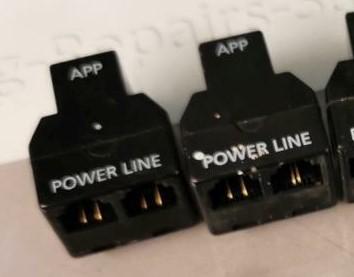
Both my Beoline (Type 1130GB) PSTN and my BC6000 PSTN use RJ11 pins 3 and 4 for the phone connection (the latter from the LINE socket of the little black 3-way adaptor*). These connections are normally routed to pins 2 and 5 of the BT plug/socket, which works fine.
I think that most UK telephones use RJ11 pins 2 and 5, and perhaps the Virgin Hub 3 telephone socket expects this. Thus you may not be able to connect your B&O RJ11 direct into the Hub’s telephone socket.
Try using you original RJ11 lead into your original RJ11 to BT adaptor and then use the Virgin-supplied BT to RJ11 adaptor to connect to the Hub.
* My 3-way adaptor is the version without the white spot – on the right in the picture below:

You can see that the version without the white spot has the LINE connections close together – RJ11 pins 3 and 4.
In the version on the left with the white spot, the LINE connections are further apart – RJ11 pins 2 and 5. If you have this version then let me know and there is something else we can try!
(As you view the socket, RJ11 pins are numbered right to left 1 through 6, but pins 1 and 6 are not used in this application).
For info, on the BT plug the pins are also number 1 through 6, with pin 1 being nearest to the locking lever.
Location: Warwickshire, UK
My B&O Icons:
-
AuthorPosts