Forum Replies Created
-
AuthorPosts
-
 Moderator
Can you confirm whether it’s only volume control or also the TV command that works with both firmware versions?
Unfortunately I cannot be sure about the earlier remote firmware. To be honest I didn’t expect it to update so quickly hence am not sure when it did! When you check your parents’, perhaps check the remote FW first – maybe it hasn’t updated because it hasn’t been connected/used in their setup.
I forgot to mention yesterday that the siri remote Mute button also works to mute the TV by IR. (Older siri remotes did not have a mute button).
If you need other excuses to buy stuff let me know and I’ll try to make a thread about it
No excuses required! I bought another Beolink Converter 1611 this week on a whim, because it was cheap!
On another note are you able to check if the 1st gen remote with the white cirkle still has the same firmware version as in the old post 0x0118? I have checked on mine without the white cirkle and it is still the same.
I sold the white circle remote on eBay and replaced it with the more useful ‘non-white circle’ version. However, I found this useful site that confirms the latest release as 0x0118: https://appledb.dev/device/ATVRemote1,2.html
It may be worth copying their naming convention, as they call the white circle version ‘Siri Remote (1st generation, Rev A)’. The site also shows that the non-white-circle remote is still at FW 0x0257. All remotes are shown here: https://appledb.dev/device-selection/Remote.html
EDIT: Forgot the add that siri volume control is still working well this morning. It works even when the Apple TV is switched off.
Location: Warwickshire, UK
My B&O Icons:

I have paid various prices over the last 10 years or so, and have always found the ‘Cameron Sino’ 700mAh ones to work very well.
Amazon UK link here for ref: https://www.amazon.co.uk/dp/B002MPYM3W
Location: Warwickshire, UK
My B&O Icons:
Okay so today (prompted by Maskp’s posts above and to satisfy my curiosity) I purchased an Apple TV 4K (3rd Generation) with Wifi and Ethernet (the A2843 model) to use with my ageing BV10-32. This came with the 3rd generation siri remote with USB-C charging port as mentioned above.
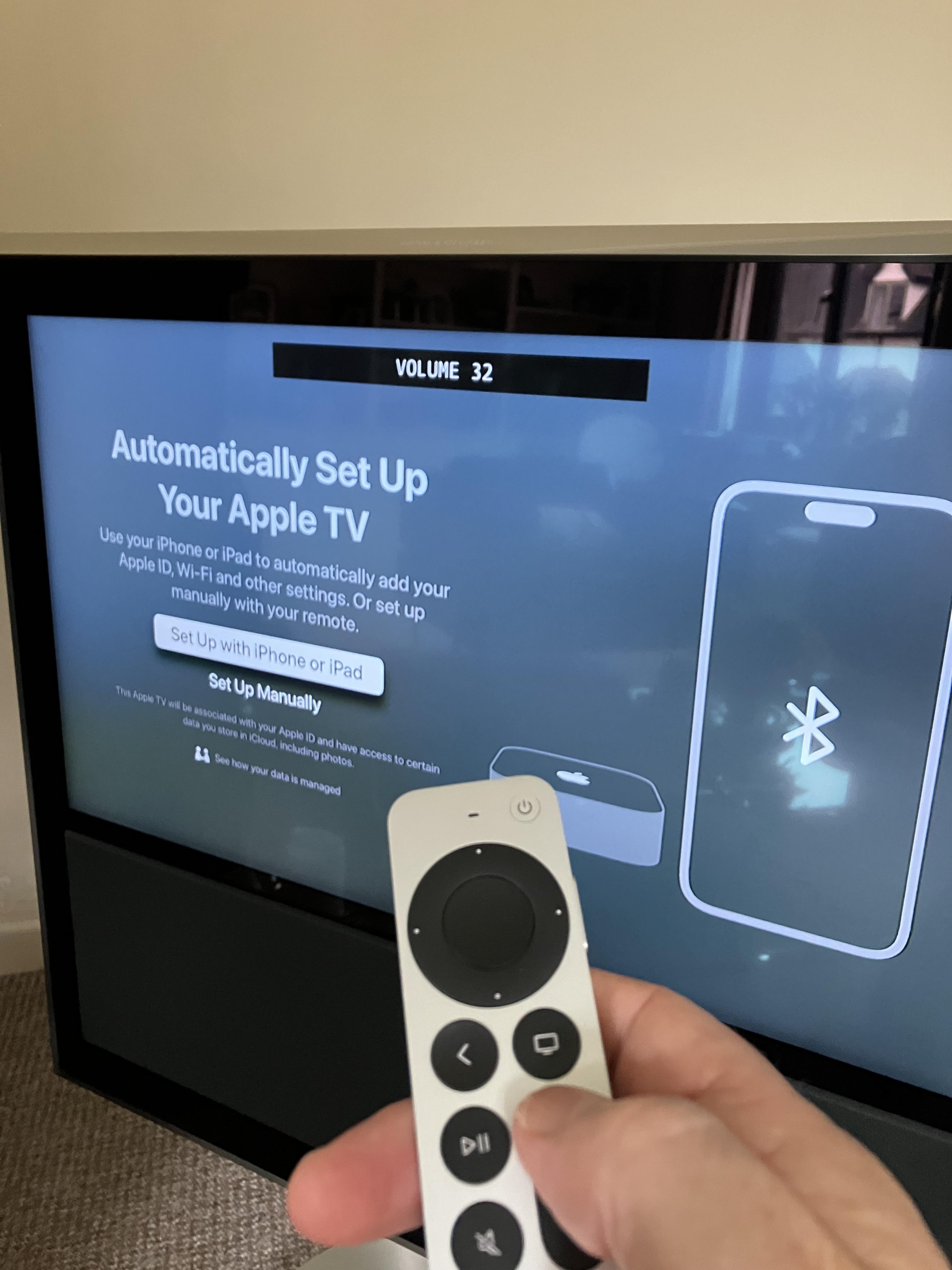
Annoyingly I forgot to try the siri remote volume control before connecting the Apple TV to the TV, but gave it a try during setup, and it worked straight away to control the TV’s volume by IR!

Great news! However about 20 minutes later (after I had completed the rest of the setup, including tvOS17.0 update) it stopped working. In my frustration I reset the Apple TV to factory settings and TV volume control starting working again.
So it would appear that B&O have re-introduced the B&O IR codes to the latest 3rd generation siri remote. I did a quick check of the remote’s firmware version – it was initially 0x21 but later updated automatically to 0x33 – both worked fine for volume control.
I did a quick test of setting the siri remote to turn the TV on and off (using ATV’s ‘Home Cinema control’) and it sent the expected IR signals and when turning on would bring up ‘TV’ as previously (rather than DTV). Occasionally it would turn the TV off and then back on again a few seconds later – perhaps the ATV was getting extra messages from the TV’s STB/PUC. I have now deselected ‘Turn On Your TV with Your Remote’ to OFF as I won’t use this function.
Whilst playing around with settings the remote volume stopped working again, but I simply used Apple’s guide here to restart the remote and it started working again. It has worked well since but I will continue to test over the coming days.
So many thanks to madskp for spotting the return of this useful functionality and giving me an excuse to buy myself an early birthday present!
Other (non-thread related) observations about the latest ‘3rd generation’ Apple TV 4K follow:
- It’s slightly smaller than the 2nd generation ATV4K (5mm in width and depth, 4mm in height) hence potentially easier to hide in the back of a TV.
- It has a passive heatsink rather than the earlier version’s active fan.
- tvOS17 brings FaceTime ‘handoff’ to the ATV (not avail on my old ATV HD version), which is very useful. Great to be able to make FaceTime calls on the TV using the Beo4 remote, and have the iPhone’s camera follow you around the room. It will also show the caller as a pop-out whilst watching TV.
- The ATV’s IR sensor has moved back to the centre – picture below of what works for me (smaller bracket now required!):

I hope this is useful – @madskp it will be interesting to hear whether your parents’ siri remote is the same version with USB-C charging, and also how well it works with the much more modern Beoplay V1!!
Location: Warwickshire, UK
My B&O Icons:
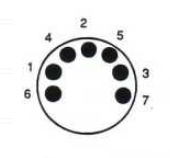
You want the Beogram output DIN pins 3 and 5 to go to RCA Left and Right respectively. Pin 2 is ground.
But if you are making your own lead and only have a 5 pin DIN socket you will need to removed DIN pins 6 and 7 (they unscrew).
EDIT: Pin numbers looking into a 7-pin DIN socket (or looking at solder side of DIN plug):

I would be tempted to purchase one of these ready made leads from our site sponsor: https://soundsheavenly.com/beogram-record-players/14-2244-beogram-to-non-bo-device-phono-pre-amp-receiver-amplifier-etc-bo-ref-.html#/2-length-1m/60-grounding-internal_ground_link
Location: Warwickshire, UK
My B&O Icons:
Thanks for bringing this useful thread to the new forum – I have referred to it several times both to answer other users questions and to remind myself of the siri remote capabilities.
First thing that happened when I touched the home button on the Siri remote was that the Beoplay V1 switched to source TV (their apple TV is on V.MEM). I tried again a couple of times and the same thing happened. When I covered the IR eye on the Siri remote this did not happen, so it seems that the IR control with B&O remote codes are back in the 3rd gen Siri remote.
One quick question: When you say ‘3rd Gen siri remote’, do you mean the very latest version with the USB-C charging port (rather than the second generation with the lightning port?) Wiki says they are identical other than the charging port, but as we know there may be hidden SW changes! See wiki here: https://en.wikipedia.org/wiki/Siri_Remote
(Looking at that wiki naming convention – we may need to rename the ‘2.gen’ siri remote in your picture as Gen 1.1 . They call the new shape (with Lightning) siri remote Gen 2)
I have been quite happy with my Apple TV HD with 1st gen (no white circle) siri remote with my BV10-32. I would like to be able to bring up the Control Center but can’t do so as there is no way to ‘press and hold the TV button – but I think my PUC may be an older Apple TV version.
My only reason for updating to the latest Apple TV 4K may be to make use of the onscreen FaceTime capability that was introduced with the last tvOS. It doesn’t work with the older HD version.
Location: Warwickshire, UK
My B&O Icons:
You could try the BC9500’s AUX/TV input as well – I think that may be a different level (but could possibly be quieter).
Also, when you were using the BC9500’s PHONO input I would expect you to have the turntable’s switch set to PHONO also – did you try this?
Location: Warwickshire, UK
My B&O Icons:
I assume from the earlier posts that you are currently using the BC9500’s PHONO input with the turntable’s switch set to PHONO.
As an experiment, try using the BC9500’s TAPE2 input with the turntable switch set to LINE. Select with TAPE2 on the BC9500 control panel.
Location: Warwickshire, UK
My B&O Icons:
I assume that your phones are connected via a modem/router – have you tried restarting it and/or checking that the firmware is up to date?
The you could try disconnecting all the phones and BeoTalk, and then trying them one-by-one to see if CLIP works individually. Perhaps one of them is supressing the CLIP signal.
You could also try a reset of the BC6000 handset and/or its base: (make sure that you have backed up phone contacts if they are stored on the base):
– Reset base: Press (dot) 7 000 8
– Reset handset: Press (dot) 7 000 9
You could also try replacing the batteries in the BC2500s.
Location: Warwickshire, UK
My B&O Icons:
16 October 2023 at 04:21 in reply to: BeoVox 3000 (Flat Panel) Passive Loudspeakers: mounting advice please. #49666I can’t find anything on the archived forums about BeoVox 3000 placement, but there are a couple of threads about the larger BeoVox 5000s that may be of use:
https://archivedforum.beoworld.org/forums/p/35195/292422.aspx
https://archivedforum.beoworld.org/forums/p/16719/123732.aspx
Personally I would try to position with the Beovox’s tweeters at approx listening (ear?) height and conduct some experimentation with the distance from the corners, whilst aiming for a approx equilateral triangle between listening position and the two speakers.
Location: Warwickshire, UK
My B&O Icons:
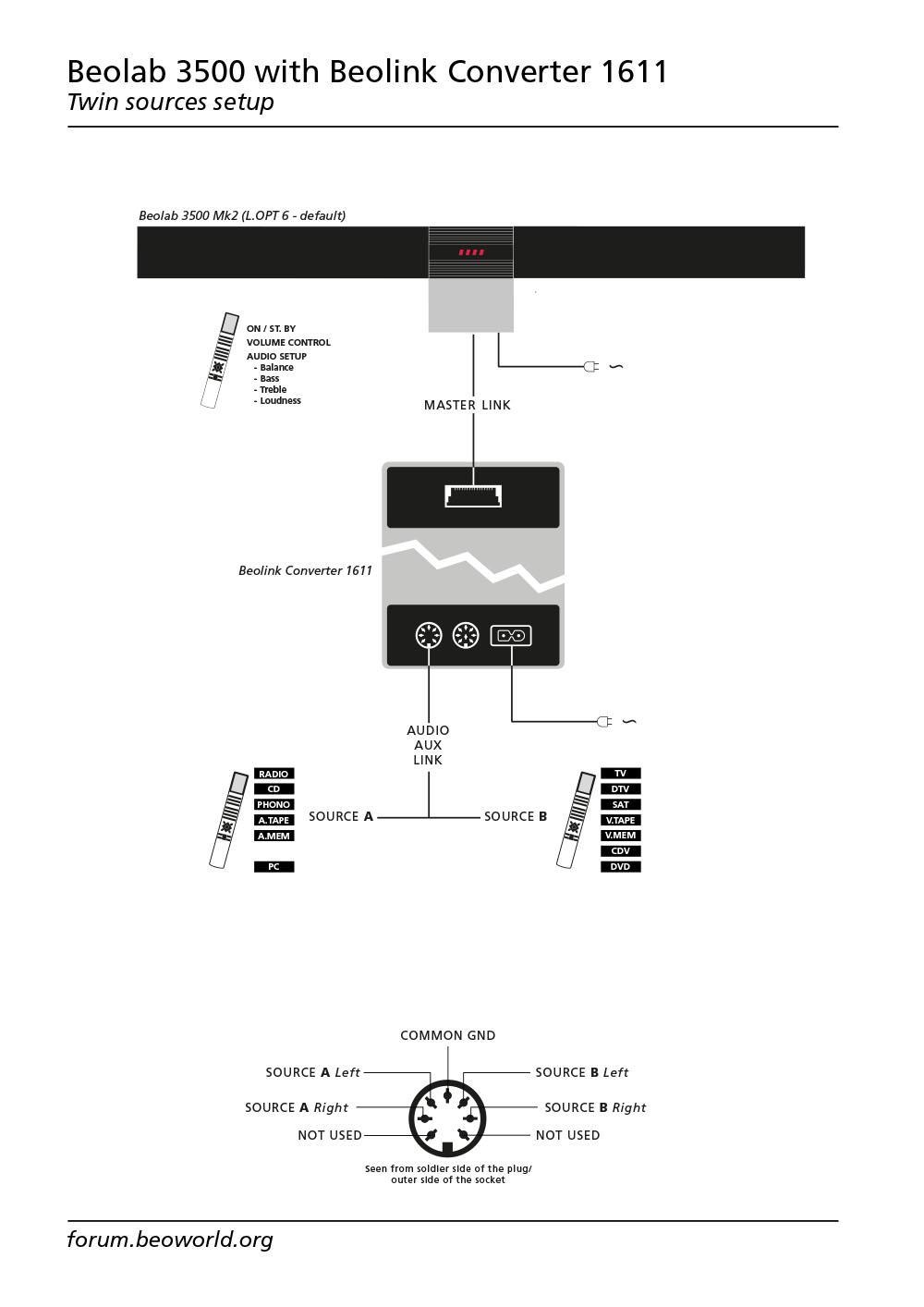
The simplest/cheapest way to input non-B&O analogue sources into your ML system could be the addition of a single Beolink Converter 1611 in place of the removed multi-CD player (presumably a BS9000). The Beolink Converter 1611 will effectively act as an ‘ML master’.
Here’s the basic setup (diagram produced by Matador):

The diagram above shows the ML connection to a single BL3500, but there is no reason why the connection cannot be to a ML multi-room system as fitted to your property. If wired as shown, you should be able to select one of two analogue sources from each room and adjust sound settings such as volume.
And you can read all about it in this thread:
https://forum.beoworld.org/forums/topic/beolab-3500-and-1611-converter-settings/
Location: Warwickshire, UK
My B&O Icons:
Some details are also on the main beoworld site: https://beoworld.org/prod_details.asp?pid=300
Location: Warwickshire, UK
My B&O Icons:
I have always found AVA services very helpful:https://www.avaservices.co.uk/
Location: Warwickshire, UK
My B&O Icons:
I absolutely LOVE B&O, but this is unacceptable.
Given that the BS3200 may be up to 20 years old, and that the reasonable life expectancy of a HDD is approx 5-10 years, I tend to see such a failure as acceptable/expected. I generally replace my computer/NAS hard drives at the 5 year point to reduce the risk of data loss.
Location: Warwickshire, UK
My B&O Icons:
Hi and welcome to the Forum!
Firstly well-done on attempting the backlight repair! I have carried out a similar disassembly on a Samsung TV but I am impressed that you have delved inside a BV Horizon.
I don’t have a BV Horizon but I wondered if you have tried controlling via the network connection. As far as I know, if you connect the TV by RJ45 to your router you may be able to use the B&O app on a smartphone to control the TV. It’s a long-shot but I think I remember others suggesting similar in the past.
If that doesn’t work, hopefully someone else who actually owns a BV Horizon will be along later to suggest another fix or re-flash the firmware/software.
Location: Warwickshire, UK
My B&O Icons:
As for the SHARC-V2 8k eARC Audio Processor – I don’t get it how it is connected to the Beomaster 6500 in that thread – it has a HDMI output, so this would require another ARC to RCA converter – or do I miss something here?
It does have an analogue output – actually shown as a headphone output. The analogue output is discussed in more detail here:
https://www.thenaudio.com/2021/12/05/sharc-v2-earc-processor/
It could be worth contacting the company to describe your setup and see if they have any suggestions. The OP from that other thread had a good response from them.
Location: Warwickshire, UK
My B&O Icons:
This seems related to an earlier problem: The older Beo4 PUC IR STB controller was unable to open the Apple TV Control Centre because there was no way of ‘pressing and holding the TV button’. The PUC table in my BV10-32 is however quite old, and I can’t remember if this was fixed in later releases (maybe in conjunction with Beo4 Navi, which I don’t use).
It’s especially frustrating since Apple have just added extra functionality to the Control Center with tvOS17.
Location: Warwickshire, UK
My B&O Icons:
Are you extracting the analogue audio from eARC? If so, have you considered an extractor which varies the output as discussed in this thread?
https://forum.beoworld.org/forums/topic/sound-control-from-lg-tv-to-beomaster-6500-not-possible/
Location: Warwickshire, UK
My B&O Icons:
I just fixed the formatting for you. Yes it’s a bit tricky to use on phones – if I have to use a phone I tend to hold in landscape position whilst formatting.
Do you have the service manual for the BG4500? It’s available on site for Silver and Gold members. I think that people have removed or by-passed the internal pre-amp in the past and it would be worth searching the archived forums for info.
Location: Warwickshire, UK
My B&O Icons:
Do you think this would work? Is the only thing I can find for now .
No that would not work with the Beocom 1. Take the 2nd to 5th numbers after ‘B&O’ on the label, which gives a Type Number of 0977. This falls into the second column of the compatibility table, showing that it will not work with BeoCom 1.
How do you like the “banana” phones?
I think that’s the only one I don’t own, which is a shame as it’s iconic!
But nothing from Europe will work correct?
Not unless it’s a Beoline US! I would keep looking for a BeoLine US with one of the Type numbers listed in the fifth column of the table.
Location: Warwickshire, UK
My B&O Icons:
An interesting ‘mash up’ of a BeoCenter 2000 from an eBay shop aptly named ‘all sorts’:
https://www.ebay.co.uk/itm/235178702242
Location: Warwickshire, UK
My B&O Icons:
-
AuthorPosts