Forum Replies Created
-
AuthorPosts
-
 Moderator
Hmmm … I think I would try a base reset next. I am not sure but perhaps you can transfer the numbers to be stored as a Personal Phonebook on one of the BC6000s, and then transfer back to a Common setting where numbers are shared later. This is within Settings, Handset, ‘Handset Type’ but check the manual to be sure – and maybe write all the numbers down (or take a video as you scroll through the phonebook).
If you do reset the base, try registering the BeoCom5 on its own first.
Location: Warwickshire, UK
My B&O Icons:

The list of registered phones viewed from a 6000 mk II (pressing the INT button) has only three slots used (1, 2 and 4).
Try going into the Settings menu from the centre button. Scroll to ‘Base’ and then ‘Remove Handset’. Using the wheel will then scroll through all the registered handsets. Pressing INT and scrolling will only show the handsets currently connected.
Location: Warwickshire, UK
My B&O Icons:
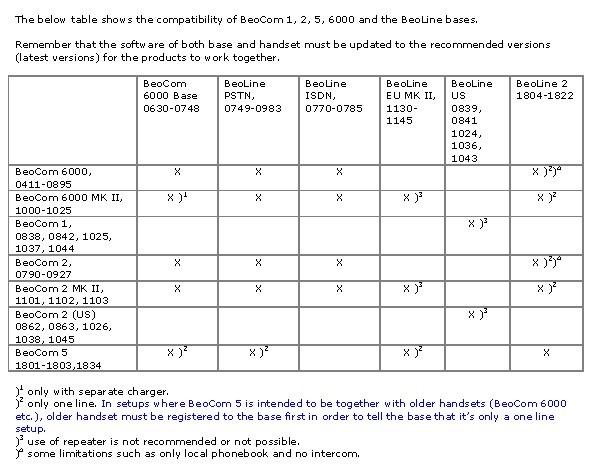
According to the compatibility table they should work together:

From the Type number I assume that your base station is a Beoline EU Mk2, so you need to read note 2 above.
Two things to check:
- Are you opening up the Beoline to registration by powering it down and then up again? I think it stays open for 5 minutes.
- Are you 100% sure that no other handsets have been registered to the Beoline – I think the maximum is either 6 or 8?
Location: Warwickshire, UK
My B&O Icons:
I can only assume that those sheets would protect from scratches caused by opening the plastic ‘hinge’ beyond its normal range of movement.
Location: Warwickshire, UK
My B&O Icons:

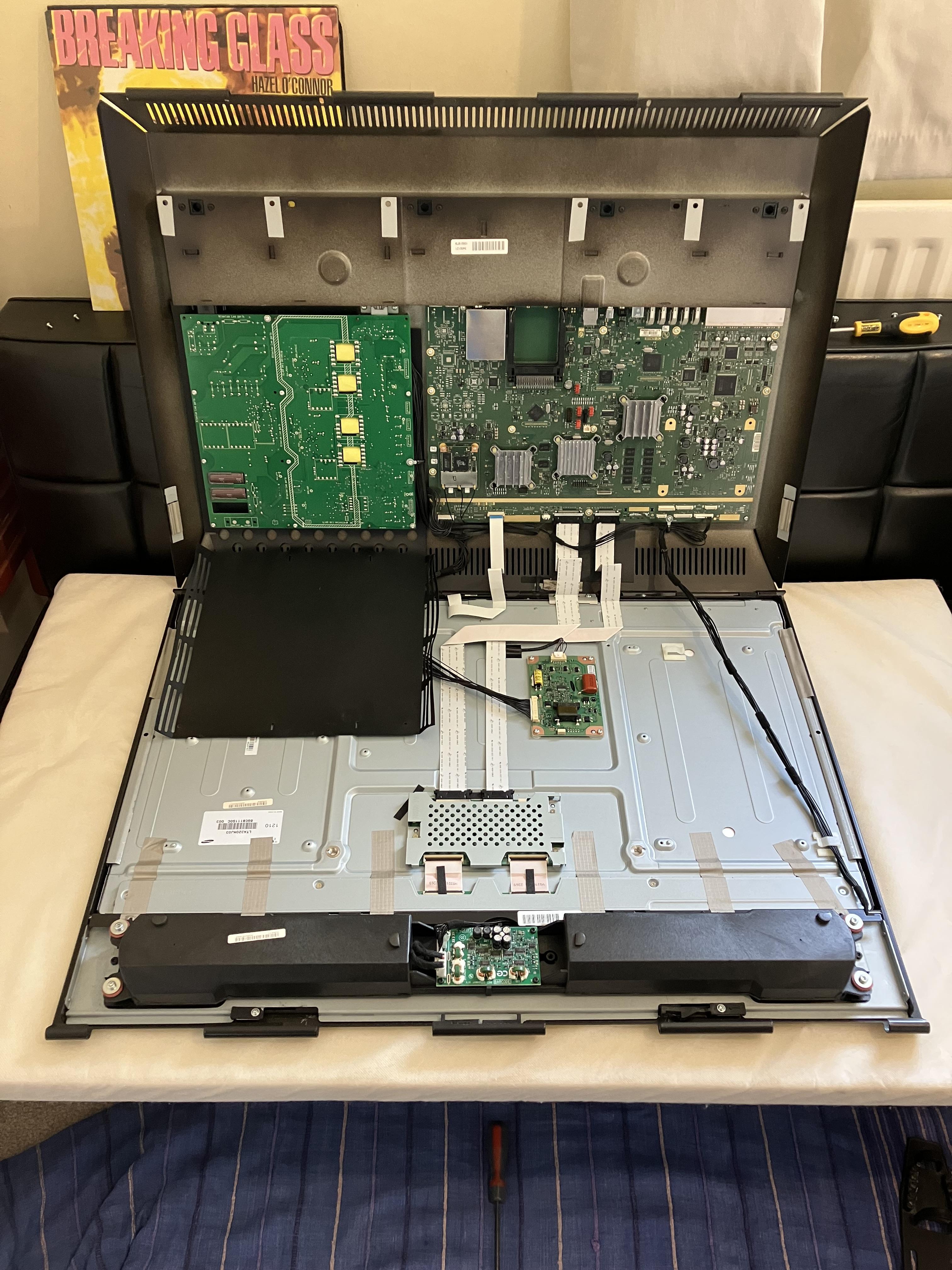
When I first opened mine it was screen downwards on an old cot mattress. I re-inserted the top part of the bracket so it could pivot (unfold) upwards.
I then reversed the tv so that the back was downwards and the screen carefully pivoted up.
Location: Warwickshire, UK
My B&O Icons:
Note the note about cable and socket matching here:
Hi Martin – yes I did have to trim the ribbon cable very slightly as described, so that it would go into the housing. When I next have time to disassemble I will double check that the ribbon is pushed fully home and will also have a look at the alignment of the contacts.
Location: Warwickshire, UK
My B&O Icons:
Picture updated with correct wiring for 40+ people !
Great work, great amendment! I can’t believe people are so picky about what channel enters what ear!! ?
Location: Warwickshire, UK
My B&O Icons:
I have a faulty V1-32 that I bought with a similar fault with similar LED behaviour. I saw reference to a leaking battery somewhere on the forum so I opened up the TV and searched the PCBs inside, and found nothing remotely like a battery! I think my internal investigations damaged something else because now I get no lights whatsoever. It’s now back in a box waiting for donor parts, or to become a donor!
EDIT: Mine didn’t show up in the app either (when connected to my network via RJ45).
Location: Warwickshire, UK
My B&O Icons:
Quick update regarding my BC2300 CD problems:
All the spares (new laser, batteries, capacitors) arrived about a month ago, and finding myself with about an hour to spare I decided to replace the laser first. It was quite straightforward using the instructions within the YouTube videos linked earlier.
Anyway, on testing, the CD player burst into life and worked faultlessly, for about 20 minutes …. ? Then the same fault re-appeared and I couldn’t get it to play any CD again! I ran the test mode and am still getting the same ERR 2 focus error.
Pressing family matters mean that I am unlikely to investigate further for a few weeks (hence my absence from the forum recently), but when I do have time I plan to replace the SMD capacitors on the CD driver board. I did mean to do this first but didn’t have time to devote to my least favourite pastime of soldering!
I do worry that fitting a new laser to a faulty CD driver board may have damaged the laser, but hopefully my concerns are unfounded.
More to follow, but not for a while …
Location: Warwickshire, UK
My B&O Icons:
Have a look on the back of the BV26 Service Manual. This has diagrams of all the stand options with Type numbers. However, I can’t recall ever seeing one in person!
EDIT: I am pretty sure that the same table stand is used for the BV7-32. It has attachment holes for the Beolab bracket, although I think these are covered when the BV6-26 is mounted.
Location: Warwickshire, UK
My B&O Icons:
Does anyone know if a service manual for Beoline 2 is accessible with membership?
Sadly no – the Beoworld library only holds User Manuals for Beoline.
Location: Warwickshire, UK
My B&O Icons:
That’s a shame. But a good exercise in Beovision stand disassembly!
How about trying to find a BV6-26 table stand, Type Number 4092? That’s significantly shorter.
Location: Warwickshire, UK
My B&O Icons:
I will try to disassemble and look into it
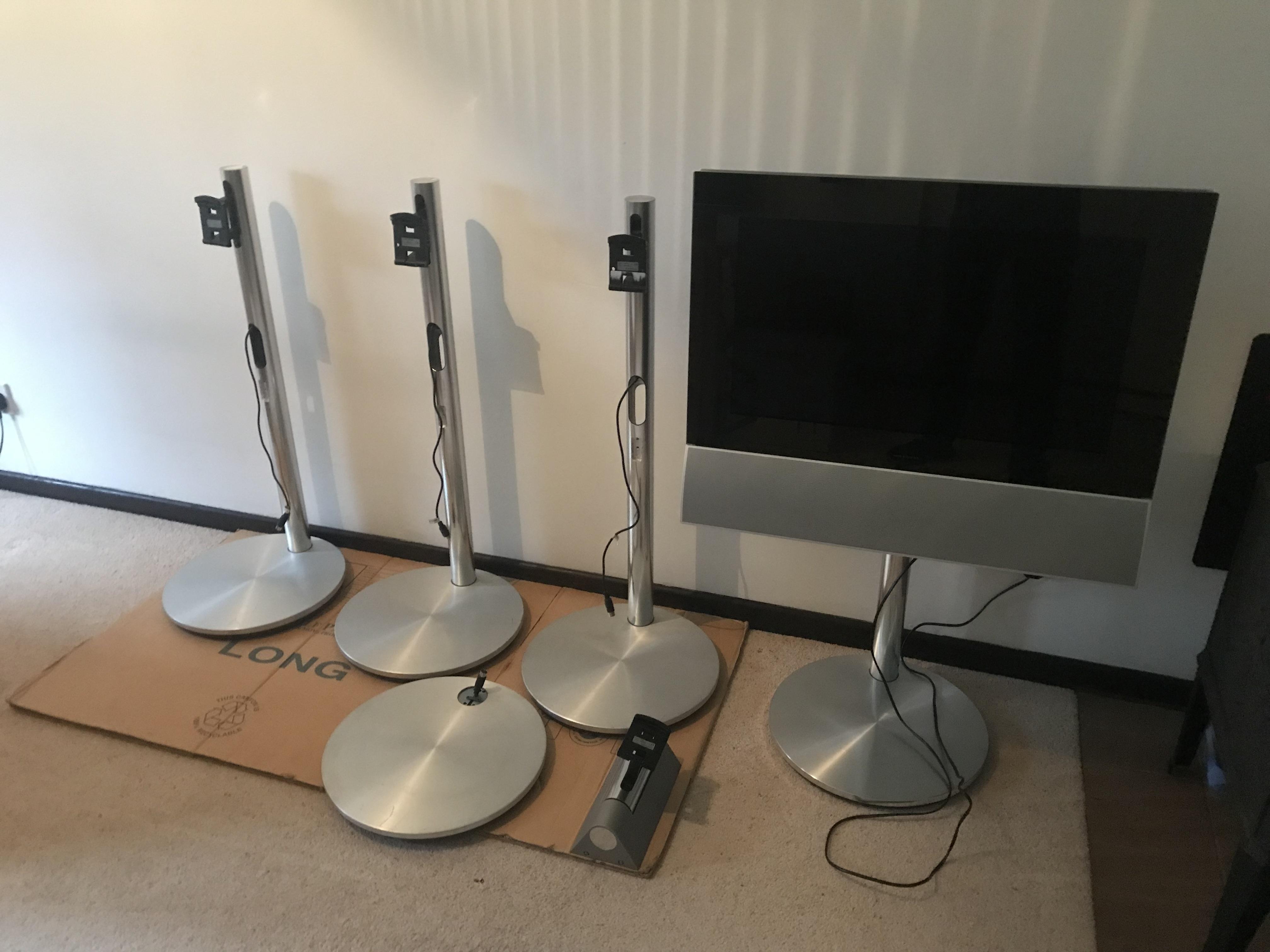
When upside down you will see an opening (hole), possibly covered by a sticker. Rotate the stand on its base until the hole lines up with the pole and you will see the four screws. As you can see in my photo, there is usually a DIN connecter within the pole to lengthen the motor control cable for the floor stands.
My photo was from a job lots of 5 stands (plus wall mount) that I bought from ‘cashconverters’ for about £40. The 5th stand was for a BV10-32 which was all I wanted, so I sold all the others, got a ‘free’ BV10 stand and made a small profit!
Location: Warwickshire, UK
My B&O Icons:
The metal of the pole is a constant cross section and if I recall correctly there are four screws that go into the pole from the base vertically from below. With a very neat (accurate) cut this should be very achievable. I assume that you need somewhere between table stand and floor stand height?
EDIT2: I think (not 100% sure) that the screws are self-tappers hence no need to make a new internal thread in the pole.
EDIT: Zoom in on the one that is missing its pole and you will see the screw holes:

Location: Warwickshire, UK
My B&O Icons:
finding out if the BS9000 can handle the “Server” or “CD2” sources
Sorry a quick thread drift question for B3OHACK3R:
Is the IR command ‘Server’ the same as ‘CD2’? I keep a list of newer Beo4 Navi commands, and had not come across ‘Server’. I have listed ‘JOIN’ as being the same command as ‘CD2’. (CD2 was avail under LIST in early Beo4s such as AV and DVD version).
Sorry for thread drift!
Location: Warwickshire, UK
My B&O Icons:
3 February 2024 at 16:55 in reply to: Remote – Using Multiple B&O Devices (only) in Same Room #52587Welcome to Beoworld!
Several options will move you in the right direction:
Use a Range Reducer – see here: https://www.beo4.faithweb.com/
If you have a Beo4 Navi, you can reduce the IR output.
You can also put devices in A.OPT 0, where they will not respond to any remote control.
You can also put some (not all) devices in A.OPT 4, where you have to select/press LINK on your Beo4 before pressing further commands.
See your Beo4 and/or device manuals for details of how to set A.OPT options, and for details of how to add the LINK function to the LIST button of Beo4.
Location: Warwickshire, UK
My B&O Icons:
Thanks for the update and glad that you got it all working, albeit with a few hiccups along the way! I am surprised that you can’t disable that TV volume ‘pop up’. @Madskp too had similar problems with an Apple TV remote, also resolved by a ‘restart’ of the remote, if I remember rightly.
I might tape off the Hub IR receiver to avoid this happening.
I assume that this is easier (more easily reversible) than learning a different remote (to cancel the first). I assume that the S8 has no A.OPT 0 equivalent, even in fixed volume mode?
Location: Warwickshire, UK
My B&O Icons:
Thanks auric. I have soldered directly into a BC9500 in the past, but I will order some of those battery holders (found also on UK Amazon UK) and give that a go. I think there is space for the holder under the CPU cover, but if not I will carefully solder a battery.
Here’s the Amazon version with the correct 20.3mm PCB pitch: https://www.amazon.co.uk/gp/product/B0B692W13Q
Location: Warwickshire, UK
My B&O Icons:
2 February 2024 at 15:22 in reply to: Beocenter 9300, after replacing CD works ALMOST perfect. #52504Anyway. Thanks for all your help. I finally can write that my Beocenter 9300 is operating again !
Glad that it is now working!
Is that with the new (AliExpress) laser, or did you put the original one back in after replacing capacitors?
Location: Warwickshire, UK
My B&O Icons:
2 February 2024 at 14:59 in reply to: Stored/Unused B&O Equipment – Potential Deterioration of Components #52296To be able to work as a master unit in a MCL2 network (as shown in the above picture) the amplifier for the MCL2 network cannot be muted even though the local speakers are. as listening in link rooms should still be possible.
That makes perfect sense – I always forget about the ‘MCL driver’ function of the Passives, even though I tested exactly that setup when I lived in an MCL wired house!
Location: Warwickshire, UK
My B&O Icons:
-
AuthorPosts