Not sure what you are asking. If you buy a new LG, then you’ll have change left over, but no soundcenter or stand. Or are you looking at an aftermarket integration of a new LG panel with the old soundcenter/stand?
If it was me, I’d probably go with the replacement screen, but the soundcenter, stand and sleek integration between them all are very important to me. I’d only go with the aftermarket option (assuming one exists) of mounting a different LG on the soundcenter if B&O could not help me. If your friend is considering dumping the entire Eclipse in favor of an LG, then I suppose audio quality and integration is not very important.
what are your thoughts have a good friend who had the above tv, they have been quoted over £2500 for the replacement of the screen. He could buy a new lg and still have change left over, are we being unrealistic about the cost of the repair. It is out of guarantee?
In this guide, operation is described with BeoRemote One. Note that to operate your television, it must first be paired with BeoRemote One. Your television enters pairing mode as soon as you connect it to the mains. For information on how to enable pairing of BeoRemote One, see the guide for your remote control, http://www.bang-olufsen.com/guides/beoremoteonebt. Also, press the red button in the on-screen help and find ‘Bluetooth’ for more about pairing.
I have the 90s. Previous to that the BL5s. the 90 and the 50s have settings in the BeoApp which enable threshold trigger on/off and source priority. I use the BL90s with a Beovision (Beosound Theatre) via DPL and Auralic DAC/Streamer (XLR). The triggers are set for priority XLR, the DPL (set your most used source last). The BL90s trigger on XLR signal and (IIRC, 30sec after no signal trigger off). Via DPL, it’s all controlled by the Beovision. but I’ve never tried that.
Hi,
I just recieved my BL50 + Theatre replacing my BL5 + Eclipse.
My plan was to connect:
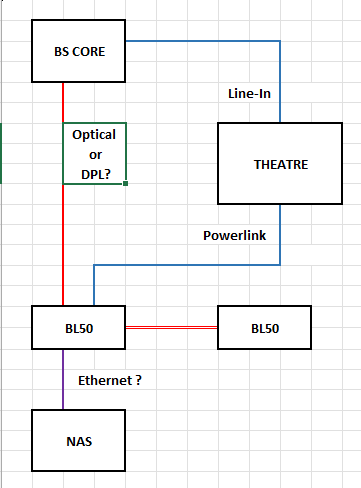
Theatre to BL50 (and 8000 as surround) with Powerlink,
Core to BL50 with Optical,
BC2 coaxial output to BL50 with SP/DIF.
Unfortunately, the dealer did not succeed to set the PWL way, as the Theater detection process always failed to find one speaker (either 50s or 8000s).
So he used WISA for the 50s.
The problem is that WISA prevents the physical input to be automatically detected and the BL do not turn-on when using Core /BS2 sources.
So I have to go in the 50s settings to stop WISA, start the source and hope that the 50s will turn-on. Quite uncomfortable!!!
So I have some questions:
how to proceed to get the 4 PWL speakers detected?
I noticed that Mr 10% used DPL to connect Theater and BL90s. Is it possible to do that on the 50s and is there any delay with surround speakers?
No problem here with a 802.11ac mesh network (2 Linksys Velop), either with ASE products (BV Eclipse, Essence MKII, A9 MKII) or Mozart (Level). Note that the Level goes everywhere around the house and the garden, and there is no problem at all. I think this rumor comes from people with a bad wifi.
ich wollte mal ganz naiv fragen ob ich bei meinem Eclipse (MK1) das WebOS zu einer neuen Version updaten kann? Inzwischen hat ja LG die Version 6 rausgebracht. Auf der LG Seite stehen nur deren Produkte, nicht dir von Bang & Olufsen. Hintergrund: bei mir gehen manche Apps wie Joyn oder RTL nicht und Disney+ ist nicht verfügbar und auch bei Apple Air Play geht nur Musik und kein Videostreaming, auch wenn ich dachte der Eclipse hat Air Play 2…
As someone who has a 65 G3 Theatre with 6 x BL17s and a BL19, whilst imo the BL8 are a natural successor to my BL17 they are too much money for me to swap out my 3 sets of BL17s for what I will get in return. As arguably the swap will be governed by the law of decreasing returns in what new sound detail, clarity, emotion I hear and feel.
Were I starting again Yes, highly likely I would not get a BL19 and buy a set of BL28 and 2 other sets of BL8s with the Theatre. But the price gap is too wide. Especially with the recent increase to the Theatre. I am just glad I was an early adopter almost 1 year ago. I will say my best decision was changing the G2 to a G3, it did cost me £2,300 to part exchange back with my dealer but imo worth it when the G3 was released.
My concern and rhetorical question is B&O leadership forgetting their own marketing… the cleverness of the Theatre to bring alive older BeoLabs was a big selling point, as well as sharing the bass across all speakers.
I suspect many existing customers were hoping for Atmos speakers for the height channels with the same specs as the Theatre as the up and side firing in the sound bar are good just not BeoLab good; and these BL8 are on the tech specs too good and too pricy for the occasional sound of church bells in James Bond. [side note the clip played in the dealers & on the YouTube video above is not an Atmos track, the bullets do not come from the correct location because it is a 5.1 DD track… check the dealerships app next time you demo any of their clips, it will not say Atmos… it sounds much more expansive when the same clip is played off Apple TV or UHD Blu-ray with the same setup).
Last thought… I am not an UHNW target market customer, but I do sit in the Top 3% on salary in the UK, and I have spent close to £50k in 8 years with my dealer being an early adopter or put it another way spending £500 a month every month for the previous 84 months! Explain that to your family, £500 a month is on par with average car payments or interest only mortgage payments before inflation. It grieves me as a customer who has upgraded from an Avant to Eclipse Gen1 to Eclipse Gen2 to Theatre. But with the BL8s sorry B&O leadership whilst your designers are on fire with outstanding speakers you have imo missed the mark on the feedback provided from customers like me who cannot justify to keep on upgrading when something new is released when what I have is damn fine! Plus my wife would say since moving to B&O TVs we have had 4 sets in 8 years two broke (red screen) and the Pioneer Kuro plasma we had before lasted 10 years.
With all the talk of VHNWH, they are actually somewhat reasonably priced (on the B&O scale, of course). Similarly priced to a pair of Balances. Yes, the Balances have more drivers per speaker and more powerful amps (100W vs 50W for midrange), but they have similar spl levels so chances are they will sound similar… maybe.
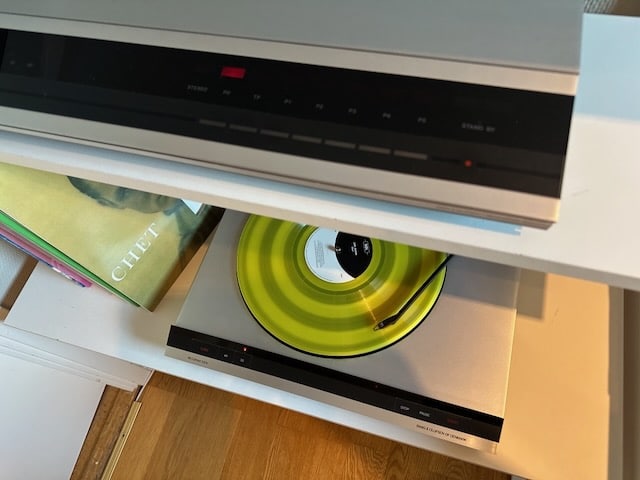
Assuming they sound similarly, I may have gone for them instead of the Balances that I bought as I like their style better. Then again, maybe not, since they don’t have an analog line-in for my turntable.
It also would have allowed me to test pairing with my Eclipse (unsure about stability of WISA or speaker placement in my weirdly shaped room). I guess I can still do that next time I find ~$7K under the sofa cushions :D.
I wish B&o all the best but in my opinion this is the wrong way. They should keep in mind they are not targeting the top 1% of people. Their new target group is the top 0,001% of people and even those only need a tv and speakers from time to time and they are way less attracted to the newest tech than the top 1%.
And that is the most glaring problem I see with B&Os strategy and new demographic. There are two major issues I see……..one is that sales will collapse in the interim as Dealers close due to lack of sales and “affordable” top end products wither away, the Company will be just another Bluetooth gadget and headphone supplier on Amazon and second, when one looks at the net worth and disposable income in the top 5%, 2%, 1%, those numbers and those numbers of who give a damn on high end AV and of those who give a damn of that AV being B&O is going to be very small.
I think this is going to be a classic case of Corporate self-immolation which could only be eclipsed by the likes of Gerald Ratner of “Ratners Jewellers” fame. (A CEO of a big low end jewellery chain who called his own products “a load of cr@p”)
What you describe was a common bug early in the BL90 life-cycle…say 2 to 3 years ago IIRC, where the App used to jump the BL90 volume straight to 100%. (90). There was a specific update (along with a more robust input selection). Since that feature was addressed, the volume starts up at a preselected maximum, you can control the max volume (up to 90) and the input switching works as good as you could expect (a notable problem was switching the BL90 with the Auralic via XLR but unless you waited 60seconds for it to time out and standby, the BV Eclipse powerlink would get very confused and no tv sound would play). All that has been worked out thankfully.
It may be presumptuous but have you checked the maximum startup volume and maximum volume in the BeoApp. Additionally, maybe your BL50s are stuck on an old FW version? A possible remediation May be to do a full factory reset, update and reconfigure?
I may have been unclear in my post, so here are some more details:
1: In my mind, best quality is seen on the technical side and means to minimize conversions/filterings made on the signal path and have the necessary ones done by the most efficient product of the setup (BL50).
2: My project is to have a sort of 2 in one system: one for TV and casual listening through the Theatre/BL50 combination and one for “active listening” using the best quality defined hereunder.
3: Music files are stored in a QNAP NAS connected to a router dedicated to A/V (as recommended by B&O when I bought a Moment) with Core, Eclipse, NL/ML converter, all wired.
In the 4 options you mentioned, the second seems to be the most adapted but unfortunately the Core is limited to the 24/96 bitrate, when BL50 supports 24/192.
I agree, this is a personal “snakeoil” approach but I like to use the maximum of what a product can offer.
I totally agree with you when it comes to wired connections vs Wifi. I plan to connect the master BL50 through Ethernet and use DPL to link master to slave.
I removed the stand and carried the TV using the speaker as the handle and gently supported by holding the screen part.
If you look at about 3 min into this video you can see the four bolts that fix the TV to the soundbar. https://vimeo.com/232474225
I never removed the TV from the soundbar during the move. I transported it “face down” supported by soft cushions and blankets in the back of my Volvo V90.
does anyone have experience moving an Eclipse 1st gen on a floor stand to a new house? I’m wondering if this is something I can do myself or if I need assistance from a dealer. If this is something I can do myself is there any documentation showing what bolts to undo etc.?
My Eclipse MK1 also with burn-in.
Replacement would have cost a good 1500€.
I have written to several dealers. Another panel can not be used because the Soundcenter MK1 can not be controlled with the B&O app.
I then decided on LG OLED G3 combined with the Theatre.
TV has 5 year warranty, new panel already after a few weeks get.
But very slow spare parts supply, waited about 4 weeks for it.
It was a costly experience for me.
I scrapped the panel and have the sound center well packed in the basement. 8 months left, then I’m retired, then I’ll have the time to reactivate the soundcenter.
Replacing the mainboard is a good approach, but you can also get into the speaker menu via an IP address, maybe something can be done.
An update. I did a factory reset and this time I made the BLC the primary Beolink product and the Eclipse the secondary Beolink product and I can both select the Masterlink sources in the local sources screen and then choose them in the app and on the remote. I can select the Eclipse sources in the local sources but they do not show in the app or the remote. I can join a playing Eclipse source. Still no B&O Radio and I appear to be at the last version of the software, 2.1.50871.22855122. Paul
Did you set the Radio preference for your system/Core to TuneIn or B&o Radio?
To do so:
select Radio on the app
select “settings”
select “Radio services”
select “Bang & Olufsen Radio”
Note: only sources of primarily set Beolink Products are visible (a change after one of the sw updates)
An update. I did a factory reset and this time I made the BLC the primary Beolink product and the Eclipse the secondary Beolink product and I can both select the Masterlink sources in the local sources screen and then choose them in the app and on the remote. I can select the Eclipse sources in the local sources but they do not show in the app or the remote. I can join a playing Eclipse source.
Still no B&O Radio and I appear to be at the last version of the software, 2.1.50871.22855122.
Firstly, I would like to echo what YannChris said about the lack of user manuals, I have spent ages going through every screen I could find to try and set up the Core. I have only just found the screen to tell the Core what type of speaker it is attached to!
I have a Beovision Eclipse, Beomaster7000 (with CD, Cassette tape, Beogram and a OneRemote), and a NL/ML converter.
On the setting up local sources screen, I can see all my Eclipse and Masterlink sources and have selected the ones I want. But on the screen to select the source to play I can only see one Eclipse source and one Masterlink source and I think these were there before I selected any local sources.
Any ideas on what I can do?
Also, I thought I would have B&O Radio on the Core but have Tunein.
Regards Paul
Author
Search Results
Viewing 20 results - 121 through 140 (of 357 total)