Forum Replies Created
-
AuthorPosts
-
 MadskpGOLD Member
My Essence doesn’t seem to be supplying any voltage to a disconnected IR wire, so perhaps there is a Firmware problem (hopefully not a hardware problem, but we’ll see).
Ok good to at least know that the problem is in the essence itself and don’t come down to a comptability issue (would not expect that either based on what we know about B&O IR eyes).
Hopefully it can be solved by replacing the firmware, but I guess you can not just download an older one yourself and try?
Location: Denmark
MadskpGOLD MemberAnd I will let the setup be conencted for now, so let me know if there are other things that migth make sense to test
Location: Denmark
MadskpGOLD MemberI forgot to measure the voltages while I had it connected. Will try to connect it again during the weekend and do some measurements
Ok got the setup with the NL/ML converter up and running again. Measuring arround 1.2-1.3V between ground and IR data when no command is used on the BEO4, rising to arround 4V when a command is used from the BEO4, so opposite reaction from when used with a ML or MCL product, but higher voltages than you see.
If I disconnect the IR data wire I meassure Arround 1V on the IR data srew terminal on the Eye, and arround 4.95V on the loose wire from the NL/ML converter.
Hope it can be usefull. In any case I got arround to make the adapter which is nice to have for easy connection until I eventually find a resonable price one with JOIN button.
Location: Denmark
MadskpGOLD MemberI forgot to measure the voltages while I had it connected. Will try to connect it again during the weekend and do some measurements
Location: Denmark
MadskpGOLD MemberI have now made and adapter from RJ45 to 7 Pin female DIN so I can connect a ML IR eye to my NL/ML converter (only ground, +5V and IR data signals are connected in the adapter).
I have tested it with the NL/ML converter in stand alone mode with line in input and an active speaker + the IR eye connected.
I can control volume, set it to standby and activate it agin with a BEO4, so seems to be working with the wirering specified for the NL/ML converter.
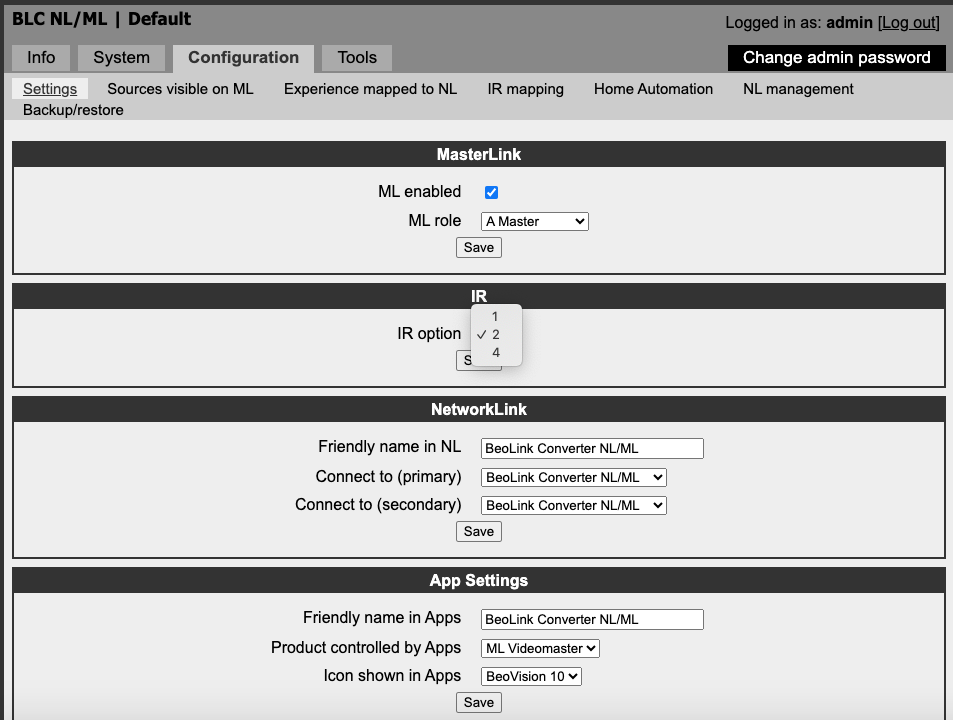
The settings for IR in the NL/ML converter are option 1, 2 or 4, and thats it, so might be different that on the Essence.

Location: Denmark
MadskpGOLD MemberAg good – at least I have an alternative then. If I can’t get an MCL2P I’ll get a Beolink Passive and an IR Eye, and connect it to my ML Distributor. The Beolink Passive amps come up cheap on eBay sometimes, but the IR Eye demands a much higher price. I have occasionally seen them sold as a package through (a 1657 with an IR Eye) so I might look out for that.
It is possible to hook up another type of IR eye to it like the MCL type. You will loose the volume control functionality on it though
Location: Denmark
MadskpGOLD MemberCould I connect a Beolink Passive such as the 1657 to that via Masterlink, or could I connect the 1657 directly to my Beocenter vas Powerlink? I know this would mean I would also need the newer IR Eye as the older rectangular type that I already have would not work, but would this alternative (made up of newer components) work?
You can connect it to Masterlink and have it function as a link room with the IR eye attached.
If you connect it to powerlink the IR eye can not be used. When conencted to powerlink it can either function as a amplifier for passive speakers or as a converter from Powerlink to MCL which is redundant with the system you have (this option is for use with for example Beocenter 2300/2500 which does not have an amplifier built in)
Location: Denmark
MadskpGOLD MemberA little down this page looks to confirm that the wirering for the Essence and the NL/ML converter is the same although different color coding is used in the examples
https://forum.recordere.dk/bo-din-kabler-connection-div-diy_topic7820_page47.html
Location: Denmark
MadskpGOLD MemberI can’t remember if I ever dif try an IR eye on my NL/ML converter. If I find some time I will take a look at how that reacts
Location: Denmark
MadskpGOLD MemberMeasuring IR wire when disconnected gives 0v at Essence, and 1.2V at sensor, the latter increases to approx 4V when IR transmitting. It is behaving as if the Essence is expecting IR data on a different pin!
Yes I think your IR eyes are fine but the Essence is not putting the IR voltage out.
One thing i note when looking at the wirering diagrams for the IR eyes in the Beolink Handbook is that Essence and Core for that matter is not mentioned. I would expect the wirering to be as for the Beolink Converter NL/ML, but you never know.
I will find something else to connect the ML sensor to – maybe BL Active or Passive, and see how the voltages change.
Good idea to have the understanding of how it should work.
BTW. could there be a software issue with the Essence, like feature removal in newer versions og first added after ceartain software revision? Pure guesswork from here
Location: Denmark
MadskpGOLD MemberSo is the 5V at the IR data produced by the powered IR eye or does it come from the source (Essence or MCL2AV)?
I just tried to disconnect the IR data pin on the MCL2 AV. On the screw terminal of the MCL2AV I hav 4.95V. on the loose wire from the IR eye I have arround 2.6 volt. As I understand this type of signaling the tramitting part should try to pull the voltage down.
Where you are measuring the 1V and 0.4V could you try to disconnect the wires to see if voltage from the IR eye differes from that from the Essense?
Location: Denmark
MadskpGOLD MemberAlso when connected can you meassure a voltage around 5V between ground and IR data screw terminal of the IR eye? No, it’s about 0.4V If yes can you see the voltage changing when pressing a key on the BEO4? Pressing transmit shows momentary change from 0.4V to about 1V
That does not sound right. I just double checked on a MCL2AV, and the voltage between ground and IR data is normally 4.95V and drops to some place between 4 and 5 V depending on the key pressed. I have also seen this behaviour on other setups.
One thing you could do is to meassure on the bare ends of the rest of the wires in the network cable if any of them have a voltage arround 5V. That could indicate if the Essence has a different wirering.
Location: Denmark
MadskpGOLD MemberI have connected exactly as in the diagram above, with just +5v, Gnd and IR data connected,
Not having any knowledge of the inner workings of the Essence I have a few thoughts regarding the cabeling, although I know you are pretty capable withe the B&O IR eyes.
- Have you used a cut over network cable to make the connection? I have seen some network cables that do not follow the standard color coding for example what comes first the white/orange or the orange.
- If possible can you check the connection between the RJ45 connector and the screw terminal in the IR eye for continuity?
- When connected can you measure 5V between Ground and +5V in the screw terminal of the IR eye?
- Also when connected can you meassure a voltage around 5V between ground and IR data screw terminal of the IR eye?
- If yes can you see the voltage changing when pressing a key on the BEO4?
Hope this can help you dertermine if it is an issue with the connection or the Essence itself
Location: Denmark
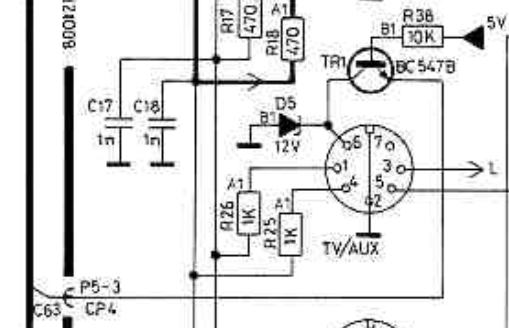
MadskpGOLD MemberIf I remeber correctly from another thread that I can’t find right now there is a possibility of a transistor and a diode in the datalink circuit that can fail. It is transistor TR1 and diode D5

C63 is directly connected to the data pins on the speaker 2 conections
Location: Denmark
MadskpGOLD MemberThanks – I’ve downloaded it ready for when it arrives. I’m using a Windows 10 PC (I’m a keen PC gamer, so Mac is no good for me!). I’ve held off on installing Windows 11 for now as it needs me to change some BIOS settings and then reinstall, and I simply can’t be bothered with all that just yet!
Great, if I remember correctly you have to run the setup as administrator for it to work
Location: Denmark
MadskpGOLD MemberAnother source for narrowing down when the button and LED was removed is to do an Ebay search for Beolink Passive and ML/MCL converter. A lot of sellers have pictures that show both the front and the sticker with the serial number.
Location: Denmark
MadskpGOLD MemberAlso be sure that the left and right speakerlink connector are in the left and right speaker 2 socket respectivly on the BM7000. One of the connectors are carrying power and the other data. If they are factory made connectors there should be left and right stickers on them.
Location: Denmark
MadskpGOLD MemberAs for the Beolink PC2, I missed out on the one that was on eBay but another will come up, and I am just too curious not to buy one now! One thing I didn’t think of though – will I be able to get the software for it?
It is not official available from B&O anymore, but I was able to find it online on a random download site. Let me know when if you going to need it and I can supply you with it. I have i running on Windows 10 even though it is not official supported.
Location: Denmark
MadskpGOLD MemberNot able to answer your questions, but have an input based on the Beolink Passive and ML/MCL converter I have:
My Beolink Passive has the LED and power button and the serial number is 142373xx, so from year 2000 (source https://forum.beoworld.org/forums/topic/serial-number-and-date-of-manufacture/ )
My ML/MCL converter does not have a visible LED (it is still in there and can be seen through the grill in the cabinet) and no power button. It has serial number 194461xx so from year 2006
Hope this might be usefull, and maybe others can chime in with info from their products to narrow down the period where it was changed
Location: Denmark
MadskpGOLD Member -
AuthorPosts