Forum Replies Created
-
AuthorPosts
-
 BRONZE Member
@Ravsted: thanks for sharing. I have ordered an original Apple A1400 charger, and will also test here if it works better.
@Madskp: thanks for checking with your own BeoLab 3500.
I am not sure if I understand what you have done with your cabling.
- Did you use a B&O original 8-pin cable, and connected that to your DIN to Mini-Jack cable?
- I think the big difference with the B&O original cable is that the B&O cable has a shield, besides the GND for the Left and the Right channel. And that this shielding is connected to pin 3, 5 & 7 on the male connector. Do you agree?
- Do you think that I could use a DIN to Mini-Jack cable that could do the same, if it has separate leads for Left, Right, Ground Left, Ground Right and shielding?
Location: The Netherlands
Favourite Product: BeoSound 9000
My B&O Icons:

Update / new findings
Yesterday and today, I did some extra testing. Using different audio sources, like the iPod. But now also different Power plugs.At some point I noticed a huge difference in Hum when I connected the iPod and powered it with different USB wall outlet plugs. One of them gave almost no Hum, while another one gave a huge Hum.
My conclusion
- The (wrong) USB wall outlet plug, was the cause for creating Hum.
- Replacing it with a different (better/less distortion) USB wall outlet plug, keeps the Hum under control.
- If anyone has the same problem, search for a USB wall outlet plug that has a low distortion to the audio signal.
My question
Since I am looking for NO distortion/Hum; who can recommend a USB wall outlet plug that creates NO/minimal distortion/Hum?Location: The Netherlands
Favourite Product: BeoSound 9000
My B&O Icons:
Thnx Madskp!
I have just tested with rotating the power plug 180 degrees. This is the outcome:
- Rotating the power plug of the audio source device/iPod & keeping the power plug of BeoLab 3500 same = no difference.
- Rotating the power plug of the BeoLab 3500 & keeping the power plug of the audio source device/iPod same = a bit less Hum than before, but still on an annoying level.
I hope you can try to replicate/test at your side. Please let me know your findings.
Location: The Netherlands
Favourite Product: BeoSound 9000
My B&O Icons:
When speaker and iPod are in the same wall outlet, there is still a Hum.
By rotating 180 degrees, do you mean:
- Pin 1 (Left signal In) becomes Pin 3
- Pin 4 (Right signal In) becomes Pin 7
- Pin 5 + 3 + 7 connected become Pin 4 + 1 + 6 connected
Let me know! 😉
About BeoLab 3500 MK1
In the meantime I learned that BeoLab 3500 til serial number 19343452, are MK1. All serial numbers from 19343452 and up are MK2. So mine (ser. 1787 xxxx) is a MK1 (like you mentioned before Madskp).
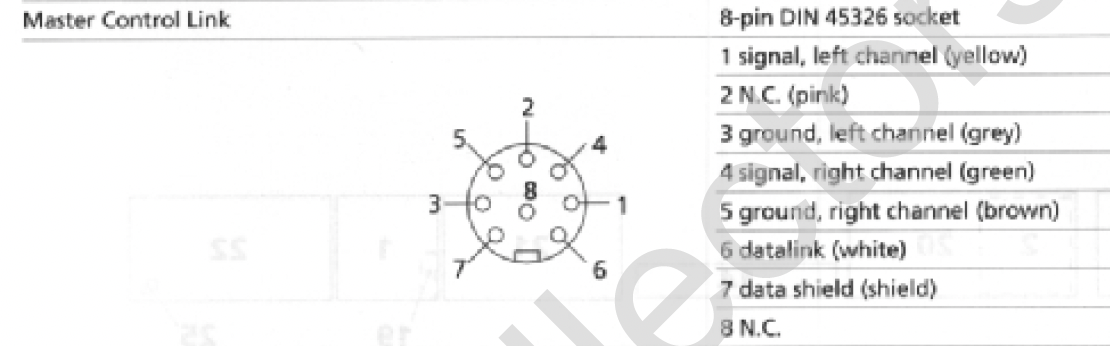
Also I read on the archived forum (post by Keith Saunders) that the Service Manuals for the BeoLab 3500 MK1 and LCS9000 are the same. In the service manual of the LCS9000 the Pin layout of the DIN connector is shown like this:

This is the way I created a Mini-Jack to DIN cable before for a LCS9000. And it worked.
Using the same cable for the 3500 MK1 gives a hum.Question
- Any ideas?
Location: The Netherlands
Favourite Product: BeoSound 9000
My B&O Icons:
Here’s an update.
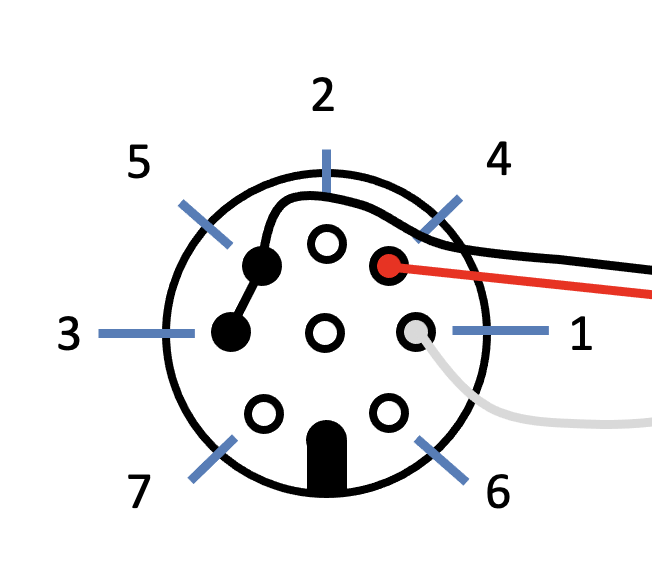
Today I received the 7-pin DIN plug, so I have just soldered a new cable based on your advice. The pin connections now look like this:

Result:
- Unfortunately there is no change, I still have the Hum on the Left channel.
In this case an iPod is connection via the Mini-Jack > DIN cable.
- When the iPod is powered by an USB wall plug, the Hum is there.
- When the iPod is powered by its internal;l battery, the Hum is not there.
Question:
What other pin connections can I try to solve the Hum?
Location: The Netherlands
Favourite Product: BeoSound 9000
My B&O Icons:
Thnx Madskp.
I have ordered a 7-Pin DIN plug, to include pin-7 in the grounding.
Will come back with feedback when I have received and tested this.Location: The Netherlands
Favourite Product: BeoSound 9000
My B&O Icons:
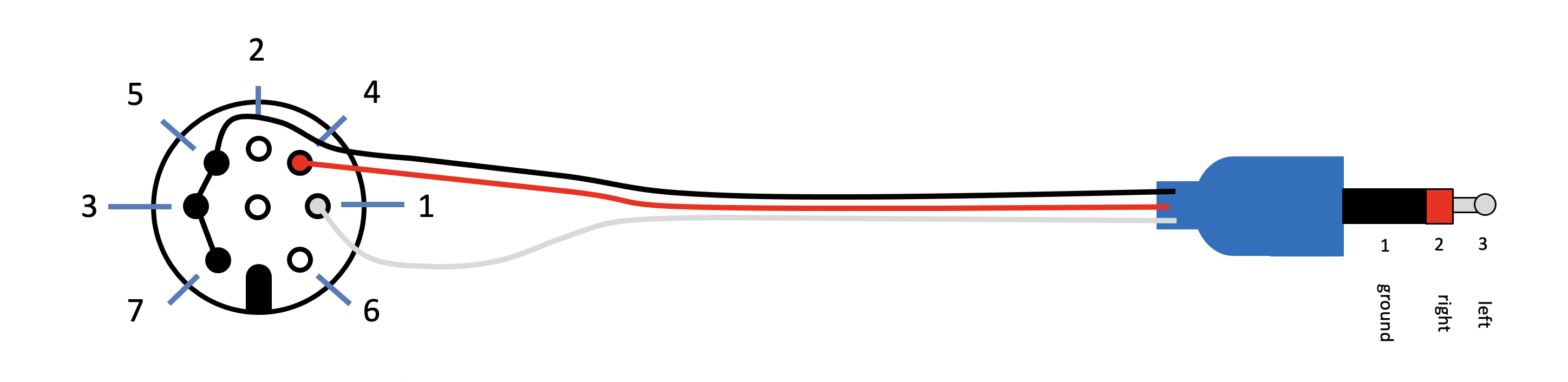
The cable just has 1 GND wire. The PIN connections I have now look like this:
- 1 = Left (grey line)
- 2 = Right (red line)
- 5-3 = GND (black line)

Question
- So, do you mean I should also connect pin 7 with 3 and 5?
- And that it should solve the Hum I am having now?
Location: The Netherlands
Favourite Product: BeoSound 9000
My B&O Icons:
Thnx Madskp!
You were right. I made a new Mini-Jack to DIN cable with the pin configuration for MK1 and it worked, when connecting a battery run iPod to the BeoLab.
Then I connected a streamer box via the same Mini-Jack to DIN cable, and that caused Hum on the left channel.
Any idea what to do about that?
Location: The Netherlands
Favourite Product: BeoSound 9000
My B&O Icons:
2 January 2024 at 11:26 in reply to: BeoLab 8000: suddenly switches to Off while playing music #51665Thanks @Auric & @Die_Bogener
I think what I will do next is switch the PCB with the LED. I have one of a working BeoLab 8000 that I can try if that makes a difference.
Location: The Netherlands
Favourite Product: BeoSound 9000
My B&O Icons:
Perfect, thanks!
Location: The Netherlands
Favourite Product: BeoSound 9000
My B&O Icons:
Thnx @Tignum, this is helpful!
I think the width of the allen screw is compliant to M4. I found a screw with a fitting thread, which has a 4mm diameter.
The length of (1) I think is correct. If I measure with a fitting screw, it goes into the speaker for about 1cm. So there should be 22.7mm sticking out to hold the bracket and have space for the washers and the spring.
The bracket thickness is 4mm, each washer is 1mm, so that takes 6mm. The spring then sits in a space of 16.7mm, actually a bit less when put under pressure. So I assume the spring in an unstring condition could be like 18-20mm.
I will now start looking for those parts.`
Location: The Netherlands
Favourite Product: BeoSound 9000
My B&O Icons:
31 December 2023 at 12:09 in reply to: BeoLab 8000: suddenly switches to Off while playing music #51662Thnx for responding and sharing your suggestion Auric.
Yes, I know about the foamrot issue. In this I did check all PCB’s, connectors, etc. for foamrot. Some copper traces have had a ‘by-pass’ already.
What bothers me is that at high volume/signal strength the Stand-by/On switching works well. But at low volume/signal strength it doesn’t.
Do you have any other suggestions?
Location: The Netherlands
Favourite Product: BeoSound 9000
My B&O Icons:
Thanks again for your comments!
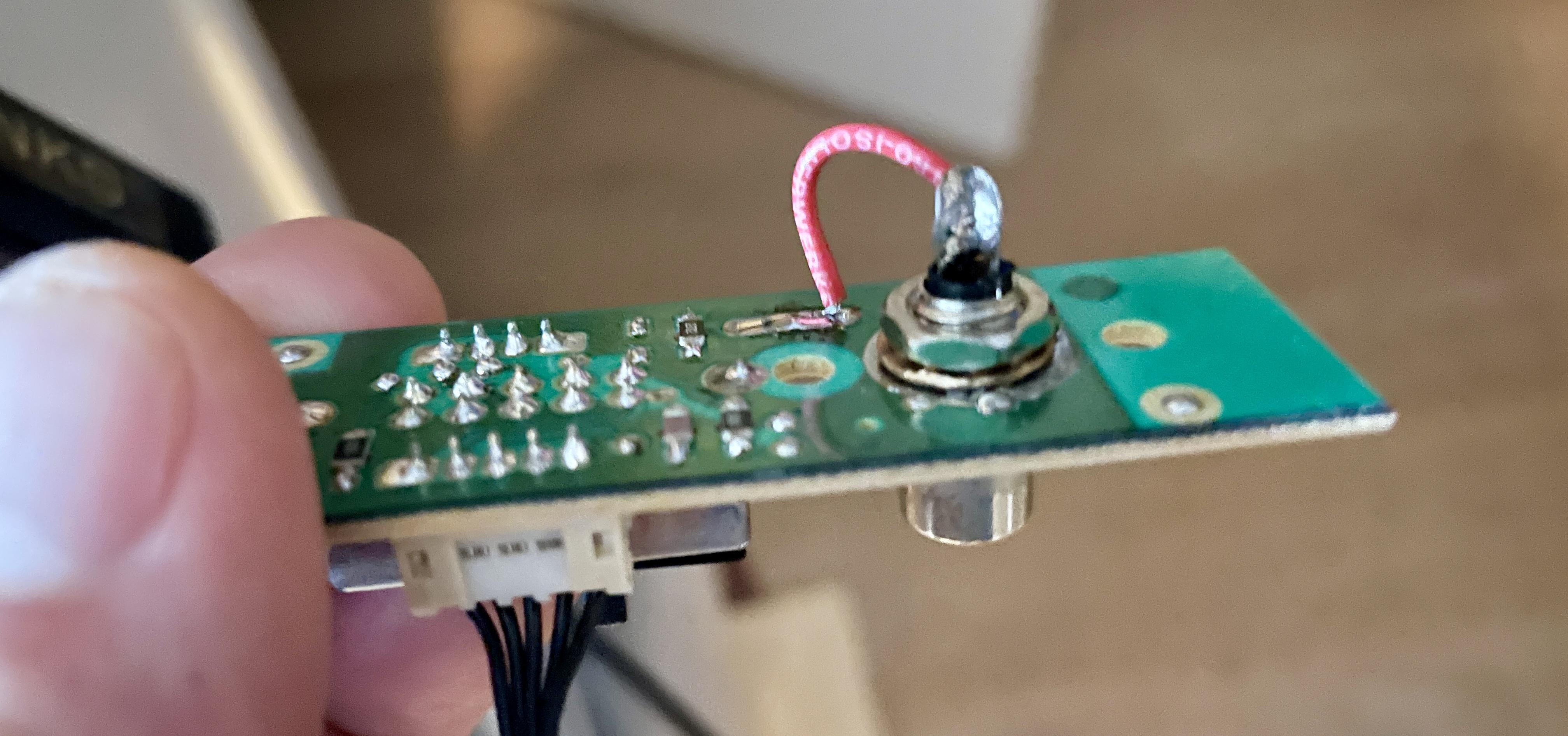
I have removed the capacitor, to check if this made a difference.
Result = no difference. Sound is the same, functioning of the speaker system is the same.I will just leave it as is, without the capacitor. Probably better to avoid damage.
Location: The Netherlands
Favourite Product: BeoSound 9000
My B&O Icons:
Thnx for responding Die_Bogener!
Answering your questions …
- Yes, the crossover network is existing and fully mounted.
- I am not sure if this is the standard work of B&O. I showed a picture to a former B&O repair engineer. He did not recognize this.
- The cap manufacturer I believe is different than what’s used on the PCB’s.
Location: The Netherlands
Favourite Product: BeoSound 9000
My B&O Icons:
13 September 2023 at 11:48 in reply to: BeoLab 8000: high frequency noise disturbs switching to OFF #48884Update 2
Someone gave me the tip to reflow all solder joints on PCB05:

So I did. Again, the first 10 to 15 minutes, the auto stand-by switching worked well. But suddenly after that time, the repeatedly Off > On > Off > On switching started again. So still no resolution found.
Tips are welcome.
Location: The Netherlands
Favourite Product: BeoSound 9000
My B&O Icons:
Dear Jessy1984.
I am experiencing a same kind of issue. (See this thread)
But I can tell that when the switch in the foot is set to Line and you have nothing connected, then it is quite normal to hear noise/hum. This RCA connector is very sensitive and when nothing is connected, it will act as a kind of antenna picking up noise.
I hope someone with more experience will respond to this or my thread. My feeling is there is an issue with grounding, but I am not sure where to look.
Location: The Netherlands
Favourite Product: BeoSound 9000
My B&O Icons:
11 September 2023 at 19:13 in reply to: BeoLab 8000: high frequency noise disturbs switching to OFF #48882Update
- On > Off> On > … – When first powering up the BeoLab 8000, the auto stand-by switch works normal and switches from On to Off/stand-by after music stopped. But after some 15 minutes or so, the auto stand-by does not work normal anymore, and switches back and forth between On and Off. (Something to do with warming up?)
- High frequency noise – I found after thoroughly cleaning the track side of PCB01/02, that the high frequency seemed to have gone. But I know noticed that sometimes it is there and then it is gone for a while and returns again.
- Hum – The hum increase when touching the casing or AMP/PSU panel is still there
Location: The Netherlands
Favourite Product: BeoSound 9000
My B&O Icons:
By making a check on the PCB with a loupe, I found two cracks.
After re-establishing the connection, the speaker works fine again.Thnx!
Location: The Netherlands
Favourite Product: BeoSound 9000
My B&O Icons:
Maybe BeoBuddy can help you (Utrecht area).
If you look for his name, you can send him a PM.Location: The Netherlands
Favourite Product: BeoSound 9000
My B&O Icons:
This is what I have (see attachment). It does not list 24xx xxxx. But I guess it will be like 2013 / 2014.

Location: The Netherlands
Favourite Product: BeoSound 9000
My B&O Icons:
-
AuthorPosts