Forum Replies Created
-
AuthorPosts
-
 Moderator
It’s covered in the Service Manual as follows, so if the dealer won’t do it simply find an electronic repairer who will:

Location: Warwickshire, UK
My B&O Icons:

I can’t find a circuit diagram for the MX4200, but it is a one-way product so perhaps it can be made to work in the MX8000.
Are you sure that the TV is not in V.OPT 0, where it won’t respond to IR commands?
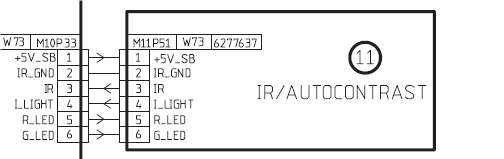
EDIT: Can you confirm that there are just 6 pins on your MX8000’s IR connector, and what about the MX4200 IR board – 6 also?
Location: Warwickshire, UK
My B&O Icons:
Great news – thanks for letting us know that the fault is cured!
And a Happy New Year to you too! ??
Location: Warwickshire, UK
My B&O Icons:
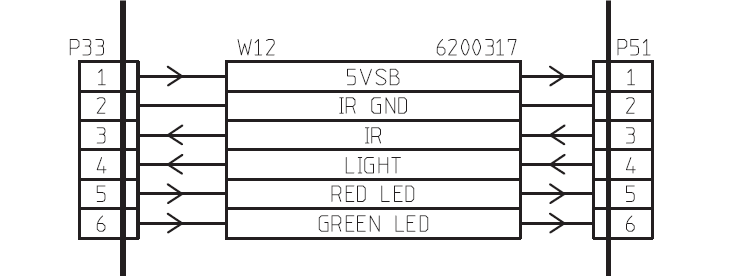
I just had a quick look at the circuit diagrams for the TVs that you mention, and I reckon it would be worth giving the IR board from the BV1/BC1 a try. It’s a one-way IR unlike the earlier models (i.e you want an IR receiver rather than transceiver).
MX8000:

BC1/BV1:

I have had success swapping IR sensor between MCL and ML systems. In the majority of cases, as long as you get the +5V, ground and IR connections (1-3 above) then it works! You could probably even try a VX sensor or BS3 sensor if you have one.
I think that in the above examples, pin 4 is the sensor for the auto-contrast and 5/6 for the respective lights.
Of course whether it will physically fit is another matter!
Location: Warwickshire, UK
My B&O Icons:
Hi and welcome to Beoworld! (BTW I just responded to your separate PM)
Are you sure that the glass panel is not loose? It can come unstuck from its plastic surrounds over time hence does not make contact with the sensors below. If so, it will need removing and re-gluing. I have done this process on a BC9500 but not a BM4500, so perhaps others can help if there is anything specific to look for. I have read that the sensors underneath the glass panel can also become mis-aligned, so you do have to be careful when re-fitting the glass panel.
You’ll get some ideas from this thread or a further search on the archived forums: https://archivedforum2.beoworld.org/forums/p/40307/299174.aspx#299174
Location: Warwickshire, UK
My B&O Icons:
I just had a look at the service manual, and the Clamper and Doors switches are shown as part of the ‘Display and Keyboard’ circuit diagram on page 2.25.
Location: Warwickshire, UK
My B&O Icons:
According to this thread there is a little switch that possibly has dirty contacts: https://archivedforum2.beoworld.org/forums/p/45201/326714.aspx#326714
The photos are missing, but the video in the last post still works. I think that you can just about make out the switch between the large white cog and the metal plate about 1:20 mins into the video.
EDIT: Here’s a direct link to the video:
Location: Warwickshire, UK
My B&O Icons:
ps/edit: how to get out of the quote mode?
Use the tab above the message box that says ‘text’ rather than ‘visual’, and then make sure that your reply is on a line below the final ‘blockquote’ text. You can then click the ‘visual’ tab to make sure that it looks right.
Location: Warwickshire, UK
My B&O Icons:
The A.TERMINAL from 1987 would have done the job!

Location: Warwickshire, UK
My B&O Icons:
Is it possible to change the function on A.MEM so that when pressing it, I choose AUX?
Hi and welcome to the Forum!
No it is not possible to re-assign the A.MEM button.
What B&O equipment are you controlling?
Location: Warwickshire, UK
My B&O Icons:
Hi Matador,
Sorry but I was mainly relying on that earlier thread, so I don’t have any further ideas. I suspect that the Beoport must remain connected to a PC. After Xmas I could test mine with PL (edit: I mean Masterlink) connection to a Passive etc, but that may well behave differently to a BL3500.
I didn’t realise that Beolink Converter 1611s seem to have increased in price – they used to be available on eBay for less than €20. Perhaps someone on the forum has one that they can let go for a reasonable price. I will keep a lookout on UK eBay.
And Merry Christmas to you too! ???
Location: Warwickshire, UK
My B&O Icons:
Great news – it was a bit of a ‘educated guess’ from me because I don’t have a BS9000, but I am glad that it worked.
Interestingly, with SHIFT showing, once you press the number 9 the Beo4 display reverts to RADIO. I suppose therefore that ‘SHIFT 9’ is the only ‘funny’ IR code and that the rest of the numbers 0 2 5 8 are transmitted normally. I might do some experimentation to satisfy my curiosity!
Location: Warwickshire, UK
My B&O Icons:
• Very few radio stations work on the BeoPort, and even those which work can’t be relied upon 100%. Even a “dependable” station appears to play from first selection only about 3/4ths of the time. If the “dependable” station doesn’t start, going to another station and coming back will usually work after a couple of times. Sometimes it will start on its own after a few minutes.
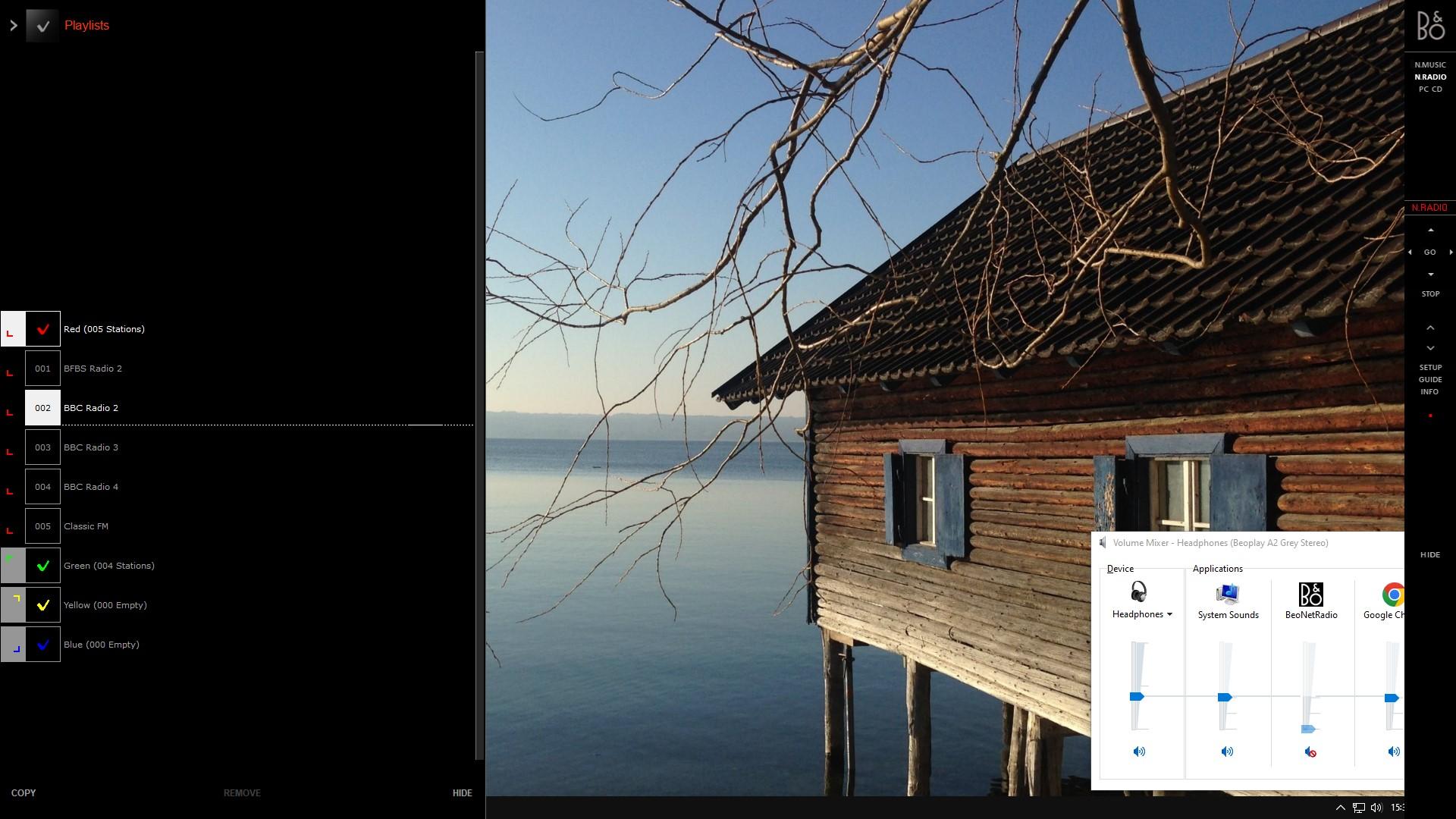
Have you checked that windows/beoport muting problem mentioned in the other Beoport thread? Basically every time you change station the BeoNetRadio level is Muted in the volume mixer – I have to go to the volume mixer and unmute each time I change radio station. See below (you can just see the red mute symbol – click the photo to enlarge):

• The radios are sometimes labeled differently on BS 5 vs BP. One BP-working station I found had two different label endings on the BP (only the 1st worked) whereas on BS 5 the “two” stations had exact same labeling and same audio, so on BS 5 it appeared to be a repetition of the same station.
Did you refresh the radio database when you reconnected the Beoport? It may be that the BM5 and Beoport are using different (i.e earlier/later) N.Radio database downloads. The latest Beoport N.Radio update was dated 2021-11-15.
I am not sure how to update the BM5 radio database, but on the PC running Beoport you can navigate to C:\Program Files\Bang & Olufsen\BeoPort and look for a file called UpdateNotifier.exe
Double click to run a database update, whereupon you get this message:

And see if the radio stations are now consistent with the BM5.
Location: Warwickshire, UK
My B&O Icons:
Have you tried without pressing GO after SHIFT shows?
i.e: Just press LIST until SHIFT shows in the display, then press 9 0 2 5 8
Location: Warwickshire, UK
My B&O Icons:
Congratulations to all! ???
Location: Warwickshire, UK
My B&O Icons:
Congratulations Dillen, RustyFerguson and Beocool so far ….
(PS: Mulled wine is all gone, drinking Waitrose St Emilion ce soir)
Location: Warwickshire, UK
My B&O Icons:
That worked! ?
Location: Warwickshire, UK
My B&O Icons:
Sadly, the cable I was waiting on did not arrive on time for the Beogram so I ended up buying some cheapo stuff from Amazon. The Line-in volume is significanlty lower than streamed music, I have the volume way past 50. It sounds alright but I little muddy to my ears.
What Beogram are you using? It may be that you need an RIAA pre-amp before the connection to the Theatre. This would explain the low level and ‘muddiness’.
(I think that in an earlier post you said that you previously used a Beomaster 6000 with the Beogram, which would have had a pre-amp/RIAA stage built in.)
Location: Warwickshire, UK
My B&O Icons:
Hi gerard,
I deleted that previous response because the User (now blocked) added a spam link.
Did the TV suddenly start behaving like that (in which case it may be a fault), or is there a possibility that someone has gone into the Picture or Service Menu and adjusted the settings?
If you want to look in the Service Menu, the following is from the Service Manual:
The Service Menu must be activated while the TV SETUP menu is displayed. From
this initial state, the Service Menu is activated in the following way:
Beo4: the Service Menu is activated by pressing 0 0 GO within 3 s.Be careful to note any settings before adjusting (maybe take a photo). You may also want to try resetting the TV to factory settings, which is one of the options in Service Mode.
Location: Warwickshire, UK
My B&O Icons:
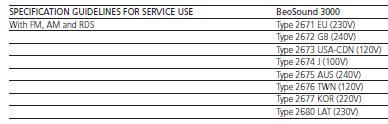
As far as I know (from the Service Manual) type numbers simply relate to the country of use (and corresponding supply voltage):

Location: Warwickshire, UK
My B&O Icons:
-
AuthorPosts