Forum Replies Created
-
AuthorPosts
-
 Moderator
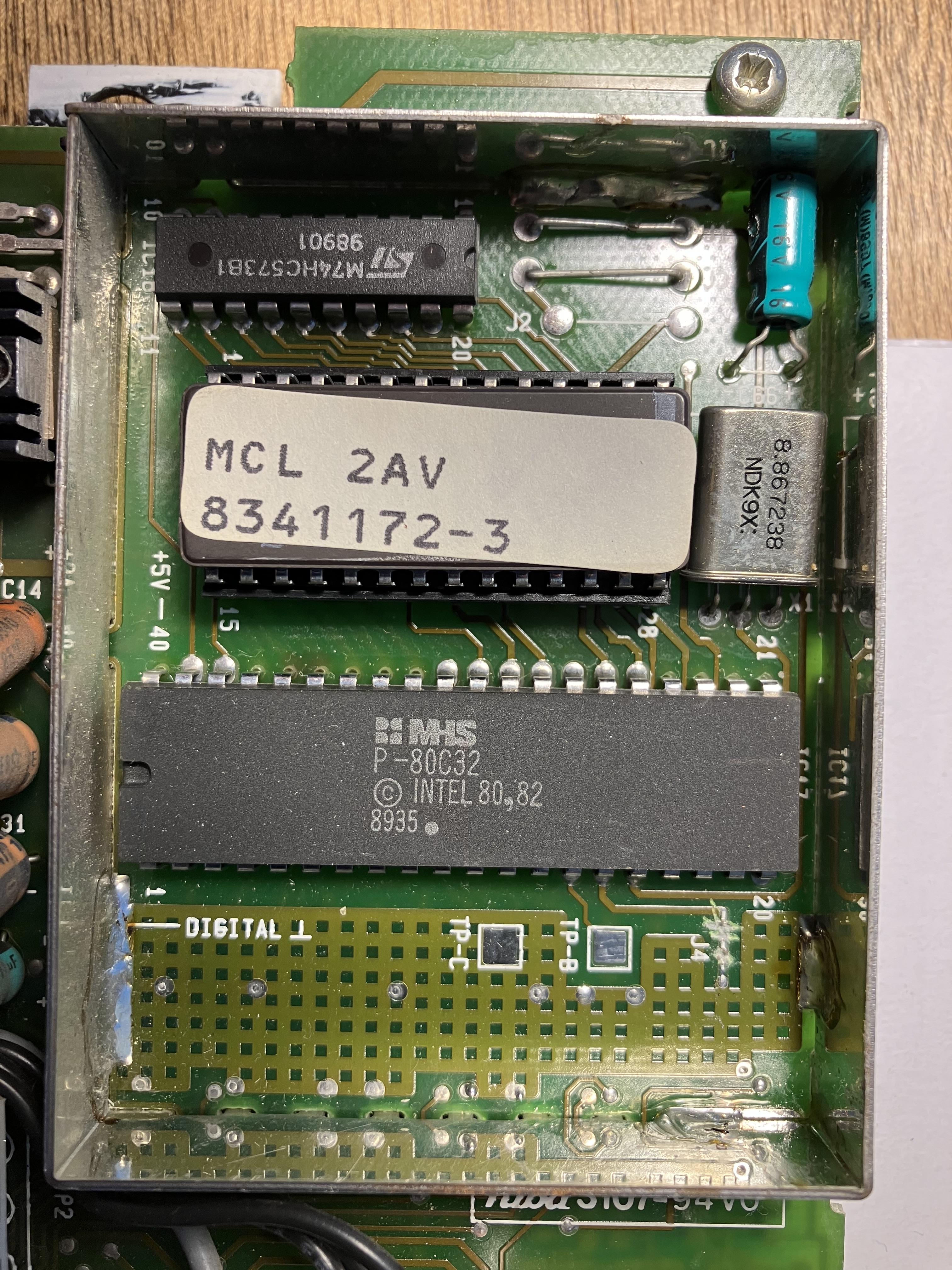
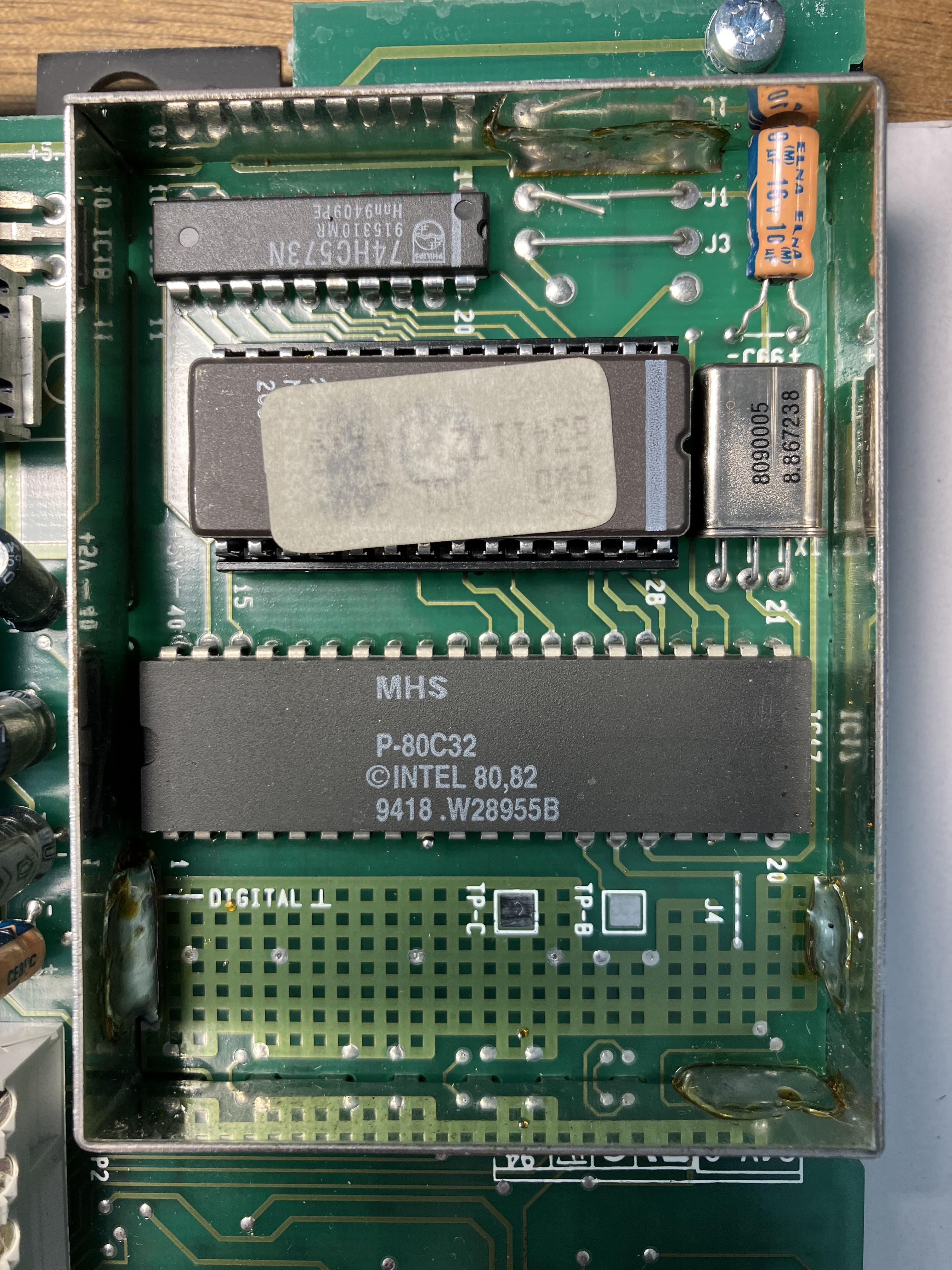
I know for sure the J1 is cut on mine, and If I remember correctly J3 is mounted, but not J2.
J1 is cut on mine but I think the two ends were touching. J3 mounted but not J2. And J4 looks like it has been scraped to break the contact – there is no continuity.
(yes J2 and 3 seem to be missing from circuit diag)

My MCL2AV Type 2032 is similar, but with J4 intact:
Location: Warwickshire, UK
My B&O Icons:

However it might not be that as the red LED next to the button is turning on and off when I press the mute button. I might not have mentioned that earlier.
With my MCL2AV in ‘stand-alone’ (just power, iPhone input to TAPE and speaker connected), the LED just flashes as I press the sensor’s Mute button – it doesn’t stay on. The LED comes on permanently when I switch the MCL2AV off with the remote.
Location: Warwickshire, UK
My B&O Icons:
Hi Guy, and thanks for the welcome but having said that a long users here on the forum, just changed the id and I think this is the 3rd forum setup I’m seeing (sadly as we get a bit cut of and finding old threads/postings including instruction/images). Having said that, it’s great to be back as I kind of lost the interest for the forum when it changes, sadly.
Sorry for the confusion, but the main thing is that you are back so that’s great news! And Tignum has kindly stepped in to help (because I was beyond my comfort zone when you mentioned NL!!)
Good luck with the configuration – I will be following with interest for when I upgrade to NL …
Location: Warwickshire, UK
My B&O Icons:
I just found the MCL2 sensor that I previously repaired – luckily I had labelled it as being from the kitchen in my last house. It was right next to the cooker hence exposed to a bit of grease over the 30 years that it was fitted.
Anyway, I have just dismantled it to have a look. You have to be a little careful prising the circuit board away from the front face, and I can see that I broke a few plastic clips last time!
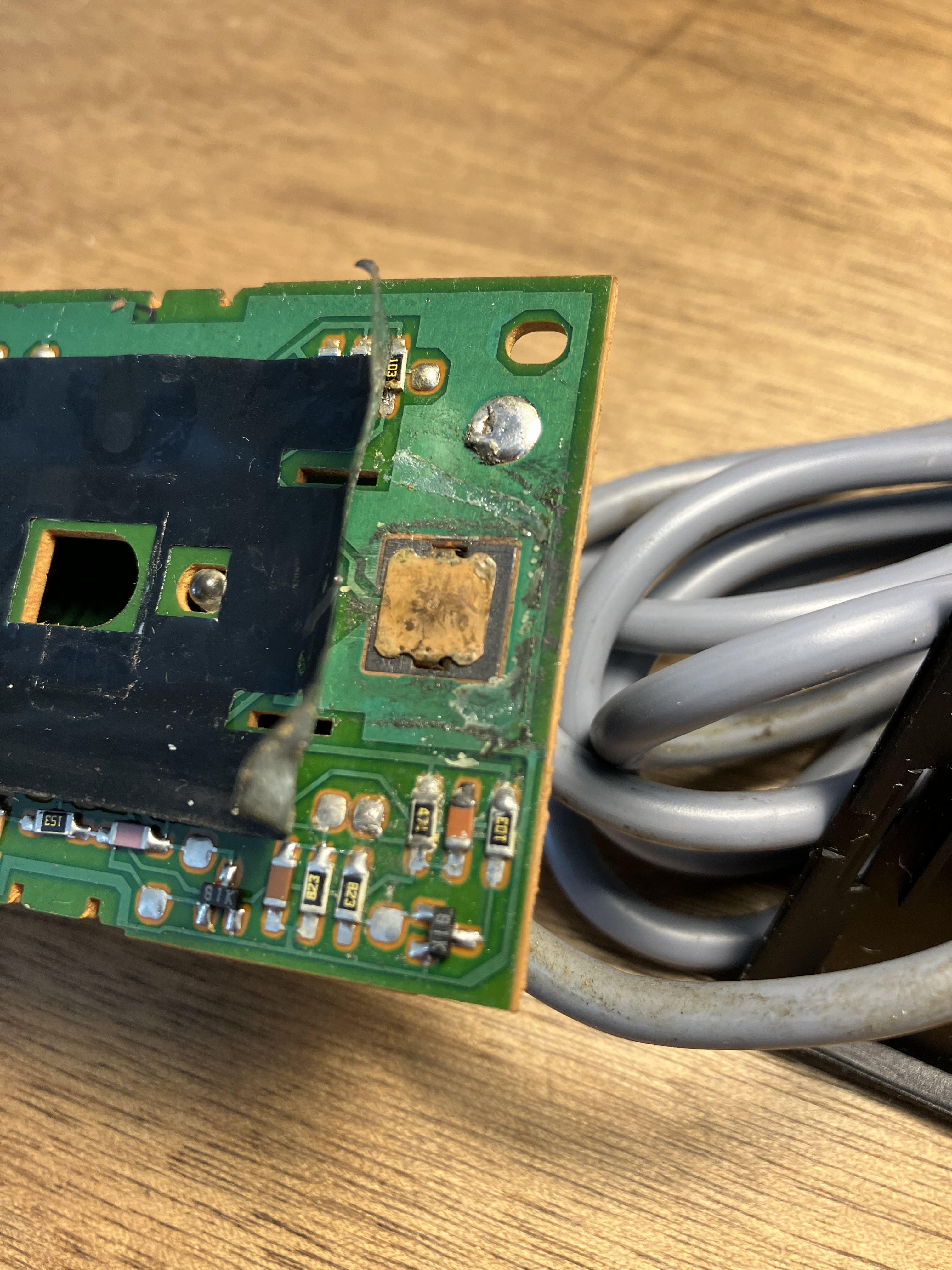
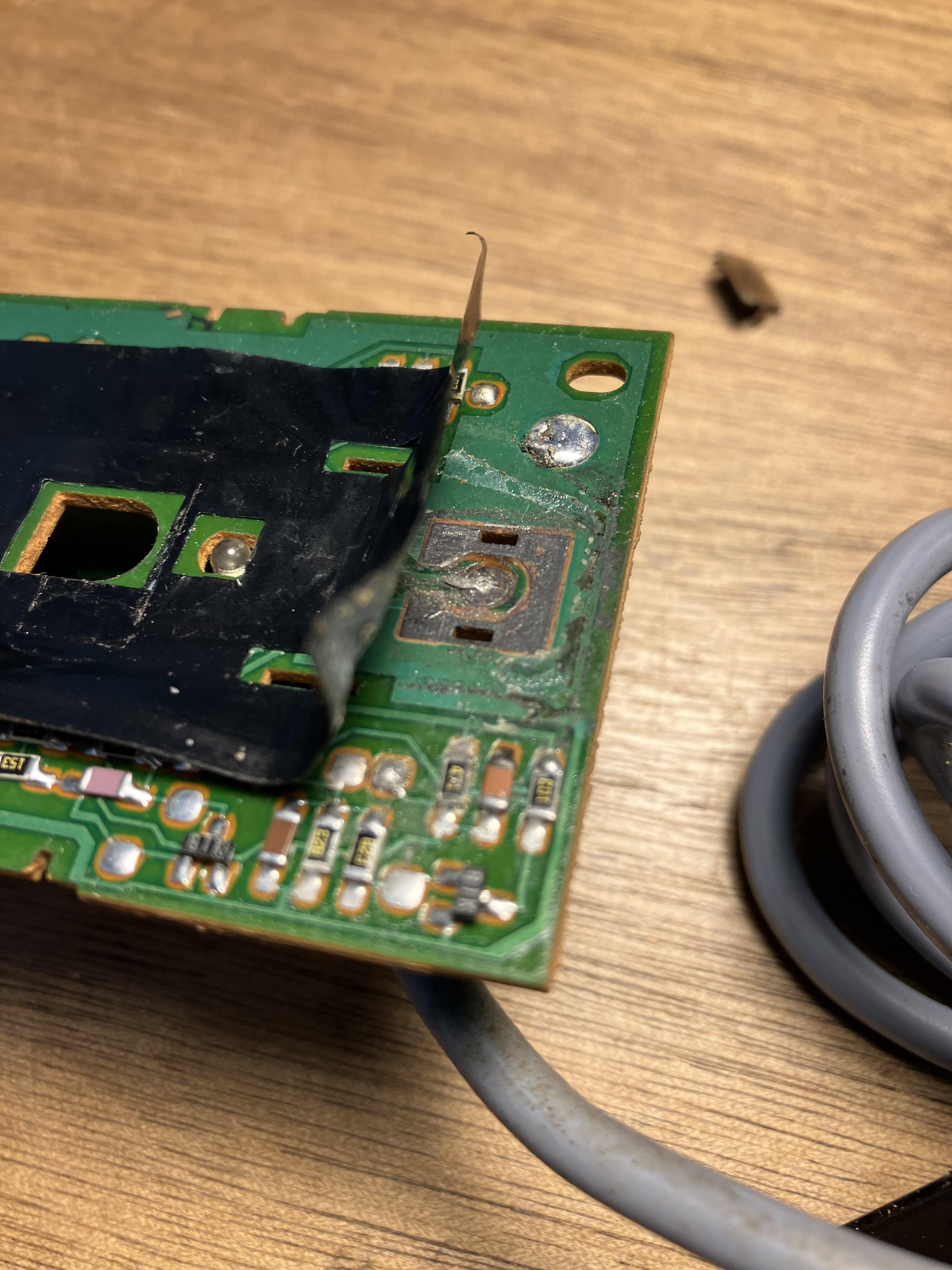
Here’s the mute switch when you peel back the plastic:
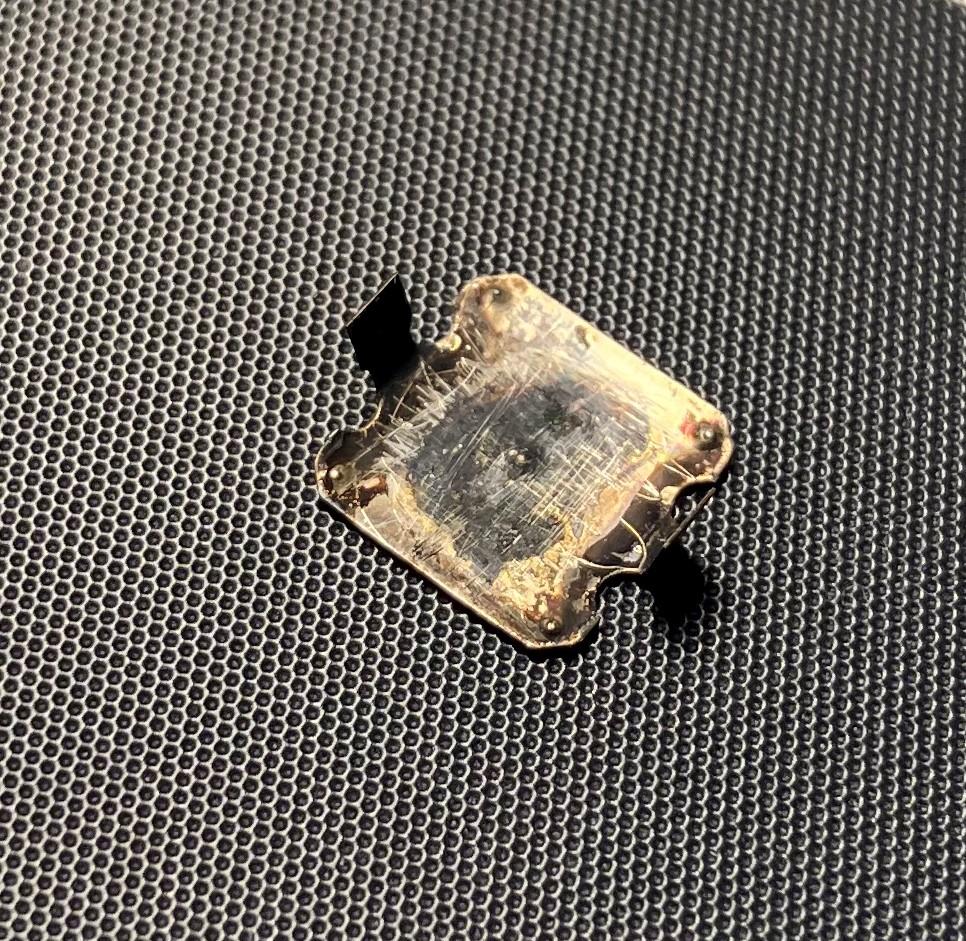
And here’s the little square metal contact piece that can be removed:

When in position it ‘pops’ in slightly to connect the center PCB contact to the outer edge (ground) to send the mute command. Here’s the PCB with the metal piece removed:
I think that I had use a tiny dab of solder when I last fixed this one (there was a broken trace to the left), but perhaps yours just needs a clean?
Location: Warwickshire, UK
My B&O Icons:
It is working now though sometimes a little unstable, but also on this one the mute button is not working. I wonder if it’s something on the MCL2AV that is actually not working.
This is strange! I think the sensor relays the MUTE instruction to the MCL2AV via the data stream, and your IR is working so the mute should be as well.
I did once have to take apart an MCL2 sensor to fix a faulty mute switch – from memory it simply wasn’t making the correct electrical contact when I pressed the button. So a faulty switch is not unheard off, but it seems a strange co-incidence that neither of yours work!
Location: Warwickshire, UK
My B&O Icons:
Hi bnousr and welcome to Beoworld!
I don’t have experience of using NL/ML converter, but if you look at the schematic (and questions) in this post/thread it would seem to answer your queries:
https://forum.beoworld.org/forums/topic/flash-your-bo-newer-thread/page/3/#post-16382
Location: Warwickshire, UK
My B&O Icons:
Ahahahahahaha (sadistic evil laugh…) Yes, you have a lot of fancy beocom triangles under table remotes, BUT YOU DON’T HAVE A ML EQUIPPED BEOSOUND! Guess what? I DO! There’s a justice on this world! Et toc!
Now I feel inadequate hence I am searching eBay for something that I can collect when my wife is away at work … ?
Location: Warwickshire, UK
My B&O Icons:
The other systems of the era (Beomaster 3500, 4500, 6500 and 7000) with Powerlink sockets didn’t have RIAA pre-amps, as they relied on the Beogram having a pre-amp built in.
It was a very rare accessory but BM6500 and BM7000 could be fitted with an internal pre-amp, as described back here:
https://archivedforum2.beoworld.org/forums/p/7576/67094.aspx#67094
EDIT: The last couple of posts of the linked thread above also refer to RIAA add-ons for the BM3500 and BM4500 – I would imagine that these are quite rare!
Location: Warwickshire, UK
My B&O Icons:
Joke aside, one thing we haven’t discussed about the use of the 1611 in this thread is how it could be used with a Beosound with Masterlink. It would probably give an extra aux input with a video command. But could it also give an extra sound input, or will the Beosound just open it’s integrated aux input regardless of audio command that is not integrated for example N.music?
Yes that would be a useful experiment, especially for one of the many BeoSounds with only one AUX socket (eg Ouverture), or with no datalink (eg BS9000 or BS3000/3200). I would imagine that some Beogram users would like to remote control their turntables using such a setup, (assuming you could add both BL1611 and MCL2AV).
Unfortunately I don’t have an ML-equipped BeoSound or Ouverture to test it with!
Location: Warwickshire, UK
My B&O Icons:
I have noticed strange physical mute button (and light) behaviour so I don’t think it’s a fault. I also had different behaviour between Type 2020 and Type 2023 so that confused me further. If I do further testing of MUTE and LED I will stick with the earlier Type 2020 to try to find results consistent with yours.
I had another quick look at this yesterday. I can only replicate the Mute button ‘lock up’ when the MCL2AV is in L.OPT 2.5, not 1.5. I used the BL3500 rather than a TV, and I could not get the same result every time. I think sometimes the result varied according to what order I did the Option settings (BL3500 before MCL2AV or the other way around), and I also think the behaviour changed depending on the order in which I then activated the devices!
The IR sensors are so very sensitive – this makes it very difficult to cover/shield each sensor to simulate two rooms! I resorted to placing the MCL2AV and sensor under a thick duvet to avoid it receiving IR commands!
Location: Warwickshire, UK
My B&O Icons:
until I find a 15V power brick
Great work fixing the fault!
If you intend to use it with passive speakers you could perhaps look for an MCL2P with its built in 15v power supply?
Location: Warwickshire, UK
My B&O Icons:
Firstly can I ask how you got on with the loudspeaker problem as you raised in this thread?
https://forum.beoworld.org/forums/topic/beocenter-9300/
With regard to the BC9300 CD door, can you still hear the motor running when the door tries to open? If, so, either the mechanism need cleaning and lubrication or the drive belts need replacing.
A service manual is available on this site for Silver/Gold members, and you can buy new door drive belts here: https://www.beoparts-shop.com/product/belt-for-sliding-doors-beocenter-8000-8500-9000-9300-9500/
Location: Warwickshire, UK
My B&O Icons:
Great news that you solved the speaker problem – many people have left a headphone adaptor in the socket in the past (it is neatly hidden), so live and learn!
With regard to the door, I think the motors are supposed to run for a fixed time, rather than stopping because of a sensor. However, the motor probably will stop if it senses resistance.
Maybe have a look at the following thread for some suggestions about cleaning and belts, but if you are going to take the BeoCenter apart then the service manual will be a great help – you need to be very careful with the top and bottom glass panels when putting the unit in the service position, because they can drop out if the glue has perished.
https://archivedforum.beoworld.org/forums/t/31601.aspx
Location: Warwickshire, UK
My B&O Icons:
I think it has been mentioned before that my MCL2AV is a type 2020, but there is no sticker with the SW version. Only sticker I could find is on the Eprom.
I just checked an my Type 2020 SW1.3 EPROM has the same lable. On my Type 2023 the label is formatted differently but has the same number up to …72, then is faded/illegible.
With regard to the rest of your testing, overall it looks pretty consistent with my results. The ‘two room setup (TV V.Opt 2, MCL L.Opt 1.5) does look most useful and it is re-assuring that datalink control of the BC3500 works so well. Also the power-off function is logical. (unlike when I used my Type 2023 MCL2AV).
Mute button on IR eye still has no function (but LED turns on and off) no long press standby, so I might have a defect somewhere.
I have noticed strange physical mute button (and light) behaviour so I don’t think it’s a fault. I also had different behaviour between Type 2020 and Type 2023 so that confused me further. If I do further testing of MUTE and LED I will stick with the earlier Type 2020 to try to find results consistent with yours.
Location: Warwickshire, UK
My B&O Icons:
Done now!
Great new name! ?
@Guy: One thing I don’t think you have tested is how the reaction to an AV + Video source command is from the BL3500 when connected to the 1611 and MCL2AV? Does it just open the video source on the 1611?
Just tried that now (with no IR sensor on MCL2AV):
BL3500 in Option 2 or 6: Behaves exactly as when selecting TV etc without AV first. Just opens the video source on the 1611.
BL3500 in Option 1 or 5: You need to press AV first to open video source on the 1611. (Hence behaves just like most audiomasters in Opt 1)
In both case above, if listening to video source, then pressing SHIFT RADO 6/7 or any audio source causes BL3500 to switch off.
Location: Warwickshire, UK
My B&O Icons:
Is the BeoSound 9000 connected to any other B&O equipment with masterlink?
Or does the BS9000 have a timer set which turns on the radio?
Location: Warwickshire, UK
My B&O Icons:
View the end of the remote with an iPhone’s selfie camera (or similar) and you should be able to see the two IR emitters flashing faintly. When you press and hold the << button do they keep pulsing, or only flash once?
Location: Warwickshire, UK
My B&O Icons:
Is there a chance to lock it by coincidence when entering random false PIN codes? Maybe making unwanted changes to a hidden menu?
According to the service manual, when 5 pin code attempts are made the TV locks for 3 hours, and cannot receive any commands. The three hours must be spent with the TV in stand-by for the timer to run (with the TV connected to mains power – red light on). After 3 hours, the pin code counter is reset.
I found out, that there must be some kind of 4-digit code that makes the set work for about half an hour, regardless of any pin entries, just for test issues, but I didn´t find that one either. Unfortunately, I hsave no access to any kind of service manuals or so.
Yes there is a ‘service code’ of 1 1 1 1 1, but you need to be in the Master code menu to enter it! If it worked it would give you 12 hours of service time.
EDIT: If you join the Forum as a SILVER or GOLD member you will be able to download the full service manual. ?
Location: Warwickshire, UK
My B&O Icons:
If I remember correctly HDMI sources (or digital sources) can not be distributed via Masterlink, so that may be the reason for that behaviour).
Yes I think that’s the problem. I did once temporarily setup a BV6 as a link TV from my BV10-32 and was able to distribute hdmi sources (eg Apple TV) with sound and picture on the BV6. I didn’t investigate much but I suspect that it was mono sound coming over the Co-Ax rather than ML. The picture was pretty poor too!
Location: Warwickshire, UK
My B&O Icons:
Thank you though for all the advice, perhaps a MK2 would work better.
No problem.
I replaced my Playmaker with a second-hand Airport Express, the later A1392 version with Airplay 2. I highly recommend this solution!
Location: Warwickshire, UK
My B&O Icons:
-
AuthorPosts