Forum Replies Created
-
AuthorPosts
-
 Moderator
Software is up to date, no idea if its a MK1 or Mk2
Playmaker mark1 = type number 2930 – 2931
Playmaker mark2 = type number 2970 – 2971
Differences:
– Only the Mk1 will play FLAC files.
– The Mk1 has to be connected (cabled) straight to the router in order to download firmware updates, whereas I believe the Mk2 can do so wirelessly.Location: Warwickshire, UK
My B&O Icons:

But back to the experiments …
Yesterday I had a quick look at the MCL2AV (L.OPT1.5)/BL1611 connected by ML to my BV10-32 (V.OPT 2) in a separate room. Overall, as a controlling device, the TV behaved pretty much like the BL3500. When playing from the MCL2AV sources (TAPE and CD) the TV menu showed only A.AUX (with either MCL2AV type).
I could also control and listen to the TV from the MCL2AV/BL1611 ‘link room’ by pressing AV TV, but couldn’t listen to any of the TV’s hdmi inputs (eg by pressing AV SAT). After trying to do so, I had to switch the system off and on again to control/hear normal TV.
Location: Warwickshire, UK
My B&O Icons:
I suggest we rename the topics since it is now far from BL3500 and 1611 only. It would help people to find information about all your experiments. Being not good at naming threads, you can suggest anything that would be relevant.
I agree! The common piece of equipment used in every trial setup is the BeoLink Converter 1611, so how about a new thread title of ‘BeoLink Converter 1611 Innovative Configurations’?
But yes this thread is lenghty and it can be hard for newcommers to fin the info. Maybe we can edit some of the important posts with relevant info tags
I just went back to the first post where I mentioned MCL2AV and added a tag of ‘MCL2AV’. However, this seems to have added that tag to each of my posts (edit – everyone’s posts!) throughout the thread, which I am not sure is right (or useful). I will have a chat to Keith about the use of tags and how it may improve the search function. On that note, when doing a Google search for B&O information I think I am seeing less ‘Beoworld’ hits than before. Perhaps this is related to the new forum?
Another thought with the current situation for Beoworld, and idea could be to make some one or two pagers with a simple info drawing and a short description of the usecases we found in the thread that could be made available to Gold members as and added bonus? This could be true for other threads also. just a thought
Yes this would be useful. Matador produced an excellent diagram that summarised the early breakthrough with the ‘dual input’ BL1611 to BeoLab 3500. When we have finished playing with the ‘added MCL2AV’ we probably need something similar to summarise the one-room/two-room configurations with TV or BL3500 connected. Perhaps when the Beoworld User/Service Manuals library has been re-vamped we could ask for a ‘Novel Configurations’ folder where we store such information?
Location: Warwickshire, UK
My B&O Icons:
The adaptor has full bar signal…..connected the playmaker via Ethernet cable.
Sorry but I am confused. Did you buy a powerline adaptor like the one I linked to, or a wireless access point or booster?
The powerline adaptor that I had in mind wouldn’t use wireless at all. One adaptor plugs in next to your Playmaker (and connects with ethernet cable) and the other next to your router (also connected with ethernet cable). The network is then transmitted over your house mains wiring.
If you do indeed have the type that I linked to, then we need to look for another solution. Do you know whether your Playmaker is a MK1 or Mk2, and do you know if its software is up to date?
Location: Warwickshire, UK
My B&O Icons:
Strange. I suppose that you could try hard-wiring the TV instead but you’d possibly need a powerline adaptor for that.
Alternatively, have a look at this old thread and maybe investigate some of the options including setting a static IP: https://archivedforum2.beoworld.org/forums/p/9305/81619.aspx#81619
Location: Warwickshire, UK
My B&O Icons:
This sound like a great use case, especially if you have a datalink compatible unit, and also want other sources connected. The Beolab 3500 should still be able to access the Video source in the 1611 I guess?
I hadn’t thought to test this earlier, so thanks for the suggestion!
I just connected the previous BL3500/BL1611/MCL2AV (no IR sensor) setup but included a Y-adaptor from the BL1611’s AAL socket. I then connected an iPad to the extra DIN socket.
So in answer, yes, you can still select a VIDEO source when the MCL2AV is also connected – any VIDEO selection (TV, SAT, DVD etc) will open this input as before. SHIFT RADIO 6 or 7 still work as before for the MCL2AV’s TAPE or CD socket.*
So the addition of the MCL2AV allows you to have a total of three selectable inputs from the BL3500.
* EDIT: One anomaly: when playing the ‘video’ source, pressing SHIFT RADIO 6 or 7 turns the BL3500 off, so to switch sources from video to audio you have to turn the system off first. There are no such problems when changing from audio to video.
Location: Warwickshire, UK
My B&O Icons:
For you, there might be an alternative solution. I’ve been thinking about using a spare 3500 square foot space above a jacuzzi in my bedroom. In order to use an NL/ML Converter with an ML Power Box for my project, there must be no ML Audio or Video Master present. Instead, you must link the ML Power Box to the NL/ML Converter. This would give you access to the NL/ML Converter’s AUX input as well as any other sources, like Deezer, TuneIn, etc., that come with any NL products, such the modestly priced Beoplay M3. You would then have a lot of flexibility in the source buttons you could map the sources to. I now have a second NL/ML Converter.
Thanks for this – yes I saw the ML Power Box mentioned by MM in this thread: https://forum.beoworld.org/forums/topic/master-link-audio-master/#post-15890
However, I don’t have any NL equipment (yet) and am therefore looking for novel (cheap) ways to make use of much of the older B&O eqpt that I do own. The thread was started by Matador to experiment with the use of a BeoLab 3500 as a stand-alone speaker in conjunction with a BeoLink 1611 converter. This was successful and you can select two different aux sources using a B&O remote, three if you add a Beolink Active. You can get everything required (BL3500, BL1611, Active, remote and leads) for much less than the price of a second hand NL/ML converter!
The more recent experiments have looked at adding an MCL2AV to the mix so that we can add datalink control of BeoCords, Beograms etc. As far as I am aware the NL/ML converter’s aux input doesn’t allow for datalink, hence some of the things we are looking at should enable a system with datalink > ML > NL/ML converter > NL.
Location: Warwickshire, UK
My B&O Icons:
A few things to add to the above following further testing:
Firstly, I repeated most of the above with the other MCL2AV (Type 2020 SW1.3) and most of the results were the same. However, with the MCL2AV in the useable L.OPT 1 setup, when both rooms are playing, a short press on the BL1000 power button just turns off just that room (turns off, not just mute). A long press turns both rooms off. With the other (newer) MCL2AV (Type 2023 SW2.3) a short press on the power button usually turned both rooms off. Hence the older MCL2AV is probably more user-friendly in this regard.
I also realised that the MCL2AV can also be put in L.OPT 4, where it only responds to commands preceded by LINK. I thought this may be useful where there are two sensors in one room and you want to choose which speakers to use. However, with MCL2AV in L.OPT 4, control from the BL3500 is very similar to when in L.OPT 0. For example, the BL3500 plays TAPE input sound whatever audio source is selected on the remote.
I then wondered about putting the BL3500 in L.OPT 4 and leaving the MCL2AV in L.OPT 1.5. I thought that this could allow same-room independent control. However, once the MCL2AV was activated (using non-LINK commands) it then responded to LINK commands from my Beo4 (in permanent LINK-mode). Both MCL2AVs behaved the same way – very strange!
Anyway, enough for today – apparently the ML cable across the landing is a ‘trip hazard’ and the BeoLab 3500 needs moving from our bed!
Location: Warwickshire, UK
My B&O Icons:
More experimentation today …
So I reconnected an IR sensor to my newer MCL2AV Type 2023 SW2.3, and moved the BeoLab 3500 to a separate room, connected to the BL1611 by ML cable. An iPhone was playing audio to the MCL2AV’s TAPE socket throughout testing. I then tried a few option settings in the two separate rooms.
BL3500 in L.OPT 1, 2, 5 or 6/MCL2AV in L.OPT 2.5 or 2.6
I can select and play SHIFT RADIO 6 from the BL3500 room (this doesn’t start the PL speakers connected to the MCL2AV). However, after selecting/controlling the BL3500 I cannot then select or control anything within the MCL2AV room. Even Mute or Volume don’t work, even though the IR receive LED is flashing on the MCL2AV’s IR sensor. Also the IR sensor MUTE button has no response. The MCL2AV room will only work again if I turn the system off and re-set the MCL2AV option settings.
BL3500 in L.OPT 1, 2, 5 or 6/MCL2AV in L.OPT 1.5 or 1.6
Independent control in both rooms is possible (has to be same MCL2AV source in each room). Can switch on (or mute) independently from either room, and ‘join’ by pressing just vol or mute in MCL2AV room (but you have to press the full SHIFT RADIO 6 to ‘join’ in the BL3500 room). The MCL2AV IR sensor’s MUTE switch works to join or mute once sound is already playing in the BL3500 room. A good useable outcome!
BL3500 in L.OPT 1, 2, 5 or 6/MCL2AV in L.OPT 0
BL3500 plays TAPE input sound whatever audio source is selected on remote – there is no separate selection/control of TAPE or CD inputs. MCL2AV is non-responsive locally, and you cannot even ‘join’ by pressing the sensor’s MUTE button. A long press of power off does still shut down the ‘system’ from the MCL2AV room.
My conclusions for far (from this and earlier testing):
If the MCL2AV/BL1611 combination is in the same room as another ML device (with a built-in IR sensor), disconnecting the IR sensor from the MCL2AV simplifies control. Unfortunately, you cannot then activate any PL speakers connected to the MCL2AV.
If the MCL2AV/BL1611 combination is in a different room to another ML device (with a built-in IR sensor), make sure that the MCL2AV is in L.OPT 1.X.
I can’t see any reason why the above two configurations would behave any differently with a proper datalink (controllable) source connected to the MCL2AV’s TAPE or CD input, but am unable to test.
I will be interested to see if similar results are obtained with a BeoVision instead of the BL3500.
Location: Warwickshire, UK
My B&O Icons:
I had some thoughts about this input selection, and it ocured to me that when the MCL2AV is used in a MCL system it will allways have an audio master with the CD and A.Tape sources available (even if nothing is connected to those connections on the Audiomaster). Therfore the MCL2AV has to register if a Datalink device is available locally, and if not it should use the Audiomaster’s source instead. This might explain the Behaviour we are seeing.
Yes that all makes sense. And with a local TAPE or CD, in a normal MCL setup you would then use the LINK button to select the TAPE or CD in the central room.
But weird that the OneRemote radio wont work the proper way here when it is working in other situations.
Yes that’s strange – I can’t think of a sensible reason for this, but |I suppose the OneRemote devices were never tested with the older MCL2AV system, so perhaps there is just a SW anomaly.
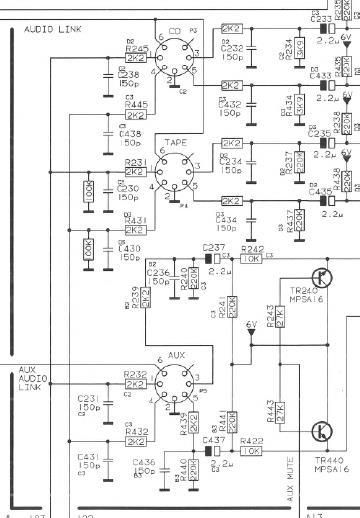
Whilst thinking about the OneRemote, I did revisit the MCL2AV circuit diagram: I think we have noted before that the diagram is incorrect: it shows TAPE and CD datalink wired to pin 6, when it must actually be to pin 7. For the AUX input, the AAL is correctly shown to pin 6.

It would seems as the 2 IR sensors introduce some kind of confussion in the system. But then again this was probably inteded to be used with either the IR sensor or the TV’s IR eye. I will see if I can get on with my testing tomorrow. Let me know if there are situations you like to have tested with the Beocord 3500 on datalink
You may have finished testing now so I could be too late!
- I’d be interested to hear how your setup behaves with the IR sensor removed from the MCL2AV. Or in two-rooms if you have a long enough ML cable!
- If you use the TV to select the MCL2AV’s TAPE input using SHIFT MENU 6, and then press MENU to turn on the TV screen, does it show that the TV is receiving an A.AUX source or A.TAPE source?
Location: Warwickshire, UK
My B&O Icons:
In my experience, the Playmaker has always been a bit ‘flaky’ when connected wirelessly. Dropouts and its disappearance from Airplay devices were frequent when I used mine wirelessly. If you search the older forums you will see many similar experiences.
The simplest solution is for a wired network connection – this has solved many glitches for other users. If cabling direct to your internet modem/router is difficult, consider using powerline network adaptor such as these: https://www.johnlewis.com/tp-link-tl-pa7017-gigabit-powerline-starter-kit-av1000/p5381943
Location: Warwickshire, UK
My B&O Icons:
I’ll keep this short and focused because there’s lots to read above, and some great ideas and thoughts!
I support Option 1: a Bi-Annual Draw with the current Membership rates.
Other comments:
- Main effort should be towards keeping the forum going, maintaining and building on current level of interest, tempting back old members and encouraging new.
- For me, content, format and usability of the Forum are much bigger factors that the Prize Draw, which I too see as a ‘bonus’ (and I have been lucky enough to win great prizes four times since joining in 2007).
- Whatever is decided, I do think that both current members and new visitors need a more obvious indication of the levels of Membership and the benefits of each of these levels – perhaps a clickable banner that encourages site visitors to explore these membership options further.
I would also like to echo the thanks of other Users for the unflinching support of both Lee and Keith – I know that some great work goes on behind the scenes to keep the site running smoothly and I am eternally grateful!
EDIT: And big thanks also to Steve for continuing to sponsor and support my favourite forum! ?
Location: Warwickshire, UK
My B&O Icons:
One thing that I meant to add: Having dug out an old BL1000 I have reminded myself what a useful remote it is; so much easier than the Beo4 for Option setting, and for anything that requires the AV button! I think I will keep it to hand …
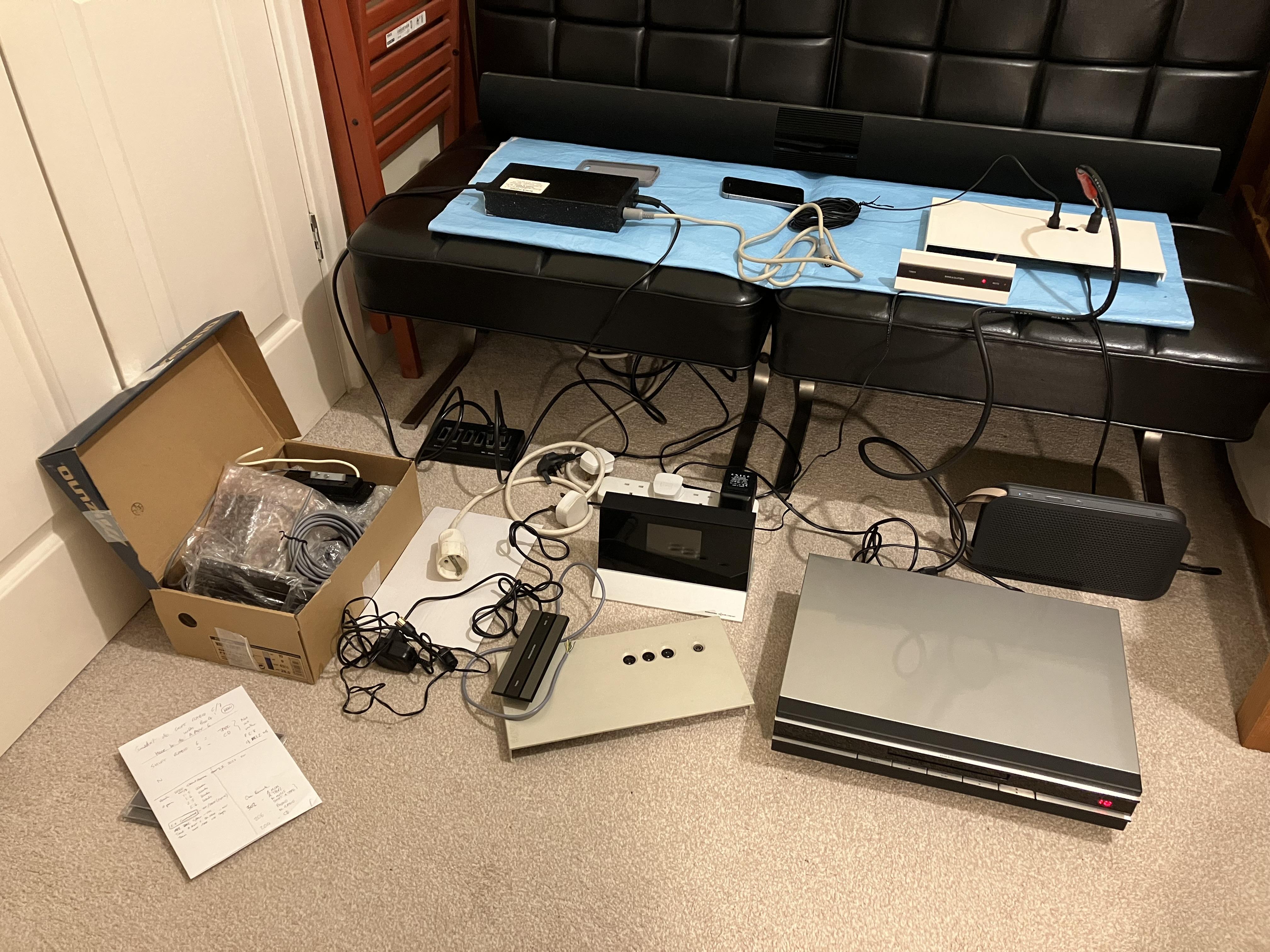
And I forgot the obligatory photo of organised chaos:

Location: Warwickshire, UK
My B&O Icons:
15 February 2023 at 17:31 in reply to: Repair service in south east UK – for Beocenter 9500s? #43858Hi and welcome to Beoworld!
It could be worth giving these people a call – I have not used them for repairs but have purchased spares: https://www.avaservices.co.uk/
Location: Warwickshire, UK
My B&O Icons:
Continued from above …
CONNECTION TO BL1611 and BL3500:
I then connected the MCL2AV AUX socket to the BL1611 AAL and then ML to my BeoLab 3500. Here, results started to get a bit mixed …
Firstly, there was no useful functionality with the BL3500 in L.OPT 0 – it was impossible to trigger the BL3500 via the MCL2AV/BL1611 combination. (I didn’t yet try adding a PL cable between MCL2AV and BL1611.)
Next I tried numerous combinations of L.OPTs on both MCL2AV and BL3500. Basically I was trying to select the TAPE and CD inputs from the BL3500 using SHIFT RADIO 6 and 7. This resulted in lots of system lockups during testing, even when I tried the MCL2AV in L.OPT 0. Although it sometimes worked as expected there was no consistency of results and it became very frustrating! I often had to unplug/power-down everything to clear the system. I was using all the eqpt in one room, shielding IR sensors when inputting Option settings to a single device.
Next I experimented with disconnecting the MCL2AV’s IR sensor, remembering that this causes it to default to L.OPT2 according to the manual. With the BL3500 as the only IR sensor, control and consistency became much more straightforward.
Basically with the BL3500 in L.OPT 1, 2, 5 or 6 it was possible to use SHIFT RADIO 6 or 7 to select correct MCL2AV input (TAPE or CD). It was not possible to select these inputs directly using CD or TAPE on the remote. EDIT: Input selection via the BL3500 did not switch on the PL speaker attached to the MCL2AV.
There was only one anomaly:
- On the older MCL2AV (Type 2020 SW1.3), after selecting SHIFT RADIO 6 or 7 the BL3500 display remained showing A.AUX.
- On the newer MCL2AV (Type 2023 SW2.3), after selecting SHIFT RADIO 6 or 7 the BL3500 display showed A.TAPE or CD.
Anyway overall I am a bit disappointed that my OneRemote radio wouldn’t behave like a normal datalink device. I will have to have a think about where to go from here!
Location: Warwickshire, UK
My B&O Icons:
Thanks Mads – some useful reminders above of things that I have tested in the past and had forgotten about! I was just about to post some results from today but have just amended them slightly to incorporate that info and the SHIFT RADIO 4 suggestion.
As you are about to see, I didn’t try the longer ML lead two-room test yet but may try that later in the week.
And thanks for trying the BS1 datalink – yes it is a little frustrating that there could just be some SW missing!
More to follow …
Location: Warwickshire, UK
My B&O Icons:
Hi and welcome to Beoworld!
Either you have left a (quarter inch to 3.5mm) headphone adaptor in the headphone socket, or the mute relay is faulty (it only affects Speaker 1 socket). Both are common occurrences and you can find more about the latter by searching for Mute Relay in the old forum.
Location: Warwickshire, UK
My B&O Icons:
As just mentioned, I did some testing today with mixed results…
MCL2AV STAND-ALONE:
First I re-tested the MCL2AV in stand-alone mode in order to form a baseline prior to connecting to BL1611 and BL3500. I tested both of my MCL2AVs, one Type 2020 SW1.3 and the other Type 2023 SW 2.3. Initially I had IR sensors and PL speaker connected.
Some results:
- In all L.OPT settings (other than 0) SHIFT RADIO 6 and 7 work to open TAPE and CD inputs respectively as expected.
- The MCL2AV needs to be in L.OPT 1.X for AV + TV to open the AUX input. In fact, AV then any video source will open the AUX input)
- When in stand-by, pressing MUTE does not start the last source (I think it would if it were part of a fully functional MCL system).
OneRemote Radio Connection:
I then setup my OneRemote Radio to respond to A.TAPE datalink commands, and connected to MCL2AV’s TAPE socket. The result: It switches on and can be controlled but there is no sound! I can then get sound by then pressing SHIFT RADIO 6 but this is far from ideal. The same result happens when set to respond to CD or PHONO commands and moved to the CD socket. I tried every possible L.OPT.
So I think that the MCL2AV doesn’t recognise the OneRemote radio as ‘proper’ Datalink and therefore won’t keep the TAPE (or CD) input open – the data receive light on the OneRemote flashes randomly even when MCL2AV is at stand-by, as if it is being interrogated and failing!
DVD1:
Note: Madskp has just reminded me that I tried the following back in Jan 2021 as reported here: https://archivedforum2.beoworld.org/forums/p/45162/326789.aspx#326789
I then tried connecting my DVD1 (with modified SCART to 7-pin DIN) to the AUX socket. Witht the MCL2AV in L.OPT 1.X, the DVD1 could be selected using AV DVD (or AV SHIFT SAT on BL1000) and full control was possible to skip through CD tracks. It did however need a long press on the remote Off button to ensure that the DVD player went to stand-by. (Note: SHIFT RADIO 4 did not open the AUX input or start the DVD1 – I hadn’t tried this before).
Hence it would seem that I need to connect a ‘proper’ datalink compatible device to the MCL2AV input sockets, such as BeoCord. Unfortunately I don’t have anything easily available to try.
Next stage in new post …
Location: Warwickshire, UK
My B&O Icons:
Btw. do you remember what commands you used when you had the stand alone stup with your computer? Was it the same you used?
I only had a BL1000 back then, so I just used SHIFT RADIO 6. I only used it like that for a few months before replacing with a Beoport.
Thanks for the useful spreadsheet – that’ll be great to help organise my Beolab 3500 experiments. I think I will also use a longer ML cable to put one of the devices in a separate room. I think that I will need to do this because using L.OPT 0 (IR-off) or L.OPT 4 (link-only) may change other behaviour.
I note from the Handbook that the MCL2AV defaults to L.OPT 2 if you remove the IR transceiver, so I may also look at that in more detail when I have the BL3500 and MCL2AV in the same room. (EDIT: I just noticed that you’d already mentioned this anomaly!)
I’ll also try the OneRemote Radio and my DVD1 with modified SCART to Aux cable as inputs into the MCL2AV to see if they can be controlled either directly or via the BL1611/BL3500.
Good luck with the BeoSound 1 test!
Location: Warwickshire, UK
My B&O Icons:
Interesting. I had read somewhere before that the BV11 mini-DIN could also control connected B&O devices such as DVD1 or V8000. This implies that it is Audio Aux Link compatible, and as such can communicate via Pin 6 of the BC2300’s AUX socket, in the same way that the BC2300 will communicate with a BL1611 converter for example.
EDIT: Oops! Read it with Google Translate and replied in English – sorry!
Location: Warwickshire, UK
My B&O Icons:
-
AuthorPosts