Forum Replies Created
-
AuthorPosts
-
 Moderator
If you send Keith a PM he will be able to upgrade your status to Gold.
My BC9500 is packed away at the moment so I can’t check the number of turns. However, next time I visit my mother-in-law I need to change the door drive belts for her BC9500 so I will have a look at a working example there.
Good luck with the rest of the restoration – while it is open I would probably replace the mute relay and also the battery as it’s only a matter of time before these fail. Personally I wouldn’t touch the CD player capacitors unless it stops working.
Keep posting updates – it’ll be well worth it when finished ?
Location: Warwickshire, UK
My B&O Icons:


Ah that was an easy fix! Thanks for letting us know – one day someone else will make the same mistake and this thread will help them fix the problem!
Location: Warwickshire, UK
My B&O Icons:
Very clear video. Quick question that I should have asked earlier – do you have the Service Manual? It is available to Silver/Gold members of the site.
The manual (page 7-5) does show the string routing – as far as I can see the only difference is that the manual shows three loops around the revolving drive rod (not two as you have done). Of course, any slack may be taken up by the spring arrangement for the pulley at the other end. The service manual is not very clear on how the string attaches to the slider, but you seems to have found the solution to that.
Location: Warwickshire, UK
My B&O Icons:
Have a look at this post: https://forum.beoworld.org/forums/topic/beoport-n-radio-stopped-working/#post-12415
Hopefully you will get a similar reply from B&O.
Location: Warwickshire, UK
My B&O Icons:
Or maybe your DVD1 with the custom cable?
Another thought for tests if you feel like it. The Oneremote can be setup to AAL. Could it communicate directly with the BL3500? And maybe the same with the DVD1.
Good ideas – I will try all of them but not for a few days …
Location: Warwickshire, UK
My B&O Icons:
Welcome to Beoworld!
A strange fault! Are there any strange indications with the lower display panel? Do you leave the unit connected to mains power when not in use?
There could potentially be problems with the control processor caused by a flat backup battery on the processor board. This can be compounded if the unit is removed from mains power when not in use. The battery is replaceable if you are happy with disassembly and soldering; there is advice on the forum if required.
Alternatively it could simply be loose or broken connections between boards/motors/sensors.
Location: Warwickshire, UK
My B&O Icons:
Compared to the BM5500 the data signals on the MCL and AUX is connected to different pins on the Microcomputer in the MCL2AV, and might therefore have differences that makes them incompatible, so this might only work for certain Beomasters/Beocenters where the signals are internally connected.
That’s a logical explanation – I can’t think of any other reason for this anomaly. I would test this with mine but I don’t have a controllable input device other than the OneRemote radio which may behave differently. I don’t have a chance to test until next week, but will see what I can do.
EDIT: And great work fixing the MCL2AV!! ?
Location: Warwickshire, UK
My B&O Icons:
Just a thought, is there any point emailing B&O either here in France, GB or Denmark to pose the question on how to activate/reactivate the DVI socket with their Tech Service depts
It’s worth a try, but I doubt that they have the detailed knowledge of the older stuff. It could be worth contacting one of the ‘re-seller’ companies that dealt in used B&O and asking their advice. I think many were purchased from hotels prior to being sold to the public. My BV6-26 (and 6-23) were bought from Timeless AV, but I am not sure if they are still trading.
Location: Warwickshire, UK
My B&O Icons:
Great news – I am glad you got it all working, and thanks for letting us know! ?
Location: Warwickshire, UK
My B&O Icons:
Also, if you do manage to get back into the Service Manual, can you tell us the ‘Type No’ that is on the Monitor Information page?
Location: Warwickshire, UK
My B&O Icons:
I don’t think PC should be present on the TV’s ‘connections’ menu; it is usually just accessed by pressing PC. Once PC is selected as the source, the only other menu available is the Brilliance, Contrast, Colour one that you saw before.
Can you still get to the Service Menu? (Using MENU 0 0 GO) – only avail when in normal TV mode, not PC.
If so, go to ‘Monitor’ then ‘Picture Adjustments’ then ‘Scaler Test Menu’. The bottom line of the Scaler Test Menu should state ‘DVI DETECTED’ with a Yes or No.
To be honest the Service Menu may be different for various TV software levels, so I would have a good look through every menu for any mention of DVI.
Location: Warwickshire, UK
My B&O Icons:
Sometimes it can take a little time for the handsets to update with the phonebook and/or handset name.
Also you could go to the original handset ‘settings’ menu, scroll to ‘handset’ menu, press centre then scroll to ‘handset type’ and make sure it is set to ‘common’ and not ‘personal’. This should force it to store the phonebook on the base rather than the handset.
EDIT: Be careful if you change from Personal to Common because this will delete the Phonebook. If it already set to ‘Common’ just wait for it to update!
Location: Warwickshire, UK
My B&O Icons:
Hopefully the PSTN button press will work for registration, but if you do end up replacing the batteries I usually buy these ‘Cameron Sino’ ones – they seem to work well: https://www.ebay.co.uk/itm/112488682394
(I don’t necessarily use this eBay supplier – it’s just an example to show the batteries I use.)
Location: Warwickshire, UK
My B&O Icons:
My BV6-26 was probably just as old (with an analogue tuner) and also had started life in a hotel. When using the DVI input my two problems were firstly getting the resolution right (as we have discussed), and secondly High-bandwidth Digital Content Protection (HDCP).
As far as I am aware, TV’s that are not HD-ready cannot display an hdmi signal with HDCP. You may find that you can go into your IdeaCentre’s graphics settings and turn off HDCP to see if this is the cause of the problem.
When I used an Apple TV with my BV6 I also used an audio extractor (to get the sound out of the hdmi) which had the advantage of stripping the HDCP from the signal so that the TV would display it.
I described my DVI experience in this post: https://forum.beoworld.org/forums/topic/hdmi-connection-for-beovision-7-mk1/#post-1707
Location: Warwickshire, UK
My B&O Icons:
Tried that, without pc output and with output, the option is just test patterns the DVI is not highlighted and cannot be accessed. The Type No 9252 Item No 1816658
So that is a Mk1, whereas my BV6 was a Mk2 (Type number 9272).
I still think there may be an HDCP problem. Have a look at this old thread (you need to translate from French) about a similar type BV6-26 (type 9251) where the owner had to use an hdmi splitter to remove the HDCP. For my TV, I managed to use an hdmi audio extractor to strip the HDCP.
https://archivedforum2.beoworld.org/forums/t/27750.aspx
But of course, if even selecting the PC input is not possible (since the reset) then you are unable to try something like this.
Location: Warwickshire, UK
My B&O Icons:
Hi, I do have a BC6-26(9280), and I do recall that I had to put the ‘HDCP mode’ setting to ‘hdmi’ or ‘disabled’, where ‘HDMI’ worked for my AppleTV
I remember that too for either my BV6-26 or BC6-26, but I couldn’t find it in the Service Manual for the earlier models. Hopefully stotty can find it, otherwise I have run out of ideas other than taking the TV aspart to see if any hotel (BtB) hardware is left inside!
Location: Warwickshire, UK
My B&O Icons:
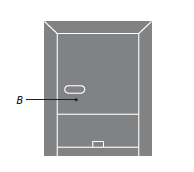
I think with that PSTN base there is a button (B on the diag below) that you have to press for at least 4 seconds to open the base for registration:

Location: Warwickshire, UK
My B&O Icons:
Ok maybe have a look in the service menu. Two things to try:
– Look for a ‘BtB’ setting and see if you can turn it off. (This is the Business to Business software that the TV would have used when it was in a Hotel).
– If the above doesn’t work, you could try the TV’s ‘reset to default’ that should be in the ‘Monitor’ part of the service menu.
Also it may be worth trying another hdmi -> DVI lead – they are not all wired the same way.
Location: Warwickshire, UK
My B&O Icons:
Further to the above, the maximum resolution of the BV6 screen is 1280 x 768.
If you are using Windows 10, go into the computer’s ‘settings’ then ‘display’ menu, and try adjusting the ‘display resolution’ figure to match the TV. You could also use the multiple display menu (or ‘advanced display settings’ menu) to control what the PC is outputting on its hdmi socket.
EDIT: Before adjusting anything on your PC, note the current display settings so that you can restore it to the original state!
Location: Warwickshire, UK
My B&O Icons:
Thanks for splitting the topic!
No problem – it seemed sensible.
DVI socket, with connection to an HDMI socket on the pc, pressing menu gives a screen showing state of brilliance, contrast, colour, and sound , no screen showing pc output, perhaps that part of the tv programming is inactive, can it be activated? if so, how? and by me?
So I assume that you have selected the DVI socket by pressing PC on the remote.
I would check the PC’s hdmi output initially – you want to make sure that it will output something in a resolution compatible with the BV6 so you may have to experiment within the PC’s display settings. Also, the PC’s hdmi socket may not be active by default, so you may need to use the computer to turn it on and then decide whether it is an additional screen or a mirror of the main screen.
Location: Warwickshire, UK
My B&O Icons:
-
AuthorPosts