Forum Replies Created
-
AuthorPosts
-
 Moderator
It’s a long time since I have done this, but I seem to recall that leaving it at standby for a hour or so before trying the Code procedure may help. It’s not logical but perhaps the unit gets used to the new battery?
Location: Warwickshire, UK
My B&O Icons:

It won’t be much help to you, but they are working fine on Apple IOS – similar 7.5.1 … app version.
Hopefully someone with Android can chip in!
Location: Warwickshire, UK
My B&O Icons:
Welcome to Beoworld Gustav – sorry to hear that you are expereiencing problems connecting to your BeoVision.
Having read your post, here are a few things that I would try:
- Double check all the TV settings to make sure that the correct audio connection (analogue or digital) is chosen together with the DVI input.
- Check in the menu of you HDMI set-top box to see if you have to chose how the audio is output (via hdmi or optical output).
- I don’t have experience of trying to conect digital sound myself, but perhaps you should go back to trying analogue, in which case:
- Try a different HDMI converter with an analogue output, and check its audio output with (eg) headphones before connecting to the TV.
- Try connecting another device (eg phone with headphone output) to the TV’s analogue audio inputs, just to check that they are working.
Hopefully others can suggest something else to try to get the preferred digital sound path working.
Location: Warwickshire, UK
My B&O Icons:
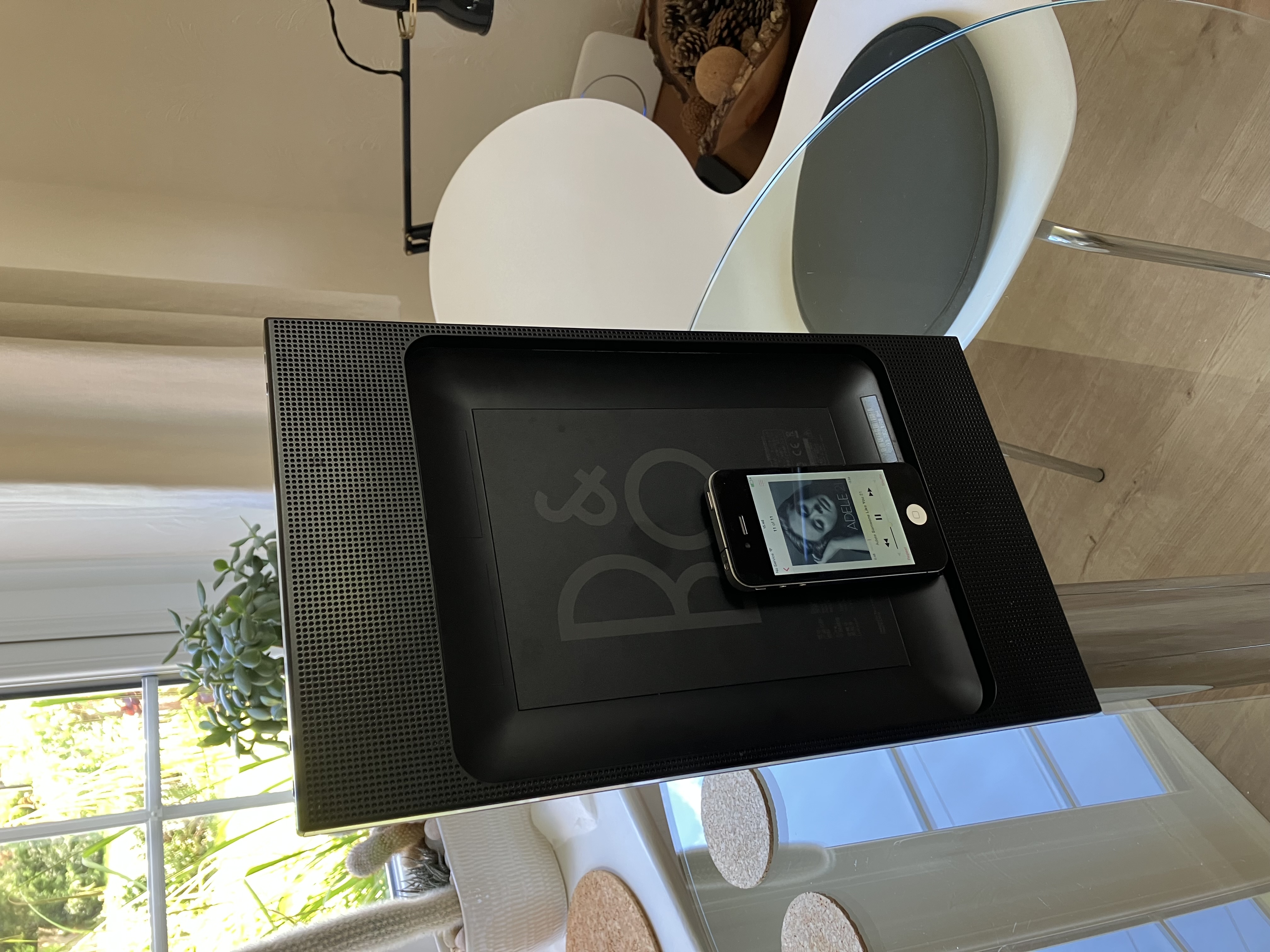
I just called up this old thread because I have just purchased a BeoPlay A3 to have a play around with. It arrived today in its original box with charger etc, and I put it straight on charge for a couple of hours.
I have ordered an A1468 adaptor and an iPad 6th Gen and hope to replicate @xavieritzmann’s setup above – thanks very much for an excellent series of posts! The adaptor and iPad have not yet arrived, but I remembered that I had some old iPhones in my ‘iphone repair box’ so I dug out an iPhone 4 which has the 30-pin connector. Luckily I also had a 30-pin charging lead, hence soon had the iPhone up and running with some music transferred across.
Here it is up and running:
I’m quite impressed with the sound quality – less impressed with the stability especially in the position shown! Once I have the iPad I’ll mainly be using in the horizontal position.I’ll post again once I have the iPad etc.Location: Warwickshire, UK
My B&O Icons:
Hi Fiona and welcome to Beoworld!
The MCP5500 should indeed work with the BeoSystem 7000. However, the MCP is quite old and can be quite tempermental – it may well be faulty.
There is no need to ‘programme’ the MCP. If it is serviceable and has good/new batteries it should work without any setup. Does it work in any of the link rooms? Does an LED show in the MCL2a sensors when you press buttons on the MCP?
If none of your remotes can control the Beosystem, the Beomaster 7000 may not be in the correct A.OPT to receive and respond to IR commands. If you still have the BL1000 then you can use this to check that the Beomaster is set up correctly. With the system in stand-by, on the BL1000 press SOUND 1 STORE, and the Beomaster should respond with a flash of the stand-by LED. Then try the remotes again.
There are other threads on here that describe dismantling the MCP and cleaning or repairing the ‘opto-sensor’ that is used by the volume control wheel – other suggestions have been to simply clean the IR transmitters and the perspex through which they transmit.
EDIT: You should also check that the BM7000 is transmitting back to the MCP5500 – without this acknowledgement the MCP5500 will not work properly. View the front panel of the BM7000 with your phone camera whilst pressing buttons on the MCP and you should see the BM7000 IR transmitters glowing in response – I think they are in the centre of the info panel. (On an iPhone you may need to use the selfie-camera)
-
This reply was modified 4 months, 2 weeks ago by

-
This reply was modified 4 months, 2 weeks ago by
Location: Warwickshire, UK
My B&O Icons:
Glad it helped you work out the solution, and it’s quite handy for you to be able to select using N.RADIO – I don’t think I can do that on my BV10, but I’ll have a look.
Another advantage of Freeview (or Freesat) Radio is typically higher bitrates than DAB/DAB+, at least according to this link: https://www.astra2sat.com/british-radio/uk-digital-radio-bitrates/
Location: Warwickshire, UK
My B&O Icons:
On my BV10 with Freeview tuner, I have to press MENU then RED to switch from TV to RADIO (straight to channel 700), and the same key presses to get back to TV. Is it similar on BV11?
EDIT: Mine would appear to behave as shown on page 6 the DVB-HD User Guide here: https://bangolufsenassistentgohe.blob.core.windows.net/manuals/APPS_AND_ACCESSORIES/DVB_HD/dvb-hd_userguide_english.pdf
-
This reply was modified 5 months ago by
Location: Warwickshire, UK
My B&O Icons:
Happy to report that I had success with fitting the three belts for the tape section and the tape is now fully functioning. Not bad for someone approaching eighty with age related hand trembling.
Excellent work – thanks for letting us know that was the solution, and enjoy your tape deck! 😊
Location: Warwickshire, UK
My B&O Icons:
Have you tried a different Masterlink lead between BL1614 and the TV? If possible replace and then try option setting again. Also try setting the TV’s V.OPT with no masterlink connected – it should still respond – try changing between V.OPT 1 and V.OPT 2 (leave it in the latter setting).
And check inside all masterlink sockets for any fluff or debris that could make for a poor connection.
Location: Warwickshire, UK
My B&O Icons:
When I set the OPTION on the BM to 0, it displays 0. When I set the OPTION to V2 on the BV, it displays nothing. The PC function on the BV (I only use Apple TV) has sound and vision, but nothing comes out of the BM.
I assume that you have already disconnected the PL lead between BM7000 and Pentas. If not, please do so.
Does the TV’s standby light flash once when setting V.OPT 2?
If set up correctly (and with BL1614 between TV and Beomaster), you should be able to press (eg) RADIO on the Beo4 and the sound emits from the Pentas connected to the TV.
Location: Warwickshire, UK
My B&O Icons:
The main speakers are Beolab Pentas, and they are both plugged into the Beovision 7. The left one is also plugged into the Beomaster powerlink, beacuse if it’s not, there is no sound from the Beomaster.
That could be part of the problem! The pentas should only be connected to the TV.
You should then put the TV in V.OPT 2, and the BM7000 in A.OPT 0. If correctly connected and in the correct option settings, pressing an audio command should result in the BM7000 playing through the speakers connected just to the TV. I would suggest that this part needs to be correct before adding the BL3500 into the mix.
EDIT: To add the Option setting procedures:
Turn system to standby/off.
For the TV: On a Beo4, press the POWER button and LIST together. Then press LIST until OPTION is shown, press GO (centre button), and then press LIST to show V.OPT. Then press 2. The power light on the device may blink to show that it has been accepted.
For the BM7000: Again using Beo4, press the POWER button and LIST together. Then press LIST until OPTION is shown, press GO (centre button), and then press LIST to show A.OPT. Then press 0. The power light on the device may blink to show that it has been accepted – actually the BM7000 may show a 0 in the display, I can’t recall.
-
This reply was modified 5 months, 2 weeks ago by
Location: Warwickshire, UK
My B&O Icons:
If using with the selector switch in the L or R setting I would not be concerned about such a double input, because the BL3500 will only amplify one or the other.
However, if as I suspect you are using the switch in the line setting, to be on the safe side I would cut the cables as suggested in your last sentence. I say this because I am unsure how the line detection ‘auto-switch on’ works and decides which pin to amplify. The auto-sense logic could be ‘L or R but not both’ – or it could be looking at the difference between L and R to switch on. Just a thought, and perhaps others will know for sure!
Location: Warwickshire, UK
My B&O Icons:
Further to the above, if you have been swapping connections around it is always worth double-checking that you have got these correct!
In particular, I would double check that the BM7000 AUX/TV socket is connected (with a 7-pin DIN) to the Audio Aux Link (AAL) socket of the BL1614 converter.
If there are no speakers connected to the BM7000, you should also have a Powerlink connection from one of the BM7000’s PL sockets to the Powerlink socket on the BL1614.
Location: Warwickshire, UK
My B&O Icons:
If not press Menu+0+9+GO The display should now show ML ON or ML OFF. If it is off use up or down commands to change to ML ON
I think we previosuly discovered that on later software versions, there may be a need for pressing MENU twice, i.e: MENU MENU 0 9 GO
Worth a try!
Location: Warwickshire, UK
My B&O Icons:
Hi Shaun and welcome to Beoworld!
Great work so far on the Beocenter 3300. A number of spares are available over at one of our site sponsors here: https://www.dksoundparts.com/product-category/beocenter/beocenter-3300/
I am not an expert on the older systems, but there may be a number of other models that share parts. For example, apparantly the same amplifier sections are found in Beomaster 2200 and Beocenter 4000 (I discovered this from this very old thread, so have a search about on the forum: https://archivedforum.beoworld.org/forums/t/5810.aspx)
Location: Warwickshire, UK
My B&O Icons:
Any chance if you know if there is a certain polarity to the opto coupler pins? I want to avoid installing it incorrectly.
The one sold by DKsoundparts does have a polarity, but it is probably very easy to work out by comparison with the removed coupler (and looking at the circuit diagram, if you have it). I would think that most (all?) opto-couplers do because they will use an LED to transmit the signal which then is received by the sensor part. If buying from DKSoundParts ask them for advice – theirs comes with an extra resistor to slightly increase the supply current, so that should have instructions how to fit also.
Location: Warwickshire, UK
My B&O Icons:
When you say “shorten the contacts”, does this mean squeeze in the contacts inward while turning the wheel or something else?
I meant to connect something metal across them (eg screwdriver blade) to simulate the contacts closing.
I tested the micro switch with a DMM. When the wheel is turned and the metal bar in the middle makes contact with either side contact, there is continuity. So at least that part of the switch appears to function.
I am guessing but perhaps the opto coupler is faulty – you can get a replacement here: https://www.dksoundparts.com/product/wheel-opto-reader-for-master-control-panel-5500-6500/
Location: Warwickshire, UK
My B&O Icons:
I would normally suggest SoundsHeavenly but they don’t ship outside Europe.
But how about this: https://www.av-connection.com/?PGr=19857
Location: Warwickshire, UK
My B&O Icons:
Hi Greg and welcome to Beoworld!
You could first try cleaning the contacts of the existing microswitch – carefully with contact cleaner. I would think that a replacement switch can only be removed from another MCP5500.
You could try shorting the contacts of the microswitch while turning the wheel, just to prove that this is the problem. (If the opto-coupler had failed then the system would light up but no changes would be registered)
I hope this helps – it’s a very long time since I worked on an MCP5500!
Location: Warwickshire, UK
My B&O Icons:
Hello B&O Experts,
I’m looking for a way to bridge old and new B&O components to create a whole house synchronous audio system. In particular, I’d like to enable my old Masterlink setup to join newer products like the ones shown in the figure below. My question to you experts out there boils down to the following: can I connect a Beosound Core (or, alternatively a Beoconnect Core) to a Beolink Converter 1611(?) via Powerlink, and have the Beolink Converter distribute the audio to the existing Beosound 3500 and Beolink Passive + passive speakers via Masterlink? If this is not possible, alternative suggestions are welcome!
Thanks!
Yes I think that should work. In effect you will be using the Core’s PL output as an ‘aux’ output, hence it should be set to a fixed level in the Core menu. It should be connected to the BL1611’s Audio Aux Link (AAL) socket (not PL socket) according to the diagram given earlier in the thread (attached below). If connected to AAL pins 1 and 3 you will select from the ML rooms using a Video source on Beo4, but if connected to AAL pins 1 and 4 you will select using an Audio command on Beo4.
You should then be able to change volume in the ML rooms, but not alter the source or turn on/off.
EDIT: You haven;t said whether there is an existing audio- or video-master on the ML side of your system (eg TV or BeoSound) – I am not sure what the dotted line to the ‘A’ means in your diagram. If there is such a device, please say! Also, the ML speaker in your diagram is a BeoLab 3500, not BeoSound 3500!
-
This reply was modified 6 months, 1 week ago by
Attachments:
You must be logged in to view attached files.Location: Warwickshire, UK
My B&O Icons:
-
AuthorPosts