Forum Replies Created
-
AuthorPosts
-
 Moderator
@madskp when you re-do the test can you clarify the SW version of the BL3500 that you use just in case it only works with a particular SW. I can try with my Mk1 SW2.0 if required.
Location: Warwickshire, UK
My B&O Icons:

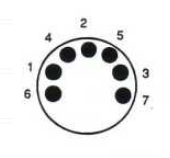
Following with interest. Just for the avoidance of confusion, the following shows the correct 7-pin DIN pin numbering, viewed from the solder side of a DIN plug:

Location: Warwickshire, UK
My B&O Icons:
20 August 2024 at 13:07 in reply to: An obsession – getting Beogram remote commands via Beosound 4! #58480If it makes life easier you could always retro-fit an RIAA amplifier inside your BG8500. This has the added advantage that you can increase the cable length between the Beogram and the audiomaster because the signal level is higher.
Look half way down this page for the ‘RIAA modul for Beogram, type 59xx’: https://claudius-elektronik.dk/designs-og-l-sninger.html
Location: Warwickshire, UK
My B&O Icons:
20 August 2024 at 08:51 in reply to: One Speaker Beolab 6201 (beosound overture 2631) not work #58470Ah sorry I misread your original post.
Assuming that the speakers still work with the original Ouverture, and that you have double checked all powerlink leads by swapping them around, then it would appear that the fault is indeed within the ‘new’ Ouverture.
Check the headphone socket to see if both Left and Right channels are working.
How technical are you? You may be able to have a relatively easy fix by moving the pre-amp board between the ‘old’ and ‘new’ Ouverture. The Service manuals are available on this site for Silver and Gold members.
EDIT: Here’s a (very dusty) pre-amp board for sale – the pictures are useful to see how many connectors you’d have to undo to replace: https://www.ebay.co.uk/itm/186593271703
Location: Warwickshire, UK
My B&O Icons:
19 August 2024 at 21:19 in reply to: One Speaker Beolab 6201 (beosound overture 2631) not work #58467Hi and welcome to Beoworld!
It may be obvious, but have you tried swapping powerlink leads from left to right to rule out a fault with the cables? If the connections to the audio channels are broken the speaker could still turn on without playing sound.
If the fault stays with the same speaker then it is likely to be faulty.
Location: Warwickshire, UK
My B&O Icons:
Guy…..Oh and yes, I guess I’ll need something to control volume if the BS2300 is out of the mix…….is that what you are referring to?
Volume control will be a requirement, but when describing your original system you said that the Beogram was connected to the BC2300 via a pre-amp, which of course it would need because the BC2300 doesn’t have a pre-amp built in.
However, the Beogram 5500 can be remote controlled via datalink*. The DIN output of the Beogram would originally have two extra pins (pins 6 and 7) to allow remote control of the Beogram via the BC2300. If these appropriate pin was connected direct from Beogram to BC2300 (bypassing the pre-amp) then remote control of the Beogram should still be possible.
* Added complication is that Phono uses pin 6 for datalink, unless RIAA Pre-amp is built in (to the Beogram) in which case it uses pin 7. So in your case any datalink bypass would need to take the Beogram output’s DIN pin 6 to the BC2300 Aux input’s DIN pin 7 (in effect, to trick the BC2300 into thinking that there is an RIAA/pre-amp equipped Beogram connected.)
Location: Warwickshire, UK
My B&O Icons:
In a way I think it would be easier to use airplay without having to put the 3000 on and on Aux. And would I then connect from PL to RCA input?
Hi and welcome to Beoworld!
I agree that you would be better being able to use airplay without having to turn the 3000 on, hence better to connect an output from the BS3000 to the (auto sensing) aux input of the Essence, with the speakers connected to the Essence).
When controlling the BS3000, if you want to control the volume control using the B&O remote or front panel, you will have to connect from the ‘variable level’ Powerlink outputs (DIN pins 3&5) into the Essence RCA, but you will have to control volume using the Essence (remote or other device with B&O app).
If you are happy not to use the BS3000 volume controls, you can use the BS3000 DIN aux socket (DIN pins 1&4) as a ‘fixed level’ output.
However, to avoid compromise I would be tempted to use on of these so that the two devices can share the speakers: https://shop.oneremote.dk/shop/69067-powerlink-switch/4162-powerlink-speaker-switch/
Location: Warwickshire, UK
My B&O Icons:
You might already have the redline manual – I have attached it anyway. (EDIT: Not sure why the quality is so poor when uploaded, I downloaded it from AVA Services here: https://www.avaservices.co.uk/downloads/speakers.html)
Page 4 picture 6A does show the piece you are missing, and it is actually described as a standard wall bracket. The notes do refer to an extra piece that is used for light walls, so that must be the extra piece that I have used in the past.
So the piece that you are missing may well be described as a ‘Redline wall bracket’ in any sale listings!
Attachments:
You must be logged in to view attached files.Location: Warwickshire, UK
My B&O Icons:
Unless you can make some? Like the home-made ones in this listing: https://www.ebay.co.uk/itm/226262051072
Actually the same seller has those bits on offer (a bit pricey) as a ‘static wall mount’: https://www.quality-dream-audio.co.uk/stands-furniture-wall-mounts-and-clocks/redline-4560-static-wall-mount.html
(The official Redline ‘static wall mount’ was actually a two part bracket, with those bits attaching to a separate piece that was screwed to the wall.)
Location: Warwickshire, UK
My B&O Icons:
Can anyone confirm this is correct?
That’s correct – you can see those brackets fitted in this listing: https://www.ebay.co.uk/itm/186599725335
Location: Warwickshire, UK
My B&O Icons:
Quick question – do you want to be able to control the Beogram by remote control? (you possibly do at the moment if you have the datalink bypassing the pre-amp).
If not, you could go with a BeoSound 3000 (or 3200) if you want to keep the aesthetics with the BL2500s. Otherwise, BS2, BS4?
Location: Warwickshire, UK
My B&O Icons:
16 August 2024 at 08:49 in reply to: An obsession – getting Beogram remote commands via Beosound 4! #58328My best suggestion would therefore be to connect the Beogram to the CD socket of the MCL2AV, connect a datalink cable from the Aux socket of the MCL2AV to the 1611 converter and let that work as a main room. Then set the BS4 up as a link room (option 5 or 6) and control the Beogram with Link + CD commands.
I am joining the discussion because I too think that the MCL2AV may be the best solution. But rather than use a 1611 converter, couldn’t you just use the MCL2AV Aux socket to provide a Line-out (DIN pins 1 ad 4) and connect this straight to the BS4 aux inputs? I am not sure if you can then get the BS4 to open the aux input with a phono command, but any subsequent double phono commands (to MCL2AV and BS4) may not be a problem – does that make sense? Maybe this could avoid having to use LINK commands.
EDIT: I forgot that N.RADIO = PHONO, so ‘double’ IR commands may be a problem! Might need to use LINK commands after all!
EDIT2: I suggested something similar back here, but then suggested taking output from the (volume controlled) MCL2AV Powerlink sockets. My older post does however remind me that it’s only the datalink signal that is required from MCL2AV to Beogram. The Beogram’s audio output (pins 3 and 5) could be connected direct to the BS4, via a phono stage. A suitably wired adaptor should work.
Location: Warwickshire, UK
My B&O Icons:
So about $35,000 AUD in 2024 money. I just bought one (in need of repair) for $200. I still can’t fathom how much they were when new!
Yes the original prices were amazing!
(I did wonder if you were engaged in a ‘new for old’ insurance claim!! 😀)
Location: Warwickshire, UK
My B&O Icons:
I can only find it in the 2011 document (BV7-55 not showing for 2010). 2011 prices follow:
BeoVision 7-55 Screen £10,290
BeoVision 7-55 Screen inc Blu-Ray Player £11,950
Motorised Floor Stand £1,275
Motorised Low Floor Stand £1,200
Flat Wall Bracket £230
Location: Warwickshire, UK
My B&O Icons:
Try the discogs link in the first post here: https://archivedforum2.beoworld.org/forums/t/44291.aspx
Location: Warwickshire, UK
My B&O Icons:
These haven’t yet migrated over to the new site as far as I know.
The prices were only ever UK prices, but if you have a specific year/model in mind I should be able to find it for you.
Location: Warwickshire, UK
My B&O Icons:
8 August 2024 at 08:46 in reply to: BeoSound Essence Mk2 final sw version number? 2.5.55678(170713653) ? #58095Thanks @Beobuddy, and thanks also to @XavierItzmann for those IR tests. It’s good to know that it is possible to get IR control working, although it’s strange that I seem to have been able to get a later SW version. (But mine was previously at 2.5.556 and IR didn’t work then either). I have tried all those combinations of factory reset, different option settings etc.
I will wait for the next SW update, and if that doesn’t cure my fault I think I will open it up and check a few components as suggested by @madskp in the other thread here.
Location: Warwickshire, UK
My B&O Icons:
Also, in order to get those, what sites do you typically quote/order from that proved successful in repairing the thing?
I purchased my new capacitors from here: https://uk.farnell.com/
In that other thread I included links to the specific capacitors that I ordered (from farnell) and fitted. Check the values of the actual capacitors on your servo board, as they may well be different. The replacement laser that I fitted to my BC2300 was from Danish Sound Parts
Location: Warwickshire, UK
My B&O Icons:
6 August 2024 at 13:58 in reply to: Old forum thread of mine re Beolab 4000 foam rot & serial nos #58044Hi and welcome to Beoworld!
Althoug it’s not specific to BS3200, have a read through of this thread: https://forum.beoworld.org/forums/topic/beosound-ouverture-cd-not-working/
In summary I replaced the laser in my BC2300 and it didn’t cure the fault – I had to replace all the capacitors on the servo board.
Location: Warwickshire, UK
My B&O Icons:
-
AuthorPosts