Forum Replies Created
-
AuthorPosts
-
6 August 2024 at 13:51 in reply to: Old forum thread of mine re Beolab 4000 foam rot & serial nos #58041
 Moderator
However, none of the original photos in the thread
Viewing on Chrome/Win10, the photos are files attached individually to each post – they won’t show until you open them.
Location: Warwickshire, UK
My B&O Icons:
 6 August 2024 at 12:38 in reply to: Old forum thread of mine re Beolab 4000 foam rot & serial nos #58038
Guy, Thats great – thank you very much. Is it only possible for moderators to access these old threads?
No problem – I think that there’s still a problem with the search function in the archived forums. Moderators don;t have any special priviledges.
To find that link, I used google to search for ‘beolab 4000 foam h1npw site:archivedforum2.beoworld.org’, then found one of your posts with the link to the thread you were after.
There’s one other thread I’d very much like to access – regarding Craig refurbishing a Beogram 4002 of mine
Here I use google to search for ‘beogram 4002 craig site:archivedforum2.beoworld.org’ and the third result is this: https://archivedforum2.beoworld.org/forums/t/36368.aspx
If that’s not the correct thread you can probably use a similar google search to find the one you’re looking for.
Location: Warwickshire, UK
My B&O Icons:
5 August 2024 at 18:00 in reply to: Old forum thread of mine re Beolab 4000 foam rot & serial nos #58023How’s this? https://archivedforum2.beoworld.org/forums/t/23794.aspx
Location: Warwickshire, UK
My B&O Icons:
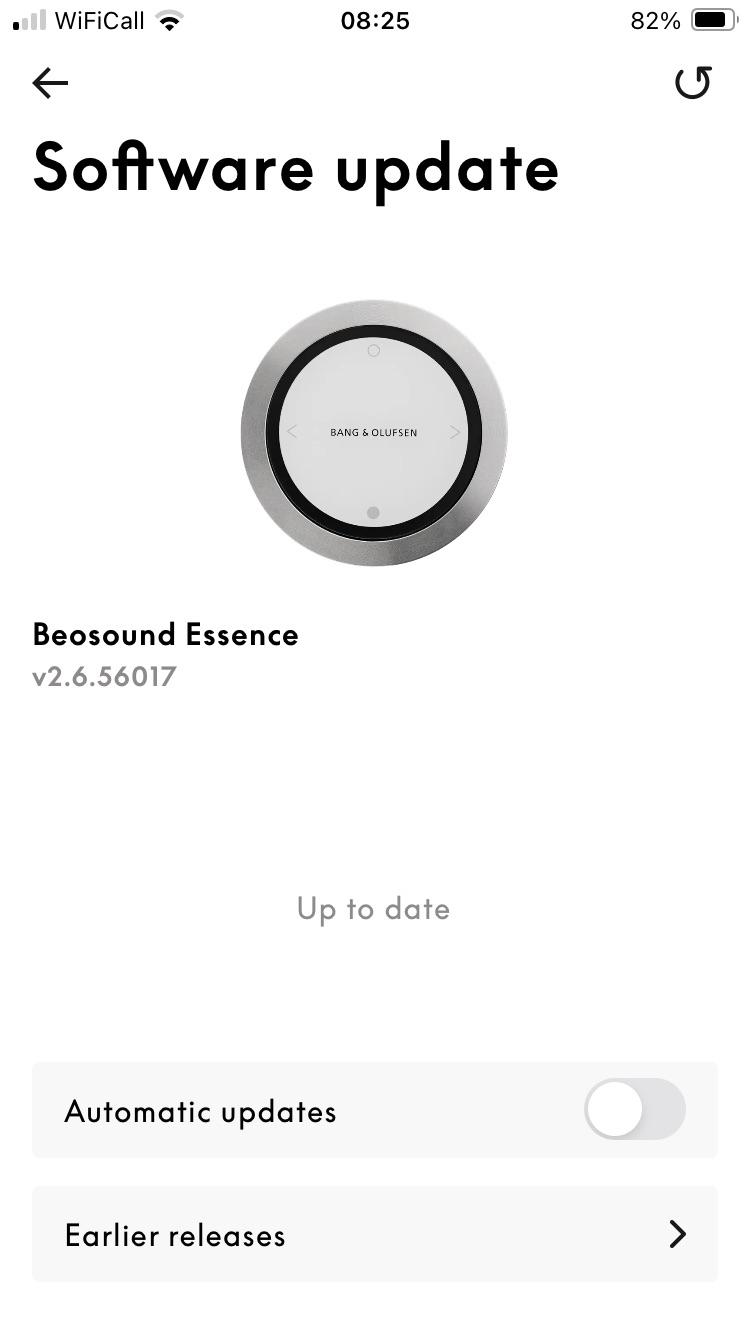
1 August 2024 at 08:20 in reply to: BeoSound Essence Mk2 final sw version number? 2.5.55678(170713653) ? #57826So, the sw is still updateable, and furthermore, an update was issued as recently as a few weeks ago!
I checked back through my emails because I remember B&O tech support telling me about a new SW update in one of their emails about IR control. Their email was dated 3 July, and said that version 2.6.56017 had just been released. I think that my Essence updated to this even later version, and will check later today.
EDIT: Here’s confirmation:

So I think that software release link that I sent earlier (here) actually shows earlier releases, rather than the latest one – the same data as the ‘earlier releases’ option on the app. It’s a shame that we can’t then see the release notes for the latest release.
(As and aside, you can see a full list of B&O SW releases (not just Essence) here: https://update.bang-olufsen.com/products)
Location: Warwickshire, UK
My B&O Icons:
31 July 2024 at 21:28 in reply to: BeoSound Essence Mk2 final sw version number? 2.5.55678(170713653) ? #57822Guy —If I get one of these, my plan is to test it with my “JOIN”-type eye that works perfectly with my ML/NL converter, in order to decide whether to buy one for the Beosound Essence. I’ll post my results if and when it happens.
Many thanks indeed – I look forward to hearing whether it works!
Location: Warwickshire, UK
My B&O Icons:
Thanks @madskp – I may well have a look inside! It’s actually boxed up again at the moment, but you’ve given me a reason to get it back out and have a play.
Location: Warwickshire, UK
My B&O Icons:
I would imagine that something like this would do the job: https://www.amazon.co.uk/Professional-Terminal-Insertion-Stripper-Installation/dp/B0D3PPC8QX
Location: Warwickshire, UK
My B&O Icons:
Just an update – having been reminded by the other Essence thread!
I have been in discussions with B&O tech support but I still can’t get it to work. They advised me to update the software (which I already had) and asked me to confirm the connections – I sent a copy of the NL/ML eye wiring diagram from the ML handbook and they didn’t say it was wrong. I also asked them to confirm when to set A.OPT 1 – once they understood the question they told me that it should be done when the Essence is in ‘Network Standby’ – again, I had already tried this.
So I have given up! If there are new SW updates I will check again. Otherwise, it would be useful to know if anyone has got it to work recently, either with the newer JOIN ML IR eye or the older TIMER version that I am trying.
Location: Warwickshire, UK
My B&O Icons:
31 July 2024 at 16:33 in reply to: BeoSound Essence Mk2 final sw version number? 2.5.55678(170713653) ? #57811Did you ever get any answer from B&O support regarding that issue?
They did answer but I didn’t get it to work – sorry I should have updated that other thread. They advised me to update the software (which I already had) and asked me to confirm the connections – I sent a copy of the NL/ML eye wiring diagram from the ML handbook and they didn’t say it was wrong. I also asked them to confirm when to set A,OPT 1 – once they understood the question they told me that it should be done when the Essence is in ‘Network Standby’ – again, I had already tried this.
So I have given up! If there are new SW updates I will check again. Otherwise, it would be useful to know if anyone has got it to work recently, either with the newer JOIN ML IR eye or the older TIMER version that I am trying.
Location: Warwickshire, UK
My B&O Icons:
31 July 2024 at 14:28 in reply to: BeoSound Essence Mk2 final sw version number? 2.5.55678(170713653) ? #57798Release notes here: https://update.bang-olufsen.com/products/58ba6c9e15524870a403957cdfbee6ab
Mine auto-updated to 2.5.556 about three weeks go, so it would appear that SW is still being updated. An older product should update without problem, as long as it’s a Mk2.
(But I still can’t get IR control to work – annoyingly!)
Location: Warwickshire, UK
My B&O Icons:
Here’s a copy of the instructions – hope they help!
Attachments:
You must be logged in to view attached files.Location: Warwickshire, UK
My B&O Icons:
Sorry, yes I read it wrong!
But my suggestion to try a different media player to play the tracks still stands.
Location: Warwickshire, UK
My B&O Icons:
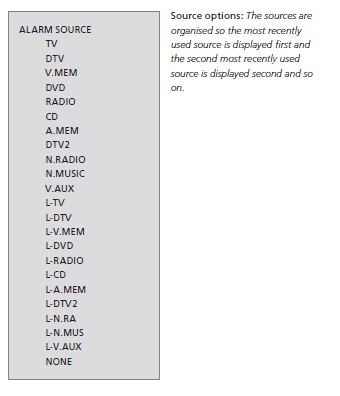
Yes, N.MUSIC is one of the options for the Beotime’s alarm source.

Location: Warwickshire, UK
My B&O Icons:
Hi and welcome to Beoworld!
I don’t have a BS5, but have you tried comparing the two formats using a different player, perhaps even WMP on your PC?
Also maybe try using Windows Media Player (instead of EAC) to rip to FLAC, and see if that makes any difference.
Location: Warwickshire, UK
My B&O Icons:
There is no sensor that detects the door position – the motor simply runs for a set period of time and alternates direction. If no noise whatsoever on first press, it sounds like a motor problem.
How technical are you? The service manual is available to Silver Gold members. I would probably open it up and maybe swap the CD and cassette motors to see if that determines the fault.
(EDIT: And welcome to Beoworld! The BC9500 is a great piece of equipment – well worth fixing!)
Location: Warwickshire, UK
My B&O Icons:
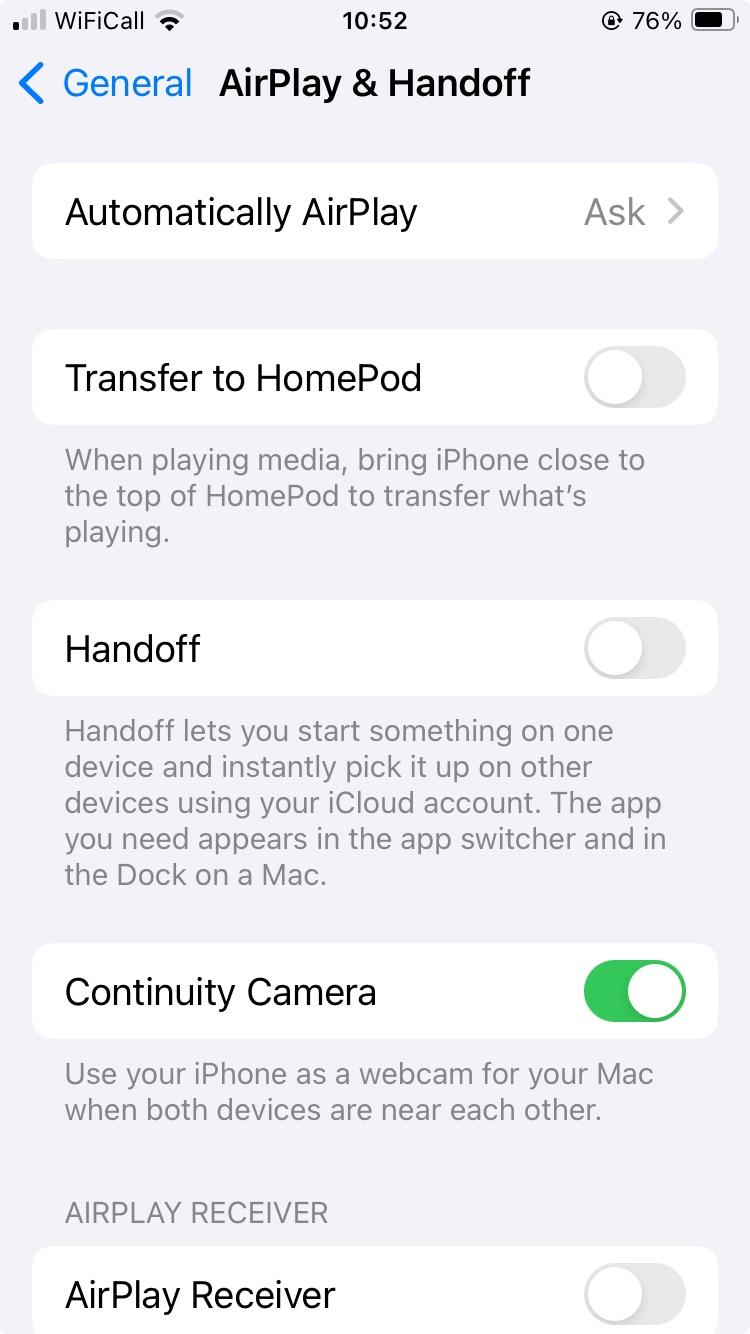
I am not sure if it’s relevant but have you tried adjusting the phone’s AirPlay settings – I found this page on mine, perhaps ‘Automatically AirPlay’ is set to ‘Automatic’ on yours? Perhaps try setting to ‘never’.

EDIT: As an aside, I just noticed that ‘AirPlay Receiver’ option at the bottom, but scrolled down and realised that it is just for Apple Vision Pro, which is a shame!
Location: Warwickshire, UK
My B&O Icons:
So far I only have one issue. The 9500 has a constant low power-like hum when in standby mode. I’ve tried chsnging between 220v and 240v but I can’t hear any difference. Anyone else experienced this? The 9300 in contrast is completely silent in standby.
I had this when my BC9500 was placed on wooden bookshelves – the shelves seemed to amplify the hum.
I tried replacing these: https://www.dksoundparts.com/product/transformer-bushings-beomaster-3500-4500-5000-5500-6000-6500-7000-etc/
The old ones were rock hard, like plastic. However, I am not convinced that the new ones made much difference!
The problem is mentioned half way down this page, where there’s a suggestion of using cut up squash balls as feet!
EDIT: I found my post about fitting them: https://archivedforum2.beoworld.org/forums/p/189/345429.aspx#345429
Location: Warwickshire, UK
My B&O Icons:
how much is the stick from AVA Service?
£4.96 including 20% VAT
Location: Warwickshire, UK
My B&O Icons:
Good work – I’ll be interested to hear if you can get hold of a new display and whether it cures the fault.
Hopefully this thread will encourage others to fix their BC2s while replacement parts still exist.
Location: Warwickshire, UK
My B&O Icons:
I think that the correct order is earpiece, gauze (thin black sheet), felt/foam, metal. My foam had perished so I didn’t bother with that. When re-assembling, it can be held in place in the plastic cover using the small piece of tape on the metal piece.
The display disconnects at the circuit board. In my first post in the thread, you can see the white ribbon connector at the top left of the second photo. So, yes you will need to dismantle further following the YouTube video that I linked.
Location: Warwickshire, UK
My B&O Icons:
-
AuthorPosts