Forum Replies Created
-
AuthorPosts
-
 Moderator
Hi Peter,
Good to hear from you – I assume from your post that you are the ‘Peter’ from the second post in this archived thread: https://archivedforum.beoworld.org/forums/t/35259.aspx
… with an impressive 9,572 posts on that forum alone!
I do of course remember you from my early days on Beoworld – I think your earlier avatar also showed a dog but I may be wrong. I certainly valued your inputs back then and am honoured to be following in your footsteps as a moderator (and possibly ‘golden oldie’) today.
With regard to ‘founder member’ status, I think that should still be valid and showing against your name regardless of current membership level – perhaps @Multicare could make the necessary amendments?
Regards Guy
Location: Warwickshire, UK
My B&O Icons:

It is shift and then radio, not shift and radio at the same time.
Yes, that’s what I said! 😀 (but as madskp says, PHONO is just one button press hence easier if you are happy for PHONO to show in the display)
any way to turn off the lights in the back while it’s on?
No
any idea if the unit has a sleep timer?
Yes but only whilst playing RADIO. Press STOP until the required number of minutes shows in the display.
Location: Warwickshire, UK
My B&O Icons:
Or press SHIFT then RADIO
(but I agree that PHONO should work too 😀)
Location: Warwickshire, UK
My B&O Icons:
I can confirm that the datalink signal from Powerlink passes through to MCL, and that MCL2AV works with two way remote when connected to a BC9300 (tested directly through MCL/speaker 2)
Thanks for that confirmation – it’s definitely worth trying once I have time and have found all the components!
However that got me looking in the user manual for the BC2300 and I can see mentiong of a stop time where you can choose to stop playback after a certain amount of time. The fact that it has this functionality must mean that it has some clock circitry to make that work. However this does not need a clock showing that correct time to work.
I hadn’t noticed that STOP (sleep) timer in the manual – that a bit like the old BS1 where there is a STOP timer in both the older (no clock) and newer (clock) versions. So yes it must have some clock circuitry.
But it is confusing that it shows the wrong time on a connected link speaker. Have you tried to connect it via 1611 and ML to see if it shows the same behaviour?
Yes, I first noticed that the time was displayed when I connected by Powerlink for that ‘trigger’ test on the other thread. I then connected in the normal manner (Aux to BL1611 to BL3500) and the time showed in the same way. I also tried the BL3500 with my older two-way (clock version) BC2300 and the time would also start/refresh on the hour. Again I couldn’t adjust the time due to being unable to find Beolink 5000.
Sadly I have to leave it for now!
Location: Warwickshire, UK
My B&O Icons:
Subsequent posts about showing time on the BL3500 moved to new thread here: https://forum.beoworld.org/forums/topic/displaying-time-on-beolab-3500/
Location: Warwickshire, UK
My B&O Icons:
I have decided to put my BL3500 time display investigations on hold – grandson visiting this week hence study/workbench reverts to spare bedroom. I have unplugged the power from the BL3500 several times, and each time I reconnect it has to wait until ‘on the hour’ to start showing the clock again (consistently 7 hours and 20 minutes behind British Summer time). This time signal can only be coming from the BC2300.
Hence I don’t have time to take the back off the BC2300 and put it in service mode – I am not sure that this would reset the hidden clock anyway. I think maybe quickly shorting out the backup battery (while the unit is unplugged from mains) may well reset the clock, but might also clear the FM offset, and it was a bit tricky to reset this when I replaced the battery so I’ll give that a miss.
But that got me thinking: If there is a hidden clock/timer in the newer one-way IR BC2300, then perhaps B&O just got rid of the two-way IR circuitry, hence it’s impossible to adjust the clock or set a timer with the Beolink 5000 remote? However, MCL equipment does support 2-way IR. So what about connecting my BC2300 via PowerLink to a BeoLink passive (ML/MCL converter) and connect the speaker terminals by MCL cable to an MCL2A (or 2AV) plus IR sensor, and then see if I can use my Beolink 5000 to adjust the time?
I had a quick look at the circuit diagrams and can follow the BC2300 PowerLink pin 6 (also Aux pin 6) to the extra ‘MCL’ pin on the Passive’s Left speaker terminal, and then all the way to the data connection between MCL2A and its IR sensor, so perhaps there is a way to shortcut this process by connecting an MCL IR sensor direct to the BC2300 to give two-way IR?
Anyway, I had a very quick look through my B&O box pile and haven’t a clue where my Beolink 5000 is, so any of the above tests are a non starter until I have time to find that. More to follow!
Location: Warwickshire, UK
My B&O Icons:
I will now test my theory by connecting my BL3500 to my BV10-32 TV and leave running until
1300hrs1400hrs (delayed by faulty ML cable!) to see what happens!It didn’t work! Perhaps the BV10-32 (as a videomaster) doesn’t send the time over ML – possibly because it doesn’t have it’s own clock but relies upon the time carried by the DTV signal)
It would be interesting to hear if BC8500 or Beoport/Beolink PC2 do send/update the BL3500 time after being left for a full hour.
I am re-connecting my BL3500 to the BC2300 and might later try a system reset to set the clock to 0000 – but I think this just clears the radio presets on the BC2300. We’ll see!
Location: Warwickshire, UK
My B&O Icons:
So I have just done one experiment! I unplugged the BL3500 and then plugged it in again. The time disappeared and I couldn’t get it to return.
So I left it running (actually playing radio) and the time magically appeared on the hour, to show exactly 1900hrs.
So perhaps the ‘hidden’ clock (in my BC2300) sends a time update over ML (actually over AAL -> BL1611 -> ML) every hour on the hour?
I will now test my theory by connecting my BL3500 to my BV10-32 TV and leave running until
1300hrs1400hrs (delayed by faulty ML cable!) to see what happens!Location: Warwickshire, UK
My B&O Icons:
Since Millemissen is curious as to why, not that it matters, at my end, I’m trying to undo Multiroom and then re-set it up as I’m not seeing the same image I saw earlier with the first set up in my B&O app.
How about a factory reset of the Essence? – this is explained in the relevant instruction manual, available here: https://support.bang-olufsen.com/hc/en-us/articles/360038206612-User-Guides-and-Software-Downloads
Location: Warwickshire, UK
My B&O Icons:
So, it does seem that the time can only be got from an audio master. In your case though it doesn’t explain how it is getting an incorrect time from an audio master that doesn’t have a clock!
The older version of BC2300 (curved laser tracking, two-way IR) has a built in clock/timer, so perhaps the clock software was left in the newer version (not unheard of for B&O) but is inaccessible.
Now I’m imagining you resetting it at midnight, but twice a year due to UK daylight savings…
I did consider that! 😀 (but I do also have an older BC2300 with the clock/timer, plus a two way remote (Beolink5000) that is needed to adjust the time, so there is possibly a work around!)
Location: Warwickshire, UK
My B&O Icons:
By the way, do you know about BL 2 ligths If you know you can see the topic about this Thanks.
Hi Ralph – I take it you are referring to this thread that you started about 6 weeks ago: https://forum.beoworld.org/forums/topic/beo-lab-2-lights/
Hopefully someone will now see it and post an answer.
(By the way, no need to raise the same question in lots of different language posts – best to stick to one, and if in any doubt stick to English because that has more members who understand).
Location: Warwickshire, UK
My B&O Icons:
There are a few posts in both this and the earlier forum regarding failed hard-drives in BS3200s. I don’t think it affects the rest of the system but be aware that they do fail, and if buying one check the hard-drive functionality. I don’t think that they are easy to replace.
Location: Warwickshire, UK
My B&O Icons:
Both reversed polarity of the sound signal, but also you are putting 5V trigger on pin 4 and 5-12V on pin 1 which are both part of the sound signal path. Also you only have the data shield as ground since pin 2 is not connected in the BL3500.
Yes that makes sense – thanks fo explaining.
MK1 is up to serial number 19343452 and has MCL engraved in the metal underneath the DIN connector. Also I belive they were never produced with higher software version than 2.1, but can be upgraded with the loss of MCL functionality.
Yes, my only BL3500 serial number starts 1497
Location: Warwickshire, UK
My B&O Icons:
22 August 2024 at 17:39 in reply to: Power socket input at back of 7-32 Beovision – where is it?? #58560Thank you, Guy. Life is so complicated enough, why they need to hide it like that, I don’t know and don’t get me started on the remote control!
After using it for nearly 20 years, the Beo4 is now the only remote that doesn’t confuse me! 😀
Location: Warwickshire, UK
My B&O Icons:
If I rember correctly the MK1 can be activated without the data signal, but will not put out sound.
I think mine is a Mk1 – it has the MCL socket marked as such.
Location: Warwickshire, UK
My B&O Icons:
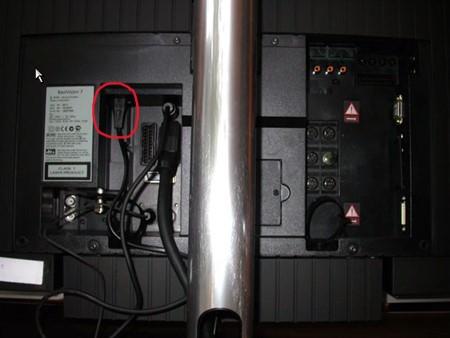
22 August 2024 at 15:03 in reply to: Power socket input at back of 7-32 Beovision – where is it?? #58551View from rear, top edge of left panel, connector inserted upwards – hope this helps!
(EDIT: It’s a standard figure of eight (C7) power cable)

Location: Warwickshire, UK
My B&O Icons:
To be honest there are a number of other variables – all of which make thorough testing very difficult:
- Mk1 or Mk2 BL3500
- SW level of the BL3500
- Whether ML is turned ON or OFF on the BL3500 (I can’t think of anything else adjustable in BL3500 menu)
- Whether the timer is set to ‘ON’ on the BL3500
- What audiomaster is being used, and SW level (does it send PL trigger on pin 4?)
- Whether the PL cable is fully wired (mine is)
- Whether the BL3500 is fully working
- Whether the BL3500 has been modified
I did try lots of option settings, also tried ML ON and OFF, and with BL3500 timer both ON and OFF.
Location: Warwickshire, UK
My B&O Icons:
You got me confused .. between “I can´t get it to trigger” to “sound from both speakers”
I mean that I can’t get it (the BL3500) to trigger (i.e turn on) by operating the front panel of the BC2300 (or by using the remote with BC2300 in A.OPT 2 and BL3500 in L.OPT 0).
Conversely, with the BC2300 in A.OPT 0 and BL3500 in L.OPT 2 or 6, I can get the system (BC and BL) to turn on and play through both L&R speakers using the remote, or by pressing MUTE on the BL3500 front panel (which plays the last played source.)
So the BL3500 will control the BC2300, but the BC2300 will not control the BL3500.
Location: Warwickshire, UK
My B&O Icons:
Do you also get sound in this setup? The beahaviour you see control wise is because the data signal is connected the same was as if you were using a ML-MCL converter to convert from powerlink to MCL
Yes, sound from both speakers. Of course PL is a variable level output so there is a double volume control problem. Whilst listening, if I adjust the volume on the BC2300 front panel I get a ‘pop’ from the speakers.
EDIT: When I listen closely I can hear a high pitched whine from the right hand speaker – sounds like a grounding problem so something is not quite right. Maybe polarity reversed on that channel – does that make any sense?
Location: Warwickshire, UK
My B&O Icons:
I have just connected my BC2300 to my SW2.0 BL3500 by powerlink, and it’s behaving pretty much as if connected by ML. I can’t get it to trigger from the BC2300. I have tried L.OPT 0, 2 and 6 to no avail.
One strange observation – when I connected the BC2300 the time appeared in the BL3500 display. The BC2300 that I am using does not have a clock/timer, and I cannot adjust the BL3500 clock to show the correct time.
Location: Warwickshire, UK
My B&O Icons:
-
AuthorPosts