Generic selectors
Exact matches only
Search in title
Search in content
Post Type Selectors

Search Results for 'eclipse'

Home Forums Search Search Results for 'eclipse'

Viewing 20 results - 41 through 60 (of 343 total)
  • Author
    Search Results
  • #60191

    In reply to: B&O LG app update

    Mbee
    BRONZE Member

    Feature wise, I’ll be happy to get the display of radio stations and music titles in audio mode like on the Harmony, but at the bottom of the screen instead of the top, when using my Eclipse.

    #59959
    MathiasMuc
    BRONZE Member

    Hallo zusammen,

    ich bin neu in dem Thema und bekomme es irgendwie nicht konfiguriert. Ich besitze einen Beovision Eclipse 65 und ein Apple TV 4k. Wie schaffe ich es nun das Apple TV mit der Beoremote One zu steueren? Habe es in HDMI C als Apple TV 4 eingebunden, aber schaffe es nicht es über die Beoremote One zu steueren.

    Vielen Dank

    Mathias

    #59439
    Rolf2
    GOLD Member

    Hi Jonathan,

    I have a BeoSystem 4500 using a BL 11 with two BL 3 for audio output. The 11 is connected to the BM 4500 via PL and from there the BL 3 are connected via PL as well. Works like a charm and is sounding so, so great. I have no experience with the BL 2, but here in the forum (mostly archived forums, I guess) are a lot of opinions available, stating that it is best for movies / blockbuster, whereas the 11 is best for music.

    Since a couple of weeks, I am testing a S8 connected to my BV Eclipse (+ BL 18 + BL 4000) and it adds nice bass to the set up.

    IMHO, the BL 11 would be a very good solution for your set up.

    Kind regards,

    Rolf

    Location: Germany

    Favourite Product: BeoSystem 4500

    My B&O Icons:

    #59148
    Robert
    BRONZE Member

    Hi,


    I have a Beovision Eclipse 1gen, and it have worked perfectly until two days ago. I turned the TV to my favourite position with the stand, and then the tv suddenly went black and turned on again.

    After this, the stand has stopped working.

    If I unplug the stand from the Soundcenter, it works one time, and then disappears from both the beoremote and inside the meny on the tv. I have also tried to reboot the tv and unplugged it for a while with no result.


    Any idea what’s wrong? Can it be a new software that have made the stand gone wrong?

    /Robert


    #57558

    Topic: Eclipse LG Software

    in forum BeoVision
    SebF
    BRONZE Member

    Hi All,

    My parents past on a 1st Gen Eclipse 55 to me and I am having problems with the software. If I click on with the LG app store or BBC Iplayer, the tv just switches off. I have updated the software and tried switching off and on again, but no change.

    When in my parents house, the technicians claimed it was a lack of wi-fi signal strength and installed an apple tv box, but I have ethernet cable plugged in, wi-fi connected, and Netflix seems to stream perfectly well.

    Any (not too technical) advice please!

    #57350
    patcherley
    GOLD Member

    I have a Fire stick Flirc combination controlled by a PUC with my Eclipse. B&O support will probably not understand this, my installers weren’t used to it but I said I had previously trained the Flirc to use a Sony control so they used a generic Sony PUC and it worked fine.

    What PUC did you use on the other televisions?

    Location: Hampshire

    Favourite Product: Beolink 7000

    My B&O Icons:

    #57343
    hiort
    GOLD Member

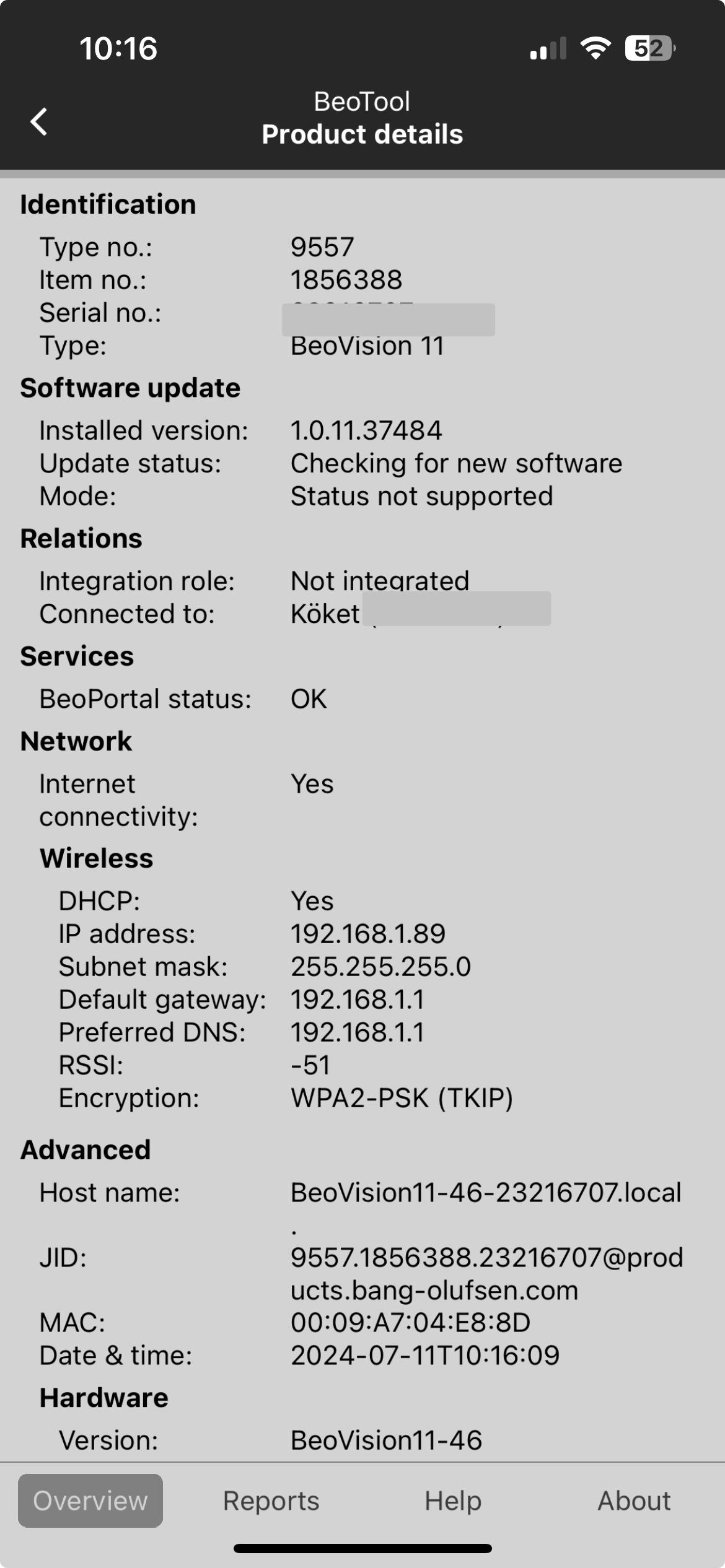
    This is what my BV11 looks like through the Beotool app.

    Skärmavbild 2024-07-11 kl. 10.16.12

    This is the latest version of the software.

    Think you need to reach out to a dealer and have them push the update to you.

    I had B&O (through my dealer) to do that when I got hold of a Beovision Eclipse with super old software.

    However, in this case I do not recall that the BV11 got something special in the latest version, but its of course best to have latest version.

    #57262

    In reply to: Speaker configuration

    Rolf2
    GOLD Member

    I use 18s as front and 4000 as rear speakers, the latter are daisy chained. They turn off if I change the profile e. g. from surround to stereo. My Eclipse is a 1st gen.

    You say Beolab 9000 as rears, so you mean BL 9?

    Kind regards,

    Rolf

    Location: Germany

    Favourite Product: BeoSystem 4500

    My B&O Icons:

    #57256
    Stuart50_1
    BRONZE Member

    Hi

    I have some beolab 9 on the back of my system and some 20 at front there driven by a eclipse

    the speaker are daisy chained together my question is
    When I change audio profiles even though the profile is set up to turn the back speakers off they stay turned on ?
    But no sound comes out when the chosen profile is in use.
    Should the back speakers stay on even though there is no need or sound coming out ?and the set up says they are turned off /

    ?

    #57182
    AdamS
    GOLD Member

    Those are the standard mains suppression capacitors that have been fitted to most electronics since the 1970s. They can fail and, when they do there’s usually a bang and some smoke, but I would have though this TV was far too young for that.

    I wonder if this is tied in with a visit we had a year or two back to change out a board on our Beovision Eclipse TV as a “preventative maintenance precaution” due to a potential failure issue that had been identified? As I’m in the UK, our lovely new forum owners, Multicare, contacted us directly and came and did the job for free, but I wasn’t home that day so didn’t find out exactly what it was they changed.

    As the TV is fairly recent, I would say that your best port of call initially would be a B&O dealer if you have one nearby.


    #56391

    In reply to: B&O App version 5.90

    Stan
    BRONZE Member

    It seems they’re redesigning some of the TV controls. I can no longer move the stand on my Eclipse gen1. They replaced the text option “stand” with a cute icon, but pressing the icon does nothing.  Same with the TV remote control features. Instead of the text “remote control” that took me to screens that allowed me to control my TV similar to the actual beoremote1, I get a cute icon that does nothing. Optimistically, I’m hoping this was a stupid oversight/build error that will be fixed soon. I can’t see them taking these function away since they were working quite well. Then again, you never know the depths to which software may sink.

    #56049

    In reply to: B&O App version 5.90

    Stan
    BRONZE Member

    I’ve finally been hit with a non-working “improvement”.  I’m not in the beta program, but with latest Android release (5.9.0.24…). The TV remote feature no longer works with my Gen1 Eclipse. I also can no longer control the stand. They’ve redesigned the interface so I get a cute little remote icon replacing boring words, but pressing it does nothing.  Similarly, there’s an icon for moving the stand that doesn’t work either. 2 steps forward, 6 steps back..

    At least the beoremote1 works, but it is sometimes more convenient to use the app if the remote is not near or lost in the couch.

    Then again, aside from Sonos, every one complains about their “smart speaker” apps (e.g. Kef, Klipsch, Naim Muso). Doesn’t mean it’s acceptable, but at least we’re not alone.

    00blue
    BRONZE Member

    Hi there, hoping someone could provide some advice please? I have a Beovision eclipse 55 Mk1 sound centre (just the sound bar, not the tv) and im trying to work out how I can set up speaker groups. I dont have an LG tv (running WebOS) to install the B&O TV app, and I also dont have a Beoremote one. I was hoping to be able to configure speaker groups via the iOS B&O app but that doesnt seem to allow me to configure speaker groups, only switch between different groups. What would be the best approach from here in order to get speaker groups configured on the Sound Centre? Would simply getting a Beoremote one allow me to do this (without an LG tv??).

    Many thanks in advance.

    #55844

    Topic: Beovision Eclipse

    in forum For Sale
    BeoMitch
    BRONZE Member

    First Generation Beovision Eclipse 55 with Motorised floor stand

    Immaculate condition in every respect


    offers in the region of £3500

    Collection Only


    Pics to follow

    #55817
    Stan
    BRONZE Member

    I have an older Orbi setup:  one base, 2 satellites.  I have an Eclipse, BS1, BS2, 2 Essences, M3 and a BS5 linked via an airport express all connected via WiFi.  I have a pair of Balances (daisy chained) and a BL/NL converter wired to the base station.  There’s also a couple TVs and variety of smartphone, computers, printers all on the same mesh.

    I highly recommend the suggestion to assign fixed IP addresses to all of the B&O devices. Before I did that, things were pretty flakey.  Now, for the last maybe 2 years, my B&O equipment is quite stable. The balances have hiccuped a few times, but this seems more from the daisy chained network connection.  I say this because, once or twice, I’ve had to completely reset them, and they only seem to reset correctly if I removed the network cable, set them up wirelessly, then plug them in to the router.  I have thought about running them wirelessly to see if this changes anything, but then I go a long while with no problems so why change anything?


    #55809
    trackbeo
    BRONZE Member

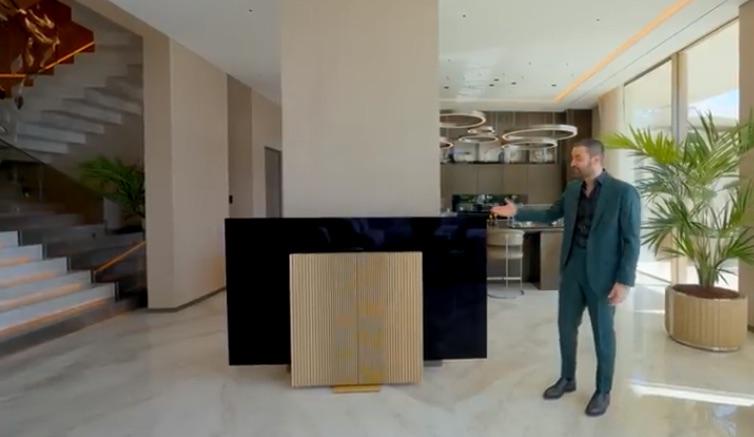
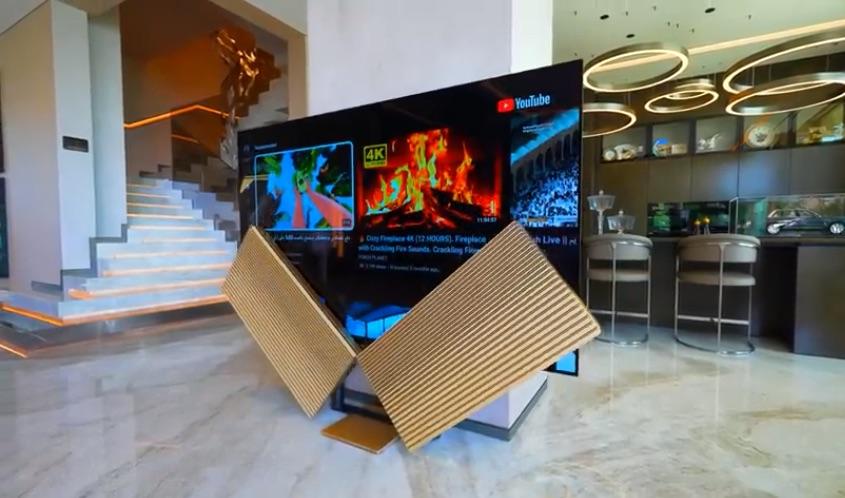
    Enes Yilmazer’s YouTube channel of mansion tours has posted another with at least 7 B&O TVs (2 Harmony, 2 Eclipse, 2 BV-Theatre, & 1 Contour).  Bonus points if you can spot the BeoRemote 1’s: https://www.youtube.com/watch?v=goFsqVqQ8H8 .Screen Shot 2024-05-21 at 8.28.19 AM

    One wag who comments on such videos pointed out that the Beovision Harmony is waaay too big for its place in front of a column and will form a “hazard to navigation” coming from the kitchen!  What he didn’t notice is that they sped up the display opening — like they do filming motorized patio doors — because it’s much too slow for snappy video pacing.Screen Shot 2024-05-21 at 8.28.13 AM

    #55325
    Stuart50_1
    BRONZE Member

    Hi all
    I have some beolab 9000 on the back of my system and some 20 at front there driven by a eclipse the speaker are daisy chained together my question is
    When I change audio profiles even though the profile is set up to turn the back speakers off they stay turned on .
    But no sound comes out when the chosen profile is one with the speakers set to off.
    Should the back speakers stay on even though there is no need or sound coming out ?

    #54100
    patcherley
    GOLD Member

    I have updated my Eclipse, apart from the UI haven’t noticed any real difference, not sure I really like the new UI. But again I also don’t use the UI much at all, it I watch a TV programme I go straight there with the BeoRemoteOne short cut button.

    Location: Hampshire

    Favourite Product: Beolink 7000

    My B&O Icons:

    #39932
    cklit
    Moderator

    Q: How do I setup a Listening Position for (2.0) music listening on Beosound Theatre?

    A: Here is what I would do: I have a 5.0.2 setup (Theatre+Fronts+Surrounds+Front heights). If this was a Beovision Eclipse or 11 or similar and I wanted a listening position for music listening, I would probably create a dedicated 2.0 speaker group, where only the Front speakers were added. However, because bass management in Theatre works differently (all speakers play their part in the low frequencies based on their capability), I do it differently here.

    1: I’ll start by setting up and adjusting a Listening Position with all speakers, optimized for the sweetspot.

    2: I’m lucky enough to have a room that allows for “the triangle”, so that I can sit perfectly in the middle of the 2 fronts at the same distance from each speaker, as the distance that the fronts are apart. Therefore, after the microphone measurement, I check that the distance to each front is set to the same (because I don’t want to mess with the timing between the 2 fronts, when I know I’m seated in the optimal position). While I’m at it, I check all the other distances too

    3: Once the Listening Position with all speakers is perfectly tweaked, go to your desired Sound mode and ensure that the processing is set to ‘Direct’. Leave ‘Bass management’ ON. This way ALL your speakers are helping with the low end, even though it’s only the fronts that are playing everything above 120Hz.

    Now you won’t hear large differences in bass performance, e.g. when switching from a movie in surround to music in stereo – AND you’re utilising the full performance of your carefully collected entertainment system.

    Just to recap: If I only have one seating position, I can limit myself to 1 Listening Position with all speakers included, and 2 sound modes; one in Direct mode for music, and one in True Image for movies (my own preference, use something different if you like). Obviously, you may need a listening position optimised for more people, but that is kind of out of the scope of this question. Remember that you can assign a specific sound mode and listening position to each individual source via the app, so that you don’t have to change manually each time.

    Enjoy the music 🙂

    #53844

    Hi,

    You can use a cable like this in one of the Powerlink outputs of the TV and set this output to stereo:-

    https://soundsheavenly.com/televisions/32-389-headphone-adapter-for-v1-beovision-1112-avant-eclipse-harmony-horizon-theatre-rj45-powerlink-to-minijack.html#/9-length-18m

    Kind regards, Steve.

    Location: The cable workshop, England

    Favourite Product: Beosystem 72-23

    Signature: Cables, friendly advice and great ideas for connecting Bang & Olufsen! Ask any questions at https://soundsheavenly.com to get the best from your B&O! Please visit my B&O YouTube channel at https://www.youtube.com/soundsheavenlycables

    My B&O Icons:

Viewing 20 results - 41 through 60 (of 343 total)