Forum Replies Created
-
AuthorPosts
-
 steve1977BRONZE Member
Thanks. Will the Beoliving APP be able to replace the B&O App to select sources and join speakers? If so, any screenshot how such screens in the Beoliving APP look like?
30 December 2025 at 17:35 in reply to: End of the road for Deezer? Move to Tidal? It’s all Elon Musk’s fault! #72218steve1977BRONZE MemberReviving an old thread.
Spotify Connect – Not natively supported in the app, but I can start streams to one B&O speaker from the Spotify app and then all my ASE speakers can be joined from the B&O app (or using touch to join)
Tidal Connect – Same as Spotify Connect, but only supporting Mozart speakers.
Deezer & Tidal – Natively integrated into the B&O app. I can select a song and play to any ASE speaker. And then join other speakers (from app or from “touch to join”). This only works though for ASE speakers when initiated from the B&O app. Streams initiated from the Deezer or Tidal app cannot be expanded to other ASE speakers from within the B&O app.
Is my understanding correct? Anyone tried?
steve1977BRONZE MemberThanks for your quick response. Seems you have done and plan to do exactly what I have in mind. Just what I am doing will be at a far smaller scale. Nothing close to 200 decvices planned.
Don’t plan to do anything cloudbased, so doing via HA seems the way to go. In this case, I would not even need Tuya, right? I could use HA and connect devices via Zigbee.
How now does Beoliving come into play? Do I need BLI to use the app or can the app control any other hub? If I need the BLI, do I need to go with the Pro version?
It seems I can get all my B&O devices directly connected with HA. What is the benefit of having both HA and BLI?
steve1977BRONZE MemberWhen I last played around trying to make multi-room work properly, the Spotiy App allowed me to choose (via “…”) whether I use CC or Spotify Connect. It seems it no longer has this option. Not sure that’s because of Spotify or because of my B&O devices. But net net, it seams I have no longer the option. I don’t mind this and in fact would be happy if B&O ditched the buggy CC (or Spotify merged/discontinued it).
Now, the big question is whether I can expand to my BV Horizons by “join” or via the APP. I will need to try this.
steve1977BRONZE MemberI checked out the guides. Thanks for sharing. I have a few BS1, A9, C0re, etc. Some of them are connected via Essence Remote (wheelie) via bluetooth.
I tried AP and then expanding through the network. It has always been buggy and failed to join, mute, etc.
It seems there is no longer a difference between Spotify Connect and Chromecast? Maybe this will be the answer as long as I use Spotify?
steve1977BRONZE Member“Hi Steve, I know that this is quite an old thread but did you see this link on Reddit? https:\/\/www.reddit.com\/r\/BangandOlufsen\/comments\/x8gohw\/beovision_horizon_google_login\/\n\nIt links to two files on Dropbox, one with instructions and one with a .exe file that you run from a PC on the same network. Maybe it will help get the old software back on?\n\n\u00a0\n\nManual: https:\/\/www.dropbox.com\/s\/orxh3wl9ggyp2zo\/Google%20Updater%20Help.pdf?dl=0\n\nFiles: https:\/\/www.dropbox.com\/s\/6ff082s7mtjzo5g\/GoogleUpdater.zip?dl=0”
Any chance you can help re-upload it?
steve1977BRONZE MemberThanks @paul.70 for sharing. Multicare is the offical B&O kit or a 3rd party provider? The color seems unchanged?
How does it connect with the Shape and is there a delay?
steve1977BRONZE Member
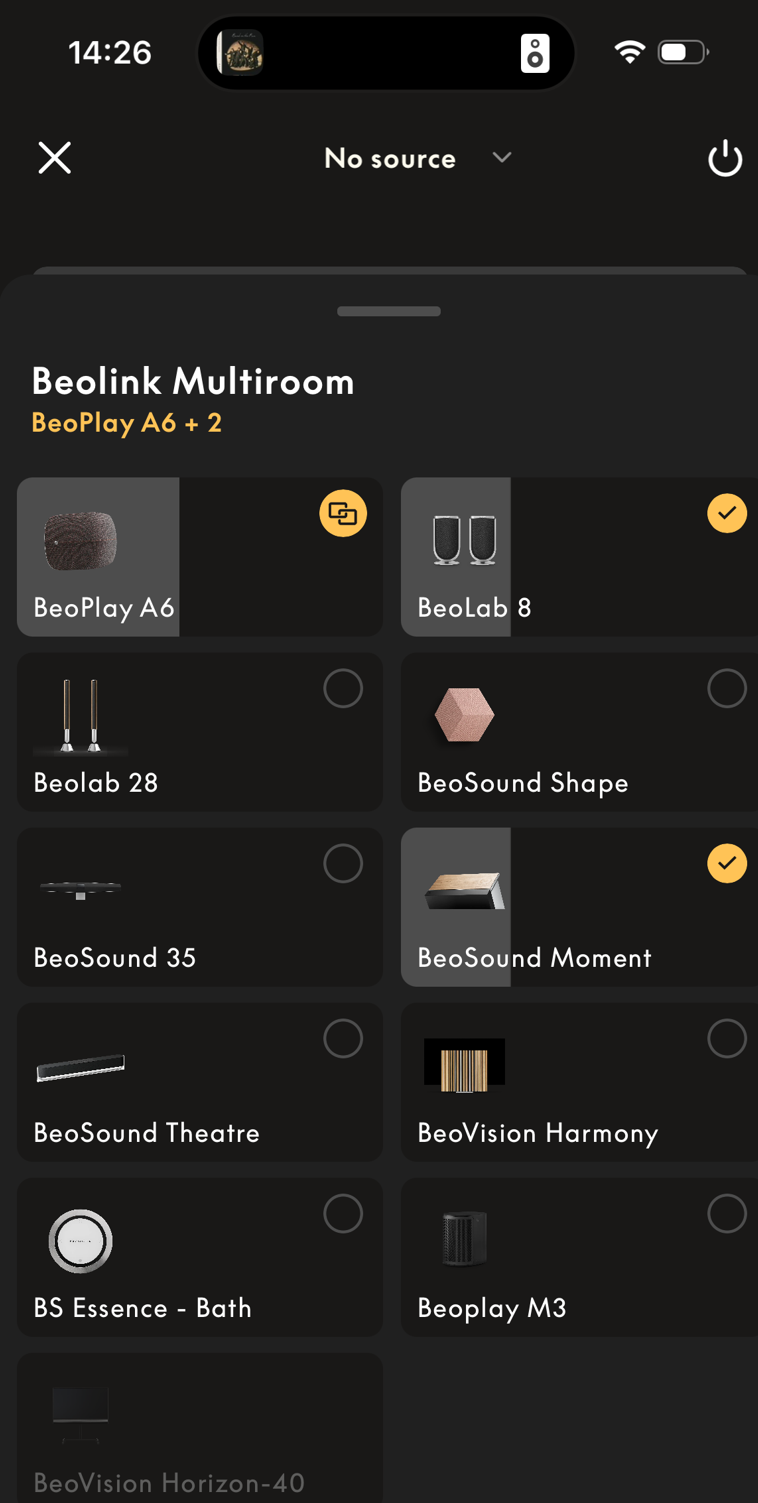
What app is this? Looking pretty cool and quite different from my B&O app. The two tagged sources are joined. What about the linked source?
steve1977BRONZE MemberExcellent, thanks, this works.
steve1977BRONZE MemberHooray!!! Thanks @Pipeandslippers for pointing me to the update. The manual is excellent. After following the steps, all works well again.
The Android OS is still incredibly slow and outdated but at least it is working again. This is great progress and great to see B&O found a way to fix it (or someone else did).
steve1977BRONZE MemberThanks so much for all your kind responses.
I decided to go ahead with 8 tiles in all Kavrad (no oak).
May take a while until it is set up, but will report back.
steve1977BRONZE MemberThanks!
Beo4 without Navi button, but with a “go button”
Not sure, which BV7 and don’t know where to find the setting in the BV7?
I did a factory reset of the BOne and now I can also no longer turn on & off the BV. So, it is worse now.
steve1977BRONZE MemberNot sure I should open a new thread, but my issue seems very similar.
I have a Beoremote 4 and also Beoremote One (IR). I am trying to use it with my Beovision 7 (using PUC). See below my issue:
- Beoremote One – I can turn on and off the BV7, but I cannot use it to control the Apple TV 4k (connected via PUC). Only turn on & off works
- Beoremote 4 – I can turn on and control the Apple TV via PUC. It works quite well, but not perfect. Some buttons (back / select) are swapped. But at least the arrows work to control the Apple TV.
Any ideas appreciated! Particularly on the Beoremote One.
steve1977BRONZE MemberThanks for sharing. Indeed a very pricey solution. Also clear from the posts you linked.
It seems to work though. And I didn’t see any alternatives?
steve1977BRONZE MemberGot it, so seems it will be an OLED S95 that still has the connect box, which I appreciate for my setting.
I will try to use the TV speaker as center speaker and then use Beolabs to complete the 5.1 setup. I believe below box should allow me to do so (even in a hybrid wired & wireless setup). Any experience with that?
https://almando.com/almando-multiplay-surround-decoder-78.html
steve1977BRONZE MemberYou’d both go with an 4k Oled over a 8k Qled?
steve1977BRONZE MemberThanks for sharing your detailed notes. You got me thinking again.
I think I am good with the One Connect Box and Samsung.
You open up my thinking again though about the following options
- Frame (as I thought I had concluded)
- 8k (QN700 or QN800)
- Oled (S90)
steve1977BRONZE MemberI made some research and concluded I will go for the Samsung Frame. Either the 75″ or 85″ version. I like the concept with having a separate Box that the TV stays ultra-flat on the wall with just a tiny, less visible cable.
Any thoughts from this group whether this makes sense? I would then need to find some way to connect Beolab speakers, but assume a 2.0 or 3.0 should always be somehow possible
steve1977BRONZE MemberThanks for your thoughts.
It’s a bit off-topic, but any thoughts on SONY x90? Your concern above is that it’s not thin enough?
Or TLC? Or Samsung or LG?
Is OLED or Mini LED better suited?
steve1977BRONZE MemberYou are right about the Theatre, but not yet ready to spend the big money…
I’d be ok just to go with 2.0 or even better 2.1, 3.0 or 3.1. I am aware some folks get the full monty running, but not plannig to go down the route. I thought there was some easier way without such sreaming box?
The C2 is too bulky for wallmount or why are you suggesting the G? Any other models you would recommend?
-
AuthorPosts