Forum Replies Created
-
AuthorPosts
-
 BRONZE Member
Nice to hear!
Is that the silver one – it seems rather dark?
To my knowledge the anthrasite version has not yet been released.Are you going to use the 18’s in the back/as surrounds?
MM
Location: Flensborg————Danmark
Oh well, maybe I just do not understand it?
I thought that the core capabilities of the company/Bang & Olufsen are Sound, Design & Craftsmanship.
Seems there is more ?
MM
Location: Flensborg————Danmark
There aren’t many speakers from the current collection to be offered.
Sure they could have recommended the 18’s (many shops use these).They probably would have used the Mozart-based speakers, if the SW had already been finished for this – and the component supply would be better.
One should not expect B&O to showcase a new product with older, EOL speakers. Of course they want to show the speakers that they actually sell.
I guess the reason why the let the Theatre do the front alone is, 1: it is capable and 2: adding front speaker would draw the attention from the soundbar, when showcasing.
They know what the Theatre is capable of and want to sell it this way.I am pretty sure that any of the older speaker will perform excellent when added to the Theatre – probably even better that now.
For my part I plan to keep my setup/speaker layout as is, when I move to the Theatre. I guess many with a current setup will do the same.So, just wait for some real life user reviews here, when people get their Theatres delievered……and the first SW quirks are over.
MM
Location: Flensborg————Danmark
I can not present a complete list.
However, if you start with the Beoplay V1, BV11, the Essence MK2, the BS Moment…..everything thereafter, that is network based, will support NetworkLink.
I’d say, that the NL/ML Converter also is in this category.MM
Location: Flensborg————Danmark
B&O upgradet 5 produkts for the smart home standart “matter” ….. sorry, only in german
 https://hifi.de/news/matter-kommt-ins-rollen-bang-olufsen-ruestet-fuenf-produkte-nach-113772
———
English readers only – use this link:
https://www.flatpanelshd.com/news.php?subaction=showfull&id=1665035559
MM
Location: Flensborg————Danmark
It’s a shame that B&O haven’t got a solution to receive NL (wired or wirelessly) – then output to a pair of passive speakers. Passive speakers – specially ones like Beovox 1 are relatively safe against humidity, so make ideal use for bathrooms.
—————
That is basicly what B&O does with the Shape.
They put a BS Core, an amplifier and some passive speakers in a fancy package….just as an example.As Guy already wrote:
“If you are happy to keep using the BeoLink Passive to drive your speakers then there is no need to change.There is no specific need to keep ML. Simply use the Beolink Passive’s PowerLink input and treat this as you would any other Active speaker.
If you need separate control of the bathroom speakers, then add an NL source with a Powerlink output.“
The Passive is here only used as an amplifier – the ir-eye has no function here.
You’d need a Beoremote One/BT to control the Essence/Core.
That is…..you could install the ir-eye, that fits with the Essence/Core and this way control this with an ir-remote/Beo4 or locally.

MM
Location: Flensborg————Danmark
It is always nice to have all informations, if you are requested to give an advice.
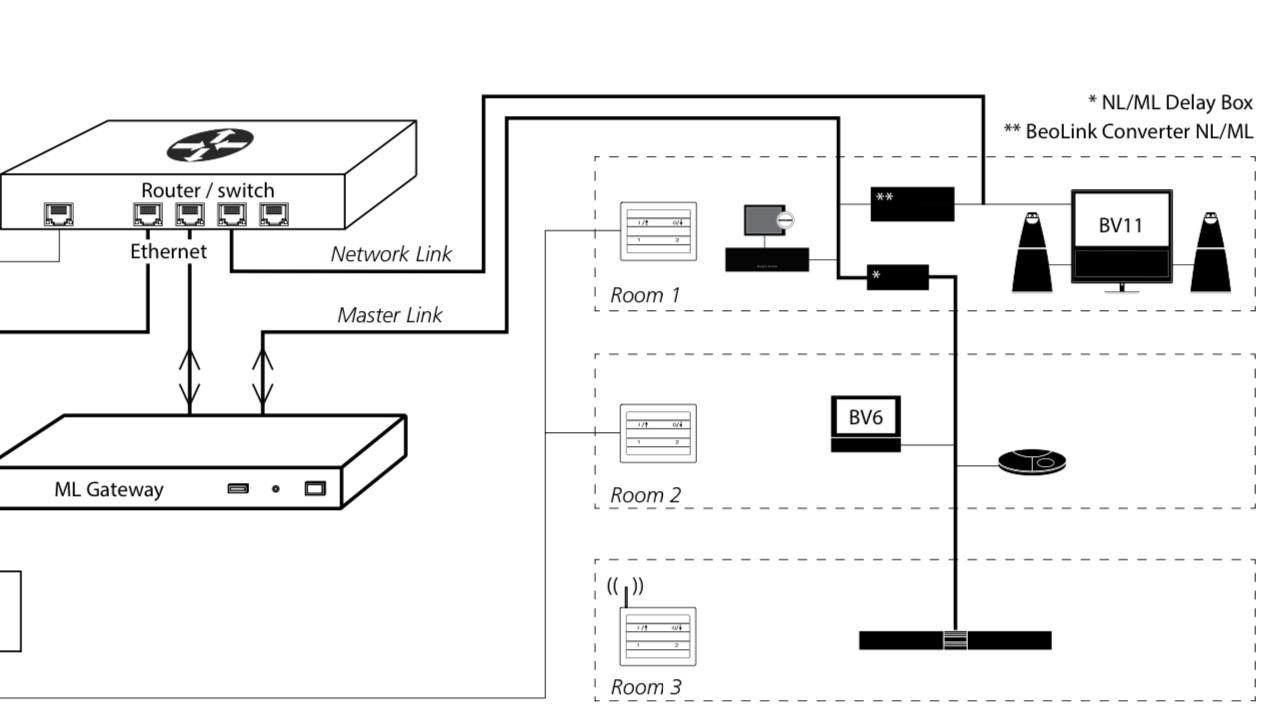
Knowing what we know now….I am sure that you’d need the NL/ML Converter in order to bridge the Beosystem 4 (and other NL devices) with your existing ML setup/the BS5.
Humidity might be a problem, yes – but will that be different than now.
Bridging with the Converter would give you some new possibilities in the setup….which a standalone Essence would not.Here is an example:

By the way – what do you mean by “the wired remote control to switch on/off.”
MM
Location: Flensborg————Danmark
Agree with Guy.
The simplest thing would be to add an Essence MK2 – if you can get one.
Otherweise you’ll need the Core.
In this case you do not need the NL/ML Converter…..just your home network. Best use wired connection – be sure that your wireless network is working properly, in case you’d want to go for wifi.
This solution also offers you the option of using the sources of the Essence MK2/Core through your Beosystem 4 setup.Please be aware that the Passive will need a special configured PL cable in order to turn on/off, when the PL/RJ45 from the Essence/Core is used.
You can contact Steve@SoundsHeavenly for further advice on cables – maybe someone can share the pin layout, if you want to DIY.If you’d want to use NL/ML Converter solution – in order to keep your existing ML structure – you would also need an (ML-) Audiomaster in the ML chain or the socalled Powerbox, that can be used with the NL/ML Converter.
More about this later, if you should choose to go that route.MM
Location: Flensborg————Danmark
That is a good question – especially if you think of a home cinema setup with a projector and e.g. an ATV4 box (and a bluray player) as the source/s.
My guess is that it will work – however I’d like that to be confirmed too.
MM
Location: Flensborg————Danmark
How is the setup, that you’d like to create?
What do you already have and which NL-based devices do you have or want to use?
MM
Location: Flensborg————Danmark
I am not sure what you want to do – where does the gateway fit in?
Maybe you mean the Converter….and speaker connected to this?If it is just about amplifying, the amp that B&O offers is called Beoamp 2 (which is pretty expensive).
From Atlona there are amps, that could be an alternative to this, but still rather expensive.
Basicly you could use any small and cheap digital/Class C amp.
You can get some without volume control – but even with a volume control built in, you’d just have to turn them up to a fitting volume and leave that so. They won’t consume much power anyway.MM
Location: Flensborg————Danmark
What are the Theatre placement options on a shelf in a (large) TV cabinet? Is there some kind of small base included or can you put the Theatre itself directly on a shelf ? Without getting too much of sound interference kind of blocking the downward direction of the drivers?
————
MM
Location: Flensborg————Danmark
Great – thanks Steve.
Helps virtualizing how things would look in your own place.
Tip!
If you want to airplay these (sound and picture) to your tv, you will have to find them here:MM
Location: Flensborg————Danmark
Can say if that will be in english….probably not, but in danish as per usual.
Henrik/BOTF has a video coming on thursday:
MM
Location: Flensborg————Danmark
Steve at Sounds Heavenly wrote:
Hi guys, Thanks for the feedback.
I like the idea of a “knowledge base” for the Theatre – maybe that could be a “sticky” thread on BeoWorld? What do you think?
Kind regards, Steve.————
That would be a great idea!
Maybe people could share some basic setup experience with the LG tv as well – might be helpfull for those who along with the Theatre get their first LG tv…..what to do first etc etc.
Since people should be able to able to control both as one unit (with the Beoremote One), it would be nice to know, what you can and you can not do just using the remote after the initial settings have been done using the app and installing the LG as such.There is no – not that I know of – comprehensive guide/video: ‘How do I set up the Theatre/the LG’ from B&O, when you already have an e.g. 5.1 well working speaker setup.
(The socalled Theatre Setup video from B&O/YT does not help much here).MM
Location: Flensborg————Danmark
Apart from the fact that FM radio – where I live – is almost dead, the only and main drawback of this unit is, that the AUX has no autosense.
I’d prefer to use the headphone out to a Playmaker’s line input…..which has line sense.
And then connect a set of e.g. BL8000’s there.
This way you – in addition – you are able to use the AUX of the BS1 for a turntable or maybe even for a small tv!Even better would be to use an Essence MK2/Core – this way you could transfer the CD playback (and the sound of an optional vinyl player) to a modern NL/Mozart based setup in the home.
If this just is about a simple ‘first time B&O unit’, I’d personally recommend the Beosound 8 instead of the BS1.
This has autosense on the Aux/line-in…..which makes it very handy, if you connect an Airplay/Chromecast/BT device there.
And it should come with its own small remote control.
The BS8 is in my opinion a very underrated unit.MM
Location: Flensborg————Danmark
I have used my beosound moment with spotify connect the last years. It works perfect.
———
I remember that there were some postings about this on the old forum.
Would be nice if you could explain, how you have managed this….since I know of no native support for Spotify Connect on the Moment.
MM
Location: Flensborg————Danmark
I have two Essence MK2 in my setup.
They do what they are supposed to – can’t complain at all.By the way, the Essence MK2 surely has support for Airplay 2!
I am not going to change these to Core’s.
As for how your sub will integrate with the 17’s, I have no experience there.
Guess it very much depends……..on the sub, the placement/the room, the crossover options in the sub etc.(Do you really need the sub with the 17’s?)
MM
Location: Flensborg————Danmark
Also see here:
MM
Location: Flensborg————Danmark
Since the product has only been in the shops for a couple of days (officially at least), you can hardly expect any in depth listening experiences/reviews.
You can listen to the Theatre (with or without the 28’s as surround speakers) in the shop environment, but that is by far not enough.
They still have limited options of showcasing it. The two shops I have visited had the gold one with the stand – as an eyecatcher – in the window for display. The other one – also on a stand – was (just like B&O want it) with the BL28’s in the back.Tip!
Don’t let them play music off YT – let them play from Spotify/Deezer instead.I guess we will have to be patient….untill someone really has the Theatre in his home.
Unless you are able to make an appointment with a dealer for a longer session.Also most dealer still have to learn a lot about the Theatre (when it works in a LG-tv setup).
If you have seen all or many of the videos in this thread, you often know more than ‘some’ dealers.Also looking forward to the video from John/Manchester – his videos mostly are very informative, inspiring and fun ?
MM
Location: Flensborg————Danmark
-
AuthorPosts