Generic selectors
Exact matches only
Search in title
Search in content
Post Type Selectors

Millemis

Forum Replies Created

Viewing 20 posts - 301 through 320 (of 1,233 total)
  • Author
    Posts
  • in reply to: Connecting Beogram 4002 to Beosound Core #53171
    Millemis
    GOLD Member

    Hi Mjoelnir

    The BS Core has one input port, which is combined mini-jack analog and toslink.

    In your case you will only need an adapter cable between the turntable and a male minijack connector.

    There is no option to control the volume on a Beogram itself (the output is fixed) – this is done in the Core.

    Once you have connected it there, the Core turns on to that input (i.e. autosense), when the turntable has started.
    You can use the B&O app for volume controlling like with all other sources like B&O Radio etc.

    The turntable will show up as an AUX-connected device.
    You will not be able to remote control the turntable (pause, play etc) – that must be done on the turntable.

    Alternatively you can control the volume with the Beoremote One, an Essence Remote or the Halo remote.

    MM

    Location: Flensborg————Danmark

    in reply to: New product launch – beosound theatre? #38527
    Millemis
    GOLD Member

    You can find a list of the ASE in this explanation of new and old way to use ‘Join’ here:

    ASE

    So yes, the Core is an ASE product.

    ASE stands for ‘Audio Streaming Engine’ and was the first generation of the NL platform, which replaced the old ML platform.

    There have been some minor updates of the ASE platform along the way.

    MM

    Location: Flensborg————Danmark

    Millemis
    GOLD Member

    When comparing three generations of the B&O app, preference depends on individual needs and features offered. The latest version might have improved functionality and compatibility, while older versions could be more familiar or stable. Ultimately, the choice revolves around which version aligns best with personal preferences and requirements.

    Of course you are right, that this is about ‘personal preferences and requirements’.

    To me it seems like the makers of the current app have neglected the thought of backwards compatibility (something that otherweise always was important for B&O) with the new app version.

    I do not see, where the new app brings ‘improved functionallity and compatibility’.
    Actually there are several options/features missing – it seems like an unfinished product even now after quite a while.
    Something that those with headphones etc and/or a setup with new (Mozart based) products may not miss or notice – but something that has made the daily use of the setups of many a long time B&O user more complicated.

    Is there hope for improvements or it it just something that we/some of us have to work around, is the big question here!

    MM

    Location: Flensborg————Danmark

    in reply to: Neverending Beolab 50 issues… #53011
    Millemis
    GOLD Member

    @Beofile7

    Nevertheless that this is better discussed in a private message thread, it would be nice if you could return here with the outcome of that.
    I guess those who have started following the thread, will be interested in the results.

    MM

    Location: Flensborg————Danmark

    in reply to: Beoplay V1 not turning on #53043
    Millemis
    GOLD Member

    Does it show up in the B&O app or in the Beotool app (assumed it is online)?

    The leaking battery issue is probably more common than one might think.
    I know that in Denmark any serious dealer will replace the battery before selling a V1.
    All you can hope for is, that it has not already caused too much damage.
    I’d let a dealer or a skilled technician have a look, if it was mine.

    MM

    Location: Flensborg————Danmark

    in reply to: New product launch – beosound theatre? #38525
    Millemis
    GOLD Member

    @Millemissen this workaround doesn’t work for me with my Theatre but should work if it was a Beosound Stage.

    Honestly I never tried!
    My MyButtons are all ‘occupied’ with radio and tv stations and now, that my wife has gotten used to that, I would not want to change it.

    My BM6500/CD6500 is in the same room as my Theatre and have no speakers connected.
    My solution is to put in a cd and press play on the CD6500 and then push Join on the BROne for the Theatre.
    Works well, since I mostly listen to a full cd there. (If really needed I can start/stop/skip in the app – choosing the Converter there).

    But it is a funny feeling, when I know that – if I go to the living room (with an Essence and a set of speakers) and want to listen to a cd – I can easily start/stop etc using the BROne there.

    However, I doubt that they will change the behaviour of the BST/and app….so I will just have to live with that as is.

    I totally agree with you – the Theatre is a great product with great sound options etc!

    MM

    Location: Flensborg————Danmark

    in reply to: New product launch – beosound theatre? #38522
    Millemis
    GOLD Member

    @BeoMedia

    None the less…you have described the problem!
    And it seems that there is no quick solution to it as of now….it seems there is just a workaround =
    Confirmed by B&O and this approach is to once the desired source is playing on the Stage via ”join” to press and hold one of the BR1 short cut buttons so that it the stores the connection to the ML source in question and can from then on activate and play this source by itself (ie without the need to go via “join”).”

    MM

    Location: Flensborg————Danmark

    in reply to: New product launch – beosound theatre? #38520
    Millemis
    GOLD Member

    @BeoMedia

    Last things first…
    ……the screenshot is from the settings/configuration page of one of my Essence boxes.
    The Essence is – like the M3/M5/CORE/Stage etc – built on the ASE platform.
    This is the previous (and first) NL platform.
    Mozart is the current.

    The Converter behaves like the ASE platform making e.g. a ML master a NL compatible product.
    This means that your description is that of the ASE platform, when it comes to interacting with e.g. the Theatre.

    You don’t have any products like the original BS2, the BS1, M3……in the mix?

    MM


    Settings page of one of my my BS Essence boxes as an example

    IMG_0865

    Location: Flensborg————Danmark

    in reply to: New product launch – beosound theatre? #38517
    Millemis
    GOLD Member

    with current software versions and experiences,

    1) is it possible to activate and listen to a source from the Beosound Theatre from a link room?

    2) is it possible to activate and listen to a source from a stereo connected to the link system from the Beosound Theatre?

    I know we’ve discussed it before but wanted to check if there was an update or solution to this issue. If still not possible has anyone heard from their dealer whether B&O is working on a solution or have decided not to pursue this? I haven’t been a me to hear either way.

    This is a weird one which shows (some of ) the differences in ASE and Mozart products.
    1)
    Assuming you by ‘link room’ mean from another product on the NL network – yes, you can connect the Theatre to an ASE product, but only as the primary product!
    The sources will also be visible in the local list of that product.
    Please note, that you also see the ‘Tone Generator’ as a source there ?

    However the sources will not be visible (and accessable) in the main page of the ASE product.

    So – the only way (still) is to join in from the Theatre, if the source of the linked product is already playing.

    2)
    No, the only way (still) is to join in, when the linked product is already playing.

    This indeed, is an annoying situation for those of us with mixed setups/Theatre and ASE products (and also the NL/ML Converter).
    I have no idea whether they are working on a solution or not….it seems to me that they do not care respectively they do prioritize other projects.
    Also I do not know, if this is ‘just’ a SW issue with the Mozart products/the Theatre or a SW issue with the app, or both.

    P.S.
    I assume the other Mozart products than the Theatre will behave similar…I have none (other than the BST).

    MM

    Location: Flensborg————Danmark

    in reply to: Free lunch/beer+ for B&O help in Seattle area #53024
    Millemis
    GOLD Member

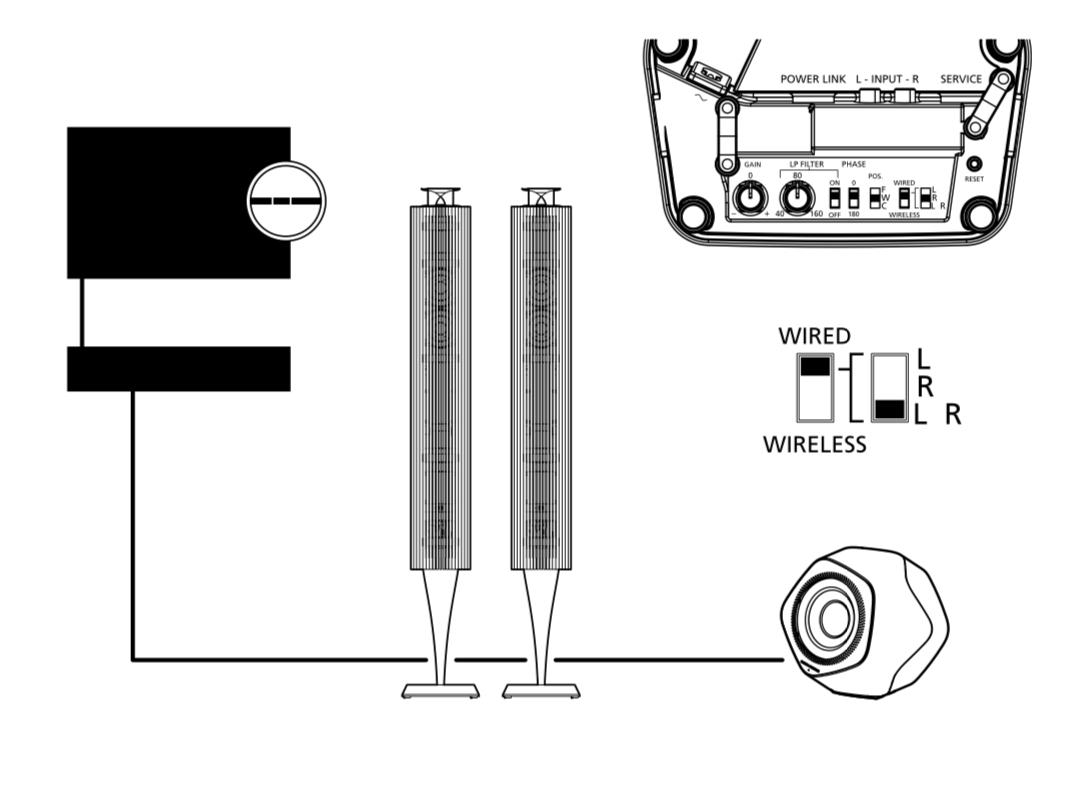
    Do I understand you correctly….you need help for connecting the speaker cables from the BM5500 to the RL’s?

    MM

    IMG_0863IMG_0862

    Location: Flensborg————Danmark

    in reply to: Beosound 5 Kein WDR? #52963
    Millemis
    GOLD Member

    Thanks Luc
    That the BS5 is EOL and will get no updates, does not mean that they won’t help.


    @Bandit

    Da siehst du – sie würden schon helfen.
    Wahrscheinlich hilft der Tip vom Luc schneller.

    Es ist aber richtig, daß BS5 nicht von der App unterstützt wird – ist auch nicht nötig in diesem Fall.

    MM

    Location: Flensborg————Danmark

    in reply to: Speaker cable length #52243
    Millemis
    GOLD Member

    You indeed can daisy chain from the fronts to the speakers in the back.
    But then these would also act as fronts…..which probably is, what has happened in your case (?).

    The backs/the 9’s must be on their own PL port in the Eclipse and they must be adressed/assugned as backs/rears.

    If you modify the main Speaker Group (1/tv), they will all play togther in their assigned roles, typically with the tv speakers as a center channel.

    If you want the 20’s respectively the 9’s to play seperately, you must create a Speaker Group just for that.

    P.S.
    You can daisy chain the 20’s to another and the 9’s respectively from their PL connection.
    The roles L/R etc is conigured in the Sound Menu of the tv.

    Did I understand your concerns correctly?

    MM

    Location: Flensborg————Danmark

    in reply to: Beosound 5 Kein WDR? #52960
    Millemis
    GOLD Member

    Versuche es doch erst einmal!

    MM

    Location: Flensborg————Danmark

    in reply to: Beosound 5 Kein WDR? #52955
    Millemis
    GOLD Member

    Da gibt es nichts, das man selber machen kann.
    Die einzige Möglichkeit ist Kontakt to B&O/Support aufzunehmen mit der Bitte um Hilfe.
    Eventuell über einen Händler.

    MM

    Location: Flensborg————Danmark

    in reply to: New product launch – beosound theatre? #38503
    Millemis
    GOLD Member

    My Theatre combo is shown correct as is – a 55 with oak lamellas and with the tv on top (using SMI).
    The Theatre version is 3.2.3
    The app version 5.7.0

    The 5.6.0 however, shows the Theatre as a soundbar.

    MM

    Location: Flensborg————Danmark

    in reply to: Masterlink #52903
    Millemis
    GOLD Member

    or disconnected in the junction box where it is connected to the other ML cables

    But be very carefull with that, especially if you are not used to doing that kind of stuff.

    MM

    Location: Flensborg————Danmark

    in reply to: BeoWorld – For Sale (UPDATED 18th Feb 2024) #52160
    Millemis
    GOLD Member

    Looking forward to Beoworld/the Beoworld Forum under the new ownership.

    Hope it stays as open and accessible as of now.

    A big thank you to Lee, Keith and all others involved in keeping Beoworld alive and kicking throughout many years.

    MM

    Location: Flensborg————Danmark

    in reply to: Masterlink #52899
    Millemis
    GOLD Member

    Thanks Madskp

    That I overlooked!

    The BS9000 has to be in A-Option 1 to be controlled remotely, when there is no BV anymore.

    MM

    Location: Flensborg————Danmark

    in reply to: Core Mk2 with IR eye – assign Beo4 buttons to sources #52820
    Millemis
    GOLD Member

    Sorry for interfering once again.
    But I am a proponent for simple solutions!

    Question – aren’t you going to install speakers in the room, where that link eye is supposed to be?
    You wrote about BL5’s, that are going to be connected digital….if I understood that correct!
    This would mean cable runs from the room where the Core is supposed to be located!
    Not just for the ir eye and the digital connection, but also – in that case – for the required Powerlink cables.

    The Core is a rather small box – it should be rather easy to hide that in the actual room and thereby have less cable runs.
    And it would be in reach of the BROne without any problems (or fancy solutions).

    Or is there still something that I missed?

    MM

    Location: Flensborg————Danmark

    in reply to: Masterlink #52897
    Millemis
    GOLD Member

    Hi George and welcome to the Beoworld Forum

    Classic question – yes, you are in the right forum.

    Since link/Masterlink is a unique B&O feature, there is no obvious solution.
    Almost no new tv nowadays has some kind of analog L/R out for sound that could be used for connecting to the BS9000.
    And the use of an eARC capable audio extractor often brings delay in sound.

    I guess you are not interested i a somewhat newer B&O tv, which could be linked – either on it’s own or using a B&O Converter.
    If you want a modern tv like the LG C or G series, the only option you will have is the BS Theatre and the converter.
    This is a rather expensive solution, I know – but in addition to the link possibility you would have the best sound, that B&O has ever made for a tv.

    If you have had external speakers connected to the BV7, you could still use these with a new tv, but that would require the use of some kind of A/V processor….and it would still not give you the link option, that you are used to.

    Sorry – but you are not the only one facing this problem.

    Maybe someone else has a solution, these often are rather DIY.
    So stay tuned to the forum.

    MM

    Location: Flensborg————Danmark

Viewing 20 posts - 301 through 320 (of 1,233 total)