Forum Replies Created
-
AuthorPosts
-
 GOLD Member
Since an AppleTV or a Blu Ray player etc all are video sources the tv/the screen will per default turn on.
Before I get into trying to find a solution, first please tell me which tv you are using.
MM
Location: Flensborg————Danmark
I am afraid that I’ll have to disappoint you….
…..this will not be possible!
There is no way to “wake up” or control the 3200, other than via the control panel of the 3200 or with a B&O remote.MM
Location: Flensborg————Danmark
Personally – if someone is only interested in having a stereo setup – I’d go for a BL3/Core combination.
That will always work!
And I’d add a Beoremote ONE/BT in order to have easy remote control.MM
Location: Flensborg————Danmark
Hi KathleenC1
Unfortunately B&O has choosen the name of a previous product (your BS1) for a newer product.
This – newer – product has now been discontinued….that is what this thread is about.Your BS1 was discontinued in 2011, but there are still many of those in use.
So, to answer your question – yes, you can connect ‘an iPod or iPod’.
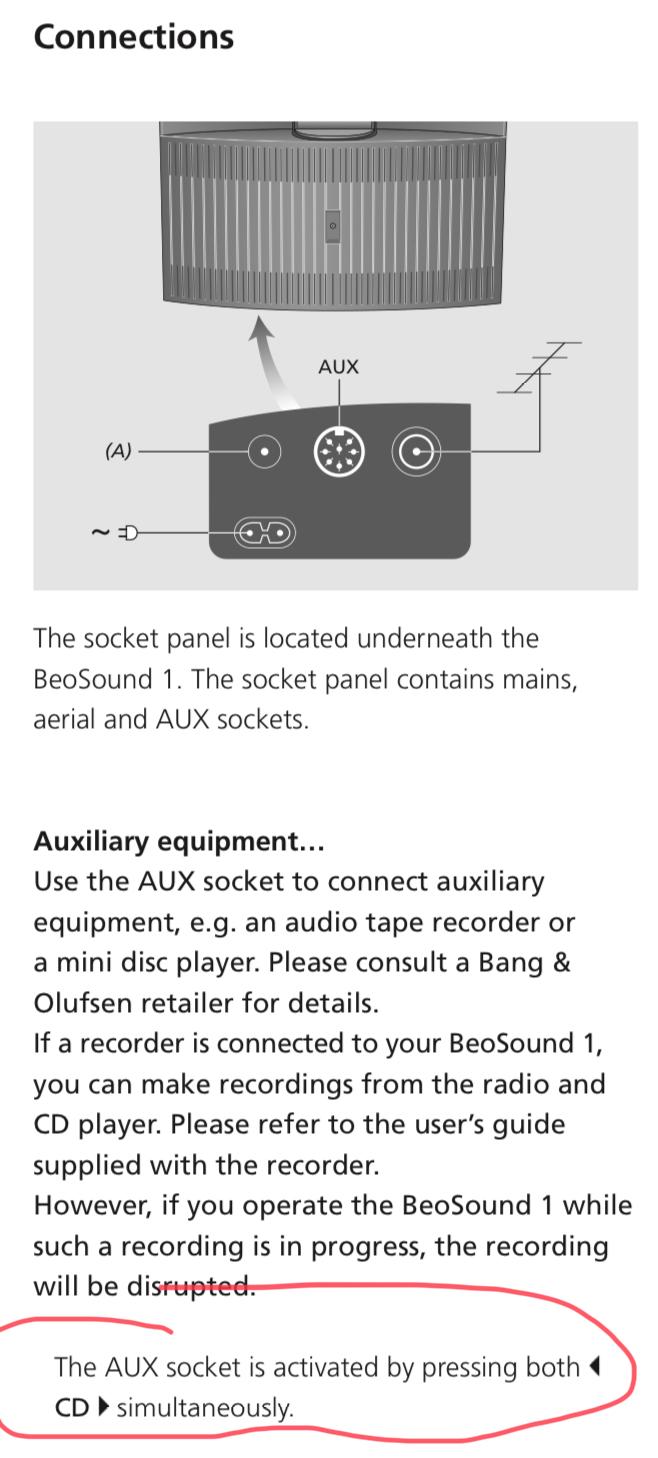
In fact you can connect anything that has an audio output there….a mobile phone, a bluetooth adapter etc etc.Please have a look here page 4.
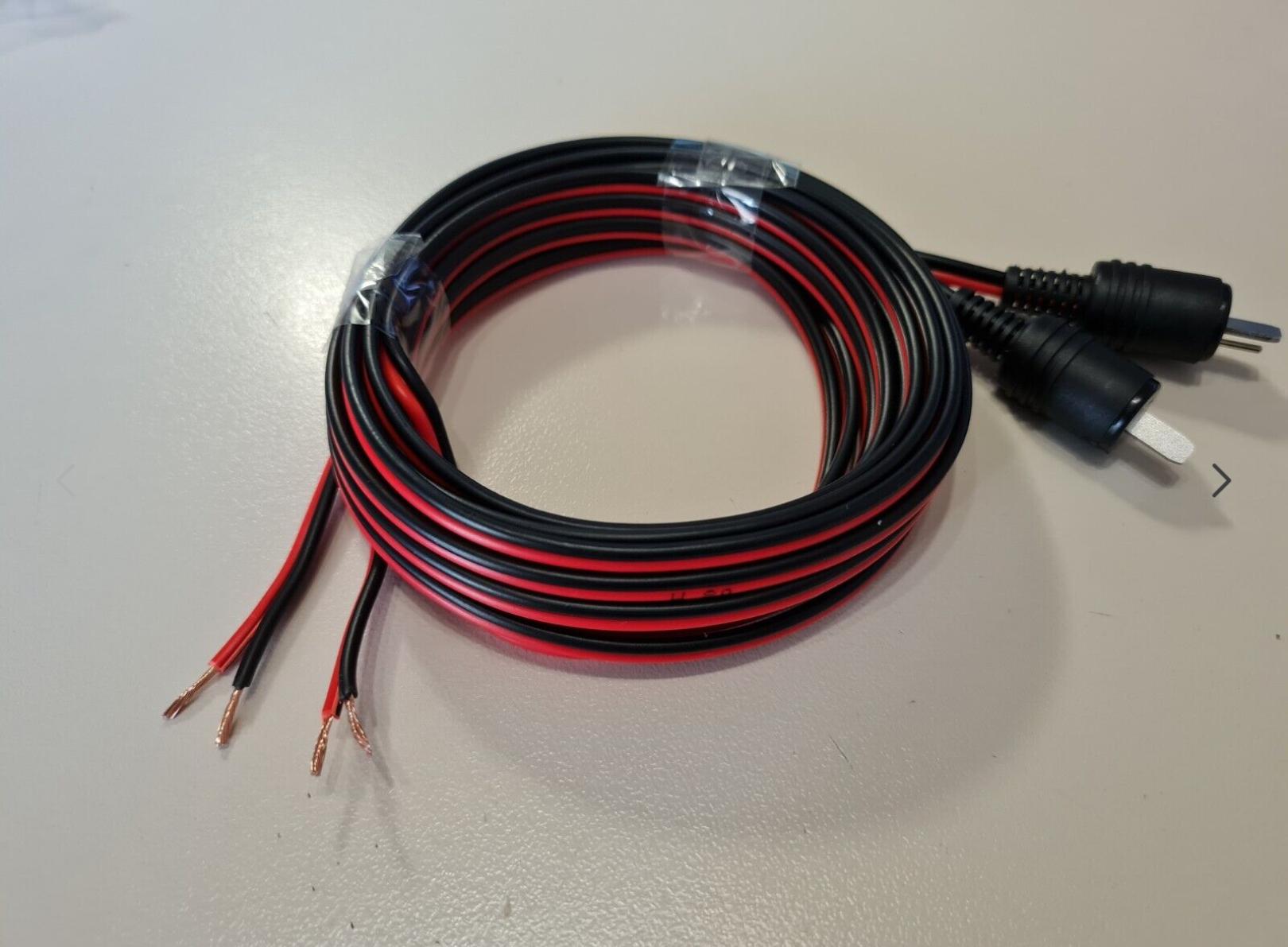
You will need an adapter cable from 5 pin DIN to e.g. minijack.

MM
Location: Flensborg————Danmark
Same here 🙁
MM
Location: Flensborg————Danmark
Seems a cool idea – definitely worth trying out.
I guess that the line out is at fixed volume, since it was used for a connection to a tv (integrated setup), where the volume is controlled.
The line-in of the converter has auto sense, if I remember correctly.Looking forward to hear about your findings.
MM
Location: Flensborg————Danmark
As far as I remember only the very first version of the BV11 had this connection panel.
A cool thing, but maybe not that practical, when it comes to cable management.
MM
Location: Flensborg————Danmark
Hi Bax24
Congrats on ‘your new’ tv.
It is definitely a hotel version of the BV10.
This means that it has a modified sw – if and how this can be changed to the regular sw, I will let others advice on….just wait and watch if other users here can comment.Meanwhile you can try, if you can access the main menu of the tv (use the Menu button for that) – let us know if and how that looks on the screen!
Generally you must – with a BV – assign the (HDMI) input, that you are using, to a specific source button on the remote in the settings menu for easy access.
However this might be impossible with the remote that you have.
If you can get hold on another regular remote version – either a Beoremote One or (even better) one of the newer Beo4 versions – it might be easier to do.
In any case – if the sw can be changed – you will need one of those.N.B.
Do not sell or throw away the one you already have, it might be a collectors item.You can find the guides for the regular/original versions of the BV10 here
MM
Location: Flensborg————Danmark
Good afternoon! What is the difference between CEC and PUC? How is PUC control implemented? CEC, as far as I know, is implemented programmatically in HDMI, starting with version 1.4 (ARC), including the latest modification of eARC in version HDMI 2.1. What is needed to connect via PUC?
PUC is a method invented by Bang & Olufsen to control external devices, that are connected to a Bang & Olufsen tv (solution), with a B&O remote.
Read about it hereThe origins of PUC goes back to the 90’ies and was previous called STB controlling.
Read about that hereApart from the signal cable – nowadays the HDMI connection – you will need an ir-blaster attached to the external device and connected to the ir-connection port on the BV (or most recent to the Beosound Theatre).
You can see a video about PUC here – in this example you see the BV11.
In the ‘old days’ the needed codes had to be loaded via cable to the BV’s from a B&O technician – since modern BV’s are online, these codes can be downloaded directly from a B&O server and installed.
MM
Location: Flensborg————Danmark
In addition.
For those who do not understand the danish answer from Sussi….
…..this is only in case you have relied on CEC for controlling.
Those who have control via PUC haven’t got this problem.MM
Location: Flensborg————Danmark
Great post Christian ?
This imo belongs to the sticked thread Beosound Theatre – Knowledge Base in order not to get hidden as time (and posts) goes by.
MM
Location: Flensborg————Danmark
18 March 2024 at 20:31 in reply to: B&O releases preliminary Q3 numbers and adjusts revenue outlook……… #53615I know they are ok with transitioning to a “leaner” model, but selling less and less at higher and higher prices is awfully risky.
I could add….to less and less people.
MM
Location: Flensborg————Danmark
That was quick!
Beoworld is back again, thank you.MM
Location: Flensborg————Danmark
@severed_hand The Marantz can’t multi-room with my Beosound in the adjoining bathroom. It also doesn’t work just like all the other beosounds with which my wife has finally become comfortable. I listened to TV through stereo speakers for many years. I don’t understand the pushback. I’m not doing critical listening. It’s mostly background noise, but with better bass, treble and midrange than the weak built in speakers. If stereo is so odd, why do most tvs have 2 speakers?
Another point is that you can not control the Marantz with a Beoremote One.
The reason why most tv’s have two speakers, is that it is the easiest (and cheapest) way to do sound.
For decades tv programmes were 2 channel aka stereo natively, so there was no real need for audio processing for more channels.Since those two speakers are located in the tv/with the screen, what we call a phantom center is mostly also heard coming from there.
The further away from the screen/the picture the external speakers are, the more this shifting of the phantom center can be disturbing…..especially for those who sit off axis.For many years all B&O tv’s have had an option for creating a center channel, if you had connected external L/R speakers there also.
In the 90’s, when I had a BV6000, there was an option for creating a socalled ‘center balance’. This was before they started processing the sound in a modern sense.
Later – when the first Avant (the CTR tv) came, there was a ‘surround decoder’ built in, which made the two builtin speakers a center channel, if you had external speakers connected.For the BV7 there was even a dedicated center channel speaker option (the BL7-4/BL10) – these BV’s had a surround decoder.
The new Avant had a 3 channel speaker system built in and in addition a multichannel processor for more speakers.
So does the Eclipse and the Harmony – also the Stage and the Theatre do have multiple speakers built in….the center being relatively powerfull.From this point of view just having a set of L/R speakers with a tv is a retreat from what B&O untill now has offered as their ‘normal’ way of listening to audio from video sources.
Nowadays a lot of video material is multichannel (5.1 and more), which means that this has to be downmixed for the Beoconnect Core, which potentially will make the dialog less audible.
Something that you would not experience with a genuine 3-channel speaker setup.
There you have a wider seperation of left/right and a much more defined center.
That two speakers isn’t sufficient is also the reason for the popularity of soundbars nowadays.Of course you may have become used to/get used to two channel tv sound, but it is far from optimal in most cases.
And it should not be praised so in the PR announcements for the BeoConnect Core:
Quote: “Simply plug in your screen and marvel as your B&O speakers transform movie nights into cinematic experiences”.
But, of course they want to sell speakers!If you primarily use the box for 2 channel audio/stereo music, the box is fine – however, so was the Core and the Essence box.
Whether this box is better, only a test/daily use will tell.
For Shape users the COM port seems to be an improvement – also the USB-out could be beneficial for BL90/50 users.
For users with primarily Mozart based products the new Core may be the better choice.If sound is just ‘background noice’, all this does not matter, of course ?
MM
Location: Flensborg————Danmark
I ordered one yesterday. Looks like just what I have been wanting to use with my 1s. For what it is designed to be, it is perfect for what I want it for. Does everything an Essence or Core would but has the newer Mozart sound adjustments just as my 28s and Theatre have. And, minimal price increase over the Core and better design if I want to leave it out in the open.
It may be reasonable to choose the BeoConnect Core over the Core/Essence MK2, if you otherweise have a Mozart-based setup.
Looking forward to your experiences.
Do you plan to use the HDMI/eARC in some way?MM
Location: Flensborg————Danmark
Back in the days I often used the 8Player Pro app on the iPad and then choosing the device I wanted for playback respectively using Airplay from the app.
Now – although admittedly not very often – I just use the built-in function in the B&O app.
I find it quite snappy (has become much better) – only thing missing is a search function.In order to have a proper DLNA playback you need a good server which runs on a NAS. Your Fritzbox NAS solution can be used, however that is pretty limited.
If you really want to use local files primarily, you might think of a Roon solution – that is what most people with large local collections use.
Roon has many benefits (like integration of music services) however, it is not a cheap solution.You could try out a small modern NAS (Synology or alike), load your files onto it and let the media server there (you can install different servers) organize your files.
I totally agree – the easiest, best solution for controlling is to have a dedicated iPad at your listening position!
MM
Location: Flensborg————Danmark
I’m wondering if the mozart platform can now “borrow” sources from other devices, like the previous ASL platform can? I use this to access my turntable (connected to a BS core) and BS9000 cd player (NL/ML converter) from other rooms without having to Join. Last time I checked it couldn’t.
No, that has still not happened….I wonder if it is even coming?
That is a ‘feature’, that makes me keep my ASE products as long as I can.With the BS Theatre there was no choice – so I have gotten used to start the CD in my CD 6500/Converter and hit Join on the remote there.
MM
Location: Flensborg————Danmark
The Qobuz app supports both Airplay and Chromecast.
You can use either to send music from your phone (depending on the phone) to the A9.
MM
Location: Flensborg————Danmark
Zwei BL6002 vorne und zwei BL6000 hinten plus zwei BL11 (auch hinten)….und BS Theatre.
Die 6000’er sind schön unauffällig in unserem relativ kleinem Wohnzimmer.
Mit den Subs und BS Theatre leisten die sehr gute Dienste für Musik und Filme.
Ich habe sie seit vielen Jahren mit unterschiedlichen BV’s, ganz früher nur zwei 6000’er.
Mit der BS Theatre sind sie am besten!Ich denke bei denen mehr an das ‘Gesamt-Setup’ als an nur BL6000/2.
Es gibt gewiss Räume und Setups, wo die nicht ausreichen, aber ich liebe sie hier bei uns.
MM

Location: Flensborg————Danmark
-
AuthorPosts