Forum Replies Created
-
AuthorPosts
-
 MadskpGOLD Member
There are some reel to reel threads on the archived forums that might be interesting for you to take a look at, for example this
https://archivedforum2.beoworld.org/forums/t/18355.aspx?PageIndex=1
Other that that I have almost zero experience with reel to reel
Location: Denmark
MadskpGOLD MemberThe Playmaker is working 🙂 It is missing the stand though. Could someone measure the dimension of the stand material and the lenghts of the standing and lying part? Then I think I can bend something out of steel wire. Thanks in advance
Location: Denmark
MadskpGOLD MemberIf you’re not using the masterlink port on your Ouverture you could connect a 1611 converter to it, and plug the tape or record deck into it’s aux in. You can pick these up for about £30 on ebay. The converter would configure itself as the video master, giving you an extra source on the ouverture. Whatever is plugged into the converters aux socket will then be accessible on the TV, SAT & V.MEM sources on the ouverture. Rob.
Thanks for the input. I am avare of this solution, however my goal is to be able to datalink control the 2 connected units. Therefore the specific question regarding the Y-cable to datalink AUX solution
Location: Denmark
MadskpGOLD MemberIt can be setup as s link room (option 5 or 6), but might not transmit the clock then. BTW it also need a connected running computer to work
Location: Denmark
MadskpGOLD MemberActually you know, there’s a very cheap Beolink PC2 going on eBay (which I believe is effectively the same as the Beoport?). Is there a way for me to have them all connected – Beolink PC2, Beolink Converter 1611, Beolab 3500 and Beocenter 8500? The Beolink PC2 on eBay has a Masterlink cable included which is split, so it can connect to two other Masterlink devices, so I’m thinking one connects to the BL3500, one connects to the 1611, and then of course my 1611 connects to my Beocenter 8500? Or am I simplifying it too much!? I’ve read that the Beolink PC2 acts as a master, so would this interfere with my Beocenter 8500?
the Beolink PC2/Beoport will conflict with the BC8500 as they have the same sources PHONO = N.RADIO, A.TAPE2 = N.MUSIC
So no that will not work
Location: Denmark
MadskpGOLD MemberGreat to know that it is repairable 😀
Location: Denmark
MadskpGOLD MemberJealousy…
understandably judging by the prices on used B&O you have mentioned in other posts 🙂
As for the BC5000 it is completly dead,
Nothing B&O is ever “completly dead”, maybe the Beosound 3 and still, not always. Correct your post unless I will have to moderate it!

Let’s call it dead on arrival then 😉
Location: Denmark
MadskpGOLD MemberAn excellent find – I am looking forward to hearing about lots of experiments with your new acquisitions, in particular the Video Link 1
I was also a little curious about that. I looks like it can send datalink signals between TV’s with datalink capability through the antenna cable, and that way a local room (I guess that means Link room in modern terms) can control the VCR in the main room. Clearly something for the MX and LX line of Beovisions, but might not be very usefull today. I will save it though if an idea pops up.
The DVD2 is a fantastic piece of engineering but just so very complicated in use – I had one for a while but gave it away free when I sold my BC6-23. I now just use the far simpler DVD1.
It’s actually a HDR2, so again a thing that might not make much sence for modern TV’s. I will hook it up to the BC6 and test it though.
What’s the plan with the Playmaker? (The main reason that I keep mine is in case I want to use the aux-in auto-sense to trigger PL speakers, perhaps for a non-B&O TV)
It is the autosense function I was going for, and might be primarely used in test setups
Btw. I have teted the 2 Beolab 3500. One is software 2.0 and is working, but the bass driveres are damaged. The other one is software 1.0. I ca not get it to activate my Ouverture, but it says ML is ok. But the SW 1.0 was also not fully working with Masterlink, so that might make sense.
As for the BC5000 it is completly dead, and the CD50 is ejecting the CD when I try to play one. It might be a small reapir.
Location: Denmark
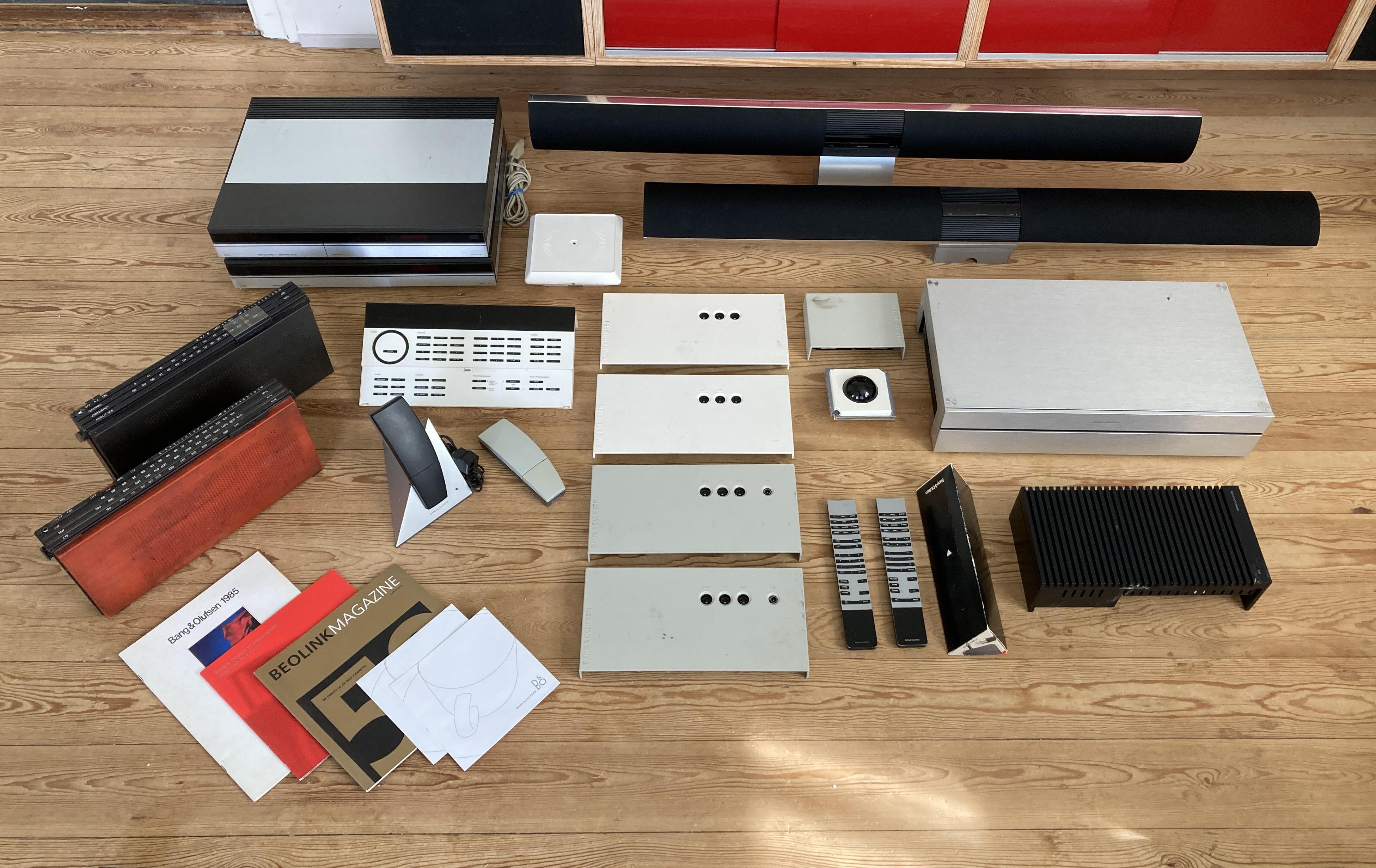
MadskpGOLD MemberI was in the market for a Playmaker when I stumbled upon this deal for ~150€

All untested so have to see how good of a deal it was, but there might be some working parts between. A bonus is the Beolab 3500 table stand on one of the BL3500’s which seems to be almost unobtaniumFrom top to bottom:
Beogram CD50
Beocord 5000
Playmaker
2 x Beolab 3500 MK1
Beolit 505
Beolit 707
MCP 6500
Beocom 6000 MK1 with extra handset
4 x MCL2AV
MVL2A
LC2
HDR2
2 x BL1000
Video Link 1
Beolink Passive
Location: Denmark
MadskpGOLD MemberI’m not sure it’d work now anyway – out of curiosity I connected the BL3500 directly to the BV8 TV via Masterlink, and although it is clearly connected (the display on the BL3500 shows ‘TV’ or ‘SAT’ and so on, depending on the TV source selected), I still get no clock, and no sound out of the BL3500. Probably a setting I’m not getting right where the sound is concerned, but I’m guessing that if the clock were going work, it would just work.
I would have expected the sound to work here, but again not sure if a Beovision is different compared to a Beocenter in that regard.
I also connected my Beocenter 9000 (which does have clock and timer, unlike my Beocenter 8500) to the BL3500 via the 1611 box, and again, no clock! I’m assuming therefore that foe the clock in the BL3500 to work, it needs to be connected to a more modern B&O audio system that has Masterlink built in, such Beosound 3000.
According to this post https://archivedforum2.beoworld.org/forums/p/38541/293010.aspx#293010 on the archived forum it can take some time to syncronize the clock so it might not show up instantly
Location: Denmark
MadskpGOLD MemberThe Beovirus makes you do the wierdest things 😉
Location: Denmark
MadskpGOLD MemberI just ran your proposed setup through the B&O Product Configuration Guide and it stated that either BL1611 or 1614 is suitable. There was a note to say that the TV ‘must be equipped with software Build 109b or higher, in order to be compatible with the Beolink converter’, but you’ve already tested it with the BL1611 so I doubt that you will have any problems.
I wonder what that comptability issue is about, or if it is just about the 1614 Beolink Converters missing voltage for the Masterlink network. New rabbit hole to dive into 😉
Location: Denmark
MadskpGOLD MemberI’m also wondering (and judging from your previous posts you might know this @Madskp!), if I bring my BV8 TV into the Masterlink network, then the TV becomes the ‘controller’, so to speak, and powers the network, so I could use either the 1611 or the 1614, but not both?
Probably the 1614 should work in this scenario*, however since you have the 1611 this is more flexible if you decide to get a different TV that does not have Masterlink.
*My experience is based on use with a Beocenter 6-26, so actually a little unsure if there is any difference to using it with a Beovision with Masterlink in that regard.
Location: Denmark
MadskpGOLD MemberGreat. Your BEO4 is one where A.TAPE2 is replaced with N.MUSIC and PHONO with N.RADIO then. The IR commands are the same just renamed for newer functions
Location: Denmark
MadskpGOLD MemberYou might be able to add the command L.A-TAPE2 to the list ( I can’t remember if is availAble. If so that should do the trick
Location: Denmark
MadskpGOLD MemberOr did you just mean that you will use the masterlink cable from the 1614? I might have missread
Location: Denmark
MadskpGOLD MemberGreat deal 😀
I don’t know if the BV8 has the timer, but if not it is possible to not show the missing clock on the BL3500. There are three display setting where one is not showing the clock. You can switch between them by holding the timer button and touching the mute button on the BL3500
Regarding the connection to the BV8 you can not use the 1614 when you already have the 1611.
You have to divide the masterlink connection with a junction boxLocation: Denmark
MadskpGOLD MemberThe BeoRemote One controls the Beosound 9000. Just like normal if it was a standalone system. So the adjusted volume goes into the Almando multiplay. Since this just passes through the line signal it receives, it doesn’t really do anything in this setup. The reason I have it is because my Denon receiver sends the front speakers into it in order to turn on the Beolab 5’s.
Ok makes sense. Was just thinking if Almando had made some new features in their products
Location: Denmark
MadskpGOLD MemberI run a powerlink cable from my Beosound 9000 into a Almando that is connected to my Beolab 5’s. I can control the Beosound 9000 fully with my BeoRemote One BT (which controls all my other units).
Could you elaborate a little on how this works, Is it just the IR function from the BeoRemote one you use for this control or is it something in the Almando box (which of their products is it?) that can recieve the Bluetooth signals from the Beoremote One and relay them via the data in the powerlink cable?
Thanks in advance
Location: Denmark
MadskpGOLD MemberVery nice looking 😀
I especially like the now playing hook system both for having a place to store the now playing covers, but also for displaying the art on the covers
Location: Denmark
-
AuthorPosts