Forum Replies Created
-
AuthorPosts
-
 MadskpGOLD MemberHello again
I tried connecting the BeoLab 3500 to the MCL 2P and from the MCL 2P to the BeoSystem 2500. They talk to each other but I don’t get any sound from the BeoLab 3500 (only from the BeoSystem 2500). I made a sketch of the setup (don’t judge my drawing :)). The red line show what cable I used when trying to connect the BeoLab 3500 to the BeoSystem 2500.
The cables looks to be the right ones. The Powerlink cable have to be a specific type to activate the MCL2P. You can confirm this if the MCL2P has a green light on the front? If it is red then it is not activated. If so try without the powerlink Y cable.
I also tried using the BeoLink 1000 and Beo4 controler with no success. Both controls work for the BeoSystem 2500 but I have no communication from the control to the BeoLab 3500. Only the buttons on the BeoLab 3500 works. Is there something I am doing wrong? Sometimes I can get the display on the BeoLab 3500 to flash brighter red when pressing buttons on the Beo4 or BeoLink 1000 control, but still no respons. Can the IR eye be broken? And do I need the control to start the BeoLab 3500 or can I do it with the buttons on the BeoLab?
The mute button on the Beolab 3500 should make it join whatever is playing on the Beosystem 2500, or start the radio if the Beosystem 2500 is in standby.
Regarding the remote control have you tried to do option settings? Option 0 is no IR, so if that is set you can not use normal commands before it is changed to option 1 or 2
However it is not unheard of the the IR part of the Beolab 3500 is broken. There is a great repair guide for it in this thread if you are able to do it yourself https://forum.beoworld.org/forums/topic/beolab-3500-sometimes-responds-to-remote-control-sometimes-it-doesnt/#post-29738
Regarding my earlier comment about other connection options that will not be possible without a software upgrade as the SW ver. 1.0 does not support use of the Masterlink connection
Location: Denmark
1 October 2024 at 18:42 in reply to: App Control of Masterlink Products Using Beolink Converter NL/ML #59660MadskpGOLD MemberI have one question that isn’t covered in the NL/ML Installation Guide (version 1.4). Half way down the settings page there are ‘App Settings’. I have set the ‘Icon Shown in Apps’ to Beovision 10 as you can see below: (the other icon options are Beovisions 9, 8, 7 and 3) But I am unclear as to where to expect to see that BeoVision 10 icon. All I get when using the B&O app to control the TV (via Beolink Converter) is a picture of the Beolink Converter, as you can see below:
I have noticed this setting, but did not pay much attention to it for my test use of the converter. I think mine is set to Beovision 10, and in the App only the BLC NL/ML is shown as you have also noticed.
Maybe more extensive users of the BLC NL/ML have more knowledge about this functionality.
Location: Denmark
MadskpGOLD Membert a BeoSystem 2500 and in that package I also received a BeoLab 3500 and an amplifier MCL 2P. My question is, how do I connect the BeoLab soundbar to the BeoSystem 2500? I heard something about a MCL2AV.
The MCL2P can be used to convert the Powerlink output on the Beosystem 2500 to a MCL network where the Beolab 3500 can be connected provided the BL3500 is a MK1 version (you can see that by checking if MCL is engraved in the metal under the 8 Pin DIN connector on the back of it). Do you have the cables for it?
There might also be other options to connect it depending on the SW version of the Beolab 3500, but then you will need another converter box in that case. Sometimes the software version is printed on the label on the back of it SW x.x, or else you should be able to see it by presssing Menu, 0, 0, Play on the Beolink 1000
MCL2AV can not be used for this.
I also heard that the settings on the BeoLab needs be on “option 1”. How do I change this setting without a controller (I only have a Beolink 1000 for the BeoSystem 2500). Do I need to buy a Beo4 controller?
The option settings should be 2 when used with MCL . Option settings can be done with the Beolink 1000 by pressing Link, X (option number), Store
If you have further questions you are welcome to ask again
Location: Denmark
MadskpGOLD MemberAn alternative could still be a Beomaster 3500/4500/5500/6500/7000 instead of the MCL2AV in the same setup. Not so easy to hide though.
Just to confirm this I repeated the test with my BM4500 – 1611 – Beocenter 6-23, and it also works in first try just like with the Beocenter 9300.
Location: Denmark
MadskpGOLD MemberOne thing I’ve just realised though – I don’t think the Beosystem 3 has an IR sensor built in – does that mean I will need an IR Eye? I do have a couple of those spare (with the wrong type of cable connection, but I can change that), but does anyone know if this is necessary?
I don’t know if you are able to get the IR commands via the Masterlink Gateway from the BS4, but if not I would say that you will need an IR eye for the BS3.
My thinking is, I use the Beosystem 3 in Opt 1, my Beosound 4 in Opt 2, and put the Beovision 7 into Opt 0.
I don’t think that will work. Check my comments in the earlier post https://forum.beoworld.org/forums/topic/beovision-7-32-with-beosystem-3/#post-59274
’m hoping the BV7 will be clever enough to power on when it gets a signal from the Beosystem 3,
I am not sure it is. remember the BS3 is practically a Beovision without the monitor, so there would be only few usecase scenarios where a TV should turn on another TV
Location: Denmark
MadskpGOLD MemberTo bad. At one point I found a link to another type of modification in this post https://forum.beoworld.org/forums/topic/bl3500-and-the-mcl-pl-connector/page/3/#post-44590
I might be at some inspiration to how the BL3500 is activated even though this project replace the control part of the BL3500.
Location: Denmark
MadskpGOLD Membercan I replace the MCL2A one at a time. for a MCL2AV on the same wire with active speakers. wil that room than be individualy from the others
That is a possible solution yes. The IR eyes are the same so you can replace wires 1 to 1. However the MCL2AV will need an external power adapter so you will need an outlet near the placement.
Beolab 3500 MK1 also has MCL integrated so also an option for individual volume control
The MCL2AV’s might not be that easy to find, so another option as suggested by Guy is to replace the MCL2A’s with Beolink passives (you allready have two and just need the newer IR eye) or Beolink Actives if you go for active speakers. Also the dedicated link room speakers Beolab 3500 and 2000 can be used here.
This will call for new cabeling for masterlink of course but you could do the conversion in sections
Location: Denmark
MadskpGOLD MemberThe Speakers is the rooms are pasive. What i do not onderstand is that it used to work. you could adjust the sound individualy in the rooms. And what does the MCL2AV actualy do?
Unless there are any hidden components that we do not see I can not figure out how that would have worked.
The MCL2AV can convert the amplified speaker level signal in the MCL system to a line level signal that can be volume regulated. This however only works for the powerlink outputs on the MCL2AV thus requirering the use of Active speakers or an amplifier between the MCL2AV and passive speakers.
If passive speakers are connected directly to its passive speaker ports it works just a the MCL2A relay box without individual volume control.
Location: Denmark
MadskpGOLD MemberAndre Bolhoeve wrote: so only room one is now individual from the others I think that this is the best that you can hope for with only two ‘Passives’. Two amplifiers = two volume levels.
You should also be able to have individual volume control in the room where the MCL2AV is placed if it has Powerlink speaker connected. If it has passive speakers connected then it is probably setup to act as a MCL2AV like the others and will follow the volume
Location: Denmark
MadskpGOLD MemberI just bougt this house. I think there was a bV 7 where I placed the 9000. And an other tv in a other room. When i placed the 9000 i had onley sound from 5 rooms there was no linkcabel connected to the nl/mcl unit. the volume worked undepended in the 5 rooms. they adviced me to place the splitter and connect the link cabel also to the nl/mcl unit. It looked like it worked. but the next day the sound was going up and down at the same time in all the rooms. Even when i restored it and disconnected the link cabel from the nl/mcl
Ok this explains some of the confussion with this system.
I have a feeling that this may have been connected differently years ago and then have been upgrade. Probably the Beolink passive and the ML-MCL box was not part of it to begin with (these two amplifier boxes are by the way the same, just with different naming and type numbers).
I wil try to disconnect the powerlink conection tomorrow. and see what happened.
I think that will be a good start as there should not be any ring connction between the units, and the MCL system after the amplifier boxes should work independently of each other.
There is one thing that i noticed today. The MLC2AV makes a hhhhhssssssssss sound for about 15 secondens when powerd up then this stops. i disconected the power from the MLC2AV for now. To be save. the sound stil will go up and down in al rooms with the MLC2AV disconected from power
I would not suspect that in the first place
Location: Denmark
MadskpGOLD MemberHi again
Wow that is somewhat complicated, and I guess that you could have misread some connections between things, but this give a better picture of what you are dealing with.
Like Guy I also wonder what the purpose of the orange wire is, and if it is actually connected to the MCL2E in the other end?
The MCL2E is an extender that is used when there is more than 4 zones in a MCL sytem, and I wonder if it is nessecary the way your system seems to be divided with two amplifiers. But I would leave it for now so you don’t make to many changes.
Have you recently done any unplugging of cables on the 1655? Could it have been a cable that should go into the IR port instead? Like guy suggest I would also try to power down the system, remove that cable and start it up again to see how things react.
The three grey boxes shown in the lover left corner are MCL2A and so is the first box after the 1551. These are as mentioned earlier just relay boxes to activate speakers and will follow the volume of the amplifier, so I will suspect that some of your zones has had the same volume control all the time.
I will asume that some of the MCL2A boxes are connected to the red wire from the 1655.
The IR eyes connect to the MCL2A and MCL2AV boxes to control them. It is the thin grey wire going into them. So every room should have a IR eye and a grey box (MCL2A or MCL2AV).
Also I wonder what the deal is with the ML delay box? are there other Masterlink components that we do not see from these drawings?
Location: Denmark
MadskpGOLD MemberI got the mail yesterday, and links are working
Location: Denmark
MadskpGOLD MemberJust to be sure, doea the small grey boxes have connectors on the front or just a flat surface?
Location: Denmark
MadskpGOLD MemberThen what you have is a MCL (Master Control Link) system.
Someplace in your system you probably have a ML-MCL converter that act as a amplifier for all of the link rooms. As the amplifier is the same the volume in all link rooms follow each other as they probably just have a relay box (MCL2A) that activates the speakers in the rooms
There is an option to upgrade the relay box to a more advanced one called MCL2AV that has some compensation that makes it possible to have near individual volume control in the link rooms, but that will also require a separate amplifier in each room or active speakers.
If you want to upgrade it might be more feasable to convert to a Masterlink system where you can get real individual volume control.
Let me know if you need more info
Location: Denmark
MadskpGOLD MemberIf you do not find one here is some inspiration for a cheap wall bracket I made when I had a Beovision 8-40”
https://photos.app.goo.gl/qFhK2cvmgrrjvyn48
It is just two shelf bracket where I have drilled some holes in for the screews that go up in the bottom of the TV
Location: Denmark
MadskpGOLD MemberDoes not sound like somthing that should be possible in a Masterlink system.
Are the IR eyes the round silver ones or the older rectangular white or black type?
Location: Denmark
MadskpGOLD MemberThis must be why it stopped working for me, then came back to life.
I guess that is the same issue your are experiencing.
Annoyingly I was late to the MasterDataTool party and so missed out on getting hold of one – it would have been ideal for me. I hope the forthcoming Datalink streamer will also include the masterlink port to bridge the two interfaces instead of just acting as a streamer.
An alternative could still be a Beomaster 3500/4500/5500/6500/7000 instead of the MCL2AV in the same setup. Not so easy to hide though.
Thank you for taking the time to help with this project Madskp.
No problem, i think it is quite interesting to explore the limits of these older systems 🙂
Location: Denmark
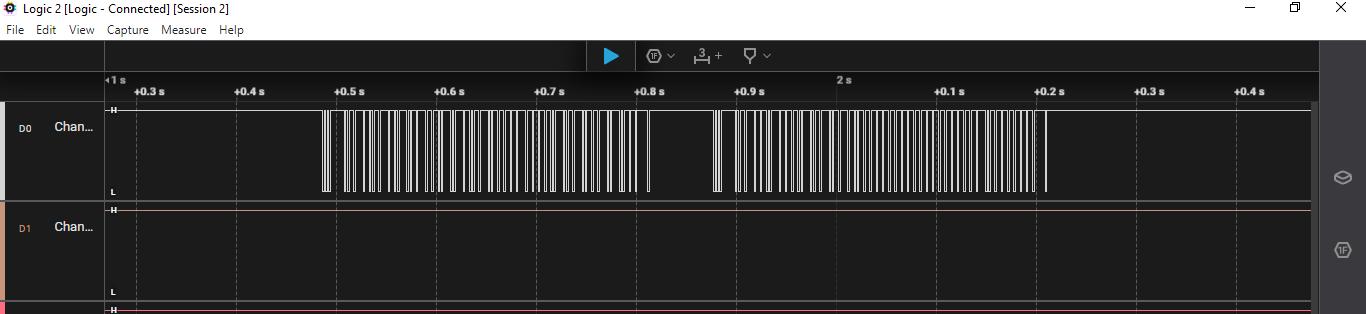
MadskpGOLD MemberI have one more option I can check. I have a little analyser tool I can connect to the datalink pin in the AUX cable to see if a datalink command is sent along with the 5V in the powerlink cable. Also I can check if the datasignal looks different then the one sent from the BC9300. I know it is a rabbit hole as we will probably not be able to fix anything if the datasignal is missing or different, but it could maybe give some closure about why this functionality is flaky
So I had a try with the data analyser tool where i captured the data stream on pin 6 in the AUX cable between the 1611 and the BC9300 and MCL2AV respectivly when the 1611 si connected to the Beocenter 6-23 with Masterlink.
If I press CD when the BC9300 is used the TV starts up immediately as I have experienced before, and the captured data signal looks like this showing that some data is sent

If I try the same with the Beocord 3500 connected to the MCL2AV for a situation where the TV does not start the dataline is just flat meaning not data.
If I after some turning on and off get the TV to start I get a datasignal much like the above (but some differences because of a different source).
So my best guess is that the MCL2AV does not establish a data connection with the 1611/BC6-23 before it has been initialised, which in this case first seems happen after the TV has activated the MCL2AV a couple of times.
One thing to note about this behaviour is that the MCL2AV was never intended to be converted to masterlink on that TV connection. Only connect to a MX/LX type of TV with datalink, so there is probably many scenarios B&O has not verified or even tested if would work.
Location: Denmark
MadskpGOLD MemberI can now confirm that the problem was with the HDMI-DVI adapter I got from Amazon – I got a better quality HDMI to DVI cable, and that works fine. I have a 3-way HDMI switch (which also separates out the audio signal) arriving tomorrow, so that will allow me to use my 3 HDMI devices with the TV, plus my old Nintendo GameCube plugged into a SCART (I’ve feeling up for a bit of retro gaming!).
Great, hope that solves it. I also had some messing arround with a cheap HDMI audio extractor that i thought was dead, bought another one that did not wor, and the the first one turned out to work after all.
The only one disappointment – the BV7 user guide recommends for an ‘integrated AV system’ it’s best to set the BV7 in Opt 1, the BS4 in Opt 2, and connect the speakers to the TV. That worked, but the displays on my Beolab Pentas did not work when connected to the TV. It’s strange that B&O built the BS4 with Powerlink 2 support, but not the BV7? I can’t lose those lovely displays on my Beolab Pentas, so I have plugged them back into the BS4 and set both that and the BV7 to Opt 1. I have to use AV commands to get TV sound, but at least it all works.
To bad that the display data does not work. There might be some hints in this thread though https://archivedforum.beoworld.org/forums/t/14172.aspx
Something about a audio / video switch one the bottom of the Pentas
Hope that is helpfull
Location: Denmark
MadskpGOLD MemberRegarding the DVI input be avare that the BV7-32 has a max resolution of 1366×768 so will not show a picture if a 1080P signal is incomming.
For my BV6-23 I had to change the resolution on a Apple TV3 when connected to another TV and the connect it to the Converter connected to the BV6-23 to make it work
Location: Denmark
-
AuthorPosts