Forum Replies Created
-
AuthorPosts
-
 MadskpGOLD Member
Yes if I make it a permanent setup I will indeed make an adaptor. No need for soldering – I can just use PL to RJ45 cables and copy @Tignum’s adaptor from here: https://forum.beoworld.org/forums/topic/beoplay-connection-hub-beolink-passive/#post-52183 (And I’d forgotten that I had contributed to that thread earlier this year – I must be getting old!)
Oh yes remember that thread to. Could just not remember what the topic was.
That’s correct – you need to use the BeoLink 5000 remote; pressing CLOCK will show the time only on the reverse remote screen. On the older BeoLink 5000 with the CONTROL button you press SHIFT then STATUS and the time is shown on the remote’s front screen. BC2300 will send the time to BL5000 whether in stand-by or playing, whereas BC9500 has to be at stand-by.
Ok I understand the concept now. A little vierd since the BC2300 has a display, but of course many systems before that did not, so might have been to keep the controls the same
Incidentally, I was just reading about the Ouverture clock in its User Manual, and noticed this text (my bold): Note: If you use the BeoSound Overture in a fully integrated Bang & Olufsen AV system (see page 39), the clock must be set via the TV. … which does suggest that a Videomaster clock takes precedence over an Audiomaster clock. Hence the NL/ML Converter (when set as V.Master) can correct the BC2300’s clock.
Ok that make sence then that a Video Master is the Master clock in the system. However B&O might no have thought this through for the BC2300 without a Video master and connected to a Beolab 3500. Of curse if the clock was set correct from the factory it would probably hold up for years, so might not have been an issue before the batteries in the units began to get old
Location: Denmark
MadskpGOLD MemberIf it is a Pin code request it should show something on the screen to let you input the pin code.
What remote did you use before?
Using af Beo4 it needs to be one with the little joystick to navigate the menu system on the TV.
Location: Denmark
MadskpGOLD MemberI don’t know if it is the case here, but on some B&O systems the plastic parts i not a connector, but more a kind of strain relief for the cable. In that case you will have to unsolder. Not easy to see if that is the case here
Location: Denmark
MadskpGOLD MemberI am not sure if it is safe to leave PL pins 1 and 4 connected, but that was just temporary so I will research further if I ever have to use this setup permanently.
It might not be a good idea since you are connecting to different circiuts. But for a more permanent solution you can solder (I know you don’t like that 😉 ) an adapter where you connect pin 4 from the Becenter to pin 1 on the Passive. That should be safe.
I think the clock is running properly in the BeoCenter and simply sends out an ML time signal ‘on the hour’, which updates the BeoLab. And yes I should be able to set the clock in the two-way BC2300 but to do so I need to find one of my Beolink 5000s – that search is presenting a problem!!! I also need the BL5000 to ‘read’ the clock in the BC2300 – I tried selecting CLOCK with a Beo4 and nothing happens. I’ll look at these and your other question if/when I find the remote!
Ok I thought you could only program the time with a Beolink 5000, but do I understand correctly that you can not even see the clock on the display of the Beocenter 2300? If so the Ouverture is much of an improvement in that regard.
Location: Denmark
MadskpGOLD MemberThe older (two-way IR) BC2300 behaves exactly like the newer one. I connected it just to the BL1611 and BL3500, and at 1104hrs the time appeared on the BeoLab, showing 1900hrs.
Do you think it is coincidence that it shows a on the hour clock to start with or is there something else going on? You should be able to set the clock in the two way BC2300, right? Can you see the time on the display of the BC2300 to verify?
added the NL/ML Converter temporarily to the mix just to update the clock in the BC2300 and then removed it. I powered down/up the BL3500 and the time disappeared, only to re-appear at 1200hrs (showing 1200hrs), clearly having received an ‘on the hour’ clock update message from the BC2300.
And interestingly enough if the clock gets updated in this scenario where you should be able to set the clock on the two way BC2300 (if I am right in my earlier question?).
As an aside (thread drift) I have noticed that with the system at stand-by, when selecting BC2300 sources in the link room, the speakers in the main room are turned on as well (in this case actually a Passive that clicks into life). Option settings are correct and this happens with both BC2300s, and with a different BL1611. It may be a limitation of using the BC2300 with a BL1611, but seems strange so I will investigate further.
This is a side effect of the Passive being able to support MCL rooms (I think we had this up in another thread) so it is waked up by the powerlink signal on pin 1 to be ready to serve MCL link rooms.

So the passive is not optimal for driving passive speakers in the main room. Might be solved by making an adapter that switch pin 1 and 4 in the powerlink cable though.
Location: Denmark
MadskpGOLD MemberHello. You are not the first to have this issue. Take a look at this post https://forum.beoworld.org/forums/topic/how-to-wire-7-din-plug-to-beogram/#post-53422
Hope that can help wire it up
Location: Denmark
MadskpGOLD MemberInteresting findings
I thought I would test the ability of the NL/ML Converter to ‘push time to ML products’, which is one of the setting in its System Menu. As soon as I selected this option, the correct time appeared in the BL3500 – not really surprising but I am glad that this worked.
Is the NL/ML converter set as videomaster in this instance? Here I am just wondering how the ML system prioritize when 2 clock signals are available
I disconnected the NL/ML Converter from the ML setup, and temporarily removed the power from the BL3500. The time disappeared. However, on the hour (at 1200hrs GMT) the correct time appeared on the BL3500. I can only assume that this time signal is coming from the BC2300.
So it appers that the clock in the BC2300 can be set by being in ML network with another device providing a clock signal if I understand this correctly?
This clock does appear to ‘broadcast’ the time over ML every hour on the hour.
Does that mean that the clock in the display on the Beloab 3500 only is adjusted once an hour, or are the minutes ticking?
Location: Denmark
MadskpGOLD MemberMadskp wrote: So my best guess is that the MCL2AV does not establish a data connection with the 1611/BC6-23 before it has been initialised, which in this case first seems happen after the TV has activated the MCL2AV a couple of times.
This must be why it stopped working for me, then came back to life.
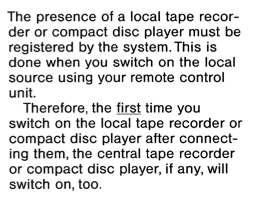
Looking through a user manual for the MCL2 system I noticed this passage:

Not sure if it has to do with the issue we have experienced, but it sounds like the use of a local source on a MCL2AV has some first time initialization when used with a MCL master. I wonder if this affects how the local source is interperted when there is not an MCL master present, and if that could cause the non responsive behaviour.
Location: Denmark
MadskpGOLD MemberI want to put one of my (currently unused) Beolab 2000s in my garage (I don’t put the car in it; it’s used as part storage, part gym). This should make that easy if I use two of these, plus a Cat7 cable. Much easier to route a Cat7 cable through the wall!
Also an added benefit 🙂
Speaking of Hall Audio, their Kickstarter has begun for the ML Streamer. I signed up as soon as I got the email and think I was the first backer! The Kickstarter is here, if you’re interested.
I have signed up for a ML streamer. Now we just have to see if they succed with the Kickstarter
Location: Denmark
MadskpGOLD MemberHi, for the crimping check this thread: https://archivedforum2.beoworld.org/forums/t/38487.aspx. I do remember I had to find connectors that have the correct ‘AWG’ dimension for the ML wires. Most suppliers are not very specific. Hope it is useful!
A very usefull thread indeed. Allways good to have more than one solution for this
Location: Denmark
MadskpGOLD MemberI used to crimp RJ45 connectors to cut-in-two ML cables for connecting to RJ45 wall outlets.
Could you elaborate on how you did this? I am thinking about how you handle the three ground wires and also the pink and white/blue wires that has to be connected? Did you use a special RJ45 connector?
Also have you also tried the other variant from Hall Audio?
Location: Denmark
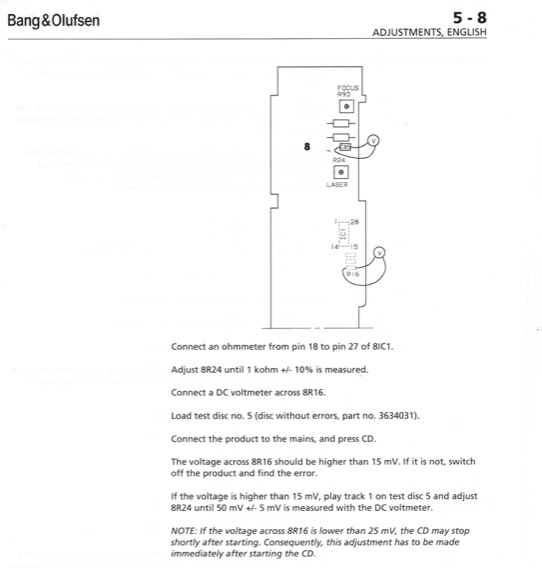
MadskpGOLD MemberGetting back to my Ouverture project I have now per Guy’s suggestion in another thread tried to play a CD which use the full 74 minute playtime. I have played it several times, and the Ouverture can play the whole CD without problems. The problem that I have to press CD twice to get the CD spinning remains however. I have tried to reflow alle the new capacitors just in case one of them had a bad connection, but that did not make any difference. The updated part of the servicemanual for the CDM laser available at Beoworld has this passage which might very well be what I am experiencing:
 However section 5 is not in the update for the servicemanual, and the procedure described in the older servicemanual is for a PCB with two trimmer potentiometers which is not on the PCB in my Ouverture
  So I wonder if a newer version of section 5 in the servicemanual is available? Also I would have to get hold of the described test CD to do these adjustments
In trying to fix this I picked up two defective Ouvertures hoping that another CD servo board might make a difference.
I disassembled my own unit and the one of the defective ones only to discover that they have another type of servo board (and also laser I guess).
Dissapointed I reassebled my own unit, and discovered that now the CD starts playing at first press on CD button both on the front panel and the remote.
So this endedup being a succes, and I got some other spare parts out of it 😀
Now I just hope this will last.
One thing I notice on the defective units is that the have software 1.4 where my original unit have 1.2.
Not sure if it makes sence to upgrade it?
I read in an old thread the option 5 and 6 is available from sw 2.1 which could be interesting,
Location: Denmark
MadskpGOLD MemberI did not know that! That does explain however why they released a version that had no labels on the buttons. I always wondered why.
Yep. an easy way to use the same IR eye for several products, and probably cheaper than develop a separate IR eye with less functionality
Location: Denmark
3 October 2024 at 18:38 in reply to: App Control of Masterlink Products Using Beolink Converter NL/ML #59745MadskpGOLD MemberI assume there is some sort of conflict between ML RADIO (which I want to be the BC2300 FM radio) and the B&O RADIO (effectively internet radio) that is part of the app. Anyone know if I can change settings to access the BC2300’s FM RADIO via the B&O app? EDIT: I have tried putting the BC2300 in A.OPT 0, and then adding an IR sensor to the NL/ML Converter – I have IR mapped the ML sources. I can select all mapped BC2300 sources (including RADIO) using the Beo4, but the RADIO source still does not appear in the app.
Not really sure, but what if you map Radio to another source in the NL/ML converter?
Location: Denmark
MadskpGOLD MemberThe Beosystem 4 only have the connection for the IR signal, so it can not use the functions from the buttons even though they are there
Location: Denmark
MadskpGOLD MemberHi again. For easy replacement it would be the whole front panel with the displsy you need.
probably Ebay could be a source.
here in Denmark it is often cheaper to buy a complete Beolab 3500 than spare parts for it
Location: Denmark
MadskpGOLD MemberLooking forward to the development in this 😀
To bad that the update did not change anything
Location: Denmark
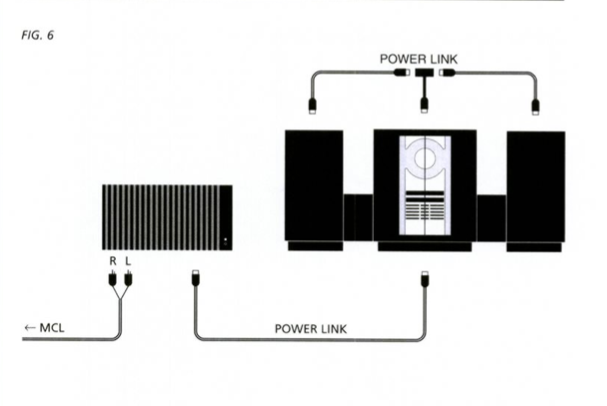
MadskpGOLD MemberAnother thing I was thinking about, should the 15V outlet on the MCL2P be connected to something for everything to work?
No thats for powering a MCL2AV if the MCL2P is used as an amplifier for that.
Location: Denmark
MadskpGOLD MemberIs there any obvious way to see if IR is broken?
Not that I know of other than not reacting to option or service commands
In what mode does the BeoLab 3500 need to be in, in order to react to the remote control commands? Should I see the clock in the display before?
It is not dependent on the clock showing. This is transfered from the Beosystem 2500, but I have a note saying that this was not working on SW 1.0. Anyway the BL3500 should just be turned on to be able to recieve commands
One last question, in what order do I press the buttons on the remote control. Do I press one button at the time, or at the same time?
On at the time
Location: Denmark
MadskpGOLD MemberThe MCL2P turns green when I turn on the BeoSystem 2500, so the cable is working. When pressing the mute button on the BeoLab 3500, the display shows (for example: cd 1) what is playing on the BeoSystem 2500, but I never get any sound. All the buttons on the BeoLab 3500 works and the systems are talking to each other (I can turn on the BeoSystem 2500 by pressing mute button on the BeoLab 3500).
This clearly indicates that your cables works (at least for the communications part).
But how do I change this option setting if the BeoLab 3500 doesn’t respond to the remote control?
If it does not respond to the options commands: Link, 2, Store the I think the IR receiver might have a failure.
Might this indicate that the BeoLab 3500 is broken? Or might it be that the volume on the BeoLab is on 0 and can only be changed using the remote control?
hard to tell if it’s one or the other. But since the remote is not working you can not even put it in a test mode to check the sound input. So first thing would probably be to get the IR reciever repaired and then take it from there
Location: Denmark
-
AuthorPosts