Forum Replies Created
-
AuthorPosts
-
 Moderator
Be aware that the IR sensor is in a different location on the Apple TV HD A1625 version. It’s just to the left of the status light. See answer here with photo: https://discussions.apple.com/thread/253560611?answerId=256663690022&sortBy=best#256663690022
The Apple TV 3rd gen (A1427 or A1469) had the sensor opposite the status light.
The even newer Apple TV 4K originally had the sensor opposite the status light (1st and 2nd gen) but it is now central (3rd gen).
EDIT: And if your Apple TV HD has the original siri remote (without the white circle around the MENU button) then you should be able to use the siri remote to control the volume of your Beoplay V1 – read all about this here: https://forum.beoworld.org/forums/topic/apple-tv-siri-remotes-and-ir-beovision/
Location: Warwickshire, UK
My B&O Icons:


I suppose I could use a Beolink Active with a powerlink to the Active (presume you mean Passive? – Guy) and a splitter but that wouldn’t save me reducing the number of units in standby.
But the BL Active will not actually produce a 5V output until it is turned on using its own IR input, so I am not sure that would work. Perhaps you could use a 5v trigger from the source audiomaster/videomaster?
Location: Warwickshire, UK
My B&O Icons:
Now I was looking to change my preamp (which is actually a normal integrated amp of which I use the headphone out of) to another one which only has Tape Out as an output (besides speaker outputs).
I am slightly confused by the bit in bold – a pre-amp would not usually have speaker outputs, so is the ‘new’ pre-amp also a normal integrated amp?
Tape Out would usually be a fixed line-level output – allowing recording level to be adjusted at the destination. As such, it ‘should’ be suitable as a line-level input to the core.
Perhaps post the make/model of the new ‘pre-amp’ to be sure?
Location: Warwickshire, UK
My B&O Icons:
Looking at the circuit diagram, the answer is no.
There is a permanent 5v at pin 6 of the IR socket, if that’s any use?
Location: Warwickshire, UK
My B&O Icons:
I added the photographs of the wiring of a RJ45 to DIN 8pin cable to a previous post.
Thanks for posting those – looks to be a good quality cable.
Location: Warwickshire, UK
My B&O Icons:
Searching back through the archives the only other suggestion for repair is to reflow some of the solder joints on the laser unit – this is a bit vague but I suppose could account for the earlier intermittent fault.
I too would be very interested to find a definite replacement laser for the BeoSound 1 – hopefully a forum member can point us in the right direction.
I sent a message to Beoparts last night to ask if their replacement laser here would fit. The response was as follows:
Seeing as different CD disc drives were used during production, there is only one
way to tell, and that is to look at your laser module and compare to the photos
of our laser module. They must be identical.During my searches I did find a photo showing a VAU1255/21 fitted to a BeoSound 1, but this specific model number seems equally difficult to find!
Location: Warwickshire, UK
My B&O Icons:
19 January 2024 at 17:47 in reply to: Stored/Unused B&O Equipment – Potential Deterioration of Components #52281Thanks Glitch – that’s very useful!
It’s only one of the BC2300s that has been in an attic, and I will try to get hold of it next week and see what condition it’s in. I think there are some Redline 60.2s up there as well!
Good tip about the battery sockets; I don’t think the BC9500 would have room for a socket in the original battery location but I could relocate for ease of access. The BC2300s should be more straightforward with enough room under the microprocessor cover (I think it’s identical to the Ouverture picture that you posted in the FM tuner thread).
Do you have a recommended battery socket with pins that match the PCB hole spacing?
As far as the equipment use affecting battery life, I think that it is dependent on the specific design. I’ve seen some designs where the battery powers the memory backup regardless of the power status of the equipment.
My mother-in-law had a habit of turning her BC9500 off at the wall every night, and the battery failed when it was about 20 years old. My BC9500 (permanently powered until storage) was still on the original battery.
Location: Warwickshire, UK
My B&O Icons:
I thought that I was going to be searching for a new laser when I bought a faulty BeoSound 1 three weeks ago. However, I used the Service Mode to run a few checks and the fault seemed to clear – I have tested the CD daily since without problems.
My post here refers: https://forum.beoworld.org/forums/topic/what-are-you-working-on-now/page/6/#post-28042
If you don’t have SHIFT currently on your Beo4, the easy way to enter service mode is to use the buttons on the BS1 control panel and press DELETE DELETE STOP STOP STORE. Then use the Beo4 to select CD, and then the number of the test listed.
Location: Warwickshire, UK
My B&O Icons:
Amazon!, 5 pack, here tomorrow
With PCB pins? (Or does the Ouverture battery simply slide in without soldering required?)
Location: Warwickshire, UK
My B&O Icons:
Guy, strangely, I have a dead BC9300 here, I had proposed spares or repair for it, so it is looking like spares currently!
What’s wrong with it? That also has a CR2450 lithium battery which may need replacement.
And here’s a potential source for the battery – I have replaced one in a BC9500: https://uk.farnell.com/renata/cr2450-nfh-lf/cell-lithium-button-2pin-3v/dp/1319731?CMP=i-ddd7-00001003
Location: Warwickshire, UK
My B&O Icons:
I did all this as you said today and for the moment everything seems to be working perfectly. I’ll wait a little bit to be sure that everything is in order and i’ll note the thread as solved.
Great news – hopefully it will stay working. One further thing that I have just remembered is that sometimes it can be worth leaving a remote disassembled for a couple of days (i.e all six nuts/bolts undone and pulled apart) to allow the contact foil ‘poppers’ to return to an uncompressed (normal) state.
I got a Beo4 Navi where the lowest part of the remote doesn’t feel right. I have cleaned it and everything seems perfect before reassembling. I’ll try loosening the nuts.
There’s nothing quite like the nice ‘click’ or ‘pop’ you feel when pressing any button on a brand new Beo4 remote! Sometimes it’s quite difficult to replicate. When replacing the contact foil you can usually tighten the nuts a bit more and you do manage to replicate that ‘as new’ feeling. You can also get away with having the PCB nuts quite loose because the design of the Beo4 still allows you to ‘pull’ the top plate (and rubber keyboard) downwards and flush with the black casing when re-assembling and tightening the 4 screws on the back.
I do wonder what the official B&O guidance is for Beo4 keyboard nut tightening! ?
Location: Warwickshire, UK
My B&O Icons:
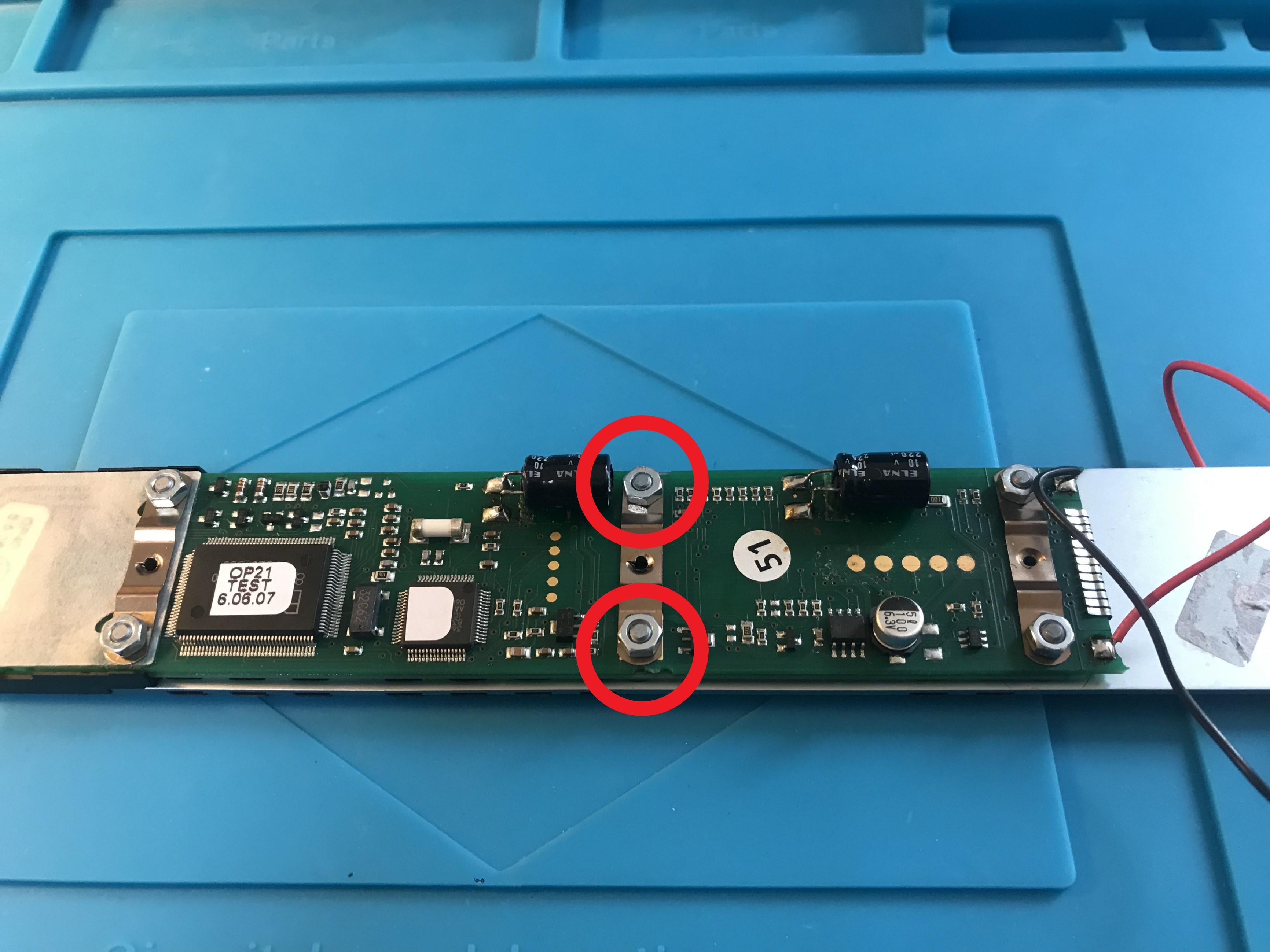
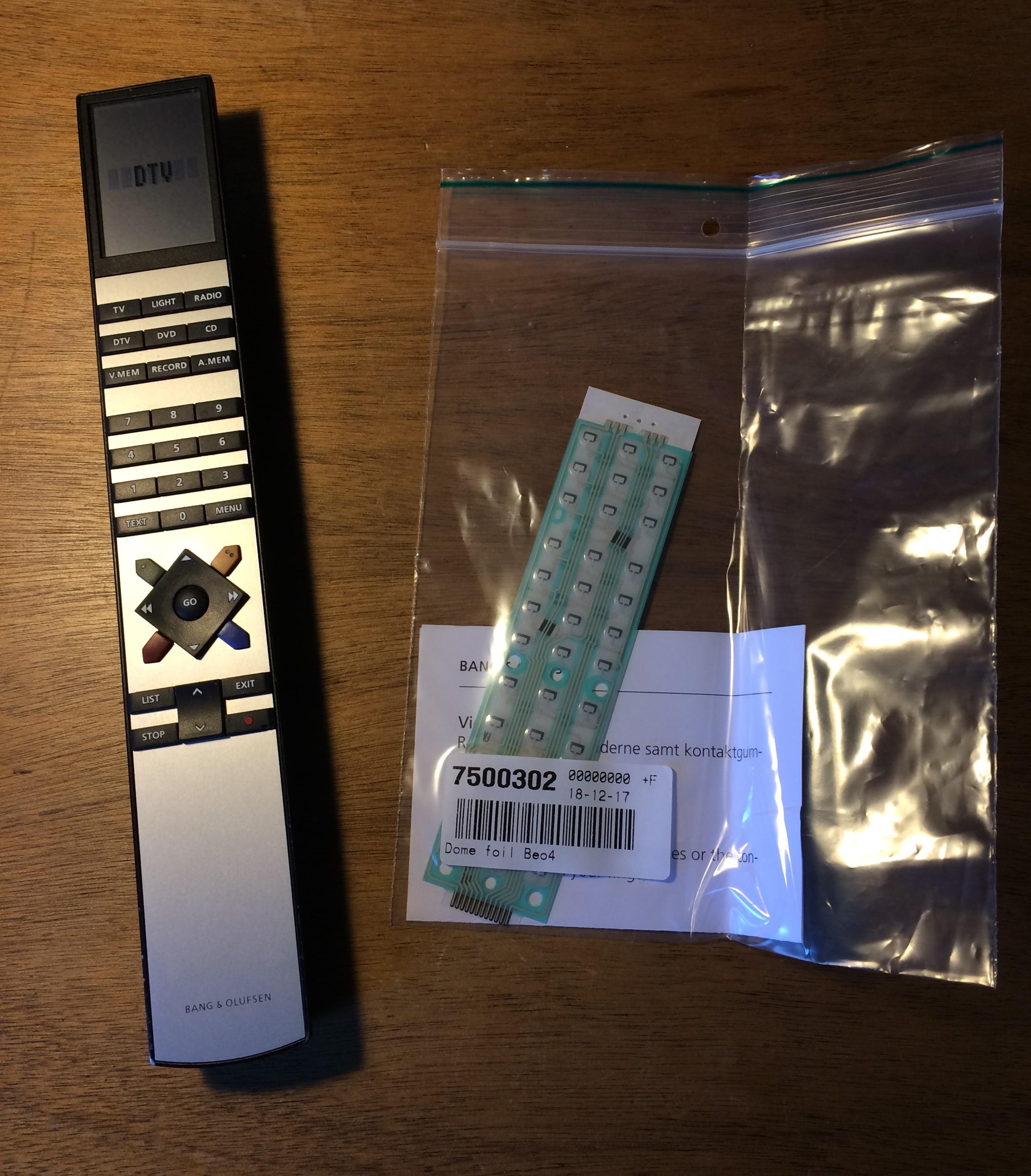
Here’s a couple of photos:
Firstly to show the amount that I tighten the nuts! (middle two circled ):
(You can also see the little clip on the right edge of the PCB)

And to show the foil part no:

Location: Warwickshire, UK
My B&O Icons:
Hi and welcome to Beoworld!
Are you sure that the 6 hexagonal nuts that hold the PCB to the front plate are not simply too tight – this would cause the problem that you describe. I usually tighten then just enough that the screw thread is just starting to emerge above the nut.
Failing that, you could try removing the little clip at the foot of the remote – this holds the foil to the PCB and ensures a good electrical contact – maybe clean underneath with Isopropyl Alcohol.
Failing that you could try removing the foil but they are sometimes very strongly stuck and hence damage is likely.
Which version of the Beo4 is it? What are the second row of buttons from L to R?
Last time I bought new foils they were approx £15 from here: https://www.avaservices.co.uk/
Location: Warwickshire, UK
My B&O Icons:
It is a Delock 2 Port RJ45 Cat.6A LSA
Many thanks – looks much better quality than many available. I think this is the same box with different branding:
https://uk.farnell.com/pro-signal/psg08003/socket-surface-rj45-cat6-shield/dp/3402347
Location: Warwickshire, UK
My B&O Icons:
^ Very neat – what make/model is the little 2 port terminal box?
Location: Warwickshire, UK
My B&O Icons:
I use the box with a MacBook Pro 2017 and it works, but I can’t remote control it using a Beolink 1000.
I meant to add (but you probably know this) that SHIFT then STORE on the BL1000 is the way to send a PC command.
Location: Warwickshire, UK
My B&O Icons:
Thanks for the update and great news that you got it all working – I am sure that this will be useful to others. I am a big fan of the often-overlooked Passive.
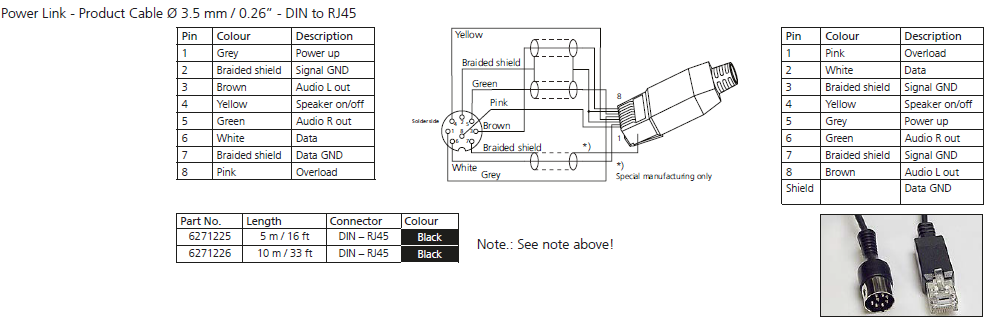
Just for completeness, you referred to B&O’s Powerlink Mk2 RJ45 to 8-pin DIN cable so I thought I would post a pinout diagram of this cable here so that others can see exactly what is going on with the grey ‘power on/up’ wire:

Location: Warwickshire, UK
My B&O Icons:
I’m trying to use the same configuration you used with the vx sensor, and I wonder how you wired the sensor with the 3,5 jack.
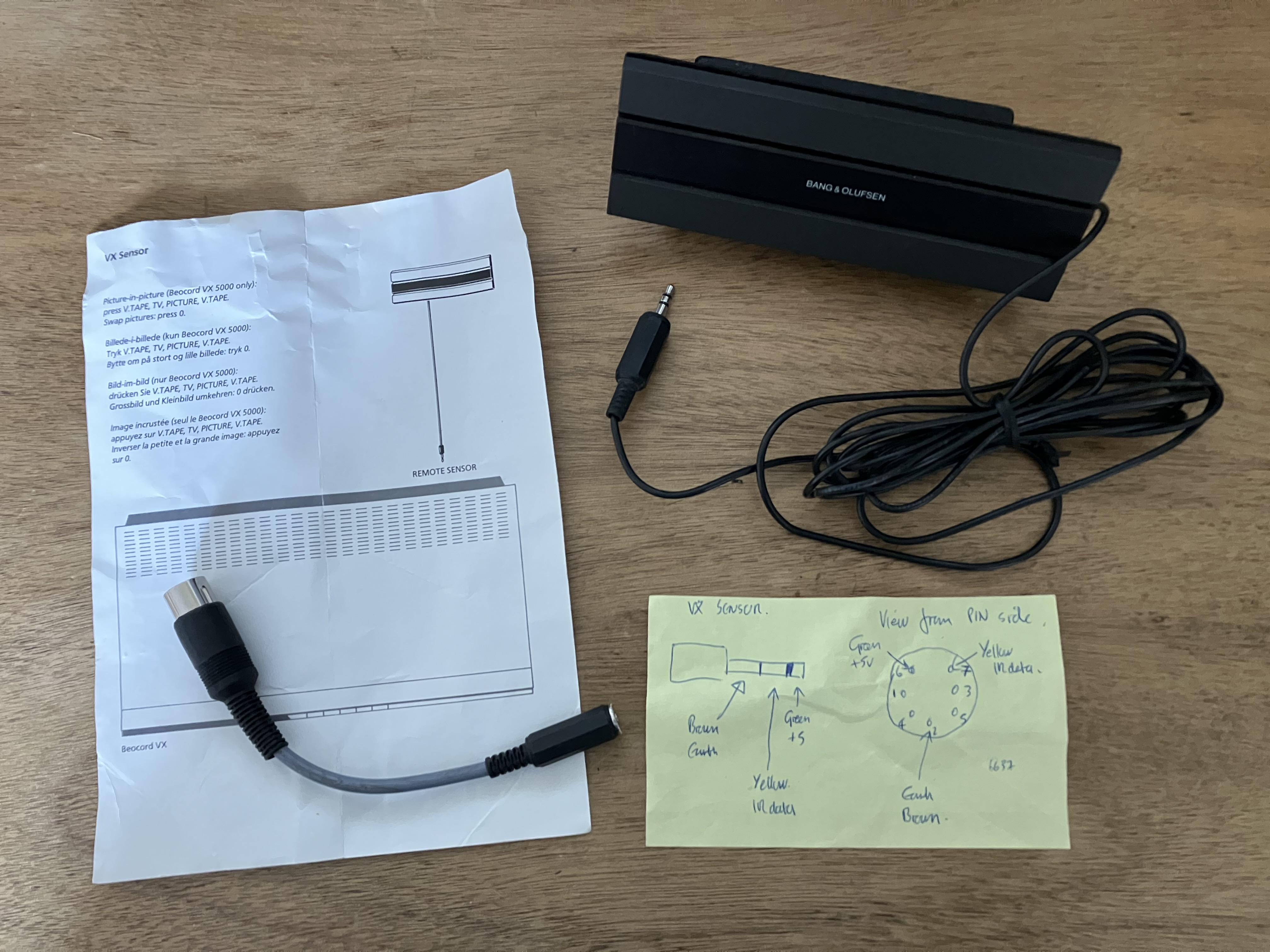
Here’s the wiring that I used – click the photo to enlarge so that you can read the yellow note. I didn’t actually modify the VX sensor- it just plugged into the 3.5mm socket and worked. The same connections (with different wire colours) are used within the BeoSystem 3 sensor also. The adaptor that I made was to use the VX sensor with a Passive/Active.

But the lack of IR control may be down to the option settings in the LinkPlayer software. I don’t have experience of LinkPlayer but you may find some hints in the following thread where matador had a similar problem: https://forum.beoworld.org/forums/topic/playing-with-blink-pc2-and-beoport/
Location: Warwickshire, UK
My B&O Icons:
Is there an easy why back to factory default or do i just delete everything and switch the unit off for a couple of days and then try again??
Part 4 of the Service Manual has a few things you can try: Part 5.1 to put in Service Mode and then Part 5.16 shows how to reset presets. You need test equipment to do anything more complex with the tuner.
EDIT: If you can find a ‘known frequency’ radio station, then you could try the ‘offset adjustment FM’ on page 5-2.
Manuals are here: https://www.beoworld.org/manuals_view.asp?pid=952
Alternatively, this may be the solution! https://www.ebay.co.uk/itm/185810793476
Location: Warwickshire, UK
My B&O Icons:
Does anyone know if the service manual is available if I upgrade my membership status?
Sadly it’s not in the library – we don’t appear to have many manuals from that era.
Location: Warwickshire, UK
My B&O Icons:
-
AuthorPosts